 Problems? See this thread at archive.org.
I used the ASUS Strix XOC vBIOS on the 1080 Ti and that allowed me to use up to the maximum 1.200V with nothing more than the power mod. Don't know if that will be the case with the 2080 Ti as well or not, but I sure hope so. Even if it does not, I should be able to get it to stick at about 2250 @ 1.093V on core and run stable if I can stop the stupid power throttling and associated voltage fluctuation. If it does go up to 1.200V, then I estimate that about 2300-2400 MHz on core should be easily achieved with the 2080 Ti. Right now, with no power mod and difficultly holding 1.093V continuously, the maximum stable core clock is 2205 (requires keeping the temps at 40°C or lower). By stable I mean not crash-free, but also dynamic (erratic) load-demand related core clock speed behavior is eliminated.
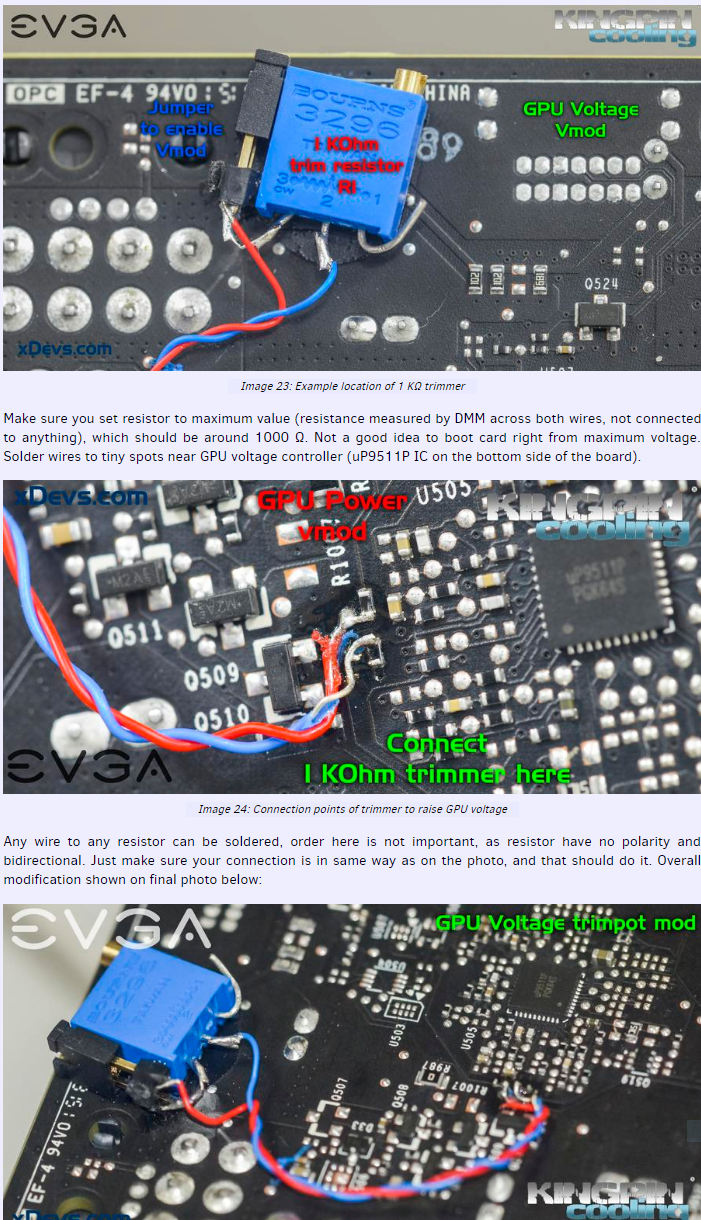
The voltage trim pot mod is shown in the tutorial for 1080 Ti here: https://xdevs.com/guide/pascal_oc/#step4
You are basically adding a manually adjustable voltage control device (potentiometer/rheostat) like what you would find on a manual fan controller with knobs. I do not want to do that unless it is absolutely necessary because I don't want wires and an external device scabbed onto my GPU if I can avoid it.
-
-
Yes, I can see why you'd want to avoid that mod. Will be interesting to see how you get on with the power shunt mod first.Mr. Fox likes this.
-
Where you at 'Desktopers'?:
https://www.3dmark.com/compare/fs/15149060/fs/17595622
 Last edited: Jan 18, 2019
 -
Ha, well I can't compete with that, my best Firestrike is in my sig! To be fair I only have 6700K + GTX 1070! 9900K + GTX 1080 desktop owners are the ones you want to slay, they should post their results!Mr. Fox likes this.
-
in case you didnt notice: second place is equipped with a 7940X cpu
Mr. Fox likes this.
-
Best I could do with a 1080, but with a Ryzen 1700x 20157
https://www.3dmark.com/fs/14754938Last edited: Jan 19, 2019Mr. Fox, JoeT44 and Robbo99999 like this. -
Well, there is the end of a hobby.... Moving to M-ITX and other hobbies when the ashes settle.
-
-
As long as the faithful continue to fan the flames, the ashes will never settle. Burn, baby, burn.

jaybee83, Raiderman, Robbo99999 and 3 others like this. -
-
Yeah, good video. It was useful to see you move your camera around your rig explaining the setup, and the dew point consideration & calculation section (the appliance of science!) was interesting & useful to those considering your type of setup with chilled water.
-
-
Well, since I cant seem to get windows 7 installed on this Asus proprietary laptop, I may sh*t can the idea of owning laptop hardware for the foreseeable future. Ive been kicking the idea around, of building a 2nd gen TR, Radeion VII rig, as installing Windows 7 on desktop hardware seems to still be a viable option. Sad that I have to base my pc experience on whether or not I can install, or rather not install Windows 10. I dont mind having it as a second boot option, but do not want to use it as my primary OS. We all know the reasoning behind this.
Even though I can get windows 10 to somewhat "look" like windows 7, there is something that just irritates me about being forced to use it. Also, the fact that sooner or later all windows 10 users will be paying by the year to use this garbage. -
Yeah, I agree on the feckless laptop crap and Windows 10. The tech world seems to get a little suckier and more contaminated by digital feces with each day that passes.Raiderman likes this.
-
Windows 8.1 + startisback not an option?
I'm still running 7 on my M18x for as long as possible but 8.1 + startisback is probably next in line before 10. It doesn't have the extra BS 10 does. -
I ordered some of this to see if it is any better than Conductonaut or Liquid Ultra. (Something changed with CLU so that no longer works as well as it used to and I stopped using it.) Maybe Coollaboratory improved it and made it as good or better than the original CLU. It is a different product, more paste-like. Liquid Ultra used to be thicker and later changed for some silly reason and became more watery and runny than the original. They claim is it 41 W/mK (versus 38 for CLU). Conductonaut is said to be 73 W/mK, but I am not certain that is accurate. If this is thicker than Conductonaut and works just as well, easier to spread and stays where you put it, then it should be a better option than Conductonaut. I will report back after I find out.
https://www.coollaboratory.com/product/coollaboratory-liquid-extreme/
Description
After the outstanding thermal compounds Liquid Pro and Ultra, Coollaboratory presents the next generation of liquid metal thermal compounds with the brand new Coollaboratory Liquid Extreme. It’s made of 100% metal, but it has an absolute new usability and offers an outstanding performance. Due to the paste-like texture the application is very easy now.
The Liquid Extreme is – like all other articles by Coollaboratory – developed and produced in Germany. The new thermal grease offers through its creamy consistency an even easier handling and of course an excellent thermal conductivity.
An important aspect in the development of the new Liquid Extreme was the long-term stability in addition to the ease of use and the high performance. Since the thermal grease does not require any silicones or oils as a carrier, the classic problem of timely desiccation does not exist. Thus, the Liquid Extreme is also suitable for use in absolute high-end systems.
Depending on the size of the Heatspreader, three to four division lines of Liquid Extreme should be applied centrically on the Heatspreader. Then the Liquid Extreme should be disposed slowly and without pressure on the Heatspreader. The Liquid Extreme has a creamy consistency, whereby the application goes very fast. Please pay attention to coat also the edges of the Heatspreaders.
The application is managed within 30 seconds on average.
@Raidriar @TBoneSanLast edited: Jan 20, 2019Convel, Keith, CaerCadarn and 8 others like this. -
-
huh! could that possibly be the jack of all trades? liquid metal paste without the need to apply foam dams for extra spillage protection? me likes!
please keep us updated on this with pics and vids @Mr. Fox
Sent from my Xiaomi Mi Max 2 (Oxygen) using Tapatalk -
I need something that has the performance of liquid metal, the thickness of IC Diamond, and the reliability (longevity?) of *insert thermal compound here that actually lasts long*
So looking forward to this. I've gone back to IC Diamond for now on my systems as Kryonaut, Liquid Ultra, etc all don't last long for me. -
That should be interesting as well.
I just ordered it and it is coming from Coollaboratory (Germany) directly. So, it might take a week or so to get here. I did not find this for sale anywhere else yet.
Rockitcool has a " Liquid Ultra II" on their products page that is not available, which prompted me to look for it. I am assuming it is the same product since there is nothing by that name at the Coollaboratory web site. I just happened to notice it when ordering one of their copper IHS for my 7960X. When I could not find it anywhere else, I went directly to Coollaboratory's web page and found it.
I am optimistic it will be good, and eager to (hopefully) confirm that. Liquid Ultra used to be better than Conductonaut until they changed something that made it so runny and thin. It used to be easier to apply as well, and then it got to where it stuck to itself better than anything else (as does Conductonaut).Last edited: Jan 20, 2019jaybee83, Papusan, Rage Set and 1 other person like this. -
New personal bests...
https://hwbot.org/submission/4047046_ | https://www.3dmark.com/3dm11/13125447
https://hwbot.org/submission/4047045_ | https://www.3dmark.com/3dm11/13125441
Good, but not best...
jclausius, Robbo99999, JoeT44 and 4 others like this. -
-
Looks like it produced results comparable to, if not slightly better than, the liquid metal that was on the CPU before.
Vasudev likes this. -
Is that with the shunt mod you were talking about?Mr. Fox likes this.
-
Nope, I have not done that yet. It's just experimenting with Precision X1 like I showed in that last video I uploaded. No farting around with a "curve" nonsense.
Edit: What I did not show in the video is applying an offset first. Say +120. That establishes the minimum overclocked boost clocks and moves the entire clock frequency line across the spectrum of the voltage/frequency table at once. (Otherwise, if you do not apply the offset first, the minimum boost clock is stock and it drops to that value when the power limit is reached.) After applying an offset, then go to the voltage dot for the maximum voltage the GPU allows (which by default is 1.093V for 2080 Ti) and raising that dot up to the max stable core frequency, then apply. I actually figured that out after uploading the video.
@Rage SetLast edited: Jan 21, 2019Rage Set, Vasudev and Robbo99999 like this. -
2.7 C lower on average.
Sent from my Xiaomi Mi Max 2 (Oxygen) using Tapatalk -
So, the parts for the shunt mod should be here (hopefully) by this weekend. Pushed the GPU a bit harder and recorded video of the power draw for a before/after video. Below is a still shot from the video showing the maximum total system power draw prior to the shut mod. (3DMark 11 Test 1). Also got a new high score while doing the power draw test.
https://hwbot.org/submission/4048018_ | https://www.3dmark.com/3dm11/13127032
![[IMG]](images/storyImages/image_id_2127154.jpeg)
https://www.digikey.com/product-detail/en/ERJ-M1WSF8M0U/P8.0MCT-ND/300472/?itemSeq=282288480
https://www.digikey.com/product-detail/en/ERJ-M1WSF5M0U/P5.0MCT-ND/300471/?itemSeq=282305661
Last edited: Jan 22, 2019Robbo99999, Vasudev, Rage Set and 1 other person like this. -
I'm missing out on the ice cold weather. For the past 24 hours, it has been 1 to 6 degrees. Add the wind chill and it feels like -8 degrees. Unfortunately, I had to turn on the heater downstairs in my cold box. The good news is I have two new weapons coming tomorrow, with the NVLink arriving today.Convel, jclausius, Mr. Fox and 1 other person like this.
-
Nice set of books along with Kill-A-Watt! The gpu is begging for total forgiveness for not getting Shunt mod earlier from nvidia when it set its virtual foot inside your household.
800W for a system! I can't even push 300W on my BGA doing that my electricity gets cut-off or tripped, so I don't push it. It kills the battery subsystem as well. -
I can hardly wait to see what those new weapons are.

Yes, life-changing books.
The CPU alone can pull over 1,000W in Cinebench or wPrime 1024M at 5.2GHz. Of the 800W shown, about 350-375W is the GPU. It will be interesting to see how much it will be after the shunt mod. It will not be possible to tell how many watts are being used from monitoring software like HWiNFO64 and GPU-Z after the mod. The shunt mod purposefully causes the power utilization to be grossly under-reported (less than half the actual power used is reported) and that is why the mod works. So, the Kill-A-Watt (or other external hardware device) will be the only way it can be measured.Last edited: Jan 22, 2019 -
-
Maybe you guys need to check TPU vBIOS db https://www.techpowerup.com/vgabios...X+2080+Ti&interface=&memType=&memSize=&since=
If you're lucky you might get updated vBIOS. Or else check unverified uploads. GPUz uploads unknown vBIOS to their db automatically, if you find them it'll make your day.Mr. Fox and Robbo99999 like this. -
A good source of vBIOS for anybody to try there, lots of difference ones!
-
Yeah, I would love to get my hands on that one. I wonder if it is a stock variant or a mod that NVIDIA signed? The Galax HOF vBIOS is 450W but I have not found it to produce better results. I suspect the Galax HOF has some hardware mods (variance from reference design) from the factory that allows the vBIOS to do its best.
Yes, this is a good source. In fact, it is where I got the Gigabyte vBIOS that, so far, is producing the best results for me overall. I started downloading and testing all 2080 Ti vBIOS that were equal or greater power limits than my stock vBIOS and, so far, the Gigabyte Aorus Extreme firmware is doing the best for me, even though its power limit is barely higher than my stock vBIOS and lower than the FTW3 vBIOS. The second best is my stock EVGA vBIOS and the FTW3 vBIOS. All three do a better job for me than the Galax HOF vBIOS with a 450W power limit.
I still think doing the shunt mod is the best solution overall. Then it really doesn't matter what the firmware power limit is because the GPU starts lying to the firmware and GeFarts drivers about how much power it is using and the fact that the GPU is exceeding the firmware-induced power limit is never recognized.
But, now I am going to have to re-test all of them after discovering some things using Precision X1 that I posted about. And, I will have to retest all of them after doing the shunt mod. I suspect after doing the shunt mod it won't matter what vBIOS I use and I suspect all of them will behave about the same with power limits removed by the hardware mod. Then the only real limiting factors will likely be voltage and temperatures.Last edited: Jan 23, 2019 -
I think one thing to be wary of when trying different vBIOS, it might mean your fans no longer work or at least regulated at a different speed, so use caution when trying different vBIOS to ensure fans are working and at the right RPM's. I don't think Mr Fox has to worry about that because he's using water on them, so fan speeds aren't a thing because - no fans!
Mr. Fox likes this. -
The vBIOS that Jay has won't be uploaded there or anywhere else. More likely than not, these came from Vince or from Vince's camp (aka someone from the EVGA's K|NGP|N engineering team). I was on a livestream with two MSI employees testing the new 2080 TI Lightning and they too had custom vBIOS. They won't share it either.Vasudev likes this.
-
Maybe someone that ends up with an MSI Lightning will dump the vBIOS and share it. I would if it were my GPU.
The Galax HOF vBIOS with a 450W power limit is totally worthless to me. I get lower benchmark scores on everything and in spite of the 450W power limit, the actual power draw when using that vBIOS is less than with my stock vBIOS. -
So, I have a feeling that some of the people that do an "Inspection" at Amazon have no idea of computer tech. One of the Asus Strix 2080 TI's came in (pre-owned in Like New condition) and upon opening it, I discover a 1080 TI in the box. Now I'm not going to totally blame Amazon, as the scammer was very smart. If you don't know tech very well, you will be hard pressed to notice the visual difference between Asus Strix 1080 TI's and 2080 TI. My main issue is the serial number label does state 1080TI, so those Amazon Inspectors need to increase their reading comprehension. I will no longer buy used GPU's from Amazon after this.
-
I did not even know they sold used GPUs. I've never seen them for sale on Amazon.
Edit: OK, I am looking and see them now. I guess I never paid attention.
I'd be somewhat apprehensive of buying a used 2080 Ti GPU given they had some issues with product failures in the beginning. I could see some folks returning them to Amazon rather than dealing with an RMA hassle. It seems the issue of failures has been rectified, as I haven't seen a lot of blabber about that lately.Last edited: Jan 23, 2019 -
Normally the GPU's are sold a few hundred below their MSRP in regards to the 2080 TI's. It's a good place to keep an eye on but you have to be very quick once a deal comes along.
-
Yeah, these monkeys are clueless, LOL. Look at this.
Vasudev, JoeT44, Arrrrbol and 1 other person like this. -
I think I may have to invest in a secondary PSU. https://www.3dmark.com/spy/5924287
That's with my EVGA 2080 TI FTW3 Ultra and Asus Strix 2080 TI OC. -
Awesome score.
Which of the two GPUs seems to overclock best?
What is the vBIOS power limit on the Strix OC? -
This is how you can tell I spend wayyyyy too much time with Time Spy Extreme. Watch the video and watch my prediction. Just by watching the benchmark, I knew the range of points they will receive based off the specs/OC settings used during that benchmark. 2:02:25 mark.
Last edited: Jan 23, 2019Talon, Vasudev, Mr. Fox and 1 other person like this. -
I really wanted matching Asus Strix 2080 TI's. My cards need to match. The EVGA 2080 TI FTW3 Ultra overclock's much better on air than the Strix's. The EVGA does have a much thicker fin stack though. I'm going to keep pushing it.Mr. Fox likes this.
-
I noticed the Strix vBIOS seems to have a lower power limit than the XC2 or FTW3, which I thought to be very odd. I would have expected the opposite based on how things were with the 1080 Ti Strix XOC.Last edited: Jan 23, 2019Rage Set likes this.
-
It appears that Asus may have three variants of their Strix 2080 TI. They have the Strix Advanced (A11G), Strix Gaming (11G) and Strix OC (O11G). I am not sure if the A11G and O11G are the same card, as Asus only shows two Strix on their website but on Amazon there are three cards. Then there is the Asus Matrix which has the highest factory boost clock of 1815 on the core and 14800 on the memory. The Matrix does have the highest factory OC out of all of the brands I believe, excluding the K|NGP|N and Lightning Z 2080 TI cards.
I would have gone with another EVGA FTW3 Ultra if they didn't increase the price by $100.Mr. Fox likes this. -
We need to get our mitts on the Strix Matrix and MSI Lightning vBIOSes and see if either of them does anything for us. There is so much nonsense going on with firmware that it may not make any difference. The thing that is limiting all of them is having such a wimpy little wuss-boy max of 1.093V. That's just stupid.
-
I agree with you. The Matrix, Lightning and K|NGP|N cards will be out soon.Mr. Fox likes this.
*Official* NBR Desktop Overclocker's Lounge [laptop owners welcome, too]
Discussion in 'Desktop Hardware' started by Mr. Fox, Nov 5, 2017.


