Problems? See this thread at archive.org.
Just found a new video uploaded talking about the 2990WX performance regression on windows. Here is the link to my post in the Intel vs AMD thread if you care to watch, along with a possible fix to the issue!
http://forum.notebookreview.com/index.php?posts/10841214
Sent from my SM-G900P using Tapatalk
-
-
@Rage Set
So, now that they are making ATX boards for Epyc, here is some basic pricing on those boards and say an Epyc 7551P:
Epyc 7551P - $2246
https://www.newegg.com/Product/Product.aspx?Item=N82E16819113470&ignorebbr=1
Asrock EPYCD8-2T - $530
https://www.newegg.com/Product/Prod...on=epycd8&cm_re=epycd8-_-13-140-011-_-Product
Gigabyte MZ31-AR0 - $670
https://www.newegg.com/Product/Product.aspx?Item=9SIA0ZX7ZK5651&ignorebbr=1
Now, those boards require RDIMMs, so a bit of a premium, but:
64GB (8x8GB 1Rx8) - $880
https://www.newegg.com/Product/Product.aspx?Item=9SIA7S67BJ1853
128GB (8x16GB 2Rx8) - $1425
https://www.newegg.com/Product/Product.aspx?Item=9SIA7S67BJ1952
Really not that much more expensive than a good HEDT rig! Plus 128 PCIe lanes and 8-channel memory.
Meanwhile, still have to see them do a speed optimized version, like they are with the upcoming 7371 16-core Epyc (estimated at $1400), but if unlocked, then doing something like Der8auer did with one of these could be fun with Zen 2 (maybe even a 64 core chip)! Of course I'd wait for the 2019 boards that support PCIe 4.0 at earliest, but something to think about... -
-
No. I never used Nvidia SMI before, but I see you are. Where can I get the bat file you're using?
-
Save as "PowerLimit.bat" or simply type in the command in an elevated command prompt.
The power limit of the 2080 Ti FTW3 vBIOS I am using is 373W. So, you will need to use the power limit for your K|INGP|N vBIOS. (The power limit is determined by the firmware, not the hardware.)Code:@ECHO C:\Progra~1\NVIDIA~1\NVSMI\nvidia-smi.exe --power-limit=373 ; You must run this script as an Administrator! If you see an error, try again as Admin. pause
If you set a power limit value greater than the power limit of your vBIOS you will get an error message, like this:
But, the error message should identify the power limit. As you can see in the screen shot above, the error message is telling me the power limit is 373.00 W. -
-
What's wrong with using the power slider in MSI Afterburner, or you can increase the power limit above what MSI Afterburner can deliver by using your command prompt? I thought MSI Afterburner was just limited by the vBIOS too.Mr. Fox likes this.
-
-
It's the same thing pretty much, but using the CLI seems to do a better job of forcing it to stick, at least to me.
I am also having better luck with NVIDIA Inspector for overclocking the 2080 Ti than I am using MSI Afterburner or Precision X1.
JoeT44, Robbo99999 and Rage Set like this. -
Strange, you'd think it wouldn't matter which program you used to set your overclock, unless the different programs are telling the card different things somehow, but I don't see how that would be - afterall you've got power limit in Watts (well % of TDP slider but related to Watts), core clock in Mhz, VRAM in Mhz, voltage slider from 0 - 100%, I don't really see how they would 'tell' that information any differently to the card, those variables are pretty absolute in nature.
I use NVidia Inspector to overclock my card, but that's only because it's easiest: just a double click of a shortcut on the desktop and it applies my pre-determined overclock without even loading up the program permanently. No voltage control in NVidia Inspector for my card, but I don't use extra voltage most of the time. I've not noticed any differences in max stable overclocks between different overclocking programs though.
EDIT: on the topic of GPU overclock stability, a couple of months ago I lost my max stable overclock when using added voltage. It used to be stable at +113Mhz at 50% voltage slider, while at 0% voltage slider only +100Mhz was stable. 100Mhz at 0% voltage slider is still stable, but not anymore for the +113Mhz with added voltage. You'd think if degredation was happening then it would affect both overclocks? It might be because I need to blow out the dust from my GPU, it's a few degrees hotter than it was, I haven't blown out the dust for over half a year (minimum). Still, it's only 2 degC hotter on the core during a looped Firestrike Extreme GT1 benchmark, unless other parts of the card are getting hotter. Will retest once I've blown the dust out to see if +113Mhz has magically returned with stability, but that will be not for a while.Last edited: Jan 4, 2019Rage Set likes this. -
It's the dust, trust me. A few degrees will affect these cards. I'm dusting my cards and fans almost every week at this point when I'm overclocking on a regular basis.Papusan, jaybee83, Mr. Fox and 1 other person like this.
-
Cool, I might take out my GPU this weekend & use can of compressed air to blow any dust out, then I'll retest & report back.Rage Set likes this.
-
Agree, it absolutely could be that. It doesn't take more than about 2-3°C to affect the maximum stable overclock on CPU or GPU.Papusan, Rage Set and Robbo99999 like this.
-
Argghh! I just removed my GPU & blew out the dust, not much there (as well as the dust on my CPU tower - lots of dust there), and now put my card back in and GPU temperatures are really high and even my lower overclock is unstable - I think the liquid metal repaste that I did over a year ago has cracked or moved somehow! Actually, I think it's possible that this was why my previous max overclock before had become unstable over the last few months. Perhaps there's even parts of the GPU core that aren't being cooled properly. I'm gonna have to take my GPU out & repaste it. I haven't decided yet on liquid metal or back to Kryonaut. If I want to go Kryonaut, will I have to remove all stains of liquid metal (I've never cleaned off liquid metal), any tips @Mr. Fox and others re liquid metal removal and if you need to remove any staining?
EDIT: I don't have enough liquid metal left, so gonna have to go Kryonaut. (liquid metal was only 2 degC cooler). If going from liquid metal to conventional paste (Kryonaut) is it important to remove all staining from the heatsink or not?Last edited: Jan 6, 2019jclausius likes this. -
It has always been reported the stain is mostly superficial, but can affect temps around 1-2 C max.
However you can remove the stain with some hydrochloric acid and a high grit sanding/polishing treatment. I have a post somewhere about it. I'll see if I can find it.
Some posts I hope help:
http://forum.notebookreview.com/posts/10779392/
http://forum.notebookreview.com/posts/10777332/
http://forum.notebookreview.com/posts/10777600/
http://forum.notebookreview.com/threads/how-do-i-properly-clean-thermal-grizzly-condunaut.813542/
http://forum.notebookreview.com/threads/liquid-metal-stains-on-cpu-and-gpu-die.826738/#post-10842269
Last edited: Jan 6, 2019Rage Set, Papusan and Robbo99999 like this. -
Thanks for that info! I've been taking some pics, and I'll post them once I've got my card put together with Thermal Grizzly Kryonaut. There's been some definite hardening and was hardly if any at all liquid metal that was still in a liquid state, basically hard & dry with some 'dust'. Contact patch looks like it was initially good as I can even see the NVidia logo in the silver stain on the heatsink! However, there was a central dark patch on the GPU where it feels like most of the heat transfer was occurring - I have a feeling it dried up & pulled away from the heatsink at the edges of the GPU core, but was still contacted in the centre portion. I can't get all the silver staining off the heatsink, but I think I'll try to remove some of the slightly raised hard build up that is surrounding the GPU core impression on the heatsink - couldn't scrub that raised edge off with isopropyl towel, will try a 'plastic spatula' on there to just see if I can get rid of that small ridge.
It's also roughened or stained the central portion of the GPU core, not sure which yet, but I'm gonna have another go with isopropyl towels on the GPU core. I'm a bit disappointed by the semi-permanent nature of liquid metal effects on the heatsink & GPU, but I knew that before I applied it, so.......!
EDIT: actually, I'm using the scouring pad that came with the liquid ultra to remove the uneven buildup on the heatsink, which seems to be working ok (not done yet), but prob won't remove the silver stain though.
EDIT #2: got the GPU all put back together with Kryonaut now, initial thermal testing is loads better than before the dramatic thermal failure, so I think my temperatures had been slipping gradually over the past few months with liquid metal. Will report back in another post with pics and temperature report.Last edited: Jan 6, 2019 -
-
So I sucessfully repasted my GPU with Thermal Grizzly Kryonaut after it dramatically thermally failed with my previous long time liquid metal application. Temperatures on a Firestrike Extreme Loop are now way better than with the liquid metal just a few weeks before the dramatic failure today, but temperatures about 1 degC hotter than liquid metal when I first applied it. Here's the temperatures, etc of the Firestrike Loop, which is a constant 195W load on the GPU pretty much, so stabalising at 68 degC and 66% fan speed is pretty good I think:

The liquid metal application lasted exactly one year before temperatures started decaying slightly 6 months ago, so the liquid metal lasted in total about 1.5 yrs before needing to be replaced. I didn't have anymore liquid metal left so I went with the Kryonaut.
I had to use the scouring pad that was included with the Coolaboratory Liquid Ultra (liquid metal) to remove the rough surface texture of the staining on the GPU heatsink, here are before & after pics:
this was all rock solid hardened, and looks like most heat transfer just happening through centre portion of GPU die, although I could tell at some point during it's life there was perfect heatsink contact:
after scrubbing with scouring pad (stain still there, but smooth at least!):
GPU core before cleaning, thank god for Kapton Tape unless that happened when I took it apart!:
GPU core after cleaning, from liquid metal some staining in centre and slight roughness, couldn't get it off, but didn't want to use scouring pad on it:
So, in conclusion, I don't think it's worth using liquid metal on a GPU core, due to the extra hassle & risks of application/removal/cleaning while leaving semi permanent marks on both heatsink & core combined with the small 1 or 2 degC decrease in temperature with liquid metal, but I do think it's worth using as the interface between CPU core and Internal Heat Spreader (IHS) during a delid - which I've done previously with great success on my 6700K which is still going strong without any temperature increases since initial application nearly 2 yrs ago. (note that I use Kryonaut between IHS and CPU heatsink though, I'm not a believer in liquid metal in direct contact with the heatsink, just a believer in liquid metal for the CPU core to IHS interface).
EDIT: b*lls! I just noticed in that last pic the 2 bits of liquid metal on the PCB after the cleaning, I can't remember if I removed those or if they're still sitting on the PCB floating around! I'm gonna roll the dice & leave it, if it shorts something out in my PC I'll just replace it after kicking myself around a bit!Last edited: Jan 6, 2019electrosoft, Mr. Fox, Rage Set and 1 other person like this. -
Perhaps a slight imperfection in the heat sink fit allowed air to slowly dry out the LM?? Still a great experience to share for others. TY.
DreDre, Rage Set, Robbo99999 and 1 other person like this. -
I don't know, maybe, but there had been good flat contact of the heat sink on the GPU core at least towards the start of it's life, because I could see the neat flat square impression in the liquid metal on the heatsink, and could even read the words "NVidia" imprinted on the heatsink from the GPU core. I had done a back plate padding cooling mod prior to going liquid metal and the back plate is not absolutely absolutely straight, slightly raised where the GPU core is padded at the back, and I also sometimes get the occasional 'ticking' sound when my card heats up or cools down, so I don't know if this creates some kind of uneven pressure and movement of components in relation to the heatsink when things expand or contract with heating or cooling.
@Mr. Fox and @Rage Set I retested my max stable overclock with added voltage (+113Mhz) again after doing the repasting - it's still not stable. Initially we had thought it was the dust & heat build up that caused the instability, which is why I took my GPU out in the first place to blow out the dust, and that's when it dramatically thermally failed after putting back in, and then I had to repaste it with Kryonaut - yeah, but alas not stable, ran for about 15mins on Firestrike Extreme loop, didn't get any hotter than 67 degC, but still crashed. My everyday +100Mhz is still stable though now. Maybe the reason for the unstable +113Mhz is operating system or NVidia driver related, or maybe something has changed with my card re degredation or some component getting hotter than it used, or maybe part of the GPU core getting hotter than it used to if heatsink is not making perfect contact anymore, but I've done everything re. repasting & blowing out dust, so I think I just have to live with it, my everyday max overclock without added voltage and +100Mhz is stable so I can use it for gaming fine. I do wonder why +113Mhz with added voltage became unstable starting a few months ago though!Last edited: Jan 6, 2019 -
-
Outstanding. I seriously doubt you will see that kind of durability with normal paste.
I suspect that disturbing your GPU caused some movement that fractured the bond between surfaces. The same thing can and does happen with ordinary thermal paste that is old and hardened.
Have you tried using a really old driver that was known stable back when you established the +113 offset as being reliable? My max stable overclock with 980M was dramatically affected by driver version(s). For example, with some GeFarts drivers I could overclock the vRAM to no more than around 1450, but better drivers allowed 1800.
The possibilities are almost endless and would even include Windows Updates. Sometimes the most unlikely thing can upset the apple cart for overclocking.Last edited: Jan 6, 2019Robbo99999 and Rage Set like this. -
Yeah, I'll see how long this standard paste (Kryonaut) lasts out on my GPU, mind you that test is likely to last a maximum of 1.5yrs, 7nm NVidia GPUs likely to come in 2020. Yes, I too think that the movement broke the bonds of the dried out liquid metal. I can't really justify using an old driver because I need the latest ones for games, but I might try an old driver to see if +113Mhz comes back stable - in the name of science!
-
Nice thing about multi-booting... I have my Windoze OS X cancer edition to play Gears of War 4 and Gears of War Ultimate Edition (UWP filth) and BFV (requires newer drivers to launch - which sucks), then my optimized Windows 7 for benching and normal use, and my optimized Windows 10 cancer-free version for benching.Rage Set, Robbo99999, jclausius and 1 other person like this.
-
Yeah, I'm excited for GPUs in 2020. Nvidia has 7nm Samsung process. AMD has 7nm TSMC process. Intel has Intel 10nm process.
Then, if AMD is able to do an I/O chip to remove the memory controller to create a single NUMA node like they did for Zen 2 Epyc, they theoretically could throw two GPU dies on the card, if it uses HBM2, they already have to use an interposer so going active interposer isn't too much more, and if Navi is able to get Vega 64 +15% performance as claimed, they could finally show back up to the party. Even if only getting 1080 performance out of Navi, of they get even 70% scaling, that is 2080 To performance, all while potentially having lower costs.
Plus, HBM3 comes out then.
Intel, I'm just expecting midrange glory.
But that is the only way I see AMD showing up in 2020, unless big die with super-SIMD. But multi-GPU chiplets would have a nice wow factor (so long as performance is there).
Sent from my SM-G900P using TapatalkRaiderman and Robbo99999 like this. -
-
-
That's a very chilly GPU! Does it stay that cool in benchmarks that are less CPU limited? (I don't imagine you would be very close to 100% GPU usage with 1080ti SLI in those benchmarks, and probably not with a single GTX 1080ti either?)JoeT44 likes this.
-
I'm running on the water chiller in my sig. The warmest it gets is on Heaven benchmark and that's between 17c and 24c under load.Papusan, Mr. Fox and Robbo99999 like this.
-
That's probably because Heaven is probably the longest benchmark, it doesn't pull the most power from a GPU, but it is probably the longest. I also reckon with GTX 1080sli you might still be CPU limited in that one, unless you run at 4K or some kind of DSR. Superposition is quite a long benchmark too and less likely to be CPU limited.
-
Last edited by a moderator: Jan 7, 2019Papusan, Mr. Fox, Charles P. Jefferies and 1 other person like this.
-
Nice score. Looks awesome, bro.
Can't say the same for the huge display scaling though.
-
-
https://www.3dmark.com/pr/811
First run on Port Royal Ray Tracing benchmark -
Last edited by a moderator: Jan 8, 2019Charles P. Jefferies, KY_BULLET, Mr. Fox and 2 others like this.
-
Looks like EVGA has an awesome new enthusiast-class Z390 motherboard. @Talon
Expensive, but built to deliver where many others leave much to be desired. Shares many features with the X299 Dark. Built for battle, as usual.
Purchase: https://www.evga.com/products/product.aspx?pn=131-CS-E399-KR
Details: https://www.evga.com/articles/01296/evga-z390-dark-motherboard/
pathfindercod, Cass-Olé, Vasudev and 5 others like this. -
I think I am done with notebooks because ain't no way SLI will be supported with these new RTX cards. Thanks for the heads up MR Fox. I will investigate building me a new rig with a good motherboard so I can get me 9900k with dual 2080ti in SLI.
Sent from my SM-G925V using Tapatalk -
Sweet! Smart move, bro. Ditch the mobile crap. You won't miss it. I sure don't.
Looking forward to some photos and benchmarks when you do it. -
Now the left matches the right. Looks better, and holds more water. Dual XSPC 270mm Photon pump/reservoir combos.
![[IMG]](images/storyImages/I5qkjcI.jpg) Charles P. Jefferies, KY_BULLET, Cass-Olé and 10 others like this.
Charles P. Jefferies, KY_BULLET, Cass-Olé and 10 others like this. -
Come on down! I second what Mr. Fox said, you won't really miss it. While I do think Clevo will be crazy enough to put two RTX 2080's in at least one of their DTR's, I don't think you will be able to max them out the same way you could with the 1080's from the previous gen.
-
First attempt with the EVGA 2080 TI - Not bad, but I see Mr. Fox and others are 200+ points above me. Time to work!Mr. Fox, Charles P. Jefferies, KY_BULLET and 5 others like this. -
Awesome board, I have one in for testing. Not going to be able to use a CLC on this board. Thought i would mention that for potential buyers.
-
And, with pretty green lights to delight my grandchildren.
![[IMG]](images/storyImages/rbfnXHS.jpg)
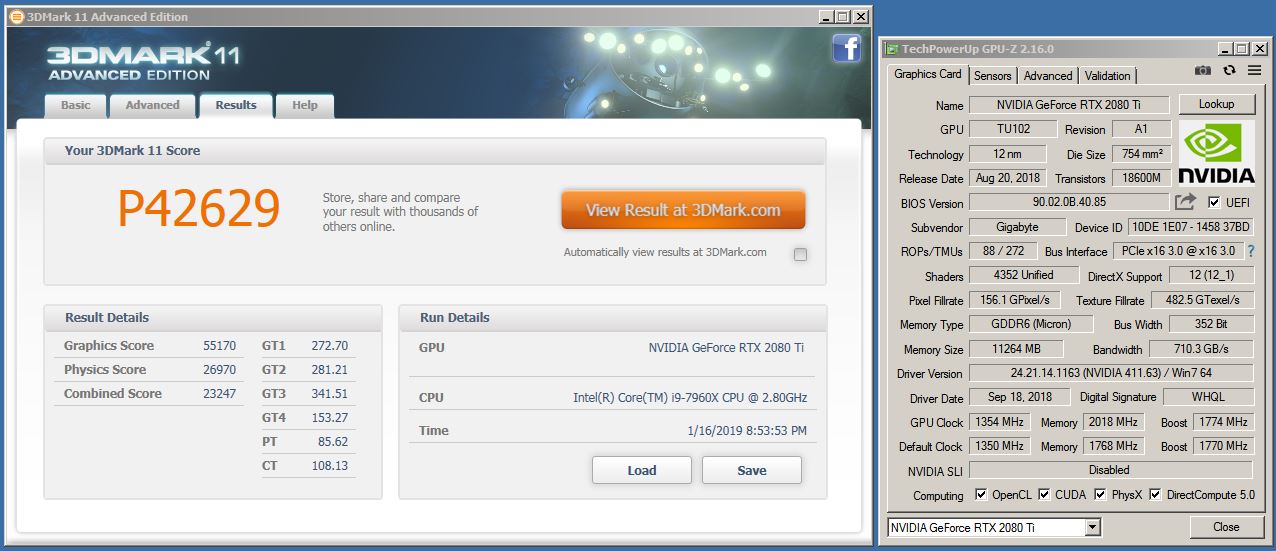
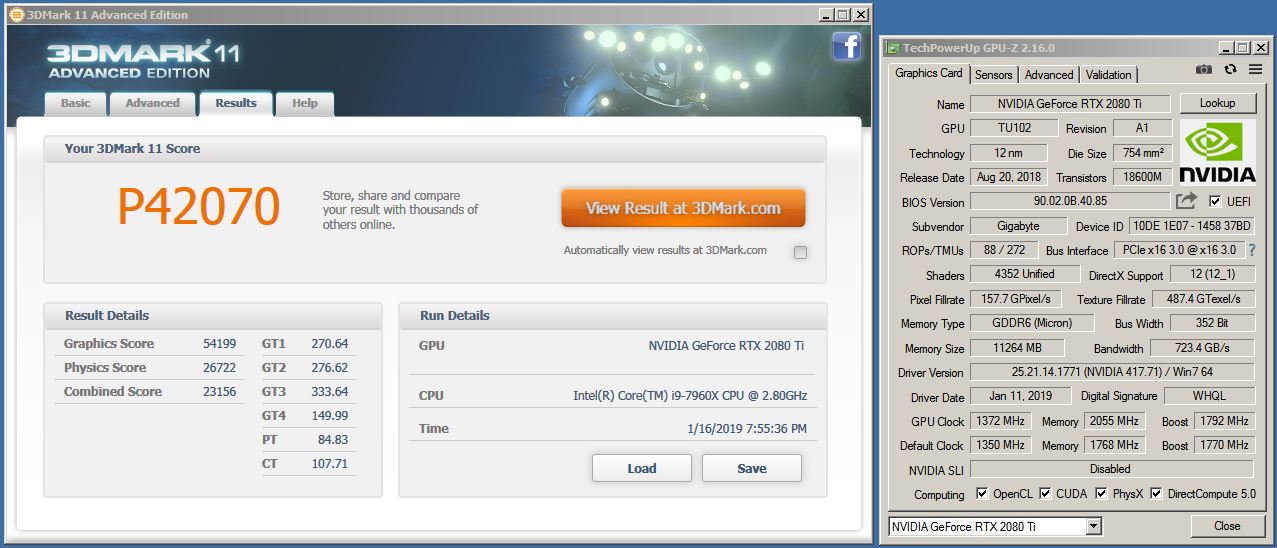
Newer isn't always better when it comes to graphics driver. Even with a slightly higher overclock.
@Talon and @Rage Set - try the Gigabyte Aorus Extreme 2080 Ti vBIOS. It seems to hold higher voltage for longer, has higher memory and boost clocks by default, and the core clocks don't move around as much.Attached Files:
Last edited: Jan 16, 2019 -
-
@Talon and @Rage Set - here is an example... lock the core at 2205 at 1.093V in the voltage curve tool. Next step down, for less than 1.093V, just flat-line it at 2175 on core from 1.025V up to 1.093V.
https://www.3dmark.com/3dm11/13118165
Last edited: Jan 16, 2019 -
Well, it's almost time to start thinking about doing soldering like I did on the 1080 Ti. If there is one thing we can say about NVIDIA, they are consistent.
That applies to their nonsense as well as their successes. They always seem to enjoy having their beasts on a short leash.
![[IMG]](images/storyImages/Qvc8ywh.jpg)
![[IMG]](images/storyImages/qfMvBUe.jpg)
![[IMG]](images/storyImages/yEgiPf6.jpg) jaybee83, Rage Set, Vasudev and 1 other person like this.
jaybee83, Rage Set, Vasudev and 1 other person like this. -
I'm going to test this tonight. The next couple of days we are going to be in the single digits or below. Perfect timing for garage overclocking.Mr. Fox likes this.
-
I guess you've been bumping up against the power limits? You're gonna do a power shunt mod on it? Are you up to 1.2V yet like you were on the 1080ti?Mr. Fox likes this.
-
Yes, the sissy-boy power and voltage limits are a major impediment, exactly as they were with 1080 Ti (and basically ALL NVIDIA GPUs from Kepler forward). Sadly, RTX/Turing is not the exception. Like a stock Pascal GPU, the maximum voltage is pathetic, with a 1.093V limit. This is nowhere near enough voltage for anything more than modest overclocking and it is difficult to even hold it at 1.093V due to the power limit pushing it below max voltage to avoid breaching the power limit. So, yes... planning on doing the power mod first. If that doesn't get me far enough, I may do the voltage trim POT mod as well. Hopefully, the power mod will be all that is necessary. That was all I needed on the 1080 Ti.
I don't need to do more with the memory overclocking, just the core overclock. I could overclock the 1080 Ti with the power mod to 2240 @ 1.200V with it never dropping any core clock speeds regardless of load. I need the same behavior from this GPU. The Galax HOF card supposedly has a 450W limit, but there have to be hardware differences (maybe a shunt mod from the factory) that allow that. Using that vBIOS doesn't get me any further (actually a little less, in fact,) than using the stock vBIOS.Papusan and Robbo99999 like this. -
If/when you flash back to the stock EVGA vBIOS after playing with the Gigabyte Aorus Extreme vBIOS, should Precision X1 offer to flash the LED firmware, cancel out of it. That failed repeatedly on mine and Precision X1 eventually bricked the Hydro Copper LED system. EVGA replaced the Hydro Copper under warranty already. Luckily, all of that circuitry is located on the thermal solution itself and not the GPU PCB. It had no effect on anything but the LEDs. But, I'm not allowing Precision X1 to update the LED firmware ever again. If it works, then updating the LED firmware is just plain stupid and unnecessary. I mean c'mon... LED firmware update? Really? LOL.
-
What's the "voltage trim POT mod"? You didn't have to do that on your GTX 1080ti then, your vBIOS gave you the option to use 1.2V on your old 1080ti? I imagine you're gonna need that 1.2V if you want to get the absolute most out of it.
*Official* NBR Desktop Overclocker's Lounge [laptop owners welcome, too]
Discussion in 'Desktop Hardware' started by Mr. Fox, Nov 5, 2017.

![[IMG]](images/storyImages/Hfpa8qF.png)