Problems? See this thread at archive.org.
If 3850X runs 5.1GHz stock on all 16 cores/32 threads and has some overclocking headroom on top of the 5.1GHz, $499 will be pretty special. I'll be watching to see how that turns out if you do it. Will also be interested in seeing how it manages memory overclocking.
-
-
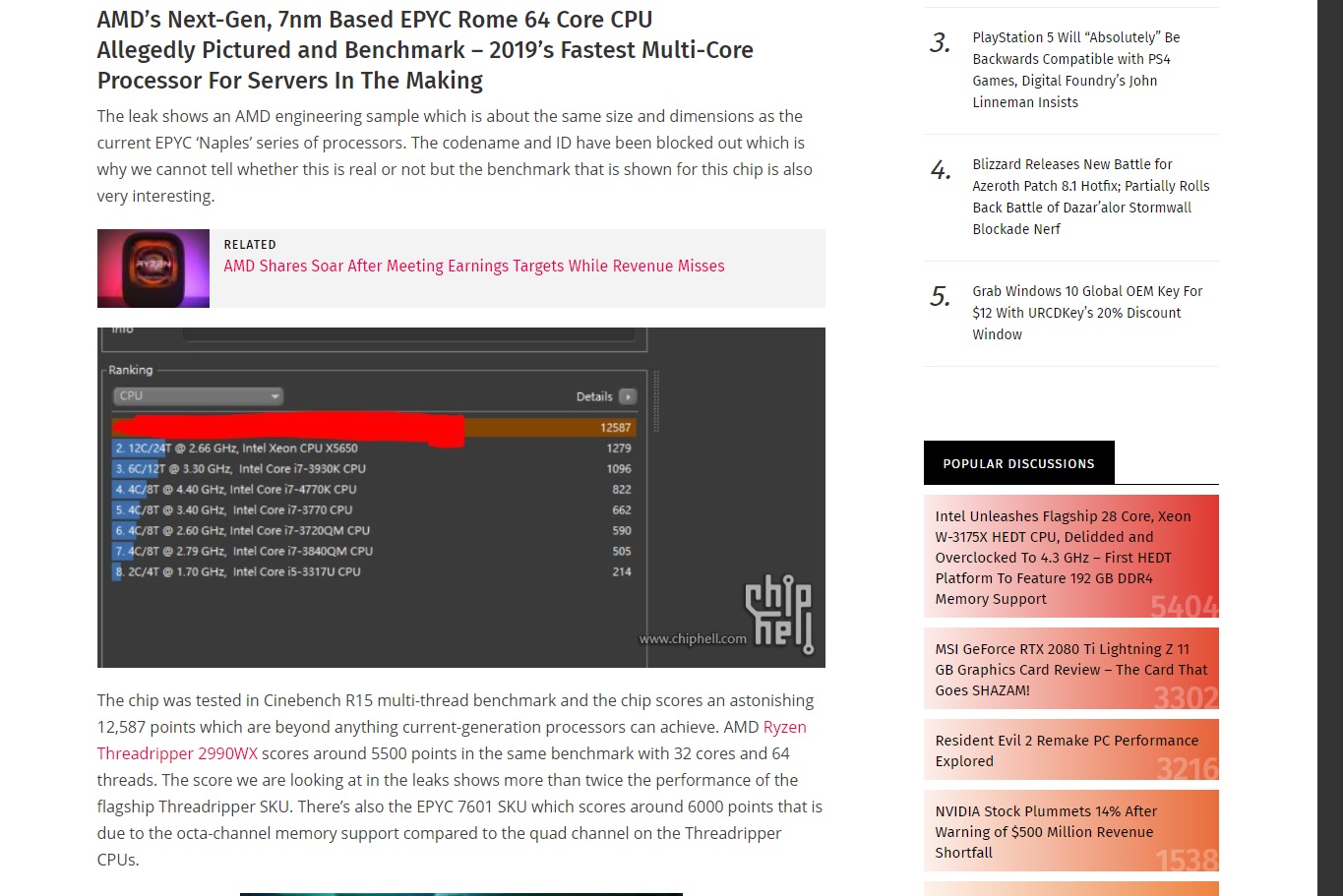
If the above turns out to be true, then I wonder whats in store for threadripper? They've gone core crazy! I think there are rumors of a 64 core TR

Attached Files:
jclausius likes this. -
-
Ok, here is my preliminary build, while waiting for Ryzen 2/Radeon VII. Thoughts?
Ryzen 2700x, Asrock Taichi ultimate x470, 16gb Trident Z @ 3600, Samsung Evo 970 500gb, EVGA GTX2070 XC Black edition, EVGA Super Nova 1000w PS, Fractal Designs Meshify S2 case, MSI optix 31.5" curved screen @165hz, Corsair Hydro Series H150i PRO 360mm.
I will dual boot 7 and 10 with 7 as the main OS of course, and 10 for some benchingLast edited: Feb 3, 2019 -
Looking sweet @Raiderman but I'd be tempted to wait for that 3850X and another 16gb of ram.Raiderman likes this.
-
The nice thing is, I dont have to wait The 3850x will drop right in the AM4 socket when its released. Im not holding any super high hopes for Radeon VII, I just hope it performs as good as, or better than a 2070. I think the next gen Ryzen is going to be great though.
JoeT44 likes this.
-
AMD is claiming 2080 performance. So I'm assuming they're stretching things a bit and only showing benchmarks that favored them.
Going by this logic, I am sure it'll at least match/beat the RTX 2070. RTX 2080 will probably be a more rare case where it's mostly slower and wins in some categories.
They're also pricing it at direct 2080 level. So there has to be some truth to the performance otherwise it wouldn't sell at all being priced higher than 2070 and not performing better.Raiderman likes this. -
Didnt they price Vega above its performance? Wasnt it priced near the same as the 1080ti?
-
Vega 64 was $499
Vega 56 was $399
1080 was $549 (Reduced to $499 later I think)
1080Ti was $649Raiderman likes this. -
Whats funny is, for a good Vega 64 card, it will still cost more than a good 2070
-
If I were forced to buy Vega 64 right now, I'd probably buy this and undervolt it: https://www.newegg.com/Product/Prod...=vega 64&cm_re=vega_64-_-14-202-326-_-Product
No point buying Vega 64 though with Vega VII coming soon.
If I'm going RTX I'm going 2080 minimum though. Can't choose anything less when you've come from Titan X (Pascal) and 1080 SLI lolRaiderman likes this. -
Now I see why my CPU temps started creeping higher and higher, load and idle, even with the water chiller. The water block has been collected crud in the fins, LOL.
![[IMG]](images/storyImages/KyfHdzz.jpg)
Idle temps are back down into the 20's again without the chiller and they were creeping up into the 40s.
Last edited: Feb 4, 2019Robbo99999, Ashtrix, j95 and 5 others like this. -
@Mr. Fox what do you use to raise your cpu voltage? Is it TurboV?
-
I generally only change that in the BIOS. I really don't care for using Windows software for that. ThrottleStop works well for lowering it (and core clocks) but not for increasing it. I don't like XTU, AI Suite or TurboV, but of those three I would use TurboV. I don't even like having XTU installed because the ICC driver crap it installs sucks.Last edited: Feb 4, 2019
-
stock memory I hardly notice difference, I leave them in stock
![[IMG]](images/storyImages/MXB8nI6.jpg) JoeT44 likes this.
JoeT44 likes this. -
Outside of specific applications, some games and of course benchmarks, you will not notice a huge difference in timings in Windows. Since you have the Gene, you obviously got it to overclock, I'd keep those timings if I were you. How much voltage does it take to get to those timings?Raiderman likes this.
-
-
Greetings NBR crew,
Jumping the ships, done with the laptops (Will get a Premamod Clevo used at some later point in time)
..Since 2020 BIOS is dead, have to get a PC. And for some reason and Win7 experiments and Linux, I want a CSM capable machine and I plan to keep it for a looong time. AMD systems BIOS need always updated due to their uArch and old OSes like Win7/8.1 without updates idk how perf will vary also TS isn't there for AMD systems. And this PC purchase would be my first Desktop PC ever.
Preliminary build idea
i9900K, MSI Z390 Ace, Noctua DH15 - Black swap Chromax kit, G.Skill Trident Z DDR4 3600MHz (B-Die 16GB C15) (F4-3600C15D-16GTZ), EVGA Supernova 1000W Titanium, ASUS ROG Strix 2080 Ti / Radeon VII or a used 1080 Ti (Go big or go medium and go big later, unfortunately due to the ridiculous market. I'm open to all ideas, also to note RTX needs Win10), ASUS ROG Swift PG258Q, and Corsair Obsidian 500D. For storage, didn't think anything a vague picture - a Samsung 2.5" SSD for games, another 2.5" SSD for Windows 7 + a Samsung NVMe Win10 drive, 1x WD RED 10TB 5400 RPM later will add another 10TB WD RED.
I don't like AIOs (Eventual failure due to many reasons) also their excessive bling trend. Massive heatsink like the Noctua DH15 looks dope asf and stays competitive against AIOs from what I read plus more lifetime, please chime in your knowledge. I like 1080P high refresh rate gaming (Since most of the new games are going the GaaS - Games as a Service model with less and less RPG elements and lots of Always OL crap, I have a ton of old FPS and good titles with me which I would replay),
Also 1440P scales bad with FHD movies, 4K is useless on a PC monitor <40". What do you guys think of that monitor ? I read the GB BIOSes are bad ( Z390 Aorus Master) and Maximus XI has lesser VRM capability for long term durability, middle ground is MSI, any suggestions ? (I hate that MSI Ace doesn't have a damn PS/2 port or the HDMI / DP on the Mobo, because PS/2 for installing Windows 7 (Z390 doesn't have ASmedia USB chipset like Z370 so it wont work with Win7 - no xHCI drivers (Intel and M$ in bed), PCIe riser card add on, still looking into this) while their Z390 Godlike is having everything that this board is missing plus the Audio is also improved a lot, too much price though. Also MSI also has some sort of Installer like EZ Installer from ASUS, however there's a thread at mdl for the same.
It's sad that DH15's RAM clearance is lesser. EVGA CLC 280mm seems like a good option about the H150i Pro - stupid non removable cabling and looks bad as well with those wiring and the design, other options that I read which are good are Cryorig R1 Universal or Dark Rock Pro 4 or Le Grand Macho RT.
Also will wait for the Ryzen 3000, if the prices fall on the Z390 and how the Ryzen 3000 fares, It will decide (high refresh rate gaming, less RAM headaches, like 2700X cannot handle more than dual DIMMs for higher perf iirc, the uncore on the Zen2 info nothing, plus no OC on AMD systems, Even being a total noob here though I would like to OC with the Desktop and stretch it's perf overtime). Also I read a rumor on the CFL/refresh CNL with 10C Ring again (max ring bus limit iirc). Just want to start off learning and researching for this BF purchase, I know too early but I just want to have some knowledge before.
Please chime in if I need to start to know more about any component that goes into the PC. Thanks a lot for your time.Convel, jclausius, Robbo99999 and 3 others like this. -
For the best overclocking system, it is still Intel. Whether it is mainstream Z390, or now mainstream HEDT (X299). Gigabyte's BIOS are a work-in-progress but better than their Z370 or other gen mobos. The Z390 Master has better VRM than the Maximus XI Hero and Code mobos, however, the Maximus XI Extreme is only bested by the Apex. Asus still has, imo, the best BIOS out there, EVGA coming in second on their higher end boards. If you don't need the extra cores for productivity, I'd go with the 8700K. The 9900K runs too hot, even with the best Air or AIO coolers. Yeah, I have a 9900K and 8700K; the 9900K barely beats the 8700K in certain benchmarks unless you add a custom loop to tame it.
The 2080 TI is a great card. I know that is an unpopular opinion but if you want the best and are willing to push the card, you get great results. Do not buy two 2080 TI's, not worth it UNLESS you are going for benchmarks. Two 1080 TI's are still a good option and you can get two great AIB partner cards for the price of a good AIB 2080 TI.
You should wait for Ryzen 2nd Gen. I think AMD is finally going to be on the same playing field as Intel, for how long, who knows? Sunny Cove is going to be in 2020 (don't expect Sunny Cove to come to mainstream desktop this year, only mobile). The rumored 10C Intel proc is going to be a bag of fiery flames and I will be staying away from it.Last edited: Feb 4, 2019 -
Well, I figured that instead of benching this evening I would find a really nice gamer-boy 24/7 all-purpose overclock. I had nothing better to do, since I've pretty much done all I can do with the 2080 Ti until I can figure out the best voltage mod to overclock it harder than I can with the pantywaist 1.093V bubblegum GeFarts gamer-boy limit.
So, I got it dialed on at 4.7GHz on 16C/32T, 1.250V (vdroop disabled, static voltage), cache/mesh at 3.0GHz, 1.250V, ram at 4000, 16-18-18-32, 1.450V. Left the GPU stock and ran AIDA64 stress test for 20 minutes with CPU and GPU running at 100% load... about 820W continuous load per the Kill-A-Watt, no chilled water. Before cleaning the crud out of the water block fins the CPU would have been over 100°C within about 3 minutes without chilled water and ended in a BSOD.
![[IMG]](images/storyImages/kQQ0Ubh.jpg)
@Robbo99999Last edited: Feb 5, 2019 -
Awesome. I'm glad you're making the jump. Looks like some great plans. I agree with @Rage Set about ASUS being the best option for BIOS features. They also have the best hardware features (like special buttons and switches, which can add value for tuning). I'd say EVGA is hands down the winner for hardware robustness, durability and customer-centric warranty. If you're going with Z390, I'd say go with EVGA Z390 Dark and pay the extra premium to get an absolutely bulletproof Z390 pro-overclocker extremist military grade motherboard that has no match and a company that will give you zero hassles if it ever needs RMA (including advanced RMA option). XSPC makes great component cooling kids. Go with an RX360 radiator, Photon D5 pump and Raystorm Pro water block. If you go with an EVGA GPU (highly recommended) get a Hydrocopper block and include it in your loop. The GPU will last a long time without any fatigue and won't have any of the extra-stupid NVIDIA room temperature throttling nonsense like it is absolutely guaranteed to have if you air cool it.
-
I like the 3700X there, seems to be best for the money. 12c + 24T, and up to 5 Ghz - pretty sweet!
I think you should build a PC next year if you can wait, NVidia on 7nm + new CPU options from AMD, etc. If you build now, I probably wouldn't bother buying a better GPU than the RTX 2060, but with a view to only keeping that card until praps end of 2020, at which point I would upgrade to a 7nm 3000 series NVidia card (probably the RTX 3070).
The one on the left! Higher bandwidth and lot lower latency!
Like I said to Raiderman in this same post, I think you should wait till next year to build a PC if you CAN wait. I like your idea of big air, but I'm uncertain how it holds up with an overclocked 9900K, I think you'd be able to run 5Ghz all core with NH-D15, but I don't think you'll be able to go higher. If you build this year I'd just go with RTX 2060 with a view to only keep it until end of next year at which point I'd buy an RTX 3070, which will be on 7nm with big performance gains.
You're gonna be a high refresh rate gamer like me - the best experience in my view - I'd go 1080p rather than 1440p, because you want the stability of 144 fps minimum, so minimum framerates need to be essentially 144 fps. (Actually, as an aside, you get best latency on Gsync monitors if you run at least 2 frames below the max refresh rate of the monitor - use game engine frame limiting options to limit fps to 142fps, and if there is no option for frame rate limiting in the game then use RTSS to limit the framerate - using any other frame rate limiters results in higher latency.). Yes, get a 1080p (144Hz minimum - I'd like a 240Hz rather than my 144Hz) - TN panel for lowest latency & least ghosting, but try to get one with best gamma, contrast & colours too (which you can see in professional monitor reviews). EDIT: there was a high refresh rate TN panel monitor reviewed somewhere recently where it had really exceptional contrast & colour, with exceptional contrast being really quite rare for TN panels, best of both worlds if you can find a TN with high contrast. (Might have been on Toms Hardware, not sure).Last edited: Feb 5, 2019 -
Well, that's a beast of a CPU for a gamer, but praps he does video rendering or extreme science on his PC in his spare time! He'd overclock the GPU though, even if it doesn't need to be overclocked - after all an overclocked GPU is a more efficient GPU in terms of the voltage/frequency curve, and therefore you'd get higher frequencies (even if you ever bounced off the temperature or power limiters at all). What was that crud you had in your CPU cooling block?!
EDIT: actually a typical gamer boy wouldn't know about frequency/voltage curves, but an educated one would!Last edited: Feb 5, 2019 -
I don't know exactly, but we can probably guess with some reasonable accuracy. It must have been some soldering debris that wasn't fully flushed out during assembly, or maybe it was something that was in the water chiller. I think the tiny black flecks might be shavings from rubber o-rings. I have only used distilled water in it, so I doubt it is mineral deposits. There are probably some microscopic metal particles that would normally accumulate from the brass radiators. One of the radiators and D5 pumps, and water block, have been in use over a year, so I think it was just due for a normal cleaning. I've drained and refilled the system so many times there should not be any manufacturing debris left, but I probably should get clear in-line filter for it with a washable screen at some point. That way I can see when it needs to be cleaned and not have to worry about trash getting into the fins of the water block.Ashtrix, jclausius and Robbo99999 like this.
-
Yeah, good call re the filtering, I suspect that if your pumps are overkill then a filter will not increase the temperatures much at all. Actually though, thinking about it, going back to the days when I was kid wafting a fine mesh net through a river to catch minnows, there was quite a bit of drag created, maybe it would reduce flow rates substantially! Afterall, water is really quite viscous in comparison to air, so a fine mesh filter on an air fan is one thing, but applying the same mesh to water - that's a lot more drag!Mr. Fox likes this.
-
I will just have to try it and see how it does. I have 3 D5 pumps and abnormally high flow rate and pressure compared to a typical water cooling setup, so it might not hurt it too much. If the filter does affect the temps, I will just throw it away and make cleaning the water block a housekeeping thing if the temps ever start to creep up again. At least now if it happens again I will know the first thing to check before wasting time checking anything else. It's really easy with the quick disconnect fittings anyhow. No need to drain fluids or anything.
Actually, I think I'm going to go with this for the bubblegum gamer-boy overclock instead of the 4.7GHz. Only needs another 50mV on the core (an even 1.300V for core and cache) and passes AIDA64 stability test with flying colors. This will be awesome for everything excepting benching. Temps will still be totally fine for normal everyday use... only about 5°C higher under full-tilt load on CPU with no assistance from the chiller. I also tweaked the memory timings a little more and increased the read and write speeds about 1GB/s and shaved about 1ms off the latency.
Last edited: Feb 5, 2019 -
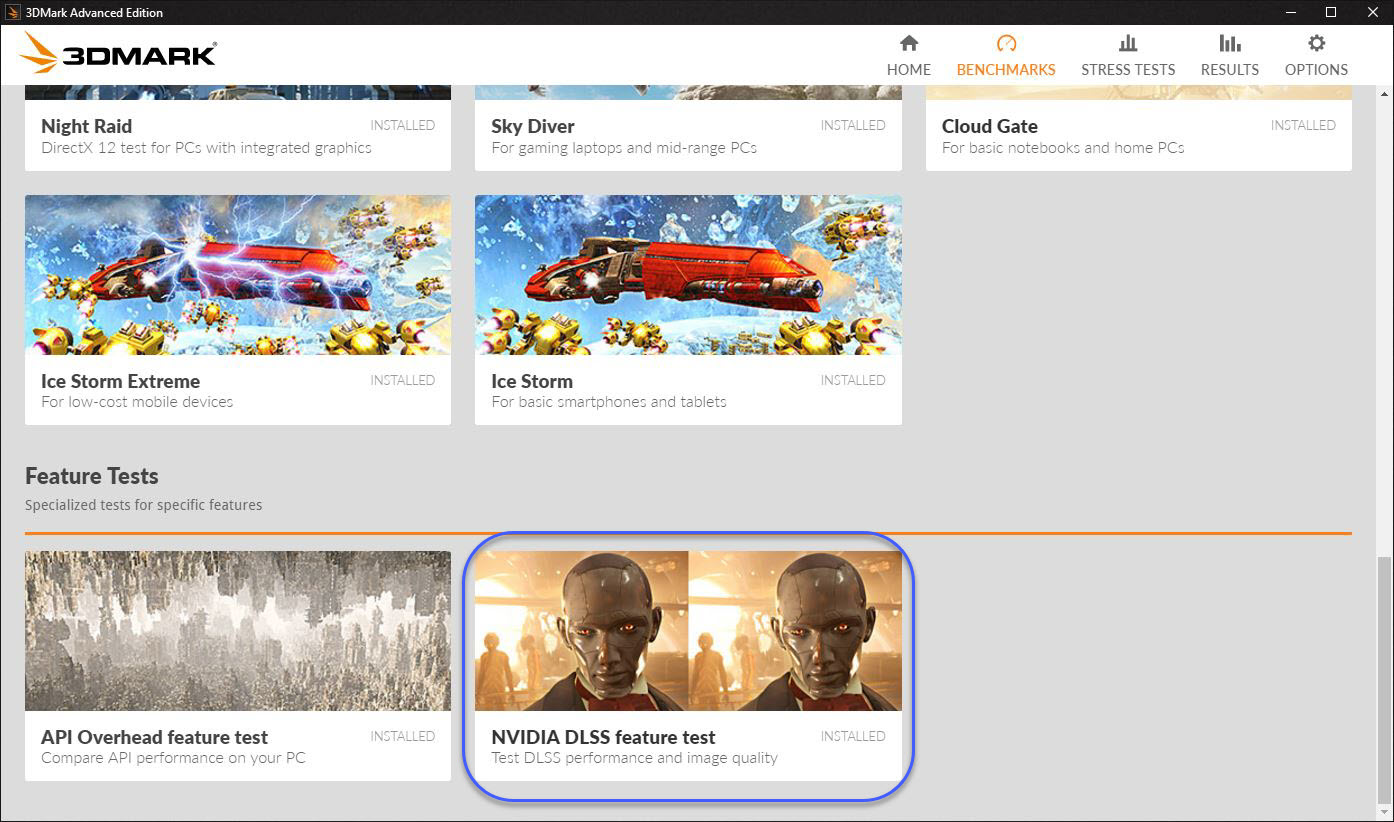
Hmmm... Gonna have test this to see if this is true or just another load of crap from the Green Goblin Marketing Team.
@Johnksss @Rage Set @Talon
Nvidia’s latest GPU driver enables DLSS in 3DMark for big performance gainsPapusan, Rage Set, Johnksss and 1 other person like this. -
I'm not much into the waiting game, and my build is already on it's way I want to drop that 3850x in it when it comes out
Already selling the Asus notebook that was supposed to satisfy my craving for hardware, because of the lack of Windows 7 drivers for the asus proprietary bs.
Sent from my SM-G960U using Tapatalk -
Fair enough, probably not the smartest move in terms of a time to build for performance & value, amoungst the worst timings, but if you can't wait you can't wait! Will be good to hear about how you get on with your build and the performance, etc.
-
My timing is always crappy. I built my last system during the crypto craze, so I know all about it. Much better timing this go around, for sure.
Sent from my SM-G960U using TapatalkAshtrix, jclausius and Robbo99999 like this. -
Yeah, it doesn't matter as long as you enjoy it & it's not an important factor for your build.
-
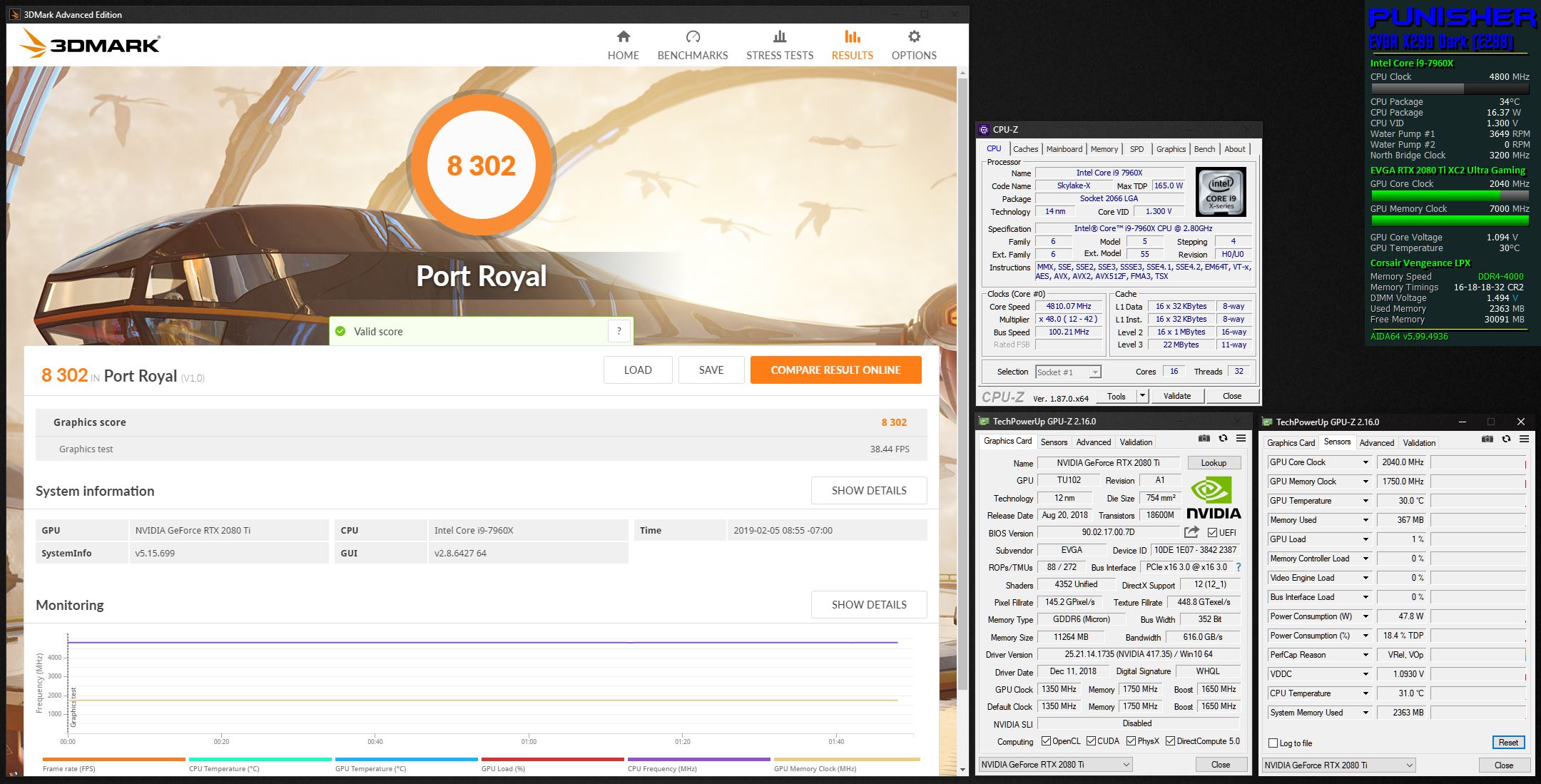
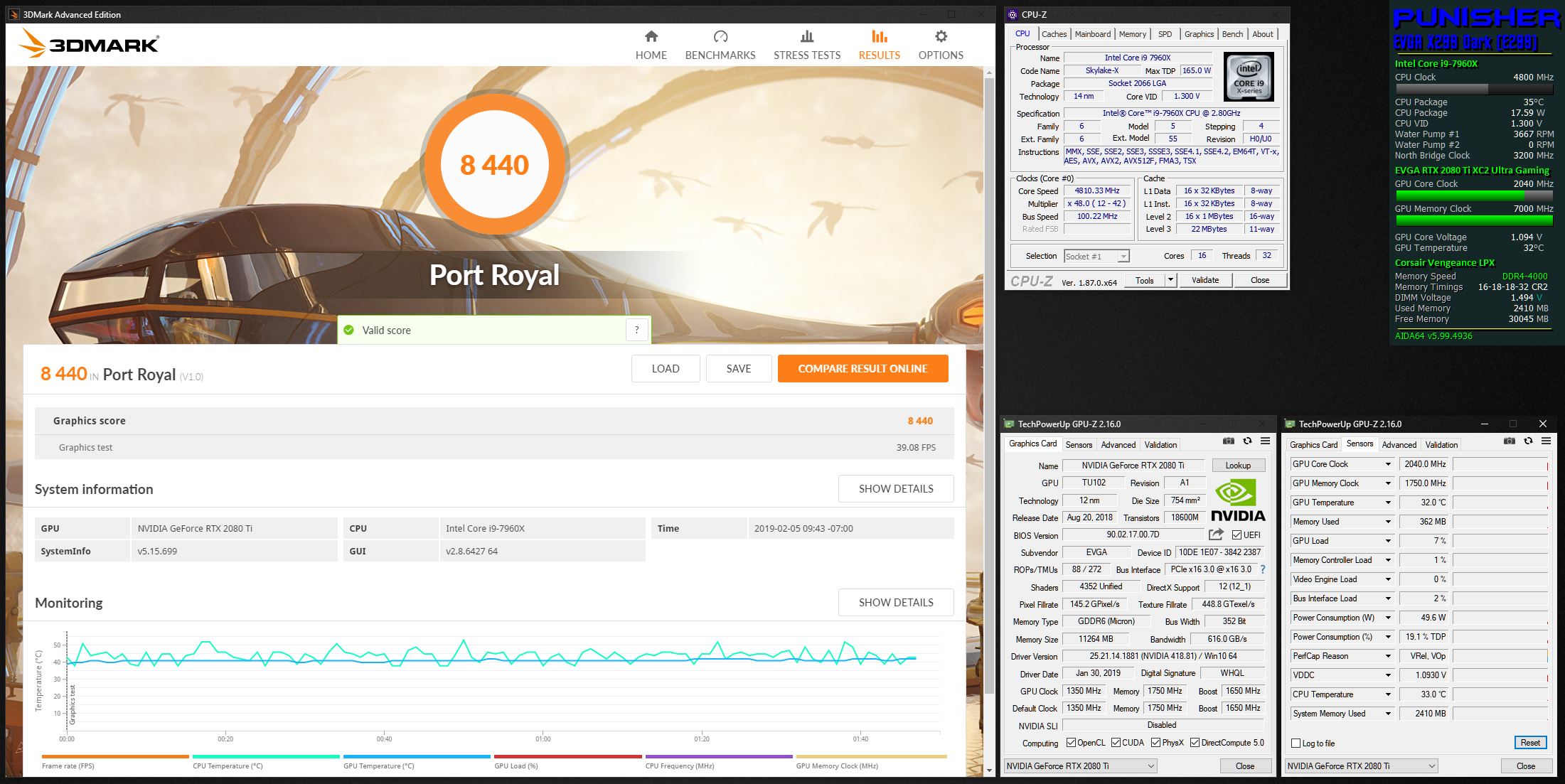
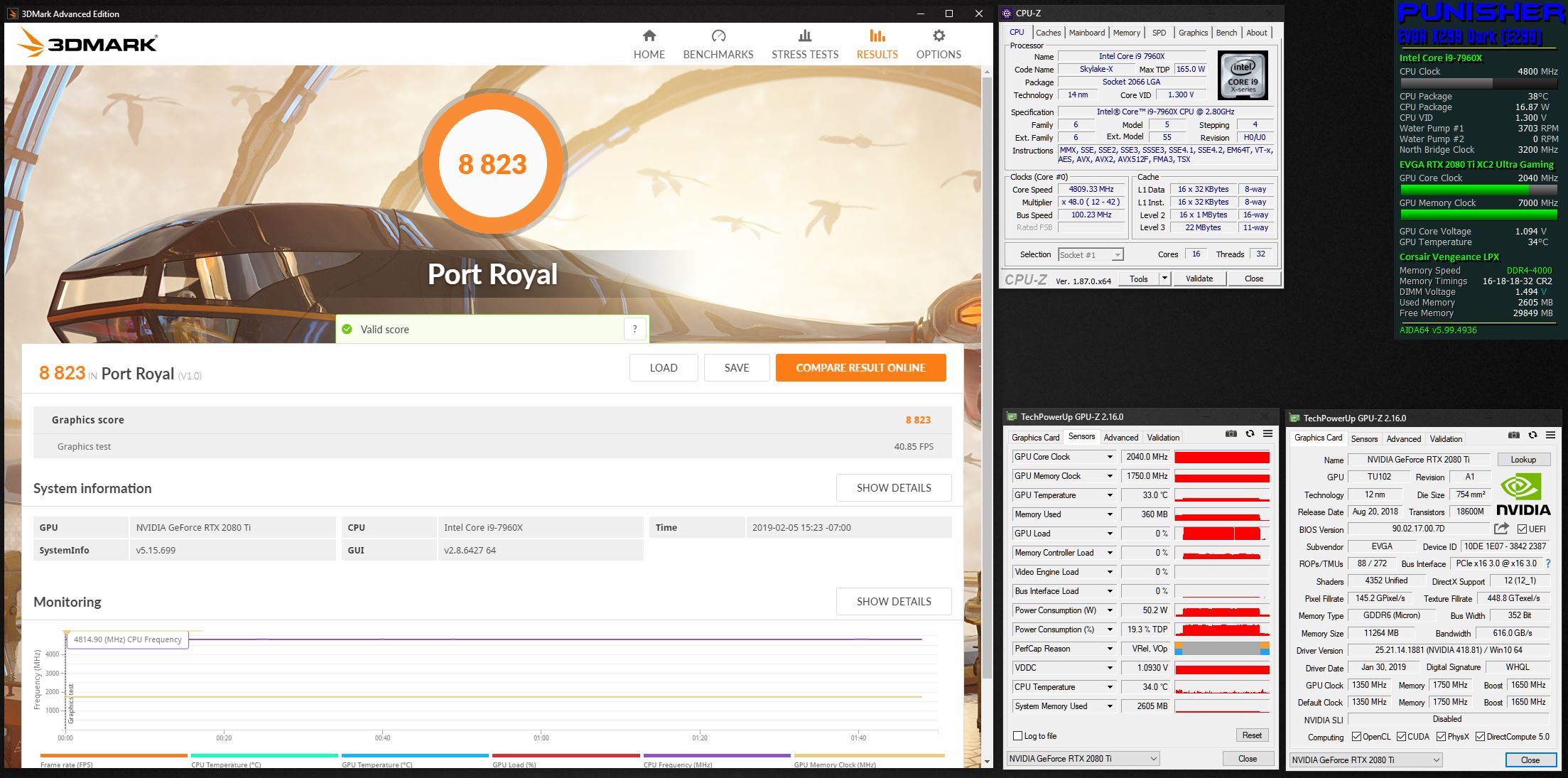
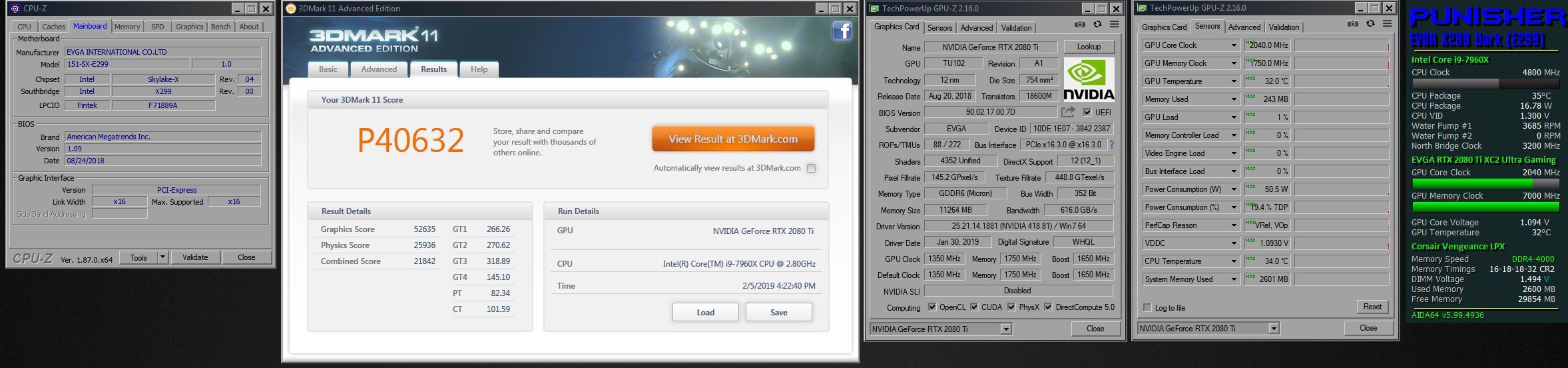
Well, so much for the hype about a HUGE performance increase. There may be a very small one, but certainly nothing that warrants a press release or any hype.
Attached Files:
Last edited: Feb 5, 2019 -
-
OK, gave it one more shot and cleaned it up with DDU, then reinstalled it again. (The first install was over the prior driver. The score did go up just a tiny bit more, but yeah... still nothing to get too excited about. Less than 2 FPS change with this new driver. That said, going up a tiny bit is definitely better than the score going down a tiny bit. So, that's nice. Even a small change could mean a few extra points on HWBOT.
There are no new settings in NVIDIA Control Panel for DLSS. Everything there is the same as before.
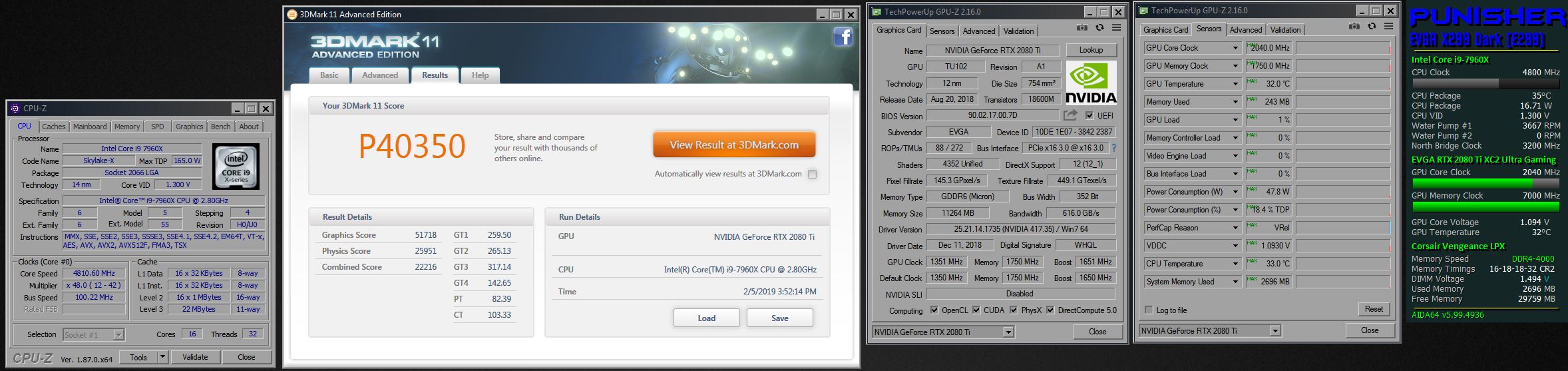
I will test it in 3DMark 11 under Windows 7 and see if it changes anything.Attached Files:
Robbo99999 and Rage Set like this. -
-
I wonder if Nvidia will go over bodies to make Turing more atractive See... Tweak for maximum performance for their newest cards and
let older come second or last
-
It actually made more of a difference with Windows 7 than it did with Windoze OS X.
Attached Files:
Last edited: Feb 5, 2019Cass-Olé, Robbo99999, jclausius and 4 others like this. -
-
-
Geforce 418.81 WHQL - Download & Discussion
Maybe a coincidence. Probably. But, if they were smart they wouldn't be. Digital STDs produce the same end result as the organic STDs.Arrrrbol, Rage Set, Ashtrix and 1 other person like this. -
Thank a lot for the input, +rep. I really love that idea of the 1080 Ti's in SLI. Yeah will wait for the Ryzen 3000 series, there are a lot of variables that were being questioned, whether the SMT performance mastery or the ST IPC or the Clockspeed vs the i9 9900K flagship that they teased at CES. I'm very curious on the AMD's Zen 2 !
Brother Fox thanks a lot, +rep. You always go full "Balls to walls no questions asked" Big Guns !! Nothing left behind , the EVGA Z390 Dark looks insanely good also the RAM clearance issues won't be there for that setup I guess due to their Socket rotation, (Plus 100% speculation, the 10C Intel 14nm fire-breather might work properly in that chipset). Those Custom Open Loop setup options, I think I'm way too noob (please excuse
) for that, But I can assure that I will eventually learn and go that route.
, the EVGA Z390 Dark looks insanely good also the RAM clearance issues won't be there for that setup I guess due to their Socket rotation, (Plus 100% speculation, the 10C Intel 14nm fire-breather might work properly in that chipset). Those Custom Open Loop setup options, I think I'm way too noob (please excuse
) for that, But I can assure that I will eventually learn and go that route.
Thank you friend for the good ideas and tips, +rep
Initially I was also thinking the same to get an RTX 2060 but that would have VRAM choke also worst RT performance also it's a low tier GPU TU106 bottom barrel chip it's a shame that even 2070 also uses the same class of silicon, But the best would be buy this - used Sapphire/Red Dragon Vega 56 with over blasting extra 240% of Power
That will blast the RTX2060 to ashes and be in line against a 2070 lol jk, power consumption is over an extra ~200W over it's stock power LOL, But It's supercool to see that GPU Overclock like that without any restriction while Ngreedia is clamping their Pascal and Turing chips like some Console voter crap, esp the Voltage limit with Freq-Temp scaling and vBIOS Falcon trash, add the A series extra bins. Worst chastity BS forcing consumer to buy a new HW always.
However waiting for 2020 means I will lose the BIOS capable systems, it's not like Win7 is flawless on the existing HW. But it just works without issues, also the PCIe 4.0 is a good sign from AMD from the already Zen2 7nm series, but that will be a brand new tech again, If I wait for that, DDR5 might as well come, totally new HW and takes a long time to stabilize IMO and pricing. Better buy a mature HW DDR4 and PCIe 3.0 ? the 4.0 might add benefits for I/O rather than GPUs since we don't even push the Max on the x16 PCIe limit, but that DMI 3.0 limit (even on HEDT - VROC ripoff only vs TR) to CPUs will be removed from both mainstream platforms but that's far in 2020 from Intel. I'm not that saturated for the NVMe drive speed for the I/O getting a TR2 after the launch of TR3 (Rome) would satisfy all the I/O needs for one I guess.
I will wait for the Zen2 though.
About the High Refresh rate, Yep, 240Hz is what I'm drooling, at 1080P, no 1440P & 4K is out of equation entirely, thank you for the tip on that Framerate limit for less latency while gaming.
Excited as a little baby for the Desktop machine, no limits just freedom, exponentially better than BGA laptops or planned obsolescence mobile phones with sealed batteries. with a proper standard defined PCIe chipsets and tons of I/O ports (Esp. those Apple junkbook Pros priced at same levels). Ofc the reliable and solid Alienware 17 R1 will be used as a portable gaming machine and DTR as well, with some neat upgrades. And a lot of learning coming in which is really interesting.
I think brother @Papusan should move to Desktop with Phase change cooling or something exotic like this
with dual sockets to beat the crap out of the BGA kids
Mr. Fox, Cass-Olé, Robbo99999 and 3 others like this. -
Open loops can be a pain in the arse at times, but their performance can not be matched with a closed loop system. You will get the hang of it, Im sure. Desktop hardware is way more windows 7 friendly ATM.Ashtrix likes this.
-
Right, I'm gonna DDU right now! Apparently this driver is supposed to deliver some general performance improvements, even to Pascal & Maxwell, as it says in the release notes, but it's very vague & non specific. I didn't get any increases in Firestrike, but Battlefield 1 was running very smooth but so difficult to quantify framerate differences in that game - gonna DDU now and see if I can get some performance differences like you saw there (as well as in your later 3DMark11 post)!
EDIT: DDU didn't allow for any performance improvement in Firestrike & Timespy.
Ha yeah, well I don't know how long that insanely overclocked Vega56 would last though, but it could be a fun experiment until the 3000 NVidia series come out, assuming it even lives that long with that kind of overclock!
On the topic of monitors, it's definitely worth buying the best that you can get, they last a long time as an investment and you want it to outlast a few generations of GPU if you can, so if you want high refresh rate gaming I don't think you should compromise on refresh rate - 240Hz would be the way to go. Blur Busters website is a great website dedicated to all things high refresh rate gaming - they showed 'scientifically' in an article that there are benefits to be had in high refresh rate gaming all the way up to 1000Hz! So the industry still has some ways to move forward, so don't compromise on refresh rate with your monitor purchase. The biggest impact of high refresh rate gaming is on competetive gaming - if you want to give yourself a chance in multiplayer fps, but if you're not into being competetive then I'd say that high refresh rate is not as important and 144Hz is just fine as a future investment rather than 240Hz; hell, 100Hz would probably be enough if you're not into competitive fps. You don't have to be a pro or even that good to enjoy the benefits of high refresh rate gaming in multiplayer competitive games, I found that the high refresh rate made things possible that I wouldn't be able to do before, there's just so much more information coming to your eyes during quick panning of the camera during close quarter combat, so it would help anyone get more out of the game & their talents.Last edited: Feb 6, 2019 -
[QUOTE = "Rage Set, post: 10859345, miembro: 679265"] La memoria RAM está en 14,14,14,34 CR1 en 1.2v?! [/ QUOTE]
cpu 5ghz 1.2v
ram 4000mhz stock
Me di cuenta de que la oc en el carnero no ayuda mucho.Robbo99999 and Mr. Fox like this. -
New CB 15 "Extreme" mod "unofficial" is now live on HWbot. Stress your HEDT properly with this. Listed as a Beta, so no points yet.
https://forums.guru3d.com/threads/a...he-community-to-stress-hedt-platforms.425161/Last edited: Feb 6, 2019Ashtrix, jaybee83, aaronne and 1 other person like this. -
I only ran it at 4.8GHz this time just to see how it worked. Next time I do a direct connection to my chiller I will run it at 5.2GHz.
I could see this mod being an issue for people with 1080p screens. The window cannot be resized properly for lower resolutions, so they won't be able to submit valid scores on HWBOT if it ever becomes eligible to receive points because the CPU-Z windows cannot be covering the render scene area. If you do that the submission will be disqualified. HWBOT would need to change the rules to accommodate that. See the discussion below the rules at this link: https://hwbot.org/news/9635_application_48_rules/
Raiderman likes this. -
I think this is why I am not seeing the difference. Going to test this now.
Attached Files:
-
*Official* NBR Desktop Overclocker's Lounge [laptop owners welcome, too]
Discussion in 'Desktop Hardware' started by Mr. Fox, Nov 5, 2017.


![[IMG]](images/storyImages/nHhxmGF.png)


![[IMG]](images/storyImages/M67fXHr.png)
![[IMG]](images/storyImages/ZonStOn.png)