 Problems? See this thread at archive.org.
I guess "too much" also depends on how far you've overclocked it. As it is right now (not the modded version) Cinebench R11.5 and R15 pull over 1,000 watts at 5.2GHz from my 7960X and can only be done with chilled water or LN2. Although, I do not necessarily think adding more stress accomplishes or proves anything, kind of like running Prime95 for hours. I do not actually want to put my CPU under more stress only for the sake of causing stress. If I were not overclocking it to such an extreme, or running it stock, then I would say give it all the stress it can handle. It's made to handle running at 100% load for hours on end if it is running stock.
All this mod seemed to do from what I can tell was take longer and generate more heat because it was crunching a larger file that took longer than the original to render. I did not notice any more watts being pulled running Cinebench R15 versus the modded version. The actual stress/load on the CPU seemed to not really be changed by much. When you change something like this all it does really is moves from one system of measurement to another. Like switching from a metric ruler to an imperial ruler. The item you are measuring is the same, you're just using a different expression to say how long it is. For example, a box is 12 inches wide, or 304.8 mm wide. The bigger number means exactly the same as the smaller number. The box has not changed size.
When you change something like this it also invalidates all of the previously accumulated points of reference for comparison and you have to start over from scratch, just like using a new benchmark that doesn't have much info in the database for comparison. All of the data compiled from the past is no longer of any value to compare one CPU or GPU to another, and until you build up a new and robust data set you have a limited pool of information to work with.
That said, I do think it's a cool mod and I like Cinebench a lot.
-
-
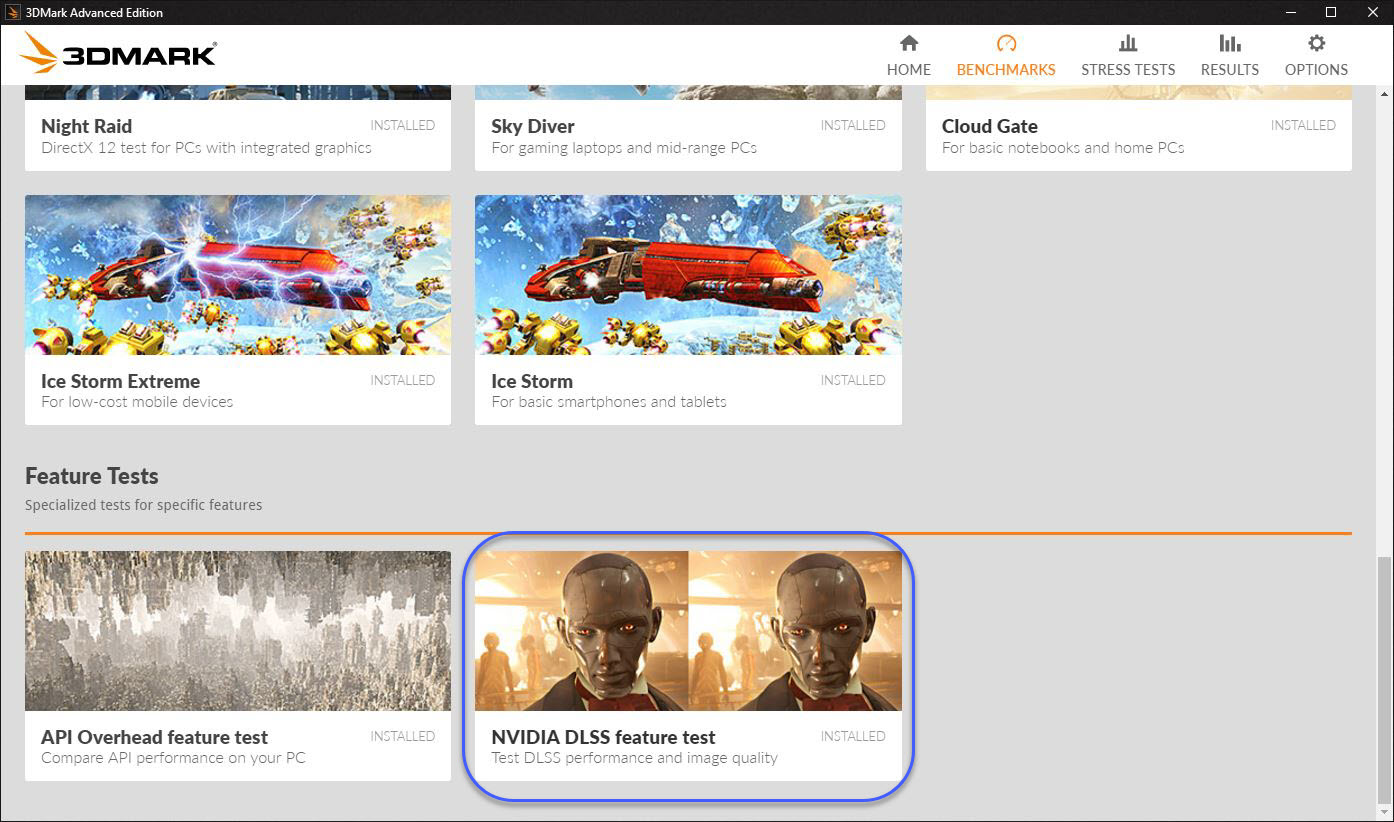
OK, here is the *proper* Port Royal test for DLSS that I did not see before. So, I do have to say that a 19 FPS improvement is impressive. It's nice that it runs it twice and shows you a DLSS off/on comparison.
https://www.3dmark.com/3dm/33216764
@Johnksss @Rage Set @Talon @Robbo99999Attached Files:
Last edited: Feb 6, 2019 -
-
when I run the new cinebech it goes off the screen ... does it have a solution?
Mr. Fox likes this. -
If it is simply too large to fit your 1080P screen (and not crashing closed) you can temporarily set a custom resolution using NVIDIA Control Panel. 2560 x 1440 should work. It may not look nice on screen, but it will fit and any screen shot taken will look like a normal screen shot. Then you can change it back to the default 1920 x 1080 resolution.makina69 likes this.
-
I do not like stressing a cpu too much either, but I do use it as a barometer for stability. If you run a cb 15 test, and it finishes in 20 seconds, it does not give you much of a stability test.
I actually use CB for stability check, if it passes, then most likely it is going to be stable, as I hate prime95 or occt. I dont need to hammer my cpu into submission for 6 hours. I find that a bit ridiculous.Mr. Fox likes this. -
Yes, Cinebench is an excellent CPU stability test. If it passes Cinebench (even 15-20 seconds) it will generally do anything and everything that I need it to in normal use and other benchmarks. Even if it doesn't pass Cinebench it might be stable enough for anything and everything else I want to do. What I mean by that is it might overheat in Cinebench, but never overheat doing everything else.Raiderman likes this.
-
interesting, you guys seem to have pretty light everyday loads outside of stress testing / benching
usually, 10 consecutive runs of CB15 is my very first stability test for everyday OC clocks, but that is by no means sufficient to avoid BSODs or freezes in my case. always have to resort to 30 min. of AVX enabled P95 1344K testing, then I can move on
as always, YMMV depending on your everyday needs in terms of CPU workloads.Mr. Fox, Talon and Robbo99999 like this. -
I use an infinite loop of x264 run overnight to check stability, found here:
https://redirect.viglink.com/?format=go&jsonp=vglnk_154952191109516&key=504c5ff67d3c4430d65443a38397e67e&libId=jru9bnf701023z6x000DAbsz3ghq7&loc=https://webcache.googleusercontent.com/search?q=cache:84xc2sGy4joJ:https://www.overclock.net/forum/5-intel-cpus/1570313-skylake-overclocking-guide-statistics.html+&cd=1&hl=en&ct=clnk&gl=uk&v=1&opt=true&out=https://mega.nz/#!ywAFDQQQ!hEQCeRXDKpHoeRYEaspux3ZA9Smx6tp8h0leb7ZHdJo&ref=https://www.google.com/&title=Skylake Overclocking Guide [With Statistics] - Overclock.net - An Overclocking Community&txt=Custom x264 with Loop Functionality and Other Improvements v2.06
The above link is found in this excellent Skylake overclocking thread ( https://webcache.googleusercontent....ide-statistics.html+&cd=1&hl=en&ct=clnk&gl=uk). For some reason that website is not working right now & I have to view a cached copy.
Yes, so x264 is easier to pass than OCCT, I used to use OCCT and it finds faults quickly, but it's unnecessarily harsh on overclocks and you will end up with a lower overclock if using OCCT as a means to check stability. I also verify with a couple of hours of Prime95 v26.6, which is the non-AVX version of prime, so that's not a particularly harsh one either. I was able to lower my voltage & increase my overclock by ditching OCCT and switching to x264 stability testing, I think OCCT is unrealistic.
@Mr. Fox , your CPU pulls 1000W during extreme chilled water benching?! I don't know how your VRM's can supply that! Do you know what temperature those VRM's get to, and how long do you bench at 1000W sustained for (less than 1 min, 10min,...)?Last edited: Feb 7, 2019Raiderman likes this. -
-
Yeah, remember that is why I had to upgrade my PSU. It only pulls that much during a severe sustained CPU load like Cinebench or wPrime 1024M, and I do not run those benchmarks frequently. Even with chilled water the CPU package will reach a high of around 110°C. That is with a starting temperature of about 9°C at idle. The X299 Dark has superior VRMs and cooling, with 2 dedicated fans. At full speed those suckers run over 12K RPM. I think the hottest I can remember seeing them was around 65°C. During other benchmarks (like those above) they are usually maxed out around 36-38°C, and their physics tests show only around 650-700W on the Kill-A-Watt, at most, and the CPU cuts through them like a hot knife through butter.Last edited: Feb 7, 2019Papusan, Robbo99999, Raiderman and 1 other person like this.
-
Wow, yes, you're right at the limit there!
-
finally I leave the memory like that ... what do you think?
![[IMG]](images/storyImages/jVKiGmo.png)
-
I think that looks really good. You are doing a very nice job of tuning your memory.

What is the program you are using for your memory stability tests?makina69 likes this. -
Well, my build is finished......On to installing software and utilities. I cant seem to get the new precision to work in Windows 7. @Mr. Fox have you had any issues with this?
Early reviews show Radeon VII mostly beating the 2070 I purchased, and nearly matching the 2080. Hopefully with some more driver optimizations, it will surpass the 2080. We ALL need this to happen! -
I am not familiar with HCI. Do you have a link?
Yes, I found a fix for it. They left something out on purpose to try to strong-arm people into adopting Windoze OS X by hook or by crook. I have attached what you need and web links referencing it.
Precision X1 Will Not Open - EVGA Forums
You will need this if you plan to run a Win7 dual boot and want Precision X1 to functionAttached Files:
Last edited: Feb 7, 2019 -
-
I want to share this program with the forum is paid ...
Link removed
you need to spend 1000% to know that the memory is stable ..Last edited by a moderator: Feb 7, 2019Mr. Fox likes this. -
We don't allow pirated software on the forums.
Here is a link to HCI Memtest, they do have a free to use version although I'm sure it's limited in some ways.toughasnails and makina69 like this. -
Thank you sir, +rep when i can give it to you, as I must have given some to you lately and cannot.Mr. Fox likes this.
-
My pleasure, bro.
It's getting really old having to put up with all of the idiotic nonsense arm-twisting antics from the Redmond Retards, and their insane clown posse of boot-lickers, to try to force people into using that piece of crap OS. It makes me want to dig my heels in even more, not use it at all, and tell them to kiss my bottom. -
-
LOL +rep @JoeT44
I agree with him 100%.....Trash OS, from a trash company, trying to sell trash, and kool-aid drinkers slop it up like crazy. I once respected MS very much. They used to be quite innovative with their hardware, and software. -
Asus did a redo of their flagship board at a paltry sum of between $1250 on Ebay and $750 on Amazon. For that you get 2x 8 pin connectors instead of 1 4pin and 1 8 pin and 16 phase VRMs plus 25 mm fans to circulate air over VRM heatsinks.
https://www.asus.com/us/Motherboards/ROG-RAMPAGE-VI-EXTREME-OMEGA/Last edited by a moderator: Feb 8, 2019Raiderman likes this. -
**cough** For a board?
-
My Extreme cost $650, a $100 premium over the last one. Unfortunately for Asus, I have an X299 Dark coming in, so I'm shelving my Extreme for now.JoeT44 likes this.
-
Hi all!
I was sent here by all the friendly folks in the NBR nvidia 2000 series thread.
I've got a 2070 Max-Q laptop coming tuesday and I'm trying to find out if there's any word on modded RTX drivers in the works?
There was me hoping I could at least flash a 90W TDP Max-Q bios (the razer 15 has one) on to my 80W TDP MQ card just by using nvflash and a few command lines to bypass the non matching device id issue but I was obviously high on crack by the sound of things..!
Do I need to just give up on the whole thing or is there even the slightest microscopic hope that we might get some kinda useful way of getting a little more juice of them poor gimped cards?
Thanks guys! -
-
I think you are correct, no big dig deal would love to get hold of one and get my hands dirty
-
Yes, and you need a 1.8V adapter for the SPI programmer or it can fry the SOP8 chip.
If you can get someone to dump their Razer vBIOS you should be able to flash that with NVFLASH. As a general rule (proprietary abortions excluded) you can cross flash stock Pascal and Turing firmware. Where the SPI programmer is needed is for modded firmware that no longer has a valid signature. The flash protection filth requires a signature.
I used an ASUS Strix XOC vBIOS with voltage unlocked to 1.200V on my EVGA 1080 Ti SC2 and I am using a Gigabyte Aorus Extreme vBIOS on my EVGA 2080 Ti xC2 Ultra GPU. Both flash without complication using NVFLASH. Just be sure to save your stock firmware (redundant copies recommended on more than one medium) in case you ever need to flash back.Last edited: Feb 9, 2019 -
Happy Saturday, guys. I haven't booted into my full-bloated and Micro$lop-updated cancer version of Windoze OS X for a while now. Just for giggles, I did today so I could see how the 2080 Ti does with Gears of War 4.
Last edited: Feb 10, 2019 -
Just got Far Cry 5 on sale for $15 and modded it so I could totally bypass the worthless EasyAntiCheat crap. (EAC feces requires driver signature enforcement be enabled... which I do not allow. I disable DSE excrement in the BCD.) I found how to mod the DLL files with a hex editor to bypass EAC. Then, you modify the launch argument with -eac_launcher. (Modded DLL files I hex edited are in this zip archive. Save your originals with a .BAK extension.)
I found how to mod the FC_m64.dll file by reading this. This DLL mod also skips the stupid intro videos that waste your time.
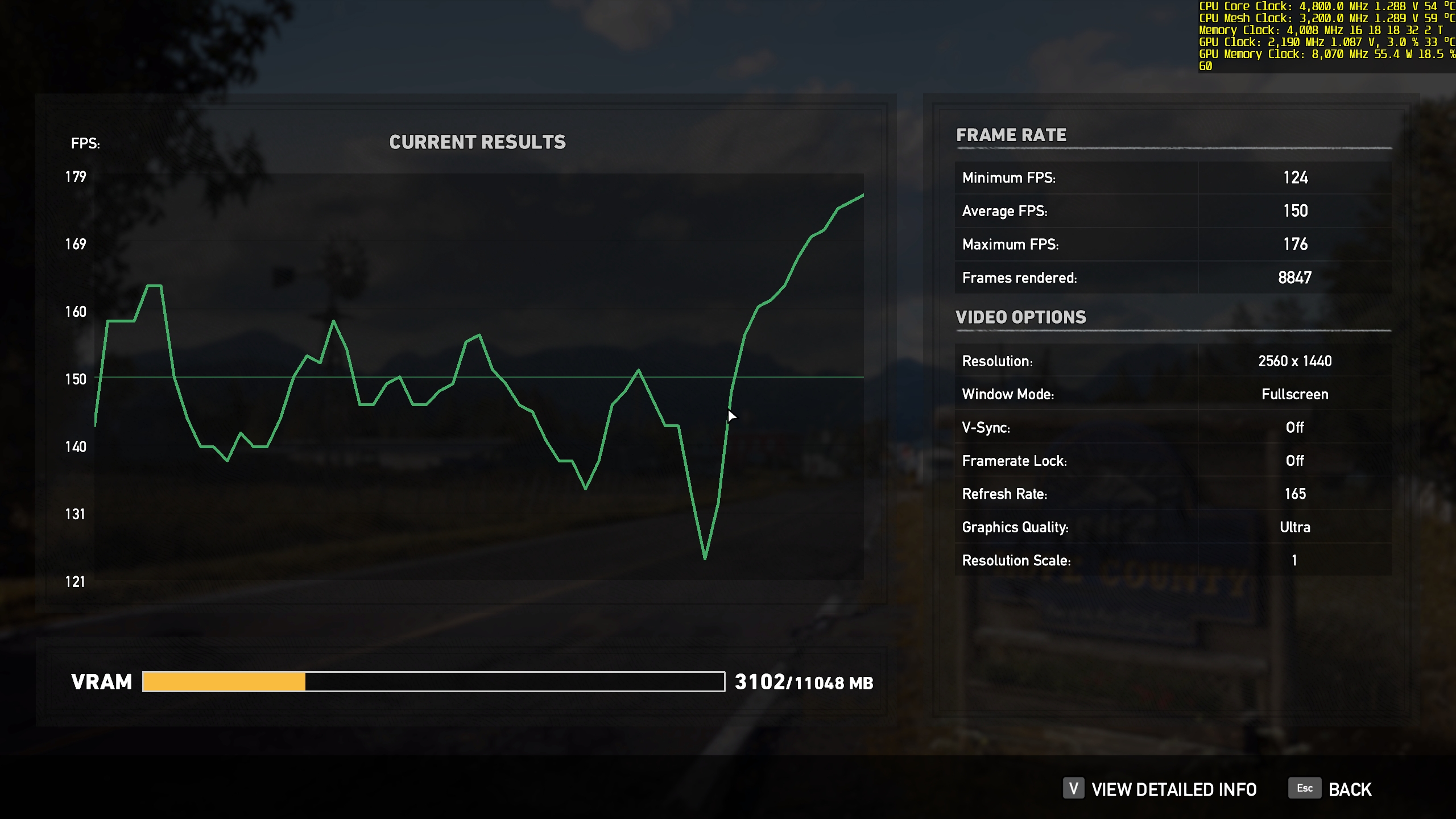
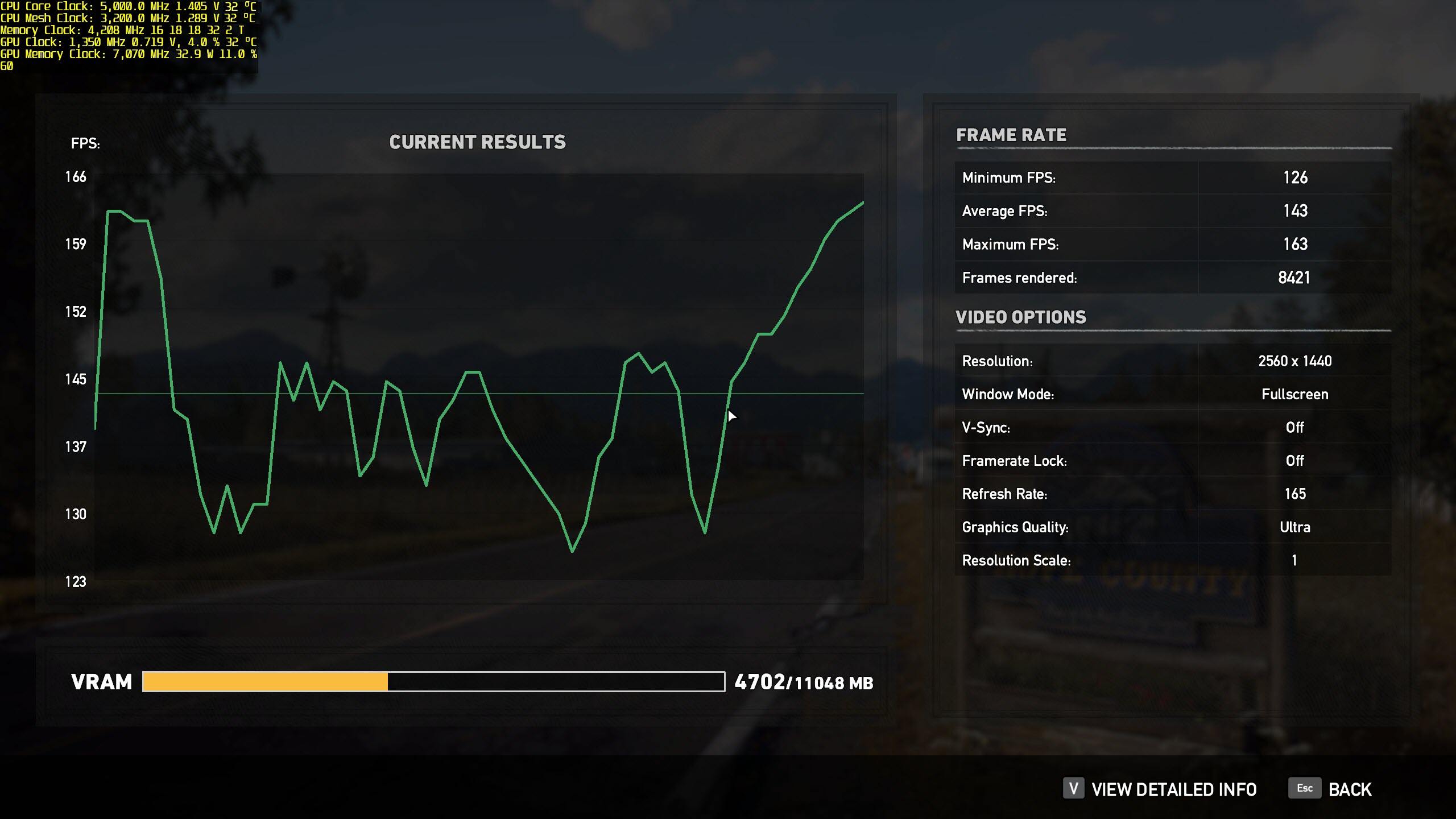
Runs quite nice with Ultra settings, 2560x1440
![[IMG]](images/storyImages/lQy6330.jpg) @Ultra Male
Last edited: Feb 10, 2019
@Ultra Male
Last edited: Feb 10, 2019 -
I bought this game in the Steam sale within the last week too, I haven't played it yet beyond using the benchmark so I can compare to similar systems (I will play it through sometime in future though). I get 107 fps avg and 97fps minimum on Ultra settings at 1080p with High Resolution pack enabled, which is GTX 1070ti and GTX 1080 performance in some reviews ( https://www.techspot.com/article/1600-far-cry-5-benchmarks/, https://www.guru3d.com/articles_pages/far_cry_5_pc_graphics_performance_benchmark_review,4.html), although my minimum framerate is quite a bit higher than most reviews, so that's not bad for a GTX 1070! You beat me though by a large amount even at your higher 1440p resolution, looks like I'm gonna have to wait for the GTX 3070 before I have a chance of beating that score you posted, but then you'll be on GTX 3080ti! ;-)
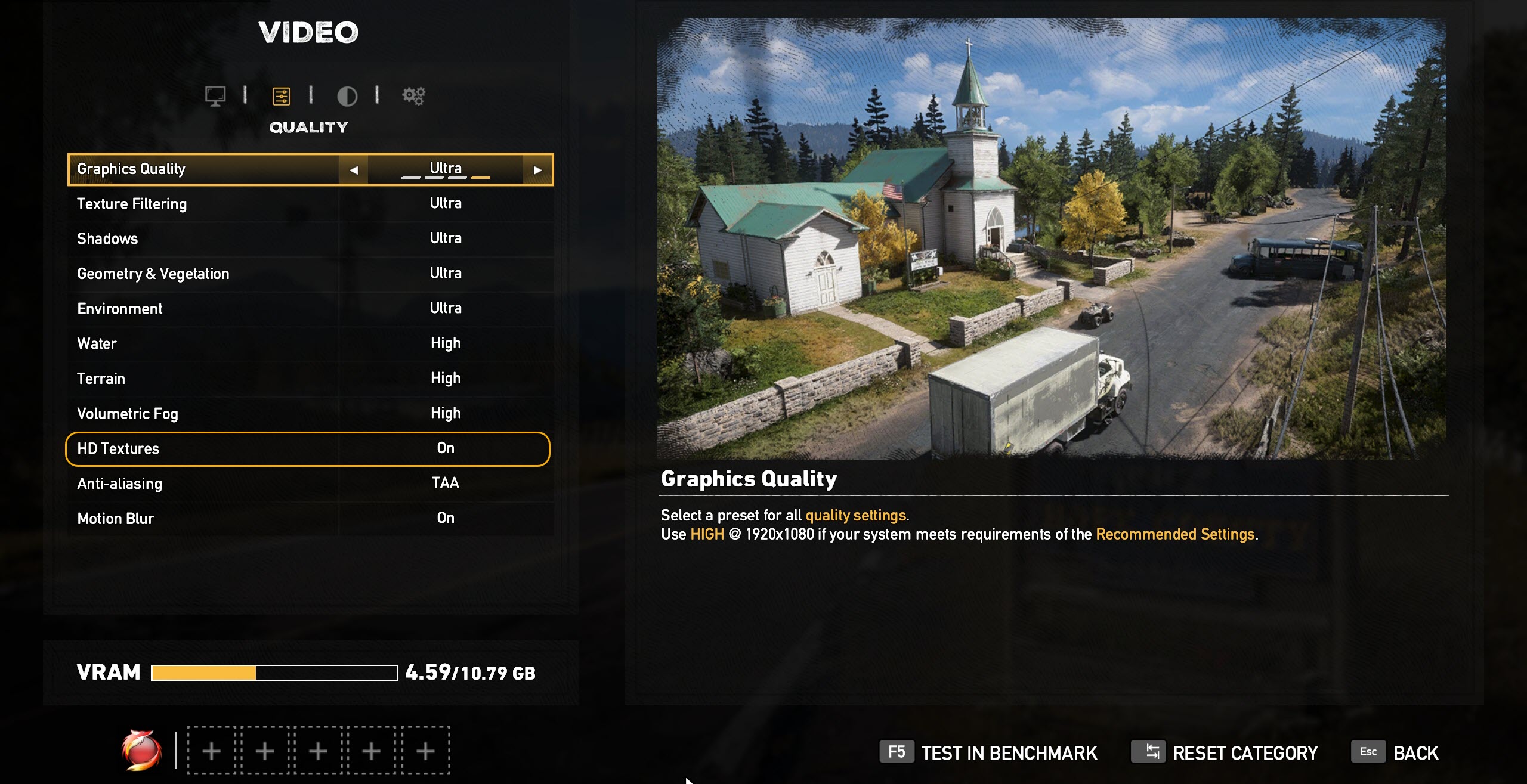
You can enable the HD Resolution pack for free Mr. Fox, I noticed you don't have it activated otherwise your VRAM usage amount would be higher - I tested it and there's no performance impact from using High Resolution Pack. You disabled anti-cheat, is there a performance improvement with anti-cheat disabled?Last edited: Feb 10, 2019Mr. Fox likes this. -
I thought it was enabled already. I will take another look in the settings. Maybe I exited and it did not get saved.
Yeah, your 1070 is actually doing pretty good.
I just played about 2 1/2 hours of it and it's pretty decent. I finally got killed and stopped playing at that point. But, it's 2:30 AM so I need to go night-night now.
Last edited: Feb 10, 2019 -
That's right, you have to restart the game if you select High Resolution Textures, I think it's the only option that requires a restart.
-
-
I cannot find High Resolution Textures anywhere in the options. I do see it being listed as installed as DLC. Does that mean it is enabled by default since it is noy showing up in the in-game options?Last edited: Feb 11, 2019
-
This is the first time I've been 1st in any bench leaderboard albeit a "sissy benchmark"
https://www.pcbenchmarks.net/leaderboard.html
-
There's definitely an option for High Resolution Textures (or something akin to that) in the video menu or one of the video menus (I think there's an Advanced one & a Basic One), and it's listed as DLC in the Steam Store, but for some reason it downloaded that DLC automatically when I bought Far Cry 5 - maybe you need to make sure it's downloaded first.Mr. Fox likes this.
-
-
Maybe next time you launch it snap a screen shot for me to show where it is in the game. I cannot find it anywhere. It shows the DLC has already been installed. I uninstalled it and reinstalled it and still do not find an option to enable or disable it in the game.
makina69 likes this. -
-
-
-
Cool, so you've got the Texture Pack installed. I've been in game to check where it is: Options -> Video -> click 2nd tab for detailed graphics settings -> HD Textures (underneath Volumetric Fog)Mr. Fox likes this.
-
OK, thanks. It was staring me right in the face and I did not see it. Good thing it wasn't a snake or it would have bitten me, LOL. It's enabled now. The impact on performance was negligible and within a normal margin of error compared with having it turned off.
Attached Files:
Robbo99999 and Rage Set like this. -
-
3DMark11 Physics Test: https://hwbot.org/submission/4070331_ #1 7960X World Record / #4 Overall World Record
https://www.3dmark.com/3dm11/13157929
![[IMG]](images/storyImages/image_id_2138178.jpeg)
5.3GHz Validation https://hwbot.org/submission/4070317_ 5314.87
![[IMG]](images/storyImages/image_id_2138167.jpeg)
@FalkentyneLast edited: Feb 14, 2019 -
Johnksss, Raiderman, JoeT44 and 1 other person like this.
-
*Official* NBR Desktop Overclocker's Lounge [laptop owners welcome, too]
Discussion in 'Desktop Hardware' started by Mr. Fox, Nov 5, 2017.

![[IMG]](images/storyImages/GQvQWRz.png)


![[IMG]](images/storyImages/2uZVVn9.jpg)
![[IMG]](images/storyImages/SC1Ikff.jpg)
![[IMG]](images/storyImages/alwJWT9.jpg)
![[IMG]](images/storyImages/pcXCLJA.jpg)
![[IMG]](images/storyImages/qCepAjL.jpg)
![[IMG]](images/storyImages/5CWzx17.jpg)
![[IMG]](images/storyImages/zp65j9y.jpg)
![[IMG]](images/storyImages/S3MSeKl.jpg)


![[IMG]](images/storyImages/MP8hlSv.png)
![[IMG]](images/storyImages/image_id_2138280.jpeg)