Problems? See this thread at archive.org.
Just running ram at stock xmp profile@3600mhz. Have not disabled page file. Going to run some more memory tests when I have time. I also have this after waking the monitor up sometimes. Cant take a screenshot, had to use camera. Display corruption.
![[IMG]](images/storyImages/814dd3b135a4c89f7116b289cdef8060.jpg)
Sent from my SM-G960U using Tapatalk
-
Those are artifacts right, VRAM stability issues on the GPU maybe. If so you could try underclocking the VRAM to see if the problem goes away, if it does then it's the VRAM.
-
Ya,bit is. Running stock everything, and still having this issue? Is the card bad? Shouldnt have to under lock a stock card?
Sent from my SM-G960U using TapatalkVasudev likes this. -
EFI mode or Legacy mode w/ CSM?
-
Some of the RTX cards had to have the underclocked VRAM to run stable, and that was proof that the VRAM was bad on those units.Raiderman likes this.
-
starting to p**s me off
efi mode
-
I've not followed all the background to this, but have you tried to rule out hardware issues by returning CPU/RAM/GPU to stock - ie no overclocks, no XMP on the RAM? If you rule out hardware issue then you can start tackling it as software issue, which I'd be inclined to do fresh Windows install. In fact I'd be inclined to return all hardware to stock (incl no XMP on RAM), and also do a fresh install while hardware is in stock condition - because maybe hardware instability has corrupted your OS install. If that approach works and you get a stable OS on stock hardware (incl no XMP), then do a Macrium Reflect image back up for easy recovery, then start doing things like tweaking your hardware with XMP and overclocks to see if the problem returns.Last edited: Feb 20, 2019Vasudev likes this.
-
Its being blocked not to work on Win 7, install Win 10 and run a quick check to see if hardware isn't faulty before return period runs out!
You should disable WU and I think they installed Microcode update for both Intel,AMD so Intel/AMD one is causing a BSOD. mcu**.dll
The BIOS have gotten intelligent to the point where everything can be done in SW thanks to advancement in tech.
Use v1803 Clean version which I PM'ed you. It has Intel RAID driver but on AMD system it won't be installed so don't worry. Also, keep a copy of AMD chipsets,GPU drivers and everything on your HDD and don't connect to internet once everything is setup. -
Also check this, but can't be sure is related:
https://nvidia.custhelp.com/app/answers/detail/a_id/4775/~/geforce-hotfix-driver-version-418.99 -
Stock SPD is 2133 and XMP is 4000. I am using manual settings, but XMP is also stable (but XMP is slower due to sloppy loose timings).
Sounds like your XMP profile is not playing nice. If you disable XMP (run default 2133 SPD values) do those problems go away. I've seen a fair number of people with AMD processors that have problems with memory overclocking (including using XMP). If that is the case in your situation, it won't matter what OS you are using. W7, W10 and Linux will all have instability issues. -
I dont think Ryzen's memory controller can handle 3600mhz. I switched to auto last night, and it fixed the problems I was having. Now using my own 3200mhz profile. Either that or the trident z XMP profile is fubar? Thanks everyone for the input.
Hopefully Zen 2 can handle much higher memory clocks.
Edit: Looks like GSkill's profile is messed up, as Ryzen can handle these memory speeds.
https://www.legitreviews.com/ddr4-m...ryzen-7-2700x-on-the-amd-x470-platform_205154Last edited: Feb 20, 2019Vasudev, Papusan, Robbo99999 and 1 other person like this. -
Try setting the memory speed manually to 3600 (not using XMP) and put all of the other settings in the BIOS to "auto" values. Then set the memory voltage to 1.400V. If you have a setting to force memory training, enable that. Save and exit and see if the BIOS can train settings for 3600. If it does and passes stability tests, change the speed to 3800 and try again. If that works, try 4000 with 1.500V. If that works, whatever the automatically adjusted timings are, try tightening them a little. For example, if the BIOS automatically sets 17-18-18-38, try 16-18-18-32.
-
Have you tried AGESA updates?
GSkill is too aggressive, have you checked if it uses Samsung B Die DRAM?Raiderman likes this. -
I always forget about AGESA. I really don't like the concept of having an added proprietary layer of firmware for AMD processors to function.
AMD promises AGESA fix for 2nd Gen Ryzen glitches | bit-tech.net
PSA: Don’t update your Ryzen Mainboards to AGESA 1.0.7.2 yet
Seems like the better approach would be working out all the kinks in firmware before rolling out new hardware to consumers. As best I can tell from Google searching, there haven't been any recent updates to AGESA. Maybe they are not well documented in terms of finding information in a web search, but it looks like more than a year ago.Last edited: Feb 21, 2019 -
I think Raiderman's Taichi mobo has much better AGESA firmware, it might be too highly clocked RAM sticked optimised for Intel XMP 2.x rather than AMD's XMP.
@Raiderman Download DRAM Calc for Ryzen and use XTU reading's as import to find Safe and Extreme limit of DRAM ICs. https://www.techpowerup.com/download/ryzen-dram-calculator/Raiderman likes this. -
From what I can tell, nobody has had great results with memory overclocking with Ryzen CPUs. Maybe there are some examples I haven't seen, but most of what I have seen suggests 3600 is better than the norm and 3000-3200 is typically pushing near the limit for them. I don't pay a great deal of attention to it, so it's possible my information is dated and things are better than when I last checked.
-
Even my info is dated. I haven't seen 4000MHz+ DRAM Freq. on Ryzen XMP. Only few sticks in the world achieved that.Raiderman likes this.
-
-
-
impressive!
Sent from my Xiaomi Mi Max 2 (Oxygen) using Tapatalk -
Overclocking on Radeon VII is no longer broken then? How much have you overclocked the core & VRAM & power limits, and what is the difference in scores between stock & overclocked? Is that the limit of the overclock and what is holding it back?
-
They went with Micron HBM2 which don't OC very well like SK hynix and sammy.
They reached on Pascal levels with Vega 7 on rebranded Instinct cards.
Update HWINFO to 6.02 for VEGA 7 support and show us the clocks. GPUz shows the GPU is barely trying anything to beat Pascal out of the box with zero core clocks and mem clocks.
-
Since AMD drivers 19.2.2, Wattman allows you to overclock the R7. Core was at 1900 and HBM2 at 1100, power limits were raised to +20. I'll post stock scores soon.
Like most GPU's (Nvidia or AMD), the issue is power limit and heat, a water block needs to come out ASAP. There are some people getting the core to 2100 but they are more experienced with Vega tweaking than I am. I'm going to learn as much as I can about this card. I have a feeling there is a lot more it can achieve once tuned. -
Cool, well let us know how you get on with any further overclocking, and post those stock scores at the same time as a means of comparison.
I don't think cards are that often limited by power & temperature (unless you have a modified vBIOS or hard modded cards for extra voltage), except maybe the larger flagship cards, also NVidia third party cards often have increased power limits and beefier coolers, my GTX 1070 is a long way off the power & temperature limits during any benchmark (apart from Furmark), mine is silicon quality limited in terms of voltage/frequency which is mostly the case with Pascal cards at any rate.Last edited: Feb 22, 2019 -
They don't even have Liq. H2 and N2 supported vBIOS for now.
-
Pascal and now, Turing, are incredibly temperature-dependent when it comes to clock speeds. Of course, when gaming gpu temps and clock speeds aren't as important as when overclocking. That's the way Nvidia has designed these GPU'S architectures.
I know a few people here don't care for AMD but I have to say, I have not had this much fun researching and tweaking a GPU since Maxwell. -
Sure, you have the small temperature related 'throttling' in Pascal & Turin, so for example my GTX 1070 goes from 2100Mhz down to 2050Mhz as temperatures increase from less than 40 degC up to about 69 degC, but that's only 2% performance difference at most - so that's not really throttling, nor is it a temperature problem. What I'm saying is that the overclock on most Pascal cards is not limited by temperature and also not by power, because most cards are not bouncing off power limits and certainly not the hard throttling temperature limits (the 83 degC limit). So, these cards are not temperature nor are they power limited in the majority of cases. Now if you want to do hard mods on your Pascal card to allow for increased voltage up to 1.2V, then you're gonna be temperature & power limited in your overclock, but not in normal situations. From your earlier post you were saying that overclock limits were due to power & heat, and that's not really the case during overclocking unless you're running something like 1.2V with a hard mod. I'm not saying that's not the case with your Radeon VII, I was just referring to the blanket statement you made about both NVidia & AMD GPUs. I guess I'm bored and I'm just making a point for the sake of it, but either way it will be interesting to find out what you learn about your Radeon VII and what it's limits are & why.
-
"Out of the box" stock settings for the R7. 5.2 on the 9900K, RAM at 3800.
Talon, Vasudev, Robbo99999 and 2 others like this. -
-
To be clear, when I say power/temperature limited, I mean in the context of overclocking. The throttling you speak about is an inherent part of Nvidia's vBIOS that tries to prevent you from reaching the power/temperature limits and that makes it temperature limited. Nvidia caps the amount of voltage you can give to the GPU, and thus limits the amount of power it can receive; that is power limiting. Nvidia does this in the name of preventing GPU damage and prolonging the life of the card. The truth is Nvidia does this to segment their cards. Take for example, @JoeT44 1080 TI's modded by @Mr. Fox, they reach 2200+ easily with the right cooling. My K|NGP|N's were hitting a wall at 2100, not because of power (they don't have a stock Nvidia voltage limit) but due to temperature on the default cooler. The K|NGP|N "opens up" with water or 'other' cooling.
The simple truth is, you can't reach a power/temperature limit with stock vBIOS if they don't allow you to.Last edited: Feb 23, 2019 -
-
You're welcome, bro. It might not be the same on every mobo, but probably not worth finding out either. It's probably just got more Spectre and Meltdown patch cancer to screw up performance anyhoo. I suspect whatever filth screwed things up for that guy's X299 TUF is likely going to do the same damage to the X299 Rampage.
-
I've been running 1602 with no obvious problems but when I saw that it wasn't available anymore I called ASUS and they told me it was taken down because users reported problems with it. I then downgraded to 1503 and my cpu temps went from 17-20c at idle to between 8-13C at idle.
-
Cool, so that's a 7% increase in performance with the GPU overclock. Is it bouncing off any of the limiters or is it just at it just limited by it's max stable frequency for whatever voltage you're allowed to give it (silicon quality)?
You might like this video from Gamers Nexus where they water cool Radeon VII ( )
That's just the setting up of the water cooling on Radeon VII, their next video (yet to be done I think) would be the overclocking of it.
The throttling I speak of is not (to quote you) "to prevent you from reaching the power/temperature limits and that makes it temperature limited". The minor temperature throttling of 13Mhz every 10 degC (or so), is voltage/frequency stability related (ie it's related to the fact that increased silicon temperatures require more voltage or less frequency to be stable and it's part of the algorithm that allows them to run the cards as close as possible to the max stable frequency for any given temperature and voltage point) - that has nothing to do with the 83 degC temperature limit and also nothing to do with the power limit. NVidia have their Power Limit and Temperature Limit throttling points already configured into their vBIOS, which serves that purpose you mention.
NVidia capping the voltage is not the same as limiting power although it is related. Limiting power would be the Power Limit variable that they currently have on all their cards, and the reasons for them not allowing up to 1.2V for most of their GPUs is because it's not an efficient place to on the voltage/frequency curve to run a GPU, diminishing returns with ever increasing power demands, also combined with silicon degredation concerns & longevity of the GPU, so there's no point trying to engineer an expensive stock cooling solution around such an unrealistic, potentially damaging, and unproductive configuration. They don't do this to segment their cards like you mentioned - they do it for those practical reasons mentioned.
This is just all in relation to my original point that Pascal cards are not really temperature or power limited, because they don't bounce off their temperature and power limits constantly. You initially insinuated that was the case. I just picked up this point to clarify. Sure, you have the minor 13Mhz temperature throttling every 10 degC or so which I talked about above, but that's only the difference between 2100Mhz and 2050Mhz on my GTX 1070, which is less than 2% performance difference. So I'd give you the fact that they are indeed temperature limited for that last 2% performance difference, but that's kinda insignificant. If you're doing hard mods on your GPU and going up to 1.2V then yes you would become severely temperature & power limited unless you had water or chilled water cooling and unless you did something like a power shunt mod on your GPU to remove the power limit issue too, so in that very small niche - yes.Last edited: Feb 24, 2019 -
Managed to finally pick up one of the EVGA Hybrid kits for my 2080 Ti XC. They've been out of stock forever, but an email in stock alert finally came through and I managed to snag one before it was gone again. My card runs very cool with the stock (huge cooler) cooler but I figured why not tinker a bit more. I could have gone full block instead of AIO, but this just seems enough for my needs. Will be installing later this afternoon hopefully. Will report my findings.
Convel, Raiderman, Robbo99999 and 3 others like this. -
Where do you live? Near Pap's house? I still think Vega 7 is not taxed properly 100% by current benchmarks or tasks.
-
I should live near @Papusan, as I love the cold and ambient temps helping overclocking is an added benefit.
I agree with you. I'm still researching more ways to push this card.Cass-Olé, Robbo99999 and Raiderman like this. -
27C is my average temps. Yesterday it was 40-45C.
-
Check these idle temps since I put 1503 on. Now I have to watch carefully for condensation.
Last edited by a moderator: Feb 24, 2019Vasudev, Convel, Robbo99999 and 2 others like this. -
-
Bloody hell, that's only about 5 degC less than my air cooled idle temps! ;-)
Ha, but it's the load temps that matter and I'm not pretending that air cooling is more potent than chilled water! -
@Rage Set , you might find this article useful too for your Radeon VII, undervolting & it's positive effect on performance: https://www.hardocp.com/article/2019/02/24/amd_radeon_vii_chilling_undervolting/1
-
I have the Dark now.Papusan, Cass-Olé, Rage Set and 1 other person like this.
-
I used my wife's smartphone to upload this video. I'm not too smartphone savvy as you will see at the end of the video.
Ashtrix, Robbo99999, Convel and 7 others like this. -
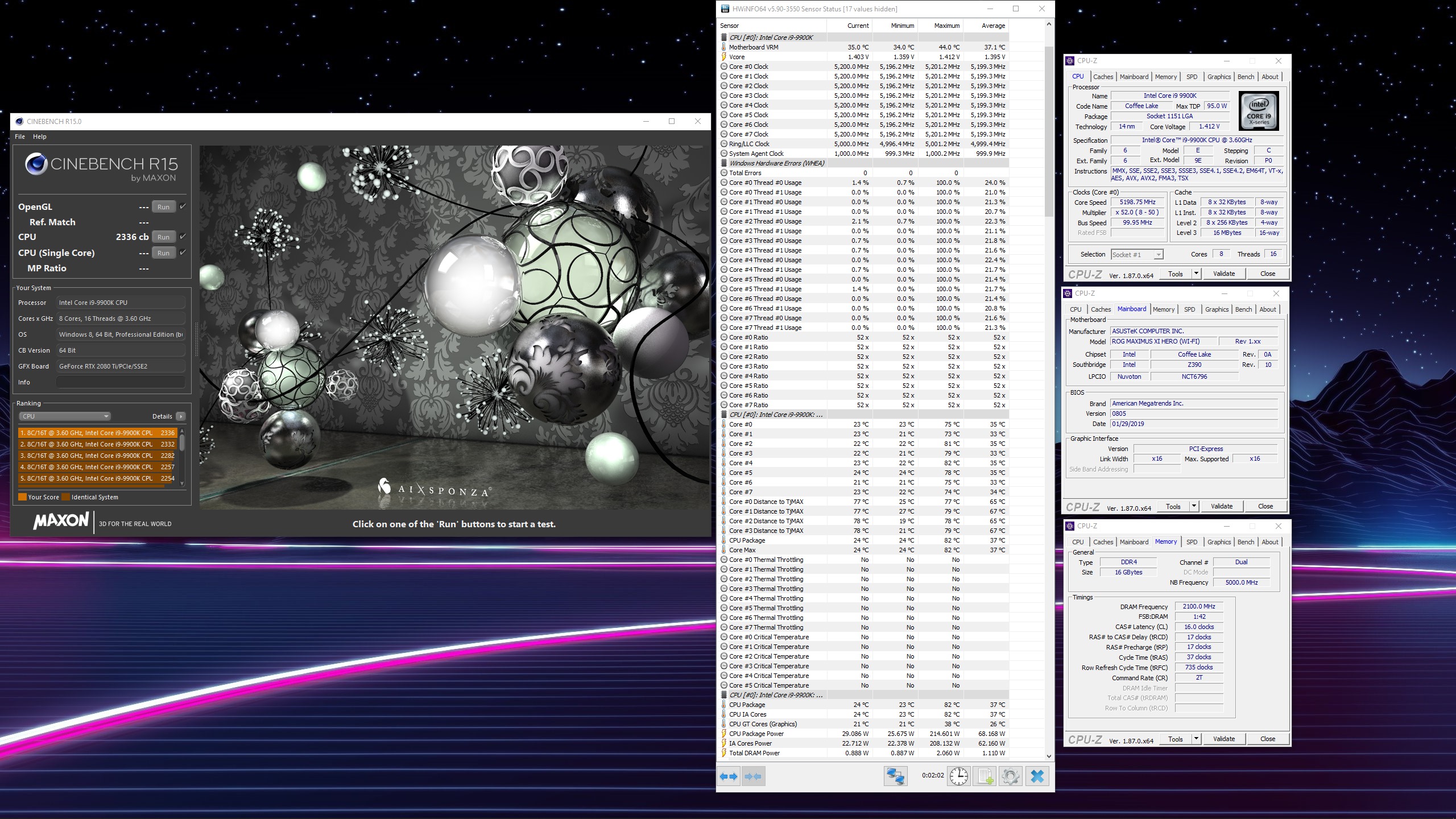
After the 2300 Cinebench mark eluding my 9900K for quite some time, I decided to tinker some this morning with a pot of coffee at the ready. Replaced the ****ty stock H100i V2 fans with some Noctua fans I had lying around. I had recently replaced the ugly brown rubber pads with some blacked out rubber pads. I've come to the realization I need to get a better cooler or just go closed loop with a huge rad.
9900K @ 5.2Ghz with cache at 5.0Ghz.
2336CB Multi
Attached Files:
-
-
Excellent progress, bro. Yes, temps really have a huge effect on the performance.
I'd go with a custom loop, flexible tubing with at least one fat XSPC RX360 radiator, 6 fans in push/pull, a Photon D5 with 270MM reservoir and Raystorm Pro water block.
Last edited: Feb 27, 2019 -
Can it run Crysis has been replaced with can it run Exodus.
I have vacation in April, I will very likely get the itch to tinker and I can't promise I won't go full rebuild with a closed loop.Cass-Olé, Papusan, Mr. Fox and 1 other person like this. -
How much higher in frequency can you go though, if you have a custom loop - you're already at 5.2Ghz and just over 1.4V. Another 50mv to just over 1.45V (which might be the maximum you'd want to run for a daily driver) would net you about 5.3Ghz I'm guessing, so what difference does it make in comparison to your current setup? Less noise?Talon likes this.
-
I think he would make some gains in thermal management by increasing the efficiency and capacity of his cooling system. The increase in capacity could be very useful for overclocked benching because it would take longer for the normalization of the water temperatures and it would likely be easier to keep the water temps closer to the ambient temperatures. The lower the temps can be kept will also facilitate using lower core voltage.Robbo99999 and Rage Set like this.
*Official* NBR Desktop Overclocker's Lounge [laptop owners welcome, too]
Discussion in 'Desktop Hardware' started by Mr. Fox, Nov 5, 2017.