Problems? See this thread at archive.org.
I stopped using Memory Test apps inside Host Windows, because they use Page file most of the time and actually don't test RAM correctly(They reserved only 90% of the total RAM) , I booted up Ubuntu/Hiren's/Sergei Strelec and use same TM5 or Memtest 86+ and the faulty stick which held for 3-4hrs in host Windows 10, didn't even make it past 30mins.
Any idea why Witcher 3 has micro-stutters on new nvidia drivers? In older drivers it is reduced! Then again, I tried so many drivers and there were some drivers which eliminated stuttering even with High FPS. I can't remember which was the driver version.
-
-
I don't think there is a 10 core ring bus Intel CPU, but show me one if you can find the evidence. Yes, i9-9900K is the top tier ring bus CPU with 8 cores & 16 threads, and then you've got the 8700K, 9600K, 9700K, 7700K, 6700K that I'm referring to ring bus too. I don't think fast RAM is quite as important for these CPUs as it is for the 'mesh' of the 10 core+ Intel CPUs.
-
Sweet, but it's like a fairground ride in there, I'd probably get rid of the blue LED strips you've got lining the case, but I like the other RGB you've got going on.
Yeah, Raiderman, don't be buying the Radeon VII it sucks hairy balls to put it bluntly! The only reason to buy it is if you want to 'support' AMD and put up with the loud loud noise of the fans. Well, the 16GB of VRAM is useful for some very niche stuff, some kind of video rendering or something, but don't need 16GB for gaming. It's a horrible card, but I suppose you could put it under water to remove the noise aspect - expensive & don't know if blocks even exist for it yet. I'd just keep the RTX 2070 you have, it's a better product.
Raiderman likes this.
The only reason to buy it is if you want to 'support' AMD and put up with the loud loud noise of the fans. Well, the 16GB of VRAM is useful for some very niche stuff, some kind of video rendering or something, but don't need 16GB for gaming. It's a horrible card, but I suppose you could put it under water to remove the noise aspect - expensive & don't know if blocks even exist for it yet. I'd just keep the RTX 2070 you have, it's a better product.
Raiderman likes this. -
My 6950X says hi. Intel's ring bus tech officially ends at 10 core and it is the reason why many people think Intel is crazy enough to dump a 10 core on mainstream.
https://en.wikichip.org/wiki/intel/microarchitectures/broadwell_(client)#Die_Stats -
I want to bench the shiznit out of it like @Rage Set is going to do. Put it under water and viola, no more fan noise
jaybee83, Rage Set and Robbo99999 like this.
-
On another note, my memory passes with flying colors, but I'm getting a pci.sys blue screen with no overclocking?? I've had this issue before, and it's really annoying. Reinstalling windows with a different ISO now.
Sent from my SM-G960U using Tapatalk -
I do most of my testing in Windows 7 because Windows 10 introduces way too much instability and inconsistency, and I disable page file and hibernation. I can have everything test stable in Windows 7, reboot and load up Windows 10 and not be stable any more. Not to mention the fact that benchmark scores on almost everything go into the toilet on Windows 10. It's almost to the point that it's not even worth any effort to make Windows 10 work right any more. It's borderline on being a hopeless piece of feces at this point (referring specifically to the latest abortion version 1809). There is no amount of "security" (I think that's the buzz word they like using) that is worth it, and their Windows 10 "features" are as worthless at the tits on a boar.
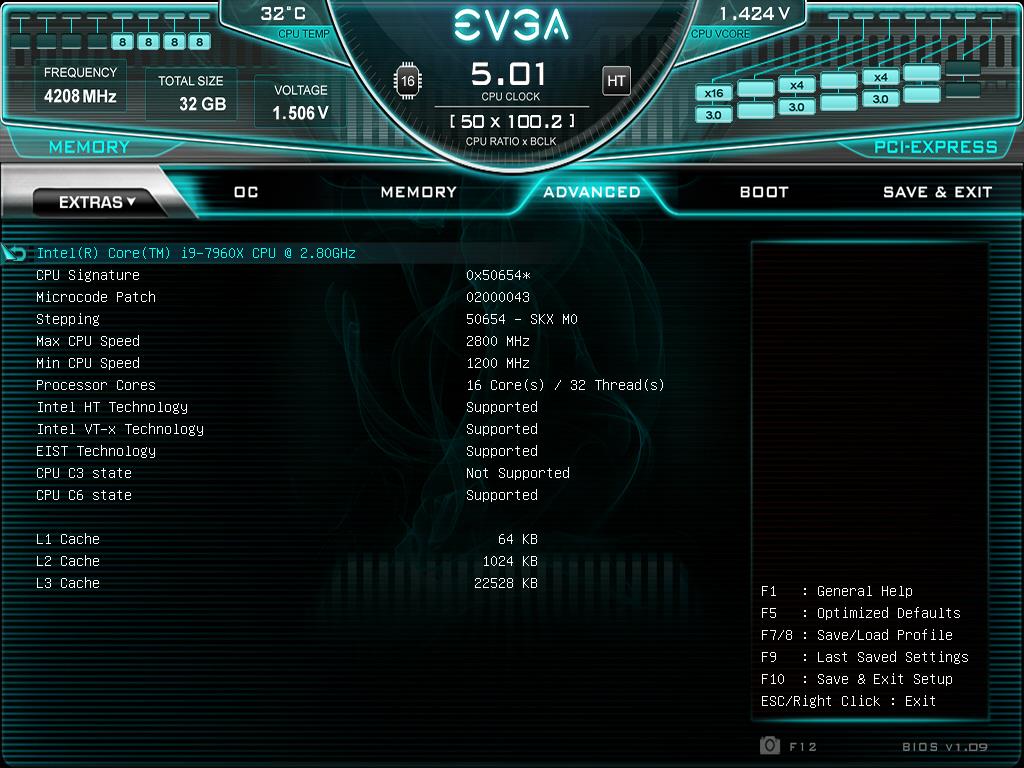
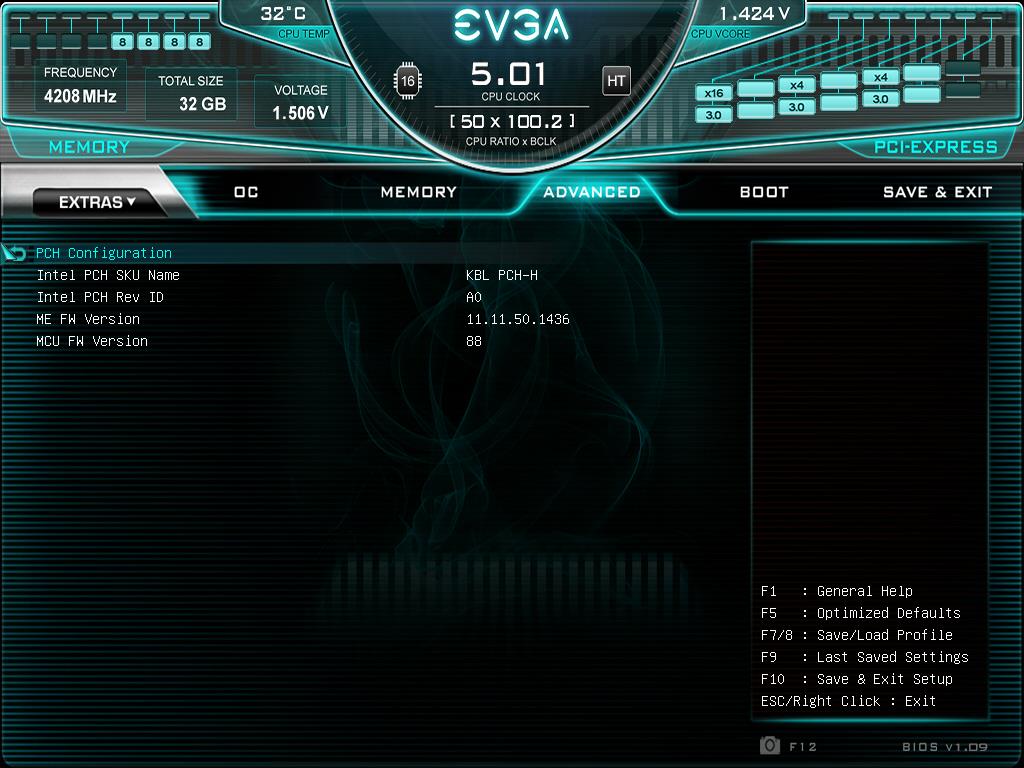
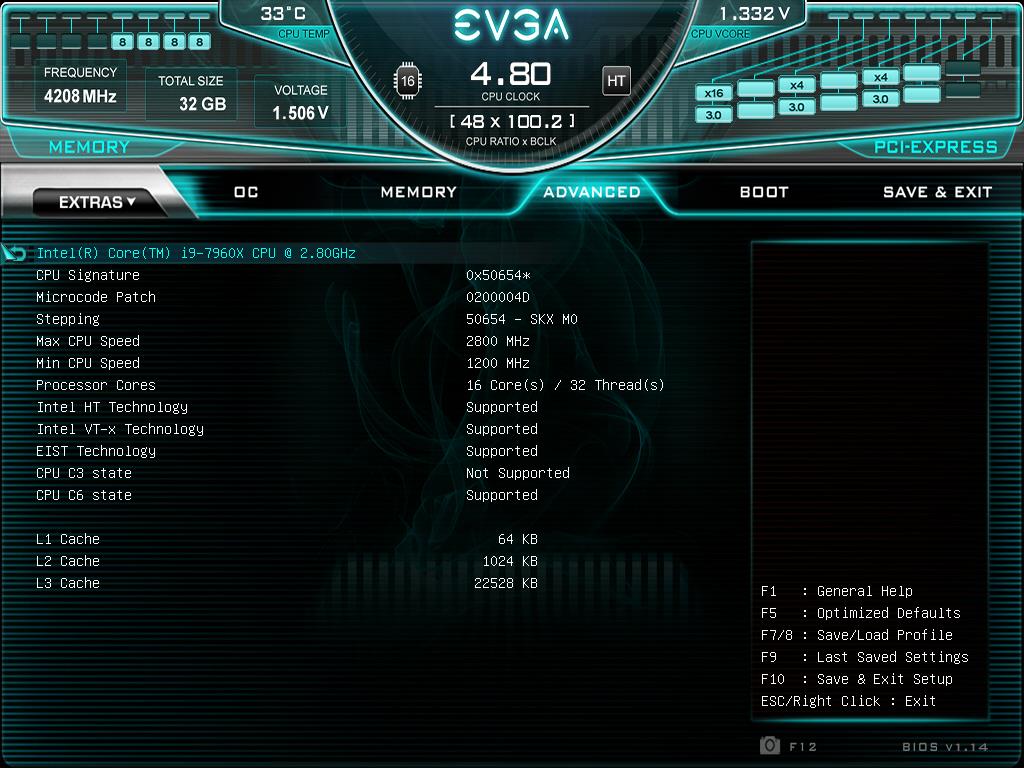
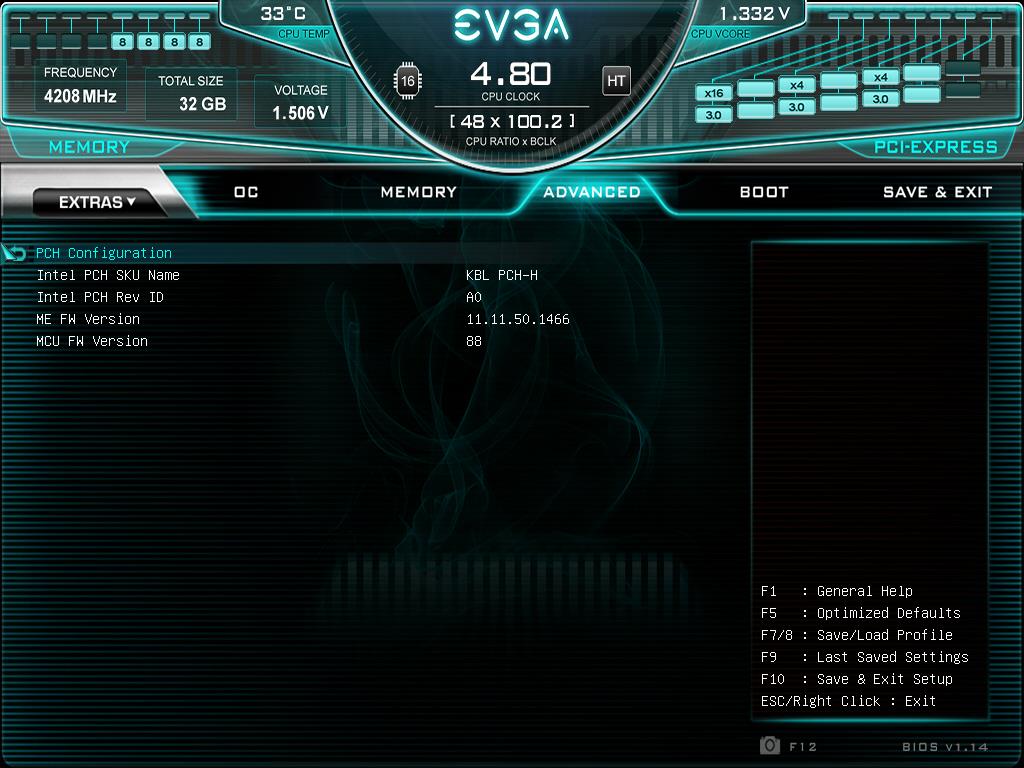
Brother @Rage Set I think you said you are on the latest BIOS. I got to thinking about that and put the latest BIOS on my BIOS #3 chip and guess what... it's a hot mess pile of doggy do-do dipped in urine. I don't know if the BIOS itself, Intel ME or Intel Micro-code changed (haven't checked), but whatever they changed it sucks like a big dog. Try using 1.09 (what I use). I cannot even boot my XMP profile on the latest BIOS.
Fact: The latest and "greatest" BIOS on the ASUS Rampage VII Apex was also a pile of crap. That was also the case on the ASUS Maximus X Hero. The moral to the story is... " If it ain't broke, don't fix it."Last edited: Feb 17, 2019 -
-
@Rage Set - Intel ME and Micro-code are both different on 1.14 versus 1.09. So, one or both of those "updates" are screwing things up with the newer BIOS. I suspect you will have much better success with 1.09 (or older).
The nice thing about the X299 Dark is having 3 BIOS chips and a switch to flip to another chip whenever you feel like it. That takes care of the ME and Microcode cancer in a split second. It really sucked not being able to downgrade the Intel ME firmware that totally ruined my memory overclocking on the Maximus X Hero. I absolutely loved that motherboard and was never happy with it after that Intel ME cancer update perma-screwed it. And, ASUS refused to downgrade it for me. They said it worked as intended and I would just have to run my memory at a lower clock speed with looser timings... bastards.
The only new feature I can see in v1.14 is you can enable the option to skip the "Home" screen, which is nice. That is just an inconvenient and distracting feature designed to impress the Millennials. I really don't understand what the point to it is and think the "Home" screen is kind of stupid. Sure, it looks pretty and all that, but I really don't care how pretty things are in the BIOS. Having a pretty UI in the firmware environment adds zero value as far as I am concerned.Attached Files:
Last edited: Feb 17, 2019Convel, Ashtrix, Vasudev and 1 other person like this. -
-
Fair enough, I suppose if it's just for curiosity & fun then why not. But I just wanted to point out to folks that it's generally a poor choice for a gaming GPU when there are better options out there.
-
-
I figured that much! K|NGP|N himself recommends 1.09 or LN2 BIOS (X04), based off 1.09. I'll flash those BIOS tonight and hopefully be able to use this board to its potential (at least with watercooling)
EDIT: I have to repaste my 7980XE. Core 5 reaches 95C very quickly. -
Where is the LN2 X04 BIOS? I'd like to give that one a try.
Edit: Never mind... found it.
https://xdevs.com/guide/e299ocg/#biost
XOC BIOS ROM and flash tool, Ver.X04 for EVGA X299 DARK
Changeset for X04 version:
- Improved memory overclocking and memory training performance
- Added memory round trip and I/O latency settings in BIOS Setup (RTL/IO)
- Default timings are optimized for better compatibility
- This BIOS is NOT patched for CVE-2017-5753, CVE-2017-5715 and CVE-2017-5754 security issues <=

Last edited: Feb 17, 2019Ashtrix, jaybee83, Rage Set and 1 other person like this. -
I fixed it for you "If BIOS ain't broke, don't risk flashing it."
Did you use my Win 10 ISO? If so, Uninstall intel chipset and RAID driver. I integrated it thinking Intel RAID users will benefit from it but let's stick to general drivers for now! Use revo w/ System component removal enabled to remove intel chipset/RAID driver. -
X04 is awesome, bro. I did not like X03.
This has a crap TON of unlocked features. You have to toggle it to expose features. Reminds me of a wicked @Prema mod. Looks like more options than the Rampage board so far.
Edit: Even let's me disable UEFI crap and go back to legacy BIOS with MBR!!!!!
I can feel an OS reinstall coming very soon. And, probably better overclocking than ever.
WOOT!!!!!!Last edited: Feb 17, 2019Convel, Robbo99999, Ashtrix and 4 others like this. -
I am happy you're happy. Those BIOS are the ones he used to break some records and I guess gave EVGA more data on what to show in their public release versions. I'll flash those X04 BIOS.
As @Mr. Fox has shown, these BIOS do not come with security fixes. Don't use them on a production PC (not sure why you would use an X299 Dark with a productivity machine in the first place but whatever).Mr. Fox likes this. -
I don't use security fixes unless they are forced on me against my will. I don't care about any of that bullcrap. I don't even use antivirus software.
Awesome. X04 enables so many more options. Even more than the Rampage. I can disable ICC Watchdog Timer and override (or disable) Intel ME options. SWEET! -
Popped off the copper IHS from the 7980XE and I see the Conductonaut LM was dried. A good portion of it was dried into the copper IHS from Rockit Cool. Strange.
-
FINALLY! That is the first thing I'm going to disable is the Watchdog Timer.
-
And, you can disable the UEFI boot logo. I always prefer text on the boot screen over a fancy image.
You're going to be amazed at all of the options. Lots of cool stuff like a @Prema unlock. You can enable SPD write access, disable all power saving features, finite BCLK adjustments, (like 100.05 being the first step versus 100.25 by default,) adjust the percentage, or totally disable spread spectrum (my preference), etc.
Last edited: Feb 17, 2019 -
Now am more glad than ever than I kept this board instead of the Rampage VII Apex. I really wanted all of this on the Rampage. It had part of it, but this BIOS is going to be extremely dangerous for me to play with because there are so many unlocked options to tinker with... and I mean dangerous in a good way. Already set my VRM max to 115°C (which was not available before). I think that should help with Cinebench crapping out running at 5.2GHz unless I have the CPU on the verge of 0°C before I start.Ashtrix, Vasudev, Rage Set and 1 other person like this.
-
Using identical settings as before, memory speeds are a shade better, latency a tiny bit lower and it's so nice seeing the core, mesh and memory clocks sitting exactly (to the penny) where I have the multipliers set with spread spectrum set to 0%.
Ashtrix, Vasudev, Robbo99999 and 3 others like this. -
What are your stock memory specs? Are they 3600mhz stock? Wondering because that's what mine are. Trying to get a feel for how much they will overclock.
Sent from my SM-G960U using TapatalkVasudev likes this. -
Normal, some gallium is lost from the mix as it alloys with copper. Always check initial application on a fresh copper surface within 3 monthsRobbo99999 and Rage Set like this.
-
I concur!!! 5.0 @ 1.415v worked perfectly with my RAM @ 3600Mhz. The true test is going to be 4000 and higher. These BIOS just saved my marriage with the X299 Dark.
@Raiderman
I have two sets of Trident Z 3600Mhz RAM. One is rated for CL16-16-16-36 (Trident Z RGB) and the other is CL15-15-15-35. I was able to overclock the TZ RGB to 4000mhz with some work on my Rampage Extreme. It performed quite well. The CL15 RAM was originally for my Z390 Extreme, but I took those out to see if I could go higher on the Dark. I am going to assume they too will OC to 4000 since they are a better binned set of RAM.Ashtrix, Raiderman, Papusan and 1 other person like this. -
There is also a "secret menu" I found. Well, maybe not a secret, but I only found purely by accident. When you are on the Save & Exit screen where you save profiles, mouse click on the silver Save & Exit tab at the top right (below the CPU temperature) and it will show you even more options. You can override SVID/FIVR stuff and a variety of other things. Some I am going to have to research because I have never seen them before and don't have a clue what they do. Not sure what MFC Mode Override is, for example.
-
I purchased one of those copper IHS and went back to the stock IHS. For some strange reason it sent my CPU temps through the roof. Not sure if it doesn't make good contact with the die or what. I tried reseating it, and left the IHS loose the second time (thinking the silicon I used was interfering with contact) and it made no difference. It was running hotter at 4.8GHz using the copper IHS than it was at 5.2GHz using the stock IHS. The one I purchased for 8700K worked great. I was really disappointed that it didn't work nearly as well with my 7960X.
-
Yeah, it's definitely working better. This is at 5.1GHz...
Ashtrix, Papusan, Cass-Olé and 1 other person like this. -
@Mr. Fox I agree...these BIOS are lovely!!! This score is without any effort to be honest and I see A LOT of headroom.
Mr. Fox, Raiderman, Papusan and 1 other person like this. -
I purchased the Trident Z RGB 3600mhz, but its sure not CL15? I believe it is CL18 branded for use with AMD. I havent really had the time to try any different timings yet, but have booted at stock timings @3800mhz. 4000mhz Ram is just way over priced right now.Rage Set likes this.
-
I saw the exact same behaviour of Coolaboratory Liquid Ultra (CLU) when I used it on my GPU - it had 'absorbed' & dried into the copper heatsink and therefore the LM had pulled away from the GPU die in places causing high temperatures. I haven't seen that same behaviour on my CLU delidded Intel CPU though, the stock IHS which I have is not bare copper, so that's probably the difference, whereas my GPU heatsink and your Rockit Cool IHS are both naked exposed copper. It's that naked copper that reacts with the liquid metal - I imagine that if you repaste your IHS again with liquid metal that it will be OK this time - the liquid metal has already reacted with the naked copper to create a stable barrier against any further reaction.bennyg, Ashtrix, Papusan and 1 other person like this.
-
correct. LM (the gallium, specifically) reacts with copper and causes a permanent stain. basically, you will have to "saturate" the copper first, then the LM will not dry up as fast anymore in subsequent applications. that stain on the copper does not have a negative impact on thermals, it's just a visual "impairment".
Check with GN for more details on this topic: https://www.gamersnexus.net/guides/...cts-copper-nickel-and-aluminum-corrosion-test -
Use the LTSC version of W10 as it offers 270 day trial and full features to tweak your PC. I tried LTSC 2019 from a torrent by gen2 and it was snappy in a VM but difference were almost NIL from public consumer GP OS. So, I took my time to copy the list of packages included and will try those tweaks on standard w10 version w/o paying huge license fees that has negligible difference in performance. I only tested LTSC 2k19.
Doesn't MEI control OC options?
I switched from Legacy to EFI because most modern OS on USB flash drives refuse to work correctly on Legacy and pops out weird errors on my old PCs, so I switched to MBR -> GPT w/o Clean installation of OS including Linux.
Most are made for EFI and with Legacy the boot time is slow. I used to get 800x600 vga screen on Legacy mode on my old PCs which are EFI capable. After switching to EFI, fonts and text are rendered at native res and boot speed has improved.Mr. Fox likes this. -
Did you see TM5 reserved for 30GB for testing while increasing Page file to 28GB to hold the RAM contents?
You need to check RAM stability using memtest 86+ or in WinPE to test if RAM works fine in the absence of Page file and swap.
Your AIDA64 results looks like an Ideal Test system which will never be attained by common people! -
I just run TM5 and if there are no errors, I start using the system. I don't have any BSOD issues, so it must be good to go. I have seen MemTest86 show errors and never have any hiccups in Windows, so I don't worry too much about what MemTest86 reports.
-
Its a hit or miss because Windows or any OS can detect and move faulty RAM sectors to the end which the application can't access. I've seen 1-2GB of RAM being untested. Most BSODs won't be triggered since new updates have a mechanism to avoid BSOD and force reboot the OS if necessary. If you want to test RAM in Windows, make sure you have a browser with 20-40 tabs open in background and then test, that way the RAM test will be a success and OS can't mask errors. I opened 100 tabs in background and instantly the RAM test failed with BSOD. Otherwise, 3 hrs straight no errors but RAM speed and system responsiveness wasn't good with faulty RAM sticks. Well, I can't imagine how to utilise 32GB RAM, ahh found it, run Google's Machine Learning Samples in web browser. Wave and un-wave a hand couple of times and take 100 samples, it is very CPU,RAM and IO intensive. On your system you won't even feel it.
Anyway, a component tested in benching might fail in real world tests/use-cases.Raiderman likes this. -
If you're using your computer mainly for benching and you don't care about long term stability and/or OS corruption (because you can always use Macrium Reflect to solve the issue), then it doesn't really matter if you're running RAM that is not 100% rock solid stable. But for anyone wanting a solid dependable gaming or productivity PC then you'd want to do all the proper stringent RAM testing: HCImemtest is the fastest at finding errors.Rage Set likes this.
-
Still they can't max out all RAM ranges whilst reserving a portion for OS. Macrium Reflect has been in my arsenal after Phoenix aka Ultra Male posted a guide on MR.Raiderman likes this.
-
I don't know what you mean?
-
If you can pick up some low concentrate HCl at a hardware store, it can be cleaned. More about this here - http://forum.notebookreview.com/threads/latest-prema-for-p150sm.818257/page-2#post-10777332
Also @Tishers covered some of the alloy-ing effect very well in her post here - http://forum.notebookreview.com/thr...-compatibility-with-copper-heat-sinks.800890/
-
Well, most apps can use only 90% of RAM and when it asks for more, page file is used instead of RAM since OS needs RAM too. So, on a 32GB RAM, only 29.8GB is allocated and rest is reserved for OS, so Memtest will have chances to skip the errors since PF takes care of that.Robbo99999 likes this.
-
Ah, ok, I see what you mean now. How does that influence how you best test for RAM stability then? I'm thinking then that you want to run a RAM test outside of Windows - ie after POST and before Windows loads you use a program that only has a small RAM operating overhead so that all RAM can be tested. Memtest86+ run from a USB stick is one way of doing that, and that is what I have done in the past, but from my own experience that test is even not as stringent at finding errors than HCI Memtest run from windows that I mentioned in my earlier post. Ideally you'd want an HCI Memtest level of harshness run before the windows environment loads up (like how Memtest86+ does it from a USB stick), but not sure if such a stringent test exists that will address pretty much all of the RAM space? But, in my testing, so far HCI Memtest run from the Windows environment is the quickest way to find RAM errors.
-
Does anyone know how to read a crash dump report? Still struggling with Windows 7 on my new build. I've tried 4 different ISO's. Now getting page fault in non pagedarea bsod. Happened right after fresh install of nvidia driver.
Sent from my SM-G960U using Tapatalk -
no need to pay huge license fees, just get yourself a license from fleabay for LTSB 2016 and manually upgrade to LTSC 2019 even the LTSC 2019 licenses arent that expensive! were talking like 5-10 bucks for LTSB 2016 license and maybe 20-25 bucks for an LTSC 2019 license
-
I did check that at fleabay for 6 bucks but there is processing fee for my card and international purchase take a hefty amount and push it to 20-35$.
-
Have you disabled Page file? Some nvidia driver exhibit that rare condition!
If RAM clocks are too high reduce it to stock values if possible.Raiderman likes this. -
I use Memtest86+ from ubuntu distro or AIOBoot, it worked fine 99% of the time in EFI and nonEFI modes.
In windows, I noticed stutters and low scores and felt RAM speed was odd, so I ran TestMem64 from TPU and it didn't any errors and I fired up FF with all my bookmarks and that did the trick and it found my RAM was faulty and gave me BSOD of MMU issue.jaybee83 likes this. -
Oh, ok, you like the FireFox huge number of tabs open method of testing RAM stability, haven't heard of that one, but why not. HCI Memtest seems to be the most solid for testing purposes - you have to run a seperate instance of the program for each thread of your CPU (so that was 8 windows of HCI Memtest open for my 8 thread CPU), and then you divide the amount of uncommitted RAM you have by how many windows of HCI Memtest you have open (use Task Manager to see uncommitted RAM) - then this is the amount of RAM you run in each instance of the program to take you to about 90% of RAM being used (to avoid hitting the page file). Then run a minimum of 400% pass rate on each of the HCI Memtest windows. Fastest way I've found regarding finding RAM errors. Memtest86+ didn't catch them all.Vasudev likes this.
-
You can use SuperPI or GPUPi on CPU to see if RAM is faulty because every new results depends on previous value which is checksummed at every step so a mismatch means your RAM is faulty or you may get BSOD.
*Official* NBR Desktop Overclocker's Lounge [laptop owners welcome, too]
Discussion in 'Desktop Hardware' started by Mr. Fox, Nov 5, 2017.