 Problems? See this thread at archive.org.
https://hwbot.org/submission/4098275_
Starting to dial in. Windows 7
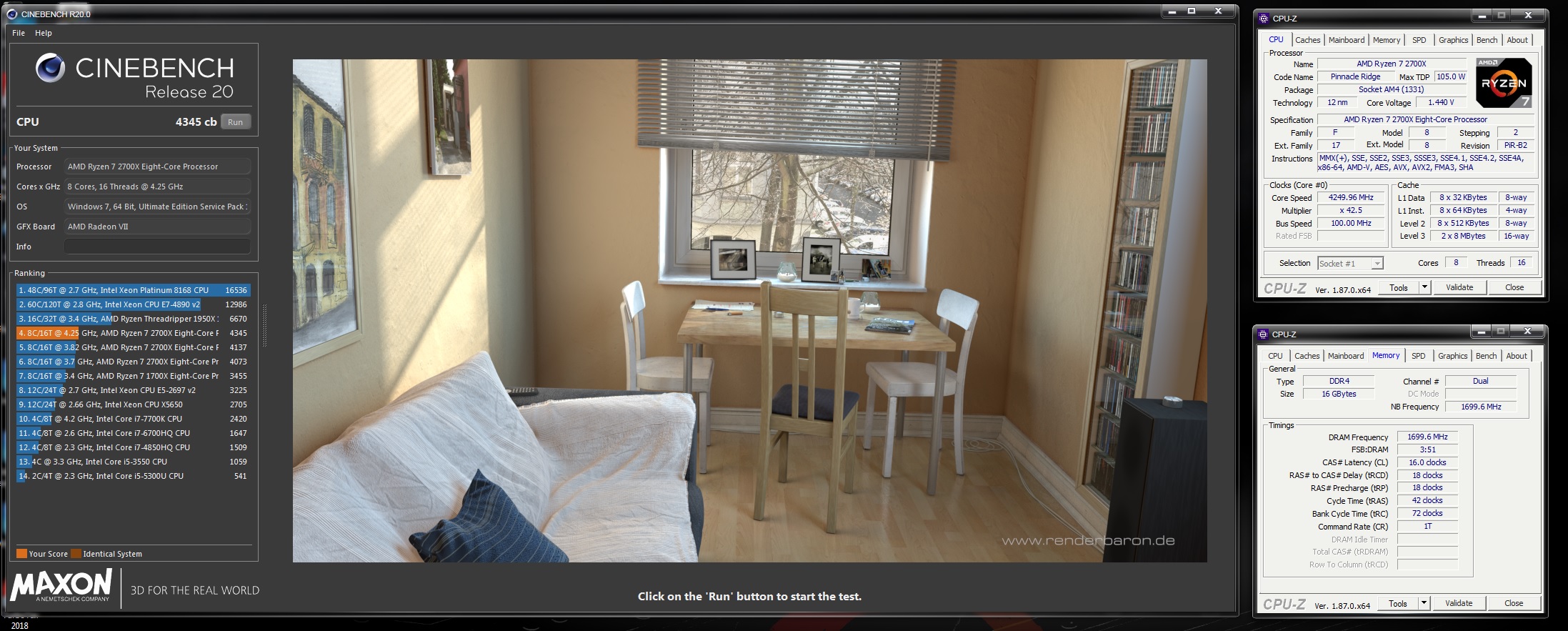
-
That was the best answer. You did not understand is what you should have lead with.
I'm the one with the card and the software and doing the overclocking with it and the explaining of what I did. Not what i found on the internet and yet you still find fault.
Like all over conversations this "ain't" a rocket science project.
Instead of trying to over analyze everything, you should stop and understand what is being explained.
MSI after burner has a max slider of 1500 for Memory and 1000 for core. These represent the slider in increments of 1.
The base clock on this card is 7000Mhz with MSI Set to 0+. If you set it to 1000+ it now becomes 8000Mhz. If you set it to 1500+ it now becomes 8500Mhz
The screen shot shows this as well. 2113x4=8452
What is so hard to understand? I don't get it.
How is this so hard to understand.
And incase that still doesn't make sense.
7000/4=1750 Mhz = 0+ on MSI afterburner. And that shows in the screenshot as well.Last edited: Mar 10, 2019 -
Have any of you come across RAM Test by Karhu Software? Apparently it can do a pass in less than half the time HCI MemTest uses without missing errors. Downside is that it's payware, which is why I haven't tried it yet. Could have sworn I'd seen a post about it here before...
https://translate.google.de/transla...-mit-ram-test-von-karhu-software-1195127.html
https://forums.anandtech.com/thread...ci-memtest-for-determining-stability.2532209/Robbo99999 and Mr. Fox like this. -
-
why not just stick to tm5? fast, free, error sensitive

Sent from my Xiaomi Mi Max 2 (Oxygen) using Tapatalk -
Thanks. That's pretty inexpensive. I will give it a shot.
Good to be home. That sounds awesome. Now you have two wicked GPUs working together. Sweet!Robbo99999, Convel, Papusan and 2 others like this. -
Almost as good as I could get using my 1080 TI with the EVGA copper water block. The 1080 TI scored 24118 with my 1700X
https://hwbot.org/submission/4098505_
-
First I'm gonna say that you're not the one to tell me what I "should" have done.
I've not been arguing with you, I've not been understanding the angle of your posts - sure I understand the words, but I didn't understand your 'point' or what you were getting at. This all started because you basically said I was wrong about what I had said about your VRAM overclock - where I said it was nearly +1000Mhz according to the MSI Afterburner Slider (which was correct), and then you replied that it was actually +1400Mhz - basically implying I was wrong. So I therefore then asked you if that meant that the Turing VRAM slider operated on a x4 basis rather than the x2 basis that I was quite sure it operated - you didn't answer that question, but instead told me something I already knew, which I agreed with, I then found out for myself by looking at a Guru3d article that for Turing the VRAM slider operates on a x2 basis. If you would have read my initial post more thoroughly then you wouldn't have missed the fact that I was referring to the VRAM slider when I was talking about nearly +1000Mhz - either that or you wanted instead to post stuff to make me look like I don't know what I'm talking about, but I'll assume the former because it doesn't assume the worst about you.
Or maybe we just speak in a different language, so we never really fully understand the angle or point of the other persons post. From my point of view your posts are nebulous and you don't seem to say what you mean - you often just seem to state 'facts' that are unrelated without explaining your point. Either way, I understand the technical differences of the item we're discussing here - VRAM/VRAM Slider/Afterburner/VRAM frequency reporting/quad-pumped RAM and effective frequencies vs actual frequency as reported in GPUz.Last edited: Mar 11, 2019 -
Just picked up a nice little 4K 144hz G-Sync HDR400 screen at Microcenter.Robbo99999, Mr. Fox, Raiderman and 5 others like this. -
Okay there internet tough guy. I"ll talk to you how I see fit. (Since we want to try to prove something in an open forum - I can bark orders that no one is going to listen to as well)
Your whole 2 paragraphs are about you wanting me to indulge your curiosity about X2/X4. Why? What does that have to do with my post?
1:X4 is from 1750Mhz to 7000Mhz - What we see using some software
2:X2 is from 7Gbps to 14Gbps - What Nvidia markets.
3: Lets throw in X8 1750Mhz to 14Gbps for good measure.
Examples of what I mean by moving the slider to achieve my speed.
In the grand scheme of things. X2/X4 has no baring on the over all picture. This is why I hesitate to answer. As you can see GPU tweak would appear to have their own take on adjusting the clocks. Does it matter? No. They both get the user where the user needs to be.
So in asking this question, why did you want to know?
As you can see from the pictures, what would you call the GPU Tweak side? X2 or X4
I had a whole different approach to this, but thought better of it. I slimmed it down from 10 paragraphs to this.Last edited: Mar 11, 2019 -
btw, my 9900K is just 16-18% faster than your best 8700K CB scores, but that is at everyday stable settings i might be able to get away with 1 or 2 multis more, but my measly little 4 phase mobo is holding me back haha
Robbo99999, Raiderman, Johnksss and 1 other person like this.
-
Currently got TM5 and HCI ready.
Let me know if you like it! Not expensive at all if it can save hours of tedious testing. -
Having hung out in the ryzen dram calc thread long enough, I will speak to what I've seen:
1) no one program for testing RAM can give definitive stability;
2) kharu Ram Test popped on the scene and people liked it, but it still suffers the same issues of other tests;
3) make sure if using TM5 to have version 0.12, to also get the modified config file created by 1usmus as it stresses the memory in a different way than the standard set made by the creator (I start with the basic test, then move to 1usmus's file for this);
4) HCI still is a beast at checking ram, but a critique is it sometimes reports an error which is actually cache errors. Separating cache errors and memory errors can be very difficult, but is needed to try to get full stability.
Memory is complex. Because of this, we need to check the ram in multiple settings, including having the memory tested with and without cache being stressed. You also need to make sure you test rowhammer for bit flips as a security issue, as that can leave you open to leaking information from memory or to zero day attacks to gain elevated control of the system.
Personally, I start with TM5 basic with the standard test, move to TM5 with the modified config file and increase the number of cycles in that config file, then on to HCI. If something suggests I need to, I also load up a thumb drive with passmark memtest86+ to check rowhammer. I find HCI on thumb drive doesn't stress as hard or find errors it finds within the OS, or at least it didn't for me.
Hope that helps a bit.
Sent from my SM-G900P using TapatalkRaiderman, jaybee83, Johnksss and 1 other person like this. -
You missed my point, (I said already I understand already about VRAM frequencies and how they can be reported differently depending on software). You missed my point like I said in my previous post, your earlier reply, one of your earlier posts implied that I either didn't know what I was talking about or instead it could have been that the VRAM slider in Afterburner might be operating on a x4 basis (which is sorted now, it doesn't). That is what I was picking up on, because either I wanted to expand my knowledge or point out to you that I wasn't happy with you making posts that imply I don't know what I'm talking about. You succeed in making the most simple conversations into a complicated and unnecessary 'fight' - I do have a suspicion that you do actually know where I'm coming from but instead you are muddying the waters with further posts with more 'facts' that are not relevant to what we're talking about (see your post I quoted), changing goal posts & muddying waters is one way to destroy/nullify another persons point as well as serving your own purposes. This might be through misunderstanding in terms of how we both communicate, but that's the impression I have. I'm just here posting in this thread because I'm curious about what goes on here, I want to continue to learn about these things, and it's kinda fun to post & see what's going on here.
Because our posts are not 'meeting', this is a null conversation, but it's a pattern we both have when we try to talk to each other, it must be a communication thing or a personality thing, I don't know. It's annoying, but ultimately it's not a big deal. (I remember you used to have some kind of a quote in your signature, something about a classic forum mistake "latching onto topics as if they're questions" - it wasn't exactly that, but I remember thinking, what the hell is all that, that really makes no sense, we must think very differently, our brains must be soo different).Last edited: Mar 11, 2019Mr. Fox likes this. -
I'm pretty sure if we take a vote, you would win that hands down. Turning a simple conversation into I don't know what.
How are you making points off of my post? I wasn't trying to make any points to begin with. People in forum's always talking about "my point". That viable in your post and if i choose to debate it, but not mine. Mine was just like everyone else. Posting benchmarks in an overclocking thread. Then you ask me about this X2/X4 when you already knew the answer because you have asked other users the same question before. Then you googled it to confirm your suspicions. Cool, fine i'm happy for you. Attaboy. If I do not answer your question, that is my right to do so. It doesn't make you right.
Dude, not sure how you keep inserting yourself into my post and complaining about them. Best to not reply if you do not understand or it doesn't pertain to you directly. Or how about you just ask before assuming you know what i'm talking about.
I gave you 4 examples of what "i'm talking about" not what "you are talking about" It's my post, not yours. Yet you find fault with it because it doesn't conform to the question you asked. You ask a lot of random questions that have already been answered. By you yourself. Why do you persist in keep asking them? The answer is not going to change. (Well in some cases they may, but not in this one)
This whole thing was a miss understanding as usual, because you assume everything has to be over complicated. Everything does not have to be that way.
Example: When I said 1400+ mhz using MSI afterburner. All you had to do was ask. "John, what is this reference to 1400Mhz, I don't understand what you mean. And all the rest could have been avoided. Of course you will just try to down play this and that's fine.
I already know the problem though....This happen with few people till we talked on the phone and now no more issues. Word projection does not always project ones emotion correctly... So the other starts assuming...ssj92 likes this. -
I agree with your last sentence, but other than that this is a null conversation, I think it's best if we leave it.Johnksss likes this.
-
-
Haha, I will basically have nearly the same system I had 6 months ago. Swap the Radeon 7 with a watercooled 1080Ti, and you have my old system. Better board, and better ram this go around, but built it for the upcoming Ryzen. Thats when the great scores will come I think.
Edit: By looking at my first ever run of Time Spy, I wouldnt hold any expectations
7690 seems a tad low. Going to have to look at tweaking Windows 10 more I guess. Kind of figured LTSC would have a lot less bloat I wouldnt have to worry aboutLast edited: Mar 11, 2019 -
happy to see more and more users going the LTSC route ill join soon! just need to get my hardware upgrades in place, that also include new storage
wouldnt make sense to do a fresh install before that
-
The only reason I even have that garbage installed is to run DX 12 benchmarks. I sure wish there was a viable alternative to that mishmash of an OS.
Sent from my SM-G960U using TapatalkMr. Fox likes this. -
Windows ltsc isn't special. I find it limits one or two things, but is less bloated. But to gut the spyware, truly gut it, I find you need either in depth knowledge of DISM and other knowledge of group policy, ipsec, etc., or utilities like NTLite or similar. But, by the time I'm done cutting out the spyware, it always breaks something that effects actual performance. Certain programs run as good or better (like cb20), others (like 3DMark) do not and take heavy hits. That wasn't the case with windows 7, where you could cut it down, make it lean, and get a performance boost.
But, with the need to gut ltsc on spyware still, I don't see the benefit of ltsc over enterprise.Yeah, that should be nice. On the OS front, it'll be interesting if windows 10 continues its decline and if Linux can continue it's assent relative to usability what may come by 2023. Especially since that may be when windows 10 goes service model, since windows 8.1 support ends that year (windows 7 ends Jan. 14, 2020, with up to 3 years of security report if you have a volume license at $350 for pro and $175 for enterprise over those 3 years).
Sent from my SM-G900P using TapatalkRaiderman likes this. -
I have serious doubts that Microsoft will make Windows 10 SaaS. It works (to a degree) with my enterprise clients but they expect a lot more in terms of support than consumers. I know Win10 is being used by Microsoft to condition consumers to the idea and it may work with a small percentage of diehard Windows users, however, they stand to lose a great chunk of users when the next version of Windows (10.5 or whatever they may call it) comes as SaaS. Sorry, I had to say my two cents. This subject is of great debate among my employees and I. I agree completely that Linux will capture many consumers once Microsoft does make its SaaS plan known.6.|THE|1|BOSS|.9, Robbo99999, Mr. Fox and 2 others like this.
-
So, to give more detail on why I say they will do it:
1) WaaS is already a component of windows 10 (Windows as a Service). It is one of the modules I gut from the OS iso.
https://docs.microsoft.com/en-us/windows/deployment/update/waas-quick-start
It was started with windows 10 and is used to give the licenser more power and control than what is allowed under the Uniform Commercial Code governing the sale of goods. By making it a service with goods attached (the software), you can then violate the consumer safeguard of the UCC. This is something that appalled me when I studied how to advise on contract and license drafting in school.
2) Microsoft already said windows 10 is their last OS, just like office 2019 is their last version of being able to but stand alone.
https://www.theverge.com/2015/5/7/8568473/windows-10-last-version-of-windows
Basically, they are moving to bi-annual updates and more than likely a pay model for the updates similar to Apple updates for recurring revenue. This is supported by how lax windows had gotten on not having the systems shut down if windows is not activated. This is also due to their spyware data gathering which is sold to third parties, thereby subsidizing the use and keeping recurring revenue.
So it may not be like the monthly office 365 subscription, but it is likely looking at other ways without the backlash, like paid feature updates (that few care about) and data harvesting.
And I hear ya. Between windows getting iteratively crappier with more glaring faults, like deleting user data, Linux is looking better and better. But seeing as Microsoft already has started the transition with all its software, and is waiting for the older OS and office suites to lose support, all of which culminate in or around 2023, so long as windows 8.1 doesn't get the extended treatments found with windows 7 (no reason to expect it would), it hints at a dark world to come and an OS migration of many users.
Sent from my SM-G900P using TapatalkAshtrix, Raiderman, Rage Set and 1 other person like this. -
Linux still has a long way to go, but it's getting there... little by little. Linux Mint is a nice OS if you overlook its limitations... almost all of which have to do with the lack of desirable software more so than the OS itself.
This is with the GPU running stock...
![[IMG]](images/storyImages/lwg13Xa.png) Last edited: Mar 12, 2019
Last edited: Mar 12, 2019 -
Sweet! I care... and, I look forward to seeing how it runs on water, bro.

Still tinkering with Linux... I sure as hell don't want to have to pay for a subscription to a half-assed POS product like Windows OS X, LOL.
![[IMG]](images/storyImages/72eAqxa.png)
![[IMG]](images/storyImages/eDu8vpV.png) Rage Set, JoeT44, ajc9988 and 1 other person like this.
Rage Set, JoeT44, ajc9988 and 1 other person like this. -
Ah now we're talking... when I saw the word "Linux," I perked up right away.
Linux Mint 19.1 is my daily driver and I love it. The peace of mind with Linux is priceless and it just works unlike M$ rubbish.
The game support is growing on Linux, especially with using wine and dxvk. It's progressing nicely...
Oh and also to add to the breaking up of the topic... 9900K going in tonight.
-
I'm going to have to figure out how to use wine. So far I haven't gotten to first base with wine. There is not a ton of good support coming up in Google searches, and much of what I am finding is dated. Lots of trial and error. Software support seems to be sorely lacking overall, but I am working my way into it because I want to be ready to give the Redmond Retards a severe kick in the groin and have as little adjustment as possible when the time comes to rid my systems of their filth. I've played with it on and off through the years, but I think the time is right for me to get more serious about looking into it as a Windows OS X replacement while Windows 7 is still kicking. I don't want to get caught with my pants down being stuck with Windows OS X.
Edit 1: I haven't even heard of dxvk, LOL. Will have to check that out as well.
Edit 2: Just found this... https://lutris.net/downloads/
![[IMG]](images/storyImages/fbRMT6U.png) Last edited: Mar 12, 2019
Last edited: Mar 12, 2019 -
If you do any benching of Linux, let us know how the scores/games/compatibility compare to Win 10 - I agree that the future of Windows 10 looks a little bleak, and I sure as hell don't want to have to pay for it as a monthly or yearly service! Any information about the values of alternative OS is always a bonus!
-
It is better than it used to be, but WINE still has to be compiled, etc. and setup. Was a bit of a headache when I was playing with it last year, but I also was trying to dive into the deep end, so to speak, learning to compile my own kernels around the same time and introducing the flag optimizations for Zen into the OS. More on that in a minute.
As to DXVK, it is good, but also was flagged by a couple game's anti-cheat as they argued it could occasionally allow someone to see through a wall, blah blah blah. But DXVK raised frame rates significantly on Linux. Meanwhile Nvidia driver support for Linux sucks worse than their driver support on Windows. That is where AMD does actually have something worth talking about, just because the open source platform better supports its GPUs. Let's hope that Navi isn't all bluster and that high end Navi and Arcturus next year are worth a damn.
As to Intel GPUs, people are trying to make a big deal out of the iGP beating the AMD "U" series integrated Vega (which it doubles). But the "g" variant of 2000 series chips with Vega 11 (but less cut down) matches Intel's performance on the iGP to a T just about, with a "2%" edge to one of the two companies, which is nothing. This also is without discussing the increased size of the Intel iGP.
Even with that, I do think Intel is making good strides, I just find it concerning regarding the hype. Intel's GPUs have never fully impressed, so I will remain skeptical until I see the final product.
I did a bit of benching last year with Linux. When it came to my CPU scores, Linux stomped the **** out of Windows. Here are some examples:
Geekbench 4 -
https://browser.geekbench.com/v4/cpu/9715694
Geekbench 3 -
https://browser.geekbench.com/geekbench3/8675016
But because of driver support, etc., GPU related benches don't fair as well as CPU related ones. Also, I wasn't running my current 4.2GHz when I did those benches, so I could probably beat those now. Need to get another SSD dedicated to a linux distro...
Unfortunately, security and good AV software is hard to find on that platform....Papusan, Rage Set, Robbo99999 and 1 other person like this. -
By how much did Linux beat Windows 10 on those CPU tests?
-
Geekbench 4
Geekbench 3
Those were both running 4.2GHz, so clocked faster with Geekbench 4 being 41% faster on Linux and Geekbench 3 around 10% faster on Linux.
Edit: On Linux, I was running either 4.05GHz or 4.1GHz all coresLast edited: Mar 12, 2019jaybee83, Rage Set, Convel and 1 other person like this. -
BTW, here is a link to TM5 and 1usmus's config file which can be loaded with the load cfg and exit tab in TM5 (edit - I also had issues with the cfg file going back to dual channel instead of quad channel memory. How you get around this is make the file read only after changing the settings to quad channel memory but before loading the file in TM5.):
https://www.overclock.net/forum/27577522-post2594.htmlConvel likes this. -
Good increase in performance on Linux for Geekbench then. Is that something to do with better scheduling of those 16 cores and 32 threads - I imagine it's something to do with that rather than just OS overhead. I mean Windows 10 doesn't have a 40% or even 10% CPU utilisation overhead in comparison to Linux (otherwise it would be showing 10%-40% usage of the CPU at idle in Windows 10, which it doesn't)?
-
Go look at Phoronix's comparison of benches between windows and Linux. Not always is the deficit there, but on average, Linux is about 20% faster with both Intel and AMD CPUs.
Sent from my SM-G900P using Tapatalkjaybee83, Raiderman and Robbo99999 like this. -
I would like to cover some achievements for the last 4 days of testing and bricking my laptop over & over & over... I now achieved my own desire & to be honest my own personal goal & to have a peace of mind & to sleep better
... I have reached over
40GB of memory read & write bandwidth with lower latecny!!
I have reached with my poor cheap 16GB ram... which is [8GB ValueRAM Kingston + 8GB Samsung] with 2133Mhz default advertised speed to
2666Mhz! and thanks to my unlocked FW ME + Unlocked BIOS with
(the so called locked down) CPU 6700HQ
(which is no longer locked down as long as it is under my hand ) with
BCLK 102.7 It is now
2733Mhz[14-17-17-38] with tRFC 370 & tREFI 37000 with
System Agent overvolted by +20mv (For Stabilty)
all is stable did a memtest64 + TM5 tests + played Ace Combat 7 Skies Unknown for 6 hours
Do you have any suggestion to OC more or to tweak my RAM timing more?? tried to reach 2800Mhz with those poor RAM set.. unfortunate it black screens at me [How dare you!?!] kinda my laptop begging for mercy to stop messing around now
Last edited: Mar 12, 2019Robbo99999, JoeT44, jaybee83 and 2 others like this. -
Swapped in the 9900K last night and got it rock solid at 5.3GHz (gaming, benching, rendering etc...)
Note: I haven't delidded this one yet as I wanted to see what it can do stock... I have another delidded one, but haven't got to taking the time to properly lap it...
I'm working on 5.4GHz at the moment ... I'll post up a teaser of a 5.4GHz run in a bit...
Cinebench R20: 5570
![[IMG]](images/storyImages/CBR20-5570cb-iunlock.jpg) Last edited: Mar 12, 2019Convel, Robbo99999, Mr. Fox and 5 others like this.
Last edited: Mar 12, 2019Convel, Robbo99999, Mr. Fox and 5 others like this. -
-
welcome to RAM overclocking, that usually involves a looooooot of blackscreens haha
Rage Set, 6.|THE|1|BOSS|.9, Arrrrbol and 1 other person like this.
-
One of the first Firestrike runs after installing the 9900K during my 5.2GHz lap around the track... It's a pretty good baseline to start from... up up we go...
I've already hit 40K+ in graphics on this same card. I'll keep yall posted.
Firestrike: 30218
![[IMG]](images/storyImages/iunlock-Firestrike-30218-2080-Ti-9900-K.png)
-
Not too bad for 50x32.
Now I need to see how it works at 52x32.
![[IMG]](images/storyImages/gNHHTJC.png)
![[IMG]](images/storyImages/zRFVvO8.png) Last edited: Mar 13, 2019Raiderman, Robbo99999, Convel and 3 others like this.
Last edited: Mar 13, 2019Raiderman, Robbo99999, Convel and 3 others like this. -
remind me again, what were your personal high scores for CB15 on windows?
and LOL, ure basically scoring as many points in CB15 as i currently do in CB20 xDLast edited: Mar 13, 2019Mr. Fox likes this. -
Look at the above Cinebench screen shots for my Linux runs and you can see them at the very top on the left.
But, those are with the chiller running and a higher overclock (5.2GHz). I ran those above at 5.0GHz and no chiller.
https://hwbot.org/submission/4012996_mr._fox_cinebench___r11.5_core_i9_7960x_49.54_points
https://hwbot.org/submission/4012995_mr._fox_cinebench___r15_core_i9_7960x_4630_cb -
Strix 2080 Ti XOC vBIOS/unlocked power limit (1000w) vbios.
Have not tested this on my XC Ultra card yet but will later today when I’m home.
https://filehorst.de/downloadQueue.php?file=cqktlGdg&fhuid=fjB8yKwzvSlpkijEhpg0jXU4LrdII49X
100% power slider = 1000w so use caution lol. -
Thank you. Apparently it is gone and no longer available for download. Do you have a copy of it you can share?
I found it. It sounds like the power limit might not useful, just like the crappy Galax HOF vBIOS. Locked voltage renders unlimited power utterly worthless, but not holding stock voltage under load results in a performance impairment.
"Read Me" Post: https://www.overclock.net/forum/27879346-post6763.html
Download: https://www.techpowerup.com/vgabios/208990/208990.rom
Yeah... just like the Galax HOF worthless as tits on a boar firmware...
Maybe it will work better with my modded GPU. Definitely going to find out. No need for special caution with the idiotic 1.093V wuss-boy limit on the voltage. No way the card will pull anywhere near 1000W with such a castrated stock voltage maximum. We need voltage unlocked to
at least 1.200V.
Last edited: Mar 13, 2019Papusan, Talon, Convel and 1 other person like this. -
Also read this... looks like MSI Afterburner won't even function properly with it. Dang it... that sucks.
https://forums.guru3d.com/threads/xoc-bios-support-for-2080-ti.425618/Papusan likes this. -
Those are what I call diminishing return bios
 It's worthless like you've said...
It's great to see Linux stuff. I wish vulken support took off and wasn't haulted by the monopoly in the gaming sector.
More tuning tonight for 5.4Ghz on the 9900K.
Sent from my SM-N950U using Tapatalk -
Well it'll be interesting to see that 5.2Ghz Linux run that you mentioned you might do, then it would be a like for like comparison of Linux vs Windows 10.
*Official* NBR Desktop Overclocker's Lounge [laptop owners welcome, too]
Discussion in 'Desktop Hardware' started by Mr. Fox, Nov 5, 2017.


