Problems? See this thread at archive.org.
Just figured I'd update that after I read that thread on the Lenovo forums about them not planning on providing a TOLUD fix I went ahead and sent my ViDock4+ back to Sewell Direct (explaining the whole expresscard 2.0 and TOLUD issues) and got an email from them today saying they will be refunding the total cost plus most of what it cost me to ship it back to them. So I guess I can vouch for their understanding of issues and if anyone in the US wants to buy a ViDock4+ but not pay the $25 shipping from Village Tronic then get it from Sewell Direct.
-
@wicked20 Yes, if you look at the schematic PDF you'll see that there is a 12V to 3.3V converter. Alternatively you could hook up 3.3V from the PSU (orange cable I believe).
-
I've read in several posts that the PEH4 has a 15-19 12V regulator but does it not say in the specs that it can handle 15-20V? I have a 19.5V DC lying around and I would much rather use that than a psu. If not I have an old server lying around from the 90s that I could use the power supply from. Any problems with using that? (Trying to save as much money as possible)
-
I believe that the 12V DC regulator can only handle wattage up to the mid 30s. You could put a heatsink on it to go a bit higher, but I doubt you'll be able to go up to the 75W max that the pci-e spec specifies. I think you'll be OK with 19.5V.
The problem with a PSU that old is that back then, the 3.3V and 5V lines were used a lot more, which means that the 12V line is likely pretty weak. Also depending on when in the 90s the PSU came from, it might even be an AT PSU instead of ATX. An AT PSU won't have the same plugs as an ATX one. If you actually had to press the power button to turn off the computer, then it's an AT PSU. If not, it's ATX. -
I have a Macbook Pro 2011 with a ATI 6770m and Thunderbolt port. I have been googling the last hour trying to find if anyone has successfully setup a MBP 2011" with a nice external graphics card. I also searched this thread.
Anyone got any helpful links? Stories? Previous setups? I'd be using Windows 7 hopefully.
Thanks. -
@Khenglish,
The 19.5V DC I have is an old Dell laptop charger. I forget the amp but it multiplied to 168W. Is that too high? :/
The psu I have is from a Dell PowerEdge 2300
It's 300W and I'm pretty sure it's ATX because it has power button connected to motherboard to powersupply. That makes it ATX right? I don't have it in front of me but it supplies over 100W to the 12V and I have a HD4670 so that is more than enough correct?
I'm just trying to figure out the best way to power this thing without messing something up.
(I'm using PE4H vers2.0a) -
I finally got my PE4H today and now I can 100% confirm that the PE4L I ordered initially is broken.
Adding an eGPU to the MSI GX640 is really painless, no errors whatsoever. Put the laptop to sleep, hook up the powered on PE4H and everything 'just works'.
For those interested, a GT520 can run just fine on a 15v/4.2A DC adapter. Got it working as a dedicated PhysX card as well even though I'm not sure that's even a good idea.. the card might be to weak for that. Could almost play Starcraft 2 smoothly at 1680x1050 and medium settings on it, did the trainings mission where you have to defend the supply depots/pylons/spires and that was playable though the zerg mission lagged noticeably at the start.
[edit]I'll run some benchmarks tomorrow for the opening post. [/edit] -
What is max power W supported by pe4H in 12V entry ?
-
What matters is the TDP of the graphics card. The HD 4760 has a TDP of 59W. I would not use the laptop charger, but the 300W power supply should be fine.
36W
Heaven benchmark: 1093
I ran the default settings at 1280x800. -
@Khenglish,
Hey, I just got my e6520 today. I'm rather excited by it.
I have a quick question. Do you know if I can use eport-plus and eGPU together? I'm wondering if there is any compatibility issue. Obviously, I'll be connecting the monitors to the eGPU and I'll be only using the eport-plus for the other ports (USB, etc.) ANy idea? -
I don't see any reason why both can't be used at the same time.
-
Seeing that the Dell Poweredge 2300 is from 2000, I'd just get another more recent PSU to be safe. Old PSUs tended to be very inefficient and have poor power quality, along with less power on the 12V. There are plenty of budget options, some people have recommended a Corsair CX430 for its low price. When shopping, in general higher efficiency=better power as well.
-
Hi ppl of notebookreview forum
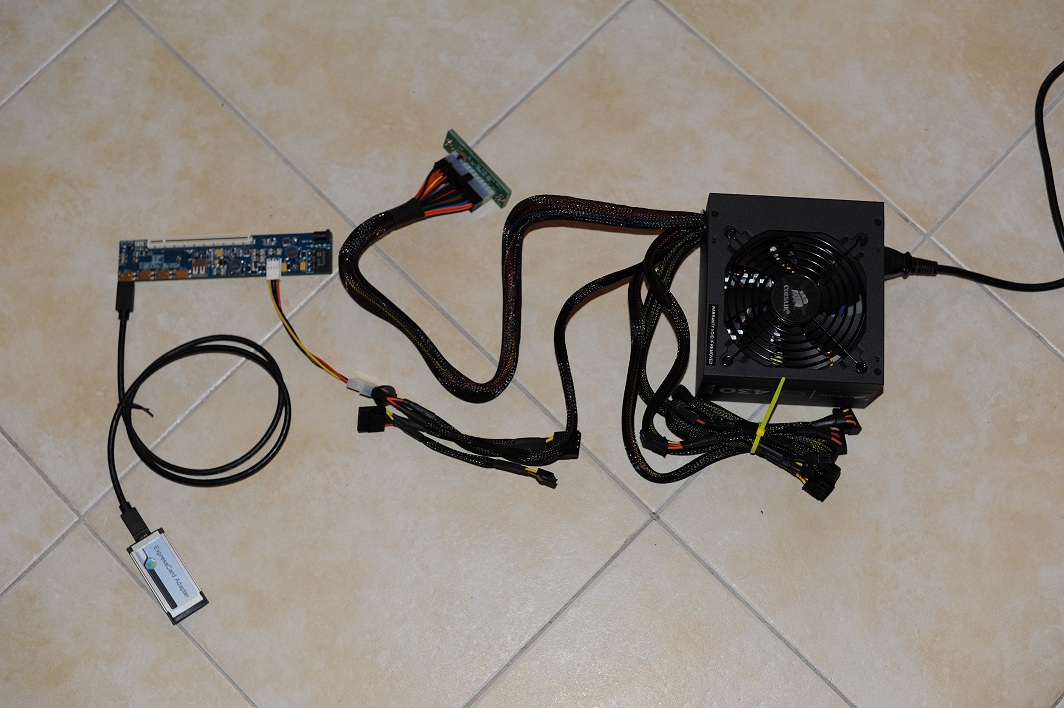
I just got my PE4H package today, I want to know if I am doing the basic set up correctly? I don't have a GPU at the moment.
Also I am wondering if it's possible for me to remove the unused cables on the PSU?Attached Files:
-
-
what would be the benefit of buying a psu over a DC adapter or vise versa? If they both supply the power, why not get a DC adapter. It is cheaper...
-
You are talking about those power bricks right? Those are actually much more expensive than ATX PSUs watt for watt. The thing about a PSU is that it is very easy to get in high power. They also have molex connectors which makes it easier to wire up.
A lot of people have had issues when using power bricks, this is because power bricks also tend to be less well regulated than ATX PSUs. Because they are poorly cooled and have plastic cases, they have a tendency to overheat, operate poorly, and even be damaged. Another benefit of the ATX PSU is you can use the 5V to supplement the USB port power, which the laptop often doesn't do a good job of supplying, if you have more power hungry USB devices.
As a general rule, some people would give a number higher or lower, but aim to be utilizing about 60-70% of the power supply's capacity. This is where the power characteristics tend to be the best and the efficiency is highest. People with power bricks tend to run near full capacity where they start performing poorly. For example if you need say, 13A (approximately what a GTX460 draws max) on the 12V, you'd want a power supply rated for 17A on the 12V or more at the very least. -
There is example of a 80W and 120W ac supply used in 12V entry. What is the max power ?
-
thats all fine (you dont actually need the adapter).
-
What about this? :: ARS Technologies - ISA and PCI Enclosures list

EDIT: Sorry, now i saw the price... :/
But a good choice regarding price. -
http://forum.notebookreview.com/gaming-software-graphics-cards/418851-diy-egpu-experiences-31.html
There is a link on there for a 12V/120W -
Where can I find out how many amps a graphics card draws? Do you just figure it by dividing it's W by 12V? Does amps even matter or is it only total W? Also, what if you only use say 20-30% of the power supply's capacity (total or just on the 12V rail)? Is that going to harm anything?
-
P = U * I
Power = Voltage * Current. If you want to be safe, a good guideline is the TDP (Thermal Design Power), the maximum wattage a card can handle thermal-wise. So if you have a card with a TDP of 150W, it is not designed to draw more. So, you are theoretically fine with a PSU that provides I=P/U=150W/12V= 12.5A on the 12V Rail. Since your PSU would technically run at 100%, it is recommended to chose a stronger PSU in order to not get any issues with PSU overheating or crashes due to not enough power provided by the PSU. A good value is to add 20-30% for the PSU, in the 150W GPU case you should be absolutely fine with a 15A PSU.
If you want to do overclocking, you need more power which also has to be considered otherwise you may get issues later.
Since many manufacturers provide cards with better electronic components (compared to the reference design of AMD/NVidia) that help reduce power consumption or for keeping the GPU cooler, you can also save some amps in your setup or chose a weaker PSU.
If you want to find out accurate values for wattage of cards, consider comparing their Furmark values. A great overview can be found on this german site:
80 AMD and NVIDIA GPUs power consumption compared in Furmark (translated)
As you can see there, we have a large deviation of cards with an equal GPU, e.g. a GTX460.
Whereas a MSI N460GTX Cyclone OC 1024 MB draws 148W peak, a Gainward GeForce GTX 460 Golden Sample 1024 MB draws 165W peak. That is 11% more and the Gainward Card is clocked even lower than the MSI card.
Regarding your other questions:
Only amps @12V matter for GPUs.
If you just use 20-30% of the PSU's 12V wattage capacity, other than wasting money for an overkill PSU and a little worse efficiency (efficiency is at is maximum between 70-90%), there are no issues. -
Hey question for people I have the acer its in my sig. I wanna know if the only way to use an eGPU is to plug throught mini pci-e since I dont have an expresscard or is it possible to have an adapter hdmi or usb like pci express card usb adapter?
-
Ran all the benchmark mentioned in the opening post and oh boy is this GT520 a poor performer
. My 5870 (which is pretty awesome as far as mobile cards go) blows it outta the water scoring roughly 4 times more in every benchmark.
Good thing I didn't buy it for the performance I guess.
My scores for the opening post:
Other info for the op.GT520 eGPU
PE4H - expresscard slot onlyATI Mobility Radeon 5870 Resident Evil 5 24.2fps 95.5fps 3DMark11 P572 3DMarks - gfx score: 508 P2016 3DMarks - gfx score: 1940 3DMark06 2840 3DMarks 11737 3DMarks 3DMark Vantage P1638 3DMarks - gfx score: 1308 P7604 3DMarks - gfx score: 7849 Devil May Cry 4 scene 4 23.52fps 103.25fps
OS: Win 7/64
Ports: HM55 EC
System: 15" MSI GX640
CPU: i5 430m 2.27GHz
RAM: 8GBLast edited by a moderator: May 7, 2015 -
There is no adapter. You must use mPCI-E.
-
Hey Khenglish, I saw you built an eGPU setup sucessfully with e6520. I will try to start building up my e6520 (intel 3000) eGPU set up, and I would like to ask some advices if you don't mind. If other eGPU expert would want to chime in, I'll gladly accept any advice.
1) Did you buy PE4H-EC2C or PE4H-PM3N?
2) PCIEMM-100 is this necessary?
3) My currenct desktop power supply is Antec True Power Trio TP3-650 650w ATX12V SLI Certified,
It has "one main connector (20 + 4 pin), one 12V (P4), one 12V (8pin), seven peripheral, four SATA, two floppy, and two PCI-E connectors'
Is this PSU compatible with the eGPU setup?
4) My current GPU is ATI Radeon 4870. I'm considering upgrading it, but since I don't play any game that is GPU intensive, I was wondering if upgrade is necessary. I usually play SC2, Lord of the Ring Online. I would love to be able to run Diablo III later. If upgrade is necessary, which GPU do you think it is most cost effective? I have no intention to go for the fastest and most powerful GPU since I find it unnecessary for my goal.
5) Do you have any specific advice or parts that I should know or have before setting up eGPU for e6520?
I'm sorry to pester you with many questions. Please forgive me, and I will really appreciate any help or guide.
Thanks. -
I had problems with trying to use the mPCI-E ports, so you must use the EC2C.
You can use any mHDMI cable you want. There is no need to use one of the bplus cables.
That PSU should be fine.
A 4870 isn't a bad card, but it will perform poorly on only an x1 link. You really need to get an Nvidia card to do optimus. -
I just shipped the PE4H-PM3N ver2.4 to the wrong address. Do yall have any idea on how to change the shipping address or cancel the order? I used paypal, and they have already accepted the payment.
On another note. Did y'all go through "Bplus," or another company? -
Thanks bro. I'll purchase the EC2C, and probably purchase a gtx460 to take advantage of the optimus.
-
Hi. I am looking at an lenovo x201, what sort of power can I get from it using an express card eGPU? Ultimately, I want it to be abit more powerful then my 8800GTXm. Is that possible? or is this a really poor choice of laptop for using with a eGPU?
-
Guys, could you please help me which card do you think would be better in case of eGPU with SB laptop?
GTX 560 or GTX 470?
I might choose GTX 560 ti if I will have enough money. I guess that would be better than the two others, right?
Thanks in advance!
D -
If you aren't concerned about power usage, then get whatever card is faster in reviews. If you are concerned with power usage, then go with the gtx 560. If I were to get a new card today, personally I'd go with the 560 ti.
Also I did some testing on how memory affects HD 3000 performance here. Was thinking you guys might be interested since you'd be using your integrated graphics on the go unless you took your 460s or whatever everywhere with you. -
Thanks! I found some tests where GTX 560 was better and some where GTX 470 was better. But my concern is the bandwindth bottleneck, and I don't know which one is using is better.
-
Neither have an advantage when it comes to performing on an x1 or x2 link. Only the 2xx series and older have shown to be worse on slow pci-e links due to needing to be set to x1E and x2E.
-
Don't bother buying a new laptop for eGPU implementation if it doesn't have a sandy bridge (2nd gen) intel processor. You will be disappointed in the results because you can't run an Optimus link (if you don't plan on buying an NVIDIA card either, then by all means go for the x201 - but you won't get the same sort of results posted in this thread). If you go back a few pages, you can see some recommended laptops with sandy bridge processors.
-
^ Not true. With the X201, you will be able to run Optimus and a GTX460 and up will make your setup get 14000+ 3DMarks06. Sure SB laptops perform a little bit better but not so much you can call a X201 a bad choice for an eGPU setup at all.
-
Well what I was really wondering was whether this spec x201:
Processor: Intel Core i5-540M (2.53GHz, 3MB Cache)
Memory: 4GB DDR3 RAM (2GB + 2GB)
Storage: 320GB Hitachi HDD (7200rpm)
With a good eGPU
Could beet this spec clevo
CPU = T8300
RAM = 4GB DDR2
Storage = 7200rpm 160gig
GPU = 8800m GTX -
I would say without a doubt, yes. However, 'beat' is a tough word in this matter. You would really want it to exceed the performance and whether or not you'll get the performance you want is what is up for debate.
-
Well I just did 3dmark06 and got 9000.
NVIDIA GeForce 8800M GTX video card benchmark result - Intel Core 2 Duo Processor T8300,Clevo Co. SANTA ROSA score: 9015 3DMarks
If the x201 and the eGPU is 5000 higher then it should perform alot better right?
(out of interest, if you overclock the GPU how much more do you think you can get?) -
Theoretically, but a synthetic benchmark isnt a very good judge. You'll want to run a few more benchmarks. I have had a graphics card perform really poorly in 3dmark06 but great in other benchmarks. Sometimes they have exceeded the performance by a different card in all other benchmarks except 3dmark06.
-
Hi,
It's my first post so I would like to welcome everybody.
I have just collected all the pieces to build the DIYViDock.
What I have are:
- Thinkpad T410i
- PE4H-EC2C DIY ViDock
- GeForce GTS450
- Samsung SyncMaster E1920 LCD display
- and a Modecom Feel2 400W power supply.
I believe I have also installed NVIDIA Optimus (although I'm not sure if it's not just a driver that I had installed).
The thing is that when I display Windows or applications like Photoshop through the DIYViDock on my external display, they are running fine.
But when I try to run a game - a demo of Heroes of Might and Magic 6 in particular - I get a Blue screen and the computer restarts.
I don't think it's the game, because I can run it on my 'raw' laptop (although extremely slow).
I have read in the manual to my GPU that it requires 22A power supply and mine is only 20A. Does that make a difference? Or is it just a software problem?
Thank you in advance for a reply.
PS What do you keep the eGPU in because I've already managed to accidentally stick my finger into the fan. -
The 22A power supply is an estimate based on the assumption that you are using the PSU to power an entire computer. Since you are only powering the graphics card, you shouldn't need something that strong.
Your PSU might not actually be able to provide 20A though. Try reinstalling your graphics driver. If that doesn't fix your problem, then the PSU may be the culprit. -
I can't believe I didn't think of this sooner, but why don't we use a mini HDMI male to HDMI female adapter, to a HDMI male to mini HDMI male adapter. It would be incredibly short to try pci-e 2.0.
Found a HDMI male to mini HDMI male adapter. It's part number is NHD-518.
Ignore the site I listed before. They charge a ton for shipping. -
I don't know if it would work but is this what you were thinking of but a little more straightforward?
Amazon.com: Mini HDMI Male to Male Adapter Coupler Extender: Electronics -
Wow that's perfect. Wish I didn't already order the other part.
-
I have a ICH7M. In everest report shows:
North Bridge: Mobile Intel Calistoga-PM i945PM
PCI-E 1.0 x16 port #2 Used @ x16 (nVIDIA GeForce Go 7900 GS (Dell) Video Adapter)
South Bridge: [ TRIAL VERSION ]
PCI-E 1.0 x1 port #1 Vide
PCI-E 1.0 x1 port #4 Vide
(The wifi adapter is shown on port #3 but i desactivated it in bios to see what it changes)
So only x1 ? or x1E or x2 possible ?
What is the best graphic card choice ?
For nearly same price i can have max the GTX460-HD6850-5850-6870. For 10-20$ difference. thks -
I believe that the 945 can only do x1, and since you can't do optimus, there really is no upgrade choice for you unless you get a new laptop.
-
So i should take the gtx460 which is not underperformed at x1, so which work as fast as x1E for the ATI ?
"ATI or older NVidia cards using Intel notebook chipsets' mPCIe/expresscard x1 1.0 are underperforming by 15-30%. NVidia's latest GTX4xx cards are not affected as shown"
Is the express card port probably the #4 ? if so i would have port3 PM3N with port4 E2C2, to run x2 mode ? -
There are GTX460-1GB and GTX460-768MB.
How much the quantity of memory influences the performances ? -
A GTX460 or even better a GTX560 eGPU will make a lot of a difference, especially in DX10/DX11 games. I think it is absolutely worth coupling the X201 which is a great portable machine with a nice eGPU.
-
A GTX460 or even better a GTX560 eGPU will make a lot of a difference, especially in DX10/DX11 games. I think it is absolutely worth coupling the X201 which is a great portable machine with a nice eGPU.
The 768MB is a budget version which is around 8-10% slower than the 1GB cards. How these numbers translate into eGPU setups, you will find at the first page of this thread.
I honestly believe that the cabling is not the reason for the issues. I rather think the wiring in the EC or the PE4L/PE4H cause the EM issues under high bandwith. You can also try ferrites with your standard mHDMI cables, I think it won't work since the problem is somewhere else. This is what it seems to me. Besides that, this type of eGPU implementation with a stiff and short connector is absolutely impractical.
DIY eGPU experiences
Discussion in 'e-GPU (External Graphics) Discussion' started by master blaster, Sep 18, 2009.