 Problems? See this thread at archive.org.
I hope you feel better soon. I really did not want things to go bad for you.
-
-
Even if you have 2.0, it doesn't matter at this point. No one has managed to set up an eGPU setup with 2.0 setting.
2X,4X
-
Kallogen I am interested in your setup if it can be used on my laptop. I just posted some info about it. Where are you in Europe?
Sorry to the mods, couldn't find how to PM Kallogen from his profile page. -
Thanks Rubenhan
My device manager just says Intel(R) HD Graphics it is 128mb expandable to 1.7GB - Is this a 3000, 3100 or 4500 or none of the above?
Just wondering about Optimus or will it not really matter since I can take advantage of 4X?
When comparing intel GMAs mine is newer than the 3000, but not as powerful as the HD 3000, it is at the start of the HD line. -
The problem is your computer is trying to run pci-e 2.0 at the 5.0gt/s rate, which is can't do so the driver repeatedly crashes. What you need to do is boot with the card disconnected but on. Then use nando's setup program to set port 3 (the expresscard slot) to pci-e gen1. Then plug in the mHDMI cable and chainload.
-
OH~!! I didn't know e6520 required the Nando's setup program. Thanks for the advice. I'll try it right now.
-
You technically have expresscard 2.0, but it can only run the 2.5gt/s rate. Only the 6 series expresscard 2.0 slots can do 5.0gt/s.
Yes the 5 series chipset is capable of x2 and x4. You need to install AIDA64 to determine your port configuration. Hardly any laptops can do x4, but a significant amount can do x2.
x1 optimus beats pure x2 in most cases, but loses to it in others. Only the PE4H can do x2 and x4. x2 is more difficult to set up than x1 optimus. You cannot do x2 optimus, but should be able to do x1 optimus.
If you can do x2, then ATI is a viable option. If you can't do x2, then Nvidia is your only option. -
Khenglish,
If I can only do the x1 setup should I opt for the cheaper PE4L?
I will install AIDA64 and get back with you on ports. -
Only running at 2.5GT/s
Depend on the available PCIe port arrangement/configuration on your notebook. Your notebook have Intel HD Graphics, so you can do x1.Opt setup with Nvidia eGPU. x1.Opt is better than x2.
For x1.Opt, PE4L is enough. However, my opinion, get PE4H instead.
Yes.
GTX460, GTX560Ti. Stay away from dual-GPU card (two GPU core in one card). dual-GPU card required 512MB PCI space which is usually not available on notebook & as far as I know, no one have yet successful getting it to work.
Take a look at first post if you want to know what kind of performance you'll get.
EDIT: Ops! Khenglish already replied. Sorry. -
Okay, just ran AIDA64 and under Devices>PCI Devices
it has
Intel Ibex Peak PCH - PCI Express Root Port 1 [B-2]
Intel Ibex Peak PCH - PCI Express Root Port 2 [B-2]
Intel Ibex Peak PCH - PCI Express Root Port 3 [B-2]
Does this mean there are at least two ports so I can do a x2 setup? Also is this pointless if I am going to do Optimus?
Honestly I don't want to attempt this if I am going to lose 50% of GPU capability. -
You can do x1.Opt. You only need to make sure your notebook have at least one mini-PCIe slot OR ExpressCard port.
Always look at first post. Look at the one who have similar processor. Let me redirect you: http://forum.notebookreview.com/7222567-post3028.html -
Thanks for answering and redirecting - going to purchase and I will get back with any problems. I also want to run tests and post my results.
The first page of this thread should come with all Intel iGPUs - Thanks Nando4 -
Thanks. It's not that bad, I put it in cold water for a long time and it seems to be okay now, no fluid or anything there, just feels a little "raw". I wanted to solder a molex connector today but I figure there's quite a bit of homework, maybe tomorrow or something.
-
Hey everyone, first off I want to express my gratitude for this community. I've learned quite a bit reading through this thread and this forum in general. Now onto my situation...
I'm currently trying to set up an eGPU for my Lenovo E420. The GPU I'm using is Newegg.com - EVGA 01G-P3-1373-TR GeForce GTX 460 (Fermi) Superclocked EE 1GB 256-bit GDDR5 PCI Express 2.0 x16 HDCP Ready SLI Support Video Card and the PSU is Newegg.com - CORSAIR Builder Series CX600 V2 600W ATX12V v2.3 80 PLUS Certified Active PFC Power Supply. I've followed apac's instructions as detailed here http://forum.notebookreview.com/gam.../418851-egpu-experiences-470.html#post7762211, but I can't seem to get it to work. There are a couple of scenarios that I have tried:
1. I boot into Windows with an external monitor plugged in. In this case my login screen displays on the monitor, but as soon as I login it goes back to my laptop display. Then it switches back and forth between the laptop and external monitor displays. My computer keeps making the sound like a device is being plugged and unplugged, which makes me think it is a PSU problem. My system tray then says "Display driver has stopped responding and has recovered." After a while my computer just freezes up and I have to do a hard reset.
2. I boot into Windows using only the laptop display. Everything will run fine for a minute or so and then Windows will either go to a black screen or just hang. It happens even when I'm not doing anything graphically intensive.
I've tried both the 275.33 and 266.58 drivers, but they both result in the same thing, though the 275.33 drivers seem to be able to hold out a little longer.
So my question is, does anyone have any idea about what's going on? Any help would be greatly appreciated!
Edit: I forgot to mention I'm using a PE4H v. 2.4a with an EC2C -
hi mates, i have a situation here. i keep receiving this message in device manager Code 12: This device cannot find enough free resources that it can use . i did try to use setup1.0 to do pci compaction, but there is always no solution found and appeared pci_alloc_valid=yes* all the time. i reduced my ram to 2gb , problem still persist. is there any solution for me mates ?? thank you
dell vostro v130
igpu: intel hd
egpu: gtx 550ti
mpcie x1 connected -
How you connect to external monitor? Are you using DVI-to-VGA adapter? Considering without external monitor connected, eGPU still unable to operate properly, probably the mini-HDMI cable is faulty.
-
Hell Kizwan I want to know if my dell vostro 1510 can run egpu before ordering pe4h kit.
Thanks. -
When doing the PCI compaction, did you tried all available combination?
-
Does this is your notebook specification?
Your notebook have Intel X3100 GPU. So, Optimus is not possible on your notebook. Optimus only possible with Intel 4500MHD, HD Graphics or HD 3000 iGPU. Unless your notebook support x2 link, you won't get satisfy performance with eGPU. Please post a screenshot of the Device Manager, set View to " Resources by connection". Does this notebook have ExpressCard slot? Please check the "memory+WLAN+HDD" bay & see how many mini-PCIe port available. If you can take a picture that would be great.Code:# Processor: Intel Core 2 Duo T5670 (1.8GHz) # Memory: 2GB - 2 DIMM (DDR2-667) (4GB max) # HDD: 160GB 5400RPM HDD # Graphics: Intel X3100 integrated graphics # Display: 15.4" WXGA Antiglare
P/S: Please use this HTML code when posting pictures (removed the " \" character):-
HTML:[URL='put-link-to-your-image-here'][img]put-link-to-your-image-here[/img][/URL]
Last edited by a moderator: Feb 6, 2015 -
Hi nando,
I have successfully setup eGPU ATI HD5870 @ x2 link. The performance boost is really huge compared to previous x1 link setup. I'm satisfied with the performance. No more lag when playing NFS Shift. I already ran all required benchmarks & also game benchmarks, and updated my eGPU Experience post. However, I got low 3dMark06 score (10XXX). I figured this is because the CPU is throttling very badly. I got lot of improvement with DX10 & DX11 benchmarks though. -
yeap. i did try all the combination but the pci_alloc_valid still remained yes* . i really have no idea why it would turned to be like ths . any other solution mate ? been trying setup1.0e and setup1.0f
-
Please enter eGPU Setup 1.x & take a screenshot (hotkey for taking screenshot is shown at the bottom of the Setup 1.x screen).
![[IMG]](images/storyImages/DellStudio1557ATIHD5870x2Link.jpg)
The screenshot will be like the above picture. After taking the screenshot, run " Save Diags" (both of them). Then reboot into windows:-
- access C:\eGPU directory
- double-click "eGPU-Setup-mount.bat" file
- new volume with drive letter "V:" will appear
- access V:\ drive
- compress or zip the DIAG folder & post it here
BTW:-
- did you connect the 6-pin PCIe connector to your GTX550 Ti?
- did you connect the floppy power connector to PE4H/PE4L?
Last edited by a moderator: Feb 6, 2015 -
here they are mate. broke the DIAG file into 2 parts due to upload size limitation and attached 2 setup pics . pls correct me if i done something wrongly. thank you mate . and one more thing, my pc wont detect the egpu without insert the wifi card at first then the mpcie card.Attached Files:
Last edited by a moderator: Feb 6, 2015 -
-
Hello Kizwan, Notebook Specification are correct.
Does this mean I can't play games laptop screen and I can play them on desktop screen? Is there any alternative for me to play games on laptop screen only?
I don't know how to check whether notebook support x2 link. Will you please help me to find it out?
Posting a screenshot of device manager and also pci port:-
![[IMG]](images/storyImages/devicemanager.jpg)
Uploaded with ImageShack.us
![[IMG]](images/storyImages/pciport.jpg)
Uploaded with ImageShack.us
Yes
I don't how to do it. Will you please help?
Last edited by a moderator: May 6, 2015 -
Have any of yall had trouble with the mini hdmi cable not being able to fit very well in the laptop(if your using the mPCIe method), because there isn't much space for it?
-
pappu, looking at your everest screenshot, it appears that you can do x2 with ports 1 and 2. You need to locate where these ports physically are. One of them will be your expresscard slot, and the other will be an mPCI-E slot.
-
Some people have had to cut off the hard plastic at the mHDMI connectors to get their cables to fit.
-
Will need help from nando to take a look at your DIAG file. I the meantime, please try " FAQ #2: even after successful compaction I still get a error12 in windows"@ http://forum.notebookreview.com/7375587-post3465.html
BTW, look like the WLAN port you're using for eGPU right now is whitelisted. Did you tried using the other mini-PCIe port (yellow circle)?
![[IMG]](images/storyImages/Image00002.jpg) Last edited by a moderator: Feb 6, 2015
Last edited by a moderator: Feb 6, 2015 -
I'm using a mini-HDMI to HDMI adapater to connect to my monitor. Have the mini-HDMI cables included with the PE4H been known to sometimes be faulty and cause problems like this? I don't have access to another mini-HDMI at the moment so I guess I'll have to wait and see. -
It is possible to play games on laptop screen but only on windowed mode. Performance won't be great though.
AIDA64 reported PCIe ports 1 & 2. To confirm this ports are physically available, you'll need to open the memory+WLAN compartment. Just flip your notebook, you should see the removable cover. Open it.
From the picture above, the first PCI bus is at 0x40000000. So, TOLUD is 0x40000000:-
TOLUD won't be a problem. Now, you need to check the available mini-PCIe ports to confirm whether x2 is possible or not.Code:0x10000000 = 256MB 256MB / 1024 = 0.25GB 0x40000000 = 0.25GB * 4 = 1GB TOLUD is 1GB
Last edited by a moderator: Feb 6, 2015 -
Is that using mini-HDMI adapter with HDMI cable OR mini-HDMI to HDMI cable? It is possible the included mini-HDMI cable (the one came with your PE4H) is faulty. Try get mini-HDMI cable from third party, e.g. Gold Plated 1080P HDMI Mini V1.3 M-M Connection Cable - Black (1.5M-Length) - Free Shipping - DealExtreme
(shipping from Dealextreme very slow. I can hear my hair growing while waiting. So find other place.) -
That's using mini-HDMI adapter with HDMI cable.
-
Ok, so reading the first post about everything, there was a section about the Nvidia Optimus driver. Now my question is that how do I install this thing and what are the effects on my laptop?
I am using a songy vaio (2010 new) with windows 7 64 bit and my egpu is a GEFORCE GTX460 Zotac 1 gig, with a Nvidia M330 integrated card. Any help would be great! -
Sorry that this thread seems like endless questions by noobs, but here are mine. Believe I have tried to figure this out, but have come up with a couple of different answers. I have intel HD with a 5 series chipset.
AIDA64 comes up with this PCI-E configuration
PCI-E 2.0 x1 port #1 In Use @ x1 (Realtek RTL8139/810x Fast Ethernet Adapter)
PCI-E 2.0 x1 port #2 In Use @ x1 (Intel Centrino Advanced-N 6250 AGN)
PCI-E 2.0 x1 port #3 Empty
PCI-E 2.0 x1 port #4 Empty
PCI-E 2.0 x1 port #5 In Use @ x1
1. Does this mean I can do a 3x4 and that my PCIe is 2.0 so potentially we are looking at x2 2.0? If this is not right what can I do - also this means I need the PE4H right?
2. If for some reason I can only a x1 1.0 configuration, is there a performance advantage of the PE4H 2.0 over the PE4L 1.5?
3. Is there such thing as x2 optimus or is it only for 1.0.
4. I would like to go with a better value Radeon card, but if I need Nvidia or it would give me much better performance for some reason please let me know. Once again I have intel HD graphics. -
Do you have an expresscard device for testing? You will want to put it in and see what port it sits on. For example, my expresscard is port 4, and although 3 is open, I can't combine for a x2 that im aware of. It would have to be on port 3 with 4 open. Someone can correct me if im wrong.
-
Is there a way to test this without buying an expresscard?
-
I got a faulty PE4L, after some mailing back and forth I did get an okay to send it back but after looking up the shipping costs I let that idea go. Would be at least €20 + petrol costs. Ordered a pe4h instead which was the same price and worked fine. It also included a mini-hdmi cable although I wasn't expecting one.
Finally got that cable today (delivery time status was set to 'please inform') which ended up being just short of 3 weeks.. might as well have ordered it from DealExtreme! They have it in stock now though so delivery time should be 1-2 days.
Anyway the cable works fine, the quality however doesn't seem to be exactly top-notch . There's like a 0.1mm gap between the cable itself and the connectors so you can see the little cables inside the cable if you know what I mean.
Oh right, might as well share this.. this is most likely going to be the housing of my eGPU (laptop stand and eGPU housing in one!) to be made out of a sheet of aluminium. Still need some parts (fan controller/DC plug) from dealextreme to finalize the design but who knows it might be useful to someone already. (zip is the same thing as a .vsd file for Microsoft Visio)Attached Files:
-
-
I think its the easiest way to verify. Keep in mind depending on your location you could buy a cheap expresscard to usb3.0 or something for $20 to test. Which isnt that bad to have on hand anyways.
-
Well if it does come up as registered on port 4 does that mean I can't do a 3x4 combination for x2? - Could one of the pros answer this?
Also would you mind answering my other questions - I am eager to purchase. -
Okay, so I've determined that a faulty mini-HDMI was the culprit. Now I can boot into Windows fine and do non-graphically intensive things, but when I try to run any benchmarks my computer or play a game everything freezes up. I've tried using the fuze bypass, but it doesn't seem to be working. I don't think it's a problem with my PSU as it should be more than adequate. Does anyone have any ideas?
-
I am very interested if I can get it shipped to the US + the price for less than retail. My email is [email protected]
-
You technically have pci-e 2.0, but it can only run the 2.5gt/s rate. Only the 6 series 2.0 slots can do 5.0gt/s.
It doesn't matter if the expresscard is port 3 or 4 for x2. All it means is you switch the cables.
x1 optimus beats pure x2 in most cases, but loses to it in others. You can only do pure x2 with an Nvidia card. ATI cards have an odd problem where they must be set to x4 to see full x2 performance. You can only set x4 for an x2 link if the card is using ports 1 and 2. IMO go with optimus, unless you play WOW a lot, which is the only game I found x2 to have a significant advantage over x1 optimus.
You cannot do x2 optimus, but should be able to do x1 optimus. There is no performance difference when running x1 between the PE4L and PE4H, but many people prefer the PE4H anyway for the full size PCI-E slot. -
OK I ordered the PE4H from harmonic inversion last thursday and I still have not received it and my order status reads "confirmed." I emailed their support and have gotten no response. It says it is in stock on their site, so I don't understand why it wouldn't have shipped yet since they claim to ship the next day.
-
Thank you so much. Ordering the PE4L to save a little money as it seems that even if I do the PE4H, I will not gain any performance and I do not play WOW.
My goal is a 40$ PE4L off ebay (hopefully they will accept my offer), a PSU from a my local computer recycling center and Nvidia off of ebay as well.
PS3 quality games on my portable for *hypothetically* $100 - We shall see. -
yeah, i did try to use the port u circled in that pic, but the egpu cant be detected even using power off and resume egpu method . ok mate, would try the solution u suggested . would report back to u when tried it . thanks mateLast edited by a moderator: Feb 6, 2015
-
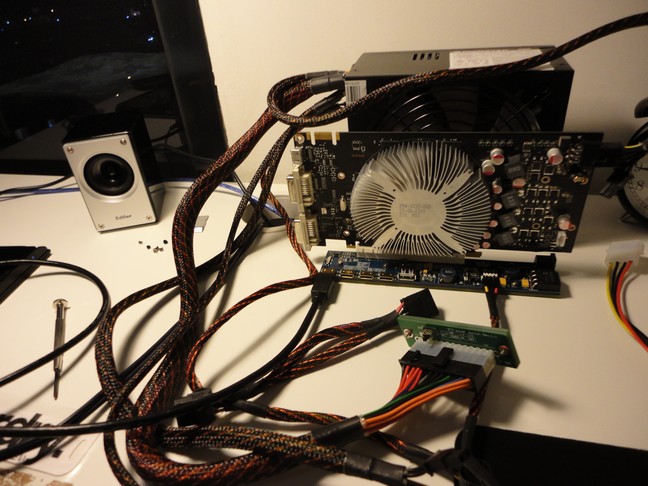
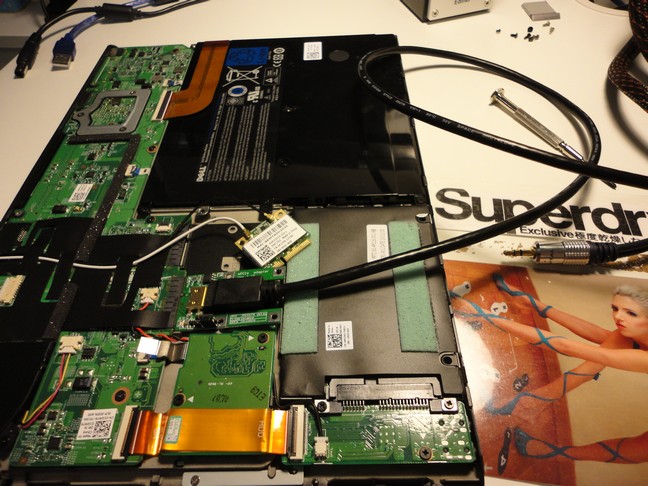
Okay today I took a break from homework, and soldered the wires on. It was rather difficult since the terminals they give clearly were not meant for soldering, and are spaced way too close. After a bit of struggling I got the wires soldered reasonably well (the joints are pretty bad, but there's not much I can do about it). Here are 2 pictures of my setup (sorry taken with my phone), the USB hub is to tell me if the power supply is working correctly...it's been having issues staying on with a very very light load.
![[IMG]](images/storyImages/img20110831160530.jpg)
![[IMG]](images/storyImages/img20110831160512.jpg)
I am experiencing an issue however, I get "This device cannot start. (Code 10)" under "Standard VGA Adapter". When I try to install the nVidia drivers they cannot detect the video card. Any help? I also apologize for the excessive image size.Last edited by a moderator: Feb 6, 2015 -
Alright, I set it to Generation 1 instead of Automatic (PCI-e link speed) and it still has Error 10 D: Help?
EDIT: here is what it looks like in device manager...I'm not sure what the HD audio controller is doing there.
![[IMG]](images/storyImages/devicemanageri.jpg)
In a google search I found that some other guy with a GT240 had this issue on this thread as well, but no one responded publicly. I wonder if this is a GT240 issue...I have a GTX460 coming in the mail in about a week to see if that's the case. -
OMG thank you mate , followed ur instructions and method , my egpu is miracally working now . thanks mate . but the performance is not quite satisfy ya , may be due to the bottleneck effect by my ultra low voltage intel cpu. anyway, so happy to have it working , thank you once again
-
Posting a screenshot of back of notebook:-
![[IMG]](images/storyImages/laptopback.jpg)
Uploaded with ImageShack.us
How to check mini-PCIe ports? What is x2? Sorry for not knowing technical term.
Is everything ok? If yes which kit should I buy? PE4H+EC2C V2 on ebay looks cheaper should I go for it?
Thanks.Last edited by a moderator: May 6, 2015 -
You can alter the TDP/TDC values on the i5-xxxUM CPU using Throttlestop, effectively engaging turbo boost permanently. The m11xR2 folks do that and see 35% better performance. Doing that plus ensuring you've used the modded Optimus driver should result in 3dmark06 > 11k and give overall quite good performance. If Optimus isn't engaging then the 3dmark06 result will be ~5k.
Vostro 1510 schematic shows port1=mPCIe and port2=expresscard. So you could do a x1E link using port1 (ATiAMD) or a x2 link using port1+2. It's based on the 965PM chipset so can't do a x1.Opt link.
Before investing in the eGPU hardware consider if you want to do a system upgrade to one with 4500MHD, Intel HD or HD3000 so can run a simpler x1.Opt eGPU instead. Core2Duo systems with a 4500MHD iGPU go for very little $$ these days. Even Sandy Bridge systems can be had for a little over US$400 (Fujitsu AH531, Lenovo E520/E420, HP Probook 4530s, Dell Vostro 3550/3450) which when coupled even with a basic GTS450/GTX460 will outperform any eGPU setup you could do on the Vostro 1510 by quite a margin.
DIY eGPU experiences
Discussion in 'e-GPU (External Graphics) Discussion' started by master blaster, Sep 18, 2009.


![[IMG]](http://i1236.photobucket.com/albums/ff457/Kizwan_Chronos/DellStudio1557ATIHD5870x2Link.jpg)
![[IMG]](http://imageshack.us/photo/my-images/849/devicemanager.jpg/)
![[IMG]](http://imageshack.us/photo/my-images/829/pciport.jpg/)

![[IMG]](http://i1236.photobucket.com/albums/ff457/Kizwan_Chronos/Image00002.jpg)



![[IMG]](http://imageshack.us/photo/my-images/18/laptopback.jpg/)
