 Problems? See this thread at archive.org.
updated some benchmark results with GTX580 @x2, and games benchmark of Crysis I & II, DMC4.
http://forum.notebookreview.com/gam...851-diy-egpu-experiences-454.html#post7722104
-
Thank you for taking the time to publish those results. Would you mind re-running the following? This then gives a clear picture of where your system's performance is relative to others on the first page.
* RE5-var DX9 1280x800
* DMCV4 DX10 1280x800
* show the GPU 3dmark11 result -
Thanks for the suggestion, I installed eGPU Setup 1.x but it won't load on startup, I select it in the bootloader, I get the cursor blinking for a second or two and then I'm back at the bootloader, it won't run...
EDIT: The only line I could make out right before the cursor blinks and I'm back at the bootloader is perhaps the following:
Try (hd0,0) : NTFS -
Window's bootmgr loads grub4dos' grldr which looks for menu.lst for it's configuraton details If you are booting from a UEFI GPT or compressed partition then grldr will not be able to find that file since it's not as yet GPT capable. Suggest make a USB DIY eGPU Setup 1.x install and boot to it that way instead.
-
Thank you, I managed to boot into Setup 1.x, run PCI Compaction 32-bit for eGPU and iGPU, everything went fine and chainloaded into Windows 7, still nothing, I get a whining noise from the PSU and when I open NVidia control panel I don't get all the settings. I might have a slight power issue so I added a second PSU to power each PCI-E 6-pin input on the GTX460 individually. Will give it another try and see what happens.
-
Still nothing, this time the whole system just froze when I tried to open NVidia Control panel...
-
Does GTX460 is detected in Setup 1.x & Windows? What is the specification for both PSUs you're using?
-
The GTX460 is detected in Setup 1.x and in Windows, I get no errors in Device Manager. One PSU has 12V 8A the other 12V 10A, I know it's not enough to get the card running at max and I'm planning on buying something appropriate, can I still get it recognized properly though at least for a multi-monitor setup?. Does the PE4H require the 5V on the Floppy connector? Otherwise I could get a good 250W 12V-only PSU, could I drive the PE4H with only a 12V supply?
-
Combination of both PSUs won't be able to support GTX460 (160W) & PE4H. You'll need ATX PSU +12V@18A at least, for GTX460. Also need to supply 12V (75W) to PE4H on the floppy connector.
-
Oh I also forgot to mention that when I'm in setup 1.x it says it can't see my external gpu, I try F5 and rebooting and rebooting the gpu but it doesn't want to be seen in the setup. This might be the reason why compaction isn't working for me.
Plus nvidia control panel doesn't want to insatall on this computer, I can install it in safe mod but even then I can't find nvidia control panel. -
Please try this:-
- Install Setup 1.x
- Connect eGPU to laptop but eGPU remain OFF
- Boot into Setup 1.x
- Run the STARTUP.BAT
- Power ON eGPU
- Press F5 (make sure eGPU is detected at this point before proceeding to next step)
- Chainload windows
Please post your PSU specification. -
Thanks, so if I can supply the 12V line only to the PE4H will it still work without needing 5V as well?
-
Sorry, I don't understand the question. If you're using proper ATX PSU, you don't need to worry anything.
-
I mean if I have a 12V power supply, not a proper ATX PSU but just a power brick, much like the DELL DA-2, can I still power up the PE4H? The floppy power connector that goes to the PE4H has 12V, GND, GND and 5V. Is the 5V necessary for the PE4H to function or is it only the 12V that is needed and it uses the floppy power connector just for its small size?
-
PE4H required 12V power (75W).
GPU on startup/boot use max clocks which means also pulling required power from PSU. Other than ATX PSU, I don't think power brick is enough. Maybe possible with multiple power brick. -
Thanks, the DA-2 from Dell should be enough, the GTX460 has total power requirement of 160W if I'm not mistaken, which means 160-75=85W goes through the PCI-E 6-pin power connectors and 75W through PE4H, the DA-2 is rated at 15A so it gives out 180W.
On a different note I still can't get the card to work, is there anyone else who has the latest Intel HD drivers and NVidia Verde drivers and it is working fine? I can't find out what is wrong. -
GTX460 required two 75W 6-pin PCIe power connectors. Connecting only one 75W 6-pin PCIe power connector won't be able to deliver enough power to GTX460. Anyway, good luck.
-
If the actual total power consumption is indeed 160W then it makes sense that it has two PCIe 6pin connectors as each one is rated at 75W, so having only one PCIe 6pin would limit the maximum power draw to 150W. Still, I will buy something better in due time, for now I still can't make it to work at all so any ideas are welcome.
-
Just for troubleshooting purposes, what is the typical sequence for setting up the external gpu? I have tried powering on going into sleep mode, and attaching the card and then resuming; I have tried attaching the card and then starting up and every combination inbetween and the card never shows up as anything anywhere (not even any errors).
Are there any jumpers or anything on the PE4H itself? Also, does it matter that the card leans one way in the slot? I am hoping it is just the cable, and not something more serious like a damaged PE4H or a non functional expresscard slot...
Also, does it matter which of the 4 ports on the PE4H I plug the cable into? -
The ports are labeled. For x1 you must use the port labeled x1, which is the leftmost port.
-
I'm in the same situation, I've tried everything I can think of, both 2GB and 4GB RAM, sleep/resume tricks, all possible PCI compaction combinations, uninstalling and reinstalling drivers, nothing so far. I'm using the x1 port on the PE4H v2.0a through the EC2C, none of the other ports work with this setup.
-
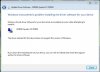 Is there a trick to getting the XP driver installed on windows 7? I keep getting the following.
-
It not just limit the maximum power draw, it will make GTX460 nonoperational. GPU will try to increase the clocks whenever applications demand for GPU processing power regardless there is enough power or not. It won't automatically underclock because of insufficient power. Usually on GPU startup/boot, clocks will set to maximum, which means it will try to draw maximum power for the card from PSU/power brick. What you need to do is underclock your GTX460 using overclock software. BTW, it is clearly GTX460 required two 6-pin PCIe power connector. If you only connect one 6-pin PCIe power connector, GTX460 will failed to operate. So, better get the PSU issue sorted out first before you try to get eGPU working again.
-
I understand what you are saying and I agree, what I said though was that if the GTX460 actually needs 160W of TOTAL power consumption, then if I can supply that much power to ALL three power connections to the card (the PCI-E slot (PE4H) and the two PCI-E 6-pin connectors) I should be fine. That's what I am trying right now, I have around 216W of 12V power available from my power supplies and I'm trying to route it correctly until I find something more suitable.
One thing regarding GPU speed and consumption, I think these are not linked together unless you factor in the GPU load. I had done power consumption measurements in the past and even if you force a certain GPU speed (850MHz for example on a GTX460) unless the load is at 100% then the power consumption won't be anywhere near the maximum possible. -
Right, I've sorted my power issue, now I can underclock/overclock fine while previously I couldn't (MSI Afterburner just froze). The card is detected just fine in Win 7, GPU-Z detects it, MSI Kombustor detects it (but doesn't use it), 3Dmark06 still runs on the Intel HD iGPU... Any suggestions?
-
This one might solve the pcie 2.0 issue :
TurboBox-mini, NA221A
somehow pricey though ...
Uk Reseller -
How did you get your card detected?
-
IIRC it was simply PnP, I just plugged it in the ExpressCard slot after I booted into Windows and that was that, it has been two days since then so I honestly can't remember how exactly I got it working the very first time...
What I can assure you of is that power is a HUGE deal. Now that I've sorted out the power issue I had I don't have any more hangs or freezes, I can open NVidia control panel without my system hanging, I can underclock in MSI Afterburner.
I'm pretty sure that AgentYura is right though, there is no need for PCI Compaction or anything during pre-boot, the sleep/powercycle/resume is also not useful from what I have seen, essentially the X201 is a PnP machine (provided you have an older BIOS with a 3GB TOLUD and not a recent BIOS that has a 3.5GB TOLUD.)
The problem is I have no idea how to enable internal LCD cloning using Optimus, I have the right-click context menu "Run with graphics processor" but even though I try that on 3DM06 I see no improvement...
I haven't tried an external monitor yet since I don't have one right now so I'll report back if that works at least... -
Then it seems something about my PE4H is defective, unless my expresscard slot itself is, but hopefully that isn't the case.
Does anyone have any way to test expresscard slot functionality without any expresscard (I don't know anyone with an expresscard 34 slot and I am not going to buy one just for testing)? -
It's quite rare for an EC slot to be defective, it might have something to do with your dGPU, my X201 has an Intel HD iGPU.
I have a new problem now, I can get HDMI output from the eGPU but as soon as I run 3dmark06 I get BSOD, I think it said:
"Attempt to reset the display driver and recover from timeout failed."
Any ideas?.. -
just a bump on this post. I'm attempting to load the windows xp 64-bit drivers for my nvidia quadro fx 3700m so I can disable it to enable the egpu. I continue to get the message from device manager that the driver is not for that version of windows.
Can someone point me on how to correct this? -
Anyone know enough of the technical details to answer this?
-
What are you using to power the card? I'd try the desktop PSU that you could overclock the card with and see what happens.
-
I have an integrated GPU as well (switchable graphics) and booting switched to the intel GPU didn't seem to help at all.
-
You can do a low-level vbios flash on a PCi-e 16x slot then put it back as an egpu if software oc does not work.
As for PSU as the primary thing to check when facing an issue, you should keep in mind that when using an egpu only the 12V rail of the psu is loaded. Then this particular rail can be maxed out easily without overloading the psu global output cause there's not an entire system to supply.
For example my GTX 560 ti SC is powered by a crappy Heden psu with only 18A on 12V and it runs like a charm. -
Are you using the PSU to supply power to the PE4H as well? 12V*18A=216W which should be plenty for a 560 Ti and the PE4H, although you might be limited as far as overclocking is concerned.
-
Is there a specific operating system that this works best with? I'm going to try reinstalling a clean version of windows 7 and try to get it to work on my hp tx2 with the lines made by chesniak.
-
OK so here I am about to build a new computer to use a DIY eGPU... but I've still got some things to think about...
About the PSU to power my eGPU... kizwan you mentioned I had to make sure it is capable of running my video card and you mentioned things like Amperes and rails that I really don't understand... so before buying I want to know what I'm doing... Can you elaborate on the specifications it needs to have to properly power my Video Card??
And about the adapters... I was checking the specs and photos of the products to know them better and I realized this
![[IMG]](images/storyImages/PE4H-HP4A-ver2.4_1S.jpg)
desktop PCIe adapter is capable of holding up to 4 PCIe cables so... does this mean the more you connect the higher bandwidth you'll enjoy? Because if that's the case, I will then try to do the following setup:
Connect this to the miniPCIe of the laptop:
![[IMG]](images/storyImages/PM2C_1S.jpg)
then connect this to the adapter:
And populate all 4 available PCIe cable slots, so I connect 4 of them...
Now does that make ANY sense??
Would that mean any bandwidth/performance gain?
Or will I get the exact same results by just doing the following setup??
![[IMG]](images/storyImages/PE4H-PM3N-ver2.4_1S.jpg)
-
GTX580 can consume up to 330W on peak 3D & overclock. So, Corsair CX500 V2 (+12V@34A = 408W) will be able to drive GTX580.
mPCIe on notebook is only x1. -
So I have to watch that the PSU for the build MUST be able to deliver 12v@34A???
So the proposed setup is useless right? the only thing worth it is to buy this one then?
I'm planning on making it as neat as possible, so I was thinking in acquiring this
Do you think it would interfere in any way? Using two adapters instead of one? mPCIe-ExpressCard-PE4H instead of just the mPCIe-PE4H?
I was reading the ads in eBay, and this one is ver 2.4... I remember you mentioned something about the 2.0 compliant version, but the 2.4 in here is only about the product right? and nothing to do with the PCIe connection?
So real 2.0 compliant version still has to come out I guess? -
Hello everyone,
Today I joined the DIY eGPU club, with a gtx560 + P4EH in my Dell Inspiron9400, and I passed from a total unplayable Deus ex with my 7900gs, to a max settings game on xp!!! Everything thanks to all the people who support this thread.
But I have some minor issues, that I would hope you can solve,
I have the gtx560 attached to an external monitor, and Xp reccognise it smoothly, but I cant´t see my laptop screen on the multimonitor tab from windows properties, is ithat the normal behavior?
I also receive an error message from windows that says, "Screen set up invalid" " The chosen screen graphics driver can´t be used, because it´s designed for a previous version of windows and it is not compatible with this one" "The system has been initialized using the VGA driver predetermined."
" Contact the hardware manufacturer to get an updated driver or choose one of the drivers that Microsoft provide."
Any ideas, how to solve this?
Thanks in advance. -
@grossemesser,
You said earlier you don't understand PSU rails & amperes. So, I recommend a good PSU for you. Corsair CX500 V2 is not expensive & can drive overclocked GTX580.
Instead of you get the mPCIe to ExpressCard adapter, why don't you get PE4H+EC2C kit? Of course, you'll need notebook with ExpressCard slot.
I recommend getting the kit directly from HWtools.
The ver 2.4 is the version of the kit, not PCIe version. PCIe v2.0 5Gb/s compliant kit still not available. -
i am thinking of building an DIY egpu! i have vaio vgncr35g!
T8100 core 2 duo @ 2.1
2GB RAM
mobile pm965 chipset
200gb HDD
ExpressCard 34mm
i am thinking of buying this PE4H PE4H + EC2C ExpressCard to PCI-E Adapter V2 stock 10pcs | eBay
that psu 700W Gaming 120MM Fan Silent ATX Power Supply PSU 12V | eBay
that GPU Amazon.com: VisionTek AMD Radeon HD 6870 1 GB GDDR5 PCI Express HD Video Graphics Card 900338 (Black with Red): Electronics
or that gpu Amazon.com: Sapphire Radeon HD 6790 1 GB DDR5 DL-DVI-I/SL-DVI-D/HDMI/DP PCI-Express Graphics Card 100316L: Electronics
will that psu capable of running this gpu?which gpu is more powerful and why?what if i have a 54mm expresscard? what are the tools i want?(PE4H etc.)
Any better recommendations for that build? -
Ok, thanks for the suggestions by the way. I'm trying to make this as compact as possible, and thus I want to make use of this PSU... but now the question is... if setting up with this PEH4 (specifically that one because the laptop I'll buy will most certainly lack the ExpressCard slot) will I NEED a PSU with a 24 or 20+4 pin adapter? I mean imperatively? Or how could I be able to set up using the FSP Booster X5? I mean is it possible?
Or maybe I'll end up using something like this?? Or this one?? They are more expensive, but at least they are compact. The former is [email protected] ( spces here) and the latter 12V@40A, as far as I know... but am I correct? At least those DO have a 24 or 20+4 pin adapter.
Thanks for the suggestion, I'll get the stuff directly from HWTools -
So I am trying this out with an Acer 6920 with dGPU nvidia 9500 GS and eGPU nvidia GTX 560 DCU II OC and using the PE4H-E2DC setup. I have spent literally dozens of hours smashing my head against the wall with it and at this point have managed to get the GTX560 appearing in device manager with 275.33 desktop driver installed. However my laptop is still using the dGPU with standard VGA drivers to render things, and isn't detecting the new eGPU as an extra monitor, even though I have hooked up an LCD screen to the card directly using a HDMI cable.
Initially I was getting code 12 errors but managed to fix it (I think?) using setup 1.x and PCI compaction (32 bit, all pcie devices). I will not here though that I never got a bootable PCI allocation that left more than 128 MiB free. Code 12 went away with that, but not sure if its enough for the card anyway...
Incidentally I also had to muck around with the Load + function on 1.x to get it to chainload without BSODing at splash - im assuming its do with the card being 'unconfirmed'
I am not really sure what to do now, as it is all hooked up for a 1x connection but nothing else is happening D:.
Some random notes on my experience:
After the initial detection of the card, my computer does not detect the card in device manager if my dGPU has a recent nvidia driver installed - anything over standard VGA and suddenly upon reboot my gtx 560 is invisible in the device manager other than on AIDA64 where it shows up as an occupied pcie port.
I realise I have an nvidia eGPu and dGPU so I may have issues - but I tried what was suggested on the troubleshooting FAQ (uninstalling both, installing one driver hoping it does it twice) but it never worked out for me. The installation process only ever happens once, depending on if I am using a desktop or notebook driver file. Also Nando's hacked driver with the copy/pasted inf file did nothing but break the setup process after I tried it once.
Please help! -
If your 9500M GS is using the Standard VGA driver then something is wrong either with the drivers or the PCI compaction. I'd suggest firstly load the modded Verde driver to confirm it runs OK without the eGPU attached. It has an INF entry for the 9500M GS and the GTX560.
Then install the devel version of Setup 1.x and proceed to:
1. Identify that chainloading works OK by testing 'chainload mbr' or 'chainload win7'
2. Perform the following PCI compaction until one of them gets you a solution:
* 32-bitA: selective - dGPU+eGPU
* 32-bit: selective dGPU and eGPU
* 32-bitA: ALL
* 32-bit: ALL
Once you have a solution, chainload into Win7. You'll need to install the modded Verde driver now for the GTX560. -
Ok, went ahead and installed the dev version 1.x fine, and used 32 bit ALL compaction (note: 32bitA hangs on me).
Once I chainloaded into win7 only my 9500M is visible in the device manager, even though AIDA64 shows a pci port taken up by the nvidia card (poer 2). I opened up the setup file in the nvidia install directory, after copying and overwriting the modified .inf file, yet once the installer starts it gives an error saying:
"Nvidia installer cannot continue. There are no components to install." -
That's a good sign. The 9500M GS appears to be running correctly.
When running NVidia's Setup, select the "clean install" option. Also check that your GTX560's PCI ID is in the Display.Driver\nvam.inf file. Search for "nando" in that file - there will be three places your GTX560 needs to be entered into. Your GTX560's PCI ID can be found by getting it's Properties->Hardware IDs in Device Manager like shown below:
![[IMG]](images/storyImages/9800gtm.jpg)
Here we see 10DE:0614. The 10DE means it's a NVidia card and the 0614 means it's a 9800GT. -
Since my eGPU isnt showing up in Device manager (it never does after I update driver on the dGPU) I checked in the setup 1.x program and the PCI ID is 10DE:1201.
That ID is already in the inf file 5 times, in groups of 2, 2 and 1 so im hoping those are the three times you mentioned.
After doing a clean install on the dGPU, I rebooted and over wrote the inf file and tried again with the setup. Again it gave the same error; no components to install. I think it is because the gtx 560 isn't showing up in device manager with the update dGPU. But yeah; not sure.
Maybe I should try installing the desktop version of 275.33 from the Nvidia site? -
There are plenty of notebook with ExpressCard slot for example 12.5" Lenovo X220 & 12.5" Dell E6220 (see this list). Probably none of the notebook is interesting for you. Anyway, if the notebook don't have ExpressCard slot, get the PE4H-PM3N ver2.4 Package.
What important from the PSU is enough +12V power to support the GPU. That all, nothing else (whether they have 24 or 20+4 pin adapter or anything else, doesn't matter). GTX580 can consume up to 330W on peak 3D & overclock.
- FSP Group Booster X5 450W Independent/Supplementary: 37.5A@+12V=450W
This PSU have more than enough +12V power for GTX580 which is good. However, this PSU have four 12V rails. If 37.5A@+12V is divided to four rails, it won't have enough power to support GTX580. - SuperMicro PWS-351-1H 24Pin 350W 1U Multi-output Server Power Supply 80Plus gold - OEM: +12V@29A=348W
This PSU certainly have enough +12V power for GTX580. With this PSU, you might need to buy these too:-
- FSP Group Booster X5 450W Independent/Supplementary: 37.5A@+12V=450W
DIY eGPU experiences
Discussion in 'e-GPU (External Graphics) Discussion' started by master blaster, Sep 18, 2009.


