Problems? See this thread at archive.org.
Hi nando,
do you know someone who could do that?
Greetings
-
hi.
i bought pe4l-ec2c + radeon 5770 and i have a problem. i am using win 7 and card is not detected. when i insert expresscard to laptop one led on pe4l is on d1_Int. jumpers are JP3= Closed, JP4= Open and fan is very slow. i tried close 2 jumpers like it was on default and fan was on much higher speed than now when i plugged expres card...
i installed latest drivers...
so can anybody help me? -
So I have officially decided to put aside my home made Vidock and return using my on board graphics. The performance of the 460GTX and connection rate was the equivalent of the card I already have on my laptop (M330 nvidia). The bandwith that the external card was running at was 1.4 gb/s while, meaning that even though it was much powerful than the laptop's standard, the performance was actually a little less.
Second I was getting tired of booting up my laptop and having it crash as soon as I typed in my password to officially log in. Once in a while as well it would crash randomly, the video card connection simply ceased to work.
Thus I shall wait for the next step in the performance section, meaning I will wait until they have a 2.0 version out. I'm not going to bother with doing a 2 X 1.0.
Hopefully it should come out soon. -
I posted this a while back but I still haven't found a solution and I would like some help:
When I play certain streaming videos from the internet in full screen, I get around 10 fps instead of 24 or 30 (whatever the source is supposed to be). This seems to happen regardless of the video resolution as long as it is in full screen. Higher resolution videos running not in full screen have a normal framerate, but full screen videos are a stuttery mess even if they are only 360p.
The weird thing is if the video that doesn't play well is on youtube, I can download it and it will play perfectly fine in full screen on my computer in VLC media player, even if it is in 1080P. This makes me think that it isn't the optimus bandwidth causing it; otherwise I would think it would be resolution dependent but ALL videos in full screen have low framerate regardless of resolution.
I would appreciate some help on this, because I would hate to have to remove my eGPU every time I want to watch an episode of a show online in full screen. -
This happened with my old laptop too, when it had a 5870 hooked up to it. I thought it was because my laptop GPU was failing (which it was). I'm not really sure why it happened, but if I were to give a suggestion, maybe change the Nvidia/ATI control panel settings for the internet browser you are using?
-
Yeah I don't think the videocard is failing since it is working fine. I have tried both forcing Firefox to use the integrated graphics and to use the nvidia GPU, but this is under the 3d settings and videos are a 2D process for the video card, so I am not sure it actually does anything. I have also tried enabling and disabling hardware acceleration by right clicking on flash videos. This has no effect either.
-
this would be awesome... especially since most newer computers are not coming with expresscard slots.
any idea when this is going to be available? -
I have no clue, I've sent numerous emails to PLX and their distributors but nobody has replied...
Estimated price for the chip by semi accurate is $7-$8!!!?!?!!?
EDIT: The only distributor that seems to mention it is here
https://avnetexpress.avnet.com/stor...ohs=&storeId=500201&term=usb+3380&topSellers=
Unfortunately, I live in Canada and I'm not sure if they will have service here.
EDIT2: Contact info for Canada West Coast says to email a representative from cascade-tech. Upon further research of this company, I have found out that they have an office in my city (Calgary). I will give them a call -
Hi!
Finally I got my Fujitsu AH531 with I5-2470, GT525M and 8GB and now Id like to connect my GTX 560Ti.
As I already have a dGPU I need to switch it off, right? Do I also have to do it as above? If yes, I'm wondering how to switch it back when I don't want to use eGPU. Do I have to only unplug the express card and restart?
Although I've been using eGPU for almost 1,5 years, my previous set up was quite easy, I only had to plug the eGPU, didn't need any DIY-eGPU-setup, or anything, so please if possible describe it more clearly so I can understand it. Thanks!
DLast edited by a moderator: May 8, 2015 -
First, install Setup 1.x. You can check available PCI space (largest_free) in Setup 1.x main screen. Second, if largest free is 256MB or more, try boot with eGPU connected & power on. If largest free is less than 256MB, turn off dGPU in BIOS & chainload to windows. Third, if eGPU detected with error 12, you'll need to do PCI compaction.
You can disconnect eGPU (ExpressCard setup only) while in windows by using the Safely Remove Hardware and Eject Media icon in notification area. If dGPU is off, you will need to sleep/reboot your notebook. Put notebook to sleep & wake it up again should make dGPU active/on too. -
Thanks! That sounds easier!

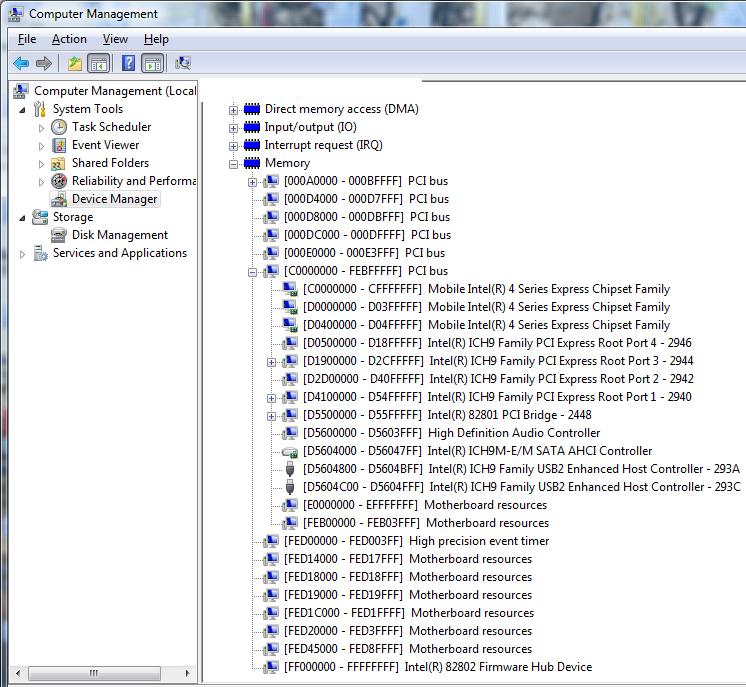
By the way, I guess you can check my TOLUD here. Is it larger than 256MB?Attached Files:
-
-
TOLUD is 0xBFA00000 = 2.99GB which is good. I can't determine the largest free PCI space from that picture. What I can tell you is, for TOLUD lower than 3.25GB, you can obtain 256MB PCI space with either dGPU off or PCI compaction or if you're lucky there is already 256MB PCI space available. You'll need to boot into Setup 1.x to know for sure.
-
Ok, thanks! I'll do it when I'm home again. Now I can reach my computer from distance only, so no possibility to boot up.
D -
Hi peeps
I am in a similar situation to "thkaw". I have a Lenovo W520 with a i7-2720QM, Quadro 2000M, 8GB RAM and running BIOS 1.30. I am trying to get a eGPU setup working (mainly for gaming on my 3D monitor and rendering using more cuda cores)
I have a PE4H + EC2C + Nvidia 8800GT (for now, GeForce GTX 460 on the way) but started running into those code 12 errors. I then tried putting the laptop to sleep, turning on the eGPU and resuming the laptop but would still get code 12 (after a few seconds). I also disabled the dGPU in the BIOS so that I run on the iGPU only.
So I tried the compaction tool. I tried using 32bit compaction but it didnt look like that was working because at the end of the log which shows its progress it would say somethig like "was not successful try another setup". Since my laptop is 64bit and has 8GB RAM installed, I thought it was a better idea to select the 36bit compaction. For the 36bit option i selected iGPU and for the 32bit option i selected egpu.
I was able to boot windows. It took a bit longer to boot and the usual windows starting animation didnt show. it onl showed the old vista animation. Upon booting, the reolution on my PC was super low and fixed at 16 colors. I checked the control panel and noticed that my iGPU was running on standard vga drivers. Reinstalling the intel drivers didnt fix it. I also noticed that the eGPU (8800GT) was no longer giving the code 12 errors but for some reason, the iGPU was giving code 12 errors and the egpu was not showing as an option in the "screen resolution" window. The Nvidia control panel was also giving errors saying that it does not exist.
Im quite stumped here...Im beginning to worry that the new gpu on the way will not work since this old 8800GT isnt getting any further...
Anyone able to help here?... ;S
I have attached screenshots of the setup process. SCN000 is before compaction & SCN001 is after compaction.Attached Files:
-
-
The W520 bios has the same issue as the X/T series where it sets TOLUD=3.5GB when the iGPU only is active. Luckily for you if you enable the dGPU in the bios, then disable it in Setup 1.x, the eGPU can hijaak the dGPU's pci-e space when you do a 32-bit iGPU+eGPU PCI compaction. You'll probably find that TOLUD will change to be 3.25GB when you do that.
You'll also need to do the steps as in BUG: dGPU[off]... at the bottom of the Setup 1.x page. -
Interesting... Alright.
I gave the workaround script a try and as you can see in the attachments, it seems I have typed up the script a bit wrong since its giving me that error. I typed:-
I removed the "." after "0:1c" because it was throwing another error and asked me to check the setpci help.Code:setpci -s 0:1c 10de:0611 1c.w=20,20
perhaps you can point out what I am missing? ;S
Thanks ;DAttached Files:
-
-
I hate to keep bothering you guys, but I really want to get this thing rolling. This was my post a few pages back. Is there any screens I can take in DIY 1x and RW everything that would help the community show me where I am going wrong?
-
Anyone have any idea about this? If it is a side effect of the eGPU than it is a pretty big issue that people should be aware of, especially if there is not solution or workaround. -
@ Mjolner:
A few pages back, someone discovered that the problem is related to hardware acceleration: right-click on the streaming video and choose settings, enable hardware acceleration. Anyway, you may want to search back in this thread, it wasn't so long ago!
-
I have only 128 MB free space so I'm trying to turn off the dGPU with setup 1.x. I can do it, but I don't know how to exit and boot up then without dGPU.
-
Lots of info to absorb in this thread.. How do i determine what exactly I need to buy?
Have an
Inspiron 1545
T4200 2.0Ghz
3Gb ram (waiting to see if 8gb will run)
If this would work with ports other than expresscard in the future since my next laptop probably wont have one lol.. figure making one of these, adding ssd and some ram will let me sqeek by on this laptop for anoth 1.5years or so until I graduate.. got the ram and ssd, looking to keep the total cost under $300. I'll be using my tv as a monitor most likely (60hz, 1080p, 37" LED)..
Will this carry audio over it to the tv, or am I stuck using the headphone jack on the 1545?
Port 1- Empty
Port 2- Intel Wifi card
Port 3- Ethernet Controller
---Port 4 doesn't show up---
port 5- Empty
It seems i need to pick up the PE4H kit ($91)?.. then I'm lost. I can't figure out which PCIe I'm going to be using (x1, x1E, 1xOpt, etc) to determine which video card I should pick up. I have a spare xbox 360 psu i can use ( http://forum.notebookreview.com/gam...851-diy-egpu-experiences-309.html#post7252020 ) although if it's more plug-n-play to use a different psu i'll go with that..
hopefully someone can enlighten me as to my next step
-
What do you mean? Your notebook have Intel HD Graphics iGPU. So notebook will boot with iGPU. After dGPU off, eGPU will take over the free space.
-
I know I'm stupid, but after I switch off the dGPU I don't know how to exit from the setup menu and boot up Windows, without reboot with BIOS. To sum it up, I can only boot to Windows with my dGPU switched back by BIOS.
-
I mentioned this in the post after the one of mine I just quoted, but I have tried both enabling and disabling hardware acceleration with zero success.
-
Ok, I could boot up without dGPU finally. I tried the same thing and somehow it worked... nevermind.
So, turned off dGPU, plugged in eGPU and start windows. I have an error code 10. What does that mean? How can I solve it? -
Do you mean, when dGPU off, screen is black? In the Setup 1.x, after setting dGPU off, choose Chainload to boot into windows. After choosing Chainload, the windows boot menu will appear again. Choose to boot into windows.
-
Error code 10 simply means no driver is installed. Install the nvidia verde driver with modified .inf file.
EDIT: Nvidia verde driver is graphic card driver for notebook. -
My new graphics card just arrived today so I abandoned the 8800gt route in excitement. ;S
It seems I got a bit closer to success with the Geforce 460 but im now running into more problems. The first time I installed the drivers for the card, I had some output on the screen and I could see my wallpaper. But after it asked me to restart, it struggles with setting my second display. Whats most wierd is that it displays the login screen on my eGPU and after entering my password, the display shows signs of activity but then deactivates, switches back to my laptop screen and shows a bubble in the task bar saying that the nvidia drivers stopped working and has recovered. Any attempt to switch it back to external screen (using my Fn buttons) causes it to do the same thing. I have tried my dvi cable and HDMI cable (with mini HDMI adaptor since my gpu has mini HDMI) and they both do the same thing.
I have the custom 275.33 drivers installed with it. Any ideas? ;S -
I've given an example of the setpci syntax required in BUG: dGPU... at the bottom of the Setup 1.x page.
If you have a 4500MHD model Inspiron 1545 then you can do a x1.Opt NVidia Fermi installation. It also has port5=expresscard slot, so can do an ATiAMD x1E implementation. I'd personally get the cheapest GTX460 (non SE) for your system for a high performance, plug and play solution. An Inspiron 1545 has TOLUD=3.5GB but has a rare 36-bit root bridge so no 4GB+ issues. It will carry audio over HDMI cable so no need for headphones.
Please outline what steps you've done so far on your W520 (eg: enabled the dGPU in bios, disable dGPU in Setup 1.x, performed iGPU+eGPU PCI compaction, added line in BUG: dGPU... described at bottom of Setup 1.x page, chainloaded to Win7?) -
SUCESS!!!
Intro:
After about 3 month of reading this amazing thread, I decided to give it a try; and I’m glad I did.
Hardware:
HP ProBook 4330s, i5-2410m, HM65 $730
PE4L-EC2C $52
Galaxy GTX460 768Mb $130 - $50 rebate
Corsair CX-430 $45 - $20 rebate
Total Cost for eGPU $227 – $70 rebate that is yet to be receive.
Extras:
I also have a Crucial M4 128 GB ($170) + 500 GB HDD via DVD drive caddy, Fenvi branded ($13), thanks again Nando4. Upgraded to 8GB of 1333 MHz Ram ($39). A 6 dollars 1.5m mini-HDMI cable. And also $160 for my 1080p 23 in. hdmi so-so quality display. Bringing Total Cost of my ultra-fast portable setup to $ 1345 - $70.
![[IMG]](images/storyImages/dsc06442w.jpg)
Setting-up:
Setting up the eGPU was a relatively painless experience. I started by plugging in all the wires and cable; using paperclip to start the PSU.
At first, I tried the sleep-wake up method; however, my laptop would not wake up. I had to resort to removing the battery. I started to get nervous
After that, I tried to boot up my laptop with the eGPU already on, the bios would not post and it had to resort to removing the battery again. I started to panic.
Next, I tried to boot up to setup 1.x, and then turn on the eGPU. After several attempt, I could not get my gtx460 to be recognized. I probably did something wrong. Getting really nervous now.
After that I boot my computer normally, with nothing plug-in. after windows and everything else loaded, I proceed turn on the eGPU and plugged it in. The GTX is recognized and began to install the generic driver. Windows 7 even self install 275.33 NVidia Driver. No Error 12!!! Turns out compaction wasn’t needed after all.
I then uninstall the NVidia driver so I can reinstall it with the modded Optimus Driver. Took me about 30 minutes to setup, and about another 10 mins dedicated to wires management.
Now, all I have to do each time I start up my laptop is to simply plug it in.
![[IMG]](images/storyImages/dsc06447p.jpg)
![[IMG]](images/storyImages/dsc06452x.th.jpg)
Benchmarks:
WEI:
![[IMG]](images/storyImages/weibs.jpg)
3D Mark06 – at first I got 15.3 k, however now, I only get around 14.1 k (not sure what’s wrong)
UPDATE: I tried disabling wifi during 3D Mark06 benchmark and got around 15k again, seems like Wi-Fi card is the culprit.
![[IMG]](images/storyImages/nvidiageforcegtx460vide.png)
Full Detail Score
![[IMG]](images/storyImages/nvidiageforcegtx460vide.th.png)
3D Mark11- P2927 3DMarks
PC Mark Vantage- Coming soon
RE5 -DX9
![[IMG]](images/storyImages/re5vk.th.jpg)
Heaven - Coming soon
Dirt3 -
Lesson Learned:
First and most important lesson: eGPU, this forum, and everyone who contributed are awesome. Thank you.
Second lesson, while my HP ProBook is a very good budget laptop. There are better alternatives if you are willing to spent a bit more. If my budget was higher, I would have gotten the X220t (better screen, longer battery, touchscreen for W8), or even a Sandy Bridge EliteBook w/ better build quality. Also, a faster processor certainly wouldn’t hurt.
Third lesson, again, the CX-430 is a great PSU for the price (assuming I get the rebate). But if you are willing to spent a bit more, there are certainly better options. Basically anything that doesn’t emit a high pitch noise. With the AC off, it is still audible from about 2 ft. away. Also, a PSU with modular cable would also be quite beneficial. Again, this is all tradeoffs between price and quality.
Quirks and Questions:
Firstly, 3D Mark 06 Score, I have already tried to disable the hdmi audio, no measurable differences.
Every time I plug it in, my Wi-Fi is knock out, I have to manually connect it; not a major problem, but I will certainly appreciate any help/solutions.
Also, full screen HD Vimeo videos seem to be a bit choppy ~20 fps, doesn’t happen with YouTube though. Any fixes?
If I power down eGPU w/o unplugging the express card, the system crashes. Is this common?
Now a question, does this pic means Optimus is activated. If so, to play games on the laptop screen (w/o external monitor), do I only have to switch the monitor with Win+P, or is there any additional steps??
Lastly, any additional tips, advices and comments will really be appreciated, also feel free to ask any questions.
![[IMG]](images/storyImages/unledoptimus.th.jpg) Last edited by a moderator: May 8, 2015
Last edited by a moderator: May 8, 2015 -
I :-
- Disabled dGPU
- used 32 bit compaction on iGPU + eGPU
- added the extra line as instructed. It occured to me that I had to type the number assigned to the graphics card not the hexadecimal address ;S
- ran startup.bat
- chainloaded into windows 7
- epic struggle begins between eGPU and monitor ;S (as mentioned i last post)
-
Nice one. And you're getting the same score as my $1800 laptop ;_;
I cant wait till i get this my eGPU working, then I will only be restricted by my i7-2720QM score ;oLast edited by a moderator: May 8, 2015 -
-So to do this I would need which part from HIT?
-then a GTX460 (perhaps this one: Newegg.com - EVGA 01G-P3-1370-TR GeForce GTX 460 (Fermi) 1GB 256-bit GDDR5 PCI Express 2.0 x16 HDCP Ready SLI Support Video Card ).
-Then would this ITX case/psu work?( Newegg.com - APEX MI-100 Black / Mirror finish Steel Mini-ITX Tower Computer Case 250W Power Supply -
Thank you for posting your 4330s experience. Was curious about that machine myself.
I'd suggest still install Setup 1.x as it will eradicate the wifi problem and ensure your eGPU is working prior to booting to Win7. You need the latter for the Optimus internal LCD mode to function.
- Boot Setup 1.x with mHDMI cable unplugged from expresscard slot.
- Power on the DIY eGPU, plug in the mHDMI cable and hit F5 to rescan the pci-e bus. Ensure the GTX460 appears in the Status window.
- Perform 32-bit PCI iGPU+eGPU PCI compaction.
- Set your startup.bat to contain
Code:set eGPU=10de:0e22 call speedup lbacache call vidwait 60 %eGPU% call vidinit -d %eGPU% call pci.bat call grub4dos mbr
You could avoid using Setup 1.x and do just step 2 above by halting Win7 boot with F8 and listen for a slight muting on the fan noise to indicate the GTX460 is on the pci-e bus. Worth trying first to see if the wifi issue is knocked out with this method as well.
Something I haven't seen before *if* there are no errors against the iGPU, dGPU and eGPU in Device Manager. Ensure you've done a 'clean install' of the modded drivers in case your Quadro's drivers have left some leftovers. You could also change the I/O port you hardcoding into your pci.bat file, ie: 'setpci -s 0:1c.1 1c.w=20,20' or 'setpci -s 0:1c.1 1c.w=50,50', though I'd not expect the latter to be a problem.
Covered in the Getting Started section on first page. Worth checking all the majors (newegg, frys, microcenter, ebay, slickdeals, tigerdirect) for deals on GTX460, preferrably NOT the neutered SE model.Last edited by a moderator: May 7, 2015 -
Nando, do you have any idea why some videos I play are a stuttery mess? I have tried disabling hardware acceleration and it does nothing. I would think that if this was an optimus egpu issue everyone would have it; right now I can't watch any streaming shows on the internet in full screen because of this problem so I would REALLY appreciate it if someone helped me out with this.
-
This is a thank you post for Nando4, Kizwan for figure me out how to run eGPU on Dell Vostro 1510.
Thank you very much. -
I gave your suggestion a try bu uninstalling the drivers, restarted, used Driver Sweeper to remove any potential nvidia driver files, restarted again, installed nvidia modded drivers, restarted...
All seemed to be well for a few minutes. I saw my wall paper on the other screen and could move things to and from it for a little while. But then it turned the screen off and it began to stuggle again while popping up that small "driver stopped responding" bubble message...back where I started. ;(
funny enough, I have this GPU meter gadget on my desktop and it is returning values from my gpu: The name of the gpu, temperature, memory clock, free used and total MB of memory, fan speed, etc. I just cant display anything...Ive attached a screenshot of gadget if that helps.
unhappy bunny here
Edit: This may or may not be worth mentioning but my PE4H version is 2.0a.Attached Files:
-
-
@ruhtraeel, USB 3.0 DIY eGPU progress added to eGPU PCIe 2.0, Thunderbolt and USB 3.0 update, copied below:
2011-10-14: GerryChen -
Thanks for images.
I see. I wonder if they can come up with drivers.
In any case, how hard is it to modify a driver? I'm in second year computer science learning assembly language; next semester/next year I will learn device interfaces. I now know that it may be a very daunting task.
But here's to hoping this can become a viable (and possibly cheaper) solution for people without expresscard slots.
I am also having a hard time visualizing how a card like the 5870 would fit in that tiny slot. -
OK - so drivers are all working OK. Now it's a matter of diagnosing what hardware is failing. It could be the mHDMI cable, PSU, PE4H or the GTX460 itself so best thing to do would be to swap out components until it all works. I had both a intermittently faulty mHDMI and HDMI (cable from eGPU to LCD) with similar symptoms that caused hours of frustration. Suggest swap out those inexpensive items first.
-
I read the whole first page multiple times today
Just not sure if the extra $25 to go from the PE4L to the PE4H is necessary?
For future proofing perhaps?
and it seems for about the same price as a namebrand 460, a 560 can be had.. and for half of either of those, a 550 TI's are available.. hmm -
What is the PSU specification, especially the +12V max current?
-
It seems like I am getting the eGPU to work for about 3 seconds before the iGPU or the PC kicks it off and says there is not a display attached to the Nvidia. (This is only with a delay BTW) can not get a 0 sec to recognize.
When it is at the 'Welcome' Windows screen, it LCD gets darker, clearer and faster, but then the iGPU takes back over. Also when I get out of the RE5 benchmark or hotplug it, same thing (even confirmed in Dev Man) that the GTX 465 works for about 2-4 seconds and then back to error 43.
Can't get to recognize with sliders to 0. Tried every iport command, but don't know how to assign memory in bridge or edit PCI.bat files.
What could be making it work for a few seconds and then off? -
Kizwan, you're my Man!!!
Thanks for your help, finally it works!
Aftterall, I don't think it was that difficult, I just had to figure out how setup 1.x works. All I did was install the modified Nvidia driver (275.x), turned off the dGPU (I had only 128MB free space) with Setup 1.x and rebotted with eGPU on. First, it didn't work, so I had to reinstall the driver with the eGPU plugged and then restart again. That's it.
My PSU is not sufficient enough for OC, so I had to downclock my GPU from 900 Mhz to 860 Mhz.
Anyway, here are the results:
Fujitsu AH531
I5-2470
Nvidia GT525M
8 GB
3DMark 06
dGPU - 8185
eGPU (internal) - 10587
eGPU (external) - 16138
3DMark Vantage
dGPU - 4066
eGPU (internal) - NVIDIA GeForce GTX 560 Ti video card benchmark result - Intel Core i5-2410M Processor,FUJITSU FJNBB10 score: P8940 3DMarks
eGPU (external) - NVIDIA GeForce GTX 560 Ti video card benchmark result - Intel Core i5-2410M Processor,FUJITSU FJNBB10 score: P12333 3DMarks
3DMark 11
dGPU - 968
eGPU (internal) - 3251 (overall score)
eGPU (external) - NVIDIA GeForce GTX 560 Ti video card benchmark result - Intel Core i5-2410M Processor,FUJITSU FJNBB10 score: P3889 3DMarks
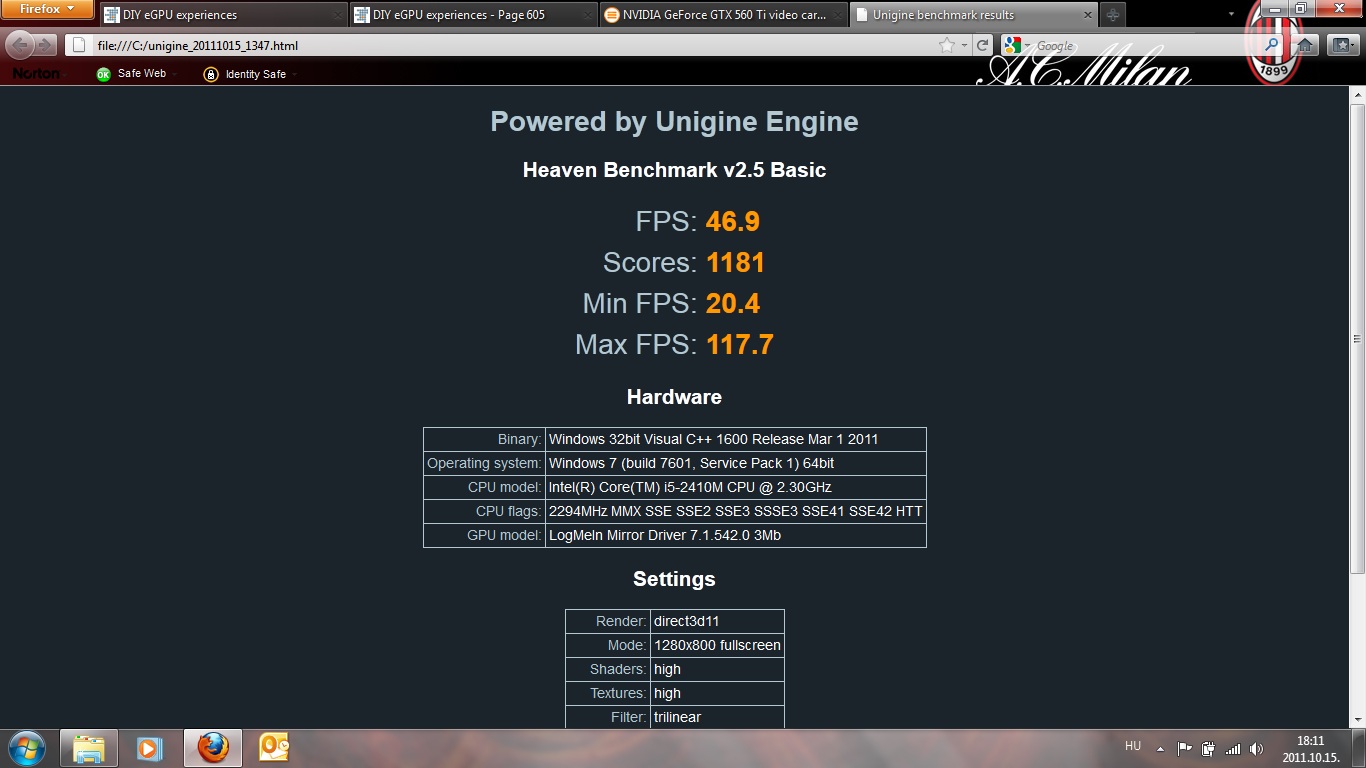
Heaven - 1181
Thank you again!
DAttached Files:
-
-
@Fardavid,
Congratulation! Nice scores. For the Vantage & 3dMark11, are they overall scores or GPU score? To take the screenshot of the DMC4 & RE5 results, after the benchmark finish, press Alt+Enter buttons. Both will change to windowed form & you'll be able to take the screenshot. Either DMC4 or RE5 will show loading screen when you do this. Just wait, it will display the result screen back after that. I can't remember how to take screenshot of the Heaven result though but you can save the result to HTML at the result screen.
-
Thanks, I'll try that and post it as well.
Those are overall scores, should I post the GPU scores instead?
D -
If you post GPU scores we can add your result in the first post. Your 3dMark11 is 3895, so GPU should be around 4XXX.
-
Understood. I cehck it when I got back home and post it.
D -
Anyone have any ideas about this? Disabling hardware acceleration DOES NOT HELP. Other than that, it seems like the same issue that people have been having that is solved by disabling hardware acceleration.
-
I found that the 285.38 beta desktop driver can be installed without any mods, and it even provides internal LCD support.
Also, I run RE5, DMC4, and heaven in windowed mode to take screen shots.
DIY eGPU experiences
Discussion in 'e-GPU (External Graphics) Discussion' started by master blaster, Sep 18, 2009.




![[IMG]](http://imageshack.us/photo/my-images/714/dsc06442w.jpg/)
![[IMG]](http://imageshack.us/photo/my-images/43/dsc06447p.jpg/)
![[IMG]](http://imageshack.us/photo/my-images/26/dsc06452x.jpg/)
![[IMG]](http://imageshack.us/photo/my-images/23/weibs.jpg/)
![[IMG]](http://imageshack.us/photo/my-images/62/nvidiageforcegtx460vide.png/)
![[IMG]](http://imageshack.us/photo/my-images/600/nvidiageforcegtx460vide.png/)
![[IMG]](http://imageshack.us/photo/my-images/196/re5vk.jpg/)
![[IMG]](http://imageshack.us/photo/my-images/831/unledoptimus.jpg/)