 Problems? See this thread at archive.org.
Hi,
I am wondering about something, does any mini-hdmi cable would work for eGPU ? or is the hwtools one a special cable ?
I 'm asking it because I want to try something with a mini-hdmi adapter, it's a mini-hdmi-TO-mini-hdmi, female-to-female.
I want to make a kind of external mini-hdmi eGPU ready port, using a PM3N for laptop without expresscard.
-
Hello everyone, as my first post on this forum I'd just like to say WOW! The amount of data in this thread alone is not only extremely helpful, it is completely STAGGERING. So thank you all for putting your obsession to good use and helping a noobie learn the ropes of pc's as an enthusiast.
Now time for business: I've been researching eGPU implementations for about a month now, and I think I have a good idea of what I want and need to make this work. First and foremost, I want to be able to run the lastest games (BF3 and Skyrim, let's go!) and those to come for the foreseeable future on highish settings, online, with playable framrates. I don't need 100+ fps at 1080p, I just want as much visual effect as I can above 30 fps avg. and smooth gameplay. That being said, I've got price limits, as I'm going off to college next year and while my parents have agreed to help me out with the lappy, it needs to be under $700 ish. So this is what I'm thinking:
HP 6360b, i5-2520 (the refurbs listed on the news page), upgrade the ram to 8gb 1333mhz, then PE4L or H and a GTX560ti, x1 2.0 (opt.?)
or
Lenovo E420, i5-2410 or 2520, upgrade ram to 8gb, PE4L or H, gtx560ti, x1 2.0 (opt.?)
My questions are:
1. Will Optimus be usable with pci-e 2.0, or is it no longer needed?
2. with the pci-e 2.0 adapters being released mid-November, I should expect a performance gain over Atticus's (awesome) setup given I would be using the same processor and GPU, just in a lower-level lenovo (which wouldnt affect performance), right?
3. With the new 2.0 compliant adapter, how would an i5-2410 stack up against the current 1.0 i5-2520 numbers? Are the gains given by the 2520's extra boost substantial in a game that is CPU intensive like BF3, or will a 2410 get the job done nearly as well?
4. I haven't seen any Hp 6360b implementations, but there are many Lenovo imp.s and a handful of E420 and E520's that have been successfully done, so is it smarter for me as a nub to go the Lenovo route, or is the HP a better computer for the money ($650 to $700) and worth the risk?
5. Any BIOS downgrading or TOLUD issues with the E420?
WHEW. Sorry for the length, but any help is greatly, greatly appreciated. Looking forward to a good hobby and new obsession .
.
-
-
Welcome to NBR and to the DIY eGPU experiences page.
x1.2Opt does work, as confirmed by serialkllr's i5-2410M+GT240 results. We don't have a comprehensive set of benchmarks comparing x1.1Opt versus x1.2Opt to see how much better it is and only Serialkllr has the modded PM3N that is pci-e 2.0 capable to be able to do it. I may be able to change that soon Though you can see my own testing with a 25% pci-e overclock of a [email protected] [email protected] implementation
here. It shows a noticable performance improvement particularly with internal LCD only mode. x1.2Opt is effectively a 100%
pci-e overclocked x1.1Opt so would be significantly more bandwidth than with my test setup.
imho: 12.5" HP 2560P > 13" HP 6360B > 14" Lenovo E420
Given the choice of a 13" HP 6360B or a 14" Lenovo E420 I'd go the 6360B. It looks better and weighs less. A i5-2520M is 300Mhz (2.9 vs 3.2Ghz) faster than a i5-2410M, or slightly more than 10%, so I wouldn't pay more than 10% extra for it. The i5-25xx CPUs have VPro security features if that matters to you.
Now we've had HP 8460p and Probook 4330s / 4530s x1.1Opt implementations already so I'd expect a 6360B will follow that trend and present no TOLUD issues.
Consider one additional wildcard that is even more portable than a 6360B. A handful of 12.5" Elitebook 2560P units have recently been spotted on ebay-US like a US$615 beauty. A 2560P has had a i7-quad installed in it here which gives far more performance improvement in cpu-bound games than going a level or two up in dual-core i5 or even i7 cpus. Plus we see here that Series-6 chipsets will be able to host 22nm allow Ivy Bridge CPUs. Popular ultraportables with soldered such as a Lenovo X220, Dell E6220/E6320 and Toshiba R830/R840 will not be able to accomodate any cpu upgrades. -
Optimus has shown to work with pci-e 2.0 and I'd definitely wait for the new adapter. I'm going to get one even though I already have a PE4H. Some games are hit and miss with 1.1 opt. BF3 for example runs very well on it, but some games like WoW and metro 2033 really want more bandwidth, which pci-e 2.0 would provide. On metro 2033 for example, I get 23fps in the benchmark while similar desktop systems get 40fps. As benchmarks go, 3dmark06 would benefit only a little from 2.0, but I expect significant gains in vantage. The best I can do is around 13.5k gfx score, while x16 setups at the same clocks get 15.5k. 11 seems to only be pci-e limited in one of its tests (gfx test 4) so gains would be small. RE5 is CPU limited all the way, and DMC4 is significantly but not severely PCI-E bottlenecked.
Even if a game does not benefit on average very much from pci-e 2.0, optimus has its random moments where it pukes on itself and give poor framerates for a second or 2, then jumps back to normal. This is very obvious in the sm3 3dmark06 tests. At these moments I believe that the compression deactivates, making you rely on the pure x1 link. With 2.0, these moments will have double the fps since you have double the bandwidth, raising fps from unacceptable levels in the 20s to the 40s.
As for the Hp 6360b, the most important data to learn if it is eGPU compatible is to find out the TOLUD value. I'd ask the HP forums to post a screenshot of their device manager in the "memory" dropdown when "view resources by connection" is selected.
As for the CPU choice, CPU seems to really only matter in benchmarks, since the CPU creates sort of a max cap on fps. Ex with my CPU your fps cap in something would be 100fps, while with an i5-2410 it'd be say 70fps. This obviously affects the average fps, but in terms of game playability it doesn't really matter. PCI-E bandwidth and GPU power have a much bigger role in game playability than CPU power. -
im sorry i barely understand half the discussion here. quick question that im sure has come up 1000 times in this topic;
Am i gimped if i try to use the PE4H kit? like running at x1 and such.
(win7, notebook sony vaio vpcf115fm, desktop gpu: nvidia GTX275)
i got the kit, and am ready to grab my vid card and psu from storage tomorrow. im worried that even if i make this all work, that it will suck for me and i might as well deal with my ty 330m
please give me good news. im still studying up on the OP's procedures, its just a lot to take in. -
hi!
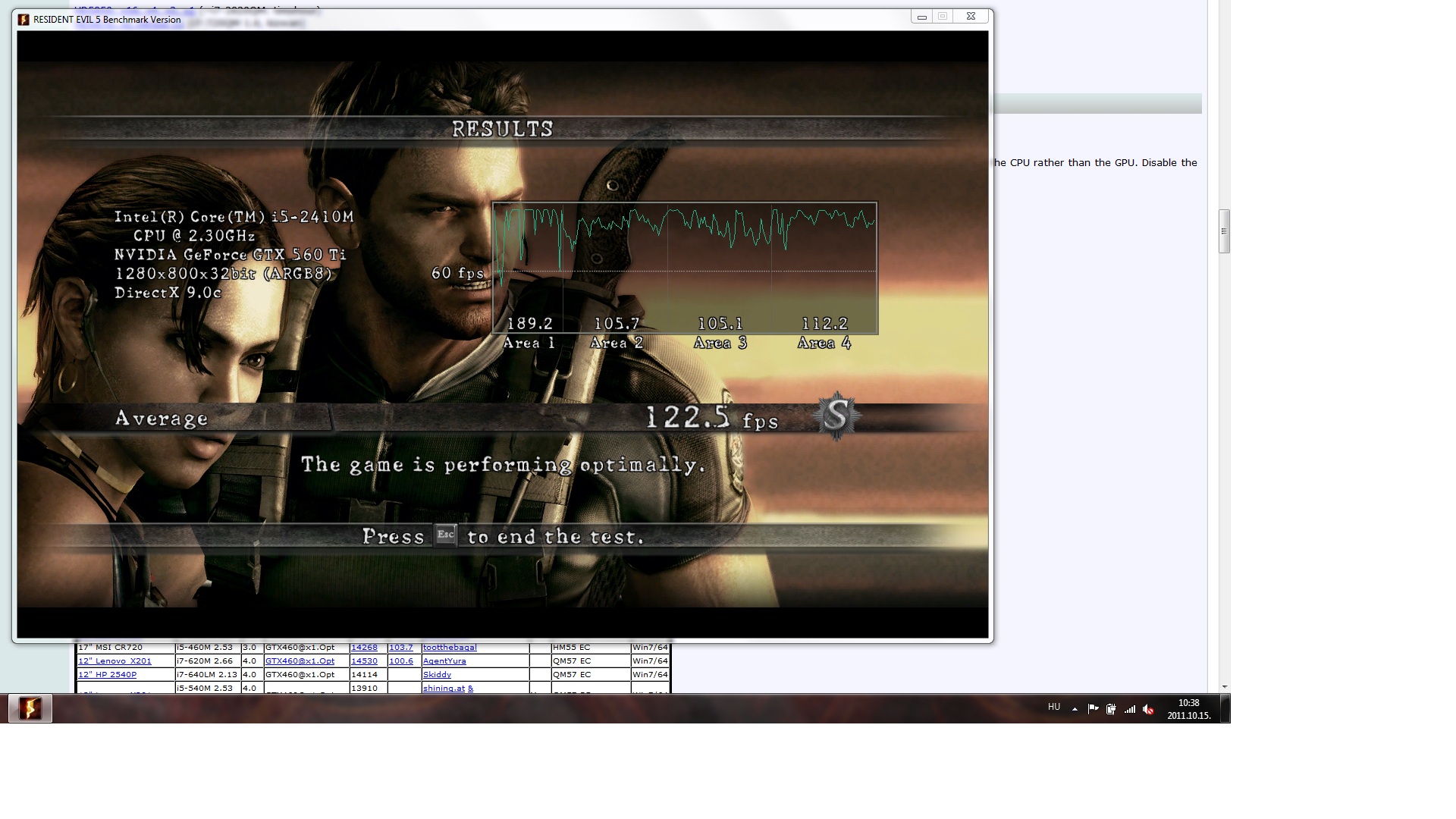
I ran a few tests, you can see the result of 3Dmark11 here NVIDIA GeForce GTX 560 Ti video card benchmark result - Intel Core i5-2410M Processor,FUJITSU FJNBB10 score: P3889 3DMarks and the RE5 test here.
I have one problem though. Sometimes it drops me back from external monitor to internal with some error messege after a while. I cannot finish 3Dmark Vantage test, or DMC DX10 test or Heaven test. I played with Wither 2, everything was fine, all the other tests are ok as well. Do you know what occures this? What is the latest Nvidia driver I can install without problem? I remember that with my old laptop and with the same GPU when I played Deus Ex in DX11, it had also some error after a while. I don't know if that counts...Attached Files:
-
-
@Fardavid,
RE5 DX9: [email protected] = HD5870@x2
Look like power is insufficient. What is your PSU +12V max current (if dual-rail PSU, the +12V1 max current)? GTX560Ti can consume up to 205W on peak 3D & can go up to 260W if overclocked. I noticed 3dMark11 is a bit balanced where it doesn't stress either the CPU or GPU too much (therefore GPU doesn't consume max power, I think). -
A couple of suggestions below to eradicate your issue:
1. Set Gen1 link speed
Add a 'call iport g1 [port number]' above your 'call pci' (if exists) or 'call grub4dos...' line in your Setup 1.x's startup.bat. Use the startup.bat->!Edit menuitem to do this. Example, if your eGPU is attached on p1 then add:
This will force the link to Gen1 speed (2.5GT/s). Some ppl have had problems if the link is set to Gen2 where it autonegotiates the link to a lower speed.Code:call iport g1 1
2. Check your PSUs 12V rail ensuring it's 21A or more
If that doesn't fix it then check your PSUs 12V rail making sure it is 19W or more. An OCed GTX560Ti requires ~222W at full load. So 222/12* is 18.5A. Adding a 10% margin makes it 21A minimum for no power starvation issues.
3. Set your factory OCed GTX560Ti to reference clocks
Use MSI Afterburner to downclock the GTX560Ti to reference speed of 822/4000Mhz. A precautionary step in case the components cannot support the OC clocks. Test to see if you can run 3dmarkvantage without error.
Optional: set fuse bypassing
222W is at a level where the PE4H fuse may engage. You'd know if this was the case as the GTX560Ti would power down completely during peak load. If this occurs then with a PE4H earlier than 2.4 do Panzer's fuse bypass. If you have a PE4H 2.4 then set the fuse bypass next to the floppy molex plug. -
Thanks!
I have this PSU Arena Electronic GmbH - Chieftec - CTG-400-80P I guess that is enough, right?
I just to be sure, when it drops back to internal LCD, I mean it still goes through the eGPU, so that should be working. All I have to do is go to display=screen resolution and click on detect, and it's ok again. Isn't that a windows display driver issue perhaps? -
Your PSU have +12V1@18A=216W. So it is enough for GTX560Ti if not overclocked. Try Nando suggestions one by one.
-
Bad news. Your system is gimped. I believe a VPCF115FM has only GT330M graphics. Having no Intel iGPU means no x1.Opt is possible. I don't believe it could do a x2 link either (refer first page for details on how to check). In which case adding an ATiAMD card will benchmark faster in some DX9 titles like 3dm06 but in real life the GT330M will be faster. Suggest sell up and get a better DIY eGPU candidate machine using the thin-and-light link in my sig as a resource.
It's a modular PSU that has 12V1=18A and 12V2=18A. You may very well be drawing power only from a single rail where the power required for your OCed GTX560Ti would exceed what one rail can supply. The Arena website doesn't tell us how the rails are split. Based upon reading the specs of other modular PSUs they often have the pci-e connectors on one rail and the molex on another. So a workaround would be to plug a molex connector into your modular PSU and use a molex to pci-e adapter to power one of the two pci-e connectors off the second 12V rail. That way you'll be able to use both rails to successfully drive your OCed GTX560Ti. -
Can you figure out how my rails are split from this picture?
Attached Files:
-
-
I made a mistake. It's not a modular PSU, so one 12V rail would be the ATX connector and the rest of the connectors would be the other 12V rail. Summary: your PSU isn't sufficient to power your OCed GTX560Ti at full load. Try underclocking/undervolting it for the meantime but otherwise seek a PSU that has a 12V/21A or greater rail to power your OCed GTX560Ti without any issues.
-
Thanks Nando4 for the help. Could you offer some PSU so I will not make any mistake?
-
Corsair CX500 V2.
It have +12V@34A=408W.
-
Not sure what the German market has but the Australian market sees the following being the least expensive high-grade PSUs that can drive a OCed GTX560Ti (222W 12V/21A) or even a GTX570 (298W, 12V/28A) both calculated with a 10% safety margin.
Antec Ion2 460: 12V/25A <-- not for GTX570.
Corsair CX-430 V2: 12V/28A, 80+
Antec Neo Eco 450 or 520: 12V/34A or 12V/40A, are 80+
Silverstone ST50F-ES: 12V/34A, 80+ -
Thanks Nando4, you helped again a lot! I had to downclock to 860Mhz and it is stable now. I updated my scores on the original post.
Thanks again!
David -
I'm from Hungary by the way...
I guess I will go for Corsair CX430. Thanks again! -
I have this adapter: http://muf.servebeer.com/files/IMG_20111015_175238.jpg
Will I be able to use it with lenovo x220 or t420 or other current SB notebook? Attaching this to hp 8510p with ati x1950gt or ati 3650 yielded no success, so I'm just worried about this.
I'm choosing new notebook to buy and my favourite is hp 8560w just because of the VGA (ati m5950), but If I would know for sure that I could get just x220 + nvidia's 560 or some combo like this and I would have more power and portability than hp8560w it would be really awesome - but I need to know for sure Is it possible to tell?
-
I just noticed I screwed the Heavon score at my post, so I updated...
-
just so i understand. is this the spec im to look up on behalf of this?
http://img69.imageshack.us/img69/2091/blah1h.png -
Ok after about 4 tries posting my video lag issue I still haven't gotten ANY response; isn't there SOMEONE who has this same problem or has ANY clue of what it could be??????????????
-
HP EliteBook 8560w doesn't have Intel HD 3000 iGPU. This means you won't be able to implement high performance eGPU setup (x1.Opt) with this notebook. The AMD FirePro M5950 included in this notebook is powerful enough, so eGPU x1 setup also not good idea.
To get portability & high performance eGPU setup, you'll need a SB notebook with Intel HD 3000 iGPU. Please go here to see the list of affordable SB notebooks. If money is not an issue, you might interested with Dell Latitude E6520. It have Intel HD 3000 & Nvidia NVS 4200M, switchable using Nvidia Optimus technology. HP Elitebook 8460p is good choice too. It only have Intel HD 3000 iGPU & also have good battery life.
You should be able to use that adapter, if they not faulty. -
Usually if nobody responds it's because they don't know.
I think I am the only other person to have this issue, and I never got it fixed; my laptop died before I could figure out why it did that.
USB 3380 USB 3.0 to Expresscard adapter = $15
Shipping = $22
Total = $40 -_- -
Hi kizwan,
I've ended up purchasing a GT430 and PE4H/PM3N. I strongly considered buying the Amfeltec kit which would have provided some fitting advantages given this netbook's lack of space but in the end I couldn't think of a tidy way to get the ribbon cable out of the case.
Regarding Optimus, I reckon the jury will be out on that until I have given it a try, as I haven't found any links where someone has done this with a "pine trail' netbook. I've done some more research and I can see several areas for concern. I found this in relation to the Ion2 equipped eee 1201PN ( First wave of Ion 2 ASUS Eee PC 1201PNs lack NVIDIA Optimus -- Engadget ):
I'd guess from that that the lcd is hooked up to the Ion2 and that the 3150 on the atom is just idling. I don't think I will have this issue as my 3150 is certainly hooked up but it's left me wondering what other hardware issues may exist.
In addition, this netbook (as with most) comes with Win 7 Starter. From what I've read Optimus will not work in Win 7 Starter. Instead, Asus supplies a utility to switch to Ion only mode (requiring a reboot). I'm guessing that will mean no x1.opt in Win 7 Starter. -
Hi mabrown,
Optimus setup doesn't need any other hardware except supported/compatible Intel iGPU. That Asus ION2 netbook have Intel GMA 3150 iGPU disabled completely (not electrically connected). On that netbook Intel GMA 3150 iGPU won't work unless Asus provide another motherboard that can support it. Your netbook don't have this problem since the Intel GMA 3150 is active & usable. BTW, do your netbook have Intel NM10 Express chipset? "Pine Trail" is platform codename; Atom "Pine View" processor + Intel NM10 Express chipset.
Regarding the OS, I also did read the Windows 7 Starter edition doesn't support switchable graphics. You'll need at least Windows 7 Home Premium for Optimus to work. -
Hi kizwan,
Yes, it is an NM10 (I just checked to make sure). Thanks for the confirmation regarding Win 7 Starter. I will deal with that once the hardware is all in.
Many thanks to you, Nando and all the other contributors to this amazing work and for the newbie friendly way this thread is run.
Looking forward to the parts arriving!
Mark -
Hello good sirs. My acer 4820tg doesnt have an external express card so Im guessing if I have to do this project I should use mPCIe, but before buying the parts, would you guys answer a couple of my questions?
1: Will the diy egpu be compatible with my mPCIe slot? Or does it only work on the 3820tg?
2: What video card should I use? I plan to use the diy egpu for eyefinity primarily, so Im hoping to put in at least a 5870
Thank you so much for your time kind sirs. Hope to be able to create my 3-monitor setup soon :3 -
Hi EGCary,
- The mPCIe port on the 4820TG can be use for eGPU. You'll need to removed the wireless card.
- 4820TG have switchable graphic cards; Intel HD Graphics & ATI Radeon HD. With Intel HD Graphics, you can do high performance eGPU setup (x1.Opt) with Nvidia desktop graphic card. Alternative to HD5870 Eyefinity are Zotac GTX460 3DP $ (4 displays) or KFA2 GTX560Ti MDT X5 (5 displays). HD5870 Eyefinity is good choice too for multi-monitor but you can only do eGPU x1 setup. With eGPU x1 setup, you'll experience FPS drop while playing games (when processing multiple effects) but 1080p video should be playable.
My eGPU use non-eyefinity HD5870 GPU & currently running on x2 link. If you want, I can run 1080p video with x1 link & post the screenshot here. 4K resolution video should be playable too using software acceleration. -
Thank you very much for that information. Didnt really have any idea how to set this up until your answer. If ever I would just like to play even at 720p x 3 monitors, do you think the 5870 would be able to handle that? and I actually plan to use a 4 monitor setup, with one 32"lcdtv up top which mainly duplicates the image shown on the middle monitor.
I am currently satisfied with my 5650 on 720p resolution so as long as 5870 can handle 720p x 3 monitors ill be a happy camper
EDIT: Ok I have read a couple of gtx 460 articles and it says it is compatible with nvidia surround, something similar to eyefinity. Id have to do without the upper monitor tho but I think I can live with that. At what resolution/fps do you think this will run on? -
HD5870 can handle games at 720p resolution but with only on x1 link, you'll experience FPS drop & stutters during gaming when there are multiple effects. Regardless any resolutions, the FPS drop will always happen due to limited bandwidth provided by the x1 link. I recommend getting Nvidia card instead. With Intel HD Graphics & Nvidia desktop graphic card, you can do x1.Opt setup. Basically x1.Opt > x2 > x1.
- x2: Require two mPCIe ports or ExpressCard+mPCIe. Combination of PCIe ports 1 & 2 or 3 & 4 or 5 & 6
- x1: Require either one mPCIe port or ExpressCard slot.
- x1.Opt: Require either one mPCIe port or ExpressCard slot. Combination of Intel GMA 4500MHD or Intel HD Graphics or Intel HD 3000 iGPU & Nvidia desktop graphic card. Opt=Optimus provide PCIe data compression which give performance boost to eGPU x1.Opt setup.
EDIT: You can see comparison between x1 & x2 setup in my eGPU experience post. x2 & x1.Opt on some games/benchmarks have the same performance. -
Ok, since I have an intel hd graphics card, ill just have to get one gtx460 and let software do the rest right? And x1.Opt is better than x2? Awesome! the gtx460 can only display surround when on sli though, so my the best option would be the zotac or the kfa560? I think ill try out the zotac since It's cheaper. still saving up for it though, so itl be a while before I get the setup complete (hopefully december). Thank you once again sir kizwan. Wish me luck!
All in all:
$ $ $ right? I chose the second pe4h because since you said 1.Opt, I assumed it still used x1, is that correct? -
Zotac GTX460 3DP support quadruple monitor. So it is good choice for you. For the time being, please install Setup 1.x & take the screenshot of the Setup 1.x main screen (instruction available at Setup 1.x page).
-
Yes, that all you need. BTW, instead PE4H, you can buy PE4L. PE4L much cheaper & deliver same functionality. PE4H have sturdy build & can hold the graphic card.
Do not forget PSU. The ZOTAC ZT-40407-10P power requirement is 160W. So, PSU +12V power must able to provide 160W. Check the +12V max current, at least +12V@15A (180W). -
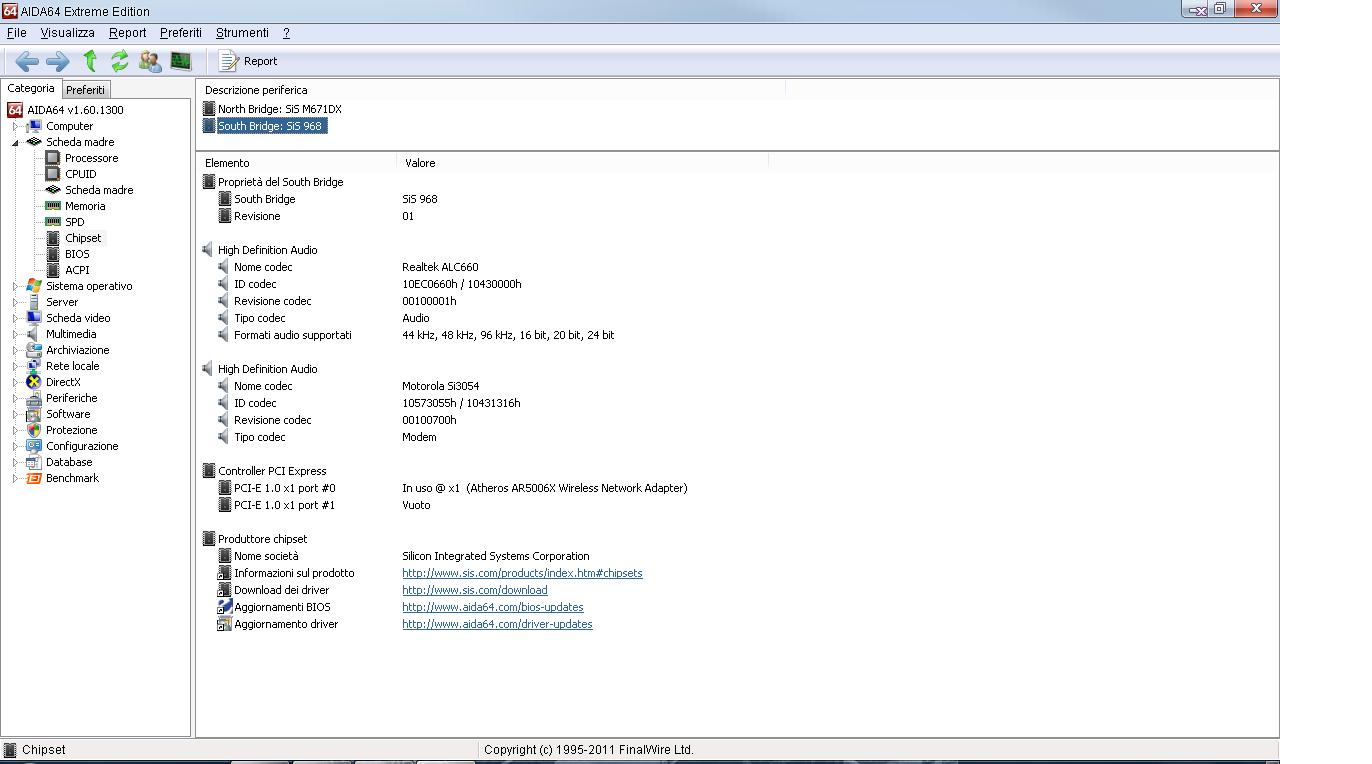
Can I do a x2 link with my SiS 968 southbridge? I would use expresscard + mini pcie (pulling out the wi-fi card).
I've taken a look in the first page of this thread, but there's info only about intel chipsets.
Here's a screen from AIDA: the empty port is the expresscard, isn't it?
Thank you very much!Attached Files:
-
-
Can you please provide the simplest step-by-step method to duplicate the problem? Without knowing the full details I'd suggest change the Power Mangement mode in the NVidia CP to Prefer Maximum Performance. Also test by ticking/unticking the Enable Hardware Acceleration by right-clicking the video and changing the Flash video options.
I'm 99% sure you can't. Would need to get a SIS 968 programmer's reference with it showing (1) it's possible to gang ports to get x2 mode and (2) shows how to do it. Problem is that reference isn't breadily available to the public. -
Can you please provide the simplest step-by-step method to duplicate the problem? Without knowing the full details I'd suggest change the Power Mangement mode in the NVidia CP to Prefer Maximum Performance. Also test by ticking/unticking the Enable Hardware Acceleration by right-clicking the video and changing the Flash video options.
NVidia would be the better option to go since your Acer 4820TG can do a x1.Opt implementation. You'd need one of the following special multimonitor-supporting NVidia cards to allow more than 2 monitors to be run simultaneously:
ZOTAC GTX550Ti Multiview (3 displays), Zotac GTX460 3DP (4 displays), Zotac GTX560 Multiview (3 displays) or KFA2 GTX560Ti MDT X5 (5 displays)
Do note that multimonitor resolution is limited to 1920x1080P with these. If you did require higher resolution then would need the slower ATiAMD EyeFinity available with HD54xx+ or newer cards.
I'm 99% sure you can't. Would need to get a SIS 968 programmer's reference with it showing (1) it's possible to gang ports to get x2 mode and (2) shows how to do it. Problem is that reference isn't breadily available to the public. -
I think im going to get the pe4h+pm3n for the sturdier base. My only concern would be the zotac gtx460. A review said each displayport output only had a max of 1600x1200 resolution, has this been tested? Although I would play games at 720p x 3 screens, I plan to use 1080p x 3 screens for the desktop interface as I would like the large screen real estate when it comes to schoolwork.
-
ZOTAC GeForce GTX 460 3DP max resolution 1x DVI (2560x1600), 3x DisplayPort (1600x1200 each port), 4 Monitor combined display (6400x1200). If you're planning to use 3 x 1080p screens, there shouldn't be any problem.
-
The GTX560 is a better option for you then: ZOTAC GeForce GTX 560 Multiview 1GB 256-bit GDDR5 (820 MHz/4008 MHz) Graphics Card [ZT-50706-10M]
-
View attachment 71648
Dear Nando4, do you think the attached PSU would be sufficient?
GIGABYTE - PC Components - Power Supply - Superb series - Superb 460
or
Corsair CX-430 (not 80+)?
Thanks! -
Look like that PSU use peak rating (12V@20A). Usually this kind of PSU only capable delivering peak current at certain temperature only. So, I'd refer to max current instead. 12V@16A=192W is not enough to drive OCed GTX560Ti.
-
Just reedited my post, but thanks anyway!
How about these:
GIGABYTE - PC Components - Power Supply - Superb series - Superb 460
or
Corsair CX-430 (not 80+)? -
That Gigabyte PSU also unable to provide sufficient power. It only have +12V1@14A = 168W.
Corsair CX-430 is good choice. It have +12V@28A=336W. This can drive OCed GTX560Ti (need 222W/260W). The Corsair CX-430 available now is V2 which is 80Plus certified PSU. Good for your electricity bill. -
I've found something that "could" be useful: what do you think of it?
http://go-gddq.com/upload/2011-07/11072617033154.pdf
Asus X51C T12C_°Ù¶ÈÎÄ¿â
ASUS F5V_°Ù¶ÈÎÄ¿â -
Ok, Thanks!
-
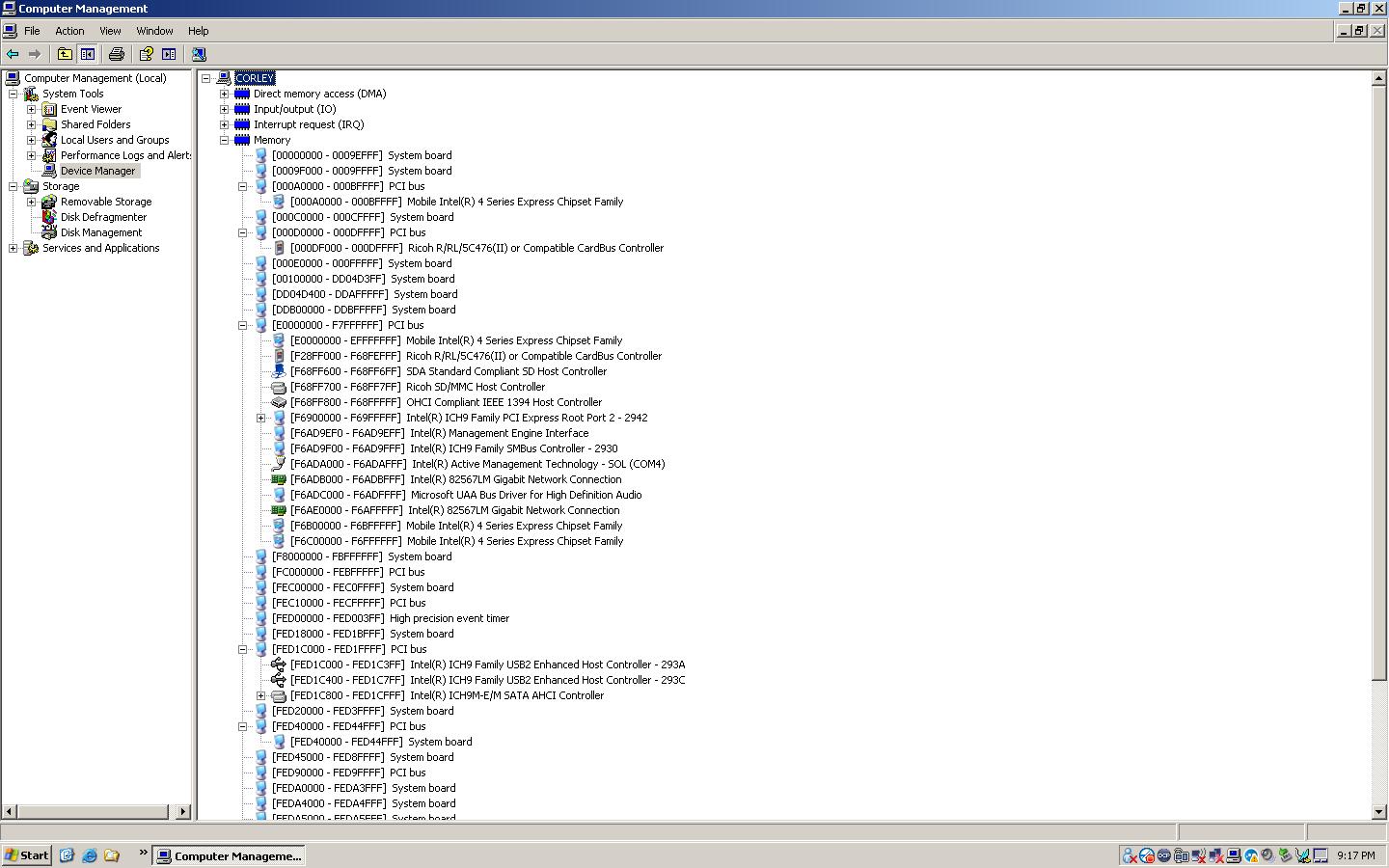
thanks mate here is the screen shot, it is currently running xp but will be using a different hdd to run win7 64bit.
Attached Files:
Last edited by a moderator: Feb 6, 2015 -
-
Hi dualbios,
![[IMG]](images/storyImages/71649d1318850544-diy-egpu-experiences-mem-usage.jpg)
First PCI Bus (with 8 digits memory address) is 0xE0000000 which means TOLUD is 3.5GB. You still can implement eGPU on Dell E6400 but won't be able to use 4GB+ of RAM. You will only able to use 3GB or less RAM for successful eGPU implementation.Last edited by a moderator: Feb 6, 2015 -
that shouldnt be a big issue. You guys are so helpfull thankyou agian. so whats the next step to getting this to work?
DIY eGPU experiences
Discussion in 'e-GPU (External Graphics) Discussion' started by master blaster, Sep 18, 2009.





![[IMG]](http://forum.notebookreview.com/attachments/gaming-software-graphics-cards/71649d1318850544-diy-egpu-experiences-mem-usage.jpg)