Problems? See this thread at archive.org.
hi, in the faq there is something described to solve the error 12 problem, but i can not figure out what is meant by this:
"So the workaround is to change the 20 to be D0 and let Win7 have it's way. This can be done by adding two additional lines between your pci.bat and startup.bat to override compact's allocation. This setting will override any further re-runs of compaction as well.
Code:
setpci -s 2:0.0 BASE_ADDRESS_5=d001
setpci -s 0:1c.1 1c.b=d0 1d.b=d0"
What is meant by adding these lines between startup.bat and pci.bat?
Greetings
-
hi, i allways get that error 12 no matter what i do :-/
my system:
FSC Lifebook E751 (i5-2520M 2,5GHz)
8GB RAM
win7 x64
my egpu:
PE4H ver 2.4
NVIDIA 7300 GS (very old, only borrowed for testing)
Seasonic SS-200PS (also old and only borrowed for testing, i want to have everything working before buying better hardware)
and here are the diags.
Could anybody have a look at this please and tell me whats wrong?
greetings -
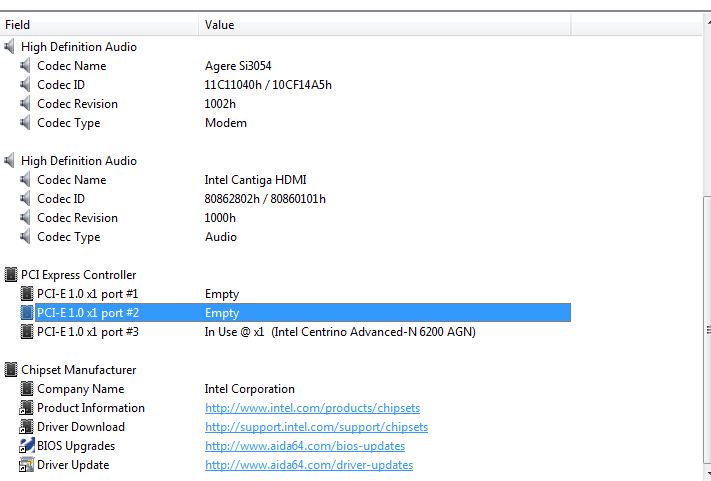
Thanks man I'm gonna try and get an expresscard to check on AIDA64 thanks
-
Why does yours use port #5 while mine uses port #3?
Attached Files:
-
-
Hello all,
i would like to know whats the best configuration and what video card, higher possible better.
Model: HP dv5t
Chipset: Intel(R) ICH9M-E/M STA AHCI
Video Card: 9600GT -
I would love to help but I don't know how Setup 1.x work internally. Nando will be able to explain how to accomplished "adding these lines between startup.bat and pci.bat".
I'll try to examine the DIAG files later.
You're quoting older post. Actually retles use the mPCIe port where the wireless card is connected to ( source).
You can find plenty of eGPU implementations on ICH9M notebook at first post. HP DV5T is too general. You might want to provide the full model name or detail specification. -
Im sorry, this is my model info
HP dv5t-1000
Intel Core 2 Duo 9400
Nvidia 9600M GT
4GB RAM -
I have looked and looked for answers that I need and I am getting a splitting headache and haven't found it so I am going to ask. I have a Sager NP9280 running an i7 975 Extreme @ 3.33GHz with 6 gigs of ram @ 1333MHz.
Sorry about the post. -
I have looked and looked for answers that I need and I am getting a splitting headache and haven't found it so I am going to ask. I have a Sager NP9280 running an i7 975 Extreme @ 3.33GHz with 6 gigs of ram @ 1333MHz.
My question is when my stuff arrives what is the best way to hook it up?
I ordered a ExpressCard External Graphics x16 kit with the Express Card Adapter and the mPCIe card. I also ordered a Rosewill Green Series RG630-S12 630W Continuous @40°C,80 PLUS Certified, Single 12V Rail, Active PFC Power Supply and an MSI N560GTX-M2D1GD5 GeForce GTX 560 (Fermi) 1GB PCI Express 2.0 x16 Video Card..I have read that some people are having troubles on their laptops but I haven't seen anyone use one like mine. Not sure if I will have any problems or not..Any advice would be appreciated..I hope I didn't double post..Attached Files:
-
-
I hope I didn't mess up since I already ordered everything.HA HA HA. If it doesn't work I guess I will be building a desktop system...Can I use the optimizer or not? I have read so much stuff that I am not sure if I can or can NOT use the optimizer..Is there something I can use or am I just to use normal drivers and software? I was hoping I could use the loop back to use the internal monitor.
-
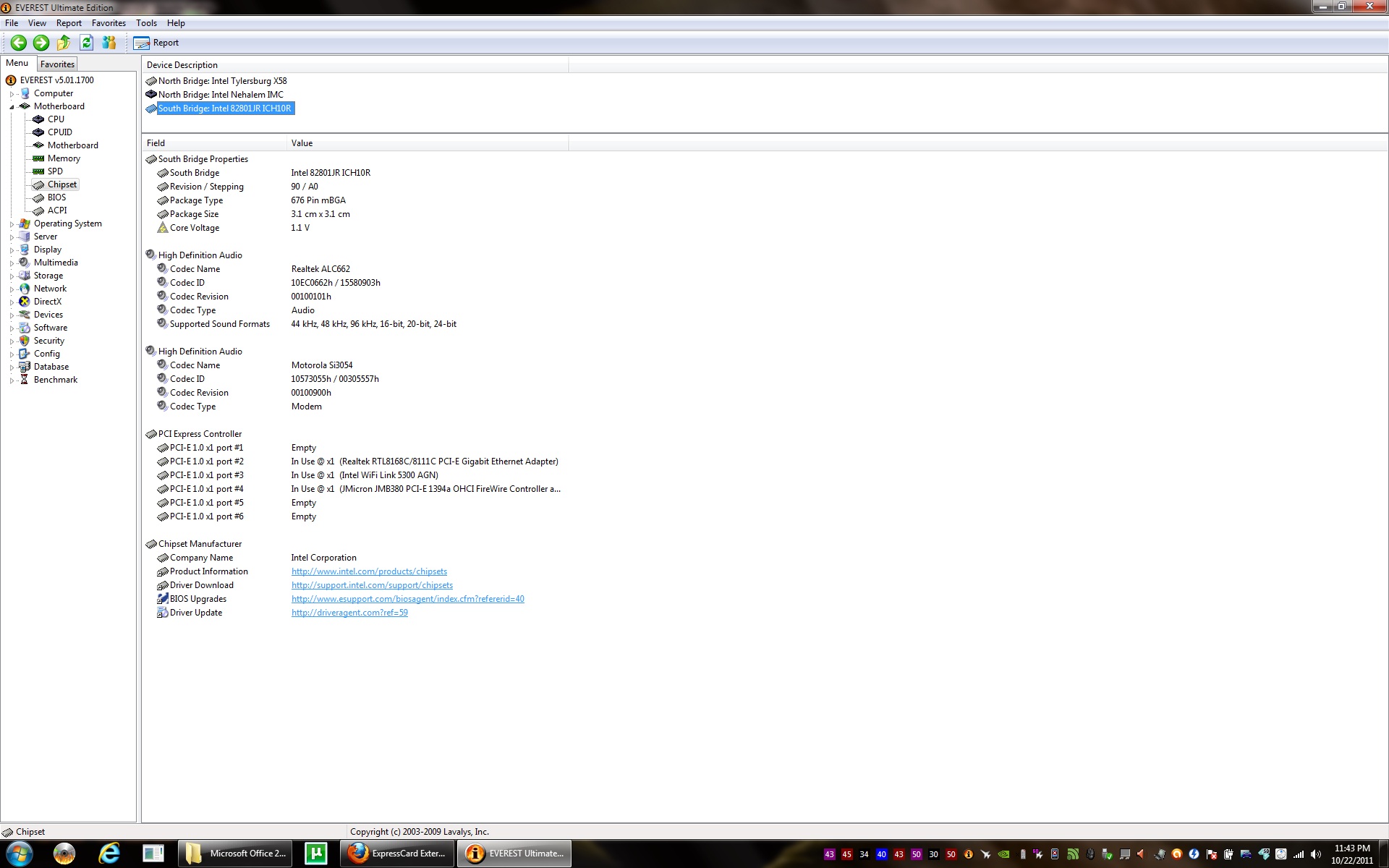
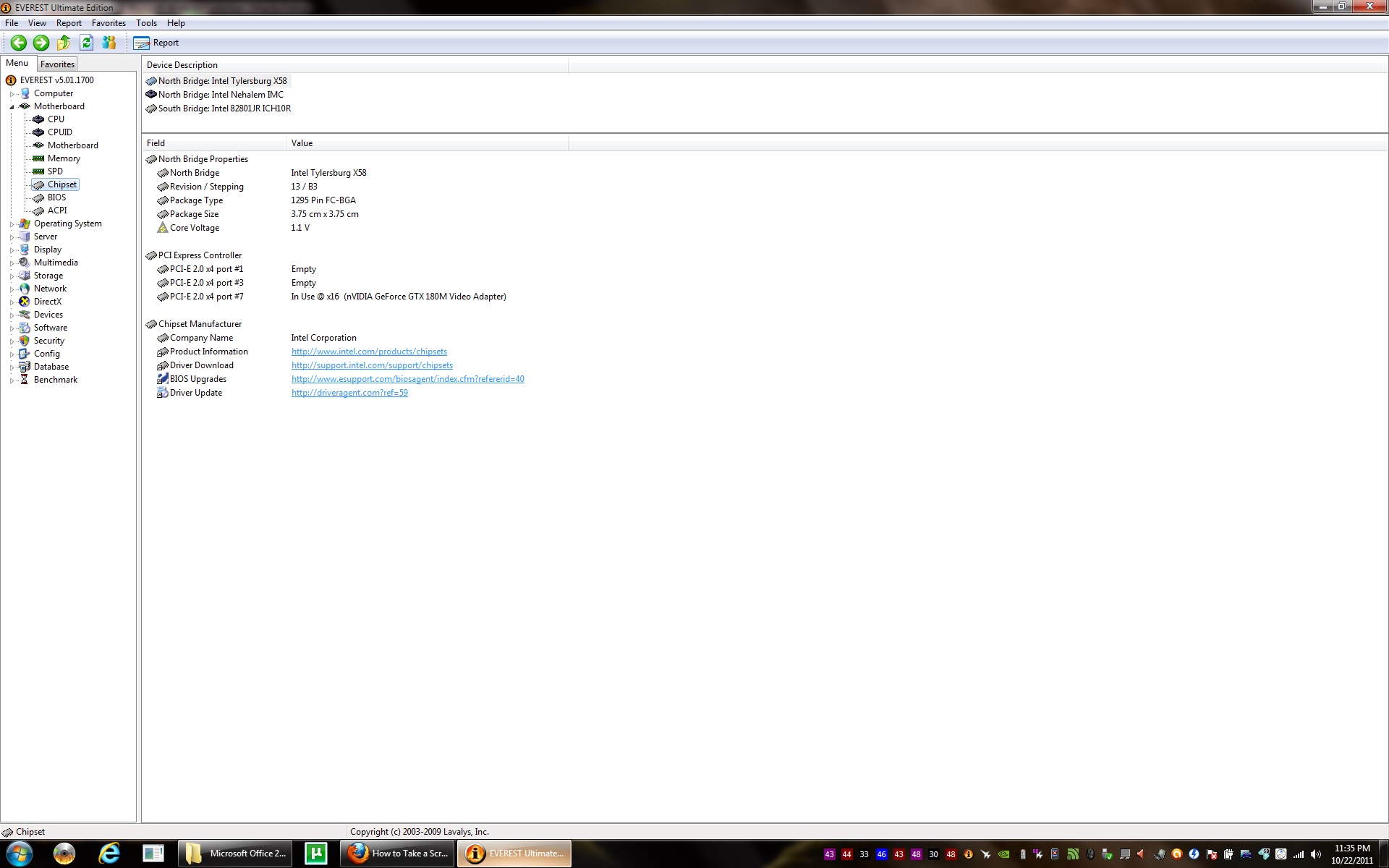
Sorry, I can't find your notebook specification. Please post screenshot of AIDA64 (Chipset \ South Bridge). In addition to that, please examine physically whether your notebook have mPCIe port or/and ExpressCard slot.
Rosewill Green Series RG630-S12 630W PSU is good choice. It able to supply plenty of power & can drive any GPU. The method use to connect the eGPU is varied between different notebooks.
- Some notebooks required you to boot into windows & then connect the eGPU.
- Some notebooks required put to sleep before connecting eGPU.
- On some notebooks, eGPU just work out-of-the-box. Meaning, just connect & it just works.
- On some notebooks, eGPU must connected before boot. This to allow BIOS to initialize & allocate the required memory & I/O resources for eGPU. This is true for notebook with dynamic max TOLUD. However, few notebooks with dynamic max TOLUD unable to utilized this because they refused to boot with eGPU already connected.
Do you means Optimus? Your notebook doesn't have Intel HD Graphics for Optimus setup to work. You can play games using eGPU on the internal screen but only in windowed mode. Performance won't be great & you still need external monitor. Since, your notebook can't do Optimus setup, the best setup you can do is eGPU x2 link setup. This will require two PCIe ports. x2 link required either [PCIe port#1 & port#2 ] or [PCIe port#3 & port#4 ] or [PCIe port#5 & port#6 ].
![[IMG]](images/storyImages/71877d1319347081-diy-egpu-experiences-np9280-south.jpg)
From the AIDA64 screenshot, one of the mPCIe port where the wireless card connected is PCIe port#3. However, firewire device is connected to PCIe port#4. So, x2 link with [PCIe port#3 & port#4 ] is not possible. x2 link with [PCIe port#1 & port#2 ] also not possible because ethernet device is connected to PCIe port#2. Look like only [PCIe port#5 & port#6 ] can do x2 link IF PCIe port#5 & port#6 are physically available. Meaning physically available in the form of two mPCIe ports or mPCIe+ExpressCard. You'll need to check this to know for sure.Last edited by a moderator: Feb 6, 2015 -
I guess there is not anything I can do right now but to just keep reading and get prepared. What is wit this? TODUS? Might have spelled that wrong.. I think that's the right thing you need to see??? Thanks for the help..
Attached Files:
-
-
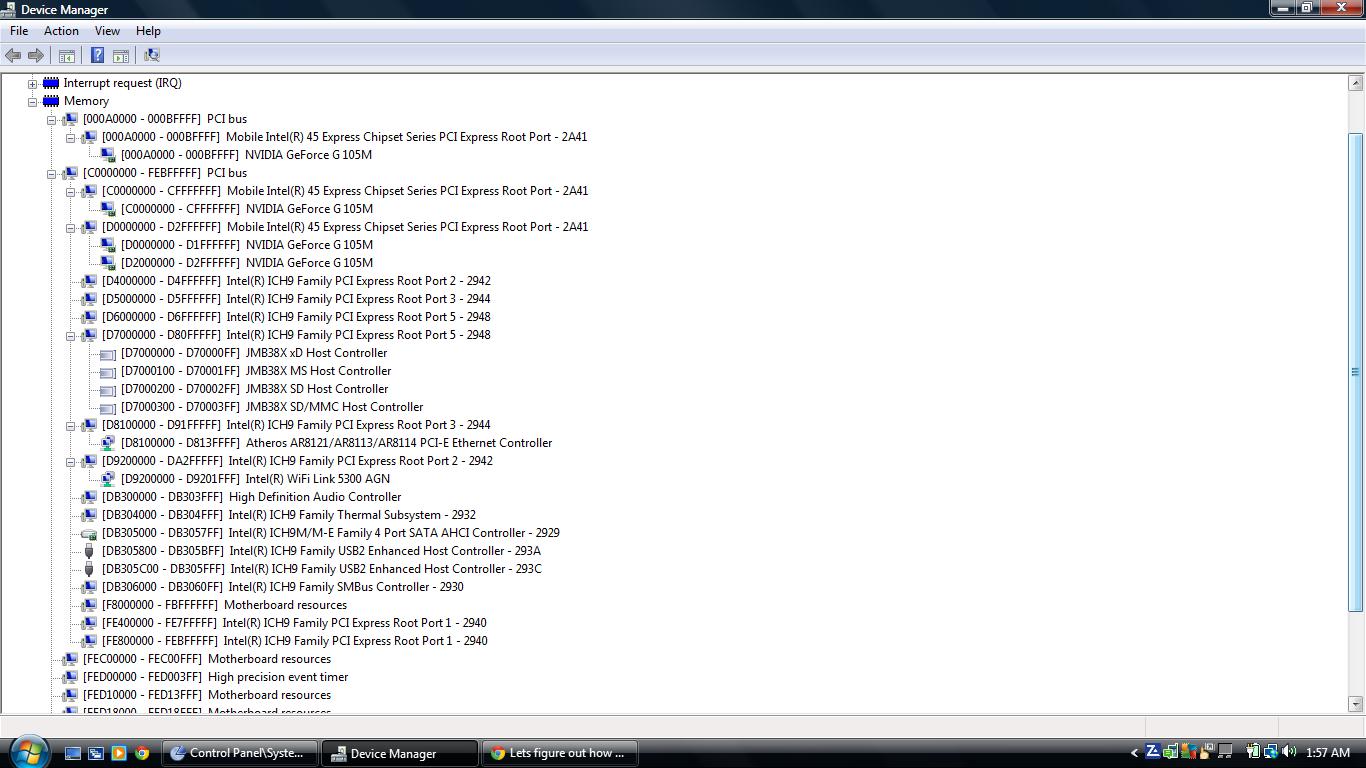
According to the Device Manager screenshot, the first PCI bus with 8 digits memory address is 0xC0000000 which means TOLUD is 3GB. If TOLUD is equal or lower than 3.25GB, you will be able to use eGPU with 4GB++ RAM. For example, if TOLUD is 3.5GB, you won't be able to use eGPU with 4GB++ of RAM because there isn't enough PCI space (PCI memory range). The solution for TOLUD 3.GB or higher is reducing the RAM to 3GB or less only.
I think you already read enough. Now, you'll need to check out whether is there any mPCIe port available on your notebook. Meaning you'll need to disassembled your notebook. Your target here is to find PCIe port#5 & port#6. If there is another mPCIe port(s), you'll need to figure out their PCIe port #. You can plugin the wireless card to the empty mPCIe port & check with AIDA64 which PCIe port it turn up. You also need to identify the PCIe port # for the ExpressCard. You can plugin any ExpressCard device & check in AIDA64 what is the PCIe port #. -
@nando4
are we better off having an x1 PCIe link at gen 2 speed (5Gbit/s) or an x2 PCIe at gen 1 speed (2.5Gbit/s)?
Purely a hypothetical scenario, just wondering.
Theoretically the bandwidth would be the same, right? -
Same bandwidth, but Optimus' pci-e compression engages only on a x1 link which gives approximately doubling of bandwidth. So we have:
We're still waiting for a pci-e 2.0 compliant PE4L/PE4H to be delivered this/next month to see how much better gaming is. -
x1 2.0 has wider bandwidth than x1 1.1 without Optimus.
-
hi nando, could you give a short explanation, please?

greetings -
I've read that you need to downgrade the bios to 1.11 to get around the TOLUD issues, but is it true that the newest x220 systems can not downgrade all the way to 1.11?
Would it be easier to just buy an older one from the lenovo outlet site? -
Hi All,
First of all I'd like to express my immense gratitude to this amazing community and the incredible innovations being done and tested here on a daily basis (Nando, Kizwan, Khenglish etc). You guys rock! Also many thanks to the people giving back such valuable feedback.
Its ironic that I discovered this eGPU thread by mistake as I came to this forum after my 8600m gt betrayed me. The gpu got screwed and I tried the heatgun fix and it worked, but only for a short time will it work.
Long story short, my laptop is:
Newegg.com - ZT Element S1017i-15 NoteBook Intel Core 2 Duo T5850(2.16GHz) 15.4" Wide XGA 4GB Memory DDR2 667 250GB HDD DVD Super Multi NVIDIA GeForce 8600M GT
C2D 5850 (2.2 ghz)
4 gb ddr2 ram
8600 m gt
intel PM965 chipset (from the above link)
Expresscard and a crapload of other ports.
I do have an expresscard slot but from what I've been trying to figure out from the forums, it is recommended that I change my CPU (processor).
Could anyone help my out a bit? I just need to know if my dying system can buy me some time as from the looks of the situation and if there is an eGPU solution that can work for me, as I would like some time to see where the Thunderbolt/Lightpeak train is headed.
In case that you guys think I should just dump this laptop and get a new one, what is the most future proof route (I will have to get a new latop by end of nov. due to time constraints IF i have to buy one).
Should I wait for thunderbolt/lightpeak next year or
wait for the impending USB 3.0 version supposedly coming soon?
Or simply go for Sandy Bridge with HD3000 and x1 2.0?
Much much thanks in advance. -
Hi prosetheus,
Getting a Sandy Bridge notebook with Intel HD 3000 iGPU is good idea. x1 2.0 support will be available soon. The device is almost ready but still need testing first before they can be available. Until the device is ready, you can do x1.Opt where Opt=Optimus will provide good performance via PCIe x1 link.
Using eGPU on your current notebook might be a solution to the dying 8600M dGPU. However, since your notebook doesn't have Intel GMA 4500MHD iGPU, you can't do x1.Opt setup. So, to get the best performance, it's advisable to do eGPU only if your notebook can do x2 link setup. x2 link will require using two PCIe ports which either:-
- [PCIe port#1 & port#2 ]
OR
- [PCIe port#3 & port#4 ]
OR
- [PCIe port#5 & port#6 ]
There is also one thing to consider which might cause inconvenience. Where the boot screen will be displayed? On some notebooks, boot screen will appear at internal screen while on few notebooks, boot screen will appear at the external screen (connected to eGPU) instead. For the former, eGPU will only take over after booting into windows.
CPU upgrade consider optional. Upgrading CPU can increased overall notebook performance. -
Sorry, the line should read "...adding two additional lines between "call pci" and "call grub4dos"...". So the STARTUP.BAT file should contain like this:-
I will make appropriate correction in eGPU Troubleshooting FAQ. However, this is not the solution to your problem (please read at the bottom).Code:call pci setpci -s 2:0.0 BASE_ADDRESS_5=d001 setpci -s 0:1c.1 1c.b=d0 1d.b=d0 call grub4dos mbr
In Setup 1.x, please do 32-bit PCI compaction. Then put this in STARTUP.BAT:-
Then choose "Run startup.bat". Please let me know whether this fixed the problem or not.Code:call speedup lbacache call pci setpci -s 0:1c.0 1c.w=20,20 call grub4dos mbr
After you have done the above, you don't need to do 32-bit PCI compaction manually anymore. At cold boot, just need to select Setup 1.x at boot menu & then choose option #1 (boot with startup.bat). -
Thank you very much for that really quick reply Kizwan. I know that I will not be able to use an eGPU solution for fast gaming on this machine due to only x1 being capable, but I only considered it so the rest of the machine would not go to waste. I could set it up as a desktop for my younger brother or a machine for guests to use if they visit.
If performance was not the reason, what would be the cheapest way for me to perform an eGPU solution on this machine if that is possible? A PE4L with a cheap GPU and a small power supply?
To check my PCIe ports, I will have to use AIDA 64 right?
Thanks again. -
Yes, use AIDA64 to know the PCIe port #. Also plugin an ExpressCard device in the ExpressCard slot & check in AIDA64 to know the PCIe port #. If your notebook can do x2 link, that will be good.
For cheapest solution, you can use PE4L & low profile GPU which only require low power (<=120W). You can use AC adapter for this.
Please post screenshot of the Device Manager. Set View to " Resources by connection", expand the Memory tree & take the screenshot. I want to check whether you can use 4GB of RAM with eGPU or not. -
here is teh screenshot:
ImageShack® - Online Photo and Video Hosting
I also wanted to know if anyone could give me an idea of how long the reflow method acts as a fix, and if there have been cases of heatgun reflow working for longer durations Any ideas? -
According to the screenshot, first PCI bus with 8 digits memory address is 0xC0000000 which means TOLUD is 3GB. So, you will be able to use 4GB++ of RAM with eGPU.
-
Thats good to hear. Also posting info about chipset provided by aida64
[ North Bridge: Intel Crestline-PM PM965 ]
North Bridge Properties:
North Bridge Intel Crestline-PM PM965
Intel Platform Santa Rosa
Supported FSB Speeds FSB533, FSB667, FSB800
Supported Memory Types DDR2-533, DDR2-667 SDRAM
Maximum Memory Amount 4 GB
Revision / Stepping 03 / C0
Package Type 1299 Pin FC-BGA
Process Technology 90 nm
Core Voltage 1.05 V
In-Order Queue Depth 12
PCI Express Controller:
PCI-E 1.0 x1 port #1 In Use @ x1 (Intel PRO/Wireless 3945ABG Network Connection)
PCI-E 1.0 x1 port #3 In Use @ x1 (Silicon Image SiI 3531 PCI-E x1 SATA-II Controller)
PCI-E 1.0 x1 port #4 Empty
PCI-E 1.0 x1 port #5 In Use @ x1 (Realtek RTL8168B/8111B PCI-E Gigabit Ethernet Adapter)
PCI Express Controller:
PCI-E 1.0 x16 port #2 In Use @ x16 (nVIDIA GeForce 8600M GT (MSI) Video Adapter)
[ South Bridge: Intel 82801HBM ICH8M-DO ]
South Bridge Properties:
South Bridge Intel 82801HBM ICH8M-DO
Intel Platform Santa Rosa
Revision F3
Package Type 676 Pin mBGA
High Definition Audio:
Codec Name Realtek ALC888
Codec ID 10EC0888h / 14623FADh
Codec Revision 1000h
Codec Type Audio
High Definition Audio:
Codec Name Agere Si3054
Codec ID 11C11040h / 11C10001h
Codec Revision 1002h
Codec Type Modem
PCI Express Controller:
PCI-E 1.0 x1 port #1 In Use @ x1 (Intel PRO/Wireless 3945ABG Network Connection)
PCI-E 1.0 x1 port #3 In Use @ x1 (Silicon Image SiI 3531 PCI-E x1 SATA-II Controller)
PCI-E 1.0 x1 port #4 Empty
PCI-E 1.0 x1 port #5 In Use @ x1 (Realtek RTL8168B/8111B PCI-E Gigabit Ethernet Adapter)
Chipset Manufacturer: Intel Corporation
My eSATA port is taking up port #3. Do u think there is a way to free it up so that leaves port #3 and #4 empty (4 is already empty)
And once again Kizwan, thank you for being so helpful. -
The Motherboard \ Chipset \ South Bridge. Also if possible insert ExpressCard device to ExpressCard slot & check the PCIe port # in AIDA64.
-
Just refreshed above post with further info. Cannot insert Expresscard right now but will post as soon as I do.
-
Here we go:
Computer Type ACPI x64-based PC (Mobile)
Operating System Microsoft Windows 7 Ultimate
OS Service Pack Service Pack 1
Internet Explorer 9.0.8112.16421 (IE 9.0)
DirectX DirectX 11.0
CPU Type Mobile DualCore Intel Core 2 Duo T9400, 2533 MHz (9.5 x 267)
Motherboard Name Hewlett-Packard HP Pavilion dv5 Notebook PC
Motherboard Chipset Intel Cantiga PM45
System Memory 4096 MB (DDR2-667 DDR2 SDRAM)
DIMM1: G Skill F2-5300CL5-2GBSA 2 GB DDR2-667 DDR2 SDRAM (5-5-5-15 @ 333 MHz) (4-4-4-12 @ 266 MHz) (3-3-3-9 @ 200 MHz)
DIMM3: G Skill F2-5300CL5-2GBSA 2 GB DDR2-667 DDR2 SDRAM (5-5-5-15 @ 333 MHz) (4-4-4-12 @ 266 MHz) (3-3-3-9 @ 200 MHz)
BIOS Type Insyde (07/23/2008)
Video Adapter NVIDIA GeForce 9600M GT (512 MB)
Monitor Chunghwa CLAA154WB03A [15.4" LCD]
IDE Controller Intel(R) ICH9M-E/M SATA AHCI Controller
Manufacturer Hewlett-Packard
Product HP Pavilion dv5 Notebook PC
Version F.09
Serial Number CNF834296B -
SD/SDHC/MMC/MMC Plus/MS/XD/MS-PRO
my laptop support these card, any chance of working? thanks -
well here a pic turns out the stupid laptop work ordered with pcmcia slot :-(
went with a mpcix card in the laptop showed up but i forgot to take one of the ram chips out, rebooted and now the card doesnt show up at all.Attached Files:
-
-
Can you check what's inside the box by lookint at S/N at the box? Or the only way to be certain is to boot the thing up?
-
Firstly, you can't removed the SATA-II Controller from PCIe port#3 because it is integrated to the motherboard. Secondly, even if AIDA64 reported PCIe port#4 is empty, it doesn't mean it is physically available. Based on the information from AIDA64, we know the wireless card is connected to PCIe port#1 (mPCIe port). Your next task are:-
- Disassembled your notebook & check whether it have another mPCIe port. If there is another mPCIe port(s), you'll need to determine their PCIe port #. You can do this by moving the wireless card to the empty mCPIe port & check with AIDA64 where the wireless card is connected now. Labeled them.
- Please check whether your notebook does have ExpressCard or CardBus slot. Only ExpressCard slot will be useful for eGPU. Plugin any ExpressCard device you have or you can borrow them, to the ExpressCard slot. Then check with AIDA64 what is the PCIe port #.
Your notebook doesn't have Intel GMA 4500MHD iGPU. So you can't do eGPU x1.Opt setup. To get the best performance from eGPU, your notebook must at least able to do eGPU x2 link setup. x2 link will require using two PCIe ports ( [mPCIe + mPCIe ] OR [ExpressCard + mPCIe ]) which either:-
- [PCIe port#1 & port#2 ]
OR
- [PCIe port#3 & port#4 ]
OR
- [PCIe port#5 & port#6 ]
So, you also need to do what I asked prosetheus to do; ^^check for available PCIe port & determine their port #.
That is card reader. eGPU is not connected to card reader.
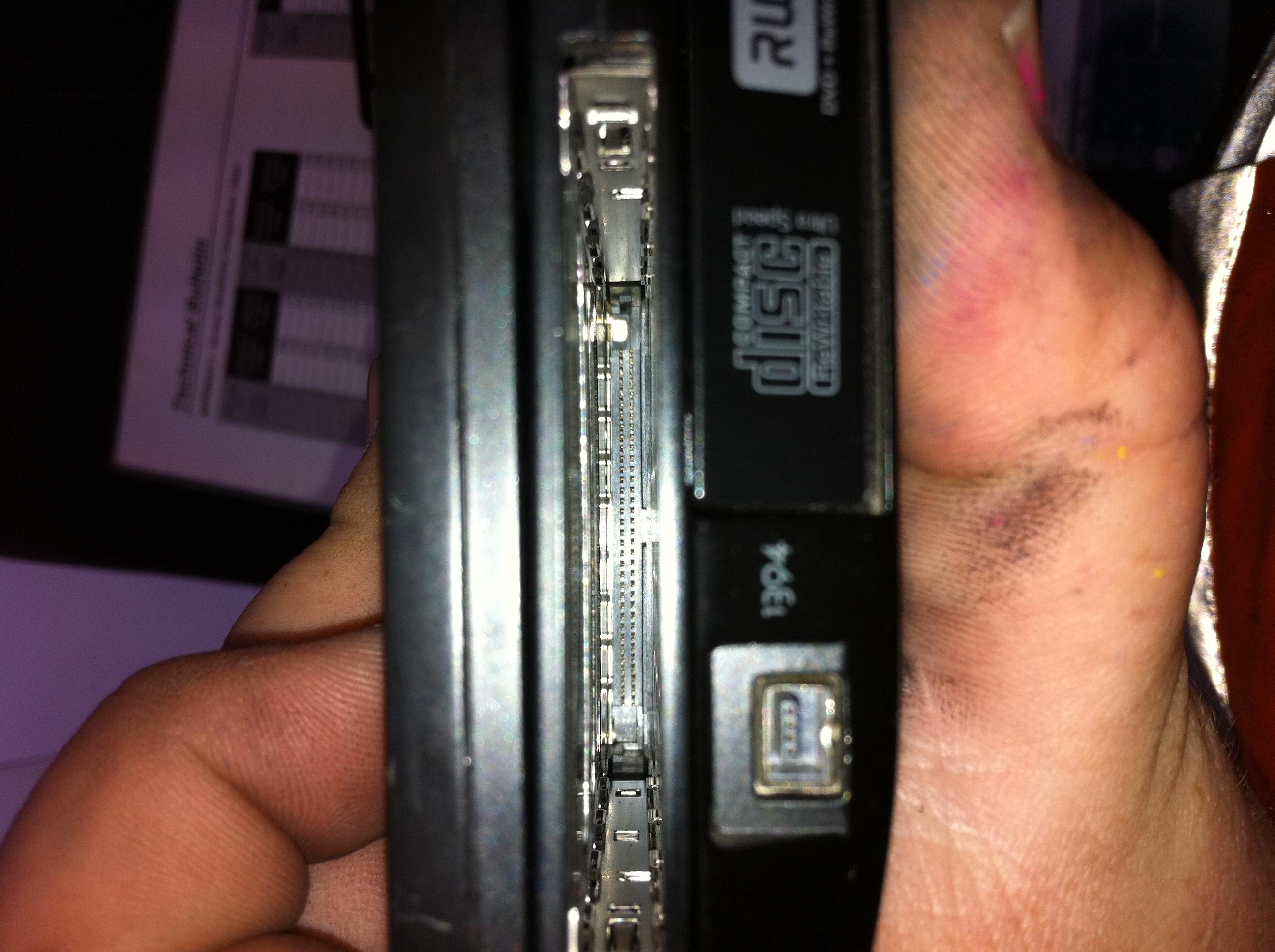
How come your Dell E6400 have CardBus/PCMCIA slot? According to Review Dell Latitude E6400 Notebook - Notebookcheck.net Reviews E6400 have ExpressCard & Intel GMA 4500MHD iGPU. Anyway, can you confirm that your E6400 does have Intel GMA 4500MHD iGPU? Did you connect everything properly? Did you connect the floppy power connector to PE4H? Does FAN on the GT430 card spin very fast? -
Ok, guys-- I've been reading, scanning, and searching this thread, and not yielding results.
I have an HP 2740p with a core i5. Windows 7 x64.
My eGPU setup is:
PE4H-EC2C (expresscard)
nVidia GTS 450
I've got the PE4H and GPU powering up just fine, but my tablet doesn't detect the card through any kind of reboot or suspending of Windows.
I figure I must have to use the setup 1.x solution. I've got the boot disk working, but, frankly, the program assumes too much of me. For instance, it took me a while to realize that the suggestion of setting the PCI delay to 7/15 seconds referred to the switch on the PE4H-- right? It doesn't detect my video card, and after trying a few different suggestions from the software "instructions" to get the card detected, I tried a few processes described by other users.
Nothing. Nothing. And even more nothing. I'm utterly lost.
Can I get a walkthrough of the process for my system?
Thanks. -
Welcome onboard. Would be great to have a 2540P tablet implementation.. a great unit.
To get it working try to set the PE4H delay switch to 0secs, power off the DIY eGPU, unplug the mini HDMI cable from the expresscard-EC2C, boot Setup 1.x (menu-based), poweron the DIY eGPU, plug in the mini HDMI cable into the expresscard-EC2C, hit F5 and see if the eGPU is listed in the Status window. If not, then need to do some hardware troubleshooting: double check all power cabling, ensure the video card is properly seated ok, confirm the video card works ok in a desktop system, change the mHDMI cable, etc.
dv5 discrete schematic shows:
So neither x2 nor x1.Opt connectivity is possible. Only a straight x1 ATiAMD or NVidia implementation is possible but will likely see stalling due to the low bandwidth. I'd suggest sell the notebook and invest in a more dGPU-friendly unit with an expresscard slot and a 4500MHD/HD/HD3000 iGPU so can do a x1.Opt installation. -
hey mate the fan spins but not at a very high speed, but its normally like that, it did show up in the device manager but i forgot to remove 2 gb of ram and i got the code 12 error. restarted with less ram in and nothing showed up :-(.
i can comfirm the gma 4500mhd
there is a option for the dell latitude to have a pc card slot for some reason these laptops were ordered in with them not my choice but works:-( btw work knows and doesnt mind -
@dualbios,
Did you mean you have successfully getting the eGPU to work on your E6400? -
Check here:
http://forum.notebookreview.com/5309356-post5527.html
It says theres a mini pci-e on the bottom... check the picture there... What do you see there?
Thanks. -
Hello,
im asking what is possible to do and how to get the best performance with what i got, if i buy a new notebook is going to be a 580mGT notebook, why would i buy just a new one just to do egpu... i see no sense on that... just my opinion... -
That is not mPCIe port. That is ExpressCard 54mm slot. The socket near the ExpressCard slot is where the modem usually connected to. It also not mPCIe port.
Nando already answered your question. Your notebook can't do x2 link or x1.Opt. Your notebook can only do eGPU x1 link. You won't get "best" performance with x1 link only. Games will stutters when GPU need to process a lot of effects (due to limited PCIe bandwidth). -
OK well playing BF3 on my setup gives me ATROCIOUS performance. Is there ANYTHING I can do to free up more bandwidth or try to get the game playable? Right now this EGPU setup is not giving me a playable experience. Over the past few months with this setup I have come to realize that a x1 optimus setup is not really a viable solution... I may be able to put SOME games on high settings, but I only get 30 fps. However, because of the bottleneck if I put them on lower settings, I STILL get 30 fps.
-
You have almost the same performance as I have. You're saying that it is not enough for BF3 at all? I haven't tried it, but it is hard to imagine. I could play The Witcher 2 3D 1080p maxed out except for ubersampling. Strange... anyway, I will try BF3 this week sometime...
-
The problem is it really depends on the game. Some games don't need as much PCI-e bandwidth, but it appears that BF3 does. Interestingly BFBC2 played a lot better; in BF3 I get aweful input lag that I never got in BFBC2.
Additionally with my setup I can't watch some full screen flash videos; they just become a stuttery mess. I don't see why no one else has this issue, or if they DO they should warn others about it because it could be a deal breaker for some.
Of course my 5650m can't play the game any better, it just looks a LOT worse. I have a feeling my CPU also isn't quite good enough for bf3 as well. -
Well, I'll check it for you in the next days. It is possible that the game has a problem, and you don't hear it from anyone else, as it is not yet out officially. The Wither 2, or Rage had some serious issues as well when they came out.
-
Guys, what is the latest Nvidia driver that works with optimus egpu? I guess latest drivers would help in some games concerning performance...
-
Yeah, it would be great if someone modded the new 285.62 WHQL drivers.
-
I agree!
-
Performance was the same on my laptop in the beta. I get none of these issues on my desktop, where the game plays very well. It seems like an eGPU restriction.
-
On the BF3 beta with the game maxed out I was getting avg fps in the low 30s. FPS at the lowest moments was in the low 20s. Despite the relatively low fps gameplay was pretty fluid with no input lag. I looked online quite a bit and due to how demanding the game is, these frame rates are to be expected from a GTX 460 on an x16 link. I would advise a complete driver and directX reinstall. If that doesn't help then maybe a reformat because I found pci-E bandwidth to be no factor at all in BF3. Other than those things the only other thing I could suggest is overclocking your 560 as much as possible.
The only 2 modern games I found to really want more bandwidth than x2 and x1.1 opt can provide are WoW and Metro 2033. All Source based games are usually over 200fps. Crysis runs as expected for a GTX 460. CIV5 is CPU limited as expected.
If there is some game in particular that you would like me to try that I don't have, I can try getting a demo and comparing it with your system. -
You no longer need to use a modded driver anymore. You can just install the desktop driver and you get full functionality, even the internal LCD option.
DIY eGPU experiences
Discussion in 'e-GPU (External Graphics) Discussion' started by master blaster, Sep 18, 2009.




![[IMG]](http://forum.notebookreview.com/attachments/gaming-software-graphics-cards/71877d1319347081-diy-egpu-experiences-np9280-south.jpg)