Problems? See this thread at archive.org.
Crysis (warhead at least) runs pretty well on my setup. However, my performance in BF3 is by no means indicative of a gtx 560 Ti; with the exact same card in my desktop I get triple the FPS at times (or at least I did in the beta). The performance on my laptop in the actual game seems similar. It would be tolerable if there was no input lag, but 22 fps with input lag is unplayable for me. I will try and fiddle around with the settings and try reinstalling drivers.
Also, your cpu is significantly more powerful than my laptop cpu, which probably has something to do with it.
-
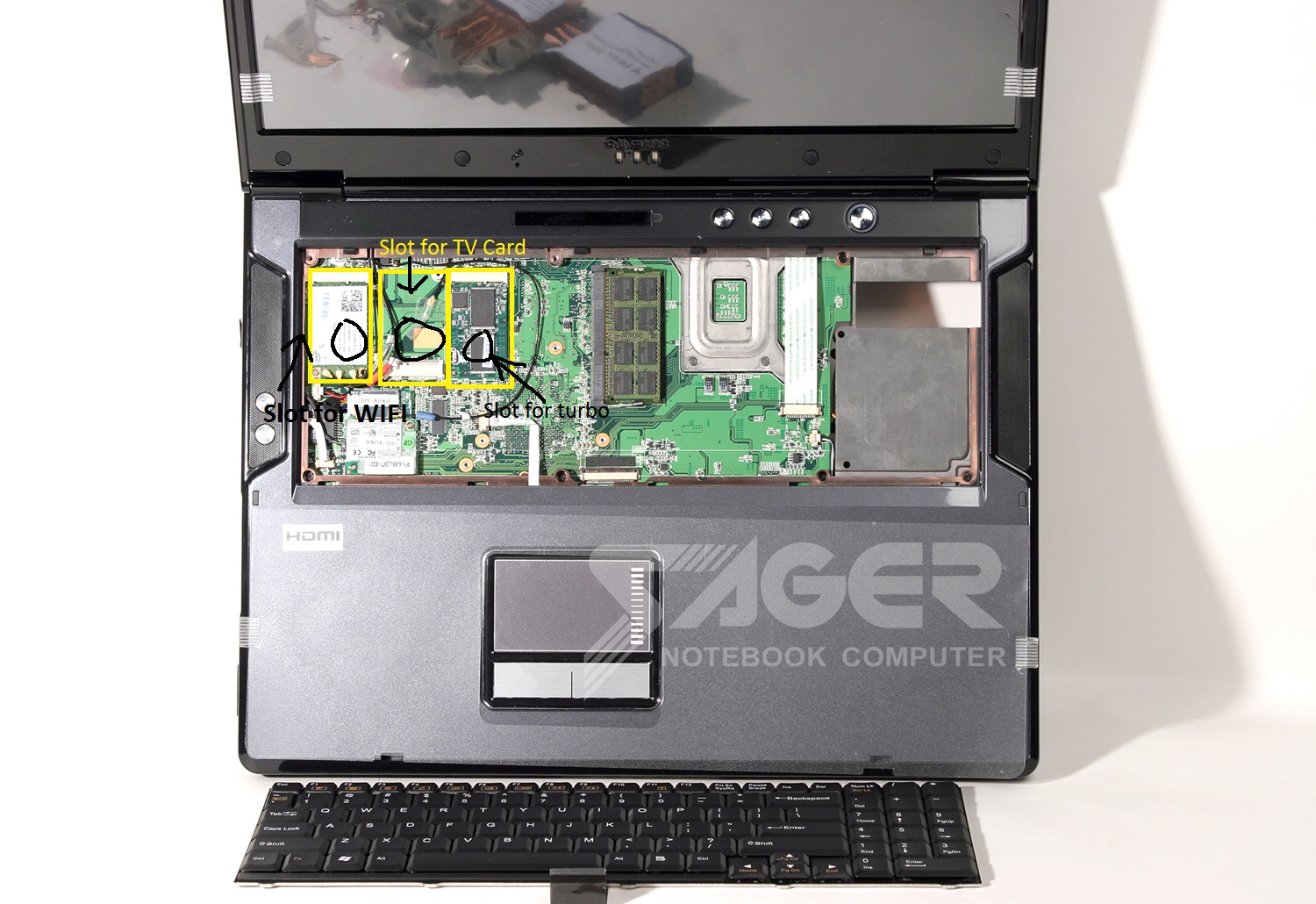
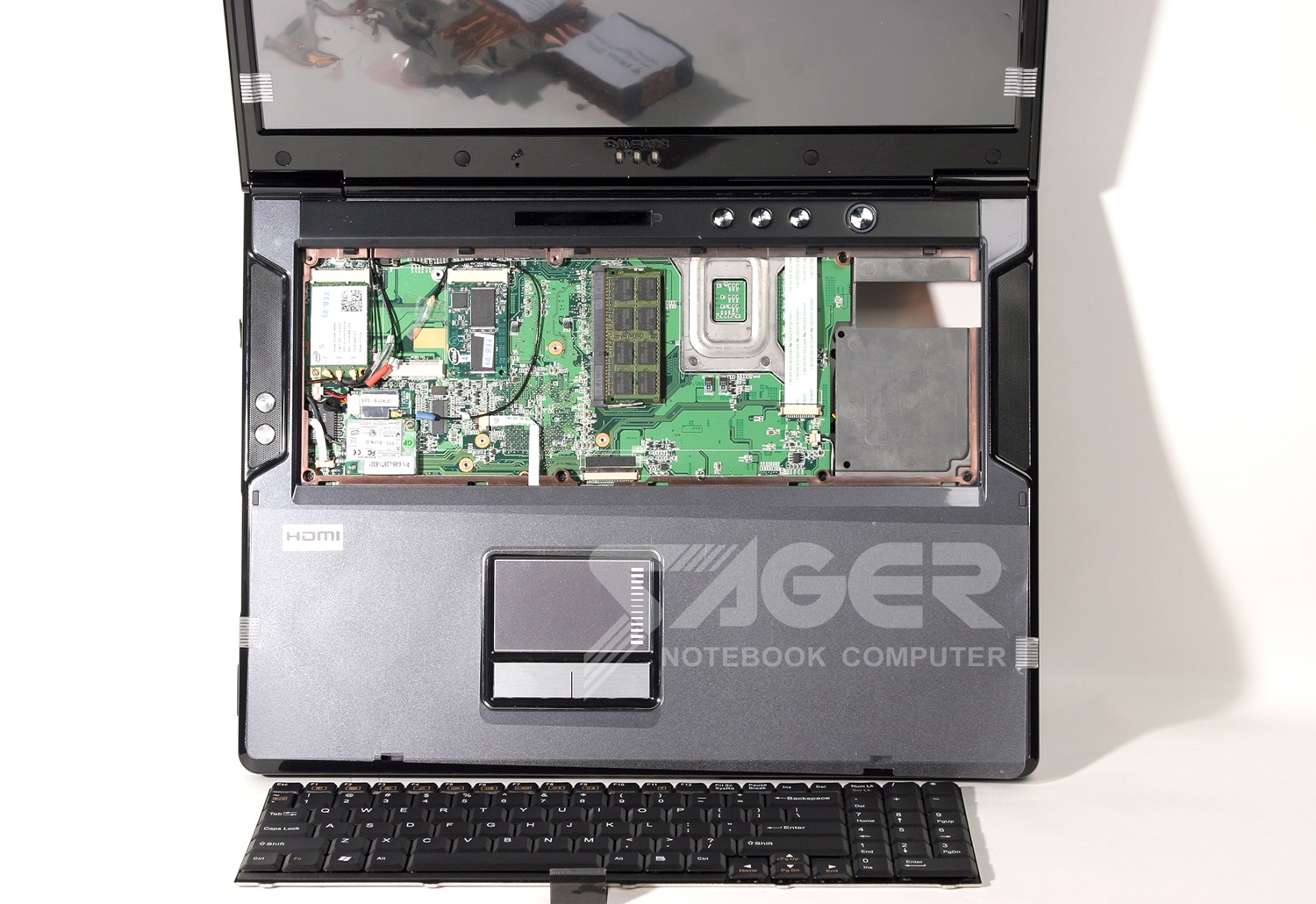
I opened my laptop and this is going to be a trick if I want to use the mPCIe because they are under the keyboard. I loaded pics of the lappy and my open slots from Everest. It says I have three available. I guess I have two under the keyboard ( I don't have a turbo memory card or a TV tuner card in mine) and I'm thinking the third is the express slot..What do you guys think I could do? Think I could do a x2?
Attached Files:
-
-
Any new updates on USB 3.0 to Expresscard 2.0 adapter? I tried contacting Avnet and making a topic on their support forum, but I've gotten no replies.
-
OK I installed the new beta drivers and the game is pretty playable on large maps and on smaller maps in tight spaces (like tunnels), but for some reason the bridge area of seine crossing gives me trouble. However, I don't really like that map so it shouldn't be as much of an issue.
-
I forgot which numbers you have to have to do a x2..Is it odds or evens??I think I can still use the internal wifi but not sure..Post #6255 for the thumnails of inside lappy.
-
If your notebook can do eGPU x2 link setup, you can get good performance from it. Yes, you show us that your notebook have two empty mPCI ports & also told us ExpressCard slot is available but do you know their PCIe port #? Let examine AIDA64 screenshot.
![[IMG]](images/storyImages/SagerNP9280PCIe.jpg)
x2 link required:-
- [PCIe port#1 & port#2 ]
OR
- [PCIe port#3 & port#4 ]
OR
- [PCIe port#5 & port#6 ]
You have PE4H, EC2C (ExpressCard) & PM3N (mPCIe card). So, you'll need to identify the mPCIe ports & ExpressCard slot PCIe port #. We know the wireless card is connected to PCIe port#3. So, you can't use the mPCIe port where the wireless card is connected to because firewire controller (integrated) is connected to PCIe port#4. So, you can't use PCIe port#3 & port#4.
- [PCIe port#1 & port#2 ]
OR
<strike>- [PCIe port#3 & port#4 ]</strike>
OR
- [PCIe port#5 & port#6 ]
We also know ethernet (LAN) adapter is connected to PCIe port#2. You can't disconnect ethernet adapter because it is integrated. So, you can't use PCIe port#1 & port#2.
<strike>- [PCIe port#1 & port#2 ]</strike>
OR
<strike>- [PCIe port#3 & port#4 ]</strike>
OR
- [PCIe port#5 & port#6 ]
This left you only PCIe port#5 & port#6. So, you'll need to identify the PCIe port # for the other two empty mPCIe port. Can you do that? Easy, just move the wireless card to the empty mPCIe port & check in AIDA64 for the PCIe port #. For ExpressCard, you'll need to plugin ExpressCard device (e.g. ExpressCard to USB or eSATA adapter) in it & check in AIDA64 for the PCIe port #.
Without the PCIe port #, we don't know whether you can do x2 or not.Last edited by a moderator: Feb 6, 2015 -
I understand now..But I don't understand why the two have to be together.Why is that??
I got BF3 and installing it now... -
Correction: my PC is the 2740p Elitebook tablet.
Thanks for the advice, Nando4... here's the results.
I went through your advice. Booting into setup and plugging in the eGPU as described did not produce results.
I then did some trouble shooting. The video card works on my desktop. I tried a second mini HDMI cable I have lying about. I did notice that my 12 volt molex was only providing power to one half of my 6 pin connection to the card-- so I spliced the floppy molex splitter together in such a way as to get the 12 volt power to the entire 6 pin connector on the card.
I looked over the PE4H... it is version 2.4. Also, I had to close the 12 volt jumper to get the card to power on. The mini HDMI cable is plugged into the left most slot on the PE4H.
Again, I have an HP 2740p with a core i5. Windows 7 x64.
My eGPU setup is:
PE4H-EC2C (expresscard)
nVidia GTS 450
Powered by a 12v 10a power supply.
When I boot into setup, typically only 3 ports are showing, 1, 2, 4. Port 4 has the intel graphics chip. The others are empty.
From what I understand-- my tablet is one of those that have the whitelisted express slot(?)
Tell me what more information I can give you-- I'd really like to get this working. -
Intel limitation. Also each mPCIe ports (& ExpressCard) only PCIe x1, so you need two to get PCIe x2 link. Can use Setup 1.x to set x2 link on the first port. The second port will be disabled (Setup 1.x will take care of this) or it will cause stability issue. x2 link can only possible with combination of either PCIe [port#1 & port#2 ] OR [port#3 & port#4 ] OR [port#5 & port#6 ]. For example, if you connect PE4H to PCIe port#1 & port#5, x2 will not engaged. It's by design.
-
Which drivers did you installed?
-
Hi everyone,
@Kizwan: I have put on hold putting my old laptop egpu project.
Right now, I am very interested in buying this new laptop:
Lenovo IdeaPad Y470 Laptop: i7 2630QM 2GHz Quad Core CPU, 8GB DDR3, 500GB HD, 14" LCD (1366x768), GeForce GT 550M, DVDRW, WiFi N, HDMI, USB 3.0, 6 Cell, Win 7
IdeaPad Y470 Laptop - 085525U - Dusk Black (with USB 3.0)
Processor: 2nd generation Intel® Core™ i7-2630QM Processor ( 2.00GHz 1333MHz 6MB )
Operating system: Genuine Windows 7 Home Premium 64
Graphics: NVIDIA GeForce GT 550M 1GB
Total memory8: 8 GB PC3-8500 DDR3 SDRAM 1333MHz
Display: 14.0" HD Glare with integrated camera 1366x768
Camera: Integrated 2.0MP Camera
Pointing device: Industry Standard Touchpad
Hard Drive: 500GB 7200
Optical Drive: DVD Recordable (Dual Layer)
Battery: 6 Cell Lithium-Ion
Network Card: Intel 1000 BGN Wireless
Bluetooth: Bluetooth Version 2.1 + EDR
HDMI: HDMI (Out)
Finger Print Reader: None
Can the forum members please tell me what, if any eGPU solutions are possible with this beast? -
The expresscard slot is never whitelisted. Only mPCIe slots are.
One problem is your 12V/10A AC adapter can't drive a PE4H. It needs 15-19V and then down regulates it to 12V. Suggest use an ATX PSU to drive it instead OR make a DC-to-molex adapter to get 12V/GND to the ATX connector on the PE4H instead.
ATM, you'd need to swap out the wifi to use a PM3N to attach an eGPU. In the future there may be a USB 3.0 connectivity instead but even prelim info tells us there is likely going to be driver hassles.
If mPCIe connectivity via underside covers is too tedious then I'd suggest you consider a Dell/Lenovo E6420, T420 or M6400/W520. They can be specced in quad-i7 form, have an active iGPU necessary for x1Opt link connectivity, NVS4200M/FX2000M dGPU options and an expresscard slot. -
Thanks for clearing that up Nando4.
I'm actually OK with buying a laptop now and waiting a while for implementing eGPU solutions.
I have two considerations only:
1: Getting the max mileage out of eGPU
(even if that means waiting a few months, I really will be needing it mid march as I have some big exams coming up in feb.)
So I would like to see where things develop on the PCIe 2.0 front and if we can actually get x1.2 Opt. or USB 3 OR Lightpeak by then.
I will be using adobe premiere and after effects running as well. so CUDA performance on Adobe Mercury Engine is important for me, and I am making a guess here that it requires a lot of bandwidth.
Looking into the crystal ball, which horse would you back?
2: Would love having a Quad Core as well due to aforementioned reasons. Although if the price becomes very high, then would have no choice but to skip. (or maybe get an i5 with an upgradable proc and upgrade in future?!)
However, I would like to get the best bang for my buck, and that buck is not much to begin with.
What would be the preferable course of action? I have even dropped the probability of getting a dGPU as the price shoots up. What and when do you believe will be the most practical and pinnacle of achievement of this eGPU saga?
Much thanks in advance. -
Ugh-- I can fabricate that adapter-- but I'm wondering now if the 12v10a adapter is enough to power both the PE4H and the GTS 450. The GPU's maximum power is 106w.
I based the set up on the earlier write up of powering the PE4L with the DC adapter, not even bothering to check the numbers on the PE4H.
Alright-- so, I could use some advice on whether the adapter is still viable for this setup-- also, if I can use the power adapter, do I want to split the molex from the new DC-to-molex connector to power both the PE4H and the gpu directly?
EDIT: I just acquired a free 200w supply that meets all the power requirements on all the rails-- just need some SATA to Molex adapters. -
285.62; last time I checked they weren't on the nvidia site so you may have to hunt around for them a bit.
-
I tested my tower in 3dmark06.
My score is 14831 3DMarks
Is that good? Bad?
When I compare with the T400, they say something about 11000, but the GFX is different, and typically older than my current HD6790.
Do you think, with your eGPU experience, that my Lenovo T500 will be a better gaming experience than my current tower?
Can i add any Nvidia Fermi graphics cards to the eGPU? Or will there be specific cards better than others?
Hope you'll help a n00b -
So I've tried to provide you with a bios dump quite a few weeks ago but haven't been able to make a dump following your instructions. I am still willing to help you get what you need to free the x220 from TOLUD hell. Did you already acquire a dump and don't need them anymore? You weren't replying in the other thread or my PM so I figured maybe you will look here.
Not blaming you or anything for giving no updates for nearly a month, since you're in no way obliged to fix this issue anyway. I was simply wondering if you needed anything from x220 owners if you were still working on this issue.
Thanks -
This is the laptop that I currently have. Given the current conditions, I cannot use my eGPU setup that I used with my old XPS M1330. I am also waiting for the USB 3.0 to Expresscard adapter solution.
For me, this laptop is well worth it, since the dGPU can already max out a lot of games on the laptop's native resolution.
KEEP IN MIND that I got mine at a discount of $820 instead of around $1300. With that in mind, a decision becomes somewhat more complex given the price.
If your main goal is to game at home while being productive at school/university/work, a smaller laptop that Nando suggests with expresscard is a smart choice. For me, my laptop is also serving as a desktop replacement, so I need discrete power on the go as well.
EDIT: WOW. Y470 is $749 dollars now. That is a steal in my opinion. -
no not as of yet, it showed up and i got a error code 12 in the device i removed one stick of ram to lower it to 2gb, then rebooted and the device never showed up
-
Guys, I need your help (again
 )
)
My laptop is not very stable, I guess due to too many false boot. I use eGPU setup for booting, but only once out of 10 it starts correctly. Most of the time windows doesn't even start up if I switch off dGPU. I don't know the exact reason. So I decided to format my HDD reinstall the whole windows from the beginnnig. I just want to make sure about a few things in order not to have the same issue again.
- Can I use the latest Nvidia drivers, 285,62 for both GPUs? First install for dGPU I guess and then the desktop one, right? Do I need to install both drivers?
- Do I use the eGPU setup crrectly? When it starts 1, I go in the menu version, 2, switch off dGPU, 3, push F3, 4, chainload Windows 7, 5, plug eGPU in a very moment when WIN7 starts (1 sec earlier or later causes freezing). Is that correct, or do I have to do anything else? (PCI compaction or anything) It worked many times, but 80-90% not.
- If I start the Windows with dGPU on, there is not enough memory for the eGPU. If I start without the dGPU (but don't plug in the eGPU yet) it starts without Nvidia driver, so no chance to plug in the eGPU later (in sleep or hibernated).
Thank you again for your help!
David -
Hello,
I have a problem with my PE4H and I hope you could help me to find the mistake
Laptop: Lenovo Thinkpad X220 and Win7 x64
Adapter: PE4H ver2.4
PSU: Enermax Pro82+ II 385W ENERMAX.CO.UK - Pro82+ II
Video Card: 560 TI
I forced PCIe Generation 1 and also downgraded the BIOS to 1.11.
Connected PSU to power source, installed SWEX and turned it on (fan on PSU spins), connected 2x 6 pin to GTX460 graphics card (1x 6pin pcie and 1x (2x4pin molex to 6 pin pcie)) also plugged the floppy molex from me PSU to the PE4H.
If I turn it on the fans of the PSU and video card are running. Also there are 3 green LEDs at the PE4H. But windows is'nt detecting a video card.
But I can use the USB on the PE4H to plug in a stick. This works.
So why is the graphic card not working? Can you see any mistake at the setup?
I think the PSU should handle the GPU -
With eGPU, there will be few games that won't be able to run in full performance due to limited bandwidth. So it is hard to tell. I have ran some game benchmarks on x2 link. Please click link in my signature to see it. Lenovo T500 have Intel GMA 4500MHD iGPU, so it can do eGPU x1.Opt. Keep in mind eGPU x1.Opt is a bit better than x2. I think you can get good performance with GTX560Ti.
Did you check the connection? Did you tried using the mPCIe port where the wireless card connected to?
What happen if eGPU already connected? Can your notebook boot with it? Basically, connect & power on eGPU, power on notebook, boot into Setup 1.x, turn off dGPU & chainload windows. Can your notebook boot into windows like this? -
Do you think that with an hwtools PCIe extender connected through USB 3 will benefit from nvidia optimus ?
Will it be faster than or slower or equal to a mPCI-e x1 2.0 ? -
I don't know yet, I'll try and let you know. Regarding the setup, am I doing that on the correct way?
-
I've done a [email protected]: GTX460 and GTX560Ti x1.Opt benchmark comparison here finding that an OCed GTX460 gets very close to a GTX560Ti in performance, yet costs 65% as much. So a GTX460 is still the bang-per-buck king. Any savings can then be put towards a X9100 CPU upgrade. Or consider getting a 2530P as linked, and TME-unlock it to allow pci-e and CPU overclocking. Best would be to trade up to a Series-6 systems which will soon allow x1 2.0 link connectivity.
12" HP 2560P + i7-quad CPU upgrade + x1.2Opt GTX560Ti/GTX570. That is the most performance in the smallest package at the cheapest possible price with what appears to be Ivy Bridge cpu future upgradability too.
If you absolutely require a dGPU then consider the systems in my last post. TB will not be cheap given it's limited to Macbooks and USB 3.0 will require some customized drivers and there's also the question of what latency the pcie-to-USB bridge introduces. A Lenovo Y470 would require a mPCIe solution atm, which not everyone is comfortable cabling. -
Depend on the notebook. Some notebooks unable to boot at all (blank screen) when eGPU already connected. So, for this notebook you'll need to connect eGPU after booting into Setup 1.x or Windows. While some notebooks don't have problem booting with eGPU already connected. You should try boot with eGPU already connected & see what happen.
On my Dell, eGPU need already connected before power on notebook. If not, there won't be enough PCIe space (only 64MB). Also TOLUD on my Dell changed when eGPU is connected this way. TOLUD already low which is 3.13GB but when eGPU connected it down to 2.63GB. -
I tried many possibilities before, but I will go through all of them again...
As for the setup 1.x, the method I described before is ok for switching off the dGPU? Perhaps I miss something there as well... -
If the drivers were to work and allow x1.2Opt, which appears to be the stumbling block to this solution, then USB 3.0 (5GT/s) will be either the same speed or slower than mPCIe x1 2.0 (5GT/s). Slower because there is pcie-to-USB3 bridge that may introduce latency. I'd still love to see a USB 3.0 eGPU solution given they are common on many systems nowadays.
Your mPCIe hacked solution for a Z2 would likely be the quickest way of getting eGPU connectivity to that system: http://forum.notebookreview.com/sony/619904-vpc-z2x-convenient-egpu-setup.html -
You said at post #6277, you haven't try booting with eGPU already connected. Please try that & let me know. I only want to know what happen if you do like this. As I explained earlier not all notebook required eGPU to be connected in windows.
- Connect eGPU
- Power on notebook
- Boot into Setup 1.x
- Turn off dGPU
- Chainload windows
If windows failed to boot or eGPU detected with error, try with compaction:-
- Connect eGPU
- Power on notebook
- Boot into Setup 1.x
- Turn off dGPU
- 32-bit PCI compaction
- Chainload windows
Except pressing F3, the method look correct but maybe not suitable for your notebook. -
To be honest, I tried many ways, but I'm not sure if I did what you wrote, so I will try it tonight.
Thanks!
D -
Thanks for the replies and suggestions.
@ruhtraeel Couldn't agree more that its a fantastic laptop going for a crazy price. Unfortunately, as Nando4 pointed out, not much can be said for certain about USB3. At $750 I almost wish I didnt know about DIY eGPU solutions. sometimes ignorance can be bliss. I am still hoping for a miracle that I get the news that eGPU works like a charm and as well as x1.2 Opt with USB3.0 but life can't be that good to me.
@nando4 I only considered a dGPU option because of that machine going for 750, which after looking around is peanuts compared to what other machines of that calibre are going for. And you are right on that, I really would not like to go for the mPCIe cabling route.
Also, I'd prefer a 14" screen to a 12 or 12.5. I think that's the balance that works best for me. Any great deals going around with that? Once again, thank you for being so patient with me. -
It would be great if we could hear some news about this!
-
Dell Vostro 3450 14" notebook look interesting. It price around $5XX to $6XX (Sandy Bridge i3 or i5 CPU). This notebook have Intel HD 3000 iGPU & ExpressCard 34mm slot.
-
I really like that Dell Vostro, Kizwan.
So I want to me a final decision between the Dell Vostro 3450
OR
the cheapest i7 Quad Core in 14" (without dGPU is also okay)
btw, Is the Vostro CPU upgdradeable?
Thanks. -
You should be able to upgrade the CPU on Dell Vostro 3450 to i7 quad core later. I look around for i7, most of them around $10XX cheapest.
EDIT: According to Dell Quad-Core is available for Vostro 3750 only. Dell E6520 also doesn't listed with i7 quad core but Khenglish able to upgrade to quad core later. -
Is there any way to confirm that the 3450 will be upgradable to quad core i7?
-
So guys.. i had ordered the Thinkpad E420(tomorrow is last day for cancellation).. But after reading a last 20-30 pages or so i am not sure now(again) since i getting some decent deals on Hp probook 4330s and dell vostro 3450 .. right now the 3 are almost priced same for the same specs..
What do guys think? should i stick with E420 or get the vostro or 4330s? cant get much info on the 4330s and the vostro 3450!! -
Hey mekanik11 and Kizwan,
I think Vostro will be a good choice, because according to the tech specs tab on this page: Vostro 3450 Laptop Details | Dell
The vostro uses the Intel HM67 board, which according to Intel website, should support 2nd gen Sandy Bridge Quads as well, providing a clean upgrade path.
I just want to run it by the experts here if my noobish investigation is correct?
Also, I was VERY happy to see this: http://forum.notebookreview.com/7838535-post5092.html -
I'd look through the 3450 owners thread on these forums. Note that the E6520 did in fact have a quad core option when I purchased it, just not a very high one, so I knew it supported quad cores.
Also ebay is your friend when it comes to purchasing cheap CPU upgrades. CPUs don't die so the lack of a long warranty doesn't matter. -
OK..I got my egpu setup using the express slot and a HDMI to TV..Turned on egpu first and everything is plugged in and powered up and then I started laptop and found card then I tried to install desktop nvidia drivers and all failed to install..Tried rebooting but nothing.In device manager it says other devices/Display..The drivers for this device are not installed. (Code 28)..Can anyone help out???
-
No progress regarding a possible dream combo of MacBook Air 2011 + External Thunderbolt GPU solution?
-
Please refer to my post above yours. Does that support Kizwan's and yours hypothesis?
-
Never mind.I unplugged the cable from the express slot and plugged it back in and it started blinking and finally came on..Hw do I know if I am using the external card or not.Any tests?
-
Doesnt even the HM65 support 2nd gen Sandy bridge??
Run 3d mark or check the windows index values .. it must have got better if its running on eGPU.. -
Well I am having troubles with installing the new driver..Whenever it blanks out the external one stops working and the driver install fails..
-
I have an MSI card and I installed afterburner and on the info tab it has the Dgpu first and the 560 second and it also said the Dgpu is master...I copied what it said...
GPU1
________________________________________________________________________________
Display device : GeForce GTX 280M on G92 GPU
Display driver : 8.17.12.8562, ForceWare 285.62
On-board memory : 1024MB
BIOS : 62.92.91.00.01
GUID : VEN_10DE&DEV_060A&SUBSYS_09031558&REV_A2&BUS_3&DEV_0&FN_0
Multi-GPU role : master
GPU2
________________________________________________________________________________
Display device : GeForce GTX 560 on GF114 GPU
Display driver : ForceWare 285.62
BIOS : 70.24.21.00.00
GUID : VEN_10DE&DEV_1201&SUBSYS_23261462&REV_A1&BUS_4&DEV_0&FN_0
On-Screen Display server
________________________________________________________________________________
Active client(s) : framerate monitoring module
Active 3D process : not detected -
Ok jus got PE4L today..(din wanna spend on PE4H since 2.0 will be available soon)
So here is my setup
Toshiba Tecra R840(i3, 3gb ram, intel gpu, express card slot)
Asus OC Nvidia GTX 560Ti
CX 430 PSU
I turned on the laptop, put windows to sleep, plugged egpu in then turned it on, VGA card detected, installed retrofit driver verde 285.27, restarted the laptop and the display is fine and all on external monitor.. Everything seems fine though I dint run any benchmarks..
But the problem is that my laptop fan is running on high speed all the time..it's spinning on maximum though my laptop is cool.. Can anyone point out what's going on or did I take a wrong step somewhere?.
Thanks ..will post back soon with benchmark results..thank you guys!!
Edit : I ran 3dmark 06 and the score was 5800.. So now I know I did something wrong..
Any help please ?? Is the power not sufficient ? The two green lights are turned on the PE4L
though the GTX 560Ti fans seem not at full speed at all..actually they seem to spin at slow speed.
Hmmm..HELP !!!! Will read troubleshooting on front page.. -
Hi everyone, I am currently in the market for a new laptop, and when I came across the DIY method for using a full sized graphics card, I really want to go that route!
My options are slightly limited, however. I have what amounts to $400 in gift cards that i can only use in some stores, Staples being one of them. I will have about $200-300 in cash beyond that to spend. I am not trying to break the bank on this, and I dont need something insanely specced, but would like something decent that can play some games, probably Diablo III when it comes out, as well as SW: TOR.
Since I dont have a laptop or graphics card to use yet, I thought I would ask if any of the bright minds on here might advise me on what laptop/card would work well? I know this is a huge thread, and I just started reading it, so I thought I would drop a message in here while I am attempting to read up on the whole process.
I have several old power supplies I could use, and dont mind going the DIY route (in fact, once I get everything, I plan on making a custom case for the card and power supply).
Any help or a nudge in the right direction would be sincerely appreciated! -
All three notebooks have almost similar features. You'll get the same performance on all three notebooks. Also all three have good battery life. So, if you have to choose, you'll need to decide which brand you want. Maybe you can compare the screen type, I/O ports (eSATA, firewire, USB3) or/and design.
Lenovo E420 have Intel HM65 chipset. HM65 chipset also support SB quad core processor.
Even though the chipsets does support quad core, manufacturer can provided motherboard without quad core support. Manufacturer usually do not implement all of the chipset features/capability. So, if you want to upgrade to quad core later, you'll need to choose the model that proven to support quad core.
In my opinion, Lenovo E420, Vostro 3450 & HP 4330s have good features, good battery life, good I/O connectivity & affordable business class notebooks. -
Can i ask if there is any progress with eGPU ? I mean, back then i heard about some limitations and e.g. GTX580 not being used at its finest
Next year i want to go SLI GTX680 for desktop. I just wanna know if the limitation might be gone by then, if thunderbolt will play some role or how it all ends up...Need some info on this matter. Thanks
DIY eGPU experiences
Discussion in 'e-GPU (External Graphics) Discussion' started by master blaster, Sep 18, 2009.