Problems? See this thread at archive.org.
You are correct, the BSOD problem still exists, What settings should I make in diy vidock setting.
-
LRH19200
I am too have X220t i2520 8gb. I ordered P4EH, but i don't know whats the diferent with GTX560TI and GTX570 on this i2520 processor (3.2ghz on turbo)?
As i know 560TI require 200W over 12v line (its means 2*12v*20A lines).
I will use for ext display projector Qumi q2, and will use 720p resolution.
Any body test high performance card(GTX 570\580 ATI 6950\6970) on opt1.1(lenovo x220)? -
I went back again and checked but even with the card off and express port unplugged, I have to have all 3 other ports out as well or it will not boot up. I tried 3, 2, and then 1 of them and they all need to be unplugged from the PE4H for it to boot up. Otherwise it turns off after a the keyboard lights up for a few seconds then it turns off.
-
I just bought a new macbook air, if I boot camp'd win 7, is there a good thunderbolt solution for it, with the egpu?
-
BTW, I have installed a latest modded driver for my video card, I set the pci reset delay to 7s, boot up my laptop, it worked well until I tried to refresh windows experience index, the screen freezes and goes either black or blue screen of death. I might need some setting to make in diy vidock setting, but I do not know how. Care to share some tips to make the graphics card work flawlessly? I will type my laptop's specs again and I will post a diy vidock setting picture later, for now here's the specs:
Lenovo Thinkpad Edge 14"
Windows 7 Professional 32-bit
Intel core i3 390M
6GB DRR
eGPU: EVGA Nvidia Geforce GTX 460 SE
EDIT: here are the photos that I took just right now, see below:Attached Files:
-
-
Hey, thanks for replying. I have already set the ExpressCard slot speed to Gen1 in the BIOS. I tried to follow Xav's installation procedure, and everything goes fine until I try to get a successful reboot with the eGPU connected. My computer won't detect the eGPU unless I take it out manually and plug it back in. As for the BIOS, I originally had v1.24 but decided to install v1.11 in case that was what was causing the problem, since Xav's post only confirms the v1.23 BIOS working. Anyways, I will go ahead and reupdate my BIOS because I don't know what else I can do at this point.Last edited by a moderator: Jan 29, 2015
-
Has anyone tried a PCI-e riser with a DIY eGPU solution? ( Photo )
I'm trying to design a case to fit all the stuff inside (with this 1U PSU http://www.fspgroupusa.com/fsp350701uj/p/773.html). With a PCI-e riser should be possible to get the mini HDMI plug on the short side even keeping the card horizontal (like viDock).
Speaking about the mentioned PSU, as far as i know, on maximum, the GTX560 Ti draws 202W (17A on +12V rail), I'm only worried to build the 2 PCI-e cables needed to feed the card, from three molex connectors (even if reading the schematics 2 molex are on one single 12V rail and on the remaining one + the FDD plug one are on the second 12V rail).
What do you think about this solution? -
there's no difference between 1.24 and 1.23 actually. just a naming error from lenovo. i've updated my post to reflect the new BIOS number.
i used to get that intermitten detection problem when i first started. Ends up its always best to install it on a FRESH copy of windows (as in retail fresh and not recovery disc). Install the intel HD 3000 drivers first (currently using http://downloadcenter.intel.com/Detail_Desc.aspx?agr=Y&DwnldID=20391&ProdId=3319&lang=eng , the lenovo ones consume an extra 4-5 watt on battery mode even when its on max battery life) then follow my procedure. should be able to get it working. -
Anyone want to help me by looking to my last post?
-
You also can use PE4L ( here OR here) too & it's cheaper than PE4H. You only need one PCIe x1 link to do x1.Opt with Nvidia Fermi desktop graphic card. Of course, PE4H have sturdier base than PE4L.
You also can wait for PCIe 2.0/Gen2 compliant kit. It will support native PCIe 2.0 speed which is 5Gb/s at each direction (10Gb/s concurrent). In simpler word, it will deliver better performance.
When you choose power supply, make sure you get trusted brand. Some cheap brand unable to deliver enough peak power to GPU. When choosing power supply, it's not the total wattage you need to look but max current on the +12V. For example, GTX460 1GB power requirement is 160W. So, the PSU must have at least 15A on the +12V (15A * 12V = 180W. Calculated with 10% margin).
GTX560Ti power consumption is 170W & can go up to 205W on peak 3D. For GTX560Ti OC, the power requirement is up to 260W.
For GTX560Ti, you will need PSU with at least 19A on the +12V (19A * 12V = 228W. Calculated with 10% margin).
If that is the case, did you try connecting all cables in windows?
- Power on notebook & boot into Setup 1.x.
- Set x4 on PCIe port#1.
- Chainload.
- After boot into windows, put notebook to sleep.
- Connect eGPU to notebook.
- Power on eGPU.
- Resume notebook from sleep.
The symptom you're experiencing right now are associated with insufficient power supply. GTX460 SE power requirement is only 140W. So, it's unlikely the fuse on the PE4H tripped upon detecting a very high load. The only explanation is PSU unable to deliver enough power for GPU to work properly. However, you can try setting PE4H fuse bypass jumper. It located near the floppy power port on the PE4H. If after setting the jumper, the problem still persist, I recommend you, if possible, to borrow another PSU & try again. You also can combine two PSU to drive the GPU where one 6-pin PCIe power connector is from one PSU & the other 6-pin PCIe power connector from another PSU. -
My psu power is 600W 12V/26A, it is enough to run the graphics card. 12*26=312, I'll ry to do the fuse jumper later and let you know soon.
-
Yes, that is what the PSU claimed able to supply but I doubt it though, looking at the problem you're experiencing.
EDIT: Please test both PSU & the GTX460 SE on a desktop computer. Run GPU stress test, e.g. OCCT or Furmark for 30 minutes to one hour. -
Hey so i downloaded AIDA 64 and saw that port 2 is currently in use with the GT 330m and port 3 is empty. Port 1 and 4 are already in use as shown below. Is there anyway to free up ports? Like disable the gt 330m and enable Intel HD graphics. And how to do a x2?
[/ATTACH]Attached Files:
-
-
Hi all,
So I had earlier posts about how I could never get bios 1.24 working for my x220t, so others seemed to be having this problem and the lenovo forums seemed to make it believe that there would be a new bios to fix this. I'm starting to believe that was a miscommunication and bios 1.24 should work for everyone.
But alas I can't get it to work.
I have followed Xav's instructions but when I reboot the computer freezes at the windows logo.
I have tried kizwan's work around for this problem but if I do this I get a code 12 will always be detected.
and yes I have made sure PCIe is set to Gen1 speed in Bios
When I am in setup 1.x with the bios 1.24 the TOULD does not seem to change it is set at 3.5 gb (interestingly if I immediately reboot from setup 1.x the next time i log into setup the TOULD changes to 3.25 gb but I can't get pass windows if I directly chainload and I can't get to out of setup 1.x if I pci-compress and then chainload when the TOULD is this lower value)
The only way I was able to get my eGPU to work was use the 1.11 bios and setup 1.x or else I would always get a code 12. I had to initialize the egpu and then pci compress 32bit egpu igpu then chainload into windows 7. If I did anything else I would get code 12
Any other suggestions to get this working?
My specs
I have an X220t, Win 7 64 bit, Intel Core i5 2520M @ 2.50GHz, 6.00 GB Dual-Channel DDR3 @ 664MHz, NVIDIA GeForce GTX 560 (not Ti) using NVIDIA 285.62 desktop driver with card always connected to external monitor by DVI (not mini HDMI), PSU Coolermaster 500W (12v/18A), PE4H + EC2C -
Well it is written on the psu, and I can't afford a branded psu.
-
Not yet but it is supposed to come out soon. Check regurarly on the first post. Nando4 is updating it with such info every day.
-
Hi, i just got a gtx570 as a egpu for my vaio z1, i haven installed all the drivers, but my built in gt330m driver has an error 43 in device manager, i am also unable to get optimus working, when i try to open nvidia control panel, it says i am using a display not connected to nvidia gpu, i would like to use the internal lcd, i have followed all the steps. Please advise. Thank you very much
-
Ok so I followed the steps listed, but again after I make the necessary changes in Setup 1.x and then I go to chainload it still goes to a black screen. Just can't seem to get that to work. The computer still stays on and its that LCD black if that matters compared to completely off.
Like once before I did the changes in Setup 1.x and instead of chainload I go down and just hit the reboot option and then when I get into windows it shows x4 on port one. Not sure what the diff. is between that reboot option and chainloading? Then I continue the steps but just like if I would hook the card up before boot, when I put the computer to sleep and then hooked it all up and wake the computer up it does the same thing and just shuts down. Not sure if anyone else has had that problem, but I haven't read about it yet.
So if I can just use the reboot option at the bottom and it works that way, and get this power down thing fixed maybe I'll be good? -
Omg guys new interesting nvidia gpu, the GTX 560 ti 448 cores.
The load power consumption is 30W above the classic GTX 560 ti
I wonder if this gpu could work on PE4H without needing a fuse bypass
Would be great !
Review Link :
AnandTech - NVIDIA's GeForce GTX 560 Ti w/448 Cores: GTX 570 On A Budget -
So I just ordered on of these to replace my HD4850, you think I'll need to set up anything special. I just bought a 430 watt PSU. It's actually the one that someone posted a page back on. The MSI Frozr III Hawk edition.
-
When is the PCIe 2.0 coming out?
-
they said middle of november. nothing until now
-
I posted earlier that I got a mail from them (After asking) saying
But here is a repost:
What fuse bypass ??
-
Oh I didn't know you did in fact have an igp. This means you can do optimus, so you only need an x1 link for good performance. As for enabling the igp, check your BIOS to see if there is a way to use the IGP over the 330m. If not, then check if you can enable the igp in nando's setup program.
-
What is your notebook specification? Does it have Intel HD Graphics or Intel HD 3000 iGPU? If your notebook doesn't have any of these iGPUs, you can't do Optimus setup. If your notebook does have Intel HD Graphics/3000 iGPU, you need to use Setup 1.x to turn OFF GT330M. This is necessary to allow Optimus engaged with eGPU.
In summary:-
- After you use Setup 1.x to set x4 & chainload, your notebook can't boot into windows (black screen but not locked up).
- After you use Setup 1.x to set x4 & then Reboot, your notebook can boot into windows successfully.
We have established, after setting x4, you need to choose Reboot instead of Chainload to successfully boot into windows. Now, can your notebook boot with eGPU connected?
BTW, can you do something for me?
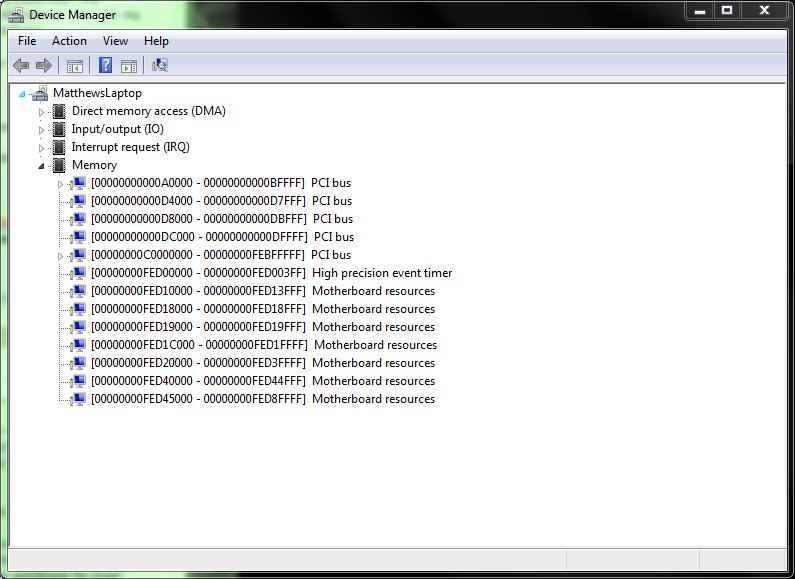
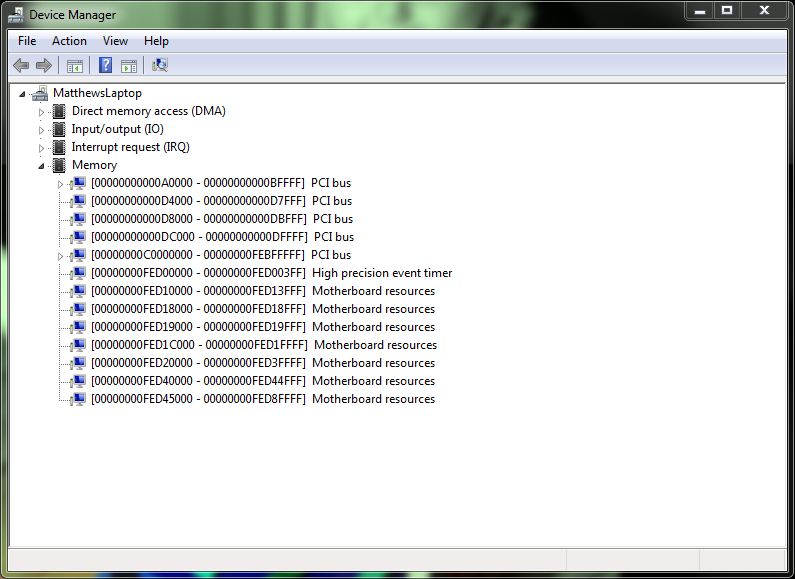
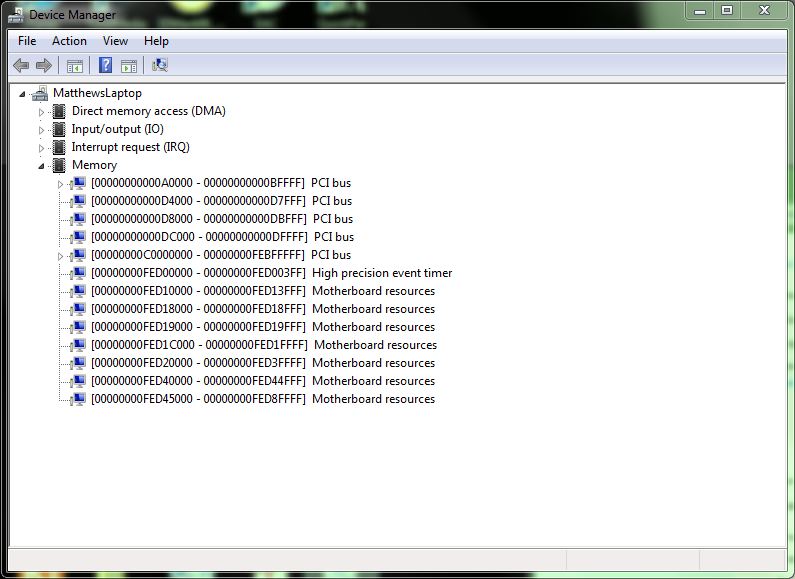
- Please boot your notebook normally, without eGPU connected. Open Device Manager, set "View" to "Resources by connection" & expand the "Memory" tree. Take a screenshot & post it here.
- Please boot your notebook with eGPU already connected (just x1 link) & take a screenshot of Device Manager (set "View" like no. 1) & post it here.
-
Hi, thanks for your help getting this going. I also was messing around before I seen this post and remember that when I switched my express port to the first one on the PE4H, that is when I had the problem with the computer turning off right away so I swtiched it back to the 4th slot and now it will boot up and no more red light on the first led on the PEH4 board. Then I did the settings to x4 and then rebooted and when I got into windows it said I didn't have the display driver installed which I did. I checked real quick and it showed the card on port 1 at x4 though so some progress. I then rebooted and used F8 to disable driver signiture and it booted ok with the driver. But Even with the card one at bootup it only showed port 1 at x4 but no card this time. So I then put the card to sleep and turned card off then on and when I woke the computer up it now showed the card on port 1 at x4. However, it wasn't showing up in the Catalyst control center like it did at x1 and the external monitor isn't working since I'm guessing it's not being fully picked up even though it shows in AIDA64. I'll do what you just asked and will post.
-
CAN ANYONE HELP? I've got everything set up as I have had before, 6800 series is recognised in device manager, but under resources it says: "Device isn't using any resources because it has a problem".
Can't get this working again (after clean windows install) for the life of me.
-
Ok heres the shots. The after restart it didn't show but then I switched it to port one with same express card slot and then I slept comp. and then it worked at x1.
Attached Files:
-
-
-
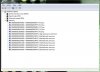
After sleep and port change from 4 to 1 with express card and shows in AIDA64.JPG
- File size:
- 83.8 KB
- Views:
- 154
-
-
Interesting. The card is detected & running at x4 link at first reboot but not detected after second reboot, need to use "sleep" method to get it detected again. Did you try again? Meaning start from notebook in power off state, boot notebook with eGPU connected, enter Setup 1.x, set x4, Reboot & boot with "F8 --> Disable driver signature". Does you still got the same scenario (eGPU not detected)?
Please try this & let me know what you see:-
- Connect eGPU to notebook.
- Power on eGPU.
- Power on notebook.
- Enter Setup 1.x.
- Set x4.
- Reboot.
- Enter Setup 1.x again.
- Check in Setup 1.x whether eGPU is detected or not.
If eGPU is not detected in Setup 1.x, please try this:-
- Connect eGPU to notebook. eGPU is remain power off this time.
- Power on notebook.
- Enter Setup 1.x.
- Set x4.
- Reboot.
- Enter Setup 1.x again.
- Power on eGPU.
- Press F5 to refresh. eGPU should be detected in Setup 1.x.
- Choose "Chainload".
- Boot with "F8 --> Disable driver signature".
BTW, thank you for the screenshots. -
Will the new pcie 2.0 kit make any difference on x1.opt performance? if so i will wait no rush here.
-
Yes it will, you'll have the same advantages of optimus plus a double raw bandwidth thanks to ver 2.0 of PCIe
-
*Edited*
Hi Kizwan, after reading your reply i gave it a try again and it work, i am able to boot into win 7 with optimus activated, however now i'm facing another problem, it seems that whenever optimus tries to activate the eGPU card for rendering, the laptop will shut off on me. Please assist if you know the problem. Thank you -
1. Optimus pci-e compression requires no other NVidia dGPU being active. To disable the dGPU a Sony Z1 use either the modified bios OR using Setup 1.x. Then you'll only have the remaining active Intel HD iGPU.
2. Optimus internal LCD mode requires:
- the standard Intel HD driver to be loaded, no Sony proprietory stuff.
- the Verde driver + modded inf. The standard desktop driver does not work
- the eGPU must be connected and detected prior to Windows booting. Hotplugging after boot and/or the sleep-resume method will not engage internal LCD mode.
Your Setup 1.x \config\startup.bat to manage your eGPU would look that below. The 10de:1086 may be up to 10de:1091 for a GTX570, so confirm in Setup 1.x what the correct PCI ID is:
To correctly define the 'call pci' used above, use Video Cards->dGPU[off] then do a PCI compaction->32-bit [iGPU+eGPU]. Then you only need to select Setup 1.x's Automated Startup via startup.bat option to do it all for you.Code:call speedup lbacache call iport dGPU off call vidwait -d 10de:1086 call vidinit -d 10de:1086 call pci call grub4dos mbr
I'd advise that you first get Setup 1.x working correctly to manage a x1 configuration using the expresscard slot (port4). Set the PCI Reset Delay on your PE4H to 6.9s (slider = middle position) and see if you can boot past the bios without any halting into Setup 1.x with the HD4850 detected OK.
Your startup.bat would then look like the one above except you'd replace the GTX570 with your HD4850's PCIID (1002:9442) and delete the 'call iport dGPU off' line. Confirm the ATiAMD DNA-drivers work correctly.
Then work towards x4, which would simply replace the 'call iport dGPU off' line with 'call iport x4 1'. NOTE: Since your port1 is mPCIe, to have the eGPU detected correctly after boot move the CLKRUN delay slider on port1's PM3N to the far right (6.9s). The sleep-resume method of detecting will not work since the bios reverts the link to x1 on resume. -
If eGPU shut off, I might know what the problem is. If notebook shut off, possibly notebook is overheating? Are you using PE4H or PE4L? If you're using PE4H, fuse on it will cut off the power from power supply to eGPU upon detecting very high load. Possibly, system "panic" when detected this behavior & shut off itself as a prevention measure. GTX570 power requirement is 219W, up to 240W on peak 3D & OC. If you're using PE4H, set the fuse bypass jumper on the PE4H (located near the floppy power port) & try again.
-
That's what I will probably try if I can't get it working any other way, however I have some promising updates on my situation.
So I finally managed to have the eGPU stay detected through a cold boot (warm boot gets stuck at the Windows loading screen) by setting the PCI Delay Slider to 7s on the PE4H. However, although the eGPU gets detected, it is giving me error 12 now I am using the latest Verde driver with the modded .inf btw.
I attempted to get rid of code 12 by using setup 1.x but haven't had any success yet. When I try to do a PCI compaction using either 32-bit or 32A-bit, it simply says "No solution found" and returns me back to the menu. However, I have had success using 36-bit on both the iGPU + eGPU and setting force to 32-bit to "none", which gives me 256mb of free memory. But if I try to do chainload win7 after this (chainload mbr simply prints "Missing operating system" and hangs) it just loads to a black screen after the boot menu. -
When the PCI Reset Delay is set (6.9s/15s), the X220 bios won't see the eGPU and I've seen comments that say it then sets TOLUD=3.5GB. If the eGPU is seen by the bios on bootup then it sets TOLUD=3.25GB. You want it to be 3.25GB so can work without any error 12 in Windows. That means ensure the eGPU is powered on AND the PCI Reset Delay is set to 0s (far left) prior to powering on your X220.
-
So a x1 link is as simple as getting PE4H, a desktop GPU, power supply and connecting them to the expresscard slot? Or is it a little more complicated than that? And will i have to disable gt330m after enabling igp or they can run in parallel with the external gpu as well? Can u please send me a link for this nando's setup cause i cant find it. Lol
-
anyone know if the 2.0 kit will have usb 3.0 connection? or are those 2 separate things being tested.
-
That's odd, for me, with the PCI Reset Delay set to 7s the eGPU is detected 100% of the time on a cold boot by Setup 1.x but the TOLUD is indeed 3.5 GB as you said. With a 0s delay the TOLUD is 3.25 GB but the eGPU isn't detected by Setup 1.x most of the time unless I do a hotplug. While I no longer get the error 12 with the 0s delay, any of the following things can happen upon a cold boot with the eGPU plugged in and active:
1. Hangs at BIOS startup screen
2. Hangs at Windows startup screen
3. Boots successfully to desktop but eGPU isn't detected in Device Manager and my computer may experiences massive slowdowns
4. Probably the most interesting, the eGPU seems to be detected according to the Device Manager, but I am unable to access the NVIDIA control panel at all (I will double-click the tray icon but nothing happens). Also, the eGPU stays detected in the Device Manager even if I use the ATX switcher to turn it off or even remove the ExpressCard connector from the computer. Occasionally I will get a BSOD as well. -
You know what, maybe you are right, maybe it the psu is too weak, I'll buy one of the thermaltake psu that has 12V/38A rail and I'll see if this will work.
-
Can you borrow PSU from your friend? I don't recommend buying PSU at this point. My analysis is base on the symptom you're experiencing. It can be not accurate. Do you have desktop computer that you can use to test the GPU & PSU?
-
Sadly I don't know a friend who is willing to give me his psu.I have a desktop computer, but I don't know how to install gpu and psu, I'm new to installing cpu and gpu. My safe choice in my opinion is to buy a new psu.
-
If I remember correctly, there are already two people with the same symptoms - "black screen" & BSOD - and already changed the PSU but the problem didn't resolved. I advice to put the PSU & GPU in your desktop computer and do GPU stress test using Furmark or OCCT for 30 minutes to 1 hour. If PSU does really weak, you can confirm with this test.
-
I have test both gpu and psu on a desktop computer, and it turns out that the psu is weak, therefore, I'm buying a new psu. What do you think of this psu:
Thermaltake TR2 RX 650W V2.3
Output: +5V @ 15A; +3.3V @ 24A; +12V @ 44A; -12V @ 0.3A; +5VSB @ 2.5A
I have said it before and I'll say it again, my eGPU works perfectly even on optimus, but whenever I try to play games like TF2 which doesn't require a high end graphic, the laptop goes BSOD, I believe it is from PSU. -
This means, your 600W PSU with 12V/26A (12V * 26A = 312W) is only able to supply less than 45% of the claimed total 12V power. Some PSU use cheap/non-quality components which failed to work effectively when they get hot. Thermaltake is also not reputable brand. I stay away from this brand. Let say TR2 RX 650W only able to supply 45% of the 12V power, (12V * 44A) * 45% = 237.6W. So, 237.6W vs. 140W (GTX460SE), it might be able to drive GTX460SE without any problem but I'm still not recommend it.
I recommend getting a Corsair or Seasonic PSU instead. I use Corsair CX500 with 188W GPU, so I'm sure it will work OK with your 140W GPU. -
Thermaltake is a worldwide known brand, most people use this psu and they don't find any problem with it, but I'll take Corsair psu as a second option for me.
-
Hi, I am interested in trying out eGPUs, and I happen to have a GT240 laying around, and I have a 2530P (which has an express card thing). Considering that my GT 240 never gets to 75W, what is the cheapest/easiest way of using it as an eGPU? I've heard that It should be fermi card if I want to use it with my internal LCD but that the GT 240 is an exception where it works
Should I consider using both my mPCIe and express card? I also have a 6870 laying around, is it much more complicated, expensive or is it even possible to use it with my internal LCD? -
After many thoughts, I will buy Corsair CX-500. I have read that it is inexpensive and performs great, do you agree with me, mr. kizwan? since you have this product.
-
Yes, I use Corsair CX500. So far running OK for me. If later you decided to upgrade the GPU, you still can use this PSU. Good luck.
BTW, I'm installing Team Fortress 2 at the moment to see what's what. I think you're the second person to have problem with TF2. Not just TF2, you also experiencing black screen or BSOD when refreshing windows experience index. You also might want to reinstall windows. Do not use recovery or restore DVD/partition, instead do fresh windows installation. Usually fresh windows installation solved many problem. -
My windows 7 doesn't have any problems refreshing experience index when not connecting with eGPU, BSOD only occurs when I connect eGPU with my laptop.
DIY eGPU experiences
Discussion in 'e-GPU (External Graphics) Discussion' started by master blaster, Sep 18, 2009.