Problems? See this thread at archive.org.
Good to know, can't wait to see your setup
-
-
I got diy vidock setup all worked, but I don't know what to do next, can you give me some recommended setting of diy vidock setup for my laptop:
lenovo Thinkpad Edge 14"
Windows 7 Professional 32-bit
Intel Core i3 390M 2.67GHz
6GB DDR3
EVGA Nvidia Geforce GTX 460 SE
I want the video card to automatically work after each hotplug. -
Hi all!
Just a simple question... Lenovo x220 has a x1 2.0 expresscard that can be used only as a x1 1.0 (due to PE4H current limitation). If you've an Nvidia card you can use optimus to compress the data, so that a x1 1.0 has nearly a x2 1.0 bandwidth.
So the maximum possible bandwidth for x220 (using optimus and with a revision of the Pe4H to support PciExpress 2.0) is:
x1 2.0 Opt
that i nearly a x4 1.0... Am I right?
Thanks (expecially to Nando4) for helping me understand how eGPU actually works! -
Yes should be right (it fit better in benchmarks, in real gaming the performance i think could be more like 3.5x than 4x).
In the case you're planning to use an internal LCD configuration, u'll have to subtract the bandwidth needed for the image from the bus (about 4MB/s @ 1366*768*32bit color depth, aka 240MB/s if u had 60 frames rock solid to render each second).
From my side:
I finally bought an HP 2560P (found a great deal on ebay), i LOVE this machine (in particular the 40Hz refresh screen option that can cap vsync on 40fps). I'm waiting for the new dock for PCI 2.0 (schedule unknown) and the new GTX560Ti (based on the GTX570 chip) that is scheduled for release on Nov 29. My main problem now is to find a PSU that could handle that card. If i made the calculations correct, i would need a 300W PSU with at least 25A on the +12V rail (compared to the old GTX560Ti that needs 250W with 20A on +12V rail). I would like to find a flex ATX or a microATX (or an evolution of the Thermaltake Power Express 250W). Anyone has any suggestions? I'm in Italy but i have no problems in buying worldwide (if the store ships abroad ofc).
Thanks -
Please see my last post.
-
Well the 1st thing to try is to plug everything in and boot with the card on. If your laptop refuses to POST, then hotplug the card after POST.
-
I have tried this many times. When I plug in the card and power the eGPU before booting, the screen does not show anything, and the laptop fan spins fast.
The same procedure, but after booting the laptop and logging in, the screen freezes and goes BSOD. Any solutions? I even tried to:
1-power off eGPU.
2-boot laptop and press F8 to halt the booting process.
3-plug in card and power on eGPU.
4- resume to windows login screen.
I don't know what to do else...help me, please? -
Hey guys, been having the same problems as Useafo,
I've done a bit of experimenting and here are what I've found:
If I shut down my laptop, and plug in my eGPU while windows is booting, everything works correctly.
also:
Boot from shutdown > Plug in eGPU while booting > Safetly eject eGPU (via icon tray) > Then hotplugging back in = works as intended
but
boot Shutdown > wait until windows boots > Hotplugging = BSOD
Boot from shutdown > Wait until windows boots > Sleep > hotplug > Resume= BSOD.
I'm guessing this is some sort of driver issue since safely ejecting my video card and then hotplugging works perfectly. Does anybody have any insights or solutions to this problem. -
Do you own a Sandybridge laptop. If yes then the BSOD comes because the gear we use right now is not combatible with x1 2.0 speeds. You can resolve the issue if prior you boot windows, you run setup 1.x and turn your port to G1 or if there is such option in your bios. Somehow if you connect while windows boot it automatically run @ x1.1, couldn't find the reason. Then boot normally to windows and hotplug the eGPU.
At least this works in my case. If you don't own sb laptop then this isn't going to work -
Hi i have a Samsung R480 Laptop
Specs:
Intel Core i5 - 520M (First Gen)
GT 330M (1GB)
4GB ram
Can i make DIY eGPU setup consisting of a gtx 460?? Will it have better performance than my current GPU?? -
Hi,
It seems that the problem is gone when I uninstalled the latest card driver, It left me with Video Controller driver, see the picture below and tell me what to do next. My eGPU is EVGA GTX 460 SE.Attached Files:
-
-
Use Setup 1.x to set G1 (Gen1) speed on the port. Then install Nvidia Verde driver.
-
Which version?
-
Any version from here. Preferably latest version available in the page. Don't forget to set G1 (Gen1) speed using Setup 1.x.
-
My laptop has windows 7 32-bit, should I download 32-bit version only or is it ok to download a 64bit version?
Also, can I install an official verde graphic driver from nvidia.com ?
And I have read that you can make your own nvam.inf , how? -
So I got my parts and tried to set up with setup.1 for x4. I have all mPCIe ports plus express port going. Things seem to go fine until I need to chainload then it goes to a black screen then i need to hit power button to restart. I think something with the MBR is messing it up. I did the query option in grub and it says I have fd0, hd0, and rd. I have a c drive and a second partition D: which is a recovery one. So not sure what the fd0 is? but any help with be appreciated. I tried to look at the grub web site help but much of it seems over my head. Thanks and hope to get my x4 working soon.
-
He has a series 5 chipset, so setting gen1 shouldn't matter since he can't do the 5.0 rate anyway. I really have no idea why he's getting BSODs.
-
I recently solved the BSOD problem by removing graphics driver that was installed by windows driver search and by doing what kizwan had told me, can you please answer my questions above?
Thanks in advance. -
Only the 32bit version will work. You can install desktop drivers 285.62 and later as is with no modded .inf and you get full functionality.
-
No one yet has done an EGPU on that laptop, so you'll need to find out your TOLUD and what ports are available. Your internal GPU is a bit weak, but not terrible. I'm pretty sure that you do not also have an intel igp, so you'll need to do x2 for good performance out of an EGPU.
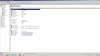
To check your TOLUD, open up your device manager. Click "view", then "resources by connection", and then click "memory". Post a screenshot for us to look at to determine your TOLUD. TOLUD has to be 3.25GB (0xD0000000) or lower to add an egpu.
Determining if you can do x2 is a bit more involved. You'll have to download AIDA64 and move around your wireless card and determine which port numbers are available including the expresscard slot if you have one. AIDI64 reports port numbers under "motherboard", "chipset", "southbridge". You need either 1 & 2 or 3 & 4 to be available for x2. -
i have an xps 15 L502x sandy bridge laptop with nvidia optimus.
I have ati 5770 and a 600w psu what else do i need to get this working besides the monitor. -
I wonder how you managed to install a driver last time. Anyway, I'll prepare modified .INF for 32-bit later. In one to two hours. Please wait.
Thanks. I played Bad Company 2 before that. The opposition is too strong, every time I tried to rush, I got killed. This make me angry & totally forgot what notebook useafo got.
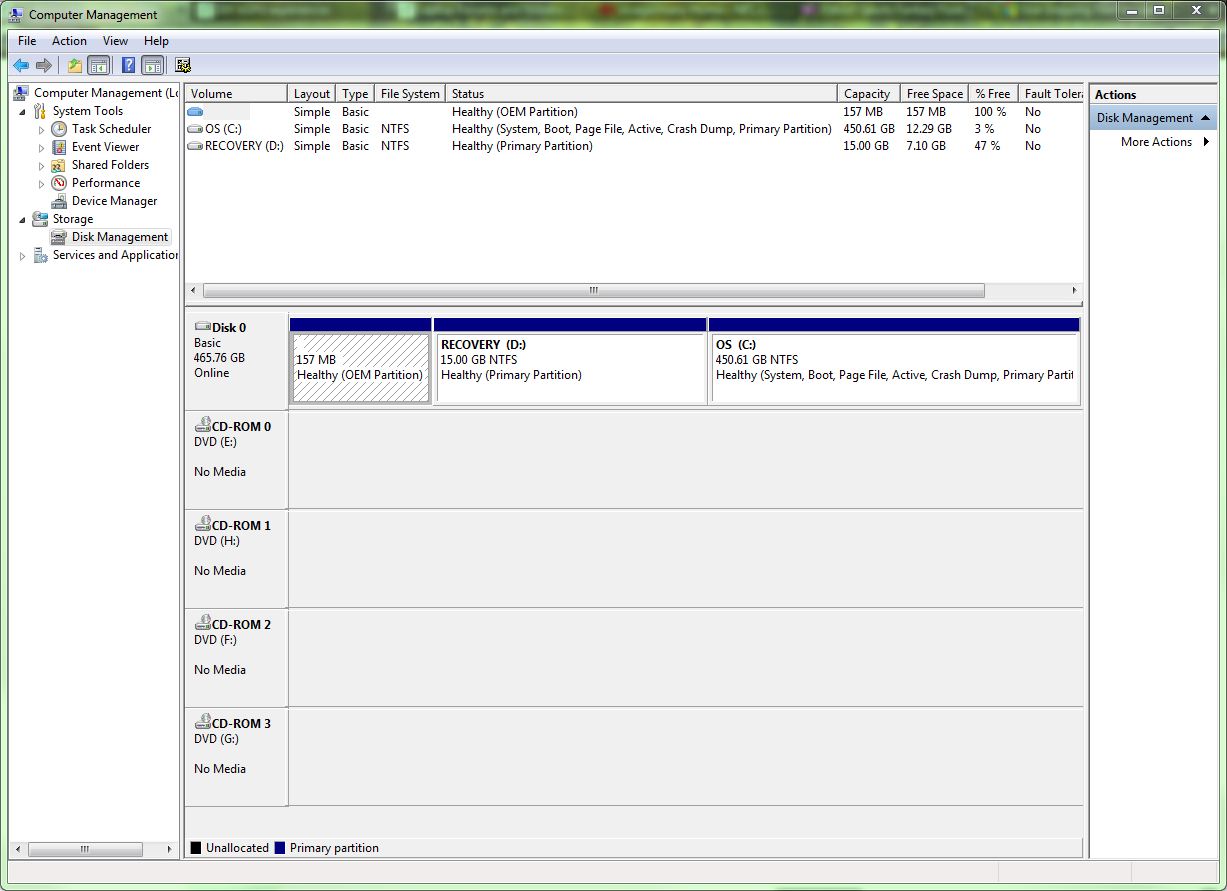
If you run "Chainload win7", please try "Chainload mbr". If still doesn't work, please check the HDD partitions arrangement. Recovery partition usually before the OS partition & this can make Chainload failed. The "C:" & "D:" are just drive letters.
Removing drivers is not a solution. -
Your notebook have Intel HD 3000, so you can do x1.Opt with Nvidia Fermi desktop graphic card. Opt=Optimus provide PCIe data compression which boost performance over PCIe x1 link. With this setup also, you can use internal LCD but the performance will almost half the external monitor give - since frames are output directly to external monitor.
Your notebook doesn't have ExpressCard slot. So, you can use one of the mPCIe ports. You already have ATI 5770. You can't do x1.Opt setup with ATI. <strike>To get good performance from ATI, you need to do x2 link. This means you need to use both mPCIe ports IF both are [ PCIe port#1 & port#2 ] OR [ PCIe port#3 & port#4 ] OR [ PCIe port#5 & port#6 ]. Please go to my eGPU experience post to see the connections when using two mPCIe ports for eGPU.</strike> Sorry, I forgot one thing. x2 setup is not possible on SB notebooks due to hardware/BIOS limitation. You'll only get x2 equivalent performance on x1 link when PCIe 2.0/Gen2 compliant kit available.
In summary, if you're going to use ATI 5770 at the moment, <strike>you'll need PE4H & two PM3N. Better check the PCIe arrangement first before buying the kit. Install AIDA64 & take a screenshot of "Motherboard" \ "Chipset" \ "South Bridge".</strike> you'll experience lagging & stuttering due to limited bandwidth. Recommended to get Nvidia Fermi desktop graphic card instead for x1.Opt setup. -
I tried chainload mbr as well and still black screen. What grub showed was HDD partitions as fd0, hd0, and rd when I did a query. I had to us the ReadydriverPlus to get my DNA driver working in Win7 so that's on one of my boot options as well at bottom, along with the setup 1.x in middle, and Win7 at top.
I posted earlier about my computer if you want to see what I'm running. Core2 Duo, Dell 1640 xps studio. Another thing I noticed is only one of the three mPCIe cards has a blue light on which is port 1. But I used my wifi card in slot 2 before and know it should work along with 3. -
so to avoid problems i should use an nvidia card correct? that will run in x2 mode with just 1 mPCIe?
-
I have prepared the modified nvam.inf file for Windows Vista/7 32-bit. You can find the modified nvam.inf file at post #6787. Replaced the original nvam.inf with the modified one & install Nvidia Verde driver.
I didn't use ReadydriverPlus but I use “F8 -> Disable Driver Signature Enforcement”. I only boot with it one time & never have to boot with it since. No matter. What matter is please check the HDD partitions arrangement.
Tips: Right-click "Computer" icon, choose "Manage" & go to "Disk Management". Take a screenshot & post here.
Sorry, no problem at all. Actually what I meant is, your notebook doesn't have ExpressCard slot. So, the "problem" is you need to connect eGPU to mPCIe port. "Not convenience" is the right words, because mPCIe port is located underneath the notebook. If you use Nvidia Fermi desktop graphic card, you can use one of the mPCIe port to do x1.Opt setup, not x2. x2 required two PCIe ports. x1.Opt deliver better performance than x2 & x1.Opt enable hardware acceleration on internal LCD. BTW, I forgot one thing. x2 is not possible on SB notebooks due to hardware/BIOS limitation. (I made corrections in my previous post.)Last edited by a moderator: May 6, 2015 -
Hmm, ok will uninstall ReadydriverPlus and try again with your method seems easier. Heres the screen shot.
(update: uninstalled Ready Driver Plus and Boot screen back to Setup 1.x and Win 7 only now, but I was thinking that you had to do the disable driver each time?) result still black screen after chainload.Attached Files:
-
-
Hi, I am having trouble setting up an eGPU for my Thinkpad X220T. Here are my system + eGPU specs:
Thinkpad X220T (BIOS v1.11)
Windows 7 64-bit
GIGABYTE GTX 560 Ti
COOLER MASTER GX 450W
w/ PE4H-EC2C
I have already installed the latest Optimus driver (Verde 285.62 w/ modified .inf) and my system is detecting the video card correctly in the Device Manager. However, I am unable to access the NVIDIA control panel so that I can configure my GPU. If I try to access it, either by clicking on the tray icon or right clicking on desktop, nothing happens.
Also, my system is unable to detect the GPU unless I manually remove and insert the ExpressCard into the slot, toggling the ATX power switcher does nothing. Because of this, I can't successfully reboot my computer with the eGPU active, my computer won't detect the GPU on it's own after a boot unless I reinsert the ExpressCard. Occasionally I will experience massive slowdown/lag on my computer if the eGPU is plugged in but not being detected, which doesn't make much sense to me at all. If someone could help me out it'd be much appreciated, I pretty much have no clue what to do next because I can't access the NVIDIA Control Panel, nor perform a successful restart of my computer with the eGPU still connected. -
New GTX 560 448 out, MSI N560GTX-448 Twin Frozr III Power Edition Review Page 3 - Specifications & Features - Overclockers Club does very well, but not sure if any of the designs can fit into my silverstone SG05, this is apparently 0.1" too long :s but it is a custom design though
-
Hey guys I've read and read and read and I'm yet to find a conclusive way to hook up an EGPU for my alienware m14x.
I would like to hook up a 590ti. I have the things I was told that would be required for an EGPU a PCI express and a Mini Pci express including the P4uh or whatever it's called. I also be going down to buy a power supply as well. I was just wondering if anyone could point me to a step by step in the most basic terms on how to hook it up. I'd really really appreciate it. Thanks guys. -
Hey thanks for replying!! I have uploaded the screenshot below!! My windows 7 is 32 bit. I do have a 34mm express card slot and i have no idea how to do a x2? Why is it needed though? Can u tell me the steps? Sorry if i sound like a noob!! =p
-
The only time I have to boot with “F8 -> Disable Driver Signature Enforcement” is when I want to install the modded driver. I don't have to boot with “F8 -> Disable Driver Signature Enforcement” since then. When I want to update the driver, I don't have to boot with “F8 -> Disable Driver Signature Enforcement” too. In fact, I just got a warning message regarding the driver signature & I can resume the driver installation.
Please try this.
- Mount Setup 1.x volume by running "c:\eGPU\eGPU-Setup-mount.bat"
- Go to V:\CONFIG
- Edit MENU.MBR. Add right before "chainloader (hd0)+1":-
Code:[B][COLOR="DarkGreen"]hide (hd0,0) hide (hd0,1) unhide (hd0,2) rootnoverify (hd0,2)[/COLOR][/B] chainloader (hd0)+1
- Test "Chainload mbr"
Please let me know whether this work or not.Last edited by a moderator: Feb 6, 2015 -
Here is Need For Speed: The Run on my setup.
Need For Speed:The Run (Second Day Experiences Level 13) - YouTube -
These what you can do:-
- Set ExpressCard slot speed/mode to Gen1<sup>1</sup>, either in BIOS or using Setup 1.x<sup>2</sup>.
- Update BIOS to latest version, 1.24.
<sup> 1</sup> Please refer to Xav's installation procedure (at the end of the post, below "Installation").
<sup> 2</sup> Any information regarding Setup 1.x, including how to install is available at Setup 1.x page.
The reason why you can't find a conclusive way to connect eGPU is because each notebook have their own steps & procedure. Steps & procedure that works with notebook A, is not necessary will work on notebook B. Since no one have yet try on Alienware M14X, it's up to you to figure it out. You can:-
- start by connecting everything & try boot notebook with eGPU connected.
- if your notebook unable to boot with eGPU already connected, connect eGPU in Setup 1.x OR in windows (put notebook to sleep, connect & resume).
Last edited by a moderator: Jan 29, 2015 -
Okay, so here's the problem:
Installed a fresh version of windows 7 (not diy gpu related).
Hooked up my 6870 to my XPS1645 as i have been doing before. However, i no longer have "68xx series" in my device manager, just VGA device. I have no output to external LCD, and GPU-Z only recognises it has "standard VGA graphics adapter". I've installed the 6870 driver disk, and have my 4670 inbuilt driver already installed. No luck
Any suggestion?
EDIT: Just restarted with eGPU plugged in... Started at 800x600 res, and then and AMD error: No AMD/ATI products installed. Not even my inbuilt graphics show in "screen resolution" or GPU-Z.
BUT when i restart with the eGPU NOT pluged in, it starts normal @1080 with my 4670... -
How much does it improves (speaking about real in-game performances) having an eGPU with 2GB of Vram instead of 1GB? I'm looking for a GTX 560 Ti. is it worth to have 2GB? Can it help to avoid wastes of the PCIe bandwidth (even in a PCI 2.0 1x scenario)? The resolution will be 1080p on the external LCD, while 720p on the internal one.
Thanks -
Do not install two driver. Instead install D.N.A. driver. It will support both dGPU & eGPU. Uninstall all ATiAMD driver before installing D.N.A. driver. Link to D.N.A. driver is available at first post (click "modded driver" link).
-
Would this be the correct driver?
DNA-ATi 10.10e.4 | Do Not Argue
Is it simply just a straight forward install?
EDIT: Just installed it, and removed older drivers. Rebooted with eGPU plugged in. Did the windows installing thing in the tray, but only said for audio device? And booting with the eGPU just dosent register? no indication of a 68xx series anywhere
-
Yes, that is the driver I'm referring to. You might want to use latest version instead: DNA-AMD GFX 11.10.1-prev2 | Do Not Argue
First, make sure you uninstall all ATI drivers. Second, reboot, press F8 before windows loading & choose “Disable Driver Signature Enforcement”. Finally, in windows, install the driver. -
Okay I'll try that now, thanks.
Once I've booted with F8 and Disabled Driver Signature Enforcement, and installed the DNA driver, where do i stand in regards to using the eGPU? Shall i then reboot with the eGPU plugged in, or should it already be plugged in during the whole process? -
Ok, I edited the MENU.MBR with what you posted and still chainloads to a black screen. I have gotten it to work in x1 on express port before I tried all 4 ports. Now when I have all 4 connected, and chainload doesn't work it still works in x1 on express port. Whenever I go in to adjust it to x4 on port 1 I always need to enable ports 2 and 3 first if that matters? The last time I tried to do x4 with the MBR changes and it didn't work, I did it again and instead of chainloading I just did reboot at the bottom, and then when it loaded to windows it did show the card on port 1 at x4 in Aida64 but for some reason it said the driver wasn't installed and I did install it before when I have been using x1 and it has worked? I also noticed for some reason since I have all 4 ports hooked up even when it is working in x1, on port 4 the express port, it drops and I can't get the card going again unless I reboot. This never happened when I had just the express port hooked up at x1; which doesn't work much better than my internal gpu
Now I rebooted and didn't try setup 1.x to get x4 working it showed the card working in x1 on port 1 and 4? It use to only be x1 on port 4, but then the card stopped working again so I'm just on the reg. card atm. -
I've installed it the way you've told me...But there's some serious voodoo going on here. I had the same display error on boot (also booted at 1400 x1050?):
![[IMG]](images/storyImages/noamd.png)
BUT on GPU-Z i get both graphics cards, with funny readings:
![[IMG]](images/storyImages/gpuzs.png)
CCC has no detected cards either... -
OK. This show the black screen is not because of the HDD partitions arrangement. Basically you just need to set x4 on PCIe port#1 & you should see in AIDA64, PCIe port #1 running in x4. PCIe port#2, port#3 & port#4 will not listed in AIDA64. Please try this:-
- Connect eGPU to your notebook. The first port on PE4H - [PE4H port x1] is connected to ExpressCard. All other ports on PE4H are connected to mPCIe ports (PM3N).
- Power on eGPU.
- Power on notebook & boot into Setup 1.x.
- Set x4 on PCIe port#1.
- Run 32-bit PCI compaction.
- Chainload
If still black screen, try this:-
- Connect eGPU to your notebook. The first port on PE4H - [PE4H port x1] is connected to ExpressCard. All other ports on PE4H are connected to mPCIe ports (PM3N). Except this time, the EC2C card is not plugged in to ExpressCard slot yet. eGPU remain off at this time.
- Power on notebook & boot into Setup 1.x.
- Set x4 on PCIe port#1.
- Chainload.
- After boot into windows, put notebook to sleep.
- Power on eGPU.
- Plugged in EC2C into ExpressCard slot.
- Resume notebook from sleep.
Hmmm... Please boot with F8 --> “Disable Driver Signature Enforcement” & see what happen. Look like you need to boot with F8 --> “Disable Driver Signature Enforcement”, every time.
I think I need to track back what I have done to my OS that make me experience different scenario than everybody else. (I didn't recall installed any 3rd party tools though.)
-
ok so i need to sell my 5770 and get a nvidia card. so x1.opt is faster than x2 that is great news. also how do i get the internal lcd working can you link me to a post i dont see it on the faq.Last edited by a moderator: May 6, 2015
-
Your TOLUD is 3GB, so you can run an eGPU.
You need to do x2 because x1 performance would be pretty poor, and not worth doing over your internal graphics.
Each mPCI-E slot and the expresscard slot are given a PCI-E port number. These numbers can be from 1-8. You need to have either 2 available mPCI-E slots or an mPCI-E slot and the expresscard slot to be numbered 1 and 2, or 3 and 4. You need to determine what PCI-E port numbers are assigned to each physical slot. I described how to do that in my previous post. -
Unless the game requires more than 1GB ram, there is no performance gain for 2GB vs 1GB. The only game I know of to occasionally require more than 1GB is BF3. I've played BF3 quite a bit and only once did I run out of video memory.
-
Just need to install Nvidia Verde driver to get acceleration on internal LCD. It's simple. Please look at this example of x1.Opt setup.
-
Ok this is a first but when I switched the ports in the order you said with express card to port 1 and then I went in order of mPCIe port 1-3 on the following connections on the PE4H a red light shows on the PE4H board under the first port, green on others and then the computer doesn't boot. The lights just come on on the keyboard then it powers off right away. I have to unplug all the cable to the PE4H, then it boots like normal.
-
Did you try the second procedure?
-
Hello everyone,
I want to set up a DIY egpu for my Lenovo X220..
I have scoured these forums and come up with a plan, i just want to run it by and see if it is sound.
First: The parts I need to purchase.
1. PE4H-EC2C ver2.4 Package ( PE4H (PCIe passive adapter ver2.4))
2. Graphics card: i was thinking GeForcs GTS 450 or the GTX 460 (is this card worth the extra 50 dollars?)
Are there any other cards that you guys would recommend that would work with the X220 and play games like BF3 moderately?
3. Power supply - how much wattage do i need for the power supply?
I have a 720p 21 inch tv that i plan to connect it too ( a dynex )
Is there anything else i need or need to know?
Thanks
DIY eGPU experiences
Discussion in 'e-GPU (External Graphics) Discussion' started by master blaster, Sep 18, 2009.