Problems? See this thread at archive.org.
@kizwan:
Thank you
-
Thanks for the response. I think i'll be sticking with the laptops i'm looking at cause i really want the fx 570m for most my work. But the ability to dock and use a desktop card when at home is very enticing. Especially because some software I plan on using requires a gpu with 512 discrete memory.
Which leads me to my next crazy question. The 8510w of course doesn't have an expresscard slot built in, thus one has to go through the HP advanced dock to use such a card. Does anyone know exactly how proprietary the docking port is? Would it be possible to connect an expresscard directly to the docking port area right on the laptop via a low profile adapter? -
It appears that TOLUD was 3GB to begin with even when you had 4GB installed. So the 4GB->3GB will not have made any difference.
Looking at the diag output, 36-bit compaction shows that ALL the other system devices could be moved to F0000000. E0000000 is a motherboard resource so isn't available, so the only area that could potentially be liberated is the range at D0000000.
Problem is the GT320M has a larger-than-expected pci-e footprint: C0000000 (256MB) + 64GB (D0000000-D3FFFFFF). 16MB could be liberated by disabling the HDMI controller but would need at least another 16MB to have a hope of using a NVidia card (128+64+32). BUT there is another headache - the motherboard resource "MEM : db200000-db200fff".
If keen to get it to work with 3GB/4GB, I'd advise trying various forms of PCI compaction and manual allocation to liberate as much of the 256MB block starting at D0000000 as possible. Ie:
1. Remove the ATiAMD eGPU.
2. Perform 32-bit PCI compaction. Confirm Win7 boots and works OK.
3. If (2) is OK, then manually start to disable the GT320M's PCI BARs to see which are absolutely essential. Ie: setpci -s 1:0.0 BASE_ADDRESS_0=0, setpci -s 1:0.1 BASE_ADDRESS_0=0 and chainload after each and evaluate the resources in the D0000000 range in Win7.
It looks like a hopeless situation. Your system would work fine with 2GB or consider using the XP ATi drivers which would allow you to disable to dGPU to liberate pci-e space for use by the eGPU but then you'll have no Aero or DX10. -
Thanks for the quick response - much appreciated. I believe my port set up is as follows:
Port 1: Ethernet controller
Port 2: wifi interchangable w/ port 3
Port 3: wifi interchangable w/ port 2
Port 5: Expresscard/54
It would appear that I don't have a port 4? Does this mean I can only do a x1 1.0 setup? Is there any other recommendations?
Thanks again for the infromation! -
x2 is not possible for you unless you lifted the ethernet controller chip and tapped it's pci-e lines (TX+-/RX+-, and GND, 7-9 wires). Then you could run x2E with an ATiAMD card (but no concurrent wifi). Your expresscard port5 also means you can run x1E with ATiAMD cards. ATiAMD cards tend to have better DX9 performance.
I'd advise offloading your system and replacing it with a better x1.Opt candidate before undertaking any such radical hardware mods. Can have a SB i3 for just over $400 whose x1.1Opt/x1.2Opt (upcoming) will outperform your P7805u. -
Nando,
I appreciate the time you took to type that up. I feel like I will probably just stick with the 2 GB for now and get a SSD for the main drive. This will help with the small memory footprint and slow R/W on the HDD.
Wish you the best of luck to you (and yours) this Christmas! -
Nando,
Thanks again, your contribution to this forum and your quick responses are certainly appreciated! Sorry to bother you with some simple questions, but would any SB i3/i5/i7 be a good candidate?
Also, is there any point in using the 560 gtx 2gb, or is that just overkill? Would it be more effective to get something a little less, or will I the 560 gtx 2gb on a SB i3 give me better gaming power than something like the 560ti or the 460 gtx (which I see mentioned a lot)? -
The reason you see the 460 mentioned so much is because it's by far the best bang per buck. For faster cards you end up paying a larger % than you get performance gain. As for 1GB vs 2GB, games will disregard any free vmem and allocate memory however they were programmed. So unless 1GB is too little, 2GB offers no performance improvement. The only game I've seen use all my vRAM is BF3, and that was only once. The only exception I've seen to this rule is the original Crysis, which would dynamically allocate vmem and use as much as it could. I have not seen any other game do this. The only use I see for the 2GB cards are if you wanted run SLI and output to multiple monitors.
-
I appreciate all the help everyone! I hope you all have a merry Christmas!!
-
Any SB notebook (i3/i5/i7) with Intel HD 3000 iGPU will be a good candidate. I personally recommended SB notebook with Nvidia Optimus because for sure you will not have problem with TOLUD register. You also want SB notebook with ExpressCard slot. This way you don't have to use mPCIe port for eGPU.
-
x220 with i5 arrived, the first thing I've done was try egpu (still with hdd).
I've had to set express card slot to "generation 1" in bios, except that it went without any (expected) problems. I just had to boot up with egpu attached to notebook - otherwise it would say there was not enough free resources for the new GPU.
tested with MSI 560Ti HAWK over 1x pci-e
NVIDIA GeForce GTX 560 Ti video card benchmark result - Intel Core i5-2520M Processor,LENOVO 42872SG score: P4025 3DMarks
this is very first run, second one got P3995 score. -
Hi all,
Thank you Kizwan, Your post was of much assistance and helped me a lot.
Here's a list of items i bought:
- 1-PE4L EPCI-ESC2 from This site for 105$ (addons: On/off switch, EPCIE 60 CM cable, 10V 10A ac adapter + 25$ for international shipping, total 130$.
- 2-Ninja Geforce 440 GT from This website (Hebrew), 284 ILS = 76$ USD, free shipping
- 3-Molex 4 pin Male to 4 pin X2 female ends.
Thats all the items i bought, the Mini HDMI cable is included in the content of that package, is there anything else am missing?, is my video card compatible as Fermi, will it work with Nvidia Optimus? If any one can tell me that would be much appreciated - so i could re-arrange the list. -
If you haven't paid for the items yet then consider the following as a cheaper way to get more performance:
* US$93-shipped PE4L-EC2C (includes SWEX and 60cm mHDMI cable)
* US$10-shipped 12V/10A 120W AC adapter or &
* A GTS450/GTX550Ti (106W TDP) or lower video card.
If getting a GTS450/GTX550Ti then will need to power the 1xpci-e power connector like shown here.
If you are handy doing soldering mods then could consider an even higher peformance GTX460 xbox360-PSU portable configuration like shown.
Would also advise upgrading your T3400-2.16 CPU to a GL40 compatible T8300-2.4. The latter runs 800Mhz FSB and is noticably faster. A T9300-2.5/T9500-2.6 would be even better but usually don't justify the price premium for the slightly faster performance. -
That's everything you need. I'm not sure why you need "Molex 4 pin Male to 4 pin X2 female ends". GT440 is Nvidia Fermi graphic card. Your notebook have Intel GMA 4500MHD which means you can take advantage of Nvidia Optimus technology.
Please post screenshot of Device Manager (set View to " Resources by connection" & expand the Memory tree - only for the root tree, no need to expand sub-tree). -
nando4,
Thanks for your quick response, sadly a GTS 450 is just out of my budget, and am mainly buying this hardware so i could actually play games - low or high detail graphics aren't everything for me (i still play PS1\ps2 Games).
And i will consider getting A CPU upgrade seeing as it only costs 50$ or less, but only after i receive all the items (due to international shipping its going to take about 10 days or more).
And Kizwan, am buying the molex - its inexpensive and i know what you told me about 1.0X optimus inner LCD, i still wouldn't mind using\trying my external LCD monitor (its practically UNUSED, we leave it upstairs in the attic).
I don't really mind if the Molex cable is not needed.
Pic:
Thanks guys, now i'll play the waiting game!. -
@samerdl,
Yes of course you can use external monitor. You'll get better performance on external monitor. BTW, the pic taken only show "Devices by connection", not "Resources by connection" that I asked you. -
I have this 34mm expresscard slot adpter but 54mm wide slot for it so it "wiggles" and I don't have any adpater for it.
Can anyone suggest me how I fix the adapter from wiggling? -
Thanks for the response kizwan, can you answer me just a few more questions?
1) In the pros and cons i saw this
- Easy, on-demand attachment without a reboot if running Win7
A simple reboot seams no problem to me, but beatTheRestrictions as found another difficulty:
What can be done to overcome that problem?
2) a eGPU will replace the performance of my gt420 or will it work with it?
Tnks once again
-
just got a 560 for christmas so i REALLY need that 2.0 p5l to be released!!
-
Here you go.
Attached Files:
-
-
just read the updates can some one tell me the difference between PE4H v3.0 and PE4L v2.0?
-
I cannot find one information:
On notebooks older than Sandy Bridge, are the mPCIe 1x already v2.0 or only v1.0? (on Arrandale chipset, Intel says that it can support up to 8 1x slots v2.0). This question is because I bought today a PE4L v1.5 + EC2C + PM3N + mHDMI + SWEX + 54mm adapter, convinced that those older configurations, (Arrandale mainly), would not grant benefit from the newer adapter, but after I clicked the "take my money" button, I realized that I always had in mind the discussion about the express card and not the mPCIe slots. Later I checked the table on the first post, but I didn't got what's the difference between "N" and "NA". ("No" vs "Not Available (yet)" ? )
My thoughts are only about the possibility to sell the adapter once the newer will be available, cause i have a SB and I will surely buy the PE4L v2.0.
Thanks -
Thank you MuF! It's really work. But I have Gigabyte 560(non TI) 830\1660 and at least 3300P 2011 Marks. Overklocking VGA to 920\1660 give me 3500P Marks. It's too few for 3.2Ghz iCore. Maybe 560 is weak VGA but at desktop i7 2600K i have 4500P marks( I use 1.2opt version of P4EH and Opt drivers 285.25. BF3 All ultra no AA 1280*1024 i have 25-30fps and game not smooth(
-
Kizwan,
here's the pic for memory of resources by connection here -
Can you post your eGPU setup? I would like to see the connection between the eGPU & notebook. I'm considering to buy Dell XPS 15 (L502x).
EDIT: Never mind. I forgot the mPCIe ports are accessible underneath the notebook.
Look like you can only do x1 link setup using PCIe port#2 which is currently occupied by WLAN card. It will not provide good performance though. You'll experience stuttering & lagging when playing games.
First PCI bus with 8 digits memory address is 0xC0000000. Which means TOLUD is 3GB. So, you can use eGPU with 4GB of RAM. -
Please try solution at Error43_FAQ#1 (see "Update 26 July 2011"). Always use latest Nvidia Verde driver.
-
hello and merry christmas from italy. today i found this very interesting project and i am interesting to do a try.
i have a Toshiba Qosmio F50 with T9400, 8gb ram, nvidia 9600 512mb, 1hd 90gb ssd corsair and 2hd 500gb 7200rpm (has 2 hd enclosures) and an express card running Windows 7 Ultimate 64bit.
does anyone have the same model with mine or can give me a short of list to do/buy because 733pages needs many time to read.
thanks -
One of these, several places make/carry them
-
Or include a $2 SPB087 ( ExpressCard 34 to 54 Bracket ) when you order from BPlus.
-
For those interested, there are interesting deals on eBay made by Redtronic, a distributor of Bplus. I bought my kit there and i'm waiting to receive it
-
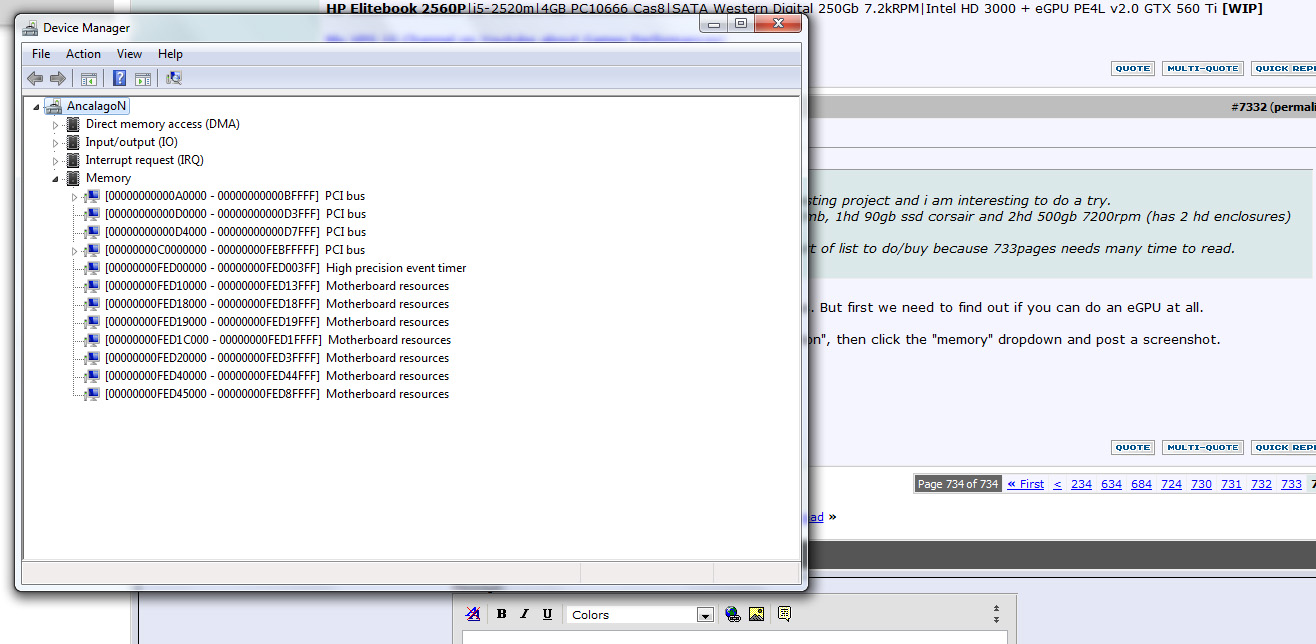
You'll need to do x2 to get good performance since you can't do optimus. But first we need to find out if you can do an eGPU at all.
Open up your device manager, click "view", then "resources by connection", then click the "memory" dropdown and post a screenshot. -
this is the screenshot, thanks for the help
Attached Files:
-
-
Yea that's nice but I already have the card so it's kinda dead end
We're sorry. This item can't be shipped to your selected destination.
I've tried EU amazon site and it costs like 14dollars with shipping. I'm not going to pay more than 4 dollars for this little piece of plastic...
-
Your TOLUD is 3GB, which means you can use an eGPU. Now we need to find out if you can do x2. If you can't do x2 you might as well keep using your 9600m since uncompressed x1 performance is so bad.
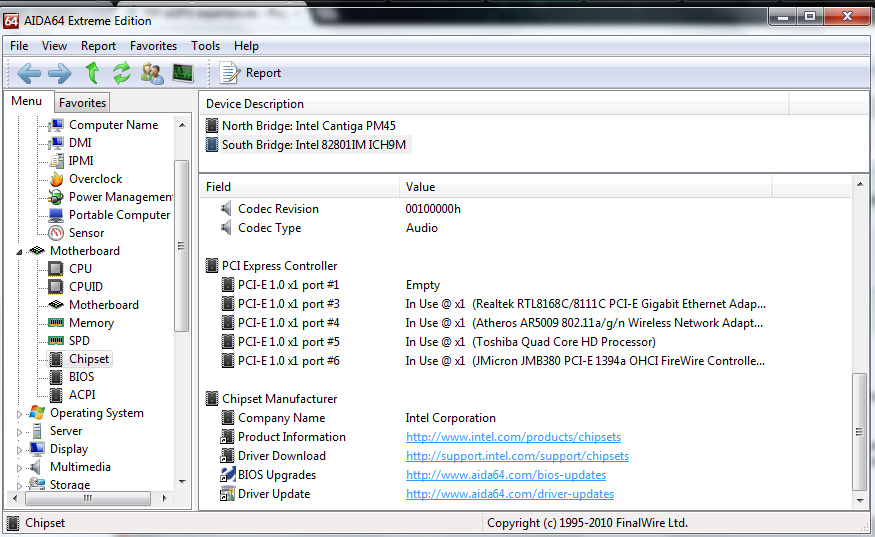
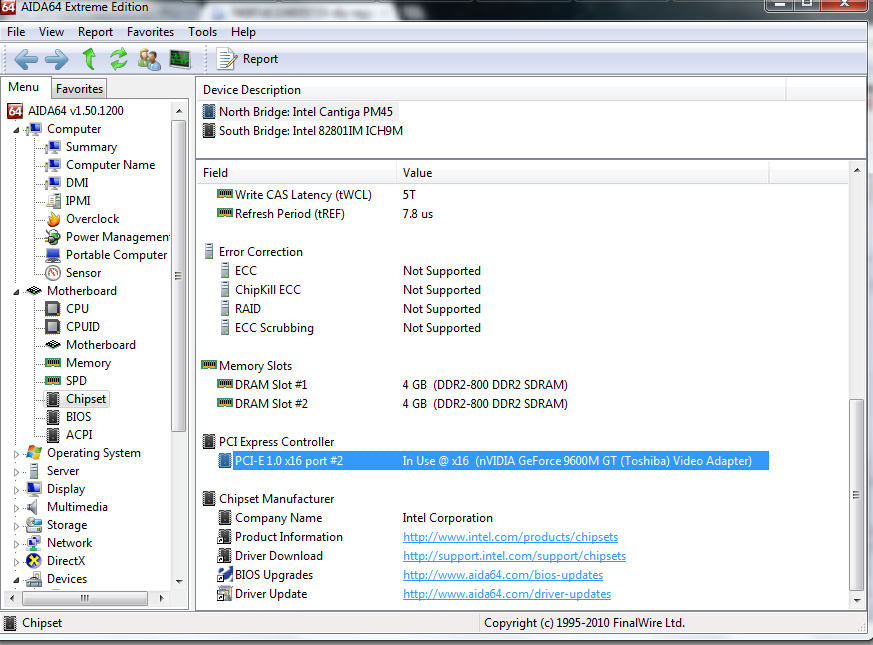
You need to determine the port number of your expresscard slot and mPCI-E slot(s). AIDI64 lists port numbers. I don't quite recall how to get to the location where it lists them, but it's along the lines of motherboard->chipset->southbridge, then scroll down. Ports 1 and 2, or 3 and 4 must be accessible to do x2. To determine the number of the physical ports move your wireless card around and see where it pops up under AIDI64. It is important to do this because you may find that some ports are USB only, or your BIOS may be disabling ports if nothing is detected in it on bootup, so just looking at AIDI64 without testing the ports could be misleading. For the expresscard slot, it will always be on since it is plug and play, so whatever port stays listed as "empty" in AIDI64 while moving your wireless card around is the expresscard slot. -
new screenshot, hope to be usefull
Attached Files:
-
-
Okay guys, I'm facing a new problem here. I'm now experiencing some kind of lagging or stuttering after 10-15 seconds while playing games, any suggestions to solve this problem?
-
Hi,
Long time lurker here. I'm close to a working x1.opt setup, and I'd love to get all the kinks out of it so I can contribute some data. I have a Thinkpad T400 with the following configuration:
14" Lenovo T400
Intel T9400 (ICH9M) w/ Switchable Graphics: Intel 4500MHD & ATI HD3470
4gb RAM (3 when the integrated graphics is running)
32bit Windows 7
I have a PE4H and a GTX 460 768MB. Here's the process I've went through so far. Hopefully this will help others who have similar setups.
1. Disable the switchable graphics in the bios. Make the computer boot Integrated and turn detection for switchable graphics OFF.
2. The Verde 270.61 driver wouldn' + MikjoA's nvam.inf (32-bit) in the optimus setup guide wouldn't detect the 4500MHD. The installer would throw the error: "The graphics driver could not find compatible hardware." Updating the existing integrated display driver with the device manager did not work. The fix was to install the drivers located here. I uninstalled the existing ATI driver and manually navigated to the unzipped directory to install the new driver. The pure Intel driver was then recognized by the installer.
3. After setup, I didn't not find any issues with Error 43. Error 12 hasn't shown up after following the instructions here.
At this point, I believe I have a completed the Optimus setup. The few games I tried worked, and I saw a drastic improvement compared to the HD3470. However, before I could run 3dmark06, I hibernated my machine. Now I cannot get the GTX 460 to boot with my computer. If I attempt to boot with the card plugged in, the machine hangs and doesn't even reach the bios screen. Chainloading (booting with the graphics card off, then inserting the PCI slot after boot) works haphazardly. Sometimes it bluescreens, other time the card doesn't get recognized at all.
What is the typical solution for eGPU with my notebook? Is it even possible for the 460 to boot smoothly in my setup without chainloading? Is it wise of me to try Setup 1.x? If so, will it affect my existing Linux partitions?
Also, will switching to 64bit Windows 7 solve my problems? There aren't many existing implementations like mine with 32 bit Windows.
Special thanks to nando for writing such detailed guides, else I wouldn't even have gotten this far. -
OK things look bad for x2. Your only hope is that port 2 is an mPCI-E port that has been disbled by the BIOS since it detected nothing on startup. You must see if you have a physically empty mPCI-E slot, then plug your wireless card into it and see if it's port 2.
-
i think that port 2 is the nvidia as i can see in this screenshot
Attached Files:
-
-
Yes, you can install Setup 1.x to be a bootitem in the grub2 bootloader. It can handle detection of your GTX460 then chainload to your OS. Recommend Win7/64 as then you'll be able to use all 4GB of your RAM.
Suggest install your wifi card in your first mPCIe slot, boot Setup 1.x, enable all ports PCIe ports->Enable.All and note what port the wifi is occuping. Switch system off, swap wifi in second slot and repeat. Build a table of your physical ports to their port number. You need accessible [port1+2], [port3+4] or [port5+6] to be able to do a x2 implementation. If you can't do x2 then I'd suggest getting a x1.Opt capable system instead. Sandy Bridge systems capable of x1.2Opt starting from as low as $400. -
That's northbridge. We need to know about port 2 on the sourthbridge.
-
link? i cant find anything
-
Nando, thanks for your quick reply.
I was able to successfully install Setup 1.x. It's now an item in my grub2 menu. Chainloading is now bug free. However, my computer still can't get past the initial Thinkpad bios boot (i.e. it hangs), forcing me to unplug the EC2C and replugging it once the grub2 menu boots. Any ideas on what the issue may be? I am using a Lenovo dock if that makes a difference.
And I will take the lessons learned here and reinstall the whole setup to 64 bit soon. I'm waiting for an SSD.
-
Hi guys
I've posted here before and I'm almost ready to buy my EGPU.
I just have one question:
What kind of power supply do I need?
this is what I'm going to get:
PE4H with AMD HIS RADEON HD 6770
Now it says for powersupply of 6770 it needs 450 watt or greater, but I'm under the impression (correct me if wrong) that because its just powering the pci card+gpu that it does not need to be as powerful? for example I could get a cheaper 250 watt instead of a 450-500 watt like it recommends.
Thanks in advance. -
I think one PCIe extra 6pin connector should be enough, from Guru3D Review, the 6770 draws 88W at 100% load test. Considering that each plug grants 75W + the PCIe slot, one plug should be enough ^^
Furthermore consider that a PSU gives the best performances at 50% of its load, so if you need for example 100W of power for your GPU, a 200W should be suggested (always respecting the needs of the 12V line in Amperes) -
Hi,
On eGPU, when choosing PSU for graphic card, we need to look at graphic card power requirement vs. PSU +12V power, not PSU total power. ATI HD6770 power requirement is 108W. So, PSU must have at least max current of 10A on +12V (10A * 12V = 120W, calculated with 10% margin). On PSU, there is a sticker with writing on it, where you can know the max current on +12V. -
Hey guy, I'm having a problem that it is effecting my laptop. I'm now experiencing some kind of lag that occurs after 15-30 seconds, then my laptop runs smoothly, then it lags, and so on.. can anyone suggest the solution for this problem, it happened 2 days ago.
Many thanks in advance. -
So, does that mean I can get away with using a gigabyte 460watt superb PSU?
Specs here: http://www.pccasegear.com/UserFiles/superb460bb.gif -
Hi guys,
I've been working on this problem for the past 2 days without any success and sifted as much information as I could possibly understand. It would be great if you could help pull together the info and help of sort out my setup.
Problem description
Encountered Error 12.
Attempted to use Windows 7 to reallocate but no success.
Went on to Setup x1 so that I can disable the discrete gfx and do a 32bit compaction and chainload but I am currently stuck at a GRUB error on chainloading which I have not seen anybody else describe in detail.
ie When grub attempts to chainload, it says cmain() "missing operating system".
When I attempt to manually boot Win 7 it gives me Error 13 Invalid or unsupported executable format.
I do not have any special partition format. I only have a fresh installation to 1system partition from Win 7 followed by the Setup x1 files.
Partition system is
1. System Partition 100mb
2. Windows 7 Install (128gb)
3. Data
Platform Description
1. OS - Win 7 Ultimate x64
2. System Description
Lenovo W520
Core i7 2720QM
QM67 Chipset
8GB (unknown configuration) RAM
Intel HD3000
Quadro 1000M Optimus 2GB DDR3
ExpressCard 34mm Gen2
BIOS 1.34 - Latest 21 November 2011
4. eGPU used - Gigabyte 460GTX v1.0
PSU used - Antec HCG-620 High Current Gamer 620W
Display used - 26" LCD via HDMI from eGPU
I would be really grateful if anybody could help me get the setup working. I have just about everything I could possibly need but I can't seem to get it working sadly.
Any help with the GRUB error would be appreciated.
DIY eGPU experiences
Discussion in 'e-GPU (External Graphics) Discussion' started by master blaster, Sep 18, 2009.