Problems? See this thread at archive.org.
If chainloading doesn't work then it's very likely you have a GPT boot partition used as part of UEFI boot. Did you buy your PE4L/PE4H from Harmonic Inversion Technology? If so, they Setup 1.10b1 with UEFI boot support which they can supply. If bought it from other suppliers then they can supply the software for a $25 fee.
I would however advise reverting to a MBR boot method which your current Setup 1.0f-pre28 can chainload into without any problems. That would mean saving your existing data, changing your boot method in the bios, booting Win7 CD, deleting current partitions, doing a new install then restoring your data.
-
-
That's just bizarre, I have the same system except that my CPU is a 2820 and the external graphics is a 560 GTX Ti, and I didn't even have to deal with the setup program to get it to work. I just plugged in the eGPU (ViDock) during coldboot and Windows 7 x64 automatically detected the eGPU and proceeded to get nVidia drivers from Windows Update, my external monitor was getting signal after about 10 minutes after windows loaded.
-
![[IMG]](images/storyImages/superb460bb.gif)
In the picture, especially in "DC OUTPUT" row, you can see +12V1 & +12V2. It show this is dual-rail PSU. Keep in mind, dual-rail PSU is inferior than single-rail PSU. +12V2 is for the 4-pin connector (also known as "P4" connector). Other connectors, including PCIe power connector & floppy power connector, are connected to +12V1. This means eGPU will be using +12V1 only.
PSU (+12V1 * 14A = 168W) vs. ATI HD6770 (108W)
So, this PSU is suitable for your setup. Remember some PSU use cheap & non-quality components which can be less effective when it become hotter. So, the 168W of 12V power might reduced at certain temperature. According to GIGABYTE - PSU Review Database , Gigabyte use FSP as their OEM for Gigabyte GE-R460-V1 (460W) PSU. FSP is one of the reputable PSU manufacturer. So, I think this PSU should work OK.
One last question, how much is this PSU? Does it cheaper than Corsair CX-430 or CX-500?Last edited by a moderator: Feb 6, 2015 -
Can get a Vantec ION2 for the same $45 as the Gigabyte Superb. Has an extra 4A (48W) of power. Though for an extra $14 can get a significantly more powerful CX-430 or Eco 450C which is where I'd park my $$. Those 12V/15A PSUs can be had for as little as $17 from MSY, eg: Shaw Elite 680W.
$45 12V/14A Gigabyte 460W Superb Power Supply
$45 12V/18A Vantec ION2 460W Ultra Quiet PSU
$59 12V/28A Corsair CX-430 V2 Power Supply
$59 12V/34A Antec Neo Eco 450C 450W Power Supply -
and running linux/ubuntu 32 via usb external drive and has free tracks for an mpci express header (as you can see here http://www.jkkmobile.com/2008/10/how-to-3g-hsdpa-to-acer-aspire-one.html). is there a way to way from linux how many mPcie ports are free? here is lshw
as i don't want to use with games, is there some who use egpu in linux for gpuprocessing? -
Why? It's much easier if you take a look at RAM/HDD/WLAN compartment for mPCIe port(s).
-
Hi guys, Been running my 6870 on my XPS 1645 with a x1 link. Just the express card slot. Was wondering if anybody had done a x2 or a tweak or whatever upgrade is available for a Dell XPS 1645. I'm really wanting to increase my performance from my 6870!
-
You might need to use two mPCIe ports (WLAN & WWAN) for better performance. See here.
-
can you please see my last post?
-
'cause i would use either the mPciexpress with the current wifi card or the egpu via soldering a new mPciexpress that could be reachable from outside through the built--in removable cover (originally studied for a 3g card) and so make it easily removable. which will be the problem with the bios, if any? is there any support for linux?
-
What games you playing when you experiencing on-off lagging? On internal LCD or external or both? It could be overheating where everything slow down until temperature lower again. It also probably because that games use a lot of bandwidth. If possible, monitor the GPU load & clocks.
-
The problem is not only effecting gaming, but also the whole system. I have discovered that my laptop is experiencing some dpc latency lag spike issue, but I could not identify the source of the latency lag...any advice? I know it is an off-topic, but it is an urgent.
-
Try this:
Go into BIOS, into the Display section, and change Graphics Adapter into Integrated Graphics, and turn off Optimus detection. Then plug in the eGPU before cold-booting the laptop. This worked for me.
-
Chief Problem: Code 12 Error
Just did a reinstallation of Windows and retrace various steps.
umm I don't have a GPT boot partition since Win7 default installation is MBR.
Does not appear as GPT in Disk Management in Control Panel.
Went into BIOS to verify setup
UEFI / Legacy Boot > Legacy Only
Reserve memory for UEFI Boot Manager > Enabled (I don't think it affects up setup)
I am still unable to chainload into Win7 with MBR. Option 4 in the Setup x1.
I had purchased the setup from BPlus but I'll be happy to pay for the software. Unfortunately if GRUB still isn't working I'm not sure how the Setup x1.0 can work.
Any leads here would be appreciated
Went on to work on a separate lead / Win 7 SP1 x64
In a separate case I went on to investigate the TOLUD issue
1. Reinstalled Win7 with eGPU powered on and plugged in
2. Device detected and working fine in device manager
3. Attempt to detect display but got error message that driver crashed
Attempt 1: Installed modified Nvidia Drivers
1. Device detected and working fine in device manager
2. Attempt to detect display but BSOD crash
3. Reboot and Code 12
4. Reboot and Device is working fine in device manager
Attempt 2: Disabled NVIDIA High Definition Audio
No difference
Attempt 3: Tried Setup x1.0 No success (See above)
Attempt 4: Look at TOLUD
I don't understand what I'm looking at. Some help appreciated here.
Display 1 (When Code 12 error appears)
![[IMG]](images/storyImages/PrwBD.png)
Display 2 (When GTX 460 works OK without Code 12, occurs with alternate reboots, note no display on eGPU possible, BSOD on display detection)
![[IMG]](images/storyImages/6kuda.png)
What is the TOLUD?
BSOD Error Details
Attempt to reset the display driver and recover from timeout failed.
nvlddmkm.sys
Any leads here will be helpful.Last edited by a moderator: May 6, 2015 -
I upgraded to win 7, and I didnt need anything other than the verde drivers. It works perfectly. My wife would thank you, but she's busy playing SWTOR on her new eGPU. Thanks for the help!
-
Disable drivers like soundcard, webcam, wifi, fingerprint reader, bluetooth, NIC one by one and after use the DPC Latency Checker to see if the lag is gone to identify the culprit.
Set the expresscard slot to Gen1 speed in the bios to eradicate the NVidia driver BSODs. As the the chainloading issue, try using 'win7' instead of 'mbr'.
Good stuff
x2 and x4 is possible on a XPS 164x. Example, see Derbish's XPS1640 + GTX560Ti@x4 implementation. -
Updated the gallery with the WIP of the enclosure
I hope to have time to finish the mechanical part before new year's eve ^_^ (link in signature)
-
hey nando
I tried to disable the drivers that you have metioned, but it didn't work. Like I said, the problem suddenly appeared while playing games. My laptop runs prefectly smooth for couple of weeks, but on Monday(which is 3 days ago), the problem appeared out of nowhere. -
I just got my xps 1640 going at x4, but I have to leave the bottom off so it takes a few minutes if I want to screw it back on and take it with me but I don't need to do that often so not a big deal for me. And x1 for me was hardly a bump from my internal so def. recommend doing x2 or greater plus if you have to take the bottom off for x2 then I figured then might as well try for the x4. I'm pretty sure you can do a x4 as well, if it's a xps studio. I have my results posted in a thread earlier.
-
What I got mine for ^ and loving it.
-
I went on to experiment with BIOS 1.06, very first initial BIOS for W520 but there was no difference in the results re egpu. (ie Error 12 still persists, no change in memory configuration)
Changed BIOS Setting to Gen1 and reinstalled Win 7 SP1 x64 again with eGPU plugged in and powered all the way.
Able to get display onto the external GPU (FIRST!). Only able to get a display on external LCD. Not able to span across both screens.
Went on to run 3D Mark 11 but I was greeted with a black display and eventually the driver crashed and went back to internal LCD only. External VGA was also disconnected from my drive as well.
I still don't understand why on every alternate reboot I get Error 12. One moment it works and the next reboot it doesn't.
Further description
Odd Reboots
Windows attempt to display on external LCD but fails.(LCD screen flashes). However device manager says everything is okay.
BSOD on detecting display.
Even Reboots
Windows doesn't attempt to display on external LCD. Device manager says Error 12 for the egpu. -
What is the PSU specification, especially the +12V max current? The "black screen" usually associated with insufficient power or fuse on PE4H is kicked in due to high load.
EDIT: You use Antec HCG-620 PSU. It have +12V@48A = 576W. It is more than enough for GTX460 (160W). If you use PE4H, set the fuse bypass jumper (near the floppy power connector). -
PSU is Antec 620W. Sufficient for GTX 460.
Here are the specs
http://www.antec.com/Believe_it/product.php?id=MjU5NQ==
I'm having Error 12 (on alternate reboots) and driver issues and GRUB errors at the moment. Can't get any bit of the software parts working at all. -
To solved Error 12, use Setup 1.x to disabled dGPU (Quadro 1000M). You also need to set ExpressCard speed to Gen1. It running in Gen2 speed which explain why you get "black screen". Did you try "Chainload Win7"?
-
The Gigabyte 460W PSU from a store I will be buying from is only $45 AUD. Thanks for helping me choose what PSU I need.
-
I've just tried that but I'm still getting driver issues. I BSOD on display detection.
-
Switched and remained at Gen1 before Win 7 installation.
The BSOD are very likely due to driver issues. The driver keeps attempting to display on the external screen multiple times (screen flashes 4 times) but eventually times out and BSOD.
GRUB error. I can't load any OS from GRUB. I keep encountering errors like operating system missing. Or Error 13 Invalid or unsupported executable format.
I have no special configuration on my hardware. Install Win7 on blank HDD, install Setup1.x and nogo. No GPT, just MBR (default installation option in Win 7 SP1 x64).
Legacy only selected in BIOS.
Is there a special Setup 1.x software that I'm missing?
Another 6 hours gone sigh. -
Appears you have a MBR installation. Only other thing that could cause problems with grub4dos is encrypted or compressed boot volumes so grub4dos can't read the bootmgr file properly.
-
Please see my post again (I edit my post).
http://forum.notebookreview.com/gam...851-diy-egpu-experiences-738.html#post8194152
http://forum.notebookreview.com/gam...851-diy-egpu-experiences-738.html#post8194187
Please post screenshot of your Disk Management. -
I read Antec HCG-620 have voltage regulation issue on the +12V where the voltage drop at certain load. I don't know whether this is cause of the BSOD/black screen problem.
-
Quick recap of my case
CC: Error 12
System Details
Lenovo W520
8GB RAM
Quadro 1000M
Intel 3000HD
Latest BIOS 1.34 Used
Gigabyte GTX460 v1
Antec 620W PSU
HD LCD
PE4H 2.4 from BPlus
BIOS Settings
Gen1 PCIE
Legacy Only (ie no UEFI)
Unable to get any display on external screen.
Attempts to do so on alternate booting up shows Display Driver stopped responding and Successfully recovered.
Alternate reboot result in GTX460 showing Error 12.
BSOD on detecting display when there's no Error 12.
Attempts to chainload with Setup1.x has given me no results as I keep encountering GRUB errors ie operating system missing / Error 13. This makes chainloading impossible. I genuinely don't understand the chainloading problem. -
That's the really wierd thing. Complete wipe, default installation of Win 7. Yet GRUB just refuses to boot the partition. I cannot understand how that's possible.
Here's a screencap of my disk management which shows MBR.
![[IMG]](images/storyImages/pKFzC.png) Last edited by a moderator: May 6, 2015
Last edited by a moderator: May 6, 2015 -
Thanks for helping me with all the issues so far. I really appreciated your help after 3 days of working at this.
I highly doubt it has anything to do with the power supply. The pattern just doesn't fit with it at all with a psu issue. I'm not sure how you can replicate a display driver crash on every alternate reboot with a psu problem.
Would really like to explore the setup1.x but I haven't had any luck at all in that respect because I can't chainload. -
Experimented with the latest beta Nvidia driver 290.53.
No difference in results.
When detecting displays, I no longer get a BSOD but I always end up the message
Display driver stopped responding and has recovered.
Okay 8 hours mark. I've got to give this a rest for now. I'll be happy to try anything you guys can suggest. I sense it's close to working but just not there yet. -
Nando and company,
I did a search for information on the Sony Vaio EB series and the eGPU but am coming up short except for the small note about the odd memory space thing on the front page. I have a friend with an VPC-EB3TFX who wants to set up an eGPU, so I wanted to make sure of what to expect before he orders any of the parts. I recommended that he go with a GTX460 to maximize cost and performance, since he is limited to Gen1 expresscard bandwidth.
I am assuming that he may need to use the setup program to chainload into windows 7, so i want to confirm that.
Thanks, guys! -
One of the many factor that can lead to driver crash is insufficient power. Your symptom fit the insufficient power. You did tell us it either BSOD or black screen when eGPU don't have Error 12 & try to connect to external monitor. If this is driver issue, you should be able to solved it by reinstalling the driver.
As I said earlier, the "black screen" usually associated with insufficient power or fuse on PE4H is kicked in due to high load. For the latter you can set the jumper on PE4H. However, GTX460 power requirement is 160W which is not high enough for the fuse to kicked in. -
Please post full specification of the notebook & post screenshot of Device Manager (set View to " Resources by connection" & expand the Memory tree. No need to expand the sub-tree under Memory).
-
Any ideas what else I could try?
At one stage I was able to drive the display entirely on the external LCD alone alongside the message the driver has crashed (ie the internal LCD became black).
I could no longer replicate it again among reinstalling the various drivers but does the above exclude the possiblity of power problems? -
Let us look at the other symptom you having. You said sometime you got Error 12 & sometime doesn't. <strike>So, it's either the mini-HDMI cable is faulty or the graphic card itself is failing. The cheapest you can try is obtain another mini-HDMI cable, e.g. Gold Plated 1080P HDMI Mini V1.3 M-M Connection Cable - Black (1.5M-Length) - Free Shipping - DealExtreme</strike>
Other thing you can try is, if you have a desktop computer, test your graphic card on it.
EDIT: Wait a sec. I don't think graphic card nor the mini-HDMI cable is failing. The symptom doesn't fit. -
I just got a Vidock 4 today. I am using a Sapphire Raddeon hd 5770 and my laptop is a Toshiba Sattelite a505-6005. here are the specs:
Toshiba Satellite A505-S6005 Specs - Laptops - CNET Reviews
After fiddling for 5 hours i have to stop to get some sleep. This is what i've got so far. When i first booted up my laptop with the vidock attached via Express Card slot, i got a black screen, after a minute or so i turned it off. Then i unplugged the vidock, and booted up normally. Did some reading, decided to plug the vidock back into my laptop while it was still running. I saw in my device manager it added the graphics card but i didn't see anything for the vidock itself (idk if anything is supposed to show up for it) so i downloaded the latest driver for the graphics card, disabled the intel integrated chip which caused the laptop display to go low resolution, and rebooted the laptop. I had an hdmi cable plugged into the vidock going to a 17" samsung LCD tv that i use for my ps3 this whole time. When i booted up, the laptop was in low resolution and i was getting a "no signal" message on the tv screen. When i tried to cnnect the hdmi to the laptop instead of vidock, it only worked if intel intgrated was turned on. I feel that the Vidock isn't regestering on my laptop and therefore causing the display not to show either. Any advice?
Also, i apologize for any grammar or spelling monstrousoties. I am typing this while lying down in bed but couldn't sleep without trying to get some help
-
Here are the specs:
Sony Vaio VPC-EB3TFX
i3-370M, 2.4ghz
4gb ram
500gb hard drive
Intel HD Graphics
Expresscard 34
The memory allocation is attached in the screen shot.Attached Files:
-
-
Your symptoms sound like either the port is still trying to negotiate Gen2 link and ignoring the forced gen1 speed in the bios, the PSU is failing to deliver enough power or your mHDMI cable is intermittently faulty. Can you confirm you have both pci-e power connectors attached to your GTX460?
Can also confirm the Gen1 issue by using Baredit and reviewing your expresscard port's (0:1c.x) pci-e config data. Specifically register 0xd9 bit6 and 0x70 bit1:0 which will be 1/0 and 1/2 for Gen1/Gen2 respectively.
As for the grub4dos chainloading issue, does it occur even if you chainload without doing any pci-e port changes or compaction? There's newer grub4dos versions available at grub4dos-chenall - grub4dos - Google Project Hosting . Specifically you want to copy the grub.exe into your \config folder and try again.
DIY eGPU Setup 1.10b2 is available with a newer grub4dos already integrated plus numerous other fixes and features. It can be supplied by HIT if you purchase a $25 license from them OR you seek a refund from BPlus and acquire the hardware from HIT giving entitlement to the software. FYI: HIT's way of being compensated for their software development costs as could not get any co-sponsorship from BPlus (and Villagetronic was asked who too declined).
Villagetronic support is at ViDock - Support | Facebook . Good luck. -
![[IMG]](images/storyImages/74160d1325136940-diy-egpu-experiences-memory.jpg)
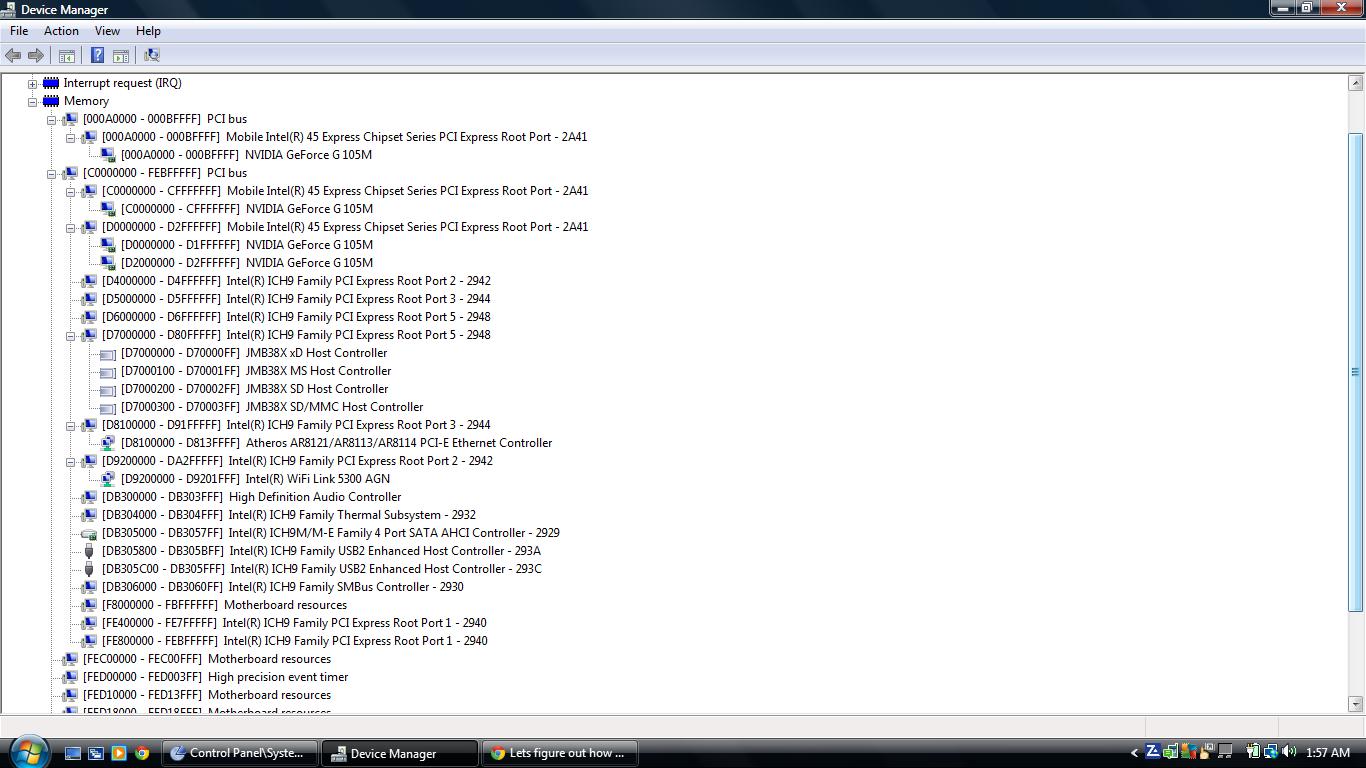
First PCI bus with 8 digits memory address is 0xE0000000. This show TOLUD is 3.5GB. For successful eGPU implementation, you'll need to reduced the amount of memory from 4GB to 3GB of RAM. If not, there will be no enough PCI space for eGPU.
You can buy PE4L-EC2C kit for eGPU. eGPU will be using the ExpressCard slot.
For PSU, it depend on the graphic card you're going to use. For example if GPU power requirement is 160W, you'll need PSU with at least max current of 15A on +12V (15A * 12V = 180W, calculated with 10% margin). You'll need Nvidia Fermi desktop graphic card, e.g. GTS450, GTX460, GTX560Ti, to name a few, for x1.Opt setup. Your notebook have Intel HD Graphics, so x1.Opt is definitely possible.Last edited by a moderator: Feb 6, 2015 -
Thanks, I'm not sure he wants to reduce memory, so I will have to find out. For the other stuff, I already have an idea of what I need, since I had an eGPU set up on my old HP 8460p. Thanks, kizwanLast edited by a moderator: Feb 6, 2015
-
You can use eGPU on linux. Just need to add eGPU PCI ID in xorg.conf. I just tested this myself with Fedora. In my case, both dGPU & eGPU are ATI, so I can only use one at a time. Neither radeon nor fglrx drivers support both adapters at the same time. When using radeon drivers, I can see Fedora default wallpaper on both internal LCD & external monitor (connected to eGPU) at login screen. However, when I tried to login, an error message appeared & forced me to logout. How good eGPU perform on linux is depend on the drivers support.
-
did anyone notice the strangely high gpu usage when doing simple tasks like resizing almost-maximized window on fullHD lcd? or when scrolling up and down and up and down frequently with browser maximized - there is unbearable input lag (approx. 150ms+)
-
okay, finally got mine working.
I'm confirming the latest driver may cause problem when using a DVI-VGA adapter.
under the latest driver, my monitor just won't light up. So I downgraded to 175.33 and the problem gone.
My setup
Dell 1420
[email protected]
2g ram
win7 32bit
eGpu: evga gtx460 1gddr5
re5 dx10: 60fps
many thanks for all those who helped! -
Hi, I am new here and am trying to get faster frames on SWTOR.
I am running a Sony Vaio NW with 4 gig ram, Intel ICH9M Chipset, 2.1gig Intel core 2 duo t6500, windows 7.
What external graphics card setup would you guys recommend me?
Specifically, which graphics card should I buy as well? -
Please list full specification & post screenshot of Device Manager (set View to " Resources by connection" & expand the Memory tree. No need to expand the sub-tree under Memory).
-
What other specs do you want?
im actually running a pentium dual core t4300 @ 2.1 gigz, 64 bit windows 7Attached Files:
-
DIY eGPU experiences
Discussion in 'e-GPU (External Graphics) Discussion' started by master blaster, Sep 18, 2009.


![[IMG]](http://www.pccasegear.com/UserFiles/superb460bb.gif)


![[IMG]](http://forum.notebookreview.com/attachments/gaming-software-graphics-cards/74160d1325136940-diy-egpu-experiences-memory.jpg)