 Problems? See this thread at archive.org.
unfortunately the thunderbolt port is on the *right side
Picture
-
-
I don't get it
-
At least we can hope that other laptop manufacturers will speed up their efforts to bring thunderbolt to their product line ups. This will mean less prices. I just hope we get very simple solutions with great performance. Can't wait to be free of desktops for gaming needs. Gaming laptops are a pain.
-
Interesting, I figured my setup wasn't actually getting x1.2 peformance though. What are people currently using for connection methods to get x1.2 performance if it isn't the adapter limiting it?
-
Except Nando (that modded a PE3A) and another guy who i forgot the name (that modded the PCB too) ,there are no other results of people using a PCI gen 2.0 adapter. Once BPlus will release the newer adapter (AIO cable + connector on PE4L 2.0 / PE4H 3.0) we shall see many more experiences and benchmarks
(mine too
)
-
Gotcha, wait it out it is then. In the meantime I'll plan out the process of fitting one of them into my ViDock enclosure (and officially make it NOT a ViDock anymore) and work on setting up my 360 power supply.
-
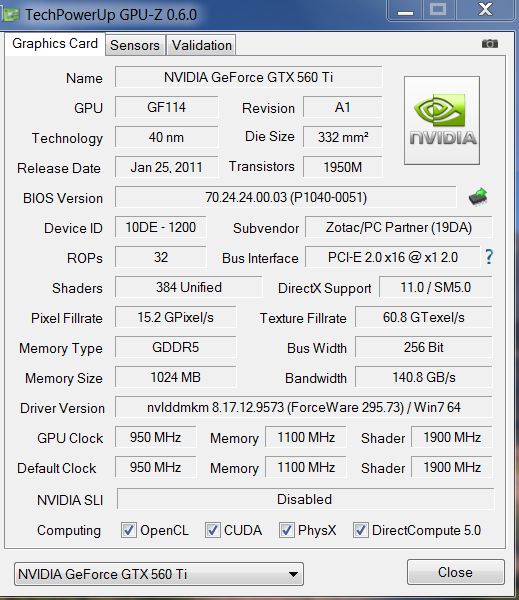
A ViDock4+ is supposed to already be pci-e 2.0 capable according to the pre-sales product info. Can confirm if you get pci-e 2.0 speed by ensuring you haven't set Gen1 speed in the bios or using Setup 1.x (iport g1), then run GPU-Z. It will show pci-e 2.0 speed like this in the first few secs after you run GPUz as it puts the eGPU under load. Once the eGPU goes into power saving mode it will revert back to pci-e 1.x speed like this. SOURCE: DIY eGPU implementation: i5-2540M 2.6 12.5" HP 2560P + NVidia GTX560Ti @x1.2Opt.
If the VD4+ isn't running at pci-e 2.0 speed then suggest seek a refund for misleading advertising. -
Edit- nevermind! Got it figured out
-
I am considering putting together an EGPU for my Lenovo T400, but would like it to be as simple as possible. This is surely a newbie questions, but if an expresscard slot is rated at 75W, why is any additional power required for the GT 430 (49 W)?
---
US$125 12V/72W GT430-1GB eGPU Portable setup (GT430=49W TDP)
US$65-ground_shipped PE4L + US$50 GT430-1GB+ US$10 12V/72W AC adapter = US$125. Optional: use a $15 12V/120W adapter instead.
---
Could I just buy the GT 430, plug it into the PE4L (LEAVE OUT the AC adapter), and plug the combo into expresscard slot? My laptop is almost always plugged into the wall so battery life is not an issue for me.
If not, another question...
Is a PSU necessary? It doesn't seem to be in the following setup...
----
US$160 12V/120W GTS450-1GB eGPU Portable setup (GTS450=106W TDP)
US$65-ground_shipped PE4L + US$70 GTS450-1GB+ US$15 12V/120W AC adapter + US$5 molex splitter/gender changer + US$2 pci-e to molex (male) adapter = US$160. Run a jumper lead from the floppy molex to the pci-e connector as shown here to split the power.
----
Sadly the links to the implementation of this setup are broken, and other examples that I found all used PSUs. As a matter of fact one of them didn't work because his PSU was poor.
So is a PSU necessary for the GTS450? -
Hi,
This is my first post and would like a little advice on building my DIY eGPU as im a bit of a noob.
I kind of have an idea how to go about installing it but would just like some clarification.
think i will need to do X1 setup as i want to keep my wifi
My Laptop Specs:
HP DV6-2113sa
Mobile DualCore AMD Turion II Ultra M620, 2500 MHz (12.5 x 200)
4GB RAM
Windows 7 Ultimate
I have ordered a ATI Radeon XFX HD 5870 (XXX Edition) , PE4H V2.4A + EC2C + 30cm-HDMI + SPB087 ExpressCard to PCI-E Adapter
I still need to order my PSU but unsure about what type and how many watts i will need.
I have been looking at getting the Corsair CX-500 V2 however i was wondering if i would be able to run this from a PSU with a lower wattage to save on costs? if so, what would you guys recommend?
if anybody could give me some simple steps to get this working on my system, that would be great.
also what kidn of framerates would i expect to get from say: BF3, Skyrim , Unreal tournament 3, Crysis 2?
i will be more than happy to post some benchmarks and pics once it is setup
thanks in advance -
with your processor, you can't expect to run BF3, it's been built for quad cores ...
crysis 2 close of bf3, skyrim i don't know about him (never tried at this time) and ulreal will work good (tested gears of wars 1 on my lappy and it works good)
Your psu could be anything, indeed it's a quality PSU (corsair, akasa, cooler master, fortron, ...) and not a no-name (Mad-X, heden, Max in power, Advance, ...) A corsair CX400 should be enouth if you just plan to use it with your 5870
X1 will be a real bottleneck added to your CPU for graphics dependant Games
[edit:] did someone tried this on core2/first gen core i?
http://slipatch.com/
it works on many dekstop computers ... -
Good call, now I feel better about getting a better card for in there, I had been thinking my setup would be just bottlenecking any other card.
I noticed mine stays at x1 2.0 and doesn't drop back down at all while idle.
I guess this adds me to the few with x1.2Opt benchmarks?Attached Files:
-
-
Yes. You are running x1.2Opt on your Villagetronic ViDock 4+.
As you have indicated you are using Setup 1.x to disable your NVS4200M to get x1.Opt working successful, then per the banner that appears on that page please purchase a $25 license from HIT for it's use on non-HIT hardware. Alternatively, you may ask Villagetronic to provide equivalent software (ViTuner??), ask for compensation for $25 if they cannot provide it, or seek a refund so you can get the PE4L/PE4H hardware from HIT giving you entitlement to use that software.
FYI: Villagetronic have declined to sponsor that software development yet have been referring their customers to use that software. -
I was under the impression that the only part of the software requiring the license was the PCI Compaction utility within Setup 1.x. Since I've never used any of the PCI compaction features (they don't even work, it gives an error that it's missing the devcon file) I assume no license is necessary. That's the way it's worded in your post anyway.
-
Just get Corsair CX-500 V2. This Builder series not expensive at all. My advice, don't save costs on PSU.
First thing you can try is connect everything & power on both eGPU & notebook. See if you can boot into windows. If can't, connect eGPU at Windows boot menu & boot into windows. If still can't, boot into windows, put notebook to sleep, connect eGPU & resume from sleep.
I'm sure you will get a lot of lags in BF3 since eGPU only running at x1. You don't have any choice anyway since you have AMD notebook. -
can someone give me the approx dimensions of a GTX 450 card (w/ the PE4L)? I'm trying to figure out materials for an enclosure..
also, there have been a few implementations of the 450 and a 120w 12v ac adpter being used, but the only adapter i've found with those specs is this one:
http://www.ebay.com/itm/120W-AC-Cha...s_Chargers&hash=item2eba38e95f#ht_2491wt_1270
would this work? if not, can someone direct me to one that will? goin for a compact set up w/ a PE4L.. -
Not sure why you'd have that impression. Per the Setup 1.x blurb:
I would appreciate that you either purchase a license or cease using the software. Villagetronic have ignored previous license terms by sending their users to use this software yet not willing to co-operate to fund development costs which is why it is not free for their users. I suggest if you decide to use the software by purchasing a license that you could forward the receipt to Villagetronic to fund since they haven't been able to create any equivalent software of their own.
There have been 459 downloads of Setup 1.x and 1 license purchased. If there are more Villagetronic users assuming this is still freeware then it may end up being distributed by HIT only. Let's hope that doesn't happen as it would spoil it for everyone. -
Did VillageTronic release a new ViDock4+? Mine wouldn't run at x1.2opt
Sent from my iPhone using Tapatalk -
Hi guys! my PE4L V1.5 arrived today! I've an ACER 5742G with i3 380m, windows 7 pro 64bit, 4gb rams and a gt540m by nVidia with Optimus technology.
I regulary connected the device with a Sapphire 5850 HD(i was inspiored by the BTM post here, in which a 5770 is plugged). The system recognizes the VGA, but i cannot make it work.
Infact when I get to Setup 1.x, and I try to chainload windows , the ACER utility to repair system starts, and i can only reboot...
Is this happening because I haven't correctly unistalled my old Windows 7 Home Premium OS (i still see it in the list of the bootable OS when i turn on my pc).
What can i do? thanks very much -
have you tried x1E link and to disable your GT540?
-
Thanks very much for the answer but this is not the point..
-
sorry, yeah, of course, acer modify their windows installation in their laptops and desktop computers, the recovery of the computer could interferate with this modifications.
Have you install eGpu tools with BCDedit or with grub?
try the one you haven't tried yet (i think you've done it with BCD, so try grub after a startup repair) -
Has anyone succesfully managed to get an egpu setup working on a Lenovo E520. I've looked around the thread and haven't found anything.
-
Mine runs at 1.2Opt. Make sure you use GPUz to confirm while stressing the external graphic card. If it's not then maybe yours was the earlier version. Manufacturing date on mine is 11/25/10.
-
anyone try one of the dedicated GPU psu's in a setup? something like this: Newegg.com - FSP Group Booster X5 450W Independent/Supplementary SLI Certified CrossFire Ready Active PFC Dedicated Multi.GPU Power
i see it's not grounded on its own. It's got to be triggered on (and presumably grounded) by a 14 pin from a main psu. Could it be grounded to something inside an enclosure? and triggered on by a switch (like the paperclip thing for the atx psu's)?
or has anyone used something like this to power stuff: http://www.ebay.com/itm/DC-12V-21A-...Power-Supply-Box-/220918858928#ht_1691wt_1183
I dont know much about these "switching" power supplies, but it appears that Max Headroom used something similar here -
apac has done a E420 + [email protected] implementation here. If yours is the same iGPU-only model (some locales get a HD6630M model) then the implementation details will be the same.
Try the 'mbr' instead of 'Win7' chainloading method. -
I just successfully got my ePGU Setup working on my T410. Here are the steps that I took to pull it off.
Laptop
Lenovo Thinkpad T410
i5-560 2.67GHz
8GB RAM
Items Purchased
PE4H
http://www.harmonicinversion.com/pr...flypage-ask.tpl&product_id=191&category_id=25
MSI Cyclone 460 GTX
Newegg.com - MSI N460GTX Cyclone 768D5/OC GeForce GTX 460 (Fermi) 768MB 192-bit GDDR5 PCI Express 2.0 x16 HDCP Ready SLI Support Video Card
CORSAIR Builder Series CX430
Newegg.com - CORSAIR Builder Series CX430 V2 (CMPSU-430CXV2) 430W ATX12V v2.3 80 PLUS Certified Active PFC Power Supply
-----------
This process worked for me. Anything else including sleep mode>plug Expresscard in, etc would equal a bluescreen.
1) Power down everything.
2) Plug in all cable, cords, and devices (DVI/HDMI, Expresscard, cords, etc.)
3) Power on ATX Power supply which will power the eGPU Video Card
4) Power on Laptop & External LCD
5) Go into the BIOS and set "Boot Display Device" to "Digital on Thinkpad"
BIOS>Config>Display
(It should boot into Windows without a bluescreen at least it did on my T410)
6) Install latest drivers from here (Remember to replace inf file):
http://forum.notebookreview.com/6542661-post1222.html
After one restart after the drivers are installed, all should be well. I've updated the BIOS twice with the latest version and the setup still runs perfectly.
I was able to play Crysis 2 on Ultra everything and medium settings with Skyrim; not too bad.
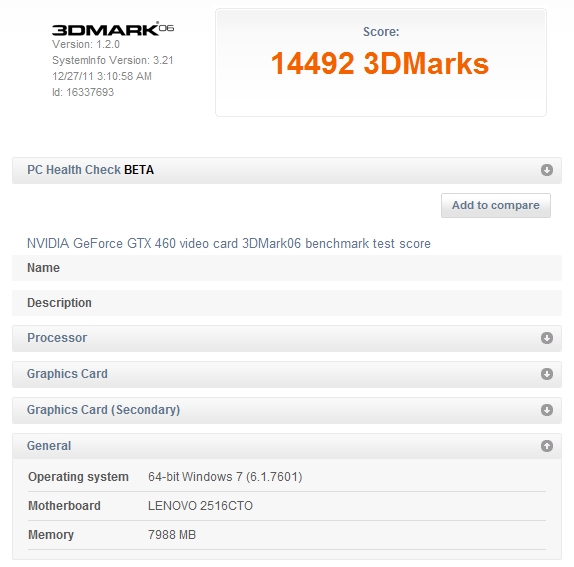
PCMArk06 = 14,492Attached Files:
-
-
I have a 1810tz Subnotebook with SU4100 @ stock.
Hooked up a 4890 with a PE4L @x1.
3DMark06 Score with x4500mhd IGP: 590
3DMark06 Score with 4890 @ 900/1000 : 5490 (external Monitor)
Thats an Increase of 830% - really Gr8
Thanks to all who kept this Thread alive and especially a BIG thanks to Nando4 who supported me greatly with his Setup 1.x.
Without that tool i would never be able to overcome whitelisting!!
Please tell me if you want to have my results in a screen, i´ll upload then
-
Hello! Is this possible with an elitebook 8460p with ati discrete graphics? Any info on this model? I can´t find one with the quad core and integrated graphics. (non-custom) and custom one is very expensive. I have a dual core one atm to make trials. Sorry if this info is in the first page but I could not find it.
-
 Good news for those who purchase an PE3A or want an x1 2.0 solution right away. Just purchased
this cable. I tested it on Z68 desktop motherboard and a 560ti on a friend's desktop. It does support x1 2.0 signaling, it shows on gpu-z and I run Furmark with no issues. The cable I purchased is an x1-x1 extension ~12cm and its price is as low as 2.22$. There are also x1-x16 @ 3.89$ up to 20cm the longest but I can't confirm x1 2.0 compatibility. Hope this helps those who can't wait. I am adding this post on the eGPU Experiences Thread too.
Good news for those who purchase an PE3A or want an x1 2.0 solution right away. Just purchased
this cable. I tested it on Z68 desktop motherboard and a 560ti on a friend's desktop. It does support x1 2.0 signaling, it shows on gpu-z and I run Furmark with no issues. The cable I purchased is an x1-x1 extension ~12cm and its price is as low as 2.22$. There are also x1-x16 @ 3.89$ up to 20cm the longest but I can't confirm x1 2.0 compatibility. Hope this helps those who can't wait. I am adding this post on the eGPU Experiences Thread too.
I am probably going to order a PE3A soon
![[IMG]](images/storyImages/securedownloadx.gif)
-
Awesome!! Hope BPlus are still selling PE3A units. They probably figured out this was possible so wanted to discontinue them. . It's been exactly 1 year since I first asked them for a pci-e 2.0 compliant PE4L/PE4H so progress has bee S-L-O-W. This way could get a solution now.
BIG difference in price b/w pci-e 2.0 compliant PE3A and pci-e 1.x compliant PE4L
PE3A= US$53-shipped + $2.22-shipped 1x riser = US$55.22-shipped total
PE4L= US$93-shipped
So could have a pci-e 2.0 compliant fit for US$55.22-shipped(!!) if prepared to mod it as described at DIY eGPU implementation: i5-2540M 2.6 12.5" HP 2560P + NVidia GTX560Ti @x1.2Opt.
A good result. Have wanted someone to do a CULV notebook implementation. Two other things worthy of your consideration.
1. You have a 4500MHD so could do a faster x1.Opt implementation using a NVidia Fermi class card like a GTS450 or GTX460.
2. Your SU4100-1.3 can be overclocked to 1.6Ghz (266x6 - FSLx+BSEL) or 1.73Ghz (266.6.5 FSLx) or 2.0Ghz (333x6 - FSLx+BSEL). The m11xR1 folks with the same CPU get a factory overclock of 1.6Ghz so the CPU certainly supports it. Others have rampled their systems up to 2.0Ghz. a [email protected] [email protected] implementation would see 3dmark06 well and truly over 10k.
See the PLL pinmod link in my sig if interested in (2).
The HP 8460P ATI model doesn't allow the iGPU to be used so is best avoided if want to have x1.2Opt capability. Perhaps get the lowest i3/i5 iGPU 8460P model and do a i7-quad user upgrade? Either that or look at a Lenovo T420 or Dell E6420, both of which have a superior switchable graphics implementation. I know the T420 has been user upgraded to a i7-quad as well. I'd be getting the T420 myself as it's lighter than the E6420 or 8460P. -
I just ordered one. We will know for sure soon if they have any right now or if it discontinued. We can call this solution the (eGPU for the poor) as it will cost only ~55$ for an x1 2.0.
-
Great news but how did the PE3A work ? I mean there's no power connector on it ?
-
Hello folks, I've been following this thread for a while now, but I've just been having the most difficult time setting up my eGPU.
At Win7 desktop, when I hotplug the eGPU hooked to ext monitor via DVI port > VGA-DVI adapter > VGA cable to monitor, I get this "Display driver NVIDIA Windows Kernel Mode, Version 275.33 stopped responding and has successfully recovered". Although the external monitor & eGPU are both detected in device manager, no signal is seen in external monitor (except for a 2-second flicker to a black screen (then back to no signal) on the ext monitor upon hotplugging of eGPU). When I hotplug the eGPU to a different ext monitor via HDMI, the laptop goes to black screen, while ext monitor goes from "no signal" to black screen as well. Then after about 3 sec, laptop automatically restarts, and ext monitor goes back to "no signal".
I also noticed something strange, if I go thru DIYeGPU setup initialize eGPU, 32bit compaction, then chainload to win7 using the HDMI cable to monitor (doesn't work for VGA-DVI adapter to monitor), I am able to see the Windows 7 user logon screen on my ext monitor. But once I login to a user (to desktop), the ext monitor just fails to "no signal" and the display goes back to my laptop screen. I'm pretty sure this is significant, but I don't know what it means.
This is what I have:
Lenovo E420
Windows 7 Ultimate (64-bit)
i5-2520M
8 gb RAM
P4EL (from hwtools)
Zotac GTX 460
Corsair CX430 PSU
This is what I've done:
1. installed standard VGA driver for GTX460 after hotplugging it at desktop
2. installed 275.33 driver +navm.inf (I've also tried Verde 285.62 + nvam.inf)
3. ran DIYeGPU-Setup-1.0f-pre28 (to solve error 12 in device manager)
-followed apac's step-by-step instructions for DIYeGPU-setup here
![[IMG]](images/storyImages/th_IMG_1231.jpg)
My DIYeGPU setup looks like this just before chainloading to win7, it's slightly different from apac's final image, but I don't think it makes a difference (right?), since my error 12 still goes away.
This problem is over my head/skill level, can anyone help me? I'm open to all suggestions and any help is very much appreciated, thank you.
Last edited by a moderator: Feb 6, 2015 -
Add a 'call iport g1 8' at the start of your startup.bat to force gen1 link speed on your expresscard slot port 8. This will resolve your symptom of BSODs/black screens due to the link trying to negotiate gen2 (pci-e 2.0) link speed with PE4L/PE4H hardware that cannot work at that speed.
-
Ok PE3A needs to be modded. Seems pretty doable
-
Question, I have an Asus Zenbook UX31 and was wondering if a work-around for not having an ExpressPort would work. Like this for example Walmart.com: SIIG USB to ExpressCard Adapter: Computers
then just set up the rest as normal.
Or if anyone knows of another way to set up to a Zenbook that would be nice. Thanks! -
That adapter only have USB connection, not PCIe which required by eGPU. If you can access the mPCIe port on your notebook, then you can setup eGPU.
-
Sup Guys, i got a bit of a problem:
I finally got around to getting an external screen, which works very well actually. The thing is tho that Firefox has a tendency to become very slow (typing laggs, scrolling laggs) after a while. Ironically that completly stops if i pull the firefox window over to the laptop screen. Furthermore, if I pull the same window back on the external screen again it is like resetting the counter and it takes a while for it to become slow again.
This got definetly something to do with the egpu setup, since I do not have this issue when I connect the screen normally via the vga/hdmi port of my laptop rather than over the egpu setup.
any ideas? Graphics Drivers are the newest one.
(my setup: http://forum.notebookreview.com/gam...851-diy-egpu-experiences-509.html#post7838535)
edit: whats the news on pci 2.0 btw? -
There is a link for the news on the first page of this thread.
Do you use firefox 8? I had this problems even without my egpu attached. It is so annoying that I finally switched browser (Opera) and now don't have any. It should be something that have to do with the drivers installed rather than the egpu itself. Try to use another browser. If the problem insists then you can try other solutions -
Could someone explain what exactly needs to be done to accomplish x1 2.0 opt with PE3A? I've looked at this post: http://forum.notebookreview.com/8042288-post37.html but I'm not really getting it.
-
Ive been using opera for a long time since on my old laptop firefox decided to just stop working (so i had to kill it in the task manager and restart) but since i got my new laptop ive been using firefox... this is really annoying sincei believe firefox is just more refined than opera with a better interface and i just hat how there always seems to be something wrong with it.
-
Hi there,
Looks like I have a problem that I bet you can't help me fix it, the eGPU is not working at all, it worked this morning (in my time), but suddenly, it stopped working. I tried the troubleshooting solution, but with no results. Sometimes when I power on the egpu, the fan spins fast and it is not detected. -
I have a Dell Studio 1440z (14z) and I just stumbled upon this while looking for a way to replace the aging 9400M in my little gaming machine. This looks like just the thing I need to bring my gaming up to speed.
However, I am unsure of compatibility, looking through the lists my laptop is not tested (I see the Dell Studio 1550 and the Inp. 1440, not sure if there is no difference of hardware) and there's a lot of technical jargon that I am not familiar with. I was just wondering if anyone is able to confirm that this type of setup would work with my laptop. -
So after moving into my new dorm I decided it was time to put the eGPU back together. After putting the parts in and all and booted it up everything worked fine. However, I feel like that its still running off my m330 card rather than my 460. I mean, It feels like the eGPU is nothing more than a conductor for my laptop to show up on the external monitor.
Is there some BIOS set up I have to do or some other missing step? -
Did you set your GTX 460 as the primary gpu in the nvidia control panel options ?
I used to have this problem because of that. Now it's working fine. -
Well, apparently you'll need a soldering iron to solder the 12V input and maybe cut some old PCB lines. Don't know more. You should ask directly to big boss Nando.
-
Does anyone have the solution for my problem?
-
Hello
I'm trying to use a Radeon HD 5870 with my Acer Aspire 5940G, which has a Radeon HD 4650 as internal GPU. I managed to overcome the "error 12" problems with DIYeGPU-Setup-10f-pre28, but now I'm stuck in Windows 7 - no matter what I do, it won't detect the monitor I plugged in via HDMI (into the external card).
The device manager claims for the HD 5870 that "This device is working properly." Well ...
Do you have any idea what I could do to get it working correctly? I'm using 64 bit Windows, so I'm not sure how I can use the DNA drivers. -
I don't see anything that is telling me that I can switch between cards. Just to let you know I'm pretty illiterate to this kind of stuff.
DIY eGPU experiences
Discussion in 'e-GPU (External Graphics) Discussion' started by master blaster, Sep 18, 2009.






![[IMG]](http://s42.photobucket.com/albums/e303/darkshark08/diy%20egpu/?action=view&current=IMG_1231.jpg)


