Problems? See this thread at archive.org.
I noticed an issue today while playing back some video files.
My EGPU setup (see sig) has been used only for gaming in the two weeks since i got it. Today i tried playing some HD video on my monitor and found that some files have slightly choppy video that lags behind the audio while others do not.
I tested two different mkv files, both HD and one plays flawlessly while the other does not. I realize that there are probably encoding differences between them since mkv is just a container.
Has anyone else had trouble with any HD video files? Is there a driver update or codec update that can fix it?
Using the KLite codec pack with media player classic. Both files run smoothly if I use the onboard intel 3000.
-
nando,
I would, too! Once the parts become available, I might order just to have them, even though I cannot take advantage of Optimus unless I swap out the M8900 for an nVidia card. I initially got rid of the eGPU because of the poor internal screen performance, but now that it looks like you can get 80+ fps with expresscard 2.0, high/ultra performance at 1080p with vsync and a steady 60 fps might be an option. -
Nice Results! Do you have Benchmarks with the stock nvs4200m?
Andreas -
Hi,
I dont think my notebook has intel HD graphics because, I have the version with the HD 5470 GPU.
I can see an empty mPCIe slot though.
Cant I connect egpu through the empty mPCIe slot for x1 link? -
I don't yet but I'll get around to it eventually.
-----------------------------------------------------------------------------------------------
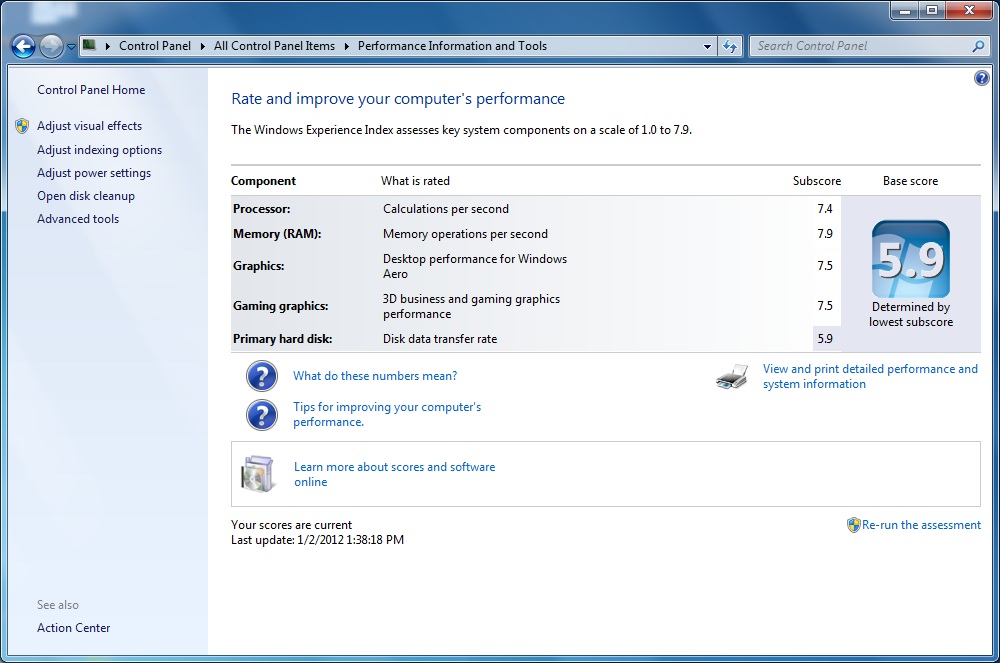
Edit: Here we go, scores are split up into 3 types:
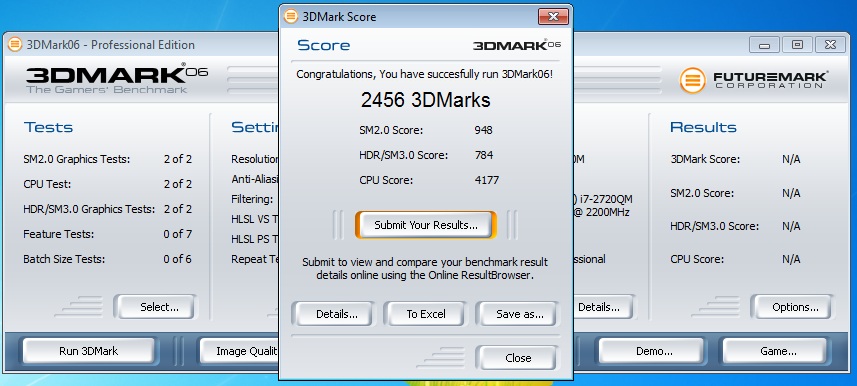
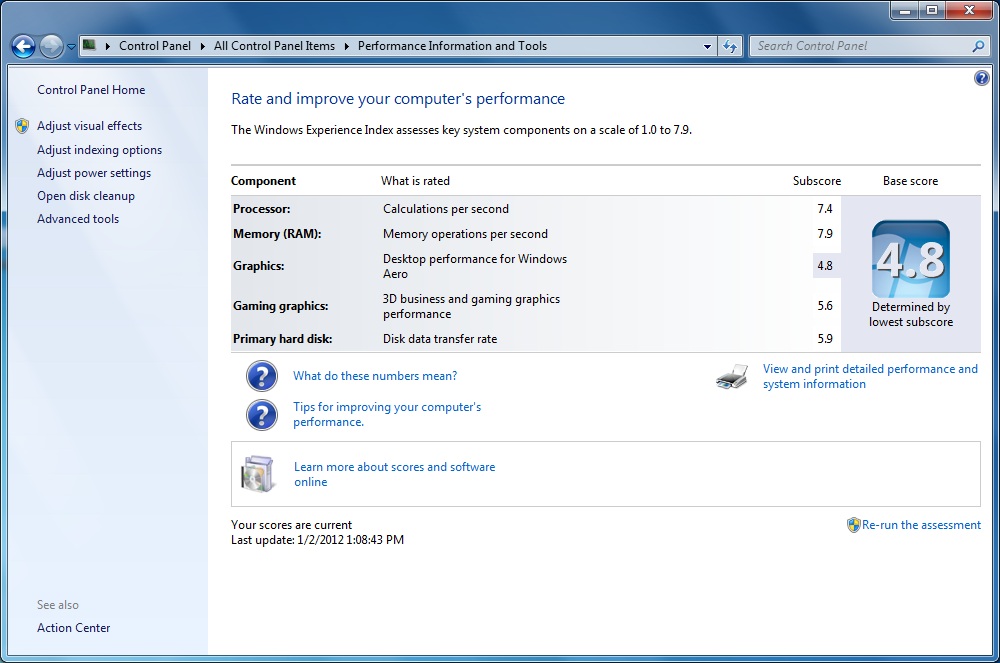
Setup 1: iGPU (Intel HD) + dGPU (NVS4200M) on, eGPU not installed (as the laptop would come from the factory)
3DMark06: 2,456
WEI: 4.8/5.6
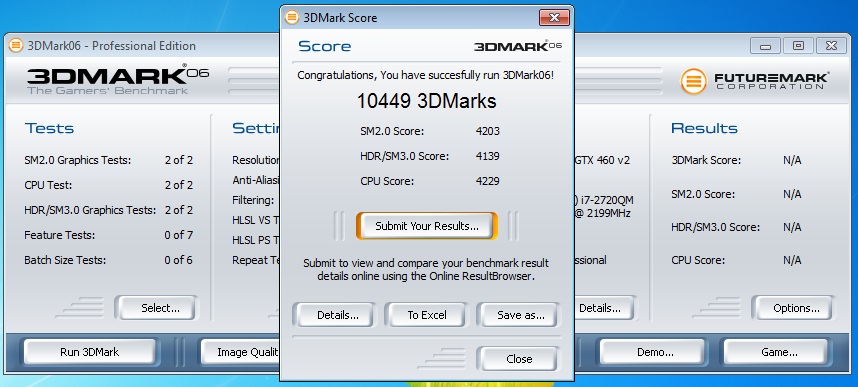
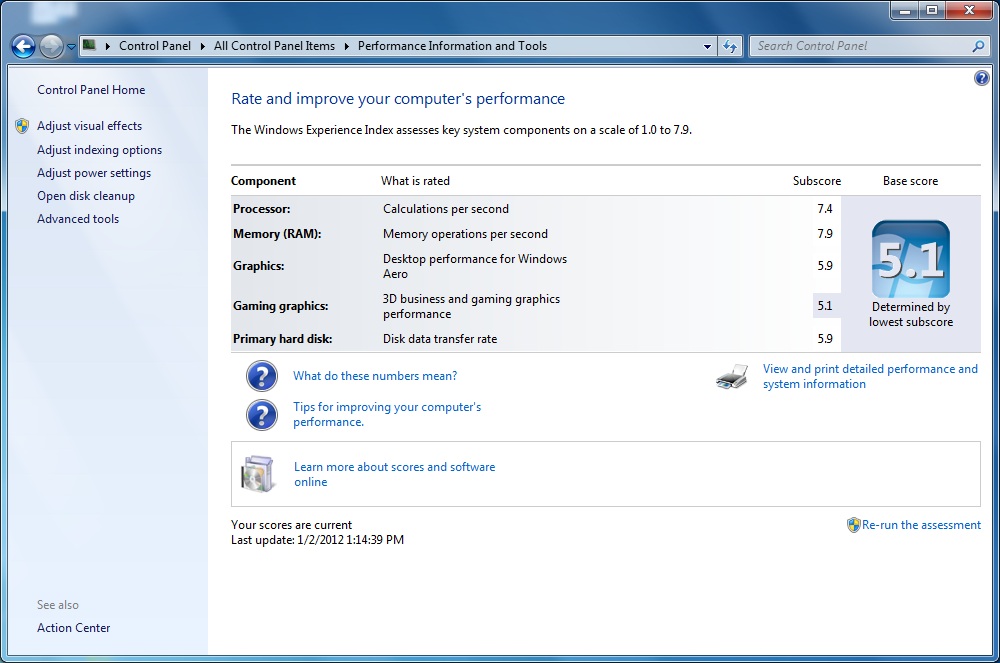
Setup 2: iGPU + dGPU + eGPU on, monitor connected through eGPU - NO Optimus with this setup
3DMark06: 10,449
WEI: 5.9/5.1
Setup 3: iGPU + eGPU on, dGPU disabled through Setup 1.x, monitor connected through eGPU - Optimus enabled
3DMark06: 15,495
WEI: 7.5/7.5
Screenshots for all results are attached. The last thing I wanted to play around with was disabling SpeedStep to see if the system was possibly throttling the proc back when the OS wasn't requesting it as much, but the eGPU potentially could have been taking advantage of the higher clock speed for PCIe compression via Optimus (just a theory).
These results definitely show the benefits of Optimus - With the 3DM score going up by over 6x it's original score of just a dGPU setup, and getting a nearly 50% increase from the same eGPU without being able to utilize Optimus.
If anyone wants to work on getting an Inf with GTX 460 v2 entries in it for an x64 OS I'll test internal LCD performance out.Attached Files:
-
-
I know the NVidia M6600 has a Optimus enable/disable function in the bios. The enable option wiring through the Intel HD3000 as the primary adapter. If you don't have that option then I've read that removing the M8900 MXM card will ensure the Intel HD3000 will take over as the primary video card so you can get Optimus eGPU connectivity. If it works then could look at adding a switch to power off the MXM card if wanting to use the eGPU.
-
I already did. See post #7449.
-
hi guys
im a bit confused about the notation of the x setup
not sure what x1.0
x1.1
or
x1.2 means
i know that x1 means that one slot is used (expresscard or mPCIe) right
and Opt signifies optimus nvidia drivers right? it's the decimal that puzzles me
thanks -
x1.1 = PCIe Gen 1.0, 1x Speed
x1.2 = PCIe Gen 2.0, 1x Speed
x1.1Opt = PCIe Gen 1.0, 1x Speed + Optimus
x1.2Opt = PCIe Gen 2.0, 1x Speed + Optimus -
tomorrow i will get a TV with a 1920 × 1080 resolution and i hope that then will work
-
Hi,
does anybody here use their eGPU with Photoshop CS4/5? Or the Nik Software plugins by any chance? Wondering about the GPU acceleration in those programs, would make getting an eGPU setup so much more worth it...
On a somewhat related note: Nando do you have any idea about the Thunderbolt status? I don't really "get" what your Bplus contact wrote. Does he mean that they are focussing on the Expresscard products before doing TB? I'm debating switching back to a Thinkpad or hp from a 13" MBP, but will stick around if TB is available soon & comes with a performance benefit...
Thanks! -
Thanks alot!
Does anybody had luck to get x1.2 running with PE4H + EC2C with Sandybridge or other Chipsets? -
Hi,
I dont think my notebook has intel HD graphics because, I have the version with the HD 5470 GPU.
I can see an empty mPCIe slot though.
Cant I connect egpu through the empty mPCIe slot for x1 link?
* so if a latop only has a single spare mPCIe Slot and used Ati HD5*** series card, can they connect eGpu & at what speed? -
Check Nando's results on the first page for SB performance on PCIe x1 gen 2.0. It's not with PE4H but a modded PE3A
-
Happy New Year guys! Best time to test my eGPU.
I test my config:
X220T i2520 3.2 Ghz
8Gb 1333 RAM
P4EH+EC2C 1x in bios, opt enable. In Aida 64 card imagine as 16x 2.0
Gigabyte GTX 560 (non TI 830/2000@ 950/2400 1.085Vcore by MSI Afterburner)
285.62 opt drivers
42" FHD TV
Chieftec GPS 550W (12V 3 rails 18A, connected to 2*6pin video connector)
I Run 3D marks 06/Vantage/2011 onlu on 950/2400 mhz because default performance is too few.
16000/12000/3690 Marks.
As for Games:
1) Crysis 2 Dx11 Ultra HiResText(All ultra, no AA, 16x Aniso, 720p require 800+ mb Vram) 25-50Fps, Playable but, not smooth. I think too few CPU perfomance, too low min FPS for GTX 560.
2) BF 3 single player ( all ultra 2xMSAA, aniso 16x, 720P require 800+ mb Vram) 30-60fps. Good performance, smooth gameplay. Good game good perfomance on 560OC.
3) NFS the Run (all ultra no AA 16x aniso, 720p require 800+mb Vram) 25-40fps not smooth, some times i see frezies. Playable, but not comfort. Not enought CPU and GPU perfomance. Bad optimisatiom, bad video quality, bad game(
4) The Elder Scrolls V Skyrim (all ultra, 2xMSAA 16xAniso, 720p require 800+mb Vram) Good perfomance, good quality. 30-60fps, pretty smooth. Pleasantly to game, but i dont' like RPG. It;s too boring.
5) Gta 4 Tony( all ultra, no AA 16xANiso, distamce 100, traffic 100, require 990mb Vram.) 25-50fps. Playable, not smooth, not interesting. Just for test. Bad game with awful optimization
6) Dirt 3 (Dx11 all ultra 2xMsaa 16xaniso 720p) Pretty good game. God perfomance 30-60fps. Smooth and pleasant image. 1080p not enough CPU, game input have some 50-100ms input lag.
7) Saints Row The Third (Dx 11 all ultra no AA 16x Aniso, requre 900mb Vram.) 25-40 fps not smooth, not pleasant gameplay. Not enough CPU. Bad optimization for dualcore.
8) Rage (DX 9c all ultra 8xMSAA, 16xAniso 720p/1080p) 18-20fps( Good image but strange performance, smooth but only 20fps. I changed config file , resolution, but performance litim by 20fps from above.
9) NFS Shift 2 (xd 9 all ultra 2xMSAA 16x Aniso 720p require 800+mb Vram)
28-40fps Not smooth, not pleasant gameplay. Bad optimization as all NFS series. Just for test.
As for me P4EH+3Ghz dualcore+560 non ti is not enough for all ultra 720p gameplay. But for High setting without AA it's pretty good.
For better performance i prefer 4Ghz dualcore GTX 570 on PCIE 2x for FHD ultra quality.
Now i try to optimize performance 560OC, because now my CPU is not bottleneck for this configuration. I can record 720p video for youtube with gameplay and benchmarks. -
Has anyone done any testing with the Macbook Air via Thunderbolt?
-
I don't believe that a eGPU device has come out to use the thunderbolt yet.
So I was looking at my P4HL thingy and I noticed that it has a USB connector on it. What does that do and whats its purpose? Could I attach is via usb instead of mini-HDMI? -
mPCI-E and espresscard have a USB component, which is not needed by graphics cards. bplus wired the USB functionality anyway to provide an extra USB port.
-
So essentially I wont be able to connect the adapter via usb instead of mHDMI expresscard?
-
Exactly, only mHDMI -> EC or mHDMI -> mPCIe, no USB (furthermore USB 2.0 is too slow to handle graphics dataflow)
-
This is looking really promising for me. I have for a few months now been looking for a a thin/light laptop that could really game. The closest thing that I could find has a gt540m which can only really game on low. Before I go forward I have a few questions. I apologize if they have already been addressed.
1. If i get a laptop with say a gt540m dedicated already in the machine, can I switch back and forth between using the 540 when travelling, and my eGPU when at home? (I would think you could as long as I have optimus and disable the 540 when using the eGPU)
2. How does this (eGPU with lets say a 460/560ti) compare to a big bulky sager gaming latop that comes with a gtx 560m card. Would the x1 PCI-e throttle the eGPU so much to make the 560m better? If so how low a mobile card would equal an eGPU, 555/550/540?
Thanks guys. -
Okay, so I have one last question.
If the eGPU is supposed to run through the external graphics card, then why is my on board GPU (330M) still whirling and freaking (fan loudness I mean) as if it was doing all the work? Is there a way to tell my on board GPU fan to shut the hell up because I'm using an External GPU? -
1. Exactly. If your notebook is Nvidia Optimus ready notebook (Intel HD Graphics/3000 + GT540M), you can use eGPU when at home & dGPU (GT540M) when traveling.
2. Graphic card is not throttled when connected to x1 link. For example, if the graphic card have core clock of 950MHz, it will run at 950MHz if there is demand for it (e.g. playing games), regardless whether it's connected to x1 or x16 link. What slowing down the eGPU is the bandwidth. On desktop, graphic card can run at [email protected]/5Gbs (depend on the chipset/north bridge specification) while on eGPU, graphic card can run at [email protected] (x2 if Optimus & x2 link setup), 5Gbs on SB notebooks when the compliant kit available. So, a lot of data is push through x1 link. It is bottleneck by the bandwidth. If I compare my eGPU (ATI HD5870 @x2) with GTX560M, using Starcraft 2 games as comparison, FPS are roughly identical. On Dirt 2, my eGPU perform worst than GTX560M. eGPU might get higher score in benchmarks but mobile card have a lot of bandwidth which make them perform much better. For eGPU vs. desktop, graphic card on eGPU will lost at best roughly 30% of the actual performance.
Does your notebook have two fans? If only one fan, it will whirling & freaking because CPU need it for cooling. -
My bad, totally missed that. Thanks!
-
I believe only one. When I web browse its not making a racket, but when I play fricken Age of Empires 2 it goes into hyperdrive. I felt the laptop and its not hot at all, just a little warm if barely. I mean, as of the moment I do not have my eGPU set up because I'm moving, but it did the same when it was connected. Its just that its loud and obnoxious.
-
Thanks you kizwan.
I understand you correctly.
because I have the HD5470 i Can only do 1x eGpu with mPCIE slot
or
2x eGPU with 2 mPCIE slot (however I cannot risk removing the wifi card to free up a slot)
Is the performance of 1x terrible compared to 2x and is there any tweak to get 1x faster? -
Performance on x1 is poor than x2. Definitely you'll experience stutters & lags when playing games, especially on huge map, outdoor scenes & heavy effects. x2 only possible if you can access & use 2 PCIe ports, and they must in either of these combinations:-
- PCIe port#1 & port#2
OR
- PCIe port#3 & port#4
OR
- PCIe port#5 & port#6
Considering you need to use mPCIe port, I can't recommend you to do x1 link. Unless you can do x2, it just doesn't worth it. -
Hrmmmm so I would probably be better off getting a sager/lotus with a 560 unless I want a smaller computer in which case making and eGPU would get me to where I need to be. Tough decision. How do you think a 540m stacks up against some of the more common eGPUs?
-
Hello All,
I would like to thank Nando4 and all contributors for this fantastic thread.
I am an owner of ancient (by today's standards) Asus N80 laptop. I would really like to try to make an eGpu, but since i cant connect it ta an external screen, im considering buying a budget/mid laptop (with a good cpu) and on board gfx so i can use optimus for internal lcd.
The questions is should i wait a bit more for thunderbolt and/or usb 3.0? or should i bite the bullet and buy a laptop right now since those technologies are still not on the market?
For now i can still game on the asus n80 luckily im not fan of fps games, but its showing its old age.
Thanks. -
Consider that with the newer adapter, the performance of the eGPU should rise enough to almost match a GTX570m (check nando's results in the first page).
The GT540m is a midrange card, good enough to play at medium on 720p (check my videos in sign to have terms of comparison, but to me is a no match against an eGPU (even with a GTX460) -
I believe Nando's setup is actually x1.2Opt and it seems to work fine.
-
Hi everybody, i'm new on this forum and i have few questions.
First of all, i'm french and i am really bad in English, i will try to write in English, and i will put my messages in French, if you want use Google Trad.
I am very interested by eGPU solution since my first laptop (Asus A6Jc, gifted to my sister) but i have a few questions :
-I search a 14" laptop "eGPU Capable" who functions with Sandy Bridge, and the cheapest possible, someone can help me?
-I don't understand the "building" (? I'm not sure, the eGPU's mounting) with Two mPCie adaptator (PM3N), if someone want help me or some pics (photos or patterns)
-How many choices exist to connect eGPU as PCiex2 or more?
Thanks for everything, this thread is amazing !
SAME MESSAGE IN FRENCH
Bonjour,
Depuis longtemps, je suis intéressé par les solutions eGPU (depuis mon premier laptop, un Asus A6JC que j'ai donné à ma soeur) et j'ai quelques questions.
-Je cherche un laptop 14" compatible avec les eGPU
-Je n'ai pas compris le montage des solutions eGPU avec deux adaptateurs mPCIe (PM3N), si quelqu'un veut bien m'expliquer, me montrer des photos ou un schéma ce serait sympa !
-Combien de moyen existe-t-il pour brancher un eGPU en PCIex2 ou plus?
Merci d'avance pour vos réponses, et merci pour tout, ce thread est génial ! -
Hello, I have a problem: I have a PE4L/GTS450 combo which works fine with the desktop drivers. I wanted to test the Optimus drivers, but can not make them work. The driver itself installs fine, but the graphic card does not produce any output (the external LCD display stays black). When I wake up my laptop (a Lenovo TP400 with Win7/x64) from sleeping, it seems to correctly recognize the attached external GPU as I hear the connection sound and the internal display flashes for a sec. I tried at least 5-6 Optimus versions with no success. Any advise on this?
-
If you have a lap top with onboard HD 5*** graphics then
you can access & use 2 PCIe ports, and they must in either of these combinations:-
- PCIe port#1 & port#2
OR
- PCIe port#3 & port#4
OR
- PCIe port#5 & port#6
****check the name of your laptop and tell us the specifications?
bonsouir -
salut Sbeul, pour toi, je verrais bien un DELL, Lenovo ou un ASUS:
Prix-portables.fr : Comparateur de prix pour ordinateurs portables, PC portable, Mac, Ultraportables, UMPC et mobilité
va la dessus, et coche express card, tu devrais voir les del vostro les asus B43 et B53 ou encore les think edge qui supportent de l'express card pour ton Egpu
in english:
hi Sbeul, for you i'm thinking about a Dell, lenovo or Asus:
(link below)
Goes here and tick express card, you'll find dell vostro's, asus B43 and 53 and some think edge Egpu compliant -
Now, i don't have any laptop, The Asus A6Jc was dead.
Now, i have desktop computer for gamer (i5 2500k, GTX 570, 8Gb DDR3, etc...) but i want to buy a new laptop and i wish to make an eGPU.
I saw some laptops who interest me :
-Dell Inspiron 14z : Dell Inspiron 14z - Ordinateur portable - Achat / vente pas cher sur materiel.net
-Sony Vaio C : https://outlet.sony.fr/shop/Ordinat...4/VPCCA2C5023D.FR5.A?CSRT=7531259087980514249
-Or another 14" cheapest than them
Anyone of them can use eGPU as PCIe x2?
In fact, i wish to mod the future laptop by putting this wire connected to PM3N inside the laptop and connect eGPU by HDMI wire A-Type.
EN FRANCAIS
Je n'ai plus de laptop, j'ai en ce moment un ordinateur de bureau pour jouer (i5 2500k, GTX 570, 8Gb de RAM, etc...) mais je voudrai me re acheter un ordinateur et fabriquer un eGPU
J'ai vu quelques laptop qui m'intéressait :
-Dell Inspiron 14z : Dell Inspiron 14z - Ordinateur portable - Achat / vente pas cher sur materiel.net
-Sony Vaio C : https://outlet.sony.fr/shop/Ordinat...4/VPCCA2C5023D.FR5.A?CSRT=7531259087980514249
-Ou d'autre moins cher que ceux là
Est-ce que l'un d'eux peut faire fonctionner un eGPU en PCIe x2?
En fait, j'aimerai faire un montage à base de PE4H et PM3N avec ce câble et le faire dans le pc portable, pour faire quelque chose de classe.
PS : Un français ! Merci pour le lien, mais est-ce qu'on peut faire un montage express card - mPCIe en x2? J'ai lu ici même qu'en x1 il y avait du stuttering, et ça je supporte pas :/ -
en 1x il n'y as pas de tering avec nvidia et le pilote optimus moddé présent sur ce forum.
Le montage x2 est impossible avec un processeur sandy bridge donc ou tu prend un core i plus vieux 3xx/4xx/5xx/7xx ou alors tu te résigne au 1x optimus, sur la première page, t'as des liens avec des résultats de performances (optimus comprime les données sur le lien pour éviter les dégradations de performances)
franchement, ne te prend pas trop la tête pour les perfs, j'ai pas de tering en 1x non compatible optimus, avec un T7500 (4 an le bestiaux)
[edit:] essaye celui là: http://configure.euro.dell.com/dell...d=137600&acd=f300ed52ce2d8845e65fbb1e67460b36
english:
in x1 there's no tering with the modded nvidia driver (highlighted in the main page of this thread)
The x2 build is impossible with sandy/ivy bridge, so you have to take an older core ix processor (i3 3xx/ i5 4xx/ i7 5xx 7xx) or to do an x1.opt. You can found some tests with this last one on the first page of the topic. there's links with detailled results (opt do a compression (who said zip?) of the data to disable performance downscaling)
seriously, don't take care oubout performances, i have massive troubles with a x1 link and a non optimus capable laptop with a 4 years old processor
[edit:] try this one: http://configure.euro.dell.com/dell...d=137600&acd=f300ed52ce2d8845e65fbb1e67460b36 -
Merci beaucoup ! Je ne comptais pas mettre plus de 400 à la base, Et le design me plait plus que les deux autres !
Mais j'ai une dernière question : le but étant de jouer en déplacement, est-ce que je pourrai installer les drivers custom pour jouer directement sur l'écran de l'ordinateur?
Ah et une question bonus, Invasion Labs vend un Vidock avec driver custom et une GTX 560 pour la modique somme de 600 (u_u) : pOrtable eXTERnaL gAMING sYSTEM by IL
Est-ce que ce sont les drivers Optimus de ce site?
Encore merci SoftReaper, tu m'as grandement aidé !
ENGLISH VERSION
Thank you very much ! I wouldn't paid more than 400, and i like his design.
But i have lastest question : I want build that to play when i'm in travel, could use modded driver to play on laptop's screen?
And a bonus question : Invasion Labs (little french society) sale Vidock with 'home made' driver and GTX 560. With it, we can play on laptop's screen.
It cost 600 u_u Them home made drivers are the same of this thread?
Thanks a lot Softreaper ! -
sur leur site de support, il n'y as aucun pilote disponible, donc pilote nvidia oblige, donc pas de modification optimus
optimus te permet, en + de gagner en performance, d'obtenir l'affichage sur l'écran du pc
600 c'est cher, quand je vois que j'ai payé mon kit 60 frais de ports inclu depuis taiwan et qu'une GTX 580 coute moins cher ...
english:
on their support page, there's no driver available, so nvidias drivers are needed, so no optimus support without modding it by yourself
optimus enable you, moreover than having better performance, to have an embedded display
600 is expensibe, considering that i've paid my kit 60 Shippement fees included and that a GTX 580 cost less ... -
I plan on making one thie weekend using a geforce gt 520 and plan on using my toshiba a505's display. Im running windows 7 so Im assuming running the chip to the laptops display should be easy. I have the gist of what I need to do but am wondering if theres any tips/suggestions. As for a housing I've got a few miscellaneous wooden rectangularish things in mind (old stereo box, cigar box, mabye even an old clock).
-
AFAIK, there are at least two version of Toshiba A505; one with Core 2 Duo + Intel GMA 4500MHD, while the other one have (1st gen) Intel Core i + Nvidia GT310M. If the latter, you will not be able to use internal LCD with eGPU, without little tweak. You can use Ultramon/Chung Gun method but you still need external monitor. However, with this method, games only work in windowed mode & performance will be reduced. If your notebook have either Intel GMA 4500MHD or Intel HD Graphics or Intel HD 3000 iGPU, you can use & get acceleration on internal LCD, if you use Nvidia Fermi desktop graphic card. Both Intel iGPU & Nvidia Fermi are needed for Optimus setup.
-
Hi everyone,
Been doing a lot of reading and finally got the stuff to get the egpu running with the nvidia gtx 550ti on my lenovo t420.
I plugged it all in, bios is 1.15 (i have 8gb of ram), did a clean install of windows 7 professional, and installed the intel hd drivers (for intel hd3000), and then reboot, installed the gtx 550ti drivers from the official nvidia site.
It just gives me the "Windows has stopped this device because it has reported problems. (Code 43)" everytime.
I've tried the modded drivers, with no luck.
I tried doing the setup 1.x doing the pci compact thing, and ran the startup.bat, and chainloaded with windows 7 (using mbr didn't work somehow since it just says "missing operating system".
Am i doing something wrong? Am I missing something?
I've been working on this for over 10 hours today. I'm going to head to bed.
I hope you guys can point out somethings for me to check on because I'm just stumped at this point.
Thank you!! -
Lenovo announces laptops with thunderbolt ports.
really looking forward to the egpu community making good use of this.
Lenovo ThinkPad Edge S430 is the first Windows laptop with Intel's Thunderbolt; Edge E430 and E530 also announced | The Verge -
Wow awesome, heres hoping to a soonish release of the thunderbolt adapter
-
Now this sounds good.. so is it only the edge S series that is going to have TB or even E series..? But think these laptops will be release only during sep-oct not before..
Sent from my HTC Vision using Tapatalk -
if the notebook had hdmi port
and connectting hdmi on laptop to mini hdmi with an converter
dirrectly to PE4H or PE4L can it work ?? -
I'm wanting to upgrade to an adapter that supports Express card 2.0 (I assum the old PE4L on the ViDock doesn't) to get x1.2Opt working on my setup. Do you suggest grabbing a PE4H now or waiting for the v3 to come out?
-
No, that HDMI port is output only and can manage only video signal, the mHDMI ports on PE4H or PE4L are in/out and can manage both data and video signal
@xtraman122: considering that the culprit of the failure in negotiating PCI Gen 2.0 is the connector, i think the PE4L inside the Vidock is able to handle it (due the cables are soldered to the PCBs). The PE4H sold now can only handle PCI Gen 1.0 for the same cause, -
it's mean i must use PM3N or EC2C ?
-
Yeah, PE4H/PE4L + EC2C/PE3A/PM3N only.
DIY eGPU experiences
Discussion in 'e-GPU (External Graphics) Discussion' started by master blaster, Sep 18, 2009.