 Problems? See this thread at archive.org.
I guess if the video driver checks the hardware and ignores the virtual stuff we would need to re-write drivers which is pretty much not doable right now. About ganging up ports, I meant virtually doing it. Actual ports would just be reporting some random device and something like Everest would see those devices as PCIe @ x1 port#. All the splitting and ganging in Windows. Other possibility would be do bind that virtual port to a physical free PCIe port and assign the same address, such as to mystical port1.
-
What?? You said "Connect 2 PCIe ports to graphics card..." & write a driver to ganged up those 2 PCIe ports to make PCIe x2 link. You meant this right?
Still, current driver will read the actual PCIe link configuration. Windows just tag along.
EDIT:-
Let me clarify:-
- "Connect 2 PCIe ports to graphics card..."
- This is physical connection - write a driver to ganged up those 2 PCIe ports to make PCIe x2 link
- This is software (driver) job, so it's virtual.
- "Connect 2 PCIe ports to graphics card..."
-
2 physical connections to graphics card. Changing the hardware is needed for the ports to identify themselves as different devices not related to VGA adapter, video driver sees virtual port, virtual port routes the data to those devices.
In turn, Video driver -> Virtual port -> 2 actual ports -> Graphics card and vise versa.
Edit:
Yes, thats right.
Saw the edit after posting this
Edit2:
Still, graphics driver is an annoying thing. Virtually hijacking one of the pci ports and telling its x2 might work.
Last Edit:
Just continuing to read through the topic (damn those 800 pages) I stumbled onto something interesting. How many and what pins would I need to get a functional PCIe port. The only thing that is holding me from doing x4 link is mystical port 1. I should be able to get the schematics for my south bridge granted that I would be able to identify them on the motherboard. -
It work. Detected the graphic card, but failed to install driver.
What should i do now? -
Hi i am have trouble getting my EGPU to work, i have a:
Laptop with 2.16 Duo core CPU.
And video card of Mobile intel 4, with GL40.
My chipset is ICH9.
My EGPU device is Nvidia Geforce 440 (desktop).
I've installed the Mobile 285.62 Verde (replaced the nva.inf file thing to make it install).
My EGPU is recognized, and reports fine by GPU-Z as shown http://gpuz.techpowerup.com/12/02/16/5sz.png here, and this is my internal GPU http://gpuz.techpowerup.com/12/02/16/c5m.png
So, my GPU is fully functional, all ports open all memory allocated PC reports it works fine, the driver went great.
My problem is, am trying to run video games - my laptop doesn't use my EGPU at all! so my gameplay performance is the same crap!. My question is - how can i make my laptop use my EGPU?
I've tried to temporarily disable my IGPU - but that make my screen go fully black, till i pressed left arrow key and enter (to revert - renable), i've disabled the Nvidia EGPU then disabled the IGPU, then re-enabled the Nvidia EGPU - and then games wouldnt start my laptop reported that i have no directX support and its no good (even though all drivers installed, egpu detected).
So how can i make my laptop make the GPU work on my internal LCD? i don't get it how this optimus thing works. -
You need external screen because you can't do Optimus link. Connect the screen to the monitor and play games on it.
-
What error you get when trying to install driver?
Please try Setup 1.x anti-whitelist too.
Make sure eGPU is connected to notebook before Windows starting. If not Optmius is not engaged. -
When installing the graphic driver, it took very long time then failed.
i use Verde 285.62. -
Hi thank you, i tried that, i booted my laptop and the screen went black and i couldn't do anything with the EGPU turned on, i started the 1.x set up and it wouldn't detect my EGPU, whats wrong now??... Odd enough my windows uses pci port 5 for the EGPU (i disabled HD AUDIO from the video card), and when i turned on 1.x set up port 5 was disabled so i enabled it.. Now my windows doesn't detect my EGPU either, not even when i do sleep\plug\turn back on..
edit:I also got BSOD when when i boot win 7 (pressed f8 b4 boot then turned on EGPU)
Sorry for my bad english, it was detected and functioned now its gone.. What do i do..? -
Are you using modded driver (edited nvam.inf) or original driver?
Please try Setup 1.x anti-whitelist:-
- Boot with WLAN card attached.
- Enter Setup 1.x
- Go to "PCIe Ports" > Anti-Whitelist > !Save Ports > (select WLAN)
- Removed WLAN card
- Reboot
- Enter Setup 1.x again
- Go to "PCIe Ports" > Anti-Whitelist > "Restore Ports"
- Connect eGPU & press F5. Make sure eGPU is detected.
- Chainload into windows.
Please let me know how it goes.
Instead turn ON eGPU, try hot-plug instead. Meaning, press F8 & then hot-plug eGPU to notebook.
Which kit are you using, PE4L or PE4H and EC2C or PM3N? -
Hi am using PE4L EC2C 1.5.
I got it to work, i just used 1.x reset - all ports feature then it re-detected my EGPU. Is it possible to boot a laptop with EGPU On and not get black screen?.
I booted with EGPU on now all detected and i got new options called Display in my nvidia options. -
Unless manufacturer fixed the problem in next BIOS update, it's not possible.
-
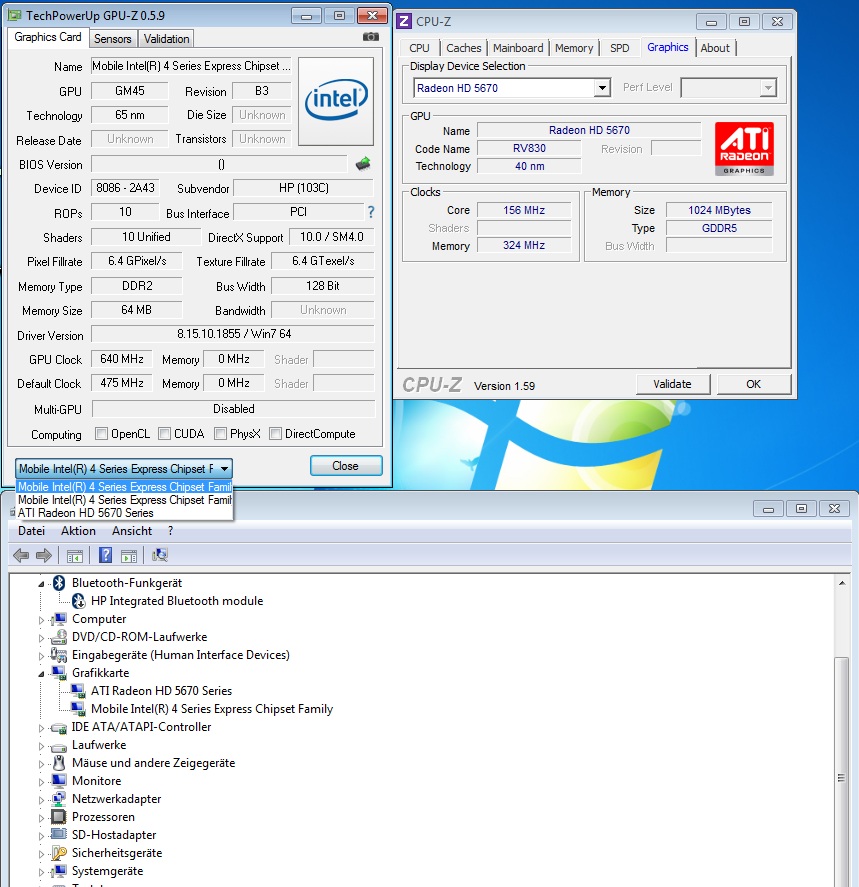
Thank U for your reply. I have checked the above two links, and tried out. and I found it doesnt work for me. My situation is that, I can only do 36bit compaction and with that, I got 512M for egpu(seems weird), after chainload to win7, the driver and every thing seems OK, hower, from cpu Z, I saw three graphic card, one ist from intel, one ist HD5670 and one ist just one device called 'Graphic card'. with external display, just like above(no aero effect no devices for DX10...) I used on VGA to DVI adapter on HD5670, could the adapter be the reason for this? Furthermore, I used DIYViDock-Setup-10e8. From everest, I saw only two PCI E ports are occupied. Port 2 is for Wlan, Port 3 is for HD5670. Wish u guys have some ideas about this problem. Thanks again...
-
Which kit are you using, PE4L or PE4H and PM3N or EC2C? What is PSU specification, especially the max current on +12V?
Probably just driver issue. Please reinstall graphic drivers. Please post screenshot of GPU-Z. I want to see the three graphic cards detected. Also please post screenshot of DX10 error. -
Hi,
sorry to interrupt the ongoing discussion. I have a question concerning PLX Technology's USB 3380 / 3382 which is using USB 3.0.
Does it work the same way PE4L / PE4H do? I have a Sandy Bridge 2nd gen Notebook without expresscard and would like to know if I can use the USB 3.0 connection. Or do the Opt drivers etc. only support the mpcie / expresscard method? -
Thank you for the response kizwan, hopefully these answers give you what you need.
1. Your first post stated that eGPU is detected & working. How did you get it work for the first time? Did you boot with eGPU connected?
The first time I got it to work I booted my system like normal, made it sleep, turned on eGPU and plugged into express card, and woke the system back up, which made windows detect it so I could install nvidia drivers. At this point device manager said eGPU and iGPU both working. I disabled iGPU and it switched from my internal screen to external monitor. I thought I was good to go at this point because GPU-z looked normal with nvidia card, so I ran furmark and I got the blue screen of death. Booted back up and did same sleep process to find nvidia card, but device manager now showed code 12
2. Your second post, if I understand correctly, you get Error Code 12 after connected eGPU in Windows. Am I right?
Above.
There are two things I need to know:-
PSU specification, especially +12V?
If it's BSOD or crashed when trying to run any games or benchmark, then most probably PSU is weak. GTX570 power requirement is 219W (240W if OC-ed). So, PSU must capable to supply at least 20A of max current on +12V (12V * 20A = 240W, calculated with 10% margin).
TOLUD?
Please refer to Pre-Purchase FAQ ("2. How can I check if my notebook is compatible with an eGPU?") to learn how to check TOLUD.
I have an ATX 500w cool master PS. I don't know exact specs (I'm on my phone) but I can find them if you need them.
If TOLUD is 3.5GB or more, your notebook don't have enough 32-bit PCI space for eGPU to work if you have 4GB or more RAM. Hence, the Error Code 12.
(Please answer all of the questions. Thank you.)
-----------------
Thanks for the response, let me know if you need more info. I asked HIT for help too, so I'll see what they have to say too. -
Look what arrived home today
I'm working to find a fit for all the cables in my enclosure
Soon gaming videos will be updated with the one made with the PE4L 2.1 setupAttached Files:
-
-
Hi, Kizwan, here ist the info,
1. I use PE4H 2.4a mit EC2C.
2. PSU is atx 300w (peak 350), +12v1/10.0A, +12v2/15.0A (see picture)
I have tried to reinstall the ATI driver, and tried from offical to DNA,,,also the intel GPU driver. they all have the same result. -
Thanks, when the GPU is in use it is reporting 2.0.
-
@Khenglish, I also have a sager, and I was wondering if you could post a picture of your setup (specifically where the cable connecting to the mPCIe comes out of the case)? I am considering doing a x2, and already have a x1 connection through the express card slot.
also in an earlier post, you mentioned problems with the 460GTS when doing a x2 setup? -
I'm install the driver using original driver.
Didnt try setup 1.x yet because i'm using secondary mPCIe, i try plug the WIFI card it work, no problem.
The WIFI card is installed on mPCIe slot 1. -
Ok got the E6520 laptop and hooked up the 5770 graphics card with windows already running and it appeared to install correctly. Went to ati website and downloaded the 12.x drivers and installed them, but now it says control center doesnt work with my enabled graphics card and to update the driver and enable the card with the displays manager (obv because the enabled card is the onboard nvidia one). how do I get it to switch over? I have a monitor connected. I see people talking about sleep mode, but this dell doesnt seem to have a sleep function, just hibernate. -
The original driver doesn't have PCI ID for your card. You should use the edited nvam.inf file:-
http://forum.notebookreview.com/6542661-post1222.html
Do you still need to hot-plug or can boot with eGPU connected? -
i downloaded Verde 285.62, put the nvam.inf inside \Display.Driver\ , not overwrite, inside dont have nvam.inf.
I on the eGPU and boot the laptop, laptop cannot boot at all, if i use ur method,
put the WIFI card from slot 1 to slot 2, boot the laptop, and F8, replace the WIFI card to mPCIe, no problem, can detect, only cannot install the driver. -
Forgot to tell you that you're using older version which have bugs in it & no longer supported. You should obtain the latest version instead.
Your ATX PSU have plenty of power (+12V1 * 10A = 120W) to drive ATiAMD HD 5670 (61W).
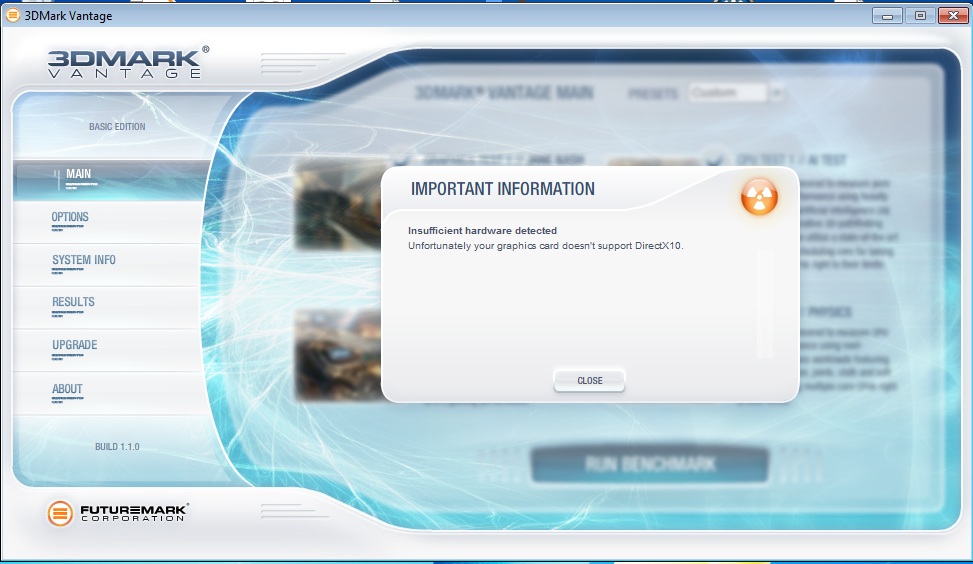
In 3dMark Vintage windows, click "System Info" & "View System Info". Please check what you see for "Primary Device" in the report.Last edited by a moderator: Feb 6, 2015 -
You should overwrite the original one in:-
If it doesn't overwrite, then you didn't extract the driver correctly.Code:\285.62-notebook-win7-winvista-64bit-international-whql\Display.Driver\
The correct way is like this:-
- Use Winrar to extract 285.62-notebook-win7-winvista-64bit-international-whql.exe
- Navigate to:-
and put edited nvam.inf from Modded Drivers section in the folder, overwriting the original one.Code:\285.62-notebook-win7-winvista-64bit-international-whql\Display.Driver\
- Then navigate to:-
and run Setup.exe to install the driver.Code:\285.62-notebook-win7-winvista-64bit-international-whql\
If you swap eGPU to slot 1 & WIFI to slot 2, can you boot with eGPU connected?
If still can't boot, then just use my method. You might also interested to try Setup 1.x anti-whitelist I mention to you earlier in my previous post. -
Hi,
sorry to interrupt the ongoing discussion. I have a question concerning PLX Technology's USB 3380 / 3382 which is using USB 3.0.
Does it work the same way PE4L / PE4H do? I have a Sandy Bridge 2nd gen Notebook without expresscard and would like to know if I can use the USB 3.0 connection. Or do the Opt drivers etc. only support the mpcie / expresscard method? -
No, you can't use USB 3.0.
Optical drive is connected to PATA/SATA port.
For graphic card you need PCIe lane. -
are you able to get it to work?
i'm not getting any detection at all with the PE4L 2.1a.
SW2 on 1-2, i get
D1 - Green
D4 - Red
SW2 on 2-3, i get
D1 - Green
D3 - Orange -
So I just downloaded Setup 1.x to help me get rid of my code 12 error, but I am completely new to this software, and don't really know how to use it to solve the code 12. I've looked at the Setup 1.x post over and over, but I am not versed well enough in the software to get much from it. Any help would be very much appreciated.
For a recap, trying to install a GTX 570 on my Sager, because my iGPU sucks. For now, I am just trying to get it to work with a 1x link through the expresscard.
Please help! -
If you've downloaded an illegal and unsupported Setup 1.0x version (based on licenses MS-DOS platform) hosted off third-party sites, then no wonder. The Setup 1.x page has a link/details on how you can obtain a supported 1.1x version which comes with comprehensive help by hitting F1.
When you obtain Setup 1.1x, then run Save Diags->compact_fails, follow the prompts, upload the resultant \diag folder contents to mediafire.com and link here for analysis. -
There are two important questions you didn't answer yet:-
- PSU specification, especially +12V?
If it's BSOD or crashed when trying to run any games or benchmark, then most probably PSU is weak. GTX570 power requirement is 219W (240W if OC-ed). So, PSU must capable to supply at least 20A of max current on +12V (12V * 20A = 240W, calculated with 10% margin). - TOLUD?
Please refer to Pre-Purchase FAQ ("2. How can I check if my notebook is compatible with an eGPU?") to learn how to check TOLUD.
If TOLUD is 3.5GB or more, your notebook don't have enough 32-bit PCI space for eGPU to work if you have 4GB or more RAM. Hence, the Error Code 12.
- PSU specification, especially +12V?
-
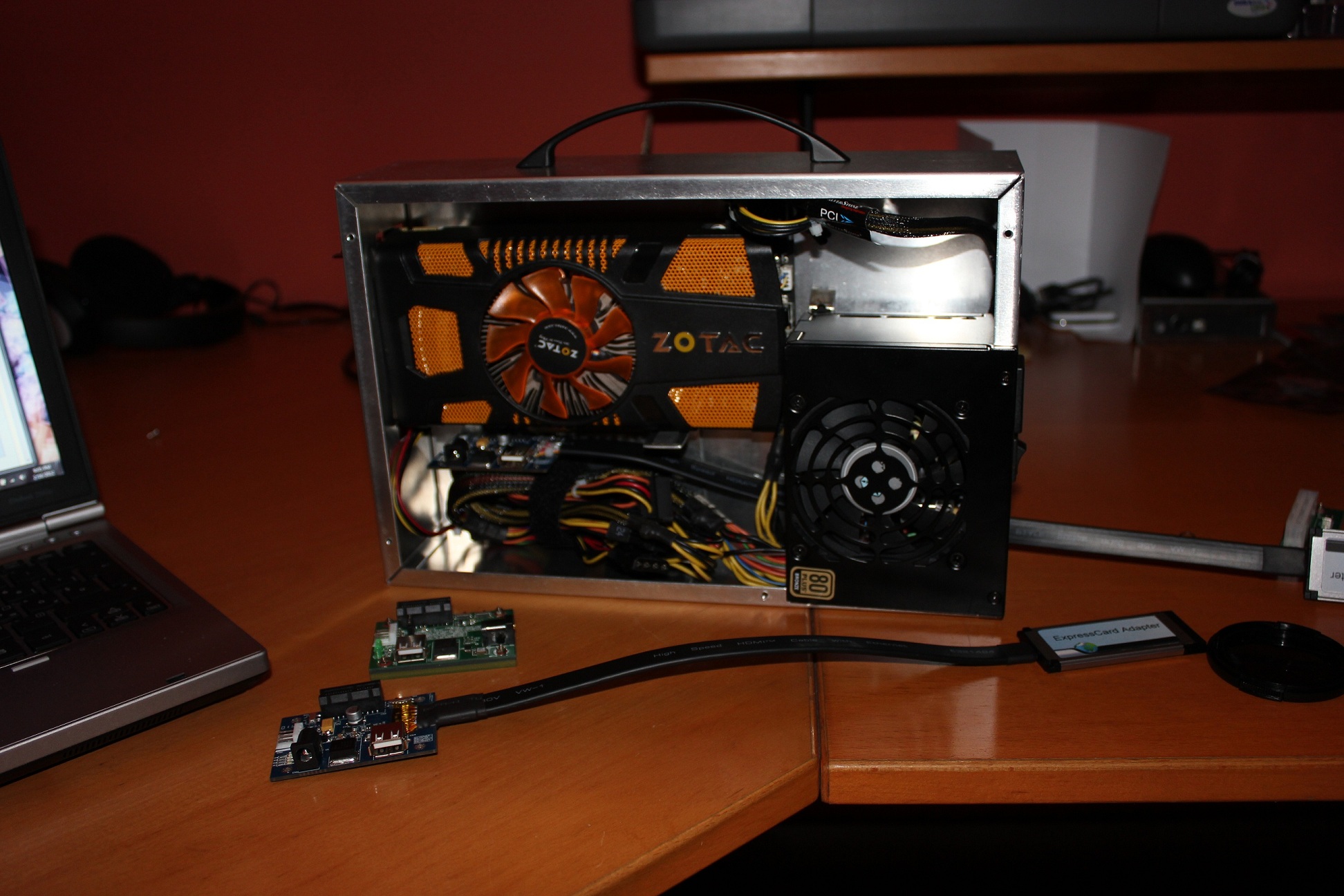
Ok i finished the design for my enclosure. Now i have to paint it in RL and it's finally done.
![[IMG]](images/storyImages/modelegpufinalwithcable.th.png)
The Sketchup model is available below if you want to try to make it by yourself. Component needed are listed in my photo gallery in my signature.
[Download Sketchup Model (~13MB)]
Have fun ^^ -
Ok guys, i have a little problem now. Since i'm planning to give the PE4L a try i opened up the bottom of my Acer Aspire 5755G to see how the mPCIE slot looks on this thing.
Unfortunately, the slot seems to be quite limited in size due to the plastic of the case. Do you think there will be any way to connect the PM3N to my notebook's mPCIE slot? Are there any other ways to connect the PE4H / PE4L to a Series-6 Sandy Bridge Notebook like mine?
![[IMG]](images/storyImages/iceuell2.jpg)
![[IMG]](images/storyImages/ykfe4ej3.jpg)
-
It's a half size mPCIe slot, PM3N can be cut to fit it ^^
-
Lol, are you serious about this? I mean, it looks like it should work, but i'm not an expert on this. -
The HIT guys sent me a link, which had me extract some files to C/egpu (two folders, extras and pciutils, as well as some egpu-setup/mount files, a grub file, and a few setup-disk-image files.
I just don't really know too much about what to do with these files.
1) Again, my power supply is a Coolmax ATX V-500, which has 500W. For +12V1 its 17A, for +12V2 its 17A, and for +12V3 its 12A. I don't really know too much about power. It also says its ATX12V version 2.0 if that helps.
2) Under device manager, under Memory, the first four entries (1 and 4 expandable) are:
+[00000000000A0000 - 00000000000BFFFF] PCI bus
[00000000000D4000 - 00000000000D7FFF] PCI bus
[00000000000D8000 - 00000000000DBFFF] PCI bus
+[00000000C8000000 - 00000000FEAFFFFF] PCI bus
Hopefully this is what you were asking about.
Edit: Found out two things, 1 of which could be problematic.
1) If I do the sleep trick, I always get a code 12 error on the eGPU, but if I get a code 12, and reboot, the code 12 goes away, but it crashes if I try to run a benchmark or a game on the external monitor.
2) The GTX 570 takes two 6 pin connectors, and it gave me adapters so that each 6 pin can convert into two standard peripheral connectors, but my PS only came with 3 peripheral connectors when I need 4, and I just didn't even see that 4th one in all the tangles of wires I have here. So underpowering is a definite possibility. I'm just going to buy a sata to molex converter, and hopefully that solves it. -
PE4L 2.1 is on ebay too. Thought it was only available on March 6th.
PE4L V2.1a+ EC2C +SWEX +60cm Flat HDMI+SPB087 GEN.2 PCI-E / PCI-E Slot Adapter | eBay -
Must be missing something simple here cause nothing in the troubleshooting faq applies to this. I connect the card and it installs perfectly either while windows is running, or from cold boot. no error 12 unless I hibernate the system, I just need to know how to make it use the external card instead of the internal one. Am I supposed to disable the dGPU or iGPU in the device manager? The Catalyst Control Center throws an error about not supporting the enabled graphics adapter and wont start. Do I need to install this setup 1.x or is that only if you have error 12? This pe4l didn't seem to come with that program even thought it did. The bios does not appear to have a setting to switch off the onboard graphics. Do I need to reinstall the ATI drivers? This will take forever if I just start trying random things. I'll send a bitcoin to the problem solver
Windows 7 32bit
Dell E6520 notebook
4gb RAM
ati 5770
700w SilverStone modular PSU -
This is my benchmark with 3DMark 11 & Heaven, my setup is in my signature.
- 3DMark 11
![[IMG]](images/storyImages/3d11.jpg)
- Heaven:
Score: 1569
Heaven Benchmark -
Hi, i did something very stupid (cant find solution in trouble shoot).
I finally got my EGPU to work on my internal LCD - worked great with Deus Ex HR (didnt try max detail, it just worked, on my embeded video card the game runs at 1 fps - unplayable).
Anyway, what i did was dumb, i went to the Nvidia control panel (Its my EGPU) and i saw that it gives me variety of options for resolution, so i clicked 1300x or so (unavailable on my laptop, my max is like 12800X800), clicked apply - screen goes black instincts told me to press left arrow key and enter, nothing.
So i unplugged, clicked FN sleep, got on - system fine, replugged EGPU - black screen.
So i know what i did wrong - i set a resolution thats out of my laptop LCD screen not i can NOT change it, because i can't access the NVidia control panel without my EGPU connected/recognized.
I've tried to uninstall/reinstall the driver and update, nothing issue is still on.
What do i do? is there a way to edit nvidia screen resolutions out of the Control panel? Like hex editor? or Regedit?.. Any idea please help... Enjoyed my 5 minutes of accomplishment then i ruined it.. I don't wana re-format either..
Edit: Hi never mind i got this figured out. Encase your retarded like me and this ever happens to you, just go to regedit > Hkey_local_machine > software > nvidia > global > coprac manager > OPtimusEnhancemet > double click set it from 1 to 0, enter.
And if the hole 'sleep' plug thing doesnt work for you like it doesnt for me, and you do it by > unplug power plug ec2c card from laptop while hdmi cable remains connected to the card and the pe4l, turn power back on for pe4l then plug in Ec2 all while your PC is still on in windows not sleep, screen flicker black and it works back reverts to use-able detail. Also go to screen resolution > detect a device > add your EGPU and set it to extend display so you get more options in invidia control panel.
Thats my EGPU experiences -
1. Your PSU only able to supply (+12V1 * 17A) 204W which is way below the GTX570 minimum power requirement which is 219W. No wonder you got BSOD/crash when trying to run benchmark/games. So, you need to get another PSU.
You also need to set the fuse bypass jumper (near the floppy molex connector) on the PE4H to prevent fuse from kicking in when it detect very high load & cutoff the power to eGPU.
2. Look for first PCI bus with 8 digits memory address. That is TOLUD. Then compare it with the TOLUD table in Pre-Purchase FAQ (under "2. How can I check if my notebook is compatible with an eGPU?")
TOLUD is set to 0xC8000000. So, you can use eGPU with 4GB or more RAM. This also means if you get Error Code 12, you can fixed it using Setup 1.x PCI compaction. If you don't know, in Setup 1.x, press F1 to open Help screen.
This show that you need to boot with eGPU connected (& you don't need to use Setup 1.x). Boot with eGPU connected & check TOLUD in Device Manager again. Check whether TOLUD is still 0xC8000000 or not.
If TOLUD is still 0xC8000000, then boot with eGPU disconnected & check TOLUD again. Please let me know.Code:+[00000000000A0000 - 00000000000BFFFF] PCI bus [00000000000D4000 - 00000000000D7FFF] PCI bus [00000000000D8000 - 00000000000DBFFF] PCI bus +[00000000[B][COLOR="Blue"]C8000000[/COLOR][/B] - 00000000FEAFFFFF] PCI bus
-
Update on Thunderbolt eGPU by Sonnet
I have been pondering getting a Macbook Pro so I could have a more portable laptop and still game when I need to, if thunderbolt eGPUs ever come out. Sonnet was supposed to release their new eGPU box for Thunderbolt back in Novermber. Unfortunately it didn't happen. I emailed them to see if they had an ETA for the Echo Express and Echo XL. Here is what I got back...
Hopefully it comes out soon, I would love to see eGPUs for Macbooks with full PCIe interface speeds. -
How much would Sonnet products cost...
-
EDIT: Whoops, nevermind. Figured it out.
-
alright, I'm thinking about going to go for a gtx 550ti with a x2 setup for my acer aspire 6920g. If anyone has any suggestions now is the time!
Also please let me know if anyone has done this with an aspire 6920g before... because I would like to know that it works before I spend upwards of $200 on this setup.
I know that I can't do a x2 setup with the express card+ minipcie but if I take my wifi card out I think it will work.
*edit* I might go for a 560ti -
According to this post, WIFI is appeared at PCIe port #4. Can you confirm? Please moved WIFI card to another mPCIe port & check where it turned up now. If after moved, WIFI card is appeared at PCIe port #3, then you can do x2 by using PCIe port3+4. You'll need PE4H, 2 x PM3N & 2 x mHDMI cables.
-
Congratulation to first place winner DIY eGPU experiences .It was a fun contest and thanks NBR... I did think we would have more than 444 voters get in on it but I think it still was a good turn out. No hard feeling really...my main objective was to get more of the team members out and vote and I can say I did that and I did have a blast doing it :yes: .
-
Hello! I cant find private message option so will post in main thread.
The question is how to install desktop standart nvidia drivers (295.51). I need unmodified ones because I want to use 3d vision with my new monitor and glases.
Thank you very much for your help!!
DIY eGPU experiences
Discussion in 'e-GPU (External Graphics) Discussion' started by master blaster, Sep 18, 2009.





![[IMG]](http://img96.imageshack.us/img96/5560/modelegpufinalwithcable.png)


