Problems? See this thread at archive.org.
Nevermind this post, stupido me downloaded 32bit drivers. Sorry for spamming this thread.
-
Swap eGPU to slot 1 & WIFI to slot 2, still cannot boot with eGPU.
Have try Setup 1.x anti-whitelist still cannot make it work.
Dont know what happen to the mPCIe slot, the slot will work only i slot in the WIFI card, F8 or Setup 1.x then remove WIFI card and place the PM3N, then the eGPU will show up. (slot 1 and slot 2 also the same)
At the end, try the F8 method. Windows successful show up the GTS450.
Try install with driver Verde 275.33 and nvam.inf (64-bit). No problem installing the driver, but an error come out code (43), even i sleep and resume the code (43) still appear.
Please advise, thanks. -
Please use latest Verde driver from Modded Drivers section. After installing the Verde driver, did you shutdown your computer? And boot with the same procedure (WIFI attached, press F8, removed WIFI & connect eGPU)? Do you still get Error Code 43? If yes, please try solution in Error43_FAQ1 at eGPU Troubleshooting page.
-
I was just wondering if anyone can post pictures of their x2 setup? I have a x1 setup through my express card, and am thinking about doing a x2 setup through my pci-e slot. I wanted to see how you guys modded your back covers so you can plug in the mini-hdmi into the PM3N and still have the back of the laptop covered up. thanks!
-
1) My power supply isn't enough? My card uses two 6-pin connectors, and I use different power strands to reach each of those, so wouldn't I be using +12V1 and +12V2, which would be plenty? Again I really don't know power well. Also how does the fuse connector work? I used everything that came with the PE4H kit.
Edit: Just looked at the PanzerHauptmann post about fuse bypass, but I have version 2.4 PE4H, so do I just do the same thing to all three of those little things, where on his 2.0 post he just did it to two?
2)My TOLUD is still 0xC8000000 everytime I boot, with or without the eGPU.
Also my mPCIe to miniHDMI adapter from HIT should be in soon for the 2x link. Just letting you know in case this would somehow make things easier. If my power supply isn't enough, is there a fairly cheap one that will easily fulfill my needs that you could recommend?
Again, thanks for the help kizwan. -
One of the 12V rails will only go to a CPU with a dual rail, leaving the other rail for all other components. Because you are only using a graphics card, one of the 12V rails goes to waste since there is no CPU to power. You are only powering your graphics cards with the 2nd 12V rail, unless you mod your PSU to use both. It's pretty simple soldering to cut the CPU connector and mod it to a 6 pin PCI-E connector if you want to save money. I did it with my last PSU.
-
this is awesome. I hope they can provide a complete set so you do not have to worry about power supply cables
-
Hi.
Is Acer 5920G, 4GB, iGPU NVIDIA 8600gt 512MB, Win7 x64 Ultimate
port1=expresscard
port2=Turbo Memory
port4=wifi
port6=lan
Means, I can make x2 link (port1+2)
Has bought PE4H ver2.4, PM3N ver1.2, eGPU Zotac GTX560Ti 2GB
The first test assemblage only x1 link
Cable from expresscard adapter (port1) in the first socket PE4H (at exposed on PE4H to an inclusion delay 7sec., differently the laptop doesn't join)
port2=Turbo Memory
port4=wifi
port6=lan
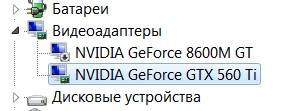
Has established the driver 285.62 iGPU with modding nvam.inf
I get an error 43 against my eGPU in Win7
Has established the driver 270.61 iGPU with modding nvam.inf, but error 43 remained
If in the dispatcher of devices to disconnect iGPU and to reboot, then error 43 vanishes, eGPU it is defined normally, but works as standard VGA
What I do not so? -
Common mistake. No, each rails are for different components. Most of connectors including floppy molex, 4-pin molex, SATA & 6-pin PCIe power connectors are connected to +12V1. So, your eGPU only draw power from +12V1. +12V2 & probably +12V3 are for CPU.
Please try solution in Error43_FAQ1 at eGPU Troubleshooting page. -
I joined these forums because of this thread. As a researcher by trade, I must say that both the quantity and quality of results in this thread is astounding. I recently got my eGPU setup working (pics to follow)
My Specs:
Laptop : Dell Latitude E6500
CPU : Intel Core 2 Duo E8435 @ 3.06 GHz (upgraded from default)
RAM : 3GB DDR2 800 (Max Due to Dell TOLUD Issue)
GPU : nVidia Quadro NVS 160m (internal)
eGpu : PE4L via Expresscard 1.0 ($70)
GPU : GALAXY GTX 460 768mb ($80, ebay)
PSU : Xigmatek 400 watt ($30, Newegg)
Fan : Cooler Master 120mm ($8, Amazon)
Filter : Silverstone 120mm ($3, amazon)
Enclosure: $5.00 Sterelite Storage Bin from Walmart
Paint : Krylon Fusion Glossy Black
I like the enclosure because I move my laptop often. The enclosure is fairly
tall, but I will soon be putting a shelf inside so that I can use the space
for my laptop power supply, display cables, mouse, headset, and controller.
The performance has been great, I was not expecting this level of performance increase. At first, I tried an old x1950 pro and was not impressed as it seemed to be severely bandwidth limited. The GTX 460 has been great, allowing me to play TF2, Portal 2, L4D2 etc. on max settings. Even the pci bandwidth intensive PCSX2 works well.
I do have one gripe however. I have noticed while using the dolphin emulator
that my gpu is being bandwidth constrained (FPS limited with only 80% CPU usage). Is there a way to hack the optimus drivers to work with my NVS 160M? This would help greatly in this situation, as the bandwidth being even 20% better would eliminate the slowdowns. Also, how do I overclock the pci express bus / CPU in my laptop (have fairly good cooling).
I should also note that I bought an overclocked GTX 560 ti prior to the 460 at more than three times the price and found these scores:
RE5 Variable (1280x800)
PNY GTX 560ti Overclocked: 75 fps
GALAXY GTX 460 : 70 fps
My 3D Mark 06 score is around 5500, which I understand is due to the bandwidth limitation; however, I am very happy with the results.
Without further ado, here are pics of my completed setup
![[IMG]](images/storyImages/dscf5722r.jpg)
![[IMG]](images/storyImages/dscf5721x.jpg)
![[IMG]](images/storyImages/dscf5720k.jpg)
![[IMG]](images/storyImages/dscf5719.jpg)
-
hi all ......i am a noob and a bit slow on english so i cant understand a lot of things.i want to do the eGPU scene but i am very confused can any of you be so kind to direct me or tell the best configuration on a DELL Studio 1555 (T6400 - 2.00Ghz and a dGPU-Mobility 4570 256Mb).
-
Hi,
I have Dell Studio 1557. Dell Studio 1555/1557/1558 share the same schematic. Please go to my eGPU Experience post. Please check in RAM/HDD/WLAN compartment, how many mPCIe ports available. -
thanks alot man.. and pm3n is the only option for x2 width.? and ill get x1 from express card... is dell 1555 capable of 2E.?
-
Yes, I have confirmed that my wifi card is in port 4 and my free minipcie is port 3 so a x2 setup will be possible. I just wish I didn't have to pull the internal wifi to do it. :cry:
-
Thank you for recognising the ground breaking information in this thread. It is believed that Thunderbolt and the locking down of multi-lane DIY eGPU implementations in SB systems is Intel's way of recognizing our work and giving an interface with the necessary bandwidth for future eGPU solutions.
Congrats on a great installation there. A couple of things which I can only provide an overview (my internet is ultra slow so can't really browse freely to quantify these).
- the TOLUD issue can be resolved by installing a registry DSDT override allow 36-bit PCI allocation. This has been done successfully on a Dell E4300 by Avlan and myself and on a Dell XT2. See my Dell E4300 DIY eGPU implementation for a download link
- hacking the drivers to allow Optimus' pci-e compression on non-iGPU systems would be fantastic. Unfortunately it seems that part of the driver is heavily protected/encrypted as searching for those PCI-IDs doesn't show up. All is not lost however. Your E6500 is however x2 capable. Please check the schematic and/or test your mPCIe ports to confirm the port layout for a x2 installation.
- Unfortunately the E6500 Silego PLL doesn't allow pci-e overclocking. You could however do a combo of 266->333Mhz PLL pinmod, overvolt mod plus decrease RAM timings and run your E8435 at 3.83Ghz. See my Dell E4300 DIY eGPU implementation with links on how to do the PLL pinmod.
I agree - it's crazy to pay the premium a GTX560Ti (384 cores) commands over a GTX460 (336 cores). Seems the market has figured this out with GTX460 s/h prices increasing while GTX560Ti ones are flat/decreasing. Keplar GTX6xx GPUs are scheduled for release in April. A GTX660 is rumored to give GTX580 performance levels at the $300 pricepoint. Expect bargain Fermi cards in the coming weeks as old stock is cleared to make way for the new. -
Yes, two PM3N are needed for x2 setup. You can do x2 or x2E using WLAN (PCIe port2) & WWAN (PCIe port1). You can do x2E with ATiAMD graphic card.
-
thanks alot kizwan and one more thing my cpu is t6400 core 2due @ 2.00 which is low will it make any difference when i play battelfield 3 , skyrim or any high-end game?
-
you should be able to run bf3 or skyrim with 2.2ghz or higher.
Crysis 2 is a little more cpu intensive as I understand, but I have run it on my as6920g (2.2ghz) with around 30 fps with the internal nvidia card, so I don't think the cpu was hurting the performance much.
Bottom line, you most likely will need an upgrade to a 2.4 ghz. -
T6400-2.0 would overclock easily to 2.66Ghz with some minor hardware mods. See http://forum.notebookreview.com/har...pll-pinmod-overclocking-methods-examples.html . Or otherwise a Studio 1555 has a PM45 chipset so you could run a 1066Mhz FSB cpu like a P8600-2.4, P8700-2.66, T9400-2.53, T9600-2.66, T9800-2.93, E8335-2.93/E8435-3.06 or X9100-2.8 (oc up to 4.2Ghz via unlocked multipliers). The lower end P8xxx/T9xxx cpus appear for reasonable $$ on ebay and can be dual-IDA overclocked on a Dell Studio to gain another 133Mhz.
-
Please confirm PCIe port number for WLAN card. You can use AIDA64 > Motherboard > Chipset > South Bridge. Please check & confirm that WLAN card is detected at PCIe port #2.
Pyro515 already tried eGPU with Dell Studio 1555 using ExpressCard slot (PCIe port #4):-
![[IMG]](images/storyImages/44438d1265246587-diy-vidock-experiences-untitled.png)
Pyro515 also confirmed that PCIe port #3 is available. This is proved my putting WLAN card to the empty mPCIe port:-
![[IMG]](images/storyImages/45303d1266412751-diy-egpu-experiences-port3open.png)
So, I need you to confirm that PCIe port #3 does available on your notebook. Open RAM/HDD/WLAN compartment, located at the bottom of your notebook. Check how many mPCIe port available. Then moved your WLAN card to another mPCIe port & check in AIDA64 where WLAN is appeared now.
If you can confirm that PCIe port #1 & port #3 are available, then you can do x4 link setup using PE4H, 3 x PM3N, 1 x EC2C & 4 x mHDMI cables.Last edited by a moderator: Feb 6, 2015 -
Hi people ! I'm doing a quick recap on my enclosure for those who could be interested, especially concerning the wiring stuff, which is actually very simple.
So as a reminder, here's my 150W AC adapter powered enclosure with GTX 560 :
![[IMG]](images/storyImages/8791628679207_recap.jpg)
First you have to buy this kind of picopsu adapter, sold with a barrel output to P4 connector adapter :
192W 12V AC-DC Adapter with Mini DIN and Mini FIT JR, PicoPSU | eBay
![[IMG]](images/storyImages/1075178151432_adapter.jpg)
There are also 150W and 168W models but this one is cheap and gives 192W. Theorically you could drive a GTX 560 ti with this stuff. Not to mention more powerfull incoming Kepler gpus.
![[IMG]](images/storyImages/12786209001225_mod.jpg)
I widened the openings to improve airflow and now the gpu is completely silent on load, have to paint it again though.
![[IMG]](images/storyImages/5071691430135_wiring.jpg)
So above is the wiring, i bought a P4 to P8 connector to have lots of cables to play with (and to minimize the possible power loss ?)
As you can see nothing complicated, yellow 12V goes on yellow 12V and black ground goes to black ground. Red cable coming from PCI-E adapters are ground too. Those are usually black or brown but were red on these particular pci-e adapters. For those who don't want to solder anything, you can build 4 molex connectors out of the P8 cables with a simple clamp. I chose to build only 1 molex and directly solder the rest cause molex connectors are huge and i wanted to spare space.
That's all. I played for hours and days with this setup and i can affirm it is completely stable and silent. The GTX 560 power consumption at stock voltage and clocks is always < 100-110W when playing real games so there is a huge margin. Only some benchs might max out the power consumption at 140W. But they have been all successfully performed. Only furmark or msi kombustor xtreme burn-in modes should be avoided to be safe cause they insanely unlock power restrictions.
Also, not very important but still interesting. Power consumption is far lower with these efficient ac-dc adapters compared to an average atx power supply. For example, the gpu idles at 18W instead of 42W and is loaded at 100W instead of 130W+++. -
Has read Error43_FAQ1.
At once the point "a" from Error43_FAQ1 isn't carried out
"a" "Ensure your PE4L 1.5+ or PE4H 2.4+ has the PCI Reset Delay slider set to 0s rather than 7 or 15. If it's the latter then upon doing a resume-from-standby the card will be delayed leading to an 'unconfigured' state, hence the error 43"
At 0s the laptop at all doesn't start. wifi it is disconnected
Because of what such occurs?
Can influence it PSU? PSU 250W
My TOLUD is
[00000000FC000000 00000000FDFFFFFF]
[00000000C0000000 00000000C7FFFFFF]
[00000000C8000000 00000000CBFFFFFF]Attached Files:
-
-
it would be much nicer looking if
<-----this was fitted flush into box.
-
Yep i thought about that too. There would be only one block that way. The adapter is about the same size as a flex atx psu, but it's silent cause there's no fan. Would need a bigger enclosure though.
-
sorry I only meant the plug for the brick to go into. Its got wires hanging out.
Not the whole PSU, THats why I posted to the right of the pic
-
I wonder how much % bandwidth being wasted by transferring sound via HDMI cable?
And how do I disable sound transfer via HDMI port? would muting the sound on my laptop solve the issue?
Thank you. -
Hey kizwan,
I have finally solved the problem, and I would like you to include it on your troubleshooting page. Here's the summary of what I have been through:
Problem: eGPU is not detected and PE4H shows red light when connected to a laptop, even when the PCI reset Delay is set to 0s.
Symptoms: The eGPU's slot connector is damaged due to many ejects and inserts, and scratching.
Solution: The slot connector cannot be fixed, consider buying another eGPU. -
I was wondering, how noticeable is it x2 over x1, performance in games wise?
I have tried GTX 560 overclocked from Asus @ 925MHz on ViDock and my fps was quiet low. Obviously the resolution was a huge factor 1920x1080. I got around 10 fps. On x2 link, what kinds of fps am I likely to get? -
I'm not sure how much bandwidth is being used, but you can change the audio device by right-clicking on the speaker in the notification area, clicking 'Playback Devices', selecting the device that you want to change to, then clicking 'Set Default'. You can also get to the same window by opening 'Sound' from the Control Panel.
-
Disabled HDMI audio device in Device Manager.
1. Is this mHDMI port or PCIe slot?
2. How do you know that is the problem? I mean explain your troubleshooting method. -
It would be great if I could mod my power supply to give me everything I need. Let me fully explain my power situation. Again, I have the CoolMax V-500 (500W) PS.
This is what it says for the specs for the PS: (manual is at http://www.coolmaxusa.com/usermanual.asp, just set model to V-500)
Input Requirement: The power supply shall operate as below:
115V (100V min - 120V max), 60Hz
230V (200V min - 250V max), 50Hz
Power Distribution configuration:
DC O/P Load: Max 500W
+5V: 22A
+3.3V: 21A
+12V1: 17A
+12V2: 17A
+12V3: 12A
-12V: .5A
+5vsb 2.5A
+3.3V & +5V max: 150W
+12V1 & +12V2 & +12V3 max: 400W
The rails are as follows (no idea what the true number order is, but I'll just number them so they can be easily referred to):
1) two 4-pin molex (peripheral) and the floppy (FDD)
2) 1 sata and 1 4-pin molex (peripheral)
3) 1 sata (I have modded this to a 4-pin molex (peripheral)
4) 1 4-pin (not molex)
5) the ATX 20 + 4-pin
My EVGA GeForce GTX 570HD requires two 6-pin connectors, but the card came with splitters that take each of the 6-pin connectors and splits them into two 4-pin molex connectors, so really I need access to the correct power through four 4-pin molex.
My current config I just plug in all of the four available molex (the 2 from rail#1 going to one 6-pin, and the 2 from rail#2 and rail#3 going to the other 6-pin), but obviously it isn't working. Let me know if there is anything I can do to mod this power source to work, because I'd love to save money if I could.
Thanks for the help Khenglish, and you too kizwan. -
What is the PE4H 3.0? Is that better than PE4Lv2.1
-
I have tried the eGPU one more time on desktop computer, and it results in the same issue as the one on PE4H. I then have realized that the problem is from the video card, not from the PE4H itself. the eGPU's slot connector is damaged, so I have to buy a new graphics card.
And ask nando4, Me and Him are discussing this problem for a month. -
Oh, didn't know it was a triple rail and not dual rail. In that case, you can hook up the 12V2 rail to one 6 pin, and the 12V3 to the other 6 pin. This requires looking up your PSU to see which cable is connected to which rail. The combined 28A will be fine.
-
I have tried every power combination I think of, but still every time I run a game or benchmark test I get a BSOD. Also unless I have the eGPU plugged in from boot time, I get the code 12 error, so is power surely my problem? I feel like until the code 12 is gone, my problems haven't been solved. Any thoughts guys?
-
How do you *assign* each 6-pins PCIe power connectors to different rails?
-
Again, if you look at the longer post above, you'll see that each 6-pin branches to two 4-pin molex thanks to connectors my card came with. As listed in that post, there are different strands of connectors coming from the PSU. Hopefully strands and rails means the same thing. What I have tried to do is use 2 molex from one strand, and connect those to one 6-pin while taking two molex from another strand and connecting those to the remaining 6-pin. Should that work? Again I still get my code 12 error if I don't boot the system with the card on, and i still get a BSOD when I run a benchmark or game. Again still not sure if power is the problem or if the code 12 is caused by something else. I get my mPCIe to HDMI mini adapter tomorrow that I was going to use for a 2x link, but I'll try using that as the 1x and see it clears the error. If you guys have any other thoughts, I'll try anything. Just trying to avoid buying a new PSU if possible. Again the post above is very descriptive of my PSU situation. I can replace any SATA plugins with molex if need be, so keep that in mind. Thanks!
-
Is this the strands you're referring to?
So, you're saying your PSU have 5 rails? That is not true. Your PSU have three 12V rails, not five. Different strands doesn't mean it is from different rails. -
yes their is an empty slot but il go for the x2E configuration but not at the moment because i am know thinking about getting a new gaming rig altogether....thanks for your help
Last edited by a moderator: Feb 6, 2015
-
awsum i dint know that....but hardware mod ? sounds outta my league, but still i am curious !! i dint find anything related to my processor ...are you referring to the jumper trick..? and sadly in X9100 isnt available anywhere in my country and if i buy it on ebay due to the tax here, its gonna hit my pocket hard! wish i could use a modded bios :'(
-
I already saving my money for Ivy Bridge gaming laptop. But I also targeting notebook with Thunderbolt. Of course using it with eGPU.
-
No I understand that now, I was just giving my full power configuration to ask if there existed a setup that would work from my graphics card. So as long as I use each 6-pin on one of +12V1, +12V2, and +12V3, I should be able to power my card, or so I've inferred. That is all. Still have code 12 though, trying to get rid of it
-
You already fixed Error Code 12 by booting with eGPU connected.
I also get Error Code 12 if didn't boot with eGPU connected. In my case & also several other notebook, e.g. Lenovo x220, BIOS automatically reduced TOLUD (and reallocate other device memory resources) to allocate 256MB PCI space for eGPU. This is not true for all notebooks though. You mention earlier that TOLUD (TOLM for i7 quad core) doesn't change (0xC8000000) whether boot with or without eGPU. I think, your BIOS reallocate other device memory resources to create 256MB PCI space for eGPU. You can confirm this by comparing device resources between boot with & without eGPU connected. You can use AIDA64 to generate the report. -
Thank you for the response. When I get home I'll get AIDA64 and confirm it. Even if I do confirm it though, how can I go about solving my crashing problem? I think I may try a friends power supply with my system and see if anything changes. If my eGPU is getting it's 256mb, than (other than power), what could my problem be? Could it be the fuse bypass jumper, which I still haven't done yet?
I am going to solder my fuse bypass jumpers today and I have the 2.4 PE4H kit, which has 3 fuses rather than the 2 that are in the 2.0 kit which the tutorial is over. Do I solder bypasses over all 3 fuses? Or just the two above the FDD? Thanks for all the help, I'd be nowhere without you (and some others as well). -
That is for your information only. So that you know why you didn't get Error Code 12 when booting with eGPU connected.
I already said PSU is insufficient which explain why it crashing whenever you tried to run games or benchmarks. Unless you mod your PSU to bridge, let say +12V1 & +12V2, graphic card only draw power from +12V1 which is insufficient for any 3D job. If I'm not mistaken, I already advice you to set the fuse bypass jumper on PE4H. So, I taught you already did that. If you look at Common FAQ5 in eGPU Troubleshooting page, you'll see this:-
-
I know that question has been asked before without any answers given... But WHY hasn't anyone made an mxm card to full length pcie x16 adapter?
my mxm type II slot is the fastest on my motherboard, and it makes perfect sense that a person might want to hook up an egpu to that slot!
I wish I was more knowledgeable about this stuff, because I would design one and have it made myself.
ANYONE?!?!?!?! -
So on the 2.4 system, I just have to jump the one fuse that is directly behind the floppy, not the two that are to the left of it, because there two to the left look very similar to the ones modded in Panzer's guide.
-
Now successful install the driver, no error code, but screen is lagging and when i try run the 3Dmark, laptop screen went black. Please advise.
-
MXM specification is controlled by Nvidia & it is not publicly available. Any company that want to get the specification must be a member of MXM-SIG group.
I can only speculate why no one made a MXM kit yet:-
- Don't want to pay fee to become a member of MXM-SIG group. I'm going to assume it's not cheap.
- Without MXM specification, the only way is to use reverse engineering method. This is likely violate MXM license since not a member of MXM-SIG group. Can get sued.
- MXM is for mobile graphic card. Using it with desktop graphic card is likely violate MXM license. Can get sued.
Not to forget, we also need SBIOS <sup>1</sup> support to get eGPU to work with MXM interface.
<sup>1</sup> SBIOS: system BIOS
You don't see a jumper near the floppy power port? You don't need to do Panzer's fuse bypass mod if you have PE4H v2.4 because a jumper already available.Last edited by a moderator: Jan 29, 2015 -
Are you using Verde (mobile) driver? What games did you tried? Did you confirm it is running with eGPU, not iGPU? Did you connect eGPU before windows loading?
What is the PSU specification, especially +12V max current? GTS450 power requirement is 106W. So, +12V max current should be around 9A to 10A at least.
DIY eGPU experiences
Discussion in 'e-GPU (External Graphics) Discussion' started by master blaster, Sep 18, 2009.


![[IMG]](http://forum.notebookreview.com/attachments/gaming-software-graphics-cards/44438d1265246587-diy-vidock-experiences-untitled.png)
![[IMG]](http://forum.notebookreview.com/attachments/gaming-software-graphics-cards/45303d1266412751-diy-egpu-experiences-port3open.png)

![[IMG]](http://s4.noelshack.com/upload/8791628679207_recap.jpg)
![[IMG]](http://s4.noelshack.com/upload/1075178151432_adapter.jpg)
![[IMG]](http://s4.noelshack.com/upload/12786209001225_mod.jpg)
![[IMG]](http://s4.noelshack.com/upload/5071691430135_wiring.jpg)