Problems? See this thread at archive.org.
I understand, thank you!
Do you mean I would probably get the performance of x1E, just out of the box?
-
No. Again, x1E tweak only applicable on older Intel chipset. For non-Intel chipset, you can use x1 link.
-
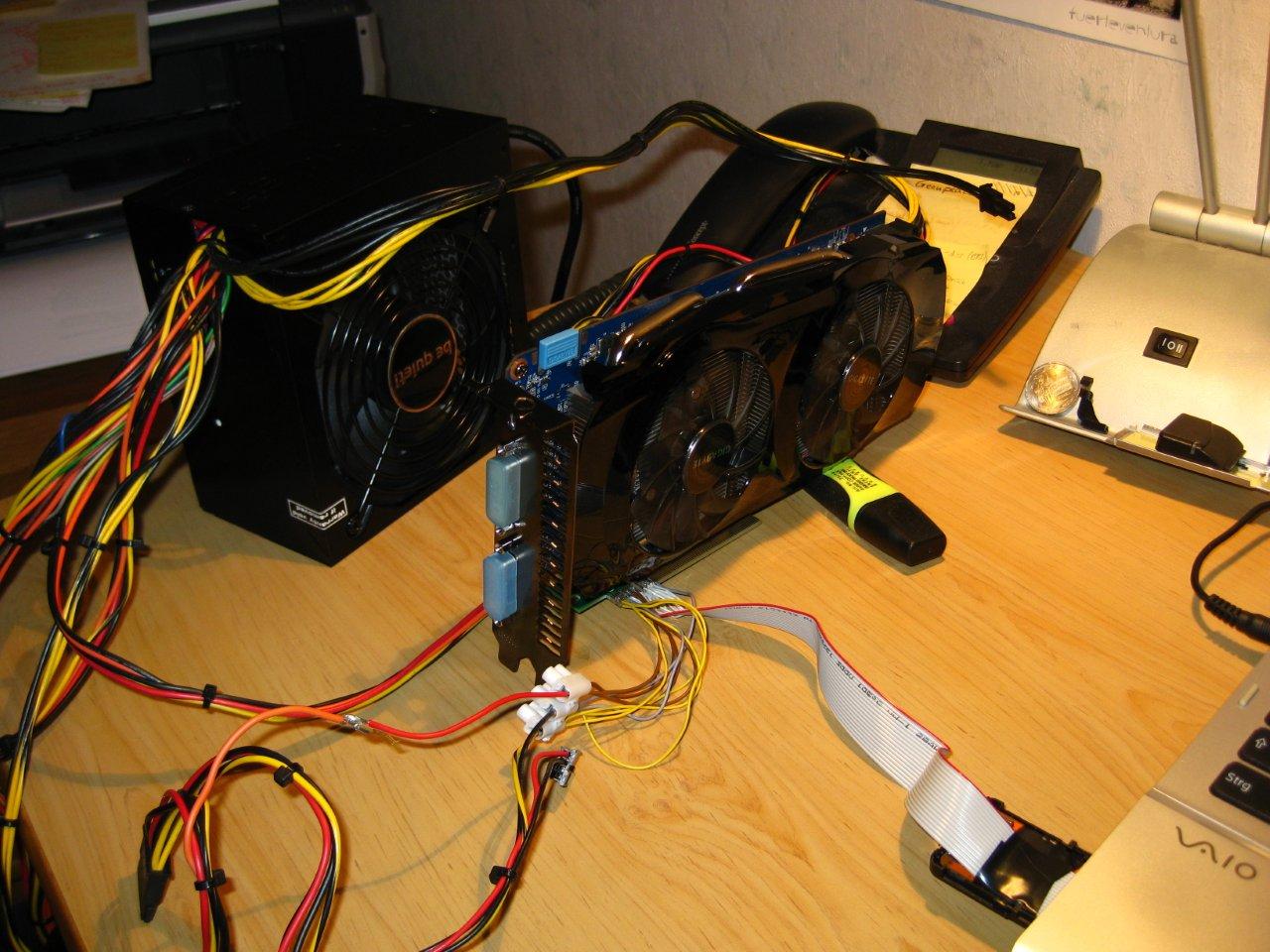
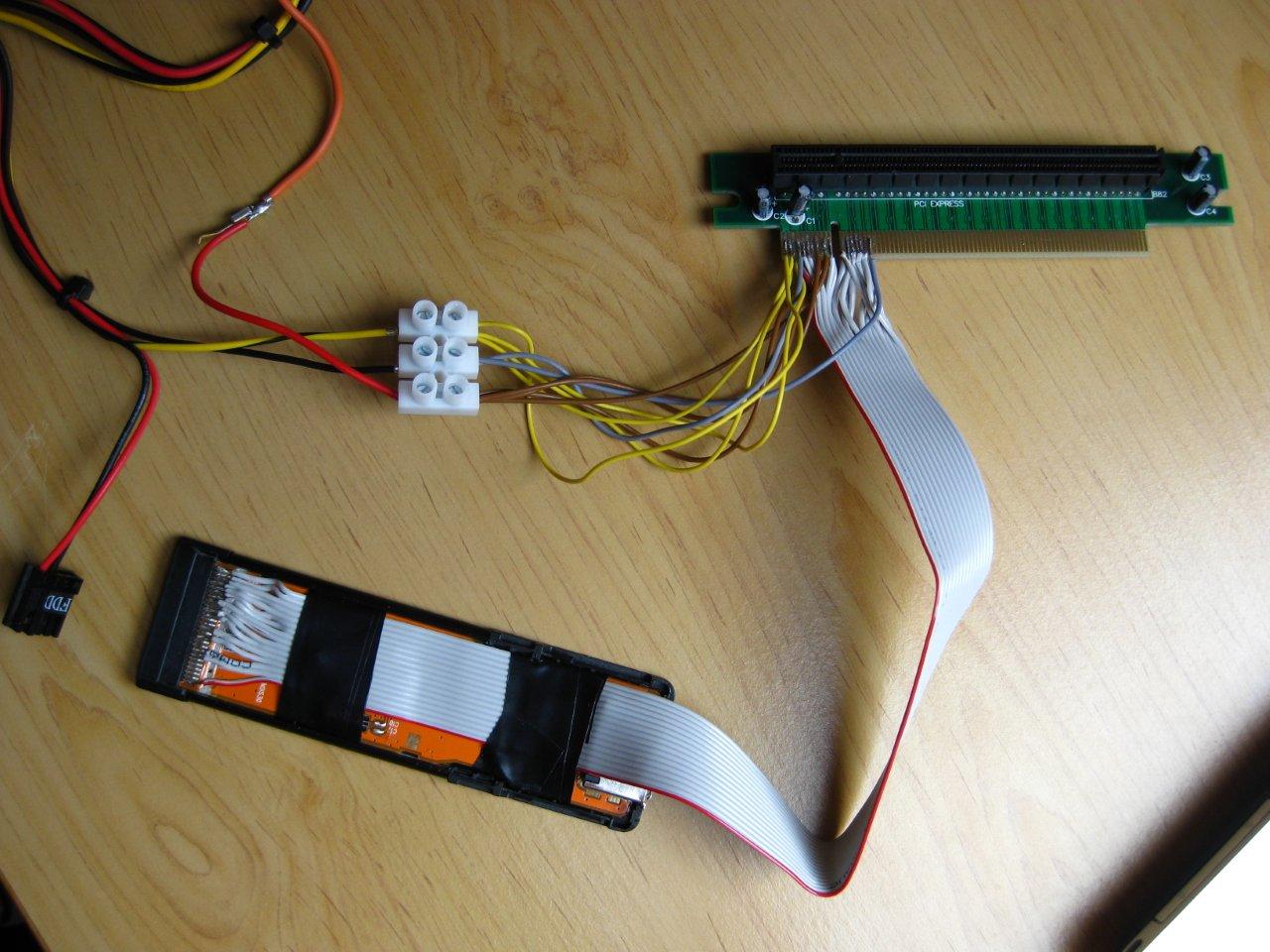
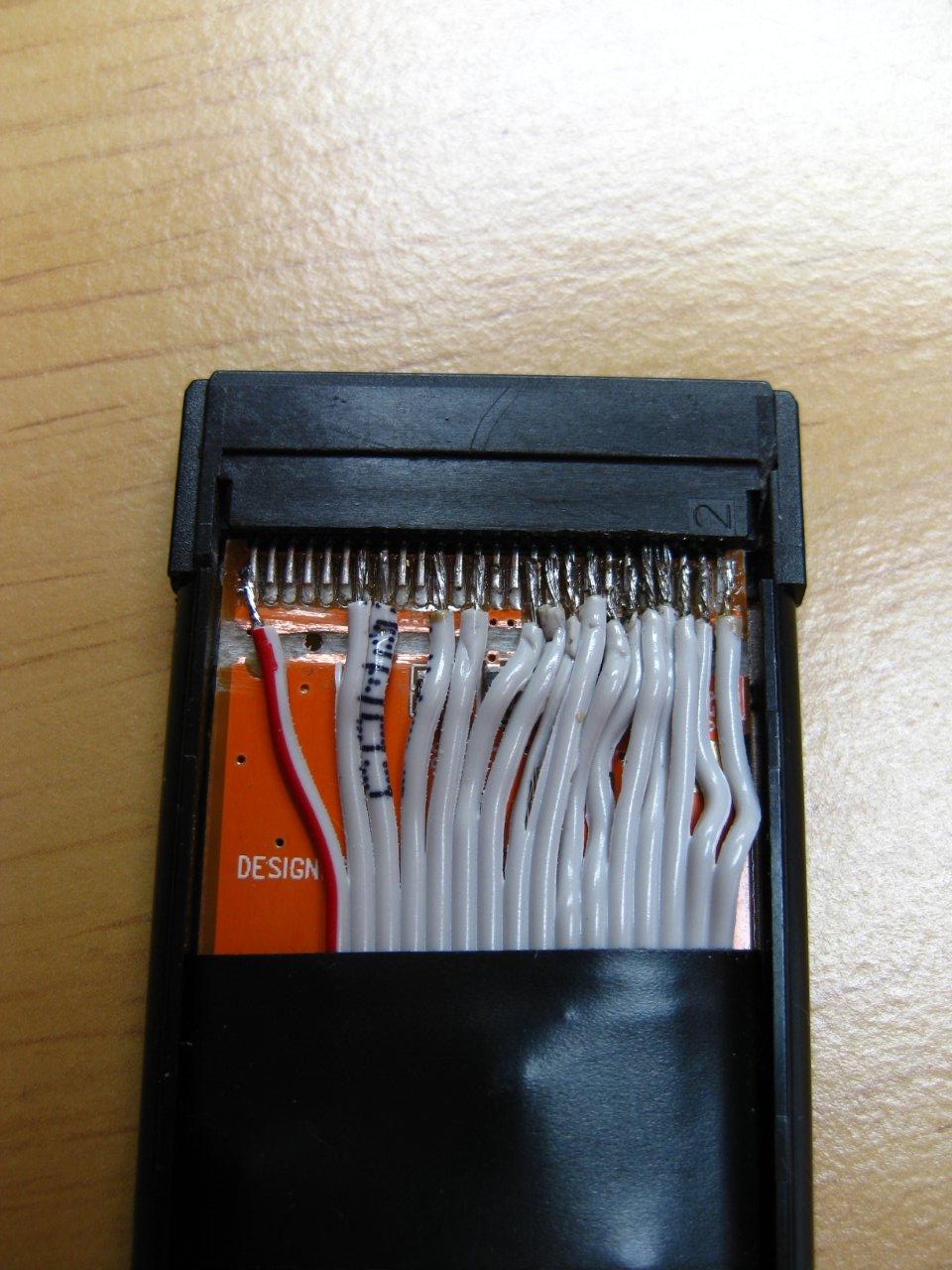
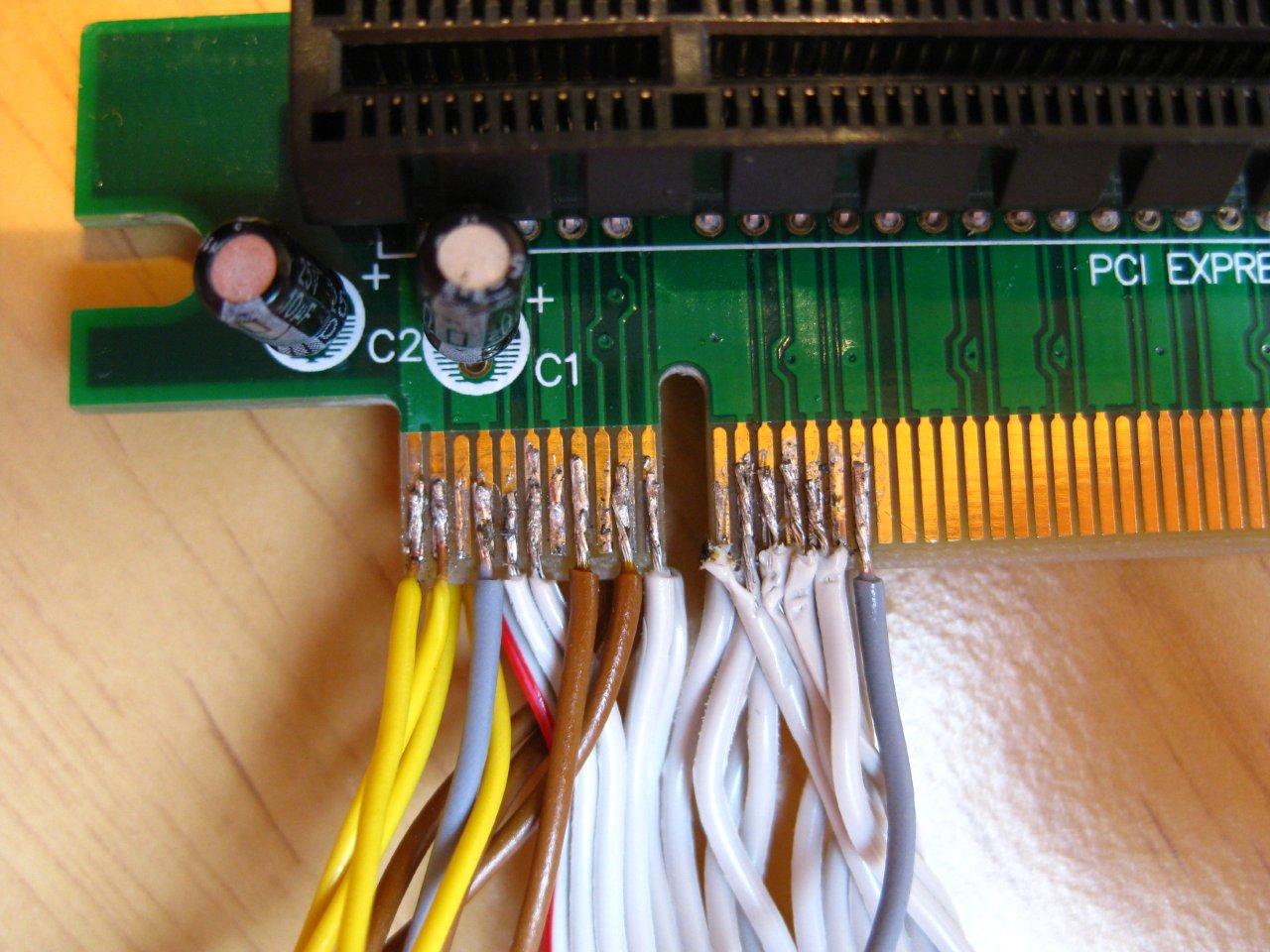
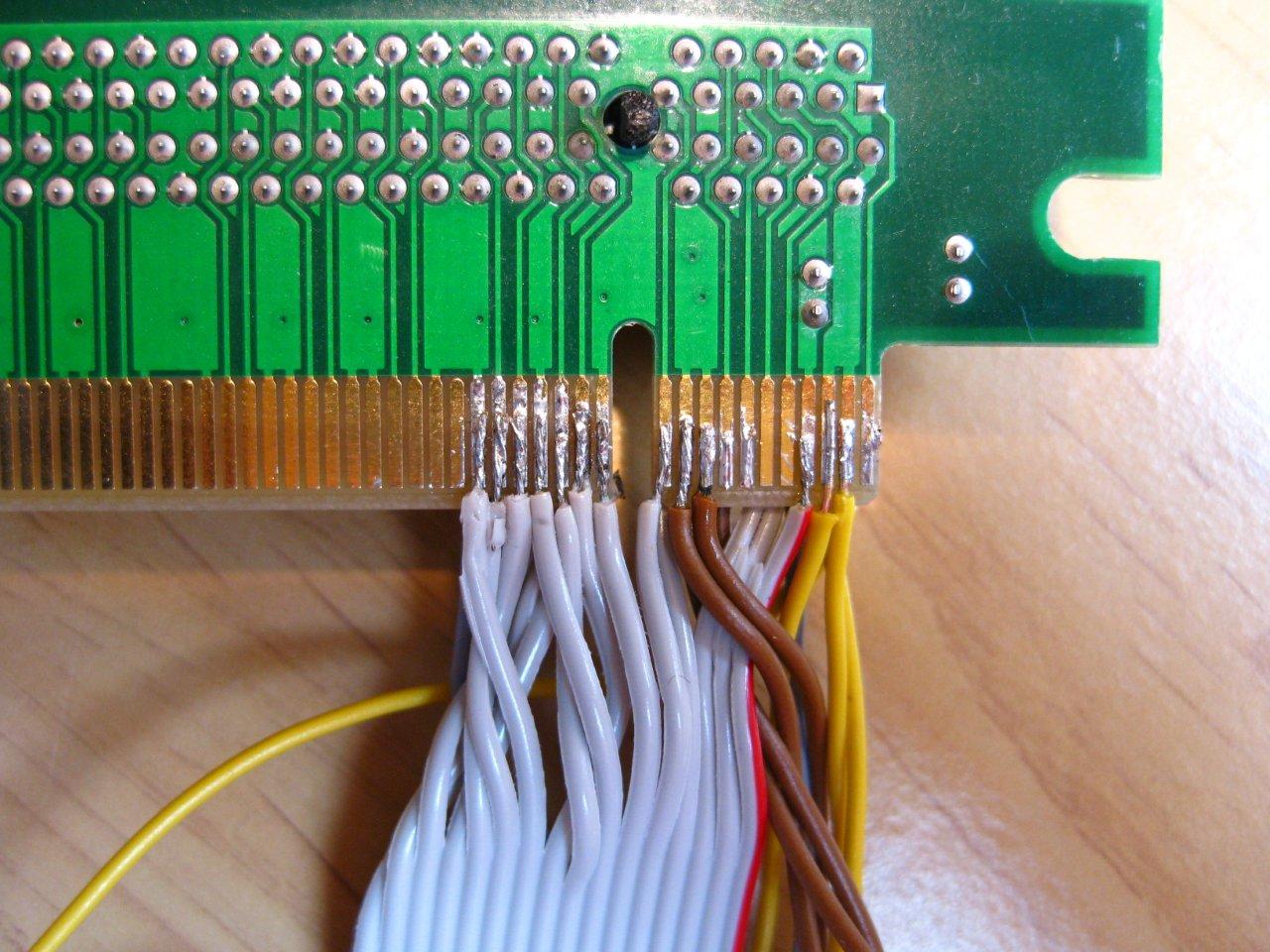
I've just done some self-made PE4L-like adapter

Some impressions in attachements..
Needed things:
- 1x ExpressCard with full plugged contacts, ~5eur. I Used this eSATA-Card (Germany):
- PCIe riser card for soldering: e.g.
PCIx16 Slot or PCIx1 Cable-Slot
- 1x IDE Kabel 36-wire
also ATX-power supply and Gigabyte GTX460OC..
Whats the matter with the electrical components on the PE4L? Only for LED-indication & some levelling of power?
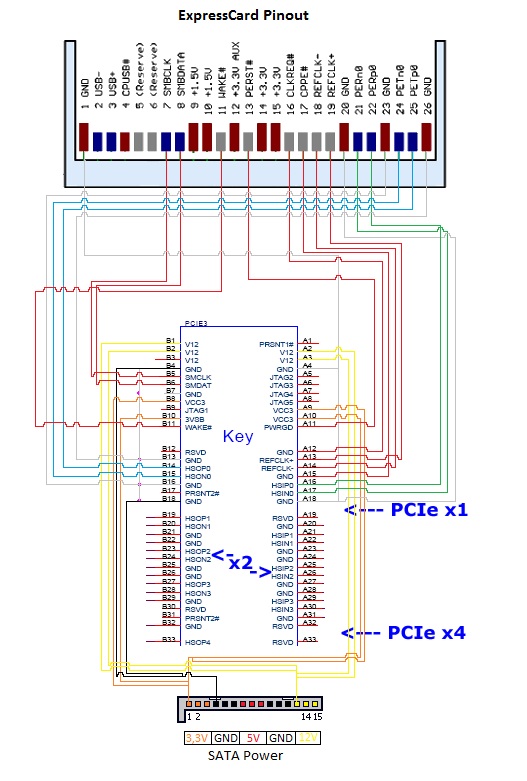
If its interesting, I can put the connector pin assignment into a pdf-file.
One problem, when driving an external display, the 3dmark 06 benchmarks only reaches ~ 9100pts. Shouldn't that be ~10000/11000pts???? All with Core2Duo P8400 and 3gb of ram!
3dmark 06 (internal lcd) --> 8126pts
3dmark 06 (external lcd) --> 9146pts like above
3mark vantage (internal lcd) --> 7153pts
3dmark 11 (internal lcd) --> 2475ptsAttached Files:
-
-
Self-made PE4L wow, that's fun.
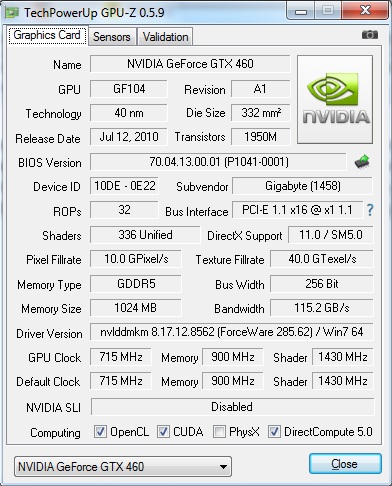
Is it running at 2.0 speed ? what does GPU-Z say ?
Your scores seem a bit low but it's with a core 2 duo so maybe it's cpu limited. -
You have amazing soldering skills. That must have taken many hours and lots of swearing.
-
Kudos Sonny, that's awesome. It's highly possible that it's capable of 2.0 speeds. Can you check GPU-Z for us? (Looking at internal scores, however, I doubt it.)
-
My Notebook just got GM45 Chipset, which is not capable of PCIe x1 2.0 over Expresscard, see Screenshot! Got no Laptop with newer Chipset!
Soldering took 5h and a little nerve-racking, but it works
No one about the low external benchs??
In attachment the connector pin assignment, maybe someone can draw it more professional?!Attached Files:
-
-
Thanks kizwan! As soon as i have a free weekend I'm going to set it up and post back the results!
Great job Sonny!
About the low 3dmark06, I suggest that you try other benchmark/games on external screen, because 3dmark06 is severely limited by the cpu. -
Hello everyone,
After using an HP Probook 4530s with a 5770 for a a long time, I've decided to upgrade my setup. The new card and PSU will be transferred into a desktop which I'll build when Ivy Bridge CPU's will comes out.
I'm looking at these two cards:
Newegg.com - EVGA 01G-P3-1561-AR GeForce GTX 560 Ti FPB (Fermi) 1GB 256-bit GDDR5 PCI Express 2.0 x16 HDCP Ready SLI Support Video Card
OR
Newegg.com - EVGA 02G-P3-1568-KR GeForce GTX 560 Ti (Fermi) 2GB 256-bit GDDR5 PCI Express 2.0 x16 HDCP Ready SLI Support Video Card
Is the 2GB version worth the extra cost? I'm playing @ 1920x1200.
Additionally, I'd appreciate your help in finding a suitable PSU.
As I mentioned, the PSU will power a desktop in a few months so I need something that will be able to handle that load.
Having the option to SLI in the future is nice, but not a must.
Thanks a bunch!
I promise to post new benchmarks when I buy everything
Edit:
How's this? Overkill? Not worth the $$? Great?
http://www.newegg.com/Product/Product.aspx?Item=N82E16817341044 -
Depend on your desktop specification but that PSU should do OK for SLI/non-SLI build. For sure not overkill for a desktop. BTW, if you want to build Ivy bridge computer, why don't you wait for ATiAMD 7xxx or Nvidia 6xx graphic card.
-
Mass Effect 3
Also, Skyrim.
Edit:
Thank you for the reply btw.
Is there another PSU you would recommend? -
Hi, I have the eGPU hardware from HIT and just recently reformatted my computer, losing the egpu setup software. Seeing that I have bought the hardware from HIT, do I still have to pay to obtain the software again?
-
If I'm not mistaken OCZ PSUs are using OEM from Fortron. Fortron is reputable brand. If you plan to gradually upgrade your Ivy Bridge desktop, maybe using liquid cooling, extreme edition processor & SLI graphic card (or quad GPU), you might want to calculate the estimate load power. This way you'll be able to know which PSU (e.g. 800W or 900W or 1000W) you need. For the brand, I recommend reputable brand, e.g. Corsair, Fortron, FSP, Seasonic & SilenX (to name a few).
-
Hi Guys,
I recently got my PE4L 2.1 and tried to use it with my X220, a GTX 560 TI 448 and a Corsair CX 600.
I plug it in, start the EGPU and then start the X220. I experience massive stuttering loading Windows and even in Windows itself (slow loadup, mouse lag etc.).
The X220 has the newest BIOS, so there should be no TOLUD issue.
Setting Expresscard Speed to Generation 1 produces even more lag.
I'm pretty sure, I have missed something! (Do I have to install the NVidia drivers before booting?)
Thanks for all your advice! -
Just email them telling them your problem. They should send you the link to download the software.
Did windows detect your 560TI 448?
i had a similar problem as well when i tried the PE4L 2.1a. x220 + 560 TI. However, my stuttering doesnt occur until a few mins after loading into windows and i couldnt get any detection. The stuttering is on and off as well. Somehow the 2.1 doesnt seem to be very stable across the various hardware yet. -
Hi All,
IIRC someone complain poor performance with the latest Nvidia Verde 295.73 driver. Does anyone else faced the same problem? -
Hey XAV,
the 560 TI 448 was not detected. Booting up/using Windows with plugged in Expresscard is no real problem, but after switching on the egpu I get severe stuttering.
-
and if i have at this moment gigabyte gtx460 OC 1GB and i'd like to swap it to asus gtx560ti dcII top, will it be pointless ? (regarding to ViDock4+)
-
According to review, ASUS ENGTX560 Ti DCII TOP provide 20-40% performance improvement in many games over GTX460. However, this card is expensive, $250, roughly twice the price of GTX460 but only 20-40% performance improvement over GTX460.
-
i'm aware of that but in poland, i bought gtx460 and now i am able to buy gtx560ti from asus, for ~ +40% gtx460 price. i was wonderind if gtx560ti dcII top will be working on vidock4+ where max power is 225W.
-
Furthermore, in the upcoming week nVidia should announce Kepler with its release date. I'm actually blocked between the choices to get another 560/560Ti (with a vaucher received for the RMA of the old one) or wait till Kepler release.
-
I checked DPC latency
While eGPU is plugged in: Pic-Upload.de - before.jpg
At every red block, the X220 stutters (mouse unresponsiveness included)
After switching off power: Pic-Upload.de - after.jpg
It's ok again!
So there seems to be a major conflict with something.
Occasionally the gpu fans blow like hell after booting up, but Windows refuses to recognize the GPU. -
Could worth the wait. But maybe first released kepler gpu will be high end stuff only. So maybe there won't be anything interesting for egpus before 1 or two months...
Amd has already released its whole 28nm gpus lineup while nvidia is lagging behind. Kind of annoys me. Especially if kepler is crap, all the wait for nothing. Would definitely buy amd if there was no optimus story for internal screen. -
Your original questions asked whether it is "pointless" or not. So, I answered the question.
ASUS ENGTX560 Ti DCII TOP is OC-ed GTX560Ti card. According to this website, TDP for GTX560Ti OC-ed is 260W. Remember, TDP is not max power consumed by graphic processor/chip but actually the max power a graphic card (device) can dissipate under regular use. So, ASUS ENGTX560 Ti DCII TOP actual power consumption is usually lower than TDP (260W) as shown here (normal clock, 219W). Only under some condition, e.g. running Furmark with overclocked ASUS ENGTX560 Ti DCII TOP, ASUS ENGTX560 Ti DCII TOP can consume more power than TDP (260W) as shown here (281W).
Conclusion:-
The 219W power consumption under load is calculated with simple formula ([under load] - [idle]). It should multiply with PSU efficiency to get actual power consumption. Since no PSU is 100% efficient, the actual power consumption may less than 219W (but not too much). So, it safe to say ViDock4+ 225W power supply should be able to drive ASUS ENGTX560 Ti DCII TOP card at stock clock. Again, no PSU is 100% efficient. <strike>So, hope ViDock4+ 225W power supply efficiency is not too weak</strike> (219W vs. 225W: have less than 5% of headroom). What I actually means is when the card is under load, it will draw more power. If the power supply use less quality component & get hot, that component can become less efficient. If this is the case, the power supply might not be able to maintain the max power needed by graphic card when under load.
Clearly Nvidia driver is the issue here. If you use older version of Nvidia driver, use latest version. If you use latest version (e.g. 295.73), try previous version (e.g. 285.62). If you use desktop driver, try Nvidia Verde driver. -
hey kizwan,
I wasn't able to use any driver because my laptop isn't able to recognize a graphics card. If I try to install desktop/verde-drivers it says it isn't able to find supported hardware. -
Even with modded nvam.inf, it still complaint unable to find supported hardware? The graphic card is detected in Device Manager, yes? What is the graphic card PCID (device ID)?
-
No, the graphics card isn't detected - that's my main problem. Having it plugged in and powered on produces constant stuttering in Windows (see the red blocks in the image i've posted)
I'm looking for a hint to get Windows to detect the card (and thought about dealing with those high DPC latencies to discover the real problem) -
I, and a few others, have had this detection problem as well, and nando suspects it might be that the expresscard end of the cable unhinged itself. So far, all of us were running the eGPU perpendicular to the laptop, and in doing so twisting the cable and exerting a force at the expresscard end. Do you also have this same placement of eGPU resulting in twisting of cable? BPlus is working on reinforcing it atm
-
Then it is likely hardware (PE4L v2.1) problem. Likely compatibility problem or manufacturing defect.
-
it is not my case because im not going to spend a lot of money (fresh-made tax) for kepler. will vidock4+ (225W) be capable to run any reasonable (abilities/price) kepler?
-
thanks a lot for this answer
-
Hey Sivikchen,
yes I have the same placement over here. Do you have stuttering issues too? Is there a workaround or do we have to wait for nando?
Setting SW2 to 2.5, I've played with SW1 but got no real result. -
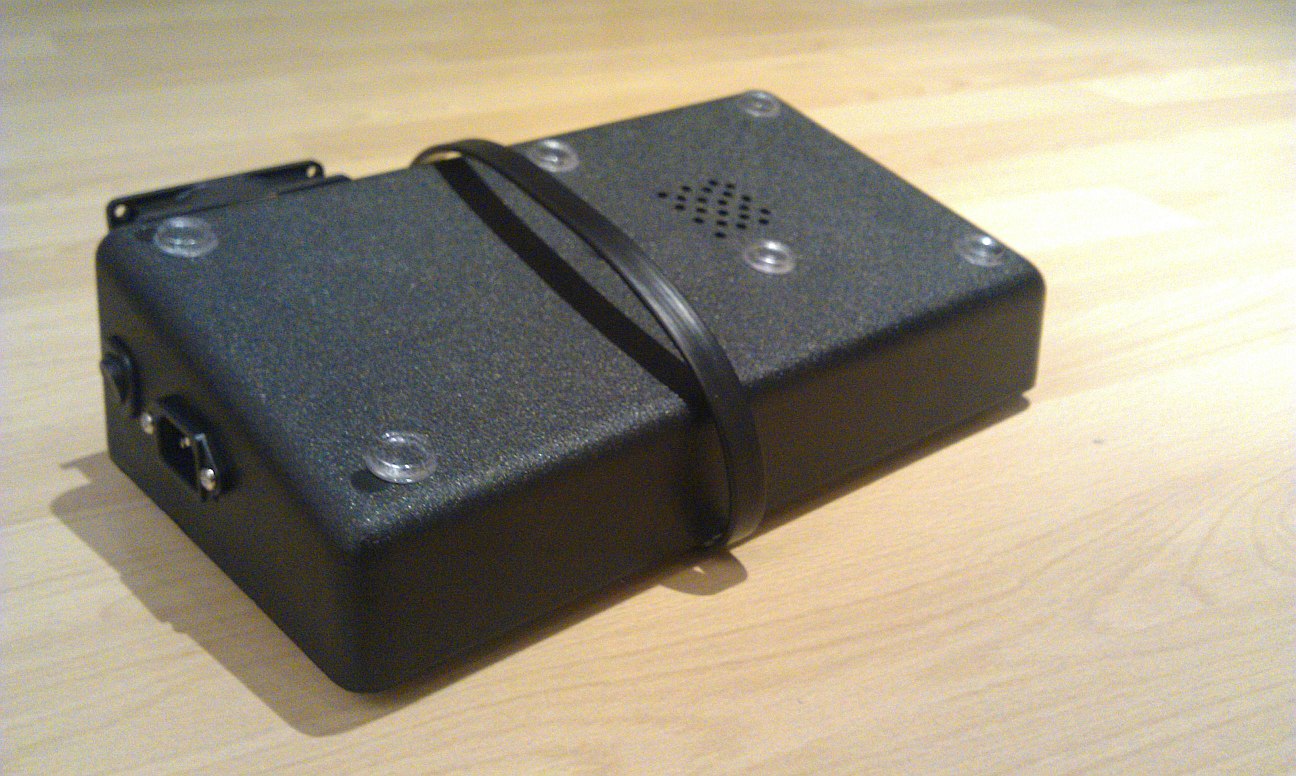
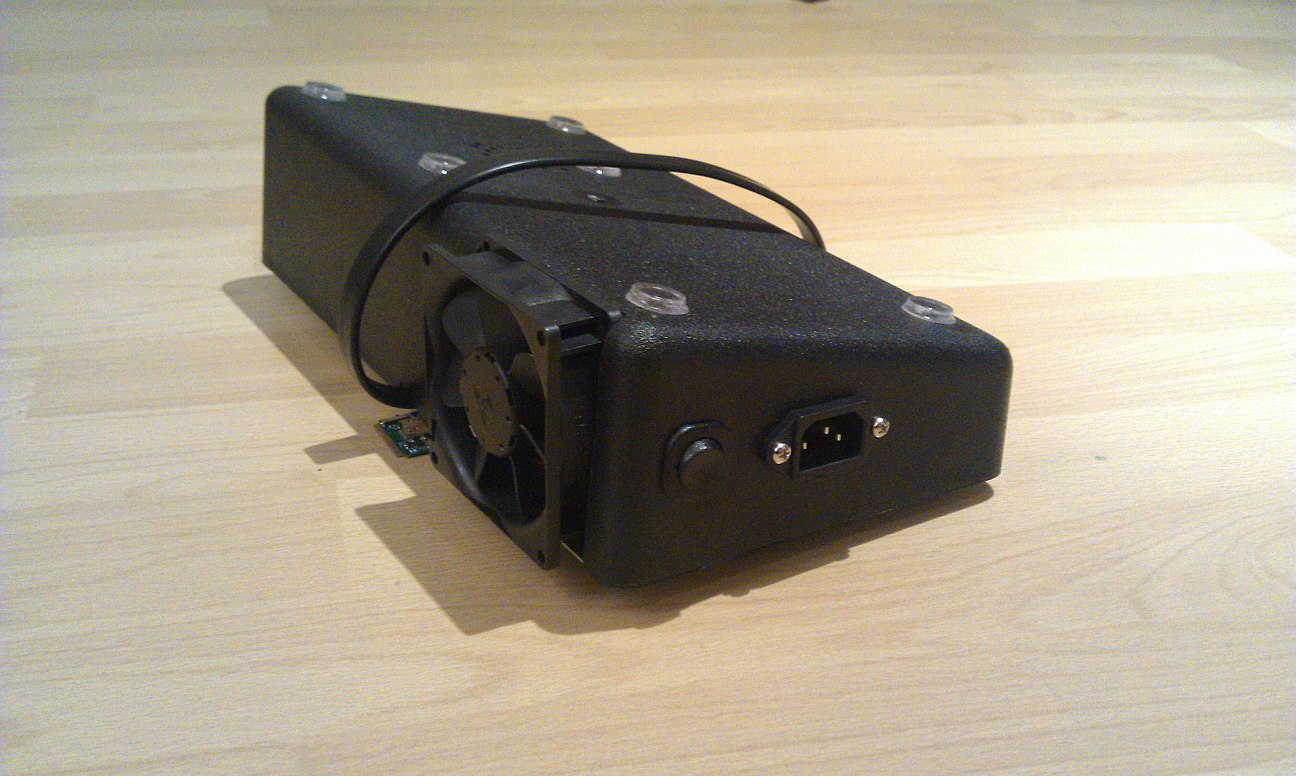
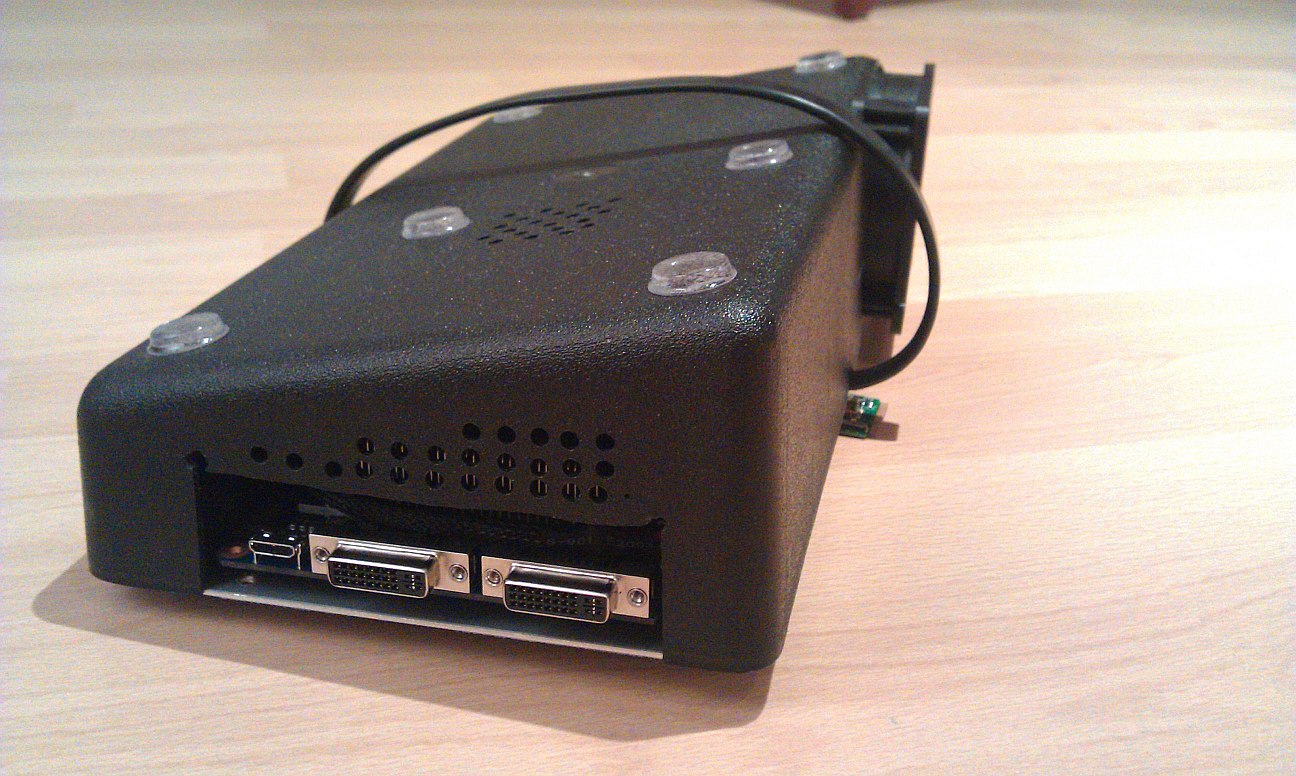
It was my first diy build and was a full day to finish it. I wanted something portable and small which could work as a notebook stand to not further take space.
In the end I was to lazy to integrate my docking station to have important ports like usb and network...Attached Files:
-
-
After doing two eGPU configurations, I'm in the same boat as you.
Can you give us an update?
+
Thanks! -
Very nice enclosure.
What is the gpu inside ? How about the psu ? i'm curious cause it's damn small. -
REALLY like this idea of having a DIY eGPU enclosure that doubles up as a notebook stand. Can you elaborate in your post how you did this? Eg: started off with some stand, cut fan + mount holes, added the PE4L, etc.
If you bought your gear from HIT on or after November 1st 2011, then it gives you entitlement to the software for freely as part of your purchase of the hardware. Please contact HIT to organize if you satisfy that criteria.
If not, then please donate to acquire Setup 1.1x.
Given how easy is is to make a <A HERF="http://forum.notebookreview.com/8356280-post8754.html">DIY-expresscard-to-pci-e adapter[/URL], you can appreciate the software side has been more complex and time consuming to sort out. The resultant Setup 1.0x software was provided freely until the honor system to recoup costs became unworkable (piracy-by-user-as-proxy by commercial vendors + cost blowout). Consider that Villagetronic had far more $$resources to play with yet had not resolved the error 12 issue until they perused our solution and plundered the first bootdisk implementation of it (and/or referred their customers to Setup 1.0x).
Setup 1.x has now had over 2 years now of fixes and development gone into it, with many refinements to bring it up to near commercial grade in quality. Donations means more development can happen and costs recouped. It's still in negative cost territory. Please donate if you have the means to do so to support the effort. It's a reasonable $15 donation (with coupon) for NBR users.Last edited by a moderator: May 6, 2015 -
nando4 your hard work is very much appreciated.
I had no idea that "in the old days" there was an honor system where users where asked to donate for the use of the software. -
I have no stuttering issues to speak of with the PE4L plugged in, but I haven't had it plugged in very long (the fan on the 9800gt is blowing at max speed). Bplus has informed me that they may have a solution this week or the next. They're currently looking at using a gigabit expresscard enclosure to prevent the twisting force directly on the cable-EC2C connection.
-
If you look closely, the 2GB card have reference (standard) clocks, while the 1GB card is OC-ed. So, better get the 1GB card. Unless you're running software like 3ds Max Design, most likely you will not needed the 2GB of VRAM. 1GB is more than enough. There is no significant performance increase with higher VRAM.
-
Setup 1.10b4 released
Speaking of which, I've just pushed out Setup 1.10b4 to HIT and the HTML online help to Palda.
HIT maintain an update list so 'donated' users will get this as a free upgrade. HIGHLY recommend doing so as compact has a critical bug fixed. Previous versions resulting in failed wifi/sata and perhaps chainload too.
The htmlhelp has been extended and will encompass a lot of the FAQ/Troubleshooting text currently on the Setup 1.x page now being merged. Means the online help and Setup 1.x help are all synced and viewable with either browser into the single location. Yay!
See the history.txt on the Setup 1.x page for fixes and new feature details. -
Hi! We finally got our eGPU work almost perfectly with my friend. Everything is in place now and benchmarks has been taken with 3DMarks.
So first of all, here are my laptop's specs:
Acer Aspire 5755G
OS: WIN7 64 Home Premium
Chipset: Intel HM65
CPU: Intel i7 2630QM @ 2,0ghz
RAM: 8GB DDR3
iGPU: Intel Graphics HD3000 and dGPU: NVidia GeForce GT540m
and hardware for the eGPU Setup:
PE4H + PM3N + 60cm miniHDMI cable, and 30cm mini HDMI cable. (after taxes, price for these were 124euros including shipments to Finland)
GPU: ZOTACs NVidia GeForce GTX560 Stock OC model. (180euros in Finland)
PSU: Corsair CX500, 500W 12V/34A. (58euros in Finland)
NVidia Verde drivers 295.62 with kizwan modded inf = 1.Opt Setup
Making this eGPU wasn't so difficult at all. Main key to making it work was disabling GT540m in BIOS("Switchable graphics = "Integrated"). We tried day after day to get eGPU setup work and we were almost ready to quit trying because the chainloading win7 wasn't working, PCI compaction wasn't working and our feelings were like anything won't work for us. But after we disabled GT540m in BIOS this project moved much easier. I also made clean WIN7 Install, but I think it wasn't necessary after all. I made that just because I wanted to get rid of Acer's recovery partitions and other Acer's own bootprograms in windows startup. Now we have to say a BIG thanks for nando and kizwan. They helped us when we were almost ready to quit.
And now to benchmarks:
3DMark 06: 17605p with external LCD and 13038p with laptops own display.
3DMark Vantage: 13950pts with external LCD. GPU scores 13348p and cpu scores 16132p.
3DMark 11: 3755p with external LCD. Graphics scores 3570p, Physics scores 6089p and Combined scores 3171p.
RE5: 125,9fps
And Windows system rating:
Processor scores: 7,4
Memory scores: 7,6
Graphics and gaming graphics: 7,7
Primary hard disk: 5,9
Here's some photos of the eGPU setup and handy enclosure with on/off switch for two led-lamps and an extra fan:
![[IMG]](images/storyImages/egpu1.jpg)
![[IMG]](images/storyImages/egpu2.jpg)
![[IMG]](images/storyImages/egpu3.jpg)
Good luck for others eGPU-projects, feel free to ask for help and thanks! -
Congratulations! You have nice eGPU enclosure there.
-
Thanks!
-
That is an awesome enclosure!
-
I just tested the PE4L and the GTX560 TI (x16 Card) again.
Using SW2 = 1,5: low volume of fan, no stutter, no detection of card
Using SW2 = 2,5: low volume of fan, heavy stuttering, no detection of card, 10% of all boot-ups followed by heavy noisy card fan action and as expected no detection.
Switching SW1 seems to have no impact on Card detection using "modern" BIOS.
I assume the card should be detected at SW2 = 2,5... -
@azori
wow really nice enclosure ;-)
self-made? I'm interested, actually I'm planing to build an enclosure too, how did you do that? Is the box with gpu and psu installed bended out of one piece with a cover or do you saw every side and screwed it together? Thanks for any tip
-
Thanks for all your hardwork. I just bought the software through the HIT website, how long should I wait to get a download link? Or is a physical copy actually coming through the mail?
-
^ I too just paid for it and I'm waiting to see if I get a download link.
However, their site just went down.. :/ -
Enclosure looks professional. Can you add more details on your post on what was used to make it? There's interest in replicating your work.
Both sorted via PM. -
Thanks Nando4!
The new version won't detect my card, which worked great with the old version
http://forum.notebookreview.com/gam...851-diy-egpu-experiences-503.html#post7827715
Edit:
The 5770 is not even showing in the pci tree
Edit 2:
My laptop just died.. won't even post :x
DIY eGPU experiences
Discussion in 'e-GPU (External Graphics) Discussion' started by master blaster, Sep 18, 2009.