Problems? See this thread at archive.org.
I don't see a download link it just takes me to a page and asks me to pay again. Keep up the good work!
-
So after getting the new DIY egpu Setup, I can't seem to get my setup back up and running.
After successful compaction I still get the PCI allocation error even after trying 32bitA compaction. I know in the troubleshooting section it says that I have to edit my startup.bat file, but I'm not very sure as to how to proceed.
These are the last two lines of my pci.bat file:
@echo -s 5:0.1 COMMAND=0
@echo -s 0:1f.3 COMMAND=3
EDIT:
Platform Description
1. OS: Windows 7 x64
2. System: Lenovo Y650
3. RAM: 4GB
4. eGPU used E4H ver2.0 with EC2C
-
Yes, the direct download no longer exists. I know you have donated so I can PM you a link to download Setup 1.10b4. Or HIT will update you via email.
I assume you mean you are still seeing an error 12 in Windows. Can you please run Save Diags->!Windows_fails, upload the resultant contents of \diag to mediafire and link for analysis. -
I assume you mean you are still seeing an error 12 in Windows. Can you please run Save Diags->!Windows_fails, upload the resultant contents of \diag to mediafire and link for analysis.[/QUOTE]
Here you go:
pcidmpw.txt -
You should post the DIAG folder. Rar-ed or zip-ed it & upload to mediafire.
-
Hello everybody ! It's my first message on this wonderful forum !
First at all, please excuse my bad english ! I'm french and when i was young, i wasn't good friend with school (Thanks to chrome corrector ! )
So, i'm waiting for my PE4H from HIT. I order in 15 February and don't have any info. on delivery date. Can any people here say me the waiting time for a delivery to Europe ?
It's hard for french spoken people to find some information about DIY eGPU, so i think a will need your help !
Last thing, to nando, do you know which version of setup1.x i will receive with my hit ? The last ?
Thanks to all for great job in a great community ! -
diag.zip
my mistake thanks! -
OK. Bug in compact, it's ignoring devices that have CMD disabled, even if they are in the useonly list. It that was assumed that bug had be eradicated. Asking for a fix. Stay tuned. If want to try something now then copy 1.10b3's compact.exe from \core to your 1.10b4 \core directory. 1.10b3's compact has the other bug of doing overlapped allocation resulting in failed wifi/sata/usb controllers in some cases. So one bug gets fixed in 1.10b4 and a new one introduced
Anybody looking to upgrade to 1.10b4 is urged to hold tight. 1.10b5 will need to be out soon with this critical compact bug fixed. -
so, they said the thunderbolt version would ship before Christmas. is now 7 March and not a single picture of the product.
how long until we can buy such a product? -
It depends on when Intel (and Apple) will give the TB schematics to third party partners. No sheets means no product (and considering they know how the market would be modified by a massive introduction of these products) i think we'll have to wait at least other 6 months to have a "working and affordable" solution.
Simone -
Has anyone gotten the PE4L 2.1a to work in a 1.2 setup without any stutter yet? I'm interested in buying it, but i'll definitely wait if there are still hardware issues that Bplus need to sort out.
-
The existence of such products will probably wreck havoc in the NB manufacturer's bottom line. At least it will be hard to justify the existence of high end gaming notebooks.
-
I got a very short nvidia: Club 3D GeForce GTX 560
The psu is a normal ATX 460W. I don't remember the the brand. It was something silent with an 160mm fan which I replaced with an 80mm papst.
I got the case in an electronic store in munich. It's really a tight fit because the gpu fan has just 1cm left and the psu heatsink 0,5cm. The baseplate is aluminum so it was easy to drill the 4 holes for each the gpu and psu. After fixing both of them to the plate the PE4L had a perfect fit and got secured with some hotglue.
I removed all the unused cables from the psu and fixed the hdmi cable with an metal strip to the base so all the tension is taken off the PE4L.
The setup is super silent because the rear fan is controlled by the psu and barely rotating in normal use. It is only getting noticeable when the gpu is stressed.
The cutouts on the plasticshell were easy. Just used a saw.
I hope that's of any help. If a photo of the inside is wanted I can open it again. -
Thus, assuming there are only few, denumerable shops in Munich selling blank plastic encloures (+ appeares as if it's made of ABS ...), I'm quite sure it has to be one of these desk cases (ABS).
I was wondering if you could provide us (well, me) the information on that (re)seller, since this case seems to be a straight choice for the purpose of egpu with minimum space requirements.
-
oh ok I dont have 1.10b3. Let us know when the new version comes out.
-
^ it may be a good idea to create a repository of eGPU versions.
I assume it can be linked with our acos on HIT's website. -
AKA purchase a Sonnet Echo to get to the performance boost now. $130 for 6 months of great performance? I would say thats a nice deal.
-
Blackett, your good it's exactly this case and I bought it at Conrad (Tal). It's made in West Germany which I wouldn't have expected.
-
I had to reinstall Windows a couple of days ago (that's what I get for messing around..) anyways, now I can't get the eGPU to work.. I'm stuck with the Code 10 issue. I am running the current Bios, 1.37. I might just reflash to the newest one or reset my BIOS settings. anyone else have issues with their eGPU's not working after a reinstall? (again, this worked on my old install of Windows 7 fine.)
-
Hello All!
I'm experiencing a problem with my PE4L setup, first here's some of my computers specs:
Lenovo Thinkpad T500
Windows Vista SP2 32-bit
3 GB of RAM
Here's the PE4L setup specs:
XFX ATI Radeon HD 4650 (Video Card)
460 Watt PSU
The computer recognized the video card and successfully installed its' drivers. It asked me to reboot and I did, but when it tried to reboot, it just couldn't and it kept trying to. Meanwhile my external Monitor, connected through VGA, is black and the power LED is just flashing green. What should I do?
Any help is appreciated,
Thanks
Dvgeetar
EDIT: Here's a vid of the situation: http://www.youtube.com/watch?v=2dPJNFHs200
EDIT: Also, I have a Code 38 error in Device Manager saying "Windows cannot load the device driver for this hardware because a previous instance of the device driver is still in memory. (Code 38)" -
You mean Sonnet Echo Thunderbolt to ExpressCard adapter? That adapter only support PCIe 1.1 (2.5Gb/s), similar to current PE4L/PE4H setup (excluding the engineering sample of PE4L v2.1 engineering sample).
When you get Error Code 10, did you try (re)installing the driver through Device Manager or using driver installation package?
How did you get it to boot last time (before installing the driver)? Did you boot with eGPU connected? If before installing the driver, your notebook can't boot with eGPU connected, this is still true even after installing the driver. Regarding Error Code 38, I don't know whether this is Vista issue or not but try uninstall & reinstall the driver again. -
Ok you strip your psu and put it directly inside. I didn't get it at first view.
Must be a little hot in your enclosure though, no ? Cause it seems to be tight with wiring, heatsinks and all. I have the same gpu as you (Club3D green GTX 560) and at first with little airflow it was getting pretty hot despite it's originally cool and silent.
The airflow seems to be well thinked on your enclosure though. That's a very nice one, i would probably do like you if i didn't already make one. -
Compared to the HD 3000 inside 2011 macbook pros... It's an enormous boost in performance.
-
I booted without the eGPU connected and plugged it in when the laptop was fully turned on. Did you see the vid?
dvgeetar -
I only see a laptop with blank screen, then you connect the eGPU & press the power button. After that you turn OFF your laptop, disconnect eGPU & power ON laptop again. When in windows, you connect the eGPU but no detection. Did I get this right? The video is taken after you install the driver & reboot, right?
You said:-
So, my questions " How did you get it to boot last time (before installing the driver)? Did you boot with eGPU connected?" are referring to the first part (bold & marked with blue color). Let me try to rephrase the question; How did you able to get eGPU detected last time, before installing the driver? I mean did you boot with eGPU connected or you connect it in windows or using sleep-resume method? -
Hi!
My configuration
Acer 5920G, 4GB, iGPU NVIDIA 8600gt 512MB, eGPU Zotac GTX 560Ti 2GB, Win7 x64 Ultimate?, 295.73 Verde drivers + modded nvam.inf, 750 Watt PSU
It was possible to run only through the expresscard adapter (port1)
Prior to that, I have an error 43
The decision error 43 is partially taken from the FAQ
Item (Ensure you are running the latest 275.33 Verde drivers + modded nvam.inf and the PCI reset delay slider on the PE4L 1.5/PE4H 2.4 is set to the 0 seconds position (not 7 or 15 seconds) cannot I, since the delay of 0s laptop will not start
Applied item (Boot eGPU Setup 1.x,
- select Video cards->Load to load the PCI space dump created when it was working with no error 43.
- perform 32-bit PCI compaction on the iGPU+eGPU.
- select startup.bat->edit, remove the 'call vidinit' since it might interfere with your load dump.
- select Apply config.Run startup.bat
- select Chainload mbr)
But with the changes (whether they are correct?, But it worked)
- select Video cards-> Save set (with Load I have an error 43)
- perform 36-bit PCI compaction on the eGPU (with 32-bit PCI and 32-bitA PCI it works, but is not involved CUDA and DirectCompute)
1.Boot from the detached eGPU
2.When the laptop is fully loaded, I'm going to sleep
3.I add expresscard adapter
4.A couple of times flashes iLCD and switched on eLCD eGPU
Everything is working
Tests have not yet spent, but on the WoT iGPU more than 30 FPS is not rising and falling to 10, now with eGPU 70-80 FPS in heavy moments below 30 does not fall
And now the question
How to go to the x2 link? or x1E?
There PM3N ver1.2 (port2), but the system does not see it AIDA64 (picture attached)
Any ideas?Attached Files:
-
-
Port2 is not visible probably because it is disabled. In Setup 1.x, try set x2 at port1.
-
Thank you for your reply. Try to set x2 at port1 in the Setup 1.x, but AIDA64 display port2 when it was Intel Turbo Memory or wifi
-
I did not boot with the eGPU plugged in. I turned on windows, turned on the eGPU, then I plugged the eGPU in. The computer recognized it and began installing its' drivers. I've heard that there might be a problem with the DVI to VGA dongle adapter that I'm using. Could this be right?
dvgeetar -
It seems your laptop disabled Port2 when no WIFI or Intel Turbo Memory is attached.
OK. Try do like this in Setup 1.x: Enabled Port2 & then set x2 at Port1. -
One thing I'm very sure is your problem is not related to DVI to VGA adapter.
You should use the same procedure to connect eGPU, even after installed the drivers. From the video, it is clearly your laptop can not boot with eGPU connected. From you previous post, you said you get Error Code 38 in Device Manager. Did you try reinstall the driver? Better uninstall & reinstall again. If still get Error Code 38, please try Windows 7. -
I will try to uninstall and reinstall the drivers and see what happens. A couple of questions though:
-If the video card is working, how can I tell that it is working? Do I have to switch from the on-board graphics card to the eGPU somewhere on my computer? Or does it automatically work? Also in Device manager it lists the graphics card as a VGA Graphics Outlet or something along those lines.
-How come the external monitor wont show the screen on my laptop? I plugged the eGPU in while running Windows and it doesn't even give me an option to show the laptop screen on the external monitor. I'm considering buying a TV/Computer Monitor that is DVI compatible and seeing if that works.
Dvgeetar -
If it work, you should be able to get output at external monitor (of course, the external monitor is connected to eGPU). When driver is not installed, it will recognized as "VGA Graphic" or similar in Device Manager.
Before you can get output at external monitor, first you need to get eGPU detected without any error (with the driver installed). -
Set in the 'Setup 1.x': On Port2 and then set on the x2 Port1, apply the choice, but in the end nothing has changed. 'Setup 1.x' setting is not saved
Attached Files:
-
-
I can see " [email protected]" in the screenshot, which means x2 is successfully set at Port1. <strike>Before setting x2, first you should connect eGPU to laptop.</strike> Make sure Port2 is disabled after setting x2 at Port1 (this should be automatic but if not, disabled it manually).
EDIT:-
OK, I understand what is going on here. Do not connect eGPU yet. Set x2 at port1 & make sure port2 is disabled after that. Connect eGPU & press F5. (This all done in Setup 1.x.) -
Pls guys can someone send me or give me a link to setup 1.x , i lost everything because my last HDD just died :/
So if somebody can help it will be awesome . -
Kizwan,
I think he tried boot with eGPU before. I believe it is the adapter problem cause I cannot get it work through VGA output either. HDMI and DVI output works for me. Do I need anything else to get work through VGA output? -
Pls PM me after you've donated for it. I can sort you out a download then.
-
I don't think the drivers are installing properly; everytime I pop in the eGPU for the first time it takes 2 seconds for the drivers to install. There has got to be something wrong. It also came with a Drivers disc, but I'm not sure how to install them.
dvgeetar -
I am considering getting an eGPU setup but i have a Dell e6500 (which i MUST use as my daily driver). Since i cant use another laptop I just have to deal with the fact that it has TOLUD issues forcing me to goto 3gb ram, and it has an integrated NVIDIA gpu so I cant use optimus.
My question is, Given those circumstances, my only option would be to run in pure x1 mode, or buy another e6500 with the Intel IGP so that i coudl use optimus. Making the move to the intel IGP would cost me about $100. Would it be worth it in performance? If i can play skyrim in high settings with a GTX 460 in X1, then I suppose i dont care if i have optimus.
Second quesiton, I could acquire a viDOCK 4+ instead of a PE4L setup for approximately $100 more than the DIY. The VIDOCK says that it has a power regulator that cuts the power when the laptop signals that it is asleep, which would seem to save alot of electricity. Would this be worth the $100 over the course of say two years, or can it be done DIY style?
Third question: If i were to go with PE4L, and a GTX 460 which requires 2x6 pin power, and DONT want to use an ATX Power supply, is there any way to do this with a DC unit reliably? (I tried with a PE4L + 5670 combo before using just a 75W DC adapter but it would always crash in games due to poor power performance)
Thanks -
[QUOTE:kizwan]If it work, you should be able to get output at external monitor (of course, the external monitor is connected to eGPU). When driver is not installed, it will recognized as "VGA Graphic" or similar in Device Manager.
Before you can get output at external monitor, first you need to get eGPU detected without any error (with the driver installed).[/QUOTE]
Ok I properly installed the drivers now and everytime I plug in the eGPU the screen goes black and comes back with a message saying: Incompatible display adapter has being disabled; at least one display adapter on the system has been disabled because its driver is not compatible with the driver for the VGA adapter. What do you think? Is it the VGA dongle lol? Also it's recognized in the Device Manager as the card's name now, but it has a code 43 error on it.
Dvgeetar -
For unknown reason OS disabled the graphic card. It is not related to VGA dongle. If eGPU detected properly without any error (driver installed) but no display at external monitor, then you can blame the VGA dongle.
Please try Windows 7. -
Any updates on when PE4H 3.0 will be released? I've been waiting since October to play BF3.
-
How do you know it's the OS? The error says it is related to the VGA adaptor so it makes sense to completely get rid of the VGA aspect and get a monitor with a DVI connection. Like aodioxp said, he tried the VGA aswell and it did not work for him; computer wouldn't start up. When he switched over to the DVI, it worked perfectly. It just seems like that would be the fix for this.
dvgeetar -
Hi!
clarifying question
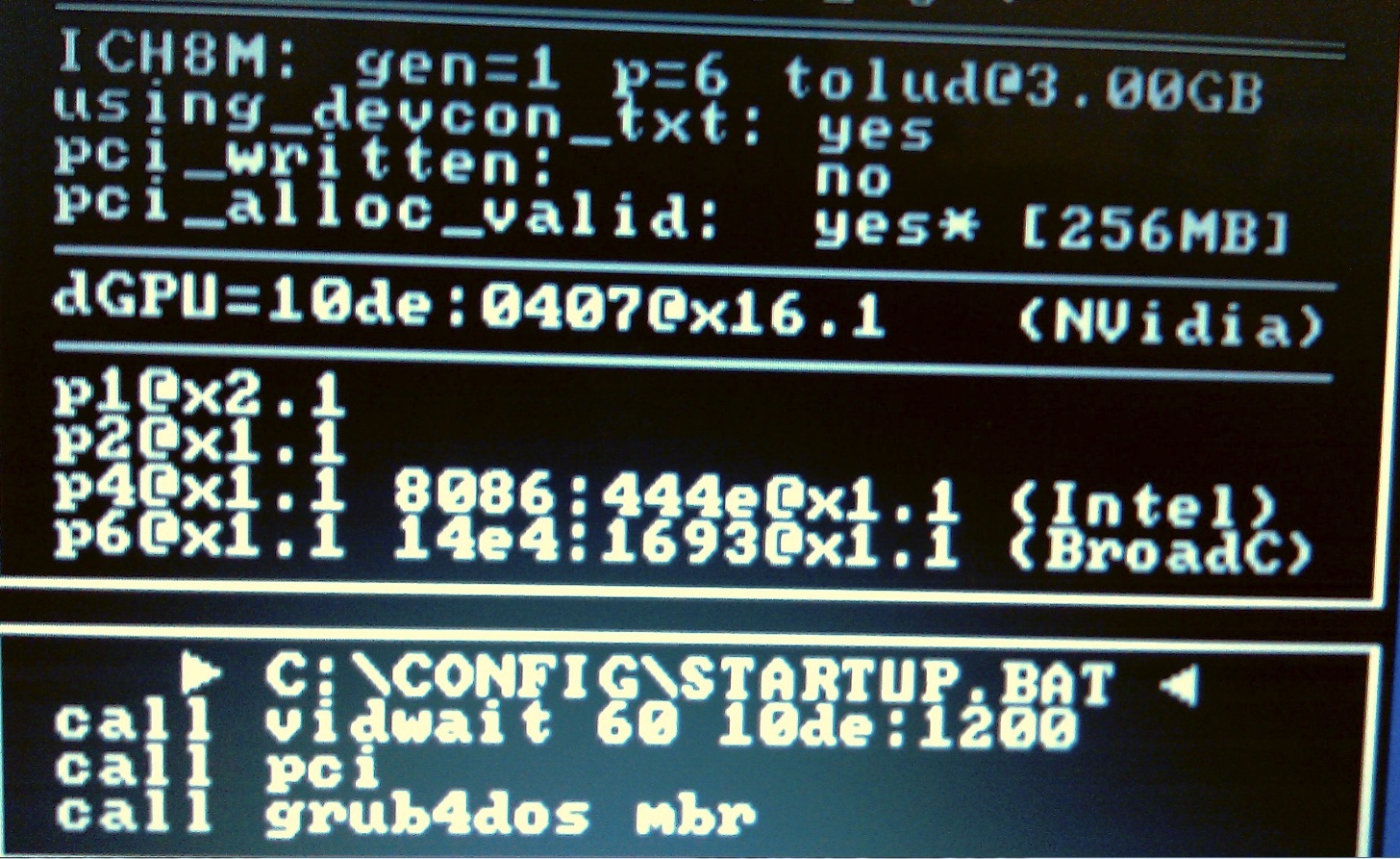
Since my port1 works in x1 (PM3N ver1.2 (port2), but the system does not see), then I need to change 'STARTUP.BAT' to the that FAQ (Set x2 link but mPCIe Port2 or Port4 enabled after reboot ? Second Method)
Now 'STARTUP.BAT' a
call vidwait 60 10de:1200
call pci
call grub4dos mbr
Replace entirely on 'STARTUP.BAT' the FAQ by adding your eGPU (10de: 1200)? -
You should try getting x1 going at Port2 first. Please connect eGPU only to Port2 for x1 setup. (PE4H port x1 <--> PCIe Port2)
Please do Anti-whitelist.
1. Boot with wifi card in port2.
2. Enter Setup 1.x > PCIe ports > Anti-whitelist > "!Save port" > Port2. (do not shutdown yet) Removed the wifi card, reboot and enter Setup 1.x again > PCIe ports > Enable port > Port2.
3. PCIe ports > "Restore port".
4. Power on eGPU & connect it to notebook (plug PM3N to Port2).
5. Press F5. Confirm eGPU is detected in Setup 1.xLast edited by a moderator: May 7, 2015 -
It does get warm but I think within normal levels.
Windows use: ~45°C
Games (3hr): ~75°C
My notebook on top stays much cooler.
I striped all the unneeded wires so even with the slowly rotating fan I can feel the airflow.
Have you posted pics of your enclosure already? -
i cant really answer your first or second questions. its pretty subjective, but for your third question, as far as I know, you should be able to use a DC power supply instead of an ATX power supply, given that it can supply enough wattage to your card. The six pin power is one row of three ground, and one row of three 12v as depicted in this picture
![[IMG]](images/storyImages/pcie.jpg)
and as described here
PCI Express (PCIe) 6pin power Connector Pinout - AllPinouts
so if you can make an adapter or wire those up accordingly, you should be ok
DIY eGPU experiences
Discussion in 'e-GPU (External Graphics) Discussion' started by master blaster, Sep 18, 2009.