Problems? See this thread at archive.org.
I tried it too, but same thing happens.
Actually simply removing some cables should not change the working of the PSU. Try to check if you accidentally short circuited some of them.
-
Nope...tried a few other methods, still not getting anywhere. Did i sent over the right files?
https://www.dropbox.com/s/k0ncvbkgjk8lq8x/diag.zip -
Saw this pic on facebook...PE4H eGPU Enclosure
https://www.facebook.com/photo.php?...57677893.67808.205378296203030&type=1&theater
AND Prototype TH05, Thunderbolt to PCIe
https://www.facebook.com/photo.php?...57677893.67808.205378296203030&type=1&theater -
Awesome news!
-
Finally, the thunderbolt interface is here! I can't wait to see some tests on Windows running MacBooks (and all the new laptops coming with TB)!
-
The inside pictures of MSI GUS II are here:
4Gamer.net ¡½ ¥¹¥¯¥ê¡¼¥ó¥·¥ç¥Ã¥È¡Ê¡ÎCOMPUTEX¡Ï³°ÉÕ¤±¥°¥é¥Õ¥£¥Ã¥¯¥¹¥Ü¥Ã¥¯¥¹¡ÖGUS¡×¤¬È¯Ç䤵¤ì¤Ê¤¤¤Î¤Ï¤Ê¤¼¤Ê¤Î¤«¡£MSI¤ÎôÅö¼Ô¤Ëʹ¤¤¤Æ¤ß¤¿¡Ë -
Hey guys,
Today I tried setting up my egpu for the first time. When I connected my psu, all I got was a red light in D1 and a green light in D3.
I'm thinking it has something to do with the expresscard, but I'm not sure.
Any help is greatly appreciated. -
It seems that in future, MSI's gus will be able to use laptop's internal screen without using virtu, optimus, ect.
Interesting. -
So I tried to buy PE4L v2.1b from hwtools.net but unfortunately they've no one in stock :-(
Is there another site sending those abroad (Europe - Czech Republic) ?
BTW Is it correct that if I succeeded with DSDT 36bit override I might not need Setup 1.X ? -
In my case the DSDT was the only thing I had to do to get eGPU running. Although I think that it might depend on your configuration. And I can't get my eGPU to run in Opt1.2 - so probably Setup 1.x might be necessary to get it working
-
Hey guys,
Today I tried setting up my egpu(PE4H v2.4) for the first time. When I connected my psu, all I got was a red light in D1 and a green light in D3. When I plug it into the expresscard slot, nothing changes.
I'm thinking it has something to do with the expresscard, but I'm not sure.
Any help is greatly appreciated. -
Does all Ivy Bridge notebook will have PCI-E 3.0 ?
Are we soon going to see 1.3Opt setup ? -
He there,
so i successfully implemented my 8800GTS with my Lenovo T420s and a PE4H-EC2C 2.4. The thing is, that i always have to restart my Laptop so the graphics card gets initialized (error 12). Would the DSDT override help in that case so i can just plug and unplug the card whenever i want? -
Hey guys,
Not really sure what I did wrong. I'm using a GTX 460 with my X220. I followed Xav's instructions here: http://forum.notebookreview.com/e-g...851-diy-egpu-experiences-403.html#post7572285
Optimus is working, apparently.
I turn on the power supply and card before booting my laptop, since I read somewhere that it needs to be in before Windows boots to get the card to power the internal LCD. But I just ran 3DMark06 and it's... not right. My results are here NVIDIA GeForce GTX 460 v2 video card benchmark result - Intel Core i5-2520M Processor,LENOVO 4286CTO score: 4852 3DMarks
core clock and memory clock of 0?
What should I do? -
I've read the initial post and the linked posts to PSUs but am still not really sure what to get. I want to run a gtx460 to play diablo 3 probably just going back into my laptop LCD screen. I believe I need something with a single rail 12V 18A but am not really positive how to double check or even search for an appropriate power supply. I've browsed Newegg but can't tell what is overkill or not. Money is a concern although not a complete barrier
-
ATI Radeon HD 5870: PCIe x2 1.0 vs. PCIe x16 2.0
================================================
(* Graphics Score)
3dMark06 3dMark Vantage 3dMark 11 PCIe x2 1.0 SM2.0 SCORE
5405
HDR/SM3.0 SCORE
723014616 3667 PCIe x16 2.0 SM2.0 SCORE
10033
HDR/SM3.0 SCORE
1142619801 4283 eGPU @x2 1.0 Performance SM2.0 SCORE
54 %
HDR/SM3.0 SCORE
63 %74 % 86 % Last edited by a moderator: May 12, 2015 -
I just realized that it is not possible to run the resolution 640x480x100hz
 Can someone explain maybe why? Is it a problem for the mpci slot or the hdmi cable?
Thanks! -
Does anyone actually know whats the bandwith on Sony Z series thunderbolt version. Is it lower than actual thunderbolt?
PMD seems to perform under par vs dedicated card inside the notebook. -
hi, guys.
let me start by saying i do not know too much about hardware.
my PC specs can be seen in my signature and i'm interested in this DIY.
i would like to use a GTX670 as the external gpu. (doesn't really need to be portable)
can someone help me about what performance gains should be expected so i can figure out if this is worth it or not ?
also what would be the best way to do this? -
I also want to use a gtx 670 as eGPU for my laptop.
i currently have a macbook pro. I don't know which one I should buy between PE4L and PE4H for best performance.
May I use the internal screen instead an external one?
Afterall, would you recommend the eGPU or a gaming laptop? -
Nevermind, I got it working. 3DMark06 score went up to 16271
-
Hi i was hoping someone could help me. I got the pe4h v2.4a and a gtx460 with a 230w atx psu. I have it all hooked up to a hp 8440p with a i5 520m 8gb of ram and windows 7 x64. the 460 gets recognised as a standard vga adapter with a code saying for this device to function i must reboot. so i reboot and on the external display the gtx460 bios text comes up, then a bunch of multicolored lines and scrambles. The screen remains frozen like this until i hard reset. Am i on the right track? Do i need to do the dsdt override? please help!
-
For hardware based internal LCD support to work without Optimus/Virtua/etc, would require Thunderbolt notebooks to be manufacturered as if they had a switchable dGPU (which would be the eGPU)
In the internal photos of the GUS-II I saw no electrical link between the circuitboard and the output Displayports/HDMI on the video card that would then route those signals back to the internal LVDS LCD by way of a mux.
If you are seeing an error 12 and do a DSDT override to resolve it then you wouldn't require Setup 1.x's pci-e compaction to try to correct that problem. In fact, the DSDT override is a simpler and preferred solution for those technical enough to try it. Still, Setup 1.x has other features like undo-whitelisting, gen1/gen2 port switching, initializing NVidia eGPUs. It's a great safeguard to get the best performance and compatibility of the eGPU across as many systems as possible
REF: Intel's Series-7 chipset has a x4 3.0 capable northbridge. We see the Thunderbolt is connect on the Northbridge (x4 2.0 or x4 3.0). The expresscard/mPCIe are connect on the Southbridge (x1 2.0). So unfortunately no x1.3Opt unless manufacturers use the Northbridge port for the expresscard slot. Would be great if they did as x1.3Opt would be approx the same as x4 2.0 in bandwidth but without the Thunderbolt licensing issues.
A GPU-Z screenshot shows it to be x4 2.0. In addition there were some benchmarks done with an external LCD showing it had the same performance as the internal LCD. Therefore it would mean they routed the LCD signals in such a way as to not impinge on the pci-e bandwidth.
If your Clevo has switchable graphics with a HD3000 then it's worth pursuing. If not, then don't bother as you won't get the Optimus "Opt" pci-e compression.
A [email protected] will convincingly outbench your GTX560M (approx same as a desktop GTX550Ti/GTS450). Your system wouldn't have an expresscard slot so would need to do a mPCIe implementation using a PE4L-PM060A 2.1b.
Do you have an expresscard or Thunderbolt port. If the former then get a PE4L-EC060A 2.1b. If the latter (likely), then wait for a BPlus TH05 with ETA of July 2012 or a MSI GUS-II.
A Thunderbolt GTX670 eGPU @ x4 2.0 in your system will outbench all gaming notebooks except SLI GTX670M ones.
Sounds like the bios is seeing the eGPU on reboot causing the GTX460 bios text to come up. You want to prevent that by either setting the 7/15s PCI reset delay OR halt Win7 load with F8, hotplug the eGPU and continue the Win7 load. -
it doesn't have switchable gfx =/
so it's really not worth it, no way to bypass the issue?
(i don't want a portable solution, just more horsepower to game at home when using just the external monitor)
hmm i want results way above what a GTx550Ti can do too...
can't it be done through 2 USB3.0, ethernet, mini IEEE 1394A or the e-SATA connections? -
Do you have an expresscard or Thunderbolt port. If the former then get a PE4L-EC060A 2.1b. If the latter (likely), then wait for a BPlus TH05 with ETA of July 2012 or a MSI GUS-II.
A Thunderbolt GTX670 eGPU @ x4 2.0 in your system will outbench all gaming notebooks except SLI GTX670M ones.
I do have a thunderbolt, so what I do now is waiting for either BPlus or GUS 2??
What performance can I expect for eGPU gtx 670, comparing to the 7970m? -
Selling your notebook and getting a better eGPU candidate would be the easiest way to bypass the issue. Unfortunately NVidia locked the drivers such that it requires a x1 pci-e link and a Intel iGPU as the primary video device (X3150, 4500MD, HD, HD3000, HD4000) to activate the pci-e compression and accelerate performance 20-333% times. Without the pci-e compression you would never come close to bettering the GTX560M you currently have.
Yes. Wait for BPlus TH05 or MSI GUS-II to be released. As for performance, please review the GTX680 x4 2.0 results at Ivy Bridge PCI-Express Scaling with HD 7970 and GTX 680 Review | techPowerUp against HD7970M results you find on the web. A GTX670 can be overclocked to GTX680 levels so the contained GTX680 results would be a close match. -
Thanks man, that was really helpful.
i could sell my HM and buy a P150 EM which has optimus but clevo only sells the barebones with a gpu. so, it's not worth it for the money, since i can buy the GTX680M at less then barebone+GTX675M... seems like a no brainer ahaahh
now i only need to find where to buy the GTX680M.. anyone knows any EU eShop ? -
I may have a stupid question. Since PE4H sports 4 ports, can I connect 2xmPcie and ExpressCard connectors? Will it give me X3 speed? Does something like that even exist?
-
Just to let you know, i used the wrong DVI cable (DVI-I Single-Link). Now i use a DVI-D (Dual-Link) cable and i can go up to 1680x1050x120hz.
-
Will it work with Lenovo g410
Celeron 1.6ghz 2gb ram and 160gb hdd intel graphics?
which version should i get and the best card that will saturate the available bandwidth -
Great news!!!
According to this the new MacBook pro have 2 thunderbolt ports. That means that people with enough money could buy two TB to x4 3.0 adapters and do a crossfire setup @ x4-x4 3.0 (same performance as x8-x8 2.0). 3DMark11 GPU score (with 2x7970) would be ~ 17000 WOW!
Total cost though would be over 3000$!!!
-
I was waiting and looking for a laptop, but now i'm really in a dilemma.
I like the Vaio Z because it's screen (resolution, gamut, etc.)
But now with the introduction of thunderbolt the macbook airs will be outperforming, but they do not have a fullhd screen with high gamut. -
I've got a Lenovo T410s with switchable graphics. I also purchased a PE4H-PM3N since I have the 5-in-1 media reader instead of the expresscard slot, and I plan on using an EVGA GTX 460 SC as my eGPU. From what I've gathered, I should be able to achieve x1.Opt. But, I have some questions...
1. Will I need to do the Setup 1.x thing as well as the verde driver?
2. Will I need to disable my dGPU (NVS3100m)?
3. Will the verde driver tweak work for nvidia 3xx.xx drivers?
Thanks! -
3. I'm using the 3xx.xx desktop drivers on my x220 with a GTX 460. x1.2Opt is working well on my internal LCD - you don't need to tweak the driver.
-
Ok, Im very interested in doing this, and Ive tried my best to read through the entirety of this thread but I still have a few questions.
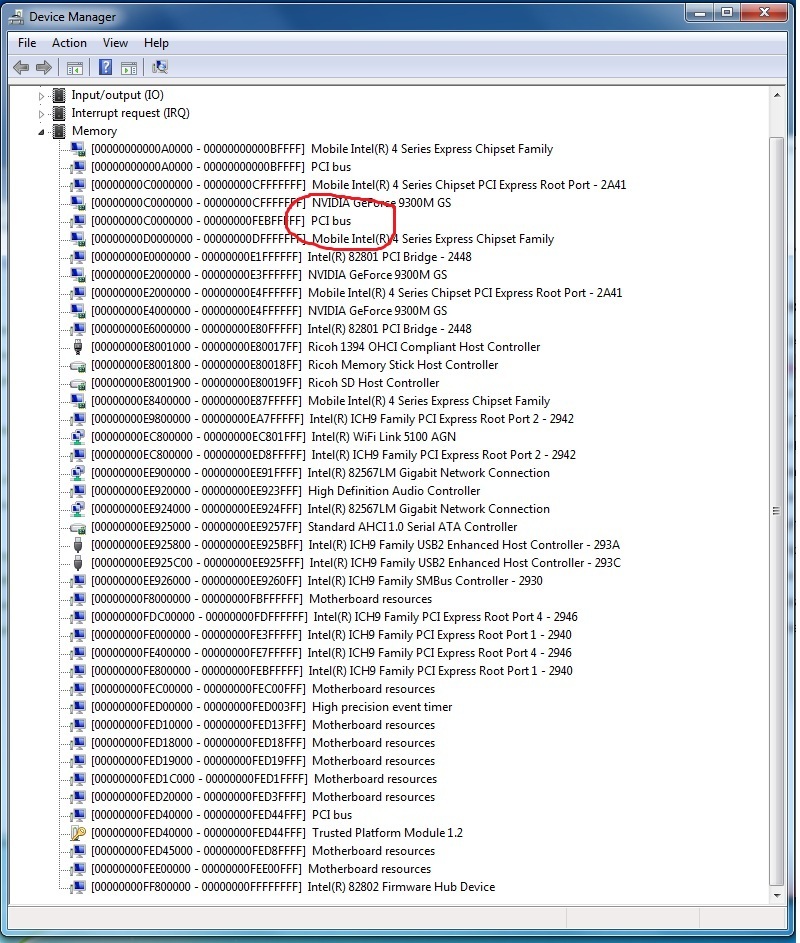
First off, the TOLUD issue, my laptop has 4 gigs of memory so its possible I might have this problem? Heres a screenshot of the memory in the device manager. Im not sure exactly what Im looking for. I think its ok but I was a little confused by this, if someone could take a look and let me know that would be great.
Second, and this is my main concern, is that I have a vaio vgn-z720 so I have both a discrete and internal gpu. It has the 4500MHD intel card so its compatible with optimus but Im not sure of exactly the best way to disable the nvidia card. If it all possible I would like it to be as close to plug n play as possible.
From reading around it seems the two options are to either use Setup 1.x or possibly to hack the bios on the sony laptop ala this thread: find thread (although this may just be for the newer VPC models, can anyone confirm it works on the VGN models?). If Ive missed any other options please let me know. Id like to do whichever can get me closest to just being able to plug in the egpu and go without a restart etc If this isnt possible thats ok but just trying to figure out what the best method would be.
Also, I thought I saw mention of a new PE4L version that comes with an enclosure being released soon somewhere back in the thread? Although I cant remember where I saw that anymore. Is this correct, are there any newer versions being released that I should wait for (not concerned about thunderbolt support as I won't be upgrading my laptop any time soon but if not too pricey an enclosure would be nice).
And finally (a minor question) on the first page it says you can use PhysX but I didnt really understand what systems would be compatible or how to set this up etc Would this apply to my laptop?
Thanks so much and sorry for the long long post!Attached Files:
-
-
I figured it out. Turns out I just needed to install both drivers one for the gtx460 and the other for the nvs3100. Now all I have to do is boot windows and do the whole sleep plugin and wake and its all good. This is on a hp 8440 with an i5 520m 8gb ram without need of the dtsd override, although its at 1.x with just the express card. wie gives me a 6.1 on both gaming/aero graphics but thats with the drivers cd that came with the card. I can run skyrim on ultra with it i want so see wha i can get on 3d mark. LOL im happier than flies on S*it Thanks to kizwan and the troubleshooting section http://forum.notebookreview.com/7816969-post1.html
-
Hey everyone,
I've had my eyes on an eGPU for the last couple of years. I was in exchange in another country the last year so I couldn't go forward with the project but now I'm back home and I'd really like to do it. I have a Lenovo X220 i7-2620m, with 8gb (1866mhz). I was planning in getting a GTX 560ti 448 cores (EVGA probably). FIrst of all i wanted to know if it was a good choice? I could get it for around 270$ before taxes/shipping. Another option would be the 384cores version for around 230$ or an older GTX460 for around 150$.
Also, I really didnt understand what was all about the different versions of PE4L. From what I've understood the PE4L v2.1b is the most recent one, so i guess that would mean it is also the best one to get? I've seen someone posting about using a PE4L v2.1b with a X220 and a 560ti so I guess it would be compatible with my setup. Am I missing something? Should I get another version of the PE4L? Will it depend on the GPU i choose? If yes, what would be the one to choose for the card I cited earlier?
Most of the time, the card will be connected to an external 24inch screen through dual-DVI. Also, last question, how do I know what kind of power supply I will need? Is their a rule on how to calculate the correct amount of power I will need?
Thank you very much! I am really looking forward this project! -
PE4L 2.1b has more bandwidth (PCIe 2.0) than previous versions, so you definitely want that.
If you can afford a 560 Ti 448, then go with that. Otherwise, even the 460 will run circles around the Intel GPU.
As for the power supply, it depends on the graphics card. I use a 450W (Silverstone st45sf) with a 560 Ti (not 448, but overclocked) and it works great. Don't be cheap about this. Cheap noname PSUs are a big no-no. -
I agree about the PSU, i have the same and my GTX670 works smoothly
-
Thank you both for the answer! I really appreciate.
WHen you say that even the 460 will circle around my processor, do you mean that the i7-2620m will bottleneck my whole setup? Which would means that I wouldnt see a difference between the 460 adn the 560ti in term of performance? I'm not that much of a gamer. I play a little bit of diablo 3 but thats pretty much all.
Ok so for the hardware, I see all that equipement on the front page for a total of around 140$. Do I really need all of this? or is it all included
US$91 PE4H-EC2C or PE4H-PM3N / &
US$20 PM3N
US$10 PCIEMM-100
US$28/$7 shipping
also, i see that there is 2 options
http://www.harmonicinversion.com/pr...flypage-ask.tpl&product_id=191&category_id=25
and
PE4H (PCIe passive adapter ver2.4)
I unfortunately have no idea what is the difference between both. Also, in each link, they re a list of extra accessories that I can add (like PCIe-Cable, AC Power Supply, mPCIe card: and ExpressCard adapter) and also sometime i have to make some choice (PE4H ver 2.4 and PE4H ver 2.0a). This kind of confuse me a lot since I dont really know what any of those things do. Can someone tell me exactly what part I'd need to buy to run one of these GPU?
Also, I have no soldering skill at all nor do I have the equipment. Will I need to solder anything when I get a power supply? Also, anyone has any recommandation for a power supply?
Again thank you very much. This will be my first DIY experience and I really dont want to mess it up hehe.
Thanks! -
Hi Kizwan just tried an HD5870 with my toshiba satellite. cpu is a pentium dual core 2.4gz oc. with radeon express 200m 2giga ram window7 32 bit.I only get around 8000 points in 3d06.Understand i use a x1 link and my cpu is not like yours howewer do you think my score is normal or should be better?Last edited by a moderator: May 12, 2015
-
The score look OK to me. Does your notebook have extra mPCIe port to support x2 link setup?
-
Hello Kizwan thank for replay.No this satellite A135 S2286 do not have (i belive) an extra mPCI available.But it has a PCMCIA Type II/Type I Card Slot.I also have an ec2 express card available.Do you think i could use that slot for the x2 link?And in case i could do you have suggestion how to make it work?Looks to me that the slot is size 54 female?while the ec2 is 34 female as well..
-
You can't use PCMCIA for eGPU. You need ExpressCard slot (34mm or 54mm).
-
Until the new PE4H is out, only PE4L 2.1b will get you the full PCIe bandwidth :
http://www.harmonicinversion.com/products.html?page=shop.product_details&product_id=193&flypage=flypage-ask.tpl&pop=0
You don't need anything else. And no soldering.
By "running circles", I meant that the GTX 460 was much better than the Intel integrated GPU. Your CPU is fine. You would surely notice a difference between a 460 and the 560 Ti in recent games. I didn't play Diablo 3 so I can't tell you if it's that demanding on the GPU. -
Thanks jemino! Do you think it is worth it to wait for the next PE4H version? will it bring anything more to the set up? also, what is the difference (other than the brand) between the link you showed me and this one
PE4L ( PCIe Adapter ver2.1 )
is one more interesting than the other? finally, what do you think about this PSU?
Newegg.ca - Diablotek DA Series PSDA250 250W ATX Power Supply
is it too cheap?
actually I made a more detailed post directly in the forum because I thought that this thread wasnt really appropriate for all my questions since from what I understood this thread is more about egpu experiences and not questions. Here is the link to my thread
http://forum.notebookreview.com/e-g...rm-setup-before-i-order-everything-x220.html#
thanks Jemino and everyone else -
All clear than
Thank you -
Hi guys.
I've been trying to figure out which setup that my Aspire 5738ZG could use for best e-gpu performance.
FAQ
Chipset: GM45, Intel ICH9M
Dedicated graphic: Yes, Mobility Radeon HD 560v
CPU: P9700, 2.8GHz (upgraded)
Memory: 4Gb, 1066MHz (800MHz before upgrade of CPU)
As you can see in the picture below I have easy access to 2x mini PCI-e:
http://imageshack.us/photo/my-images/823/acerminipci.jpg/
This is what I see in device manager:
http://imageshack.us/f/21/5738zgpcibus.png
When I swapped my wifi card (from p2) I found out that the other port was p3.
Is it possible to do a x2-link combining p2+p3 or does it have to be p1+p2/p3+p4 etc.?
Or maybe I could do a x1E on p3? (if port4 is empty or how does it work?)
Thanks for any help guys! -
Hi guys,
sorry if i missed it but i was wondering if anyone could link me to places (UK prices in pounds) where i could get the stuff to make one.
cheers -
I really wish the PC laptop developers can catch up with the Thunderbolt development...
DIY eGPU experiences
Discussion in 'e-GPU (External Graphics) Discussion' started by master blaster, Sep 18, 2009.