Problems? See this thread at archive.org.
Please take the time to thoroughly read and understand the first post. It answers your questions and more.
-
-
In addition to the questions in my above post: I think I have found the correct cables but I am not sure as it is hard to judge the gender of the molex cables from those pictures. Here they are:
4 Pin Molex Splitter Cable Adapter Male to 2x Female | eBay UK
PCI EXPRESS CABLE MOLEX to PCI-E SPLITTER POWER CABLE | eBay UK
Are those the correct cables? Could you please link to the exact type of cables you are using? -
thinkpad x220+egpu anyone? i read a few pages back there is someone who is doing this but when using the search function i cannot find any information.
its basically coming down to the x220 or t420s, i just want to get the one that will work best with an egpu. also what is the highest performance card i can use with this setup?
will there be any other ways to run an egpu setup in the near future other then pcie or expresscard? a lot of new laptops dont have an express card slot, and i dont like the pcie connection as i dont want to have to open up my laptop. Looking for plug and play options only. -
Expresscard 2.0 = x2 on a single port then?
-
Nando has kept up a great OP and there are lots of x220 experiences there you can go to http://forum.notebookreview.com/gaming-software-graphics-cards/418851-egpu-experiences.html then search x220 in your browser. Each links to the individual success (all?) and many include steps for how to reproduce. Or throughout the thread, especially in the last 10-20 pages, x220 owners are sprouting up all over. ;D
-
Has anyone tried the NP8130/NP8150 and the eGPU?
I'm looking to get the top end card there is out there.
Mr. Mysterious -
i just found a few looking a few pages back thanks.
its seems like it is still very technical getting these setup and fixing bugs. In nands op he lists a thunderbolt option on the way. So i just looked at the mbpro 13 with thunderbolt port, how far out the way are we to having a Thunderbolt egpu setup? Should that be more user friendly then the current options? -
Both come with the HD 3000 IGP, both have the same processor options, both have the same chipset and both have an expresscard slot. Shouldn't matter which one you get, they should both perform similar if not the same.
-
Can someone explain how to tell the difference between a WWAN mPCIe slot with only USB pins, and a standard mPCIe slot?
-
Has anyone tried this on any of the following netbooks that have ExpressCard?
OCZ Neutrino
FIC CW001
HP mini 2140 mini-note -
Hey I have a new X220 here. So far people have gotten x1.Opt working on an X220 and a T420, so you're in luck. As far as the laptop goes I recommend the X220 as it's a better deal imo, although if you really need the bigger screen while away from the desk...tough. The T420s is seriously overpriced IMO.
For people with a SandyBridge notebook I seriously would wait (which is what I'm doing) till the PCI-e 2.0 data rate can be fully taken advantage of. In addition, 28nm nvidia 6xx and amd 7xxx series cards will debut late this year probably around the same time, after a painful 2 years of waiting on 40nm. I think there really isn't a better time to wait than now... -
So I bought a new power supply unit, the OCZ StealthXStream 2 500W.
It really was because of a weak old no name psu, why I had troubles during heavy load such as 3DMark06 or vantage.
With the new power supply unit I became immediately results on 3dmark06.
My system:
HP EliteBook 2540p with Intel core i5-540m 2,53GHz/4GB RAM/Win 7 64bit/
Nvidia Verde 275.33 + nando's nvam.inf (64-bit) (x1.Opt)
Zotac Nvidia GeForce GTX 460 768MB
PE4H + EC2C ExpressCard to PCI-E Adapter V2.4
13817 3DMarks06 by using standard clock rate of the graphics card.
Result
13850 by using overclocked graphics card.
I got only a plus of 33 3DMarks06 by using a core rate from 750MHz instead of 675MHz standard, and a memory clock of 2000MHz instead of 1800MHz standard.
Result
I think the result is quite ok for the setting but it did not work to get a screen on the internal display anyway. I especially want to thank Khenglish and nlooije, who claimed that it has to be the weaknessthe of the old power supply. Without your help I would have given up the project. -
A full mPCI-E slot and a crippled USB only one physically look completely identical. BIOS whitelisting ports also can make a fully functional port seem USB only. Whitelisting is where the port can only be enabled if the bios thinks that a certain device is plugged into it.
Also if a device is not detected on a port on startup, the bios will likely disable the port, making everest read fewer ports than you might actually have wired (my bios does this).
Basically the only way to see if an mPCI-E port is fully wired is to turn on all ports, and have something that you know requires PCI-E (most if not all wireless cards) to be plugged in. If all ports are on and it doesn't work, then it's a USB only port. I believe if whitelisting is an issue that you won't be able to turn the port on without an anti-whitelisting script, so if you manage to turn on the port you are concerned about, then whitelisting is not an issue. -
I was wondering where I could buy a HDMI mini express card 2.0? Or is there such a thing?
-
Thanks, Khenglish. So basically, you have to know from previous experience what the model of laptop you are getting has, otherwise, there's no guarantee with mPCIe.
Separate question for anybody:
What overclocking tools have you guys been successfully with when used with the DIY ViDock? I have a Gigabyte 5870 Super Overclock series, and I can't get Gigabyte's OC GURU to detect the card through the ViDock. CCC isn't supported by the card, and MSI Afterburner detects the card but won't let me change anything. Is there another tool out there that can do the job? -
Does anybody know what's the chipset pinmod for a lane reverse on a GM45 chipset?
I did a google search but nothing yet.
thanks in advance!
PS someone knows where I can find the answer just point me there. -
-
@nando
Thanks for the very fast answer. before I reopen my laptop where is the sata interface (where the sataled# is) located? -
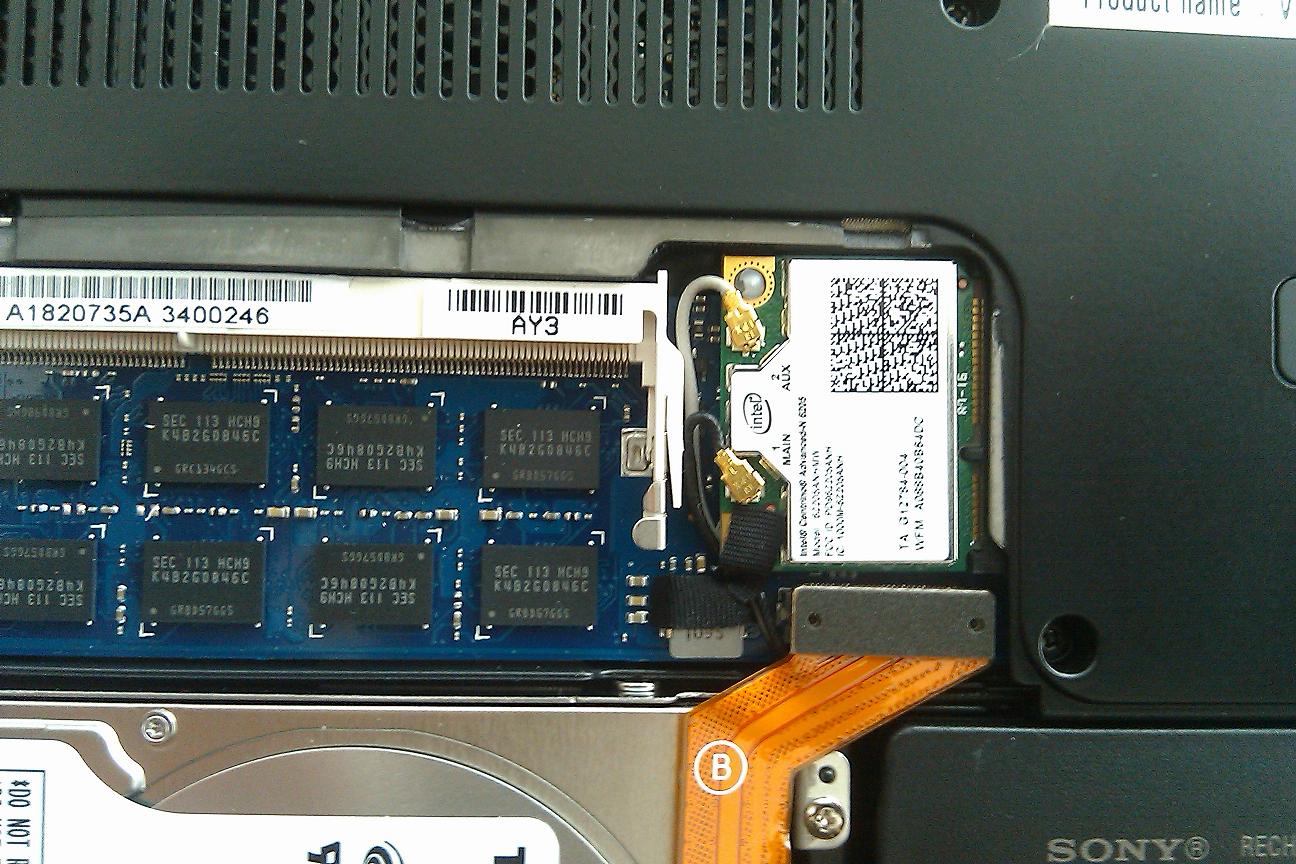
new to this and trying to decipher my way through the first page. could use your help to see if my notebook has the hardware to try a egpu out. I have a sony SA with this ( http://www.intel.com/Assets/PDF/prodbrief/324747.pdf) wireless card in the 1 mpcie slot. i attached a pic cuz what if the PM3N doesn't fit.
even if it did work, would i be able to get performance much better than the AMD 6630 gpu in it already? thanksAttached Files:
-
-
You can always cut off the thin edges on the PM3N if needed. They are there just to be able to screw down the PM3N.
If you can only do x1, then it's be a mixed bag on if you can beat the 6630 with an external GPU. You would run into situations where you would get say 10fps with a game maxed out, but also get 10 fps with the game at rock bottom settings. It really depends on what games you play, but a lot will have major unavoidable fps slowdowns with an x1 link.
Your internal card is around 50% more powerful than mine, and I would not have found it worth getting an eGPU if I could only do x1, so my suggestion to you is to just overclock your 6630 unless you can do x2 or Optimus. -
13" Sony SA/SB eGPU setup?
Below is a screenshot of the devel Setup 1.x taken on a Sony SA. We see if has an Intel HD3000 iGPU + HD6630M dGPU with wifi on port1. TOLUD is set to 2.5GB and there is already 256MB of pci-e space free to host an eGPU. NOTE: The NEC USB 3.0 controller on port3 had previously been switched in Setup 1.x to Gen1 (2.5GT/s) speed. The system's bios otherwise boots up with it running at Gen2 (5GT/s) speed as seen here.
![[IMG]](images/storyImages/sonysa.jpg)
The HD3000 component means it can do a x1.Opt setup. A GTX460 or GTX560 eGPU running on a x1.1Opt link will outbenchmark your HD6630M. ATM the hwtool's gear is limited to x1 1.0 speed (2.5GT/s), however once they update the kit your system will be able to run at x1 2.0 speed (5.0GT/s). Or could get a ViDock3/4/4+ which claim pci-e 2.0 compatability.
If still browsing for SB systems to buy then suggest peruse the Sandby Bridge notebooks for an eGPU noting the systems with an expresscard slot. 14" Lenovo T420s or Toshiba R840 both have a 900P LCD option, an expresscard slot and weigh 1.83/1.91kgs. -
Hello all, My name is Ray and I am new here in the forum

I am all new to the all idea of eGPU setup (diy vidock) but i've been reading a lot so far and i've already started to buy online at hwtools.
Please help me with deciding which vidoe cards are compatible with the diy vidock setup so i can rush to buy one ASAP....
Can I buy the best video card in the market now? Are all video cards suitable?
what about the PSU? How do I know if the PSU meet the demand of the card?
I have an alienware m15x laptop and a iGPU Nvidia GTX 460M video card.
(Cant Wait To Write There Also "eGPU...")
Thank you for replying -
Another day another try.
Now I wanted to know if my desktop replacement notebook could do the same as the HP EliteBook 2540p.
My desktop replacement notebook is a 18,4" big Toshiba Qosmio X500 with an Intel PM55 Express mainboard, Intel Core i7-720QM @1,6GHz, dedicated Nvidia GeForce GTS 360M with 1GB GDDR5, 8GB RAM, ExpressCard 54 slot and 2 harddrives (I. Intel G2 Postville SSD, II 500 GB Toshiba 7200RPM).
I also tried to run my external Zotac Nvidia GeForce GTX 460 768MB on the notebook with dedicated Nvidia graphics card and without Intel HD graphic option by using Verde 275.33 + nando's nvam.inf.
I was forced to use an older image to avoid error code 12 shown here:
http://forum.notebookreview.com/7155725-post2861.html#q13
and here:
http://forum.notebookreview.com/7155725-post2861.html#q3
But after clean re-imaging the system I was able to install both graphics cards with only one installation by using Verde 275.33 + nando's nvam.inf without having troubles concerning resources.
![[IMG]](images/storyImages/dualgpu.jpg)
But the result was not I was expecting from this system.
I only gained 5261 3DMarks06
Result
That was only half as good as the result gained by the dedicated Nvidia GeForce GTS 360 1GB GDDR5.
11345 3DMarks06 with the dedicated Nvidia
Result -
The m15x doesn't have an Optimus/Intel HD graphics setup. So then can't do a high performance x1.Opt eGPU setup.
The m15x does however have two mPCIe slots which correspond to port3+4 (see lspci output here). The wifi slot is port4. The second mPCie slot is under the keyboard as shown in http://forum.notebookreview.com/alienware-m15x/551820-added-3g-wwan-connection-m15x.html . So if you're prepared to wire up both ports then you could do a port3+4 x2 link which will benchmark faster than your GTX460M.
If don't want to do that then I'd suggest sell your m15x and get a x1.2Opt capable Sandy Bridge system with an expresscard slot. Some ideas in Sandby Bridge notebooks for an eGPU. Just note that we are limited by hwtool's hardware to x1 1.0 (2.5GT/s) link speed only for the time being as detailed.
A i7-720QM doesn't have an iGPU onboard. So your system can never do a x1.Opt setup. This means your 3dmark06 result will be in the 5K range as you found out. The x1.Opt link does pci-e compression to achieve 20-333% faster performance than your x1 without Optimus.
So the x1.Opt capable 12" i5-540M 2540P will get a much better 3dmark06 result than the non x1.Opt capable 18.4" i7-720QM X505 when tested with your GTX460 eGPU attached. -
I knew, that the core i7-720QM doesn´t have iGPU onboard.
But I didn´t knew, that the result will be that bad.
I guess, there is no chance to get better results for the notebook, am I right?
Anyway, I plan to afford a new desktop replacement notebook.
I quite flirtatious with a business notebook from Dell.
Dell Precsion M6600 with AMD FirePro M8900 Mobility Pro Graphics with 2GB GDDR5.
The CPU would be an Intel core i7-2720QM.
That should work with an external graphics card, cause the core i7 asndy bridge has an iGPU. -
So i'm a little confused. The mpcie CAN attain the 5.0GT/s speed which is usb3.0 rite? (given when hwtools gets the 2.0 compatiability (soon?))
i'm deciding between the SA and lenovo X220 which has expresscard and mpcie that i think i can use x2 connected. but since the x220 also has usb3.0 w/ i7, can it also get 5.0gt/s from the mpcie assuming hwtools 2.0 compatibility in the future? can the x220 use the x1.Opt link to outperform the Sony SA? thanks again guys for the quick responses -
I'm running on an X220.
All my parts arrived and I went out an bought a Gigabyte 5450 with 2xHDMI, 1xDP and 1xVGA (since I'm looking at running 3 digital outputs). However, whenever I plug in my HDMI to DVI cable the monitor shows that "no cable detected". I predict this is due to my card (for whatever reason) not having a 6pin PCI E port an thus expecting to be fully powered from the board, but since it's not a full computer, it can't deliver enough power through the board. However, the actual Graphics card works fine, and the VGA output does work. I have not connected anything to the DC In, does this add more power in addition to the floppy power connector? -
I doubt that power is a problem unless the card is unexpectedly shutting down. The floppy connector should be able to provide the full 75W that the PCI-E spec calls for. Most people use the floppy connector over the DC jack from what I understand, and I don't know of anyone using both.
-
I tried both to no avail, but I did notice that the PE4H board has LEDs indicating 3V, 5V or 12V. Is there any way to deliver 12V to the card, is that perhaps the issue?
-
Anyone?
Mr. Mysterious -
anybody have experience or knowledge of ecpc+mpcie working on the x220? Xav had awesome results with a ecpc so just wondering
-
Hi all - just got an R6850 up and running with my Lenovo T410 (Dedicated Nvidia 3100M only - not the switchable graphics/optimus model) , and I'm having horrible performance in DX10 apps.
DX9 stuff is fine - 3dMark06's first benchmark runs at 80-90FPS, and any DX9 games I try are running great @ 1920x1080 maxed out settings.
DMC4 DX10 Benchmark - 11-12 FPS. Just Cause 2 is unplayable unless I set the resolution to 1024x576. So very very poor DX10 performance.
I'm using the newest Catalyst Drivers (11.6) , 8GB Memory, i5-540M
Does anyone have any thoughts on improving DX10 performance? As it stands right now the 3100M is giving better performance, which should not be the case at all. -
Your system does not have switchable graphics. It's not x1.Opt capable nor is x2 readily possible on SB systems. That means there's no way of bettering the GTX460M's performance. So I'd suggest trade for a better eGPU candidate system OR look if MXM upgrades are possible.
x2 is not readily possible on SB systems nor is it necessary. x1.Opt and x2 (non-Opt) give similar real-life results with x1.Opt outbenching x2.
A x220 GTX4/5xx x1.1Opt eGPU setup will outbench your SA. A Z2 with a Thunderbolt port would however be a better eGPU setup giving 4 times the bandwidth of what we've seen so far, or twice more than a x1 2.0 setup when we finally get hwtools gear to run 5GT/s. Z2 will cost more than a X220. It may very well be that NVidia drivers will once again disable x1.Opt on the Thunderbolt x2/x4 link so a NVidia card on a TB link (x2 2.0) would perform the same as a NVidia card on an x1 link (x1 2.0 Optimus).
A T6600-2.2 + HD5750@x1 got DMCV4.DX10 S4 of 38.0 here. Your faster i5 + HD6850 should beat that.
I've read accounts of DirectX 10 being broken due to DirectX 9 being installed. The solution was to reinstall DirectX 10 by loading DirectX End-User Runtimes (August 2009). If this corrects your issue then please post benchmark results. Non-Optimus capable folks may want to see what the newer AMD cards can do. -
ATTENTION!
I tried this pinmod to reverse the pci express lanes 1-4 but it didn't work. It only killed my sataled .
maybe it doesn't work on every ICH9 chipset!
Toooo bad. -
Lenovo Y550 is x2, not x4 capable
Y550 schematic shows it has 3 mPCIe slots + an expresscard slot. From the lspci output I can determine that ALL 6 ports are enabled with:
port1 or port2=remaining mPCIe slot
port3=wifi
port4=expresscard (from next post)
port5=mPCIe slot (from next post)
port6=LAN
<strike>If the other mPCIe slots + expresscard are port1-4 then the Y550 is a x4 capable machine.</strike>. If you happen to have a 4500MHD, rather than the G210M, then could do x1.Opt setup. It should at least be x2 capable.
Consider also a dual-IDA bios mod to get that overclocked T9300 running at up to 3.6Ghz. -
it does have 3 mpci-e ports.
Two of them unsoldered, one for TV card and another one.
I soldered the other one (from an old mobo) because near the TV card there is no space (I 'll upload a picture). it appears to be port5. I swapped with the wifi port3 and I hoped that the reversal pinmod would work so I can have an x2E since my EC is port4. However nothing happened as explained previously. maybe i am going to solder the TV card mpci-e port to check what port it is. however there is not any other mpci-e on the motherboard so my only hope is that the e-sata uses a mpci-e port.
Any other way to test an unsoldered mpci-e port?
Thanks for the feedback.
4500MHD is disabled from the bios and I already have reallocation problems with more than 2GB memory...even if I enable it through your eGPU bootdisk it will require extra space. Also you can add to the first page that G210M on this system cannot be disabled cause it gives black screen to both cards (internal - external) even on a 64bit system. Only solution is less than 3GB of memory at least with an external ATI card.
i will soon upload my results with t4400. It is around 11000 I think.
T9300 is very hot @3.33GHz consider 3.6GHz.
Also Y550 shares the same bios as the Y450 which have been tried, so I don't think it is possible to mod the bios... (not enough space) -
No longer a problem. There is a solution. Please refer to Rev 1.1a doc. If too hot, try re-apply the thermal paste with better one or anything that can improved the cooling.
-
So... I ran the dx run-time installer, same problem. I started messing around with driver settings, and disabled ATI's morphological AA (I had it on, because I had read so much about how it works with barely any performance hit, etc,etc) - all of a sudden when the DMC DX10 benchmark starts up the first few seconds are running at over 200fps. As opposed to 12.
Edit: I'm assuming (since everyone seems to get much better results with MLAA on normal setups) that Directcompute stuff must be very PCI Bandwidth intensive, and not going to function well on these setups.
I'll run a full benchmark later - what is the standard being used here? 1280x1024 - any AA turned on? -
1280x800 at default settings it what people have been using. I've found AA in general not to be a big pci-e hit. I've only found a few random in-game settings to ever have major pci-e impacts, such as WoW's ultra shadows vs high, and SC2's ambient occlusion in story mode.
-
Yeah, typical AA just means extra renders (which is gpu intensive) - MLAA is a directcompute post processing effect, which doesn't bog down the render engine, but apparently does not work very well over a 1X link (judging from what is happening to me here)
Edit for results:
DMC4S4 Result - 59.44
3dMark Vantage - 10196
3dMark 11 - 2629
Heaven - avg 31.7 (@720p normal tesselation)
This puts the rankings I'm seeing somewhere around a R6970M as far as these benchmarks go. Not too shabby considering I don't have to carry around a 10 pound M17x that gets 45 minutes of battery life. PITA to get up and running but its working great now.
/Edit for results
Lenovo T410 - 8GB - i5-M540
1GB MSI R6850 - OC @ 825/1050
By the by, when getting this up and running this weekend, I had the weirdest thing happen. I could not get windows to stop with the error 12 nonsense no matter what I did, until I actually told Setup1.x to disable my wifi entirely. That made it start the card - but no wifi available. The next day I rebooted, and forgot to select Setup1.X from the boot menu, and the card was still working (along with wifi) when windows booted up. This has persisted through several boots now - seems like once it had it working once Windows found a way to allocate it properly on its own. (Either that or my intense swearing frightened it, could be either!) -
Thank you for the post. However the only number I can use is the DMCV4.S4 result.
Can you post 3dmark06, RE5.dx9 1280x800, DMCV4.dx10 1280x800, 3dmarkvantage.gpu? Then can add you to to the first post. Please disable the HD6850's HDMI audio controller to maximize video bandwidth as well. -
That is the vantage gpu score, sorry. Not the overall score
Edit: DX9 Scores
re5 - 86fps
13352 3DMarks
hdr/sm3 6499
sm2 6003
I'm actually kindof surprised at how high these are coming out. Was not expecting performance this good. -
T420s (IGP only) with GTX 570 experience:
Bios 1.12 -> Not enough resources for device.
Bios 1.09 -> Windows detects it, USB quits, Windows locks up shortly after
Bios 1.05 -> Same as 1.09
Any ideas? -
Can ya post more info on your system specs?
What do you mean, "USB quits"?
I had a problem before I downgraded my BIOS such that my G15 and MX518 USB accessories would stop working and my WiFi would drop when I connected the eGPU. Is that what you mean?
Maybe there are more motherboard settings differences between the 420s and 420 regular version than one would suspect?
I'm running T420 1.15 and it works perfectly with 6gb RAM. -
Anything on this?
-
i5-2540 CPU
Intel HD 3000 GPU
8GB HyperX 1600mhz memory (bought from Newegg, not the GX memory)
128GB Samsung SSD (stock)
Expresscard slot set to Gen1 in BIOS.
When I plug in the device, after Windows is already on, USB stops working - mouse/keyboard won't respond but the built in ones do, then after a few seconds the entire system hangs. -
Also if I boot with the video card, Windows starts with Aero disabled, USB never works, then the system hangs shortly after boot (60 seconds or so).
-
Ok, I reset everything up at home. Plugged the video card in while Windows was on, USB works still and the system hasn't locked up yet.
Now my issue is that the drivers don't install. Says the graphics driver couldn't find compatible hardware. Going to try just doing the manual install. -
My 460 came with splitter cables, and I think most, if not all cards do.
-
Download nando's modified optimus drivers, and the modded .inf.
Extract the drivers, usually to C:\nVidia or something like that.
Go into the extracted folder, replace the original .inf with the modded one.
Then go ahead and run the nVidia installer program, it should detect your card properly now. Assuming it is Fermi or up.
DIY eGPU experiences
Discussion in 'e-GPU (External Graphics) Discussion' started by master blaster, Sep 18, 2009.


![[IMG]](images/storyImages/lanereversal.png)