 Problems? See this thread at archive.org.
What do you think about this one, Nando4?
Fujitsu LIFEBOOK AH531 W7HP64 - Notebooks - computeruniverse.net
It is quite cheap, good CPU, comperatevly good GPU (if eGPU is not used) and of course express card...
I might get one soon..
D
-
Thank you for pointing out Fujitsu. I've updated the table here with their systems. One of the few manufacturers that's kept expresscard slots on most models (except LH531). They also have a lightweight 12.1" model in the preferred 1280x800 aspect, with and without optical drive. A serious competitior to a X220. Also a 13" with a GT520M. Quite an impressive model range to choose from.
The other budget expresscard-equipped system with a decent dGPU would be a Lenovo E420/E520 with a HD6630M. -
i have a HP DV6 3050tx laptop with core i7 720qm processor..egpu is possible with my laptop? and do i need to have an external monitor for this to function?
-
I tried several hours in order to get my external graphics card started but no way.
I wanted to work with an external Zotac Nvidia Geforce GTX 460 on a HP 2540p with Core i5-540M cpu by using PE4H version 2.4a and an old Mercury 400W ATX power supply.
I always have black screens and hang ups during graphical-intense or heavy load. I did not have the chance to get a 3dmark06 result because I got a black screen right after the program has started.
I have read " PE4H 2.4+ can set a jumper at J4 to do the same bypass" and " The solution is to set the PE4H 2.4 fuse bypass jumper (near the floppy molex connector).", but honestly I have no idea how to deal with. Where is the so called J4 jumper on PE4H version 2.4a???
It would be great, if somebody could help me.
I am really desperated and would like to throw all these things out of the window. So many time spent on this situation without any solution in my case. -
You should never have to bypass that fuse unless maybe you have a GTX 470 or higher. With a 10% voltage increase and at over 900mhz, I don't have to bypass that fuse on my 460. It is very likely that your PSU is too weak. The total power rating often is meaningless on a PSU since graphics cards only use the 12V rail.
-
It sounds like a classic case of an inadequate/underpowered PSU as discussed in the Troubleshooting FAQ section q5.
Please try a newer PSU rated with adequate amperage on a single 12V rail.
Edit: damn beat me to it Khenglish
-
Your word in God's Ear.
I just wanted to copy the following setup:
![[IMG]](images/storyImages/mafiaiiint.th.jpg)
http://imageshack.us/photo/my-images/861/mafiaiiint.jpg/
Ok, but how to do that if it would be necessary (to bypass the fuse)?
That would be great, if it would be the power supply.
A new one is not that expensive and this one is too loud for me too.
Ok.
Oh, I have read the FAQ many, many, many times...
Therefore I asked about the way how to bypass the mentioned J4 jumper and things like that.
I will do so next week.
Any idea for a new Power supply?
It should be very quiet and it should be high quality. Price is unimportant.
Both of you think a new power supply should be the sollution.
I hope you are right; I trust your experience.
And I can still throw those parts out of the window if it won´t work soon.
I thank you so much for supporting me at in this difficult time.
-
Corsair. Love em.
Especially the modular ones to get rid of excess cables. -
hellloooo.. can someone reply me here..my laptop dosent have express card slot and iam confused by all these pe4l,pe4h,pm3n..and i dont find my laptop name in the start page..could someone help me out here..how can i get it to work? and what is the graphic card range i can use? and what shud i use from these "pe4l,pe4h,pm3n etc.."
i have checked in AIDA64 about the pcie slots,it shows 2 pcie ports
here is the screenshot
http://imageshack.us/f/718/unlednxr.jpg/ -
Screen shot for Nando (Trying to overcome Acer WIFI whitelisting)
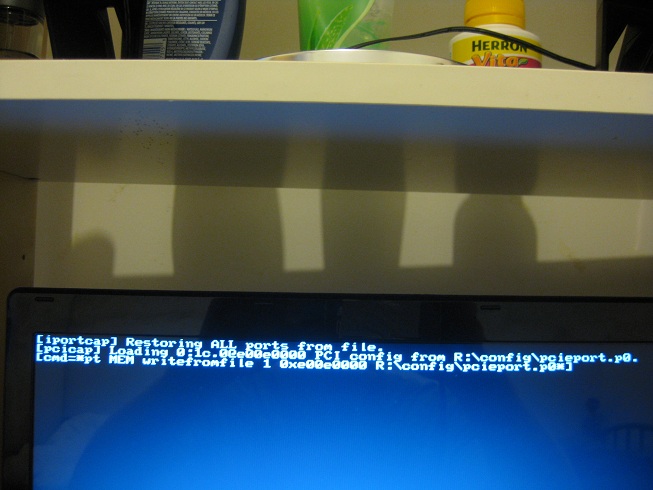
Each time I try'restore' the system freezes. Whether the save was 'ALL' or just 'port 2'
Here is a screen shot of the freeze. Sometimes it gets past this screen and then freezes back at the setup 1.x menu
This is with setup pre 23
I tried to save the pci Tree screen shots to the DIAG folder but couldn't find any screen shots in it. I can take snap shots with my camera if you need.
CheersAttached Files:
-
-
Hi. I've read the first page, but since there is no real definition of the terms used in the scaling I was wondering about my specs:
My notebook is PCI-Express version 2.0.
It has two 2x slots empty and one 16x empty. The two 2x slots says "Slot data bus width: 1x / x1" While the 16x has "16x/x16".
Which is the expresscard and what kind of performance can I expect?
THe notebook is in my sig, PM55
PS: I guess it would be nice to get an explanation/definition of these terms as they are easy to confuse, and a bit difficult to understand:
Example:
-
Here is a picture taken from the old power supply unit.
Do you still think my problem is because of a weak or deffective psu?
Unfortunately I do not have the chance to test another psu from somebody else.
![[IMG]](images/storyImages/netzteil.jpg)
-
Finished my eGPU case, designed it from ideas from Shuttle XPCs I've owned in the past.
All construction done with hand tools, a drill, and a Dremel knockoff by Black and Decker for cutting.
(click on any of the thumbnails for a higher res version)
Here you can see my PE4L settings used with the Corsair HX520 external power supply, eVGA GTS 250, connected to T420:
![[IMG]](images/storyImages/img1907ae.th.jpg)
Along with the required T420 1.15 BIOS
I used nando's 275.33 Optimus tweaked drivers here with good results.
Please, do yourself a favor and buy a Fermi based card. I am replacing my GTS 250 with a GTX 460 once it shows up in the mail. The non-Fermi based cards apparently can't do the x1.opt link so performance suffers.
Cutting the plexiglass sides (0.25" for the sides and bottom, 0.13" for top and front/back):
![[IMG]](images/storyImages/img0803ml.th.jpg)
Cheap hand saw blade, good thing I had replacements:
![[IMG]](images/storyImages/img0804d.th.jpg)
Gluing the L-bracket braces onto the base:
![[IMG]](images/storyImages/img0808d.th.jpg)
Drilling ventilation holes, using the Cooler Master notebook cooler as a template:
![[IMG]](images/storyImages/img1884n.th.jpg)
Making sure everything fits, measure twice, cut once:
![[IMG]](images/storyImages/img1885wk.th.jpg)
More gluing:
![[IMG]](images/storyImages/img1900qz.th.jpg)
Everything fits!
![[IMG]](images/storyImages/img1897a.th.jpg)
Top view:
![[IMG]](images/storyImages/img1908mh.th.jpg)
(Krylon Fusion is the best for Plexiglass...)
I put an adjustable speed Thermaltake 80mm fan in there for additional ventilation, don't think cooling will be an issue:
![[IMG]](images/storyImages/img1909z.th.jpg)
Power supply side with its ventilation holes:
![[IMG]](images/storyImages/img1915x.th.jpg)
Shot of the rear:
![[IMG]](images/storyImages/img1914x.th.jpg)
Put a 1" cable grommet in the bottom for the USB cable to power the Thermaltake fan (you can see its adjustment knob) and the mini-HDMI cable to connect PE4L to my laptop:
![[IMG]](images/storyImages/img1918c.th.jpg)
Completed product:
![[IMG]](images/storyImages/img1921l.th.jpg)
-
Your 12v only gives 204w, probably the culprit.
Get an 80% rated PSU from a reliable vendor at least 500w. That way you'll be guaranteed it won't be the PSU. -
After seeing that, I can guarantee you that the PSU is the problem. The 204W listed is peak power that cannot be sustained for long. Sustainable power is likely around 150W, which is below the 160W required by a 1GB gtx 460.
To at least use your card while waiting for a new PSU, you can use MSI afterburner to undervolt your graphics card. If you have a decent card you can run the stock clocks at .9V, instead of ~1V, which will cut power use by around 20%. -
OCZ StealthXStream 2 500W ATX 2.2 (OCZ500SXS2-EU), Corsair CX 430W ATX 2.3 (CMPSU-430CX) or Sharkoon SHA450-8P 450W ATX 2.0 SATA (5871) are possibilities for me. OCZ ist the most powerful one with 500W and 83% rating but also the most expensive psu. I would take that one in order to get my Zotac Nvidia Geforce GTX 460 started.
-
Nice box. Right now I'm working on making a new internal cooler for my laptop so I can OC higher. Tracking down 3/16" copper in the right size is difficult.
-
Thanks!
The white box looks pretty good on my birch Ikea Fredrik desk.
No joke, I shimmed a part in the past and it was not easy finding what I wanted. It was awhile ago but I think I just gave up searching. -
Gave you positive rep for posting the enclosure pictures and results of x1.Opt using a Sandy Bridge. That's awesome news for me. I hope you can get x1.Opt and maybe even internal LCD working so we can learn if this works great on our Lenovos.
I can't wait until financial aid this summer so I can get my set up going. I'll probably go with a Fermi too. -
I just wrapped a bunch of aluminum foil around my 1.5ft mHDMI cables to see if i could hit higher PCI-E clocks. It made a very slight improvement, but not even 1%. I now get slightly better performance out of 25%+ pci-e OCs. The only thing that really made a difference for me was putting a shield between the power cables and the mHDMI cables, which I did a long time ago.
This is only one case though. Perhaps other people are limited by shielding on their cables while I'm not. -
Very nice - it's a professional looking enclosure. You've inspired an enclosures Quicklink on the first page. It's debadged for a stealthy look. Though could add a sticker if did want to advertise it:
I think you'd find a market on here/ebay if wanted to build and sell them, like this product did.Code:[eGPU logo] http://tiny.cc/eGPU
Your dv6-3000 has mPCIe wifi=port2. It uses a Series-5 chipset with switchable Intel HD+HD5470/HD5650 graphics The ATi component can be switched off it needed using Setup 1.x to free up an additional 256MB of 32-bit space. You would have plenty to host an ATiAMD or NVidia card. The wifi port is probably whitelisted. You'd need Setup 1.x to overcome that.
Please check to see how difficult it is to access your mPCIe slot, then purchase a GTX460 (recommended, not SE version) + 12V/18A (or more) ATX PSU + PE4L-PM3N + appropriate length mini HDMI cable. The standard 30cm one will be too short. 50cm or more is better for your purposes.
Please refer to the first post where you will probably find answers any additional questions you may have. -
I can't do the x2 setup unfortunately because I still use my laptop for class and other school work. =T
But thanks for the tip on the cpu. I'll be sure to try that out. =D -
Hi Nando,
I finally got mine 2720qm running w/ 2GB RAM stable enough but with only
P9392 Vantage. I'm trying to find out how to improve and determine if it's using Optimus. There seems to be no difference w/ notebook 275.33 w/ Nando modded nvam.inf or desktop drivers. Or could it be RAM limited?
How can you tell if it's using Optimus?
Result
3dmark06 is less than 7K? less than 9K of the dGPU 525m. However, gaming seems quite faster than 525m.
Setup.1X forcing mpcie to G1 doesn't seem to help including 6GB RAM compacting various options.
Much thanks again. -
You are not running optimus. You need to disable your internal 525m. If you cannot disable it in the bios, you can disable it in the setup program that nando made. Disabling the 525 also may allow you to use all 6GB of your memory.
-
Hi this is my first post but I've been lurking for a few weeks. Could you tell me if the Lenovo thinkpad t420s would work with an eGPU and could you recommend the graphics card I should get to play bf3 in perhaps medium? I feel like a GTX460 would do the trick.
-
420 works fine, you just need to use an older bios to use 4GB+ ram.
-
It's not Optimus. You'd be getting 3dmark06 of 17k+.
A lot has transpired with Series-6 chipsets in the last few days with successful X220 and T420 x1.Opt implementations. The key to getting a stable link being to force the port hosting the eGPU to G1 speed. I've update Setup 1.0f-pre24 with more code to do that. Please try that.
Series-6 chipset has also locked the x16 port so can't disable it in Setup 1.x anymore. The technique to use is to disable the GT525M in Windows, reboot to Setup 1.x, do a 36-bit PCI compaction on all GPUs, but force the iGPU and eGPU to 32-bit, chainload to Windows7. The GT525M will now be 'out of reach' in 36-bit space and the GTX460 will have hijaaked it's 32-bit resources.
Please PM me if need more assistance. I'd love to see i7-2720QM (Quad core) x1.Opt results. -
Could someone please enlighten me? what are the options for my laptop, and what kind of performance decrease can I expect vs a regular desktop setup?
Thanks -
my laptop dosent have switchable graphics its just the ati mobility radeon 5650. some of dv6 3000 series have it but dv6 3050tx dosent have it..what solution do you suggest now?
and how much percentage of performance will i get compared to original gtx 460 on actual desktop -
Your system can't do x1E, x2 nor x1.Opt. There is no way of getting better performance than your existing HD5650M.
So suggest sell the DV6 and get something like a 2.11kg $715 13" HP 6360b with i5-2410M, optical drive and expresscard slot (x1 2.0 capable). Then add an ~$200 GTX460 eGPU. -
Judging from your signature, you are not able to establish x1.Opt link since (until now) you need an Intel iGPU for that. Depending on other components like CPU and GPU with Optimus, you can get around 60-80% of the GPU's performance compared to the same card in a desktop. Example:
GTX460 Vantage scores:
14000P (Desktop x16, i7-920)
11000P (x1.Opt, i7-620M) -
Due to the lack of an Intel IGP you can't do optimus. If you can do x2 then it's worth getting an eGPU, if not, then your internal card would perform better. The 1st page has instructions on determining if you can do x2.
x2 gets 75-90% x16 performance in most games. The only game I found to be a real exception is the original FEAR for some reason, and flight simulators perform badly. Benchmarks tend to do worse due to all the camera view jumping, which requires a lot of data to suddenly need to be loaded. x1 without Optimus really is just for people who have IGPs who wouldn't be able to play a game otherwise. There will be points where fps is very low, and you might not even be able to get 20 fps in some situations. -
__________________
Thanks Khenglish and Nando,
I tried your suggestions but Optimus seems to not enable. Any other ideas? There's no "Preferred Graphics" for the gtx460 in the Nvidia Control Panel (NCP). What are the troubleshooting steps others have done when there's a dGPU? Is there a way to force "Preferred Graphics" in NCP such as using regedit or memory hacked/edit similar to games cheats program to change the value so that NCP will treat gtx460 as Optimus enabled?
If I re-enable gt525m in Device Manager, I still have "Preferred Graphics" but not for gtx460. I'm using the same driver w/ Nando modded nvam.inf.
Attached shows that pcie Gen2 is working stable but no Optimus. Is there any tools/benchmark software to monitor the actual transfer speed of the pcie bus is 2.5 or 5.0G?
Much thanks again.Attached Files:
-
-
Thanks guys.
Is the x2 basically 2 ports hooked up to form 1 connection or is it possible to get x2 with just an expresscard?
I tried looking on the first page, but it is a bit messy and really doesn't explain a lot, so it's a bit hard to understand all these technical terms.
Just trying to determine if an eGPU is for me or if I should upgrade to a 6970m
-
The 3dmark06 SM 3.0 value would tell us if Gen2 speed is engaged. What value do you get? Gen 1 without Optimus gets ~ 2000pts.
Now as to x1.Opt not engaging, this is likely due to Optimus setting up only a single "simulated" GT525M via HD3000 link. Can see this by searching your registry for the string "simulate". Need to get it to do that using the GTX460 instead.
The way I'd suggest to do that is disable the GT525M, remove ALL existing NVidia drivers (driver sweeper), remove the GT525M entry from the nvam.inf, reinstall the 275.33 Verde + modded nvam.inf, reboot and hopefully x1.Opt engages.
If that works for you then could try to merge the two simulate registry entries (GT525M/GTX460) to see if can have both entries available, with you manually disabling one of those GPUs for it to work properly. -
iv given up trying to find the perfect mix of business laptop+ internal gpu for gaming. So now i have seen this thread and the diy vidock thread.
My current sony vaio sr has the express card slot or pcie i dont really know. But the new computers i am looking at the thinkpad x1, t420s and sony vaio SA do not seem to have an exxpress card or pcie slot. Does this mean they cannot take advantage of a vidock type system?
edit: So it seems as though the t420s does have an expresscard slot. Does anyone have experience using either the vidock 4, 4pplus or a diy vidock with the t420s? Also what is the maximum recommended gpu to use with this system? Is it better to purchase the non optimus t420s if i plan to use a vidock? -
I pulled the trigger and bought the Lenovo x220!
But after reading countless pages, I still am not sure how to make my own vidock. I bought a Cooler Master Elite 460W ATX PSU, a monitor, x220 laptop(of course), PE4H, and I will soon buy a gtx 460.
Is that all I need? And if someone can give me a step by step tutorial to set everything up on a Lenovo x220 that would be great.
Thank you! -
PE4H should come with all the connectors. I believe you switch on your computer, switch on PSU connected to the GPU, then plug in the expresscard adapter when it's on. Oh but go to the BIOS and set pci-e to Gen1 first.
-
Hi nando,
I have an old PSU, FSP 400W. On the sticker, it said " 12V1 & 12V2 = 384W". Can I use this PSU with HD5870? Max TDP for the HD5870 is 188 watts, right?
EDIT: Nando already answered my question. -
I am sure you also read about the BIOS problem on x220/T420/T520? You need to use an early BIOS version in order to make a eGPU work with more than 3 GB of RAM in your system. Can be a PITA unless Lenovo fixes the problem in a new BIOS version.
-
Nado4, the following notebooks support (x1 2.0)?
SAMSUNG RF Series RF511-S02 Notebook Intel Core i7 2630QM(2.00GHz) 15.6" 4GB Memory 500GB HDD 5400rpm DVD Super Multi NVIDIA GeForce GT 540M w/ NVIDIA Optimus
HP dv6-6033cl 15.6" Laptop Core i5-2410M 2.3GHz, 6GB, 640GB, Bluetooth, Beats Audio, USB 3.0, Fingerprint Reader, Webcam, HDMI, VGA
For U$900,00 or U$800,00 and 15 or 14 inches what notebook you suggest for eGPU?
last question, how do you know the chipset of the notebook is a 6-series, with pci-e 2.0?
thanks for attention -
All Sandy Bridge laptops with core-i xxxxM or xxxxQM (e.g. i5-2410M, i7-2630QM) have series-6 chipsets.
-
I'm at the end of my patience for this setup... Last year, I had good success that was both solid in performance (for the gfx card) and in stability for six months. Then it suddenly stopped working. Since then I have tried every option I can think of and have been utterly unable to get any gaming system stability (for the same games even!)
Any time the eGPU system is given "heavy load" I get a black-screen freeze. It is either instant (using the GTX560TI or after 5-30 minutes w/the GT240).
Here are the scenarios and new components I've bought and tested, in every possible combination:
1. Soldered a bypass to the PE4H fuse
2. New PSUs (250W, 300W and 600W); 600W was the new one
3. New PE4L (had a PE4H)
4. Three different mHDMI cables
5. Many different NVidia drivers, including optimus
6. New video card, Geforce GTX560TI (had GeForce GT240)
A few eccentricities:
* did not replace the EC2C
* PCI reallocation pre-boot is only needed for the GT240
* the GTX560TI only works if I boot with it plugged in (no pci realloc script is necessary...)
Any advice or similar experiences would be *greatly* appreciated.
--
Update 6/14:
* After reading the last hundred pages or so of this thread (totally caught up now!) I am buying yet another PSU. It seems pretty likely now, others have had similar stories, that the blackscreening is insufficient power. The (cheap) Diablotek 600W is going back in exchange for a Corsair 430W 80plus AND a 500W (the latter is incase I end up buying additional components for an entire desktop soonish). I am dead serious about solidifying the PSU in the eGPU equation.
* Nando also suggested swapping HDMI cable but I'm using DVI - this might help someone else though. -
Thanks pyro0,
pyro0, some notebooks are available with 6GB memory, but from what I understand the sandy bridge is dual chanel and not triple, as in this situation the performance is compromised?
tanks for attention -
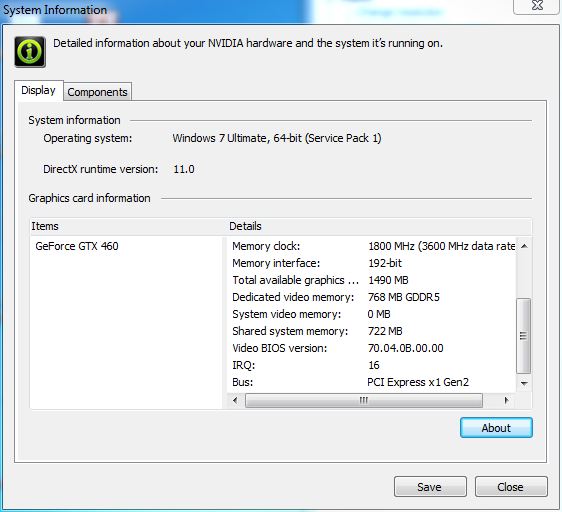
Finally got my GTX 460 in so I can run x1.opt on the T420, results:
![[IMG]](images/storyImages/captureizh.th.png)
-
nando4, hopefully you are still keeping track of this massive thread!
I will be doing a DIY ViDock in the future, I am thinking a GTS 450, for my ThinkPad T400. I was settled on a PE4L, until I saw that the T400 is capable of combining two PCI ports to get x2 bandwidth instead of x1, with the PE4H. Is that correct?
If so, I have another question. What PSU do I need for the PE4H and the GTS 450? I don't want an ATX, I want a power brick to keep it tidy and somewhat portable. Can you maybe give me a link to an eBay listing or the like for the UK? (where I live) If I am not mistaken the GTS 450 needs a 120W PSU, but I have no idea as far as the diameter of the plug or the voltage.
How will I connect the PSU the 6 pin connector on the card? If I am not mistaken with the PE4L there was some sort of molex connector that required adapter cables. Is it the same for the PE4H? Again if you have a minute could you find me some listings as an example?
Thank you in advance. It is great that you have put so much time and effort into this and I hate to be bothersome, but I just don't want to get the wrong stuff.
-
Nando,
Removed GT525M from nvam.inf per your instructions still shows GT525M in device manager with same result as before Optimus is not working for GTX460.
Regedit shows that both gt525m and gtx460 seems to have the same values?
GT525M regedit:
Windows Registry Editor Version 5.00
[HKEY_LOCAL_MACHINE\SYSTEM\ControlSet001\Control\GraphicsDrivers\Configuration\SIMULATED_10DE_0DF5_00000001_00000000_100100^868DC61D80E57DBA8F6A1E2D8D1992B5]
"SetId"="SIMULATED_10DE_0DF5_00000001_00000000_100100"
"Timestamp"=hex(b):2b,f7,c4,43,60,29,cc,01
[HKEY_LOCAL_MACHINE\SYSTEM\ControlSet001\Control\GraphicsDrivers\Configuration\SIMULATED_10DE_0DF5_00000001_00000000_100100^868DC61D80E57DBA8F6A1E2D8D1992B5\00]
"PrimSurfSize.cx"=dword:00000400
"PrimSurfSize.cy"=dword:00000300
"Stride"=dword:00001000
"PixelFormat"=dword:00000015
"ColorBasis"=dword:00000002
"Position.cx"=dword:00000000
"Position.cy"=dword:00000000
[HKEY_LOCAL_MACHINE\SYSTEM\ControlSet001\Control\GraphicsDrivers\Configuration\SIMULATED_10DE_0DF5_00000001_00000000_100100^868DC61D80E57DBA8F6A1E2D8D1992B5\00\00]
"Flags"=dword:1301ff87
"VideoStandard"=dword:00000001
"ActiveSize.cx"=dword:00000400
"ActiveSize.cy"=dword:00000300
"VSyncFreq.Numerator"=dword:0000ea64
"VSyncFreq.Denominator"=dword:000003e8
"HSyncFreq.Numerator"=dword:03dfd240
"HSyncFreq.Denominator"=dword:00000540
"PixelRate"=dword:03dfd240
"ScanlineOrdering"=dword:00000001
"Scaling"=dword:00000004
"Rotation"=dword:00000001
===========
gtx460 regedit:
[HKEY_LOCAL_MACHINE\SYSTEM\ControlSet001\Control\GraphicsDrivers\Configuration\SIMULATED_10DE_0E22_00000002_00000000_200100^38772ACB736648AD809FCE54A04F7A11]
"SetId"="SIMULATED_10DE_0E22_00000002_00000000_200100"
"Timestamp"=hex(b):79,b9,98,18,64,ff,cb,01
[HKEY_LOCAL_MACHINE\SYSTEM\ControlSet001\Control\GraphicsDrivers\Configuration\SIMULATED_10DE_0E22_00000002_00000000_200100^38772ACB736648AD809FCE54A04F7A11\00]
=====
3dmark06 SM 3.0 = 7230 for ATI 5870 but only 2000 for gtx460 non Optimus. Why such a big difference?
Much thanks. -
Does it have an accessible mPCIe slot or expresscard slot?
If it has Optimus already then monitor this thread to see if wicked20can get an eGPU x1.Opt to override the existing onboard Optimus.
As pyr0 points out, all Sandy Bridge notebooks (i3-2xxx, i5-2xxx or i7-2xxx) use a Series-6 chipset like HM 65, QM 67 that are pci-e 2.0 (5GT/s-per-lane) capable.
x1.Opt outbenches x2 and is simpler. Recommend x1.Opt for your setup. Details of how to do a 12V/120W GTS450 setup is linked from the first post to here.
PM sent. Briefly, removing existing drivers then disabling the GT525M (VGA adapter now) prior to loading the Verde driver +nando4 nvam.inf (with the removed GT525M) will mean you'd no longer have a GT525M "simulate" registry entry. You'd only have the GTX460 in which case x1.Opt should engage using the GTX460. As you still currently have a GT525M simulate registry entry please re-do these steps. -
Thanks. I assume this adapter would work?
New 12V 10A AC adapter for TV and LCD Monitor (Inc VAT) | eBay UK
Those pictures helped quite a bit too for the cable setup. Do all GTS 450's have the external power connector? And could you direct me to a guide on enabling Optimus? I need to anyways as I want to use my internal LCD primarily. Also, instead of disabling my Switchable Graphics discrete ATI card with the ViDock Setup 1.x tool, can I just disable it in the bios? Or will that not have the same effect?
And finally, anything else I should know before doing this? Thanks again.
Update: Does this apply to me as well?If it does what will I need to do to overcome this as that adapter does not have a USB plug. -
hello guys ,
after reading a lot about the egpu experience , i decided to make my own egpu
and help with my results .
so i have a toshiba f60 with hm55 chipset , no expresscard port
but got 2 PCI -Express 2.0 x1 empty slots .
shown here :-
![[IMG]](images/storyImages/pciexpress.png)
so i will buy PE4H-PM3N , ATX psu and evga gtx 460 1gb
just want to ask for your opinions , and whats the best thing to do to get the
highest performance .
and will i get get the exact performance if using the same card in a desktop ?
also big thanks to all who kept this thread alive
DIY eGPU experiences
Discussion in 'e-GPU (External Graphics) Discussion' started by master blaster, Sep 18, 2009.



![[IMG]](http://imageshack.us/photo/my-images/89/img1907ae.jpg/)
![[IMG]](http://imageshack.us/photo/my-images/864/img0803ml.jpg/)
![[IMG]](http://imageshack.us/photo/my-images/841/img0804d.jpg/)
![[IMG]](http://imageshack.us/photo/my-images/851/img0808d.jpg/)
![[IMG]](http://imageshack.us/photo/my-images/163/img1884n.jpg/)
![[IMG]](http://imageshack.us/photo/my-images/94/img1885wk.jpg/)
![[IMG]](http://imageshack.us/photo/my-images/823/img1900qz.jpg/)
![[IMG]](http://imageshack.us/photo/my-images/217/img1897a.jpg/)
![[IMG]](http://imageshack.us/photo/my-images/146/img1908mh.jpg/)
![[IMG]](http://imageshack.us/photo/my-images/10/img1909z.jpg/)
![[IMG]](http://imageshack.us/photo/my-images/231/img1915x.jpg/)
![[IMG]](http://imageshack.us/photo/my-images/402/img1914x.jpg/)
![[IMG]](http://imageshack.us/photo/my-images/848/img1918c.jpg/)
![[IMG]](http://imageshack.us/photo/my-images/543/img1921l.jpg/)




![[IMG]](http://imageshack.us/photo/my-images/217/captureizh.png/)


![[IMG]](http://imageshack.us/photo/my-images/96/pciexpress.png/)