 Problems? See this thread at archive.org.
BTW, NFS Shift will always run with DirectX 9 or 10? NFS Pursuit will use highest DirectX (DirectX 11), right?
-
Implemented
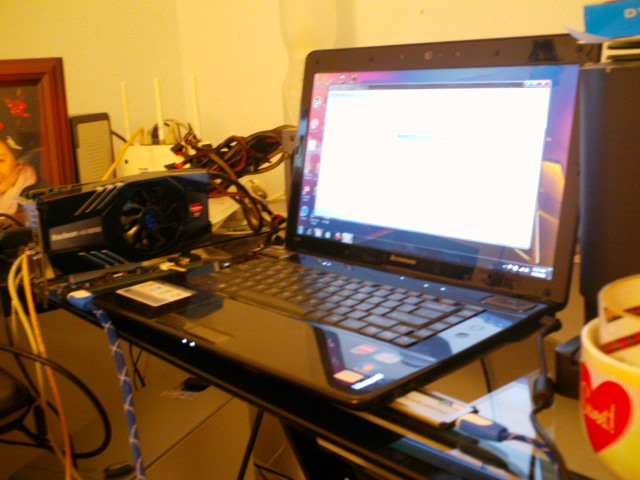
Lenovo Ideapad y560p
Core i7 2630QM (Sandy Bridge)
8GB RAM
Radeon Mobility 6570M 1GB
Radeon HD 6850 1GB via ExpressCard
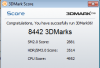
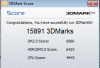
3DMark06
InternalDiscrete vs. [eGPU]
8442[15891] 3DMarks
2881[6966] SM2.0
3514[6423] HDR/SM3.0 Score
4952[4943] CPU Score
Vantage soon...Attached Files:
-
-
Can't wait to see how it works! So as I understand we need to buy a whole new thing, not only a cbale, right? I hope the enclosure will not make it expensive.
D -
GTMAX mini HDMI cable?
Thanks for posting your experience. It's a shame the Lenovo Y460P/Y560P doesn't have an iGPU via switchable graphics as then it would make a great candidate x1.Opt system using it's expresscard slot.
The braiding color on your mini HDMI cable suggests it might be GTMAX flat mini HDMI cable. I've only found ones that are mini HDMI to HDMI. Is yours mini HDMI to mini HDMI or are you using some sort of adapters? If it's mini HDMI to mini HDMI flat cable then can you advise where you purchased it from? Would be handy for those who need to thread cabling under keyboard or out of crevices where mPCIe slots are located.
Based on the wording it looks to me that is probably the case. I'm getting sketchy details. Perhaps a tactic to offload the existing pci-e 1.0 PE4L/PE4H stockpiles? It never did make any sense that the mini HDMI cable would be the problem given the cable is good for 10.2Gbps. -
Have you tried any games yet?
-
Yes, but if it was not tha cable (I agree it didn't make any sense) but the PE4L/PE4H, they cannot offload the stock as it is not compatible with 2.0, I guess.
Anyway, let's see how it is... -
Hello Lurifax,
if I understand it correctly a:\ could correspond to the virtual drive a.k.a the image that is mounted when you are inside the eGPU-setup boot environment. You can try to check that by leaving the setup and looking at the DOS you have there. ("dir" to see current directory's content, "cd" to change directory or simply "a:", "b:", ... to change the drive). So maybe you can also check if there is this diag-text-file somewhere to be found.
After you startup Windows and you want to mount the drive again you go to the C:\"eGPUSetupDirectory" and use the "eGPU-Setup-mount.bat"-file (you probably can just see the ".bat" if you have enabled to see known extensions in your explorer's config). If you would look inside that with any text editor you would find that imdisk mounts the image file to "V:". So after you run this *.bat a drive V: should appear next to your current local drives in "Computer".
Alas this is the case with the old version "1.e" I use. And I double checked that with the newest (1.f pre26) version I found.
So I do not quite understand why you mount the drive yourself? The "eGPU-Setup-mount.bat" should do all the work for you.
Next: How do you create the devcon.txt? I find that the mentioned V:\devcon\mkdevcon.bat you should execute to do so from nando4 does execute the following script:
I hope I could be of some little help. I am not really sure I could give you some information of value - it seems to me that you have to really re-read and analyze some of the FAQs and informations mentioned in this initial setup 1.x post http://forum.notebookreview.com/6295529-post641.html and post some more structured information to get better help next time.Code:@echo off :::::::::::::::::::::::::::::::::::::::::::::::::::::::::::::::::::::::::::::::: :: mkdevcon - create devcon.txt to be used by Setup 1.x :: Run in Windows :::::::::::::::::::::::::::::::::::::::::::::::::::::::::::::::::::::::::::::::: :: Get executing directory :: Change to executing drive and directory if "%windir%"=="" goto not_win SetLocal set curpath=%~dp0% set curdrv=%curpath:~0,1% set dcon=%curdrv%:\config\devcon.txt pushd . & cd /D %~dp0 call devset resources "ACPI\PNP*" > %dcon% if errorlevel 1 echo [mkdevcon] ERROR - failed to create %dcon%. Ensure UAC=off and you are an admin user. T& pause & goto end call :check_devcon if errorlevel 1 pause & goto :end echo [mkdevcon] successfully created %dcon% with a valid "PCI BUS" echo section. If using a disk image then please dismount it to ensure a 100^%% echo successful save. echo. echo ****************************************************************************** echo NOTE: if you change your RAM configuration or use your disk image/usb disk on echo another system, then pls re-run %curdrv%:\devcon\mkdevon to create a new devcon.txt. echo ****************************************************************************** pause goto end :not_Win echo. echo [mkdevcon] ERROR: Please run this utility while in Windows XP/Vista/W7. echo. goto endDOS :check_devcon :: Look for PCI BUS string in devcon.txt and exit 0 if find it. findstr /I /R /C:"pci[ -]bus" %dcon% > nul if NOT errorlevel 1 exit /B 0 findstr /I /R /C:"bus[ -]pci" %dcon% > nul if NOT errorlevel 1 exit /B 0 findstr /I /C:"AMD PCI Express (3GIO) Filter Driver" %dcon% > nul :: Found a PCI-BUS section, so exit 0 if NOT errorlevel 1 exit /B 0 :: Did not find PCI BUS section, so warning and error 1 echo mkdevcon: PCI BUS section NOT found. echo. echo If you are using a non-English language, then please edit the %dcon% file echo and remove the "PCI BUS" section. Otherwise that *whole* section will echo be excluded from allocaton when performing compaction and compaction will fail. echo. exit /B 1 :end :: Return to originating directory popd :: CLear variables EndLocal :endDOS
But don't give up, the goal is worth the effort
-
This is something I've seen a lot and would like to comment on. Only 4 wires are used for PCI-E data transfer, while 9 are used if an HDMI cable is used normally. (4/9) * 10.2 = 4.5 Gbps, so it is possible for the cable to be a factor going by the data rate rating.
-
Hey all - Im actually a long time user of the DIY vidock system. My laptop is a Dell XPS M1330, and I am using the PE4L with a Corsair 400CX PSU and Geforce GTX 460 (MSI cyclone OC).
MY system has been running perfectly since setup, and I am very pleased with results. In fact, you can see my rig run starcraft 2 in ultra settings from the front page ( YouTube - laptop DIY vidock - Starcraft 2 Ultra Settings‏)
It turns out, that I have decided to build my own desktop, and am going to assimilate the graphics card into my new rig. Because of this, I have a PSU and PE4L setup for sale now. (all that is lacking is the GFX card which can be supplied by you)
The power supply is a Corsair 400CX (400W) extremely quiet and high quality PSU which has a single 12V rail with 30Amps - good for any card you want to supply in a DIY setting (meaning only GFX card). The supply works perfectly, and is eerily quiet. I bought this for around 45 dollars, and am willing to sell it for 20 dollars
Additionally I have the full PE4L set from Harmonic that has been working without issue for the last 9+ months. It includes the following:
* x1 PCIe board (PE4L)
* Mini HDMI (Type C) to Mini HDMI (Type C) 1ft cable
* External 5V/12V power supply cable
* ExpressCard Adapter
* Additional HDMI cable - 6 ft (IM ADDING THIS)
This set sells for 65 dollars with shipping, and I will be selling mine for 45 dollars. (PLUS I AM ADDING A 6ft HDMI cord for free!)
If you buy both, you will get a fully working system for 65 bucks + 5 dollars shipping that simply requires your own graphics card. (normally this will cost you around 90 dollars or more for the stuff to run your card)
All of these parts are completely pristine and 100% functional. If the PSU was 50 watts more I might have used it for my new system (its an amazing unit).
All payments would be through PAYPAL, and I will ship starting July 5th (as I am out of town until then).
These prices are negotiable, feel free to email me at [email protected] -
^^^
Smoking deal for someone to buy a working eGPU setup. -
Yeah, I grabbed that cable off of Amazon, then bought an HDMI->mHDMI adapter off of monoprice.com.
I tried Dragon Age II with max settings at 1080p (DX11) and it was pretty smooth. It's something my mobility chip can't chug out.
I have some mPCIe slots to try out the X2 link, but they may be whitelisted. Hopefully we get EC2.0 soon, however, I haven't tried forcing it to 2.0 with the Setup 1.x yet.
The y570s have switchable graphics, but no expresscard. So, I picked the y560p, which allows basically plug and play eGPU. -
Would HWtools ever consider making eGPU solutions for Sony's VAIO Z light peak/USB 3.0 port?
-
Will the PE4H + EC2C set be updated because of PCIE 2.0? I tought that it was only a passive adapter, "forwarding" the given lanes by the motherboard.
-
Hi Nando,
Here's the updated info and screenshot showing x1.1 of HD5870
3dmark06 score = 18405
SM2.0 = 8158
HDR/SM3.0 = 7558
CPU = 5423
3dmark Vantage = P14725
http://forum.notebookreview.com/del...sandy-bridge-l1502x-l1702x-3.html#post7361044
Thanks so much again -
did you ever get your legacy ati combo working? I use a 4850 with an onboard x1250 and ran into some of your problems. The solution for me was use 8 series drivers, not 9 or legacy. On both vista and win 7 8.12 ccc boots everytime and supports both those cards. If win 7 use vista drivers anyway. xp never worked for me and egpu.
-
I have tested two more games; Left 4 Dead 2 & DiRT 2. The results can be found at post #4221.
-
I doubt this will apply to very many egpu users, but if you're like me, stuck with an amd chipset and legacy igp (x1000 series dx9 cards), and wanting to get the most out of your much better ati HD series vidock addon, you can get around ati's crappy unified driver from three years ago (9.3 was the last legacy + HD combo driver and it's slow) and use the newer 11.6 drivers which gave me a 50% performance boost on my hd4850. Driver modding doesn't work with x1000 based legacy products because they need southbridge drivers.
This will.
Simply install the 9.3s or any of the drivers prior to that (8.12 boots more stable) then start an installation of the 11.6 drivers but kill it, so you only get the installation files out of setup.exe (they usually save to ati folder: support). Next open up command (dos) and navigate to the driver directory in the ati support folder, till you come to all of the atixxx.dl_. Every file ending in _ needs to be expanded in command. Use the command "expand -r *.*" and command should expand all the dll's.
Now the fun part. Copy every file that has been expanded, plus all the other ati essentials (I just copy em all) to your game directory. The old opengl icd trick actually works with all the drivers. The game you play will use the drivers in its directory and will not search the system folder in windows. So your game gets about 100 mb of new dll's and it uses your vidock to its full potential using new drivers. My frame rates in every game, d3d and opengl doubled at lower resolutions and I saw at least a 20 to 30% boost at 720p and beyond. Three years in driver development is a long time.
This is necessary for amd 690 chipsets like mine. -
Does this mean, it's recommended to wait and buy it, comparing to the old one?
EDIT: Mine is PCI 2.0...
EDIT2: Sorry to ask this, does this perform better as 2.x exp? (comparing to the pe4l-pe4h?) Whats the recommendation? Thanks. -
Only wait if you have sandy bridge/series 6 chipset notebook.
-
It would be great to have some update from HW Tools as it is already 30th, but nothing on their side... no information, no pictures, no price...
-
Just tried to install my eGPU in a case with other hardware. The cable won't fit
![[IMG]](images/storyImages/img_7370nmb4.jpg)
![[IMG]](images/storyImages/img_7373o89z.jpg)
What about the power consumption if the eGPU is not connected? The PSU would power the other hardware 24/7 and therefore the GTX460 too. -
I've been running a 9600GT for about a week with my Thinkpad T60 and PE4H + external PS and so far things have been very stable. Just got a Gigabyte GTX 550 Ti and swapped it in for the 9600GT but it doesn't work. My machine won't boot... even with the BIOS set to boot to the internal LCD it still won't boot. I tried the reset option switch on the PE4H in a couple of different positions but it made no difference. I swapped it with the 9600GT a couple of times and, while the 9600 always works, the 550 never does.
I still need to try the 550 in a desktop to see if maybe the card is bad. Is there anything I'm missing? -
Unfortunately my new GTX 550 works ok in a desktop machine, so I'm thinking there is some problem with my T60's BIOS recognizing it, even though my system works just fine with the 9600GT. My BIOS is 2.25, and the latest version is 2.27, but the BIOS readme doesn't mention any changes related to PCIe since 2.25.
With my luck the new version won't work with either card. I'll have to figure out if it's possible to downgrade before trying this. -
I tried the latest BIOS and still no joy... the machine won't boot with the GTX 550 plugged in, even with the BIOS set to ignore the external PCIE graphics. Looks like I might be stuck with my 9600GT... not the end of the world, but it's still going to bug me.
-
Did you tried boot without eGPU plugged in, put to sleep, plugged in eGPU & resume windows?
-
Sir Nando,
You are absolutely brilliant. You did it! We broke 19k w/ 3dmark06!
Optimus is now working w/ dGPU Nvidia for Sandy Bridge (Series 6).
Much thanks.
RE5 = 123.7 fps
![[IMG]](images/storyImages/30d9c857c06355a5dd2775faecda436a5b69fbb26d5cd2d81de5f9b2099974f32g.jpg)
Updated w/ DMCV4 DirectX 10=118.86 fps
Not bad that a cheap gtx460 768MB be as fast/faster than gtx470 and a 560 Ti.
![[IMG]](images/storyImages/2110f14ba4c1b5fab4355f8aef5269d062853e485dd6e5df85da5bfcda894b932g.jpg)
Waiting for somone to make a mini Displayport to mini hdmi adapter for the TB active cable or similar. I'm quite satisfy w/ 40-50 fps.
Much thanks to allLast edited by a moderator: Feb 6, 2015 -
When you say it doesn't boot does the system not even POST, or does windows BSOD on startup?
-
Would you bother to explain that to us?
-
This is confusing! If i buy GT430, can i do the Optimus setup?
"NVidia Optimus driver provide a transparent internal LCD cloning mode for systems with 4500MHD/HD primary video when using a NVidia GTS4xx/GTX4xx card." -
I'm willing to bet its the power supply
-
Most probably. He use 350W PSU.
To run GTX 550 Ti (max TDP is 116 W), recommended to use 400W PSU. The card require 1 x 6-pin PCIe power connector. -
Sounds great! Could you let us know more detailed how you achieved optimus with dGPU? Also I noticed you overclocked your GT 525m. I'm about to buy a sandy bridge laptop also with 525m, could you share with us how you did that?
Thanks in advance!
D -
Only got 16k with GTX460(1GB!!!) and i5-2520M (3GHz while testing with turbo)
![[IMG]](images/storyImages/unbenannt4ni1.png)
Is it possible to get more? -
wicked20 can score higher because he have better processor. Your score is not bad too.
-
Doesn't even POST... even if the BIOS is set to ignore the external PCIE, I get nothing on the LCD. It's as though the BIOS is looking at the PCIE devices pretty early during startup and just hanging when it sees the GTX 550.
A couple of other people suggested a power supply problem. Based on rated current (from the supply) and TDP of the card, the supply I'm using should be fine, but I'll get something larger and give it a try. -
Get something rated 80% efficiency at least 450w from a reputable manufacturer.
-
How are you connecting your PE4H to your laptop, through expresscard (EC2C) or mPCIe slot (PM3N)?
Do you get a series of beeping sounds when your laptop freezes on POST? If yes, what is the sequence?
I'm asking this because I've had issues booting my X200 with my GTX 460 already on. It always works fine connect it to the expresscard slot but I had issues booting with my eGPU connected on one of the mPCIe slots. I eventually figured out that somehow the problem was in the RAM. I had upgraded my X200 to 8GB using Crucial 4G SODIMMs but apparently the BIOS has some issue with it which only manifested when booting with the eGPU on port #3. Replacing the RAM sticks with the original Lenovo 2x1GB sorted it out. I'm still unsure if the problem is in the Crucial SODIMMs or in having >2GB RAM.
If you're using EC2C, have you tried connecting your GTX 550 after booting up Windows (suspend, connect to EC2C, resume)? -
No, no beeps. I'm using the Expresscard slot on the side of the laptop. Sometimes I get some beeps (don't remember the sequence) when starting up with the 9600GT. I shut down, re-seat the connectors (the Expresscard adapter is a little lose), and restart and it usually comes up ok.
I haven't tried connecting once Windows boots... will try that later. Will also try a higher-power PS. -
Cold booting with the eGPU is less fussy but enabling the eGPU after Windows has started up has the advantage of keeping the IGP enabled in addition to the eGPU screen. At least my X200 always disables the IGP if it detects another GPU connected upon POST. If Windows fails to detect the eGPU upon suspend+resume then it's likely that your PSU is insufficient. What are your PSU specs? Is it single or double 12V rail?
-
I'm now powering with a 650W Antec Earthwatts supply... nothing has changed. Machine will not POST with the 550 plugged in. If I boot into Windows (XP) and then plug it in, Windows will recognize it (it installed the drivers successfully), but can't use it - I guess because I'm already using the on-board X1300 adapter. If I leave the GTX 550 plugged in and powered during startup (either cold- or warm-boot), my LCD remains blank and the machine just dies with no beeps are anything. This is the same whether I set the BIOS to use PCIE or internal graphics.
My only other observation is that the GTX 550 fan initially comes on at high speed until I turn on the T60. Then the fan speed drops down to inaudible levels. If I start the T60 with the external PS off and then turn on the PS, the PC boots just fine (but doesn't see the GTX) and the fan keeps spinning fast. I guess the BIOS is seeing the GTX at turn-on and starting some sort of handshaking that's causing the GTX to reduce its fan speed. I'm guessing the T60 is getting hung up during this handshaking for some reason, although I don't know enough about PCIE and Lenovo's BIOS to say for sure. -
Hi David,
Nando has been helping me since March. I tried so many things but I think when Nando just added codes to disable the dGPU, it allowed Opt 1.x with and likely any/many future versions of Quadcore+ or faster CPUs and dGPUs + pcie 2.0+, with limitless possibilities:
gtx580+ / 590 / SLI / and newer GPUs (GTX 680/780/ etc) within our reach.
I use MSI Afterburner to O/C.
Thanks. -
One more data-point... plugged the expresscard adapter into an X201 running Windows 7 and it booted up on the GTX 550 just fine (it got all the way into Windows and then kind of got stuck - probably because I hadn't installed the Nvidia drivers yet). Unfortunately I really want to use this setup with my T60 (my main development machine), so I guess I'll be sticking with the 9600GT for now and use the GTX 550 for something else.
-
If it gets picked up by Windows that's a good start. You should be able to use the GTX 550 together with the X1300 but I'm not sure that will sit well with WinXP. Have a look under Device Manager and see if there are any errors on the GTX 550 under Display Adapters. Code 10 might mean a driver installation problem whereas code 12 means you need PCI memory space remapping in order to free up resources for the GTX 550 to work (see page 1). Let us know what you find.
Most people here seem to connect their eGPUs after Windows has started up rather than booting the machine with eGPU on and let it become the only active GPU (in the case of Lenovo laptops at least). This is probably a feature kept in Lenovo BIOS for advanced docking stations with GPU (e.g. Thinkpad Advanced Dock). Still, details on this BIOS feature are scarce - the Advanced dock was designed for mid range GPUs first released 6 years ago so compatibility with current-gen desktop GPUs is uncertain. -
Thanks for all the feedback. I think it was code 12 but I don't remember for sure. When I have some time I'll play with this some more and report back.
I like being able to boot the machine directly on the eGPU and I guess I was spoiled that this worked the first time with the 9600GT. I have the problem even with the latest T60 BIOS, and probably this is something not high on Lenovo's list to fix. It would be interesting to know what the most modern card is that is still supported directly by the BIOS on this machine. -
Can anyone tell me the notebook cooler in this image ( http://forum.notebookreview.com/att...-egpu-experiences-d830-diy_vidock-small.jpg)? It was linked in Sander's setup and seems perfect for what I have in mind. Thanks!
-
Hi guys,
I've been using the eGPU for quite a while without any problems. Just recently after I installed windows updates (service pack 1 for w7 I believe) I can no longer chainload after running the diy vidock set up utility. After I run pci compaction and chainload, I just get a blank black screen.
Any ideas? -
If code 12, you can fixed it with eGPU Setup 1.x. You don't have much choice if the BIOS doesn't allow vanilla setup. You can try eGPU Setup 1.x.
-
Try reinstall eGPU Setup 1.x. Better removed it first & then install it again.
-
Does this code means that your dGPU is disabled continuesly, or only when you use eGPU? How do you have to use that code? In a kind of bootup setup, or in bios, or how exactly?
Thanks!
D -
I tried reinstalling it without removing it first so I guess I'll try that next.
DIY eGPU experiences
Discussion in 'e-GPU (External Graphics) Discussion' started by master blaster, Sep 18, 2009.



![[IMG]](http://www.abload.de/image.php?img=img_7370nmb4.jpg)
![[IMG]](http://www.abload.de/image.php?img=img_7373o89z.jpg)


?)