 Problems? See this thread at archive.org.
Okay not so good. The drivers installed fine. I uninstalled, rebooted, installed your set.
But the same problem is present, I can't use Direct3D or OpenGL applications unless Aero is running.
Turning Aero off just results in a grey or black screen when any 3D app (Quake, Google Earth etcis launched, same with yours and the normal ones.
Also, this driver has one issue, when my laptop is on battery, I get random black flashes, almost like the card is trying to go into power saving mode or something, when it's on AC power I don't get this. But I've had this before when using drivers straight from Intel and not the official Lenovo drivers. So obviously they must make some changes to the Intel ones for this notebook.
So sadly your effort was in vain
-
Yeah I used that before to get a boost when I played Max Payne 2 once
-
that is very strange cause i can turn off aero and stuff and everything seems to be running good
![[IMG]](images/storyImages/123123123123t.png)
a quick search doesn't reveal any problems on windows 7 aero for thinkpad t61, it seems like this is an isolated case
http://www.google.com/#hl=en&sugexp...ows+7+aero+problems&pbx=1&fp=f478bdfafcb0c911
http://www.google.com/#sclient=psy&...&aq=f&aqi=&aql=&oq=&pbx=1&fp=f478bdfafcb0c911
i am not sure but i have a feeling a something is causing your computer to black flash and not working opengl and dx on aero off
if there is bios update for your computer, i suggest you look at the changelog it might have a fix for your computer but looking at the results of the search
it looks like its a software that is giving you problems -
I don't think it's software, I've reinstalled my Thinkpad many times and even with a fresh install with just drivers loaded I get this issue all the time.
Since the early betas of Win7 onwards, it's always been the same issue.
Also one of the other members on this thread has the same issue with no OpenGL/DX with Aero turned off.
I've come across it a few times.
This issue isn't in XP at all for me.
I'll experiment a bit more though.
Oh and the BIOS is up to date, I upgraded it recently and is the current version. -
are you having error something like
"display driver has stopped working"
or
"display driver has recovered from a crash"
i remember when i start using the modded drivers, i have to reinstall it because it kept crashing especially while playing HD movies
i suggest you give this method a shot
make sure UAC is turned of otherwise it will fail to install the unsigned(modded drivers)
what i did was
step 1
right click my computer then select properties>
then select Advance system settings>
then click advance>
then settings>
then select adjust for best performance>
then click apply>
![[IMG]](images/storyImages/54524812.png)
step 2
uninstall the current video driver and make a reboot>
i used ccleaner to scan the registry and fix the remaining traces of the old driver
step 3(very important)
right click on desktop then select screen resolution>
click Advance settings>
click Adapter>
you record the Total Available Graphics Memory
![[IMG]](images/storyImages/19685733.png)
step 4
extract the driver(rar)>
go to graphics folder and open igdlh64
find these lines
[iCNT0.GeneralConfigData]
MaximumNumberOfDevices = 2
MaximumDeviceMemoryConfiguration = 256
[iCNT1.GeneralConfigData]
MaximumNumberOfDevices = 2
MaximumDeviceMemoryConfiguration = 256
[iEGL0.GeneralConfigData]
MaximumNumberOfDevices = 2
MaximumDeviceMemoryConfiguration = 256
[iEGL1.GeneralConfigData]
MaximumNumberOfDevices = 2
MaximumDeviceMemoryConfiguration = 256
replace all the "256" with the digit you get on step #3>
![[IMG]](images/storyImages/19481058.png)
then save and close>
step 4
right click setup.exe and select Run as administrator (VERY IMPORTANT)>
when the unsign driver pops up, make sure you select INSTALL(as far as i remember, it will appear two times)>
make sure you restart after the installation has finished
step 5
restore the previous setting/change you made in step #1 " Let Windows choose what's best for my computer">
just do your stuff and observe if it is stable -
Tried that, same issues
I don't get any errors. The symptoms of launching Quake Google Earth (in DirectX or OpenGL) or any 3D app is either a blank screen or a grey screen, I can hear sound and the application works but there's no display.
When I turn Aero ON then it works 100% Even with the original driver and yours.
I don't get any errors, my UAC is always off And like I said previously, upon clean installations I get the same thing, every time.
What I may try and do is download the Intel GMA driver from Lenovo and then apply the mod and see if that helps. -
Okay I tried the Sigma drivers by the 9xx Soldiers group. But same issues with their modded drivers.
[GUIDE]Fix & Performance Increase for Intel GMA Users - Minecraft Forums
Modded Drivers 9xx Soldiers sans frontiers - 9xx Soldiers sans frontiers | Google Groups
I'm 100% sure it's not software related, as I said before, fresh reinstalls have always done the same thing, and the software I'm running on my laptop is almost identical to that of my desktop, which doesn't have this issue. :\ -
Did some more googling.
Found this for Quake Live
Grey Screen as game tries to start
"do you use an intel x3100 card?
If so it happens when aero dies, I don't know of any way to solve it, other than try older drivers, or vista drivers. (I have an x3100 laptop with this problem)
This can be proven by going into windowed mode, and running the win7 troubleshooter (type in troubleshoot in the start menu) and choosing 'display aero desktop effects' when run it will force aero to restart and you will be able to see the game until it drops out again."
Another thread, which Google has listed but not cached and the thread is no longer valid I found somebody saying:
"I think this issue might be related to Windows 7's handling of OpenGL. When Aero is disabled, non of my OpenGL games will work, ..."
So it appears to be a semi common issue with the X3100 + Win7.
Edit 2: Another http://www.quakelive.com/forum/show...ot-Grey-screen-appears-quot-(windows-7-64-bit -
I have the same issue after installing punkbuster on my system.
-
Found another user who had to turn Aero on to get OpenGL working: windows 7 - Intel GMA 965 M - OpenGL missing - Super User
So at least it's not just me
-
masterjumong2012, if you're still lurking in this thread:
I got Google Earth and other directX apps working with Aero disabled. Google Earth won't work with OpenGL unless Aero is on, so it seems now only opengl applications are affected with Aero off. DX seems, to be OK so far. -
My apollogies in advance for not reading all 200+ pages
Any news in this regard?
It seems that ever since the release of "dominion" for eve-online little more than a year ago, the game suffers from constant crashes on 3100/4500 making the game unplayable.
This seems to be a widespread issue and after trying everything that I can think of (reinstalls, 32/64, Ubuntuwine, different drivers etc) I (and the senior GM that I have spoken to) have given up. Other games like wow (god forbid that I reactivate my account seems to run "fine"
Anyone feel like looking into the issue?
I'll be happy to provide any information needed.
Regards
Rune -
There's isn't going to be a GMABooster for X3100 because he can't program it. If you are running a 800Mhz FSB then the X3100 is already running at max core render speed already.
If you want more performance see my sig on PLL pinmodding or a DIY ViDock. -
Ok, will look into the PLL Pinmodding, gonna have to disassemble to boardlevel to replace my useless smartcard/PCMCIA with an expresscard before doing the DIY Vidock.
This still doesn't solve my problem as I'd love to be able to do a bit of trading/chatting in Eve when I am on the go and thus, what I am really looking for is someway to fix the intel issue on my T61.
I have even considdered geting a refurb MB with the Nvidia gfx, sadly this opens up a whole new dimension of concerns as to heating issues and such.
So ultimately, my hope remains that someone will look into the Intel/EVE issue (given the amount of eveplayers, the structure of the game and the amount of laptops out there with 3100/4500 gfx I assume that some financial incentive could be found to work on a donationware-based solution?) -
Hello X3100 enthusiasts
Is it possible to allocate more ram to the x3100, and get better performance?
Is the performance increase you get by using modified 4500MHD drivers significant? -
FYI: setPLL now includes setIGP and GMABoost which can increase/decrease the Core Render clock on a GMA950/X3100 and 4500MHD.
I use it on my 4500MHD to decrease the Core Render clock to achieve a higher FSB overclock. -
The same issue with eve. Random crashes especially when the market window is open
-
Worth noting that the Sherry Win7 Drivers are scheduled for release in the coming weeks promising improved performance.
-
Are there any modified drivers that are compatible with Win XP?
Is it possible to modify 4500MHD drivers and make them compatible with Win XP? -
Sherry 1.3 for x3100 (965) is here!, Update : Fixed available to download!
June 24, 2011 by AngelicTears posted here
-
oh cool will check this out. aww no x64 drivers yet.
-
No chance the drivers will work on x64?
-
I guess i'll have to wait, I'm just running stock windows7 drivers for my x3100 965 chipset.
-
from what I know 32bit drivers and programs will work on an x64 system. Just not the other way around. I never realized my acer 5315 was x64 capable so now im running windows 7 Ultimate x64 and I am going to try and install the drivers and see what happens.
From Microsoft
Most programs designed for the 32-bit version of Windows will work on the 64-bit version of Windows. Notable exceptions are many antivirus programs.
Device drivers designed for 32-bit versions of Windows won't work on computers running a 64-bit version of Windows. If you're trying to install a printer or other device that only has 32-bit drivers available, it won't work correctly on a 64-bit version of Windows.
I was wrong. -
Meaning that this driver will not work on x64?
-
It will not work....it will not install. At least I havent been able to get it installed. Any workarounds (if possible) are appreciated
-
BUMP
Any workaround to getting this to work on x64?
Or any similar mods that works on x64? -
I have x3100 on GL960 chipset running at 400mhz ,I upgraded from T2390 FSB 533 cpu to core 2 duo cpu FSB 800 but the clock stays at 400 and not 500 like in the Gl965 chipset I thought it would have but it seems it's limited to the chipset.
-
have I missed anything in the last 213 pages on here ?
-
Looks you'r stuck to 400 MHz Rendering clock with the GL960 p.132:
http://www.intel.com/Assets/PDF/datasheet/316273.pdf
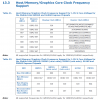
-
Hy there,i know this topic is pretty old,but a few days ago,i've got a hp with x3100 video card,and i'm asking,what driver should i install for better fps,or moded ones?Thx allot!
p.s. srry for my bad english,i'm from Romania.
-
so what's the best way to improve performance on an x3100 in windows 7 x64?
-
Buy a new laptop?
-
Haha, yes, it's time to buy a new laptop.
Intel X3100 users rejoice! It's finally here! New Pre-Beta Drivers
Discussion in 'Gaming (Software and Graphics Cards)' started by epictrance4life, Jun 7, 2007.


