 Problems? See this thread at archive.org.
I wonder what the power usage of a single clevo GTX 1070 notebook compared to the MSI 1070 notebook. The MSI peaks at around 120 watts. I am seeing if the external power picks up the slack?
you can use RTSS to find that out and that's how I found out that the MSI was drawing 120 watts as a max.
Sent from my SM-N910G using Tapatalk
-
-
When Svet said security features I wonder if that's all nvidia 10 series or just MSI?
Sent from my SM-N910G using Tapatalkhmscott and mason2smart like this. -
I think all gtx 10 series feature some kind of security on them.
Sent from my SM-G930W8 using Tapatalkhmscott likes this. -
I'll double check with them.
Sent from my SM-N910G using Tapatalkhmscott likes this. -
-
Svet confirmed that it's nvidia and not MSI implementing the security features. Shame though, would love to see a more controllable 1070.
Though clocking it to a boost of 1772MHz is cool, I don't get how it can go to 1900+ when the utilisation is low and the clocks drop when utilisation goes to 70% and over.
Sent from my SM-N910G using Tapatalk -
Yeah, people have had trouble on desktops too. But y'know. Prema.
Because TDP constraints. That's how the card is designed. They're designed to *NOT* boost. Plain and simple. No mobile pascal card keeps their clocks except apparently those 1080s in the P870 models... with the bugged firmware, no less. -
Hmm... And yet it boosts between 1700 and 1800 when utilisation is at 70%+. It seems that 1080p60 is the optimal to get 1900+ in core clock.
Still quite strange for me. I see the watts go up to and peak at least 118w.
Sent from my SM-N910G using Tapatalkhmscott likes this. -
Well, your motherboard also has power-saving features turned off via Prema mod, no? That's probably the difference. 1080/60 is optimal because the card isn't being used. But then overclocking is pointless. What's the difference between 1080/60 at 90% util on 1500Mhz core versus 70% util on 1900MHz core? The card is essentially performing the same.
3W isn't much over the 115W limit; who knows what it could be. Either way, they'll need a mod to actually function properly. -
Overclocking does seem to have an appreciable effect in firestrike. With a +120MHz overclock I scored 15313 for overall which was enough to even match the desktop 1070.
Sent from my SM-N910G using Tapatalkhmscott likes this. -
If it does, then firestrike simply doesn't draw enough power, most likely.
Remember that max utilization doesn't equal % of TDP used. -
I was running the tests with an uncapped framerate.
Sent from my SM-N910G using Tapatalkhmscott likes this. -
Yes, but the power used is different. How much power do you use in firestrike? Have you checked with an OSD?hmscott likes this.
-
HDMI 2.1 Spec Announced at CES 2017
by Scott Wilkinson on January 9, 2017
http://www.avsforum.com/hdmi-2-1-spec-announced-at-ces-2017/
"At the heart of the new spec is a maximum data rate of 48 Gbps, almost three times the maximum data rate of HDMI 2.0. This allows many significant features, including support for 4K at 120 frames per second or 8K at 60 fps and dynamic HDR metadata."
"I’ve read many comments on AVS Forum wondering if any of the products introduced at CES this year have HDMI 2.1, and the answer is no. The final spec will be released in the second quarter of 2017, so we probably won’t see any products that implement it until CES 2018. Will it be made available as a firmware upgrade for existing products? Probably not; any increase in data rate will require new transceiver hardware. Still, this is exciting news for all AV geeks."Last edited: Jan 9, 2017TomJGX, Prototime, NuclearLizard and 2 others like this. -
I've linked my results somewhere here and it lists 1759Mhz as the highest clock. I have seen it jump into the 1800 territory in games like BF1.
I think this card is more suited to 1080p60 gaming.
Sent from my SM-N910G using Tapatalk -
Here's to hoping we'll see some legit 120hz TV's. Not this motion flow rubbish.Prototime likes this.
-
Kaby Lake generation GX800 CES 2017
-
They exist. Have done so for some time. They're just rare, and are dwarfed by 60Hz TVs selling 120, 240, 500 or even 600Hz as their selling point.
-
Found this on GenTechPC and XoticPC:
https://www.gentechpc.com/ProductDetails.asp?ProductCode=Asus-GL702VS-DS74
Seems to be a GL702 with a 1070. Will it overheat or will it be cool enough? @D2 Ultima @hmscott
If temps are 80C (CPU) and 80C (GPU) after undervolting with stock paste, I like the look of it. The screen seems very nice.hmscott likes this. -
What I meant was figurative - there's about 2 or something right? I wanted one but couldn't source it locally here. That was a long time ago now. I think it was a 4k 30hz or 1080p 120hz that peaked my interest. There's also a few models that can be overclocked to 120hz fairly consistently.
I'm hoping to see more DP in make it's way too. I've read freesync is possibly making it's way to sets in the near future (using HDMI too). I'd like to see that happen too. -
Don't know. It looks too thin, but its weight is sufficient. I would have to see the cooling system. However honestly, I'd just get a P6xxRS with a Prema mod.
I don't know about the 2 something, though I saw you mention it.
HDMI can't use Freesync by design. Gsync and Freesync are built upon Displayport Adaptive Sync technology; they need Displayport. Or you could use it via DVI as well as HDMI. Besides, freesync doesn't affect a TV's usage as a TV, nor would it affect any of us nVidia users. -
AMD recently stated they have freesync working on HDMI (not sure which version though). I'd like it to make its way to TV's (for gaming) either through HDMI / Dp etc. I'm thinking if consoles and Media/Gaming PC's capitized on it we'd see Nvidia have to start offering up their free solution and do away with their closed ecosystem approach and do away with their tax for non scaler chip Gsync .
-
Firestrike uses quite a lot of TDP power on Pascal according to my measurements, especially Graphics Test 1. I've seen pretty much the highest TDP usage at 100% load during Firestrike testing on my desktop GTX 1070 - more so than games. I suppose these mobile Pascal cards are strictly TDP limited, I know on my desktop card that it's never throttled due to TDP reasons even at max overclock - the clocks do lower slightly as temperature increases (2062-2025Mhz) - I summized that there are corresponding voltage vs temperature requirements when it comes to how NVidia have set up their Pascal cards, e.g. I think they must lower the voltage (and thus the clocks) as temperature increases for I guess graphics card longevity reasons (electromigration).Last edited: Jan 10, 2017
-
5 Minutes on Tech - CES 2017 Part 2
-
I don't know. If AMD manages to get displayport-specific tech to run on non-displayport, that'd indeed be a feat. It could actually benefit consoles too I suppose. But I don't know about forcing nVidia to make their gsync free when they still have the better products for gamers.
How much power did you draw, though? And what games do you play? There's differences all around, plus that you keep it above 2000MHz in general.
This is why I asked him specifically for the number. He can do it with HWiNFO64 and MSI Afterburner/RTSS as an overlay, so he doesn't need to tab out if he doesn't have a second screen. -
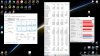
There's a screenshot after a 20min Firestrike Extreme Graphics Test 1 continuous loop run. So far it seems to be the most stressful thing my GPU does in terms of power draw. As you can see from the pic (averages are valid, started shortly before benchmark) the power draw is 181W average with 208W peak corresponding to 94% and 83% TDP draw accordingly. Core clock stabalised at 1987Mhz @1.025V at end of run. During normal gaming it's stabalised at 2025Mhz mostly, with 2050Mhz occasionally. One thing I've noticed, mobile cards seem to run quite a bit of voltage for their low clocks, which I don't understand, would have thought it would be the other way round - my GPU uses 1.062V for 2050Mhz, 1.05V for 2025Mhz, 1.043V for 2012Mhz, and 1.025V for 1987Mhz. I think for a lot of mobile cards I've seen something quite high in terms of voltage of 1.05V for something like say 1700-1800Mhz. EDIT 1: did some research, it was a GTX 1080 in the MSI Titan notebook using 1.043V for only 1835Mhz - some of these laptops are using too much voltage, at least in comparison to my GTX 1070 desktop card! (at this link: http://www.notebookcheck.net/MSI-GT73VR-7RF-Titan-Pro-Notebook-Review.189710.0.html)
(Also found that this continuous loop of Graphics Test 1 in Firestike Extreme is the quickest way to root out an unstable GPU overclock - found that for my Pascal card if it passes about 20mins of that test then it's stable even if left over night).
EDIT 2: F1 2015 gaming benchmark run on a loop for 20mins = far less demanding than the Firestrike test in terms of TDP & Watts, here's screenshot after F1 2015:
-preview.jpg) Last edited: Jan 10, 2017jaybee83 likes this.
Last edited: Jan 10, 2017jaybee83 likes this. -
This is an overclocked desktop with higher voltage than mobile, is it not?
Also you're running firestrike Extreme which is 1440p, not firestrike which is 1080p. There can be a difference in power draw due to resolution.
I want to see his mobile card specifically. nVidia's aids vBIOS is something else. -
Yeah, I don't know why you asked me for the info anyway, haha, but I provided it. I just made initially a comment on my observed behaviour of Pascal cards in terms of voltage (& therefore clock) vs temperature, and also a general comment that I thought the mobile cards must be TDP crippled, then you asked for the info I posted (screenshot).
EDIT: Oh yeah, the other point I was originally making was that Firestrike is high TDP demanding on GPUs - Graphics Test 1, I don't see such high TDP in games, and I guess my screenshot shows that it's quite TDP & Watt demanding. I would imagine that being a good test for mobile Pascal to explore TDP throttling issues.Last edited: Jan 10, 2017 -
i can confirm the firestrike thing. i must admit, futuremark did a good job on that stress test function! i do 10 min runs of firestrike ultra loop for quick checks and 1 hour runs to nail it down. finds instabilities pretty quickly and reliably
 Robbo99999 likes this.
 -
-
third column is the max of course
![[IMG]](images/storyImages/LmKNgTk.png)
-
That's still a high clock though, which is good. Is that overclocked? Have you tried running Firestrike Graphics Test 1 on a loop for 20mins to see what clocks it finally stabalises at? I think that's a really good test to see what kind of clocks your GPU can sustain under a high load, probably the most extreme gaming type load you'd ever see.
-
is there seriously an artificial OC limit of 134MHz?
-
Quick question: Nvidia GTX 1060 3GB vs 1050 ti? I'm having a hard time choosing between these two as I'm heavily factoring the graphics card in my next laptop purchase, and the laptops that are within my budget have either. I'm planning to use my future laptop as a sort of mobile gaming rig, one where I can quickly set up in between travels and play away as well as the occasional video and photo edit. Would like to keep this for 2, 3 years tops. My games lean towards MMORPGs and RPGs, though I also delve into strategy and simulation games. Not interested in VR at the moment.
-
GTX 1060 3GB any day.
Sent from my SM-G935F using TapatalkPrema likes this. -
Keep in mind both cards are not MXM, which means you'll be stuck with them and the laptop for whatever lifespan they have. I'd rather go with the 6GB MXM 1060 seen in higher end models, as the 3GB variant is most probably underclocked and gimped in lower end 999$ models with weaker cooling solutions.
Sent from my SM-N900 using Tapatalk -
The 1060 3GB is probably the same as the desktop version - that is, 1152 CUDA cores vs. 1280 CUDA cores for the 6GB 1060.
Sent from my SM-G935F using Tapatalk -
For laptops it's a different story. Yes, the difference in cuda cores might remain the same, but the 6GB variant is a replacable GPU in MXM format, while the 3GB variant is soldered.
Sent from my SM-N900 using Tapatalk -
Doesn't matter performance will be similar to the mobile 6gb version. The pc version 3gb performs literally aswell as the 6gb version.
It's only needed for games at higher settings and resolutions. But even then you can push beyond the 3gb with out any real adverse effect on performance.
Oh and I'd pick the 1060 3gb all day long over the 1050 ti even if it came with 8gb vram.
Sent from my iPhone using Tapatalk -
It does matter when the GPU fries after some time. People with the MXM GTX 1060 can simply pay for one and replace it (albeit a bit expensive), instead of throwing the entire laptop onto trash or having to replace the entire MOBO. If I'm going to get a GTX 1060 in a laptop, I'd rather get one in a high end model with proper cooling. Very few laptops have the 1060 3GB at this moment, and they are mediocre in terms of cooling and general build quality.
1050Ti falls in the budget option (800$ and less), and you cannot find a GTX 1060 laptop for the same price.
Sent from my SM-N900 using TapatalkTBoneSan likes this. -
Yea that depends if that's also the 2gb or 4gb model with the ti. But with warranty you should be ok if it dries. They replace the board. Or unit and you can sell it for something else or repeat. Not really a downer. But sure the ti price at $800 or £800 is well attractive vs £1500 for a 1060. Even though I've come from a 960m I've already had a 970m 2 times before that. Didn't want to feel like I was paying for a side grade for the 3rd time. So just went all out with the aw13 since it was a similar size as the p34w I had with 970m.
Sent from my iPhone using Tapatalk -
I agree with the abysmal difference in prices. But also keep in mind the 1500£ you are paying gives you a quality package: A huge jump in performance (1050 to 1050Ti cannot compare to 1050Ti to 1060), Top tier cooling, build quality, a replacable GPU and an amazing screen. Those budget options will cut many corners so they can provide a cheap unit that is still using the 1050Ti.
Also, VRAM theorically almost makes no difference, it's all about cuda cores and the GPU clocks. 1050Ti 2GB or 4GB are almost the same when it comes to benchmarks. Same goes to the 1060 3GB and 6GB: The difference is the laptop itself and the fact the 6GB variant isn't soldered! I'd rather get the one with higher end components because it'll give me an extra reassurance than just the warranty.
Sent from my SM-N900 using Tapatalk -
Thank you guys for the replies. Could only afford a budget option for now, so as much as I would like my next machine to have a non-soldered graphics card, it looks like I would have to settle for such a laptop. I'm choosing between two Clevos based laptops at the moment, and with the configurations that I like they pretty much come down at the same price point. I'm used to not cranking the settings up but would really like to play at full HD since my current laptop sports a 1080p screen but has only a mid tier graphics chip so I have to turn both the resolution and the settings down. My worry is this would not be as future proof as I would like given that the next laptop in the store I'm looking at has a proper 1060 6GB costing hundreds more, but budget's really tight so there's that. I wonder if dedicated graphics cards can still borrow from the system RAM as integrated solutions do?
-
Oh yea 6gb myself which is what I got. I haven't seen any 3gb models but will look cos I wanna see the price difference. In a way the £1500 laptop is worth it. The £800 laptop offers better value. Your spending nearly twice the amount for 40-50% increase. And if your a gamer that doesn't max everything for for better performance then. I suppose the 1050 ti would be a better choice and save the cash. It will be better spent.
Sent from my iPhone using Tapatalk -
You don't just pay for the GPU. Like I said, you get what you pay for: If the price increase isn't proportional to the mere increase in performance, it means the higher end model offers better hardware. It could be a better screen (IPS in high end vs TN in low end), better build quality (metals used, bezels and hinges), a better keyboard/trackpad, and most importantly, a better heat management!
Sent from my SM-N900 using Tapatalk -
There is all that. But sometimes not. Like the gs43re. If they did a version with a 1050 ti. There wouldn't be any difference worth the several hundred quid difference. I think that laptop is overpriced for what you get. But there are some nice laptops that are just as good for less though. Sometimes you ARE just paying for the gpu
Sent from my iPhone using Tapatalk -
The GS43VR is a thin laptop. No matter how good the fans are, heat problems are still there. The GTX 1060 is too much for such laptop but they still do it. If you look at its equivalent in the market, the Aero 14, it costs several hundreds more but offers a better build quality.
I would personally exclude the thin and light laptops from "getting what you pay for" because to me, those will never qualify to be high machines worth getting. They're just full of problems. See the GT62VR or its desktop equivalent, the Eurocom Tornado F5. Thick machines with proper cooling and quality control, and their prices are reasonable.
Sent from my SM-N900 using Tapatalk -
Yes thicker machines are reasonably priced. I just wished the p640re refresh was a 1060. I suppose clevo could of known about the tdp and thought they couldn't do it in their refresh. Dropped the 970m and put 965m in and then put a 1050 ti so it does look like an upgrade for those that don't know. And their prices would of been better in line Of reasonable.
That would of been my better option to save money. But I wish I could afford to take the bite. The discount on the aw13 was way better for me. But I do like the battery on the aero. I don't feel like I'm getting even 3hrs on my aw13 even though 4 hrs is attainable
Sent from my iPhone using Tapatalk -
Have you seen the temps in the somewhat thin GL502VM? That's what Clevo are trying to avoid. a GTX 1060 (or 970M from last year) is never suitable for machines that tend to get rid of thickness for the sake of a more practical machine. The sweet spot for those is either a 965M (basically a lower TDP and underclocked 970M) or a 1050Ti (Again, a nerfed 1060). I don't blame them for doing such. I'd rather have a stable machine in terms of heat than an excess of performance with a bigger power supply and chances of throttling.
Sent from my SM-N900 using Tapatalk -
It's true. No point spending more than what you need. But I fancied just being able to go in the setting and set it to ultra without messing around. Although 90% of the time you won't notice the difference going from very high to ultra. And sometimes even from high.
Fortunately for me I wasn't experiencing all those heat and throttling performances out the box.
At the moment though my build had a choice of a 1050 ti or a 1060 for no extra cost going from the 1050 ti. That is no brainer for me.
Sent from my iPhone using Tapatalk
*Official* nVidia GTX 10xx Series notebook discussion thread
Discussion in 'Gaming (Software and Graphics Cards)' started by Orgrimm, Aug 15, 2016.


