Problems? See this thread at archive.org.
Wow! for a 1600 dollar laptop?! I have mine on order and the t9300 is most definitely in it's future.
-
Did some Crysis benchmarks.
[1]1280x960 DX9 no AA High avg fps 24.05
[2]1280x960 DX10 no AA High avg fps 18.975
[3]1280x960 DX9 no AA Med avg fps 42.385
[4]1280x960 DX10 no AA Med avg fps 33.14
[5]1400x960 DX9 no AA Med avg fps 35.64
[6]1400x960 DX10 no AA Med avg fps 30.655
-
It looks like the Gateway site pulled the nvidia drivers for this, I refreshed the page and they were gone.
When I try to download any of the drivers off of laptopvideo2go.com right now I just get 404 Not Founds. What a bad time to re-install my OS and loose video drivers
-
Getting/modding a video driver is very easy if you know how to do it
-
I just tried that, it kinda worked...I think.
I have the nvidia drivers, but not the utility to modify the settings.
I downloaded a forceware from the nvidia website, extracted it, and then replaced the INF with a modded one from laptopvideo2go.com
<--Edit-->
Nvm, laptopvideo2go.com's DLs are back up, w00t! -
Having nvidia driver issues with vista 64-bit tryed 169.09 169.12 169.28 vista 64 bit.. get error message just after instalation begins "no drivers found that meets your current configuration" It thinks I am running vista 32bit... I did a full install of vista 64 bit and the welcome screen says 64 bit operating system... any thoughts..
-
how is it at 960 vertical resolution on a 1440x900 screen? or are you using an external monitor?
-
Just finished crysis, was playable through most of the game on medium settings, max resolution (some lag at the final fight) but my defect laptop did well throughout. Video card kinda hopped up to 110 degrees celcius tho, kinda bad. I'll see about replacing this once they get it in stock, meanwhile what's this rebate everyone is talking about? Is it US only or do us canadians get to cash in also?
Also, The witcher ran flawlessly on maximum settings. Two Worlds also ran well on max settings. -
I'm sure most people know this. However, for those of us that jumped in and did a clean install before making a driver/app recovery disk. As long as the D drive recovery partition is intact you can still make one without doing a full recovery.
Follow the directions here:
http://support.gateway.com/s/SOFTWARE/Medialess/FAQ/MLXPH0faq45.shtml
to copy the apps to your C: drive.
Go to the C:\Apps directory and reinstall the Gateway Recovery Center Installer (For me it was in the C:\Apps\App001497)
Then just run the program and create your DVD/Multiple CD recovery disks. -
I don't know if you've seen the benchmark, but it only offers wacked res. settings no 1440x900 or 1280x800. it has only1280x760 1280x900 1400x960 nothing standard, why I don't know.
-
I'm actually becoming more and more skeptical about that tool, in game testing seems to be best.
-
Having nvidia driver issues with vista 64-bit tryed 169.09 169.12 169.28 vista 64 bit.. get error message just after instalation begins "no drivers found that meets your current configuration" It thinks I am running vista 32bit... I did a full install of vista 64 bit and the welcome screen says 64 bit operating system... any thoughts.. It a problem with the unistaller its a 32 bit unistaller installed on vista 64 bit... I have been working on this for hours... need help!!!!!
-
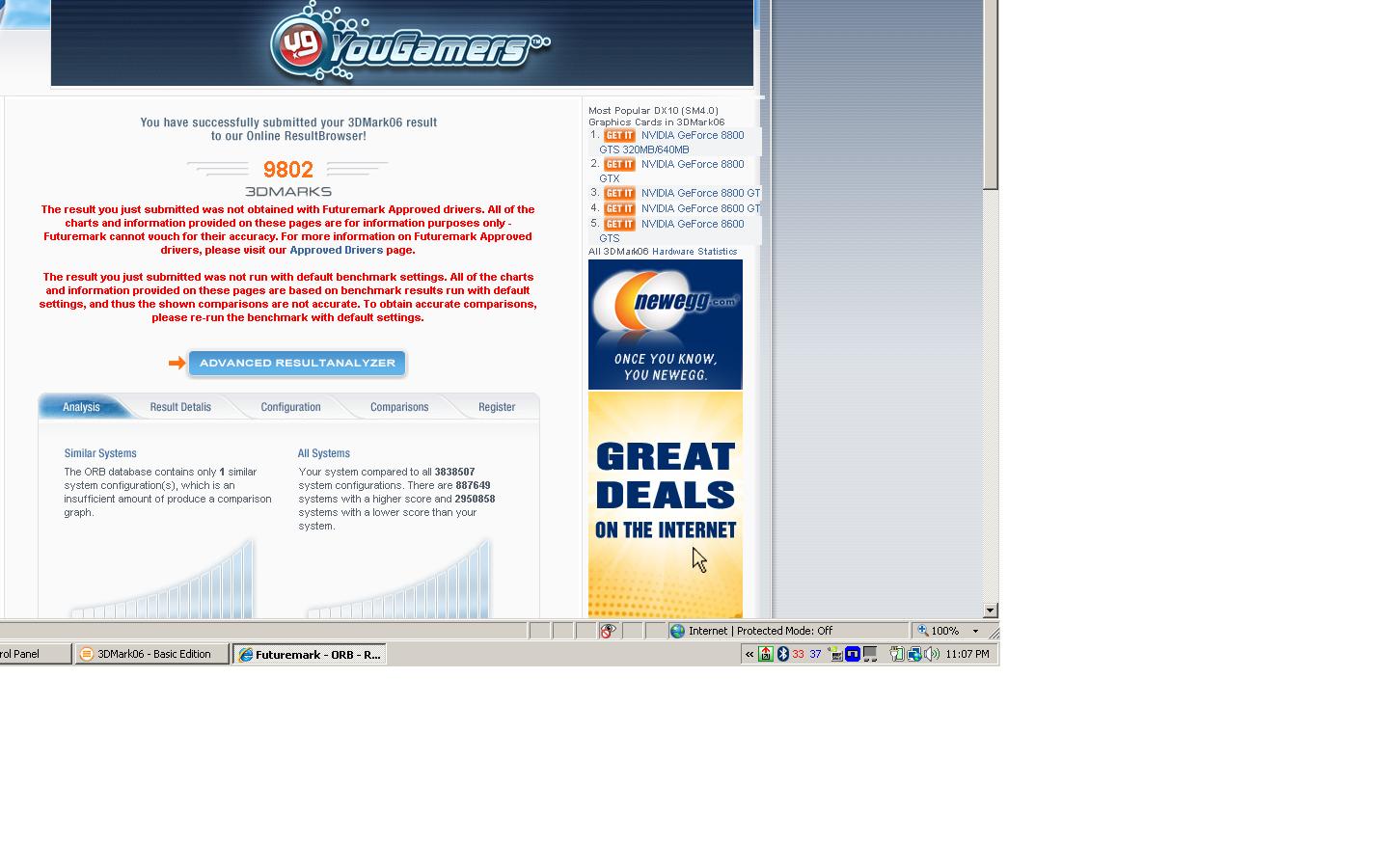
http://forum.notebookreview.com/attachment.php?attachmentid=14674&stc=1&d=1201764843
9802.jpg Holy $#C&, 10000? This machine has a lot of potential I was hoping to get to 9000, was really surprised to get 9802!Attached Files:
-
-
lol just shows you how cpu bound it was before
-
did anyone else have problems getting the 64bit display driver to install... HELP!!!!!!!
-
WOWW!!!! I'm amazed once again.
 What is the advanced result breakdown? sm2/sm3/cpu etc. With this kind of increase in cpu performance T9300's will sell fast.
-
110C is definately too high. Along with your initial 700 score in 3DMark06, you should return and get a new machine.
-
The FX edition are out if anyone is interested.
http://www.gateway.com/systems/series/529598006.php -
Thanks for a link!
-
No prob...
Just noticed the FX edition won't ship until March.....
-
you made no other changes. Thats just with a t9300??? lol.
Thats about a 25% performance boost.
If so thats all i can say is .... Holy CRAP!
T9300 it is then and nothing less.
Just looked at the prices.
Not badly price at around $336.
If only we could sell our t5450's.
Would cut the price probably in half. -
FYI on where to buy a T9300
http://www.amazon.com/gp/offer-listing/B0011BFRPU/ref=dp_olp_2
$388.10 + 9.86shipping
So with the 100.00 Savings... If you resell the old CPU for say 40.00 The cost of the upgrade will be only 260.00 over the non sale price of 1349.00
...
Thats 1600.00 For this monster. I dare anyone to find a better price/power ratio out there. The only thing that will beat this beast of a machine is duel 8800 GTx in SLI mode. And the only manufactures that offer this configuration will rake you over the coals until your wallet falls out, and after that they will waterboard you to devulge your life savings information. But at least they will let you keep your first born
John, Where did you find this CPU at this price? -
Might as well sticky this thread, it has been on the front page of gaming section for a while now.
-
No I scored 8578 with just the T9300 install, I tweaked it some to get the 9802, I think the 10000 barrier should be with in reach, I'am still adjusting things. The T9300 is idling around 31c-32c. With XP it would be 10000+ for sure. I paid $346 for it.
-
Gateway Application folders:
App000059 = Microsoft Office 2007 Trial
App000069 = Napster
App000091
App000092 = GemMeta ???
App000093
App000101
App000296 = Gateway UK Support info (click supportinfo.cmd to run, but apparently will install sponsor links like AOL in your startmenu)
App000321 = Gateway US Retail Support info (same above)
App000338 = Google Portal in Internet Explorer
App000615 = Windows Vista KB930193 X86 Patch
App000888 = Flash Player 9 ActiveX Plugin for Internet Explorer
App000943 = Hotstart button function (click Hotstart.cmd to install)
App000955 = Acrobat Reader
App000991 = Vista Administrator account enabler to provide various installation functions and preinstall preparations
App001000 = Intel Chipset Driver 8.2.1002 (12/06/2006)
App001012 = Microsoft Office Activation Assistant
App001081 = Microsoft Office OEM Audit (Adds shortcuts and descriptions)
App001121 = Sun Java SE Runtime Environment 6 Update 1
App001170 = Windows Vista KB929399, KB932246, KB932634, KB932635, KB932636 patch
App001189 = Windows Vista KB931768, KB932818 patch
App001246 = Windows Vista KB929685 patch
App001258 = Microsoft Money Essentials
App001309 = Windows Vista KB929123, KB931213, KB933566, KB936824, KB936825 patch
App001324 = Synaptics Touchpad Driver
App001325 = Realtek USB 2.0 Card Reader Software
App001329 = Windows Vista KB936003 patch
App001370 = Gateway Connect
App001422 = Cyberlink Power2Go
App001457 = eBay icon/link
App001494 = Cyberlink LabelPrint
App001497 = Gateway Recovery Center
App001499 = Windows Vista KB931836, KB933928, KB935280, KB935652, KB935807, KB936357, KB937077 patch
App001505 = Adds AOL, Napster...etc links to your Favourites
App001510 = Adds a MouseSensitivity registry entry. The value is 16.
App001531 = Microsoft Live Messenger 8.1
App001534 = Apparently a Google portal that runs in background
App001535 = GemMeta ???
App001552 = Gateway Hardware Reference Manual (PDF)
App001572 = Windows Vista KB925528, KB928089, KB929427, KB929615, KB929685, KB929735, KB929761, KB929762, KB929763, KB929777, KB930163, KB930857, KB931573 patch
App001623 = Bluetooth Driver & Software
App001634 = Windows Vista Power scheme tweak. Makes Balanced default.
App001646 = Windows Vista KB936181, KB933579, KB935807, KB936021, KB936782, KB937143, KB938123, KB938127 patch
App001672 = Windows Vista KB925902, KB930178, KB930585, KB931099, KB931174, KB931621, KB932635, KB932637, KB932638 patch
App001739 = Windows Vista KB941600 patch
App001755 = Spare Backup
App001759 = Unknown HPCD driver. The driver file is only 1 byte. :|
App001835 = Wild Tangent
App001849 = Windows Vista KB928366, KB929729, KB928365, KB929916, KB933360, KB938194, KB928952, KB938979, KB939159, KB939165, KB939778 patch
App001867 = Google Desktop Search and Google Toolbar
App001897 = Gateway BigFix
App001898 = NetZero
App001901 = Windows Vista KB933729, KB939653, KB941202, KB941229, KB941600, KB941651 patch
App001909 = Gateway User Guide
App001926 = AOL 9.0
App001937 = Windows Vista KB929762 patch
App001966 = Norton Internet Security 2008
App001978 = Microsoft Work 9.0
App002019 = Realtek 8169 PCI, 8168 and 8101E PCIe Ethernet Network Card Driver for Windows Vista
App002020 = Agere Soft Modem Driver
App002022 = IDT Audio Driver
App002024 = Intel Wireless N Driver
App002025 = Camera Assistant Software
App002036 = Gateway marker. Reads your system's partnumber and integrate a "shipping date"
App002048 = NVIDIA Geforce 8800M GTS Driver, 167.46
App002057 = Intel Matrix Storage Manager
App002064 = Silicon Image 3531 SATA Driver
App002065 = Gateway US Retail Support info (loaded with crapware like AOL/NetZero/Napster/Walmart)
App032100 = USB Media Reader Patch (I didn't install this and no problem whatsoever) -
I keep encountering a problem when I put the laptop into sleep mode(the one where it is low mem but keeps your data). This is what the message is:
Problem signature:
Problem Event Name: BlueScreen
OS Version: 6.0.6000.2.0.0.768.3
Locale ID: 1033
Additional information about the problem:
BCCode: a
BCP1: 00000000
BCP2: 00000002
BCP3: 00000000
BCP4: 81C27D1C
OS Version: 6_0_6000
Service Pack: 0_0
Product: 768_1
Files that help describe the problem:
C:\Windows\Minidump\Mini013108-01.dmp
C:\Users\Zach\AppData\Local\Temp\WER-36629-0.sysdata.xml
C:\Users\Zach\AppData\Local\Temp\WERC3CB.tmp.version.txt
Read our privacy statement:
http://go.microsoft.com/fwlink/?linkid=50163&clcid=0x0409
It basically gives me a bluescreen when i open it back up and does a reboot.
Anybody know what could be causing this? It happens about every other time I sit it down. Could something be wrong with the computer itself, or should I reinstall windows? -
I would definitely try a fresh install of windows before returning it.
-
http://www.lagoom.com/INTEL_CPU_CORE_2_DUO_T9300_2.50GHZ/BX80576T9300/partinfo-id-579832.html
I just happened to see it there.
No Idea about the retailer.
I was just trying to price the cpu because I havnt seen it on newegg yet. -
I took a quick look at that site. Said the socket on that chip is 478. Not socket P I'm assuming that is not going to work.... But you know what they say about assuming LOL
-
Anybody else? I really don't want to install a new OS for the 3rd time. -
Have you found the drivers to activate the On-Screen Display for function keys?
-
I will, just waiting for the bay/dundas store to get some more in stock. Apparently I took the one and only one that they received, but I'll check again today as they just received a shipment truck last night.
Just wanted to say that even the defect ones work pretty damn well, lol.
Also tweaked it enough to get a 6066 score
Anyways, gonna grab some breakfast and go check what they got. -
Hey, thanks for the heads up on Lagoom, I actually just ordered one from them.... from everything I can tell they've got the retail T9300's in stock and are shipping... mine is supposedly being shipped out today. I had never heard of them, but did some checking around and they seem to be legit. I called after my order to confirm, and said it should in fact ship today.... was the best price I could find as well. I'll let ya know if I have problems, but hopefully all is well.
-
I hate to bring this up again but I could use the help if anyone is running vista 64 video drivers then what freaking driver did you use, and did you have complications and how did you overcome them??? Please help...
-
Ok thanks to snowsurfer for providing me with a copy of his vista audio driver I can now begin working on my XP install guide again. It will be up around 12:00 am mountain time or early next morning. Its not a complete guide yet, but the drivers and guide provided will get xp running with sound and provide xp's increased gaming performance over vista.
Update: rapid share driver package. I used winrar so you might have to download it. I'll get the instructions up late this evening.
Did you install it properly? What problems are you having? -
the install was from a vista 64bit disk... Installs fine but without proper video driver.. downloaded numerous nvidia drivers and the one from gateways site that says its compatible with vista 64 or 32.. I can not get a video driver to install... quits during installation and says that setup has determined that the operating system in use is not V32 bit install terminated..
-
Do any of you who own this machine play any MMORPGs like EQ2, Vanguard, LOTRO?(other then WoW since its not that graphic intensive) I am wondering how its holds up when there are many people in one area.
-
The driver that is installed is the Standard VGA Graphics Adapter... I think if I could get this off.. I could install other drivers.. It unistalls but upon reboot it reinstals it almost instantly.. What I think is happening is that the Nvdia runs the unistaller and sees the unistaller a 32 bit... I am about to give up and go 32bit..
-
Uninstall your current driver and then restart the computer. I've never had to clean my registry to make sure new drivers work, but if you want, download ccleaner found here. Next step is to download this video driver, after you download the driver, then download the modded inf. Next create a new folder and place the driver you downloaded into the file, then extract the driver in the file you placed it, next after you extract the driver, place the modded inf into the file. It should ask you to replace the the previous inf file, go ahead and do that. Next run the setup file in the folder and continue and restart the computer. That should be all you have to do.
-
how bout a link to the modded inf... will let you know how it turns out... thanks..
-
>.> the modded inf is right next to the driver. I wont be back for a while, but I'm sure you will get it to work
-
Driver installed successfully thanks a bunch... I spent hours on this hopefully no one else will have to..
-
Graphically no problem once the models are loaded. You might want to think about getting a faster HD to load in those models though.
-
Wow this looks really nice, but where would you get a new processor? What I mean is, which stores carry them (online I guess)?
-
At this time, you can find them on amazon.com , ebay.com or you can try asking some of the clevo, or asus resellers on the forum.
-
Ok I promised this guide was coming, I still have a few more things to work out but for the most part this will get you guys over to xp and be able to play games and have sound. Before I to much farther I'd like to thank snowsurfer for providing me with the vista sound driver since I had removed mine when I did a vista reinstall. Also to anyone else who would like to assist with this, if you find a driver for unknown devices, go ahead and host it on rapidshare or post a link so I can add it to the guide. Again this is just a temporary guide to get windows xp functioning to the point where you can game and have sound, it is not complete yet. There are a few devices that I'm leaving out for the time being that are the "mass storage device and modem driver". These unknown devices can easily be updated by right clicking on them in the device manager, select update driver and then allow it to search online for the driver. Below is a temporary guide to get sound working.
ISO cd with SATA drivers guide Thanks to th3t1nm4n
An XP tip:
The problem - Some XP installer CDs (including my XP Pro Edition CD) will not have the storage drivers built in to have Setup find your harddrive, this is a pain when installing XP since it will ask for the drivers on a floppy and for you to press F6 to load them.
The fix -
1. Install nlite ( http://www.nliteos.com/ )
Run it, it will ask for your Windows CD, pop it in, it will then copy it to your harddrive. When it's done with this and brings you to the menu of things you may want to do with this XP CD, exit it.
2. Get a driver pack ( http://driverpacks.net/DriverPacks/ )
You will need the base pack ( http://driverpacks.net/DriverPacks/DriverPack.php?pag=b ) and the mass storage pack ( http://driverpacks.net/DriverPacks/DriverPack.php?pag=m )
I used others just to see if I could get audio, but those methods didn't work, I'm about to try this method: http://forum.notebookreview.com/show...&postcount=647
3. Extract the base pack, copy the .7z of the mass storage pack into the extracted folder's Base\DriverPacks\ directory (you may want to read it's instructions)
4. Run the program, select the MassStorage driver pack, then SlipStream
5. Fire up nlite again, you might want to mess with settings and options in here, I know that I really liked a lot of the options it had. Read up on their website before removing any software or doing anything that you aren't sure of. I tweak out my desktop to make it clean and also remove stuff like MSN and languages that I don't use.
6. Create the ISO
7. Burn the iso
If you don't have a program to burn the ISO then I recommend this since it is free and released under the GPL 2 license: http://infrarecorder.sourceforge.net/
A helpful guid for if you're completely lost on this part: https://help.ubuntu.com/community/BurningIsoHowto
I hope this helps some of you ditch the bloat of Windows Vista and get a nice clean XP install running on this awesome laptop.
Temporary fix for sound
Step #1 is to download this driver package from rapidshare, its a compilation of the most important drivers you will need to get started.
Step #2 may be optional for some, but I use winrar for compiling and extracting files. You can download it here
Step #3 Install the latest version of winrar and open up the drivers file.
Step #4 First install the wireless driver if you need it
Step #5 Next install the chipset drivers reboot when done.
Step #6 Next install the netframework update, you don't have to reboot
Step #7 Next install the Kb888111 hot fix. After installing reboot
Step #8 next step is to extract and install the sound driver in the file named "sound driver fourth install."
Step #8 Now extract the file inside of "Sound driver install fifth" Move the file "Winxp" to a location you can easily remember.
Step #9 Now go into device manager and right click the audio device that doesn't say "modem device on high definition audio bus"
Step #10 Reboot the computer and you should now have sound working. -
whats so great about clean installing? i just bought the laptop, set it up and starting installing games, did i do wrong?
-
Clean installs gets rid of bloatware and unnecessary files from your comp.
-
I've been playing LOTRO, I have no idea what FPS I get, never bothered to figure out how to turn it on in the game, but I am running DX10, Ultra High Settings, and 1440x900 with out a single bit of trouble.
I've noticed one slow down, and that's right after zoning into Bree, I'll move, and the computer takes about 3-4 seconds of hard drive churning before it's smooth sailing again.
Otherwise, I've been out in the world, in some intense trees and shadowed areas with everything max'ed and it runs smooth! (WAY BETTER than my Sager 5790 w/ 8700GT ever could!)
Also, I've been playing Hellgate London, while not an MMO really, is pretty rough on the graphics and multiple things going on at once. (ie: 30+ zombies trying to eat you.) And I've been playing that, also in DX10 mode, full res, everything max'ed out, not a single slow down.
I'll probably be reinstalling / subbing to EQ2 this weekend.
edit:
Rather than making a new post, I'll add to this one.
I encourage everybody, if it's in your mental capacity, to perform a clean install of Vista.
Out of the box, everything I said above WAS NOT possible. The overall performance of the system was terrible, and I was just unimpressed. (and I did delete everything, and try to optimize it.) So, certainly do yourself the favor, don't try to optimize, or tweak out of the box, you won't get the same result. Do a complete clean install and enjoy your laptop to it's full potential! -
For those who care Vista 64 bit clean install Windows Areo Disable 3DMARK06 6874... Also the processor rating went from a 4.7 to 4.8..
P-16831fx gateway 8800m gts
Discussion in 'Gaming (Software and Graphics Cards)' started by Rorschach, Jan 8, 2008.