Problems? See this thread at archive.org.
I've searched the forums, downloaded files which were corrupt, really not much luck here or elsewhere.
anyone have the file? if so, upload PLZ!thx!
-
-
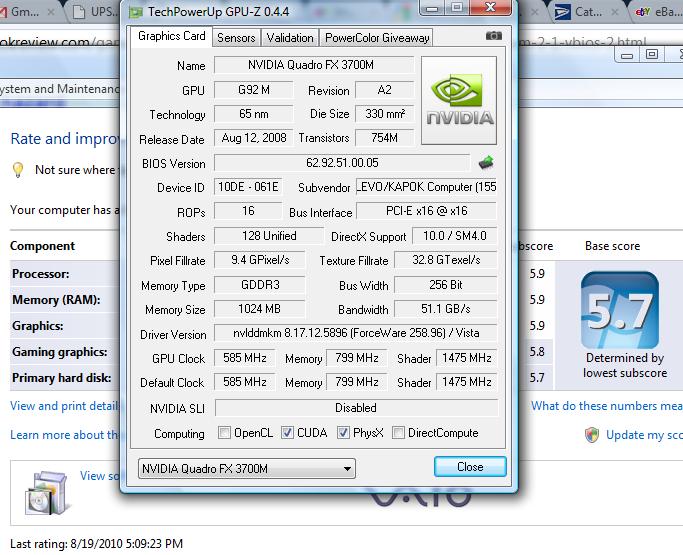
Here is one I found, it has the vram at 800mhz so it must be mxm 2.1 right?
Attached Files:
-
-
i dunno i guess were about to find out!
-
Sounds like you're going to do something risky?
Are we going to see your FX 3700m flashed to a 280m? -
I hope so. Its been done before.
if my shaders will run at higher than 1100 !!! maybe this will fix it. rrrgh i thought it was the card what the helll -
Just checked, that's a stock MXM 2.1 280M vBIOS.
The 280M is basically a die-shrink of the 3700M, so there should be a bit more heat. -
Let me know if it works, I might flash mine also.
Can you upload a copy of your current vbios for me?
I have a really old bios version on my card (dated 06/25/08) . -
I knew it would "work" which it did....
except my system freezes completely and goes to a black screen in under a minute... furmark started once...
at first everything was just scrambling occasionally.
but now this is TOTALLY unrelated to this thread because I reflashed it with the 3700m bios with NO CHANGE.
so it probably works pretty well actually considering theres something seriously wrong with my laptop
-
Well I just tried it, got into windows fine. Installed the driver, after a reboot I tried to log in but the screen filled up with artifacts.
I just held down the power button and reflashed the stock bios (which I'm using now with no problems).
I hope you can get your card working again.
I'm not sure why the 3700M doesn't play well with the 280M vBIOS. -
Just what were you trying to accomplish?
-
Can't speak for niffcreature, but I wanted a newer BIOS. The 280m bios is from 2009 while the 3700m is from '08.
-
I wasnt trying to accomplish anything really at the moment, just wanted to know i could do it.
I dont know why it permanently broke my graphics drivers though. My system only crashes when i start doing something. -
Did you try a system restore?
-
Yes, I just installed windows vista.
I flashed the card before installing Nvidia drivers this time, still no luck but It works now finally flashed back to the fx 3700m.
there is an option in the bios to clear configuration data so I did that...
I wonder why I cant get it stable. It will overclock to the GTX 280m stock clocks pretty easily I think...
maybe I need to up the voltage... guess i should try to figure that out. -
Is your vBIOS version different to mine?
I've uploaded my vBIOS here:
http://forum.notebookreview.com/msi/507923-msi-gt627-1651-works-fx-3700m-full-clocks.html
The default voltage is 1.03V which I don't know how to increase (I know it's possible with the hex view but I don't know exactly which register to change). -
download Nibitor to modify the vbios and increase VID. Im about to try it with the 280 bios.
If the vbios was made for a 55nm card, then it can have lower voltage as 65nm is less efficient, right? -
I really dont understand what the problem is, dangit
![[IMG]](images/storyImages/54597d1282258775-wanted-gtx-280m-mxm-2-1-vbios-untitled.jpg)
This is with the stock 3700m bios flashed to the exact clocks of the gtx 280m bios. Working perfectly! rrrgh.
I also tried several other versions with Nibitor including (but not limited to):
-the above bios with the "Device" field to gtx 280m. Apparently this changes too many things, maybe the "board"
-the same as the above bios but without changing the clocks
-the gtx 280m bios with increased voltages
-the gtx 280m bios with the fx 3700m clocks
all with bad graphical errors shortly after startup and then a bsod (at least its somewhat blue with white... cant see through the scramble)
Does anyone know how to edit the bios of the gtx 280m to work?
Maybe a DX10 instead of 10.1 version?
If anyone wants the ones I modified above just askAttached Files:
-
-
Sux I hope you can get it to work. On another topic weird how you only get 5.8 and 5.9 WEI scores for such a powerful card. Are you using Vista or W7? My 4670 stock gave 6.6, 6.6 while it should be certainly less powerful.
-
Yeah I'm using nibitor, but it wont let you take the voltage above the stock 1.03V for the 3700M, I was able to go down to 1V, 0.95V, 0.9V and 0.85V.
I know you can go higher than 1.03V if you use the hexview in nibitor, but like I said, I don't know which register to change. I saw a good guide on the net about that before, but I can't find it again.
Sounds right. If you notice the default voltage for the 280m is 0.03V lower than the 3700m. -
Yeah, the voltage must not be the problem though... changing almost anything makes the "integrity" indicator yellow.
The newest official fx 3700m vBIOS is here: http://forum.notebookreview.com/hp-...ebook-8730w-owners-lounge-71.html#post5940044
I guess I'll just keep trying stuff... every time i have to blind flash it i get kinda worried...
I attached my version with gtx 280m clocks. for some reason it loses integrity with these clocks and the newer driver however. Its running surprisingly cool and fast in my notebook however, shaders go to 1500Attached Files:
-
-
Yeah thats an oddly high score... maybe win7 is just different...
Actually I only get 5.3 with stock clocks, 5.8 is gtx 280m clocks. could be the driver causing all my problems... -
must be driver.. the Ge force 195.62 is best i think.
-
nope.... where is THe Moo when you need him... he flashed his 260 to a 280 i believe....
http://forum.notebookreview.com/alienware/445917-flashing-260m-gtx-280m-gtx-id-2.html
how did u do it moo?? -
That vBIOS made my 3dmark06 score in win7 go down to 7K.
In XP it is still good.
I don't know what it's doing in win7, but I'll keep it for now. -
well at least these hp fx 3600m's are working flawlessly as 8800gtx... it was all I could find, if someone has a 9800gt vbios that would be nice...
funny though they dont actually work as 3600m's, wont work on the lvds display at all.
edit: meaning i fixed them by flashing the bios. the seller i initially got the 3700m's from told me almost all of their 3600m's got returned... LOL i wonder what was "wrong" with them
-
wow well actually its an 8800m gts which I dont have the vbios for. apparently the 9800m gt bios work
so uh yea...
vaguely interesting discoveries i guess lol
I wonder who else has tried to use HP fx 3600m cards in this way or realized that they only have 64 shaders.
hmm. -
I thought the 3600m had 96 shaders until kaltmond posted this:
http://forum.notebookreview.com/har...upgrade-fx-3600m-vs-fx-3700m.html#post6534388
BTW, how well does your 3700M overclock?
Seems like I can't get past 571mhz on the core, kaltmond said he can't get past 560mhz:
http://forum.notebookreview.com/har...-he-tab-help-me-supply-power.html#post6622737
I've never seen a GPU that wouldn't even take a 10% OC. -
If I flash a 260M vBIOS onto my card, will that disable 16 shaders?
One more thing, can anyone upload a different mxm 2.1 280m vBIOS, there might be a chance that a different version might work better with the 3700m. -
i guess it would.. the GPU would only be able to use the number of GTX260M shaders...
-
It might use 128 though, because mike09 flashed a 9800M GTX onto a 280M and still has 128 shaders even though the 9800m GTX only has 112 shaders:
http://forum.notebookreview.com/sager-clevo/404155-gtx-280m-possible-working-d901c-owners.html
BTW, does anyone have a 9800m GTX vBIOS that they can upload for me?
I found an old 9800m GTX vBIOS that has 1.05v as the max volatge, this will get me a higher overclock. -
Ok, I tried the attached files.
One of them is a 260m vBIOS. Using it, GPUz still shows 128 shaders.
But this BIOS has the same problem as the 280m vbios had, once drivers are installed, I get artifacts.
The second file is a 9800m GTX vBIOS and again after flashing it I still had 128 shaders. A bonus is that this BIOS has a max voltage of 1.05V which gave me a bit more overclocking headroom.
I wonder why the 280m and 260m vBIOS versions cause problems
Attached Files:
-
-
Wait, so the 9800m gtx vbios is working for you??
I found that bios and a bunch of others. I got the same artifacts I'm pretty sure. -
What we need is for someone to work out the inconsistencies with hexview in nibitor. It will have to be based of the fx 3700m bios or parts of it will have to be added to a modified gtx 280m bios.
Considering the original HP fx 3600m vbios wouldnt display on the laptop panel at all, I think HP has just revised their policy relating to the way stuff gets whitelisted and all that. Its lucky that these cards work with the OEM vbios at all. -
It works better than the 280m vBIOS and 260m vBIOS, but the GPU temps that are reported are just crazy (like at idle, the temps were quickly jumping from 22-26C). My 3700M never idles below 40C.
There are some other hex editors out there that will compare two files for you.
Makes it easy to see what changed.
I like hexworkshop hex editor, but it's only a free trial. -
Has anyone managed to breakthrough this apparent impasse?
I'm eager to see the results of your efforts so I can convert my own 3700m.
Once it arrives I'd be happy to provide my system for testing. -
WELL
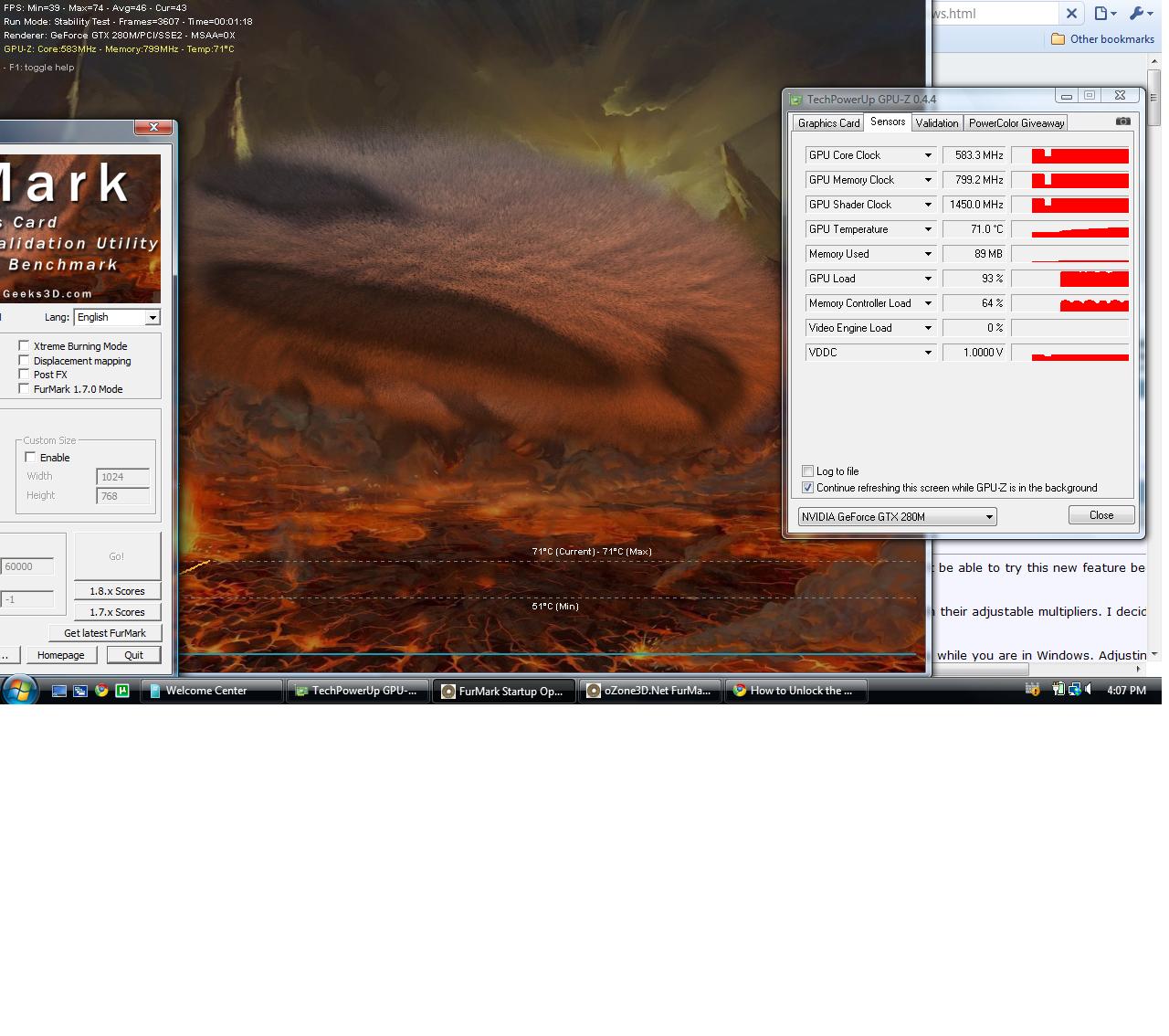
I guess either it some completely random insurmountable problem... or I just figured it out!
![[IMG]](images/storyImages/55277d1283375734-wanted-gtx-280m-mxm-2-1-vbios-screen.jpg)
I'm using a card (the only one of 4) that has a sticker with the newest hp fx 3700m vbios on it. This one ends in .10 instead of .05 or something.
If this really is it, then its just a matter of luck unless your seller is listing the vbios version.
more updates later! this is pretty surprising. lolAttached Files:
-
-
I just checked mine, which arrived today, and it's the .05 bios.
Could there have been a minor hardware revision that was done to the cards that carry the .10 bios? Otherwise it doesn't make sense that a card with a vbios one revision higher works, while the one below it doesn't.
Which 280m vbios did you use? The one that is attached to this thread?
What happens if you flash the .10 vbios from that card to one of your .05 cards and then flash the 280m vbios?
Can you upload an image of .10 vbios you have on that card? I'd like to try it on my .05 card.
I look forward to seeing what further information you have determined at this point. -
I don't have much definitive proof of the vbios thing. just this one works, and usually it artifacts.
I dont think it has to do with the other vbios ever having been installed. moral hazard said it made his 3dmark score go down.
Its in the 8730w owners lounge... http://forum.notebookreview.com/hp-...ebook-8730w-owners-lounge-71.html#post5940044
The gtx 280m bios I'm using now has voltage at 1.05 if you want to try it:Attached Files:
-
-
It's worth a shot.
I'll report back what happens on my system.
What's the upper thermal limit I want to see on this card at full load, ~70°C? ~75°C?
What version of Forceware are you using with your card?
The artifacts you are seeing on the other cards that you flashed, do they happen as soon as the BIOS POST screen shows or is it only once you get into Windows?
Any help you can provide is greatly appreciated. -
I'm getting 76C with 3dmark06 stock, overclocked it goes a lot higher, running furmark it's not even funny.
I would try to keep temps under 80C.
I only get artifacts after installing the driver and when I restart at the windows login screen they show up. -
Interesting. That def. speaks to it being a problem with the way the drivers/directX are interacting with the card rather than a fundamental problem with the way the system itself is handling the card.
Had anyone tried one of the Linux live distros to see if they show the same graphical distortions? If they are not present it would strongly support my theory and indicate that the drivers for Windows most likely have to be altered to play nice with the FX3700M as a 280M but the problem is not insurmountable. -
I think I have a linux disk somewhere, I will see if I can get it to work (or I will need to download a new distro).
-
I look forward to reading your results.
-
I've tried mandriva, guess it was too old and it didn't have drivers for my gpu.
Can you suggest a good distro? -
I know Ubuntu supports the 280m.
Now that I got my system I'm going to start testing as well to see if I can find a solution to this issue.
I think I may have already found something to investigate further. The 280M bios files I have found on the internet are all 62464 bytes in size, but the .05 BIOS I backed up from my card using NVFLASH is 61952 bytes in size. I'm not sure why there is a 512 byte discrepancy.
I'm also going to try zeroing out the subvendor and subsystem IDs. From what I read of the PCI SIG group standard the subvendor and subsystem ID can influence how the drivers interact with the card, if the subvendor/subsystem mismatch is causing the drivers to act stupid then zeroing it out should solve the problem. Zeroing out the subvendor/subsystem causes the drivers to fall back to the main device ID and go from there to determine how to interact with the card in question. -
Yeah, man, now thats the sort of thing i was trying to figure out when i randomly got this single card to work.
subsys id, eh? I KNEW there was something like that! It just seems so much like the problem is drivers interpreting something wrong.
well I've got to do a lot of card testing tomorrow as well as vbios flashing, maybe i'll swap my cards again and beat you to it if you haven't already tried everything...
i may try the linux thing, i think i have ubuntu 10.04 on a flash drive...
@moral hazard: i dont think its a matter of mandriva supporting it or not. you probably need a newer version of mandriva to use the latest nvidia driver.
in my experience, its pretty useless to try and do stuff with a linux live cd especially when it comes to drivers. you have to install first.
i bet i know what will happen though... i mean it could work, but i think instead it will artifact in a somewhat similar fashion... just not crash the system as quickly.
which will be interesting lol. -
Okay, I think I have this one figured out.
The artifact generation we are seeing after the installation of the Forceware drivers is due to the system BIOS sending a lock out command during POST to the card that prevents it from activating its 3D mode. This isn't a problem when Windows sees it as a generic VGA card as it doesn't try to activate the 3D mode, it just uses the most rudimentary 2D functions. However, once the Forceware drivers are installed Windows sees the card has 3D functionality and tries to activate those features. When Windows tries to do this with the 3D functions locked out the card starts freaking out and fills the screen with crap.
One way to fix this is to open the vBIOS in NiBiTor and copy perf. table entry #4 into table entries #2 & #3. This will allow the card to activate it's 3D mode despite the lock out command from the system BIOS and should banish the artifacts that we were seeing in Windows.
I'm going to work on this some more and see if I can't come up with a more elegant solution. If anyone tries the fix above, please report back here so I know if I'm on the right track. -
I can try that fix (I've done it before on a 9600m), but I don't think it's going to work.
It just doesn't sound right to me, I can't really put it into words why, but let me test and report back with my results.
EDIT: Just tried it, didn't fix the problem for me. -
Well, crap. That was my best theory to date.
Back to the drawing board on this one... -
hello everyone
which is the best BIOS for FX3700 to be flashed to GTX280M ?
(for best gaming performance)
Wanted: GTX 280m MXM 2.1 vbios
Discussion in 'Gaming (Software and Graphics Cards)' started by niffcreature, Aug 17, 2010.