Problems? See this thread at archive.org.
I see now. You meant modifying the limits of different cooling gears to lower. Thats not a bad thing at all. Please inform on this thread if you'll manage to modify that and how - i'd be interested in too.
It seems that you've tried every single MghzI am happy with 900Mhz, though shall try 920Mhz today.
For ultimate stability I guess I should keep away from more than 1Mhz limit from crash clocks. So instead of 922Mhz something like 910Mhz should be safer/more stable.
I haven't yet tried if the copper plate memory mod affected overclockability to GPU and shaders, but could try that too. Before the mod the GPU wouldn't go faster than 680Mhz and shaders 1610Mhz. Your shaders goes easily 1650Mhz stable in Pripyat benchmark too?
Sure. I'll keep you all folks informed as soon as I'll get it.
As x9100 has a lot of overclocking potential, it at the same time should have a lot of undervolting potential when using the default 3.06Ghz clock.
What I have read x9100 should run fine when lowering volts from default 1.23V to somewhere near 1.00V (or whatever the exact voltages are).
Lowering the volt should make x9100 run moderately cool and cut also the power consuption from default 44W maximum to much lower (presumably somewhere around 35W).
I have no interest in overclocking the x9100, but in case somebody finds suitable pin mod for 6935G for changing FSB and/or multiplier, that could be possible too. I read somewhere that the bios is locked down so seriously that this specific laptop cannot be CPU overclocked with SetFSB or any program without soldering something and/or pin modding.
-
I`m not shure how is your memory mod done but my memory has copper pads which are in conntact to bigger copper plate which again has connection to original heat spreader so in this way you ensure that memory is cooled from fan to. Yea have tried allmoust all variations of core memory shader speed and somehow memory is more stable when running 992mhz then 966 for exempel
even with same clocks on shader and gpu.
-
What the heck?! I just noticed that I have misread your memory clocks whole the time. Your mem clock wasn't 922Mhz but instead of 992Mhz!
How insane is that! from 800Mhz (1600Mhz) to 992Mghz (1984Mhz)! So I may aswell has till unpotential - not 22Mhz but 92 Mhz if my mem goes 992Mhz too.
My modification is little bit milder than yours - i simply replaced the gummy pads between the mem chips and the original aluminium rack (orwhatever the thingy is on GPU card) with copper plates + silver paste - and also applied silver paste between the original rack and edges of the original heatsink to allow best possible contact between those too (as I noticed that only the copper center and GPU were properly contacted).
I need to run some more testes later on. Thats insane if the mem goes 992MhZ stable! -
Yeah I noticed that and no chance it could be done without copper mod.
-
Okay, I did some more tests and 950Mhz did run just fine on Pripyat. Then I finally got the border with 1000Mhz which started to show major graphic render errors and hanged pretty soon after setting 990Mhz.
I also tried 975Mhz but it kind of hanged (the machine didn't, only the benchmark) - I didn't investigated further.
960Mhz went fine, but after playing some time of GTA4 I noticed single graphical render errors here and there so I lowered it back to 950Mhz which seems to be nice and round number for ultimate stability for me - which I am more than happy.
So +150Mhz to memory just by adding some copper and silver paste. Wow
I also ran 3dmark06 with clocks 680/960/1610 and finally achieved just over 7000 marks So that border is now reached.
It seems that after playing GTA4 intensively for almost an hour the GPU temp wont go higher than 65C which totally satisfies me. I am quite sure that so far I am settling with clocks 680Mhz for GPU, 950Mhz for memory and 1610Mhz for shaders (though I could try to tweak just a little bit some other day..)
X9100 should arrive within a few days so I'll keep you guys informed how does it go with that after I'll get it. If I'll manage to reach over 7500 3dmark06's with 100% stable clocks I am very happy
-
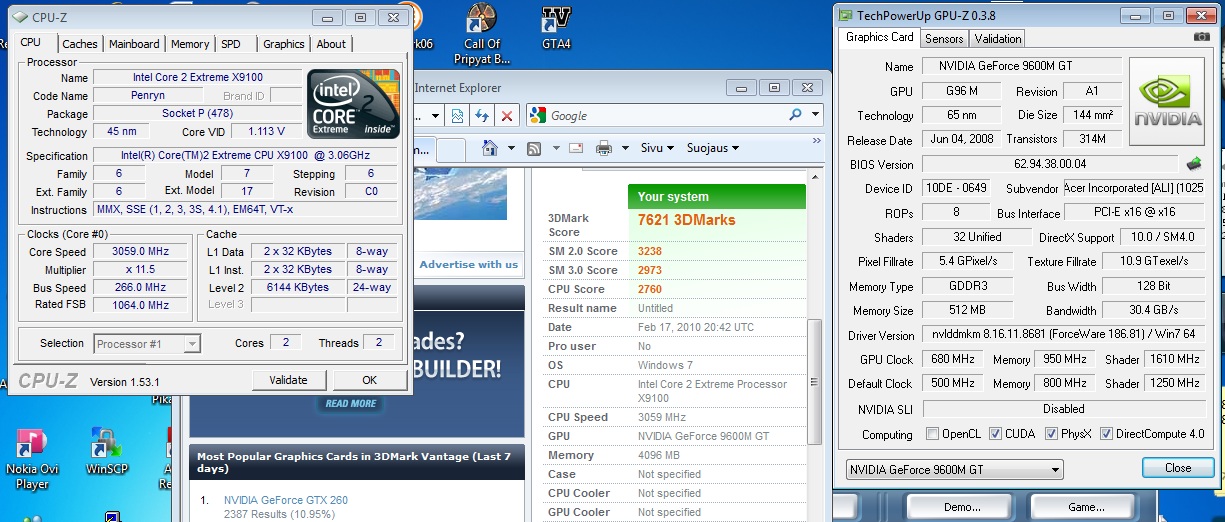
Okay, I got the X9100 and the results were quite pleasing.
I kept the GPU settings at 100% stable what I had used before (GPU 680Mhz / Memory 950Mhz / Shaders 1610 Mhz) and this setting gave with P7350 processor ca. 6950 3dmark06's.
However, after switching the X9100 you can see results as follows. The CPU score bumped almost to 2800 points and the total score achieved nearly 700 extra points.
Freakin' 7610 points I got now!
Maybe if X9100 could be overclocked a little bit and GPU / Shaders / Memory could be tweaked some more too, I guess reaching the 8000 score 3dmark06 could be possible
Attached Files:
-
-
Oh yeah, and about temps you some may wonder.
I guess I first managed to install heatsink with bad connection or something as my temps seemed to show 47/49 C idle just after the first boot and jumped at some point to 69/72C. Also the fan seemd to jump to 2nd or 3rd gear just when booting to Windows.
I tried to run some 3dmark06 but it hanged to bluescreen so I decided to reopen the laptop and make sure that silver paste is optimized on the core and heatsink is properly connected.
After booting the idle temp seemed to be 26C, however i undervolted the cpu a little bit to 1.113V (can be possibly undervolted some more).
But it seems that the heat sensors seem to hang or for some unknown reason won't give me exact information about temperature (until some certain times), so I don't know about full load temps.
It however seems that fan is not pushing any more than with P7350, so I could say that this processor "runs as cool as a dog's nose" with some undervolting.
I am no going to test the stability with an hour session of GTA4 to find out more about temps too. The temps seems ok so far - core 1 idling @26C, core 2 idling @26C and GPU idling@45C.
-
Also, If I am not mistaken, the GTA4's bechmark test jumped from 23.xx frames to 31.xx frames with same settings, just by chaging the processor from P7350 2.0Ghz to X9100 3.06Ghz.
Also with P7350 the CPU usage was 98 or 99%. Now it seems to be 95%, so with GTA4 performance I guess the CPU has been a some kind of bottleneck (at least with my spefici settings).
It seems that GTA4 isn't lagging at all, as it did before with the older processor (meaning there's no random lags/pauses on some occations anymore). -
This thread seems to become my monologue but I am so keen on the matter, so I shall post what I have found:
1. It seemed that my voltage 1.113V was too low as GTA4 crashed after some time, but 1.125V instead seems to work fine. What I have understood is that 1.235V is the default value.
I have undervolted with ThrottleStop which seems to recognize the volts little bit wrong (at least with version 1.91) but CPU-Z shows the voltages right. Running the processor @1.125V should keep it moderately cool.
It seems that Acer's temperature sensors are hanging/not working properly, as they give some info and stop changing after that. At the moment I have core temp of 44C and because of that fan runs on 3rd or 4th gear all the time.
I also noticed that when playing GTA4 after some time GPU temp rise up to 68C so it's very likely that x9100 runs hotter than the previous cpu and stresses the cooler. I started to notice some render errors and it seems that GPU memory cannot go 950Mhz when temperature rises over 68C. Naturally these profiles are good thing when they work as they should (like downclocking the GPU on desktop, but for some reason they jump from Extra profile to 3D profile on times they shouldn't). What is this 3D profile after all? Why it's underclocking the GPU as it's named 3D which should give maximum performance?
For some reason the GPU halted to settings 400/800/300 and caused GTA4 to slow down until I rebooted the machine. This problem should not be related to X9100 as it did this some times with P7350 too.
When looking the GPU bios with Nibitor it shows following settings:
Core Shader Memory
Extra 500 1250 800
3D 400 800 300
Thrtl 275 550 300
2D 169 338 100
So there seems to be a different kind of profiles in GPU bios - and this extra profile is what I am able to change with nVidia System Tools. Naturally
But the question is, what causes my machine to go to 3D profile on GTA4 after temperature goes up to near as 70C and/or some graphical render errors is happened.
This is very weird as I experiences also similar problems with CPU that startet to throttle on very low temps. The solution was to install this ThrottleStop and after that the CPU didn't throttle.
Well, now GPU seems to throttle at times when it shouldnt Does any other of you have similar problems?
I have upgraded bios 1.13 which after this behaviour started to occur. I guess I could try to downgrade bios to 1.10 or something.. -
I am a little bit afraid that x9100 generates so much heat on full load (even undervolted) that this causes GPU memory to go warmer too and makes it more unstable on overclocked 950Mhz.
I shall try undervolting & possibly underclocking the CPU later and see does this affect on stability.
That's quite bad news because then simply 6935G's cooling isn't sufficient for both (overclocked GPU card + x9100 @ 3.06Ghz) on full load. I am thinkig could there be any ways to improve cooling easily (like drilling more holes on the bottom etc.) -
Hello Scy. Sorry to hear that you have problems even I have expected that. Yepp cooling fan is shared on cpu/gpu thus affecting them both. Have you monitored your cpu temps what are those when gpu begins to throtle?
-
Monitoring is quite hard as the thermal censors doesn't seem to give any changing information, but instead are stuck in some value for hours. Only rebooting changes the value. Don't you have this kind of problems? CPU temp not changing & CPU starts to throttle withouth ThrottleStop on random occasion / on very low temps. The same thing happened with both CPU's - so i guess the reason is because of Acer bios / motherboard than CPU itself.
But I am not sure is this because of CPU as it did the same thing with P7350 once in a while, though not so much.
Is there any way to disable GPU throttle (as there is to disable CPU throttle with ThrottleStop)? One thing could be modifying the 3D profile to be identical with Extra profile.
Anyways, I need to run some more stress test to make sure is this because of new CPU or something else. I am not sure is it worth paying 270 euros for new cpu if it causes more heat problems than any benefit.. -
To be more specific, the thing is that the GPU problem may not be heat (imho 68C is just as ok as 65C) but instead some weir behaviour with profiles (that may be heat related via overclocked mem).
The GPU wont' go from extra profile to throttle profile, but instead from extra profile to 3d profile (so called "low demand 3d profile" I think it is).
This occured also with older processor, so I am not sure is it related with heat. It happened sometime when moving inside GTA4 from game to graphic options. Usually jumping between the options and game caused game to go back to extra profile, but still weird.
However, with X9100 i noticed that after 15 minutes of play some rendering errors occured (950Mhz memory, 68C temp) and GPU jumped permanently to low performance 3d mode. I wasn't able to get it back until rebooting the laptop.
Though at this point I wasn't sure was the x9100 running at normal voltage, because it seemed that ThrottleStop settigs didn't save at first and possibly the CPU was heating more if it was on regular voltage.
So I need to do some more tests to find out does x9100 generate too much heat for GPU to be overclocked as excessively at it is now. I shall try to set GPU speed back to normal and/or set x9100 undervolted/undermultipliered to find where the problem actually is.
If the problem is with GPU/mem/shaders temp/mghz itself, as this problem happened also with P7350 couple of times (though on very weird occasion, when moving inside GTA4 menus).
Anyways, as I said, I shall test it more and in case the damn thing overheats I shall possibly revert back to old CPU and return the x9100 or resell it.
The thing is that it is possible that there is some kind of safe system in GPU that sets it to 3d low performance profile in case some weird behaviour occurs in extra profile (like overheating or graphical errors).
I am not sure but I shall find out later.. -
I am not sure but cant you lock gpu profile with powermizer.? And thats why I trying to gain control over fan states. Anyway check this first.
-
Detecting the problem is hard as CPU temperature censors seems to be stuck in temp it has been during the bootup. I searched from this forum and some other people have experienced the same thing: no matter what program you use to monitor CPU core temps, they're not changing at all.
This makes it very hard to define how hot this cpu goes, as I cannot read it anywhere.
I am not even sure is this an bios version 1.13 issue as somebody else had commented that this has occured also with 1.10.
Do you have same problem?
If I could somehow fix the CPU temp censor thing first it would help finding out is this processors heat possible to cope with this laptop cooler. -
I have the same problem and suspect that all 6935g users have. But I suspect that cpu thermal readings can be read in hwmonitor and that they are ones of tz readings. I never experinced that my cpu throttles its p8400 anyway. I would do this: install hwmonitor and play GTA and wait for throttling to occur, go out and see what are readings on hwmonitor. If they are not crittical then Acer made bios for safe which means that it throttle at first sign of overheating
. If and if there is no reason for panic then wee can try and modify throttling states for cpu in bios.
-
Okay, after some testes, it seems that when GPU reaches 67-68C, some graphical errors occur very shortly and Powermizer kicks in setting profile from extra to 3d ("low performance 3d").
I am not sure is this because of excessive heat generated by X9100 - or is it just something that is built in the Powermizer - or is it just because GDDR3 cannot just go 950Mhz @ over 66C (which causes Powermizer to think that something is wrong and downclock the GPU).
Yes, I guess I can disable powermizer with following tool:
http://forum.notebookreview.com/showthread.php?t=273276
Which is quite usefull also in cases if you want to play on battery.
But in my case this I can see following sollutions:
1. Disable powermizer and see what happens. It may be solution to problem if the graphical ches are not because of overclocking + heat
2. Downclock the memory 950Mhz to something lower (I wouldn't like to do that either)
3. Change the processor back to P7350 and see if it works with mem clocked to 950Mhz
I shall continue doing some tests..
-
Disabling the Powermizer was a no go, because at the same time it seemed to disable fan speed control based on GPU temperature and GPU temp got up to 72C where GDDR3 @ 950Mhz simply made GTA4 to crash.
So I am simply facing this problem that overclocking GPU with x9100's 44W isn't very good solution.
Fortunatelly I have 7 days return & refund policy with this purchase so I am possibly going back to old CPU.
I really cannot recommend any other CPU's to this than P-series that output 25W if you prefer to overclock the GPU. -
As I was afraid for but you stil have couple days to try and find solution so dont give up as yet.
-
And I still didn found way to mod fan to kicks on full when temps reach 60 deg
-
Well, one thing it to downclock X9100 from 11.5 multiplier to 11.0, 10.5 or something lower to allow undervolt it more. But I really wouldn't see that either a proper solution.
At default settings (3.06Ghz, 11.5 multiplier) I can drop voltage only one step from default to lower - if any more the CPU goes unstable. It seems that this is not enough to cut the heat outputtage from 44W to anywear near as 25W.
But when running X9100 on 3.06Ghz (and undervolted one step) it works properly, but causes GPU & GDDR3 to overheat (from regular stable 65C maximum with P7350 to somewhere 67-68W that doesn't allow GDDR to go as fast as 950Mhz and kicks low 3d profile in).
So I think I am going to return the CPU and be happy with P7350 (or find somewhere inexpensive deal of P9600) that can be undervolted too and does output only minimal heat to allow maximum cooling for GPU as maximum overclocking.
(On the other hand I could see making this X9100 downvolted & downclocked to something like 2.66 - 2.8Ghz that could cut it's heat production somewhere similar compared to P9600, like 25W. I guess purchasing the new processor from P series could cost still about the same. Though I am not still sure what is the best solution. I wish I had chosen T9900 which would have outputted 35W on default.
Anyways, I have few days to test and shall decide what to do by the early of the next week. -
I think to optimal & most powerfull processor for this laptop would be P9700 (28W, 2.8Ghz, 6M cache) which I probaly start to hunt from eBay if I decide to return x9100.
Also P9600 (25W, 2.66Ghz) could be another, second best option.
I guess avoiding T-series (35W) gives much more overclocking potential to GPU, as CPU generates only minimal heat. -
Okay, still continuing the monologue.
I tried nearly everything imaginable with this X9100. I even downclocked it to 2.93Ghz and was able to lower to volt to 1.10V.
Still it produces too much heat and couses trouble to GPU. So I swiched back to good old P7350.
I played nearly an hour of GTA4 getting no trouble / no artifacts or rendering errors / no switching to low power 3d profile and it seems complitely stable with these GPU clocks.
So I am going to return the X9100 because it is just not working. It would possibly work if the GPU wouldn't be overclocked, but what the idea would be in that - Of course I want to keep at least the stable 680/950/1610 clocks for GPU.
Anyways, if some of you wonder that CPU speed won't do any practical difference in games, I now can say that you're wrong. With the same specific settings GTA gave 31 frames in benchmark test with X9100 @ 3.06Ghz. Now its giving 23 frames in same test with P7350 @ 2.0Ghz.
So I would say, that at least CPU intensive games, like GTA4, the difference is tremendous. In this case 3Ghz processor gave +35% boost in frames and the game runs noticeably smoother, so CPU is a bottleneck there.
What I am planning to do is to return the X9100 and purchase a P9700 or P9600 instead to get the same thermal situation than with P7350. I am hoping that with P-series processor of 25W heat output the laptop runs smooth and withouth problems even GPU is overclocked to the max. -
To reply myself, I am thinking about making "Extra" and "3D" profiles identical, as NiBiTor allows them to set so with voltage too.
Because it is not very clear to me why this GPU hits from extra profile to 3D at some point in the middle of the game (if it would've been to throttle mode, then it would have been clear that GPU tries to protect itself from too much heat) I cannot see any other solution.
My GDDR3 just won't go any faster than 950Mhz stable (even 955 Mhz cause single artifacts on certain areas), but it seems that this copper plate memory mod allower shaders to go 1625mhz, or even some more, but not over 1650mhz.
Also I am trying to find out does GPU goes any faster than 680Mhz, as it seems that this memory mod has been helping transfering the heat out of the chips and other components as well. -
Its not gonna work, I have tried it and are stumbled why?
-
Which one is not going to work? Making extra and 3d profiles identical - or overclocking GPU over 680 Mhz?
-
Making extra and 3D same. I can run my card at 750mhz easy, need to lover memory clocks bit though.
-
Hm, okay - so could you please tell me following (or please answer these questions all 6935G owners):
1. Does your CPU thermal censors work properly? Meaning do you see thermal information changing when checking with Core Temp, Speedfan, SiSoft Sandra or any software that shows both CPU core temps? Mine doesn't and the temp value is stuck on what it is when the machine was last started/booted (so both CPU cores show temp that stays same, GPU censor work properly though.)
2. Does your CPU throttle when playing intensively for some time? Mine does, and at least processor P7350 keeps dropping the 2.0Ghz to something like 931Mhz etc on extremely low temps. (maybe because of acer bios 1.13 / maybe because of faulty temp censor etc.) I solved this problem by installing ThrottleStop found on this forum, but I still would be interested to hear does anybody else have the similar problems?
3. Does your GPU trottle (or switch from "Extra" clocks to lower "3D" profile clocks)? Mine does sometimes when playing GTA4 and so far I haven't find any solution to solve this? ThrottleStop doesn't solve this problem because it prevents only CPU to be downclocked. Is this laptop just faulty or what? Have I just overclocked too much or what? Unusable it is, it's fair to say...
jmhdj: Because you have tried to making extra and 3d same, why was that? Did you experienced the same problem that on some occations GPU just simply downclocks itself to 3D?
Why didn't it worked if you tried to set extra and 3D profile to same with NiBiTor? Did you get some error message or what happened? Did you also try to remove/disable extra profile, as it seems that NiBiTor allows them removed and using only 3 or 2 profiles? If you remove extra, does the 3D profile work on maximum clocks after that? Does GPU downclock to throttle profile after that?
Sorry for too many questions, but I would like to hear does anybody else have similar problems with their 6935G laptops.
If not I am starting to thing that this is some faulty one and I am going to move to some other brand and buy a new laptop. Clevo's with GTX 260M would be fine giving over 10k 3dmark06's on default and over 13k overclocked
Acer seems to be low quality and full of problems... -
Huh I will try to answer best I can.
1. As said nobodys 6935g show cpu actual temps. Why? It has to do with howbios is made for this machine. Cant go deeper on that.
2. Probably yes, there is huge thread on that on same forum. Why? Again reason is how ACPI works.
3. I am not shure here but cuold be multiple reasons. Only time when it get to happen on my pc is when I have raised memory/shader/gpu clock to high. And thats reason why i tried to raise voltages in thought thats problem. That didnt help anyway. Maybe gpu is doing that for reason if/when gpu does not operate properly and then it switches to lower perf. level. One thing i thought and reason why I already have tried to set 3D and extreme perf. levels at same and that made card unstable.
Now Im really hope I have helped you a bit more but those things are so complex and is very difficult to tell for shure. -
jmhdj, thanks for your explanations! You've helped a lot!
Anyways, what comes to problem no 3. I guess I just solved it just by downclocking the GPU memory little bit. I set it to 925Mhz and played nearly 2 hours of GTA4 withouth any problems or GPU getting from extra clocks to 3d clocks. So that one seems to be solved.
I even managed to push GPU little bit farther so now they go with clocks 725Mhz/925Mhz/1625Mhz and worked flawlessy when ran Call of Pripyat Benchmark and playing nearly two hours of GTA4, max GPU temp reaching 67C which is totally ok for me. (I guess I should install Crysis or any other DX10 game and play it for couple of hours too to test that the clocks are 100% stable.)
There may still be small tweaking available for me from GPU between 725-750Mhz, for memory between 925-950Mhz and for shader between 1625-1650Mhz to get every single mghz squeezed what is still 100% stable. But it seems that now I have nailed the most of those and so far happy with these clocks.
The interesting thing is that how adding some small copper plates helped overclocking the GPU and shaders as well, as before the mod I wasn't able to get any over 680/800/1610, but I think that is some kind of thermal conductivity thing that caused this.
So far getting from 680/800/1610 to 725/925/1625 stable just by purchasing a few euros worth of copper plate and cutters was worth every cent
What comes to problems 1 & 2, I reverted to bios to 1.10 but no change in that - I think I can manage them with ThrottleStop. The CPU temp is just something that I won't really need (especially when using 25W cpu's) and the ThrottleStop can handle CPU throttling. It would have been nice to have properly downclocking CPU too, but I'll manage.
Anyways, these clocks should give pretty ca. 7000 points in 3DMark06. Updating P9700 or P9600 could add possibly 500 points but I am not sure is it worth ca. 300 euros. They would improve gaming performance though (even like X9100 gave +35% in frames in GTA4, as P9700 should come very close behind giving +25-30% frames boost as well) so we'll see shall I upgrade the CPU later. -
Glad to hear that Scy. Basicaly cooling sistem on this pc is not designed to efficiently cool anything over 50w tdp.
-
Something like that, which results that with X9100 outputting 44W there's pretty much nothing left to GPU.
Anyways, I would say that P9700 with 28W output + overclocked GPU should work just fine. I think I am buying that.
With this old CPU 7350 I just hit my personal record:
- GPU 735Mhz
- Mem 935Mhz
- Shaders 1635Mhz
Seems to be stable and pretty much maxed out what can I get fully stable with this card.
Anyways 3dmark06 gave the following:
3DMark Score 7127
SM 2.0 Score 3307
SM 3.0 Score 3032
CPU Score 1817
Whoa! over 7100 score with P7350! and over 3000 points with both SM 2.0 and SM 3.0.
I am pretty much happy with these settings. I guess with X9100/T9900 the score would be very close or even over 7800!
Although I am targeting to get P9700 and that should give 7500-7600 score in 3dmarks06. -
http://service.futuremark.com/compare?3dm06=11772001
HD 4650
http://service.futuremark.com/compare?3dm06=11603740
9600m GT
Both at 1280x1024. -
No comments,
Attached Files:
-
-
At what resolution however?
-
We're talking here the default 3DMark06 resolution 1280 x 768 of course (giving default for this laptop screen) - which of you should run the tests as well to get comparable results, as not everybody of the laptop owners have external display
But Why don't you Meaker just give up and say that your HD4650 with DDR2 is simply slower
I got following points with my 9600M GT overclocked to:
- GPU from default 500Mhz to 733Mhz
- GDDR3 memory from default 800Mhz (1600Mhz) to 935Mhz (1870Mhz)
- Shaders from default 1250Mhz to 1635Mhz
After the copper plate heatsink modification before mentioned clocks were reached and are 100% stable, GPU max. temp 68C after extremely heavy gaming session.
3DMark Score 7127
SM 2.0 Score 3307
SM 3.0 Score 3032
CPU Score 1817
Both SM2.0 and SM3.0 scores outperforms your HD4650 even overclocked, getting both over 3000 points. The thing is just the GDDR3 memory ticks faster than DDR2 and even though HD4650 should be a little bit faster, the DDR2 mem is a bottleneck and it just doesn't go (even overclocked) as fast as 9600M GT GDDR3 overclocked, which with these clocks are giving similar results or even overperforming the HD4670 DDR3 and possibly getting even rather close to 9800M GS.
And these results are with slow P7350 CPU. With X9100 the 3DMark Score would've been over 7800 (as X9100 is givin ca. 2800 CPU score), though I am planning to get P9700 which should give ca. 2500 CPU score and hit the 7500 pole easily with these GPU clocks.
Naturally if you compare those results to 1280 x 1024 screen you need to cut off some points, but generally speaking the results are just speaking for themselves. -
Because actually at the "standard" resolution as you put it I get a higher SM3 score and in vantage it smacks the 9600m GT around.
I should point out my sig and the 4650 scfore are actually old since my 4650 is now running a 725mhz core clock.#
I'll run a bench. -
http://service.futuremark.com/compare?3dm06=13296687
1280x768
GFX @ 750/605(1210)
Yeah that's right desktop HD4670 core clocks
EDIT:
http://service.futuremark.com/compare?3dm06=13297111
GFX @ 760/625(1250) -
Meaker: Hehe, are we getting small boys saying "my father is stronger than your's" or what?
Anyways, your HD4650 overclocked (comparing with your first link as it seemed to show better score) results only marginally better in SM3.0 (your's 3197 vs. mine 3032 - difference is just +5.5% for your win) but compare the SM2.0 (which most of the games still run) and mine score wins much better (mine 3307 vs. yours 2487, difference is huge +33% for my win!)
So it's kind of weird to say that HD4650 DDR2 overclocked outperforms 9600GT GDDR3 overclocked, as it's only +5% faster in SM3.0 but gets beaten badly in SM2.0.
To me like 5% is something like term "about the same" as it can be also within score variation, but 33% is more like "one third faster", if we makes the terms clear
Also btw, did you run any other stability tests than 3dMark06 (which is not any stability test at all)? I guess you should run Call of Pripyat Bechmark and play couple of hours some DX9 and DX10 games to say is the clocks stable at all
Mine is.
Also mine general scores goes way over 7000 points (7127 points in resolution 1280 x 768 should give easily over 7000 points also with the "standard" resolution of 1280 x 1024 if ran in external display, I shall try that later).
Also my general score of 7127 is achieved with much slower processor P7350 (2.0Ghz) that gives only 1800 CPU score compared to yours P8700 (2.53Ghz) that gives 2300 CPU score (+ 28% faster) and you still get beaten in general score in 3DMark06, so I really wouldn't say that HD4650 DDR2 would have much to win with 9600M GDDR3.
Anyways, I shall run the 3dMark06 "default" resolution 1280 x 1024 as I'll get it connected to external display to see how much it differs (I guess the difference between resolutions 1280 x 768 vs. 1280 x 1024 is just not so much)
Also I shall try to install and run the Vantage later to really see which one is the faster system
-
Okay and one more thing. As it seems that 3dMark06's default resolution is actually 1280 x 1024 (though 3dMark06 seems to set it default 1280 x 768 as the vertical resolution limits it in this laptop) it would be more realistic to compare only the benchmark results ran on external display and resolution 1280 x 1024.
So please everyone, after that, post only results of 1280 x 1024. I shall try to run that in 3dMark06 as well as 3dMark Vantage as soon as possible to get "as much as standard" results achievable.
So let's compare after that.
Also, Meaker, please post also screenshots - and also with 3dMark Vantage results to compare them with me I shall get mine here later. Let's really see does your HD4650 DDR OC'd beat mine 9600M GDD3 oc'd as you claim
Also, before posting, please test you clocks stability by runnin Call of Pripyat Benchmark (which seems to be quite good DX10 stability test). I could also overclock my GPU even farther from my current clocks but the thing is that even they score well in 3dMark06, the system isn't stable and crashes at some points on Call of Pripyat or on some other game. Running 3dmark06 only once and getting the score isn't as same as "stable".
My aim is not the find the maximum possible 3dMark06 score but the maximum possible 3dMark06 score that is also 100% stable with all of the tests and won't overheat or crash the laptop even if played hours in intensive DX9 & DX10 games -
Most games are now running shader model 3. I would be interested in comparing some real games. Do you have crysis?
-
768 is only 75% of 1024. I had a gaming session after and it was fine, I ran a 780/625 but that was not stable so I did not post it.
Also why do you want me to take screenshots? I have posted compare links. -
-
If so, why on earth we (or everybody else) is running and comparing still 3dMark06 scores, as in this assumption they are totally irrelevant (as only SM3.0 score counts in your opinion).
Should we start running 3dMark Vantage then and compare them?
I have to admit that my mistake was that I simply assumed that the 3dMark06 is running default resolution on this laptop (which it wasn't) when runnin on it's own screen (that has native resolution 1380 x 768).
Naturally 3dMark06 downscaled its default resolution 1280 x 1024 to vertically lower 1280 x 768 to fit on this laptop's screen. This caused of course abnormally better score than it should've been.
My only defence was that I wasn't the only one, as everybody others has posted their score on this thread with same downscaled resolution.
(On the other hand, if compared to actual gameability or performance in games, if the laptop isn't used with external display but only its own display of native resolution 1380 x 768, it's simply irrelevant to test anything beyond that.)
But you're right - these tests should be run only in default resolution 1280 x 1024 to get any comparable results. This requires external display, of course, but that's what it takes to see the proper results in 3dMark06 that can be compared to other results in the Internet.
So this laptop doesn't give 5800 score on default settings but only ca. 5100 (which is the result when run in default 1280 x 1024 settings in 3dMark06).
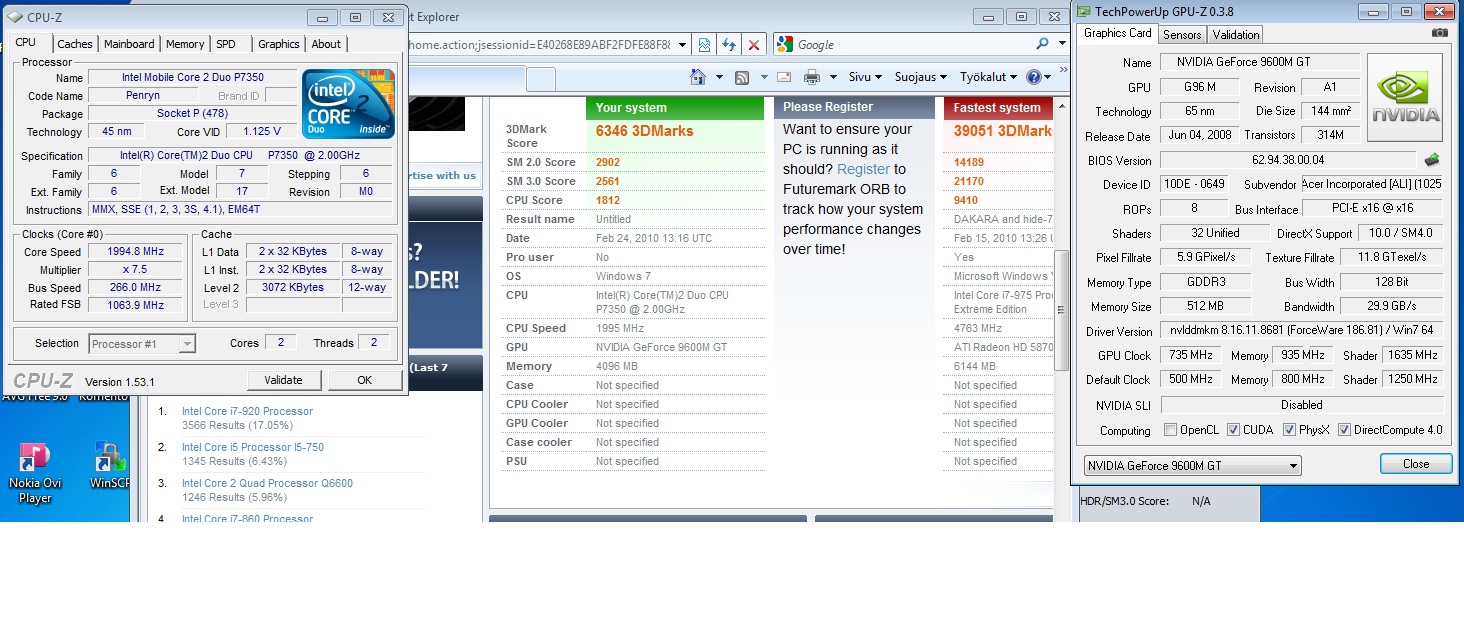
Unfortunatelly I didn't get over 7000 points when running with overclocked settings but instead of only:
3DMark Score 6346
SM 2.0 Score 2902
SM 3.0 Score 2561
CPU Score 1812
(See the screenshot attached)
That's a bummer. The results dropped dramatically when reverting test from 1280 x 768 to 1280 x 1024. (Okay, maybe with P9700 7000 score is reachable or at least not very far away on 1280 x 1024).
Now which link is to compare the score to your oc'd HD4650 with resolution 1280 x 1024?
See my previous questions. I cannot determine your resolution or clocks or any details with links.
Usually when postin screenshot of 3dmark06 resolution, result score, CPU-Z and GPU-Z that shows the clocks helps comparing.
Anyways, if I shall compare to this:
http://service.futuremark.com/resultComparison.action?compareResultId=11772001&compareResultType=14
As you can see below my SM3.0 score is 2561, your's is 2571, so they're pretty much the same.Attached Files:
-
-
Oh, yeah, this:
I should be able to install it (and have been planning to do so) to test DX10 stability on the long run. What kind of benchmark did you had in mind with Crysis?
Also, please run 3dMark Vantage and post the results. (Vantage should allow only 1280 x 1080 resolution so external display is required). -
If you look in the details they will tell you the resolution.
Anyway here is my latest vantage score:
http://service.futuremark.com/compare?3dmv=1927257 -
Okay, resolutio yes, but not for. e.g. GPU clocks.
Anyways, how do you get those links? Do you need to register to 3dMark Orb or something?
I shall install the Vantage asap and post the result. -
You need to register and if you want to post more than 1 result you need to buy it too.
-
Okay, I took the one free ride and here's my result (see screenshot below):
3DMark Score P2611 3DMarks
CPU Score 12187
Graphics Score 2069
I admit, mine is a bit slower with GPU graphics (my 2069 vs. yours 2323).
But what the heck happened with my CPU score??! 12 187 points?? How can it be so with P7350 as your's with P8700 is only 4951??
Anyways the total vantage score is nearly about the same, though I really wonder what is with the CPU as I got over 2 times better result.Attached Files:
-
-
Thats the physX stuff coming in (for a valid compare it should be disabled).
my Acer Aspire 6935G graphic card overclocking experiences
Discussion in 'Gaming (Software and Graphics Cards)' started by SanZoR, Nov 26, 2009.


![[IMG]](images/storyImages/bench.jpg)