 Problems? See this thread at archive.org.
Here are my best score so far.
-
Attached Files:
-
-
I've heard about this PhysX but not sure what does it do? Moves some of the CPU oriented tasks to GPU - or vice versa? How can I disable that?
Okay, so now we're comparing 1280 x 768 again or what? Anyways, if the other people continue posting internal display ran scores, then it may be easier - allthough it's not fair to say that "i am getting over 7600 points in 3dmark06" as it's not run in default resolution (and running in default resolution should give ca. 6700-6800 score with your settings. Please try that too and post results.)
What would be also interesting is to see what kind of CPU-Z and GPU-Z clocks was when getting that score. It would help comparing. So it would be nice to include these also in the screeshot.
Anyways, if we concentrate to compare only the 1280 x 768 resolution scores (which is a good idea to keep in mind that if only the internal display is used, any resolution beyond 1380 x 768 isn't relevant), and forget the total & cpu score because of different cpu's, here is what we get:
Mine:
SM 2.0 Score 3307
SM 3.0 Score 3032
Yours:
SM2.0 3461 (+4.6%)
SM3.0 3189 (+5.3%)
So if you're clocks are stable with those settings I guess it is fair to say that your overclocked 9600M GT is about 5% faster than my overclocked 9600m GT (at settings GPU 735Mhz / shaders 1635 Mhz / Mem 935Mhz (1870Mhz). What settings were you able to get?
Although I should be able to squeeze still some mghz's out of this stable. (*35 to *40-45 Mh on each clock).
However, could you jmhdj post both 3dmark06's score also in 1280 x 1024 to help compairing with Meaker (running the test in external display)? Also, could you try to run 3dMark0 Vantage as well to see can you get past Meakers's Vantage graphics score?
Btw, Meaker, did you modify any heatspreaders on your HD4650 DDR2 GPU memory? Doing that could allow your mem to go even further. -
I am sorry but I dont have possibility to test on 1280x1024. Anyway what is the point on laptop to use external display. Got this score with 720/992/1750 clocks and so far no problems in games, just once but thats my mistake I switched off internal cooling fan
. Will try to tweak more and see what I will get.
-
Okay, thanks for the info. Wish I could go with GDDR3 992Mhz clocks, but mine started to show artifacts in 980Mhz and even 960Mhz wasn't very stable. 950Mhz caused still some overheating. 940Mhz should work but caused still possibly some single artifacts (not sure), so I decided to settle with 935Mhz.
Weren't you able to set GPU any higher than 720Mhz when memory was 992Mhz? Did you say that specificly 992Mhz was stable but not for e.g. some lower clocks with you?
Is it possible that these clocks have some kind of timing relations with each other causing instability or other problems but just certain clocks (like mem goes 992Mhz but not lower 960mhz etc stable).
Also, I have started to think that maybe I would still go for T9900 which is 3.06Ghz but outputs 35W. This laptop should handle that as the T-series processors should work on it on default.
Undervolting T9900 should be able to drop the W output little bit more, somewhere between 30-33W I guess.. -
Okay, on some forum I read that the optimal GPU/shader relation would be 2.5 x
Meaning that shaders should be clocked 2.5 x compared to GPU, so they would be optimal to each other.
But I guess the shaders won't go say 2.5 x 720 Mhz = 1800Mhz - and there's no point dropping GPU lower, like 660Mhz (to get shaders 2.5 x, like 1650Mhz), I guess this relation hasn't much to do in stability, but instead of that overclocking GPU past 2.5 x shaders doesn't give any significant performance boost.
So far I am keeping the clocks 735/935/1635, but I could try if the exact value for mem 992Mhz would be somehow magically stable, even if dropping others.
It seems that maximazing the memory speed gives the best performance here, after that shaders and finally GPU (mostly because of 128-bit memory line, and because shaders should always be 2.5 x compared to GPU, so adding GPU speed becomes rather irrelevant after 660Mhz). -
One more thing - I downloaded Atitools for ultimate stress testing. It tests GPU constantly and shows in yellow dots for any artifacts, which indicate instability.
As it seemed to me that atitools stresses the GPU so hard, that my temps rised up to 75-76C (whereas same clocks caused GPU to go only in 68C in GTA4).
I found out that - at least in my case - I needed to lower GPU clock down to 715Mhz to reach stability and 100% working clocks also in extreme stress where temp rises higher than usually.
So I recommend you to run also the Atitool for like 30 to 60 minutes and check the screen where artifacts appear in yellow pixels if the clocks are not stable. It's also excellent tool while running and setting clocks with nVidia system tools to find the maximum stable clocks.
My GDDR3 mem seems to go 735mhz properly (I tried 992Mhz too but it gives visible artifacts instantly), but for some reason I found out that 3dmark06 test started to crash with shaders being 1635Mhz, so I needed to lower them down to 1610Mhz.
I am not sure what is the reason for that, as shaders being 1635mhz ran 3dmark06 just fine before - not any more
-
Monologue continues: shaders seem to work @ 1620mhz running 3dmark06 properly, I am not sure why 1625mghz or 1635mghz crashes as it didn't before.
Anyways, I decided to test the stability even more and started to run Atitool + Prime95 at the same time.
It seems that constant 100% usage for CPU + GPU is just too much for these clocks and temperatures slowly rised over 75... 77... 79... and finally up to 80 C which where I stopped to test.
It is propably still quite safe as in actual usage (games, desktop applications or anything) the constant usage of CPU and GPU is never 100%, but it gives some information that the cooling isn't just enough.
It seems that lowering GPU clocks may help a little bit (and is required to avoid artifacts as they appear on lower clocks too when temperature rises).
I tested and it seems that if GPU temp goes up to 80C clocks 700/935/1620 seems to be stable. If the GPU temp stays below 78 clocks 710/935/1620 doesn't show any artifacts, at temp 76C clocks 715/935/1620 are stable etc...
So it seems that there isn't just a optimal setting that would allow CPU + GPU run constantly on 100% load, as I suspect that at some point temp rises and artifacts appear also on default settings if run Atitool + Prime95 long enough..
I suggest you all to download both software, Atitool and Prime95 to determine are your clocks stable enough after all. Even though no artifacts appear in games or temp doesn't rise very up, after you put 100% stress on CPU and 100% stress on GPU with these tools, you can be sure that you're clocks are not stable and the GPU overheats over 80C, as well as artifacts appear that shows that everything isn't working as should.
Anyways, I am settling at 710/935/1620 as it seems that it's table up to GPU temp of 78C (and playing GTA4 for hours rises the temp up to 68C). So there's still 10 C gap between GPU getting unstable with artifacts and actual gaming temp. -
-
I really want to overclocking my GPU ( 9600m GT ) ,
I have an aspire 6935G-944G32Bn ,
and my notebook cooler is ( Zalman ZM-NC2000 Notebook Cooler Black )
its fit the notebook width with 15mm more space
any tutorial or easy software for overclocking the gpu . -
Sup, there is a guide for overclocking gpu, after search found here: http://http://forum.notebookreview.com/gaming-software-graphics-cards/219954-overclocking-stability-testing-guide.html#post3000755
-
Hi there i want to ask what i need to modify with Nibitor the Extra or 3D frequency.
Please help on this. -
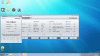
Hi im seriously considering doing this. What do I need to change?
Are these settings ok? Do I change the settings in red? These were default settings.
![[IMG]](images/storyImages/98004430.png)
Uploaded with ImageShack.us
And if I'm correct, what should I change them to? (Something standard, good, but not best since I'm new starting out!!)Thankyou!
-
hi
Your numbers are ok
You can modify settings in red
600 core, 1550 shaders and 900 memory is a good choice with low temp and good performance (120% in comparison non-oc)
for less heat (depends your cpu), in voltage, 1,05v--->1v in extra mode
try stability and temps with atittools, furmark (my favorite) or 3dmark -
managed to get my 9600m gt to
700 core
1750 shader
1050 ddr3
with about 25mhz headroom on each - dont wanna run max at all times and want it to last more than a week
-
Hello
has anyone tried to get 1.1v instead of 1.05 with the voltage table editor? -
I've got my 9600M GT 1GB DDR2 from stock 500/400/1250 to 650/520/1625 which is 30% OCed clocks..
I wonder if anyone has OCed higher than this for the 9600M GT DDR2?
Max temps on Bad Company 2 about 65celcius. -
mine is a 9600m gt 512MB ddr3 (acer 6935g) so it's not exactly the same for memory clock
But my max frequency for the moment is 665/920/1750
with higher frequencies, i have black screen in 3Dmark06
In game i have max 67C -
or simply 1.16v like the 9700m gt?
my Acer Aspire 6935G graphic card overclocking experiences
Discussion in 'Gaming (Software and Graphics Cards)' started by SanZoR, Nov 26, 2009.


![[IMG]](http://img836.imageshack.us/i/98004430.png/)


