Problems? See this thread at archive.org.
It's a little old, but wanted to say thanks for your help and work TANWare!
.17 fixed all my issues (minus the Mass Storage Controller with Windows8) with black screen reboot, DVD player not working, S L O W shutdown.
I don't know if I'm just late figuring it out, but for those looking, .17 is on the first post in the BIOS pack under the folder IMV-035W.zip
Thanks again!
-
no problem, just glad I can help.
-
It is requiring a user name and password to download the bios's? Am I missing something? LOL
-
www.pcambrosia.com/Files/7811_BIOSES.zip Works fine here..............
-
LOL, I must have been clicking on the wrong file. Worked fine that time. Is the .17 still the preferred choice?
Also not seeing 9c.17 bios in that zip file. -
It's IMV-035W.zip
-
I thought I reply to this posting and to the OP that Gateway does have a update to the BIOS from what is currently listed here:
Release Date: 2/22/2010
Gateway P78 BIOS Update v9C.20.00
Here is the link to the gateway site with the latest BIOS version:
Gateway Support Drivers & Downloads
Update 9C.20.00 update stopped the Bluetooth form working so user whom want bluetooth function avoid this. I did find another updated again..
Release Date: 4/26/2010
Gateway Support Drivers & Downloads
Bluetooth link from the site link above:
Gateway P78 BIOS Update v9C.23.00
Got those to update but now I don't have bluetooth device? I think I had 9.05.00 or that earlier version that did find the bluetooth device on my Gateway P-7811FX but not aftter 9.20 update there is no Bluetooth device did anyone experience this problem? Will go back to 9.05 and go slowly up from there to see if it detects the bluetooth again. Wells looks like my bluetooth bit the dust.... dang....I have to now disassemble the system and look at the bluetooth. Read and did some more research and was found that it mentioned didn't come with Bluetooth device so now I have to look for and find the right bluetooth module that will work. What a drag...... -
I posted the device in the other thread...............
-
for me 9c.25 is good
especially with OCed gpu -
Hi all,
I've read about 100 of the replies here, and am still uncertain and leery about updating my BIOS. I haven't updated a BIOS in years, and need my hand held like I was the proverbial 5th grader.
I have a Gateway P-7811 FX that is still using Phoneix BIOS 9C.05.00.
I use it almost exclusively to copy video & audio from SD/SDHC cards to external drives (both eSATA) and USB 2.0) and to play/display those video files on an external monitor once the copies have completed.
After all files have been copied, and I return home, I copy those video files to NAS drives on a wired home network.
From time-to-time, I also connect to the internet with both wired and wireless.
The machine came with 2 HDDs, and VISTA 64 installed
In the past year, I've removed the original 2 HDDs and have replaced those with SSDs and have installed Windows 7 to those SSDs.
I haven't changed/replaced chips, drivers, or anything else, other than whatever came with/was installed along with Windows 7.
Since doing that, I'm still suspicious of these concerns:
1) The machine seems to recognize only 1 of the SSds, i.e. the 2nd drive is not shown in Windows Explorer),
2) it works, but still runs hotter than I think it should. (I don't have a temp gauge installed, so I don't know what the temps are, but the machine has occasionally shut down on it's own, I suspect because of overheating).
I have visited the Gateway site, and used the multiple drop-down lists to select what appears to be the BIOS for my machine (See following lines of text), but the only version that is listed is 9C.23.00.
Product Category: Notebook
Product Series: P Series
Product Model: P-78
From reading through this thread, it seems I would be best served by using BIOS version 9C.17.00, however, It's not listed on the Gateway site.
I'd GREATLY appreciate instructions/advice from the experts here as to:
A) how I should proceed, and
B) how/where can I find BIOS version 9C.17.00.
Kudos to all those who pioneered/tested the various BIOS versions.
x -
here it sounds like all your missing is some simple (intel matrix storage manager drivers, or chipset drivers, or SATA AHCI Drivers lol) Gateway Support - Downloads & Support Documents - Notebook / P Series / P-78
That link directs u to the p-78 drivers at gateway, try those drivers to get ur ssd working and temps down before u fux with bios -
-
I have a 7805u I am on 17 gpu fan dont work at all thinking of hardwiring it to get it to work not sure if I should upgrade bios or not from what ive read I want to oc my processor is 17 going to let me do that?
-
do u have a 64bit version? plz trying to OC i need it unlocked ty
-
There is no way to unlock these for OC on the CPU. To overclock the CPU either you need to get a Xtreme CPU or for FSB you need to make a hard modification to the main board..............
-
Hi guys,
I am selling my gateway P-79XX laptop as a whole or parts. Check it out if you need parts or a nice intel SSD or RAM modules.
Let me know, I can ship to USA and make a good price for NBR members!
Gateway P 7908u Whole Or Parts For Sale in Cork City Centre, Cork from PsyAuto
Cheers! -
THANKS to both of you (laptop_central & TANWare) for your replies.
I finally worked up the nerve to make the changes. Looking in SETUP for BIOS 9.05.00, the machine is set for AHCI. BIOS 9.23 and all but 1 driver have been installed and working, and looking in "SETUP" for BIOS 9.23 also shows AHCI. . The only 'driver' that hasn't installed is the AHCI/SATA driver. No "setup.exe" file was found in the zip for that driver, but there are 2 apps: iata_cd and iata_enu. I'm not sure what to do with those, and because Win 7 is already installed, I don't want to go through the pains of re-installing.
FWIW, I also installed the "PowerManager" app. Now the fan turns on/off more frequently, and the heat rises and falls, but that isn't a problem for me in the environment where I use the laptop (very noisy and pretty dusty).
So, the only problem I have left is how to get a 2nd SSD recognized.
When purchased, the machine came with dual HDDs. I replaced both with SSDs, but only the C drive is recognized. The 2nd drive, (what I hoped would be 'D'), is supposed to store small video files, (approx. 60-70 MB each) that I need to play. I was hoping to get smoother, less-choppy performance storing those on an SSD and playing from there, but I can't figure out how to get the 2nd drive recognized.
Is that related to Intel's Matrix Storage Technology/Rapid Storage Technology?
The readme file claims that the AHCI drivers must be installed prior to installing Win 7. I didn't know that at the time I installed the SSDs.
If so, is there any way to install RST without having to re-install Win 7? Would doing that solve my problem?
Or, is this machine simply incapable of using dual SSDs?
Any additional feedback/input would be appreciated.
Thanks so much. -
I have to correct my prior post...sincere apologies for the confusion...I think I was suffering temporary insanity.
I do NOT have 2 SSDs. My C drive is an SSD, and is working fine. My 2nd drive is a 750MB HDD. That is the one not recognized.
When I checked the 9.05.00 BIOS before updating to 9.23.00, the machine was originally set to AHCI without the RAID option available.
After updating to 9.23.00 BIOS 'SETUP' still showed only IDE and AHCI as option.
I eventually removed the HDD, rebooted, and checked BIOS 'SETUP' again, and RAID appeared as an option in the BIOS "SETUP".
I then re-installed the HDD, and "RAID" still appeared in the BIOS 'SETUP".
However, after Win 7 has loaded, and when selecting "Computer/Manage", the drive still does not appear.
So, while the 9.23.00 BIOS has provided the RAID option, and presumably made other necessary changes, I'm still unable to get the HDD recognized.
Any ideas on how I should proceed would be greatly appreciated. -
Once the drive is there go to, in control panel, administration tools, computer management and disk management. You will need to initialize the drive then format it etc.
-
Another thing I noticed that may be prevenitng recognition of the 2nd drive (a Seagate Momentus drive) is that it is rated at 5V while the SSD (a Crucial M4 drive) and the Seagate HDD are both rated at 4V.
Might that voltage difference be the reason the why the Momentus drive is not being recognized? I also noticed that once it's in the machine, even though it isn't recognized by Disk Manager, it does get very warm.
Am I relegated to only drives rated at 4V? -
Is this file still available @ another link? This one is giving a 404.
I'm looking to downgrade my bios back to 9c 17 and cant find it anywhere. Need windows 64bit flash version. Hopping you can help.
thanks! -
For those in need my full collection of bios's in this sticky thread
http://www.pcambrosia.com/Files/P78xx/P78xxBios.zip -
I upgraded my CPU from P8400 (OEM stock) to the T9900 on my Gateway P-7805u laptop with NVIDIA GeForce 9800M GTS with driver version Driver Version "9.18.13.1422" shown under System Information (MSINFO32.exe) | Components | Display (a.k.a. "314.22" with NVidia GeForce Experience service) and loaded Throttlestop with version "2.99.6", then a later version "6.00". Months later, I started to take some advantage of games such as a PC version of a Star Wars game. I then found my LCD laptop screen starting to go black or blank, video lost, at random points in time. Initially, I thought this might be due to power option settings or screen saver settings; no change in power option settings or screen saver settings appears to fix the problem. I wondered and still wonder if a virus could do such a thing at random times. But, Malwarebytes and Microsoft Essentials do not seem to find a problem. I am left guessing that this is an overheating problem. The black or blank screen problem now appears to happen when I am not playing games. I use an Extended Desktop monitor, the Gateway FHD2400, and awesome monitor made by Gateway prior to Acer's purchase of Gateway; this extra monitor, used in conjunction with the integrated laptop LCD monitor, makes the GPU hotter that if either monitor is used separately. I have used Thottlestop to turn down the speed of the CPU; I have "C States" checked, which I think lowers the CPU cycles when demand is less, and SLFM not checked, which I believe controls the bus speed as normal or half speed; my presumption is that this will reduce some of the heat. I have also tried playing with the voltage (VID) settings in Throttlestop; this may only regulate the CPU. If the voltage is to low, the system might blue screen; and the higher the setting the more heat is produced. I have set the voltage at "1.2125" at present, the highest allowable being "1.2625", the lowest allowable is "1.0500".
In looking for a solution, my research came upon the thread "p7805u - Overheating GPU after BIOS update" ( http://forum.notebookreview.com/gat...p7805u-overheating-gpu-after-bios-update.html ). Currently, I have upgraded to "9C.23.00" which appears to kick on the GPU fan at 80C. In reading the thread "Kurt's P-7801u FX upgrades" ( http://forum.notebookreview.com/gateway-emachines/658716-kurt-s-p-7801u-fx-upgrades.html ), blogger Kurt appears to indicate that BIOS version 9C.20.00" has the same overheating problem, the fan not kick on until the GPU gets hot. Kurt goes on to say that BIOS version "9C.17.00" uses fan fluctuation to keep the GPU cool.
I have seen Throttlestop report GPU temps reaching maybe 82C or 83C. I am not sure what the rule is for this BIOS. A blogger in this linked article mentions the same problem with BIOS version "9C.20.00". Another blogger appears to say that BIOS version "9C.17.00" keeps the BIOS GPU at or below 70C. I am concerned about going back to this BIOS since another site seemed to offer the opposite effect; so I do not know what is accurate information.
I found another site P-78 black screen issue - hotfix only for 9800m gts - bios "9C.25.00" - EEPROM ID: (20,00ff) ( http://forum.notebookreview.com/gat...800m-gts-bios-9c-25-00-eeprom-id-20-00ff.html ) which appears to offer a patch to this problem. One blogger even notes having BIOS version "9C.17.00" and still has the black screen issue; so he is obviously interested in the hotfix or path for BIOS version "9C.23.00". However, the patch, according to one blogger, works only for Windows XP, not Windows 7/8. Then the same blogger later in the same linked thread says the BIOS patch for version "9C.25.00" does fix the problem. The website links are shown below. The only problem I see is having a patch or hotfix to BIOS version "9C.25.00", a version that Gateway abandoned issuing a recommendation at some point to roll back to BIOS version "9C.23.00", the version I am currently using. My Gateway knew about the overheating problem, but did not know what BIOS version it started in, so they did a quick rollback versus a hotfix, the inexpensive support cost way out. If this were the case, BIOS versions "9C.20.00", "9C.23.00", and "9C.25.00" may all have the same overheating problem. So, it would be interesting to know if the hotfix or patched BIOS version "9C.25.00" solves the overheating problem. If something else is wrong, other that with overheating and fan control in BIOS version "9C.25.00", then a hotfix or patch to "9C.23.00" might be more appropriate. And, maybe that is what Gateway did with it most recent published release of BIOS version "9C.23.00_A_A", dated on 2010/07/13.
P-78 black screen issue - hotfix only for 9800m gts
bios 9C.25.00 - EEPROM ID: (20,00ff) - Slic 2.1
HotFix Bios 9C.25.00 Black Screen GF 9800m GTS Slic 2.1 Win7/8
http://www.mediafire.com/?0q9tl16489tk1av
HotFix Bios Black Screen GF 9800m GTS only for nvflash Win7/8
http://www.mediafire.com/?3w5ylgg0bcdcbw0
I hear "9C.17.00" had an open version of the BIOS which might have been created for super gamers using the X9100 overclocking CPU. Maybe also this earlier BIOS could have been an early release or test BIOS with a higher than normal fan speed algorithm. Newer NVIDIA cards now support fan control in the NVIDIA Control Panel which may be supported add-on software for some supported video cards. In my assessment, looking at NVIDIA System Tools with ESA Support ( http://www.nvidia.com/object/nvidia-system-tools-6.08-driver.html ), my video card is not supported.
Gateway's official support site ( http://us.gateway.com/gw/en/US/content/drivers-downloads ) using Group="Notebooks", Series="P Series", and Products="P-78" provide the following BIOS:
Category: BIOS
Vendor: Gateway
Description: BIOS
Version: 9C.23.00
Size: 4.6 MB
Date: 2010/07/13
Filename: BIOS_Gateway_9C.23.00_A_A.zip
Currently, my computer has the following BIOS:
Execute MSINFO32.EXE from the Windows run line for System Information
BIOS Version/Date - Phoenix Technologies LTD 9C.23.00, 10/1/2009
or
Execute CMD from the Windows run line.
Then, execute the following from the command line:
Microsoft Windows [Version 6.1.7601]
Copyright (c) 2009 Microsoft Corporation. All rights reserved.
C:\Users\James>wmic bios get SMBIOSBIOSVersion
SMBIOSBIOSVersion
9C.23.00
C:\Users\James>wmic bios get ReleaseDate
ReleaseDate
20091001000000.000000+000
I already have BIOS version 9C.23.00 on my computer. But, I am not sure the release dates or posting dates for the current 9C.23.00 BIOS on Gateway's official website reflect the same BIOS I have on my computer now or a minor update. The filename currently posted by Gateway, "BIOS_Gateway_9C.23.00_A_A.zip" looks like it might be a minor update which could be tied the overheating problem; my assumption here in thinking there might be a minor update is the in the double "_A_A" after the version number of the BIOS; but after loading this BIOS from the Gateway official website the information is still reporting the same version and release date . And, Gateway does not provide detailed update information In the BIOS readme file. I am left to assume that I reflashed my BIOS with the same BIOS again. I also appears that the GPU fan becomes active when the GPU temperature hits about 80C.
Then if the video continues to fail, the GPU overheating, giving a blank or black screen and requiring a reboot to regain video to the computer, I will likely look at a retrograde BIOS update back to version "9C.17.00" which supposedly uses fan fluctuation keeping the GPU cooling better for the system, especially for gaming.
I assume this older BIOS "9C.17.00" is better for keeping the GPU very cool, but it likely consumes more power if it does work on fluctuation or runs periodically versus on demand when the GPU get hot. The new versions of the BIOS, as I understand it from other bloggers, looked at cooling the GPU on demand only when the GPU exceeded 80C. However, the newer BIOS version from "9C.20.00" forward appears to turn off the GPU or video card forcing the screen to go blank or black; and a reboot I find is the only way to get my video screen back until the next failure.
I have also tried moving backwards from the latest version NVidia GeForce driver to driver version "9.18.13.1422". This did not appear to impact or fix the overheating GPU and Fan problem.
The T9900 consumes more power at 35W @ 3.06GHz ( http://cpuboss.com/cpu/Intel-Core2-Duo-T9900) as opposed to the P9700 which consumes 28W @ 2.8GHz ( http://cpuboss.com/cpu/Intel-Core2-Duo-P9700). Maybe, there is a little bit of heat difference here between these two. I might tend now to recommend the P9700 over the T9900 if it will eliminate the black or blank screen video failures due to GPU overheating.
Any enlightenment would be helpful before I consider possibly reverting the BIOS back to version "9C.17.00" which I believe many P-78 users have done. Since Gateway did a rollback from BIOS version "9C.25.00", using the patch or hotfix for the overheating GPU problem published for the P-7811 FX may not be the best safest way to go, even if the class of machine is the same as my P-7805u FX. I with more input from Gateway, I then might be am tempted to try a move to BIOS version "9C.25.00" and then apply the hotfix or patch for Windows 7/8 from the MediaFire link I provided above, already tried on P-7811 FX.
Revised 04/09/2015
I retro-uploaded BIOS "9C.17.00" to my P-7805u FX. I am still getting the BSOD even when not gaming, but I notice my BSOD is more prevalent when I conjunctively use an external Gateway monitor along with my laptop monitor. My guess is that I am putting more stress on the GPU. It is hard to know if the GPU is overheating or if power is an issue, or even if some IRQ problem exists. I do know that I have added the Intel T9900 which consumes more power than the P series CPUs. Maybe the P9700 would have been the better choice. I also have a RAID configuration running as RAID 0 with two Seagate Momentus XT drives. I am also using the MR15 with two SDHC SD Cards in the internal mini PCI-e port next to the OEM Wireless Wi-Fi mini PCI-e adapter. And, I have a PCI-e external adapter with two USB 3.0 ports too. Maybe power could be a problem at some level. I am about to upgrade to Windows "8.1". I do not expect that to fix my problem. However, maybe some new graphics driver could impact the GPU in avoiding the BSOD. I see a suggestion in this thread to updating to a P-79 series motherboard, as a new replacement part. I may consider that, if not start looking for a new machine. Outside of the fan control in the BIOS, I understand third party fan control software might exist to potentially prevent the BSOD; so I will look into that as well.Last edited: Apr 9, 2015 -
I found this official Gateway FTP site. A link on this thread or another thread allowed me access to the site below. I saved the URL but I cannot get into the P78 folder now. Maybe Gateway caught the security breach or the link I clicked on had some impersonation name and password which allowed access. This folder does have a number of BIOS versions to include "9C.17.00", "9C.20.00", "9C.23.00", and "9C.25.00", the last no longer supported by Gateway due to a rollback. Gateway is now posting "9C.23.00_A_A" if you look at the filename. Maybe, this is a minor update, hotfix, to correct the black screen reboot overheating GPU problem.
ftp://ftp.gateway.com/pub/hardware_support/drivers/notebook/ <-- allows access
ftp://ftp.gateway.com/pub/hardware_support/drivers/notebook/P78 <-- no anonymous login; requires name and password -
No one is sure of why the roll back, only that it happened. The black screen you are having is a memory timing issue. There have been various posts on getting it to keep from switching between 2d and 3d speeds but the idea is you have to keep it at 3D speeds. My guess here is 9c.25.00 tried to keep at 2D speeds even more often.
The Idea this worked primarily for XP is because there is no Aero. Since no Aero the system requires switching between memory 2D and 3D speeds less often if not just avoiding it almost all together. As you can see there is a patte3rn here.
The bios issue, well this is NVidia's fault. Early 9800m's were still unofficially subject to the solder issue. The P78xx series on the early cards could be subject to this. The thought was keep the card hot so that the temperature fluctuation would be limited increasing life span by slowing the cold joint effect. Now this will slow a card from dying but not prevent it. Now machines to consider possibly having this issue are early 512mb card like from the P7811's. Our late model 9800m 1GB cards should not be an issue. Memory timing is an issue for the cards across the board.
My bios file has a collection of all the bios versions minus 9c.25.00. I had it but because I am not sure of the roll back issue(s) I deleted it! I no longer have a P78 board to test it on either. Just as well as it also creates the heat issue.
My suggestions are;
1.) get the bios to 9c.17.00, that 80c+ is will more damage than good over time on a P7805 GPU.
2.) correct clock your T9900 and undervolt it if you can without any blue screen.
3.) get rid of NVidia tools if you have them. Get rid of any profiles and the like as well.
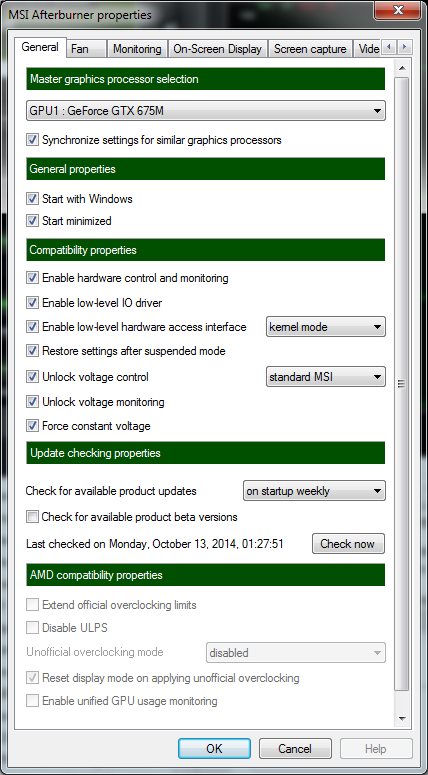
4.) Get MSI afterburner. Be sure here to select unlock and force constant voltage under settings (all three check boxes).
5.) is GPU still tends correct clocked to run 80c plus then it is time for pulling it apart to clean and apply new TIM to the GPU. Unless you are running in a high temp ambient area you should only see high 70's under furmark etc. gaming even lower temps.
Edit; as time goes on and you have proven the system stable again, then think of video overclocking but not before. -
Resolution to my Gateway P-7805u FX: (so far)
1. I had already replaced the thermal contact layers for the CPU and GPU with Arctic Silver. About two or three months ago, I then purchased some thermal pads for the GPU, something similar to Arctic Silver and reapplied those after this problem with the black/blank screen overheating GPU or GPU driver crashing problem started. I was still getting temperature ranges from 66C to 82C. With Throttlestop, I would watch the temperature climb, the GPU fan would kick in, and the temperature would decline back to something in the upper 60Cs or low 70Cs.
2. I have taken resolve to rollback to the Gateway supported Phoenix BIOS version "9C.17.00". With Throttlestop, and the laptop LCD screen and my external secondary Gateway FHD2400 monitor both active, the temperature range is now reporting MIN 44C and MAX 54C, and a fairly constant 52C right now. This is a night and day difference from what I was getting before. One blogger claimed that Gateway had officially claimed the temperature was reporting wrong on BIOS version "9C.17.00", hence one of the reasons for upgrading the BIOS. In any case, as opposed to BIOS version "9C.23.00", I no longer see the temperature gradually climbing like a did before; so I believe the fan is acting differently now, constantly, periodically or fluctuating, rather than acting only on demand when the GPU reaches 80C or above. I also do not hear my fan turning on loudly anymore, which always occurred when the GPU exceeded 80C. This appears to be great news! Maybe I will try some gaming again now on this system . Note: At this revelation, I believe I will stick with this BIOS through the remaining life of this laptop.
Options I did not try:
A. Hotfix posted for BIOS version "9C.25.00" on the MediaFire website, a patch version posted for Windows XP and another for Windows 7/8. Reason: Gateway abandoned the BIOS version "9C.25.00".
B. A custom BIOS a blogger claimed to have designed to undervolt the GPU. I was not clear to me what BIOS was modified. And, there was some warning about altering the device id to something which could brick the ROM BIOS or computer requiring a BIOS replacement. -- This seemed like too dangerous a move to me.
3. I do intend to play around more now with undervolting of the CPU in Throttlestop.
4. I have no Performance Tools from NVidia installed on my Gateway P-7805u. From the NVidia GeForce site, it does not appear that they were supported for my NVidia GPU, model 9800M GTS, anyway.
5. I will check into MSI afterburner. You mention, "Be sure here to select unlock and force constant voltage under settings (all three check boxes)." I am not clear on the benefit to doing this. More input would be nice.
Thanks for the reply. -
When the system is running at lower GPU clocks the voltage changes over automatically to 2D levels. This voltage change is the leading reason for 9800m going to black screen. With MSI forcing voltage to stay up this cause is eliminated.
Be careful with thin TIM's on the GPU. Since you were running 82c for a while it is easily possible it is already boiling out. Most GPU's do not run this high of a temp, The TIM looks at it as if you were running the GPU at high load the entire time. This is why I prefer ICD for machines like these.
The are newer tools that work with the more recent drivers. MSI is the better option as you have a lot more settings to chose from. You have to unlock the control and then force the voltage for this too work.Attached Files:
-
-
TANWare, I will look into your advice on using MSI. Even though my temperatures show as 52Cor 53C in Throttelstop using BIOS version "9C.17.00", I just experienced another failure. You could be correct that I have sustained damage due a defect in hardware soldier to the GPU or to problem software in the BIOS or NVidia GeForce driver. If the solder on the motherboard was inferior, possibly with reduced or eliminating lead content, the soldier is becoming unstable after a number of years. Leaded soldier is more stable with heat. Maybe, the move to keep the BIOS hotter was by-design with release of BIOS "9C.20.00". I believe Gateway may have just wanted their laptops to make it passed their best 3-year warranty. Still, with the failure occurring again, I am now looking to your solution. I am also looking into the video driver as a potential problem as the GeForce Driver I have is Driver Version "9.18.13.1422", which is likely beyond what Gateway supported. And, my system has recently been reporting an event problem with one of my striped (x2) hard drives, a Seagate Momentus XT (HHD) ST95005620AS; so I need to back up soon. Maybe something with that drive, like a short, is triggering this video failure. I would have guess more at the blue screen of death in that case. Anyway, I need to check into drive replacement. I am going to start off with seeing how often this failure occurs.
Update 04/09/2015
I have warranty replaced my Seagate Momentus XT (HHD) ST95005620AS drives used in a RAID configuration a couple of weeks ago. ST500LX003 is the new part number of the replacement drives. I am using them in the same configuration. I would like to upgrade the size of these drives later, if not go to SSD drives. And, I would like to switch from RAID 0 (stripe) to RAID 1 (Mirror) given the cost of storage. I am a software engineer and I just cannot afford to lose anything. I do my best at backups too to external storage with a 4TB Seagate USB 3.0 external storage drive. I am still getting the BSOD, especially when using two monitors, the laptop monitor and one external monitor.Last edited: Apr 9, 2015 -
The drive, HDD, could be another issue on its own causing a black screen. I remember running a Raid0 and can tell you once thing to stay away from that can cause a black screen. That is letting the drives sleep, what happened was one drive was spinning up slightly faster than the other and the stripe would not initialize properly. I got a black screen every time. It could be running for a while but then because the drives were not being used it would put them to sleep. What a pain that was.
It turned out the drives caused an IRQ lockup on the PCI buss. There was no BSD because the lockup was low level. -
Sorry did not realize you additional info. Gateways response on the temps reporting improperly on 9c.17 is not quite true. What is true is with 9c.20 and above the fans kicked in at the NVidia recommended settings for the card. This again, as you mentioned, was to try and get the card past that 3 year mark.
MSI should be used instead of NVidia's own tools. It gives options to try and keep at the 3D memory speeds better. If you do not use the NVidia tools to overclock then just get the Afterburner just to keep the 3D speeds, it will prolong the card and make it more stable for you. -
Sorry for being very late in the game with a reply. TANWare made an excellent but fundamental comment about making sure the drive is initialized. Microsoft started this in Windows NT 4.0 under one of the service packs for security reasons. I think it has to do with detecting drives that have been moved from one machine to another. I had SCSI drives once upon a time and moving drives between machines at one point produced no error, even boot drives. But after loading one of the service packs I suddenly received a Dr. Watson error. Anyway, drives running under Windows require initialization.
Closer to your situation possibly with the Gateway P-7805u, I changed my system from non-RAID to RAID, from an OEM 32oGB drive to two Seagate 250GB drives in RAID 0. And now, I am running two Seagate Momentus XT 500GB drives in RAID 0 (Stripe) for almost a Terabyte of space. My cluster sizes are large, maybe 128KB, which I think was the default. In my Gateway P-173XL FX laptop, I have two Seagate Momentus XT 750GB drives running in RAID 1 (Mirror); I do not remember the OEM drive(s) I started with in this computer, so I cannot tell you if I switch from non-RAID to RAID on that system. I did a good bit of research on changing the system from non-RAID to RAID without having to reload the OS from scratch. Intel only support the path to reconfiguring the BIOS and then reloading the OS from scratch; however, an alternate path does exist. This path is tricky as you have to modify the registry before doing a backup-restore operation. But, I would do a backup "as-is" first. I would then do a backup-restore operation with the modified registry second. The effect of the modifications is to change the driver nomenclature from non-RAID to RAID, or vise-versa. Microsoft only loads one driver typically when loading a new OS from scratch, one for non-RAID or one for RAID. It knows what driver to load from the Registry settings which are likely pulled from the BIOS configuration. If you update the BIOS and Registry setting(s) for the disk driver from non-RAID to RAID before backup-restore, then the OS will look to load the RAID driver on demand. This worked for me. The danger I could see here is that you update the Registry, and BIOS maybe, then reboot the computer by accident or from some system glitch where you are then trying to run RAID with one drive, or the reverse non-RAID with two drives. So, you have to be careful. With research, you can find information on this process on the web as I did. I produced an artifact document on my research. I will try to find it and post it for you. It may be the eventual path you wish to take. In your case, you have two different non-redundant drives, one HDD, one HHD (or SSD) with a different voltage requirement. I have configured my dad's Lenovo Ideapad to use an mSATA SSD for a boot drive (or programs-applications drive), and his OEM 5400rpm drive as a second drive for data or backups. I would like to update the latter OEM drive to a faster 7200rpm HDD drive later and use the OEM drive for backups. I have this document and can provided it to you, but it is too large to upload here. You can reach me at [email protected] if you want to request a copy of this document from me.Last edited: Apr 9, 2015 -
Hello all,
I recently upgraded to W10, and it is working pretty well. I am having one issue that I have not been able to knock down, a BSOD during sleep, hibernate and shutdown. Happens every time, details are here if anyone else is having a similar issue:
http://www.tenforums.com/bsod-crash...x0000001a-00000000-00004477-a.html#post514904
I am on 9C.25 (which is working fine for me BTW) but after upgrading a while ago (when I went from 4GB to 8GB, installed SSD, driver refresh and other general upgrades) it seems that this BIOS update has been pulled and some are reporting trouble with it. I don't game much, use it for CAD, media work and development, so haven't had thermal issues that I am aware of so far. Fans crank up sometimes under load, but no funny behaviour. Normal use CPU temps are in the 40Cs and 50Cs, GPU temp is around 75C (just now measured it) - which is hotter than I expected honestly. Only time I know it got really hot was I had a problem for a while that the latch switch would cause it to come out of suspend in a bag, then it got hot! Fixed that pretty quickly though, never saw any signs of damage from that.
Now I am wondering if possibly an earlier BIOS might have different DDR settings that could eliminate this issue. I read a few threads about DDR replacement and the 1T issue, and I don't have that problem. I am running two 4GB matched Patriot sticks (details below if anyone is interested in an upgrade to 8GB).
So I am wondering if I should retro back to .23 or even .17 and see if the timings are different? I don't really know how often they mess with those, or if they are pretty much all the same. I really don't know much about the guts of the memory configuration in the BIOS at all. I have seen references to people messing with the settings, perhaps out of BIOS, but that seems risky and not sure how it would work really. If I remember right from when I did the upgrade, some of the lower revs (I had .08 at the time of upgrade) didn't support 8GB.
If anyone has any ideas, I appreciate any and all feedback.
And thanks to all, especially TANWare for a lot of good info when I was doing the BIOS update the first time around. I love my 7805 and hope to keep it going for a while yet. Just have my fingers crossed that a mandatory OS/driver update doesn't come along and kill it!
Regards & thanks in advance!
Bob
Details on my 4GB sticks:
DIMM # 1
SMBus address 0x50
Memory type DDR3
Module format SO-DIMM
Manufacturer (ID) Patriot Memory (7F7F7F7F7F0200000000)
Size 4096 MBytes
Max bandwidth PC3-12800 (800 MHz)
Part number PSD34G16002S
Number of banks 8
Nominal Voltage 1.50 Volts
EPP no
XMP no
AMP no
JEDEC timings table CL-tRCD-tRP-tRAS-tRC @ frequency
JEDEC #1 5.0-5-5-14-19 @ 380 MHz
JEDEC #2 6.0-6-6-16-22 @ 457 MHz
JEDEC #3 7.0-7-7-19-26 @ 533 MHz
JEDEC #4 8.0-8-8-22-30 @ 609 MHz
JEDEC #5 9.0-9-9-24-33 @ 685 MHz
JEDEC #6 10.0-10-10-27-37 @ 761 MHz
JEDEC #7 11.0-11-11-28-39 @ 800 MHz -
Hello all,
Case closed. I figured out that it was the Connexant softmodem driver. I fixed that (kind of a long story) but now I can go into and out of sleep, shutdown etc, with no BSOD! I documented the debugging steps including using WinDbg to figure out a recurring driver failure in the thread, maybe it will help someone. So I can confirm that there is at least on P78 out there on 9C.25 that runs great with no known issues.
Best regards,
Bob
Here is the link one more time for future reference:
http://www.tenforums.com/bsod-crash...x0000001a-00000000-00004477-a.html#post514904
Official Gateway 78xx Series FX BIOS - 9c.05.00 thru 9c.17.00
Discussion in 'Gateway and eMachines' started by E-wrecked, Sep 25, 2008.