 Problems? See this thread at archive.org.
-
-
Thank you! Unfortunately I can't find a 11-11-11-28 stick at my local shop, would a 11-11-11-27 be ok?
-
Intel XTU also.
Now I undervolted also the graphics (HD4600).
Do you reach similar values? -
Is it possible or reasonable to think that battery life could be extended through drivers or firmware updates?
-
Just got my P34G yesterday. Love it so far. Except for two problems. The front left part of the base seems to be higher than the rest of the chassis, implying that the body is a little bent. This means the device rocks back and forth a little on flat surfaces. Looks like I'll have to get it replaced by Newegg. Also the screen does not close flush with the base. Anyone else have any build quality issues?
-
Mine is tight and level. What a bummer. :-(
-
+1. Mine's good, "bummer" redux on your build.
-
I got a tiny detail:
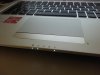
The power button also, but is not as noticeble.
Everyone is getting 3h30m battery life with 30% brightness+wifi? I'm worried, I'm just getting 2h30m...with all the undervolt (do you actually measure or just look at the windows prediction?) -
Hey, been using my P34G for a few days now and I'm getting similar battery life just watching youtube videos, I haven't tried undervolting or anything yet. Am I right in saying you got yours from OCUK too? (shoutouts to haribo's)
-
Yes

Give it a try with intel XTU, there's no risk, as long as it going down xD -
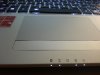
I have the same defect but slightly less pronounced. I did not observe this until 3 days after I got my notebook.
-
It's the rocker assembly. Mine does it too. Question, issue is whether it will become more pronounced on one side or the other over time and that will go to build quality, degree of wear and tear.
-
![[IMG]](images/storyImages/7JlCJ8ul.jpg)
Rocker is flush on mine, guess I feel lucky. -
Yours got the opposite effeect xD
-
I do enjoy the laptop though, most of my gripes are with windows 8 not the hardware - like how by default it'll open jpegs in a crappy metro gallery not the preview tool like before, but most is easily rectified. VMware flies on the haswell too which is nice.
-
Truly. Running Cisco VPN through NAT on a client's P2V'ed machine and just dropped hauling two notebooks through airports.
-
I received mine today the laptop is nice looking but the screen is ... meh. The viewing angles are great and the colors seems fine but it's grainy. Definitively not as much as my sony vaio S13 but the anti-glare coating gives the screen a kind of blurry effect. I'm really disappointed since this laptop is everything I wanted.
By the way I'm answering my question about disabling dGPU in bios: it's possible! -
Matte screens are always grainy.
-
@ xtremekh
My P35K was bent on one side too.
http://forum.notebookreview.com/gigabyte/720395-new-gigabyte-p35k-62.html#post9399313 -
Wasn't your box also crushed when it arrived?
-
Finally placed an order for one of these
Ordered it from Gentech with an Intel AC 7260, free IC Diamond upgrades on both the CPU and the GPU, and free 30 day no dead pixel warranty. -
The fans on mine seems a bit erratic, getting louder when loading web pages and then going completely silent, then up again. Changing to 'stealth mode' with the smart manager doesn't seem to do anything.
I haven't tried undervolting before, is it straight forward? -
Undervolting is very straightforward. Just drag the slider until it breaks things lol.
Sent from my SGH-M919 using Tapatalk 2 -
Is anyone else's webcam showing up as 0.9MP instead of the advertised 1.3MP?
Sent from my SGH-M919 using Tapatalk 2 -
Here's the problem with mine, on video, in case anyone care/ has the same problem.
https://www.dropbox.com/s/ad30r3jd5n18j2g/VID_20131010_202455[1].mp4 -
Take a look at Lammi's review to get an idea for an initial first cut on undervolting. As others have stated in this thread, use Intel XTU to do it with. It's easily found on Intel's site for download.
Or else just hang out on this thread for a while and watch what others do, compare to what you want to accomplish (power, battery, etc.) -
Got the laptop. First impressions:
1) Speakers are not so bad especially when Dolby is enabled.
2) Seems that it doesn't throttle!
3) It remains cool under load.
4) Mic/camera are ok.
5) Keyboard suxx.
6) Backlighting is good (not bleeding)
7) Build quality is good.
8) Display is grainy... Actually it looks like a TN but not an IPS. Though angles are good. -
Curious that it reports 4 memory slots, mine does too.
-
Could you tell me what RAM you went with? I'd like to upgrade too. Or anyone else for that matter, I'm from the UK if anyone knows any deals
-
@bmidbar
just the Haswell :chipset: -
There's a patriot 8 gig with the correct timings and voltage. That one would work.
Sent from my SGH-M919 using Tapatalk 2 -
Again, maybe I'm just doing this wrong but it seems cheaper to to with Gentech's own? They're adding 4GB to the 35K for $25
Cheapest KNOWN brand 4GB on Newegg is $35: http://m.newegg.com/Product/index?itemnumber=N82E16820239313
Does brand matter that much with RAM?
Sent from my Nexus 4 using Tapatalk 4 -
Actually, does anyone want to buy my original Transcend DIMM? I might just get two other branded DIMMs to get a matching set. PM me if interested.
Sent from my Galaxy Nexus using Tapatalk 2 -
That's not a half bad idea, plenty of people will wanna buy a matched pair of good RAM and plenty of people want a matched pair of the OEM RAM.
-
What is ETA?
I didnt want to add any upgrades because of the delivery time, so im curious, when will it arrive, when you have added those upgrades? -
I would have, but I just bought a second Transcend with the same part number. Found it on sale for $80. Sad that 80 is a sale price.
Sent from my SAMSUNG-SGH-I337 using Tapatalk 4 -
Same here. I've upgraded to Patriot sticks from NewEgg. If interested in my Transcend DIMM PM me, else I'm throwing it up on eBay.
-
Yeah I think the same. The screen is TN quality with good angles...
Is there a way to backup the hidden recovery partition in order to remove it? And what is the small 300mb recovery partition?
I copied the two recovery partitions with easus parition master, pretty straightforward. -
I ordered from Gentech 10/3/2013 with upgrades (replace msata with 512GB Samsung msata, remove hard drive, replace Windows 8 with Windows 7). Shipped 10/9/2013. Seems reasonable given changes and testing, and that I didn't specify hurrying. Takes a while to get here with default UPS though (expecting 10/15/2013).
-
You paid $1937 (minus any discount)? Jeeesus. Go you! Hahahaha
Sent from my Nexus 4 using Tapatalk 4 -
If I do this, does it still have the current options such as three finger swipe and edge swiping? I like these on the default driver but just missing the multi finger taps is a bummer. -
This goes to my exchanges yesterday with an individual on the P35K thread yesterday regarding do-it-yourself upgrades and the warranty. Beyond a previous e-mail exchange I called Gigabyte technical support yesterday to re-confirm and they said upgrades are fine as long as you "don't break anything." Gentech charges $519 and $465 respectively for the Samgsung 840 Pro Series or Samsung 840 EVO on the 512GB SSDS. Xotic charges $325 and $339 for the Samsung 840 Series and Samsung 840 Evo SSDs. My 512GB Crucial M4 I got NIB on eBay for $260. The new EVO 1TB SSDs are going for about $500.
-
Yesterday tried a few games (+135 to GPU, +1000 to memory).
Battlefield 3 showed ~30fps (1920x1080, Ultra). ***No throttling***. The laptop was totally cool.
Tried also Crysis 3 (1920x1080, Very High) and Bioshock Infinite 3 (1920x1080, Ultra). Both of which were perfectly playable. I don't know framerate as Fraps didn't work for me (seems that there are Optimus-related problems) but I could play.
Finally Furmark + Prime95 (without overclocking). GPU and CPU didn't throttle after 10 minutes. Again the laptop was totally cool. The area above the keyboard was warm but I don't care as I don't touch it.
This is just amazing. -
Same problem for me, no bass untill I change the bitrate
-
"No bass" in speakers? Or "no bass" in headphones? And which setting are you talking about (Control Panel -> Sound -> Playback -> Speakers?)?
-
I found a dead pixel. And another user reported the same problem. Does it mean that AHVA screens are so bad? Also the dead pixel is white and very annoying. And usually dead pixels on IPS screens are black and not very noticeable.
Actually this is the first laptop for me that has this problem since 2000 and since then I dealt with 15 laptops (at home and at work) at least .
Let's see how "30 days dead pixel warranty" is handled by Gentech... -
How loud are the fans under gaming load. Wondering if it would annoy my wife if she's sitting close by.
-
Almost not noticeable if sound is on. At least I didn't notice them when played.
If sound if off then you'll notice them for sure. Yesterday my wife noticed them from ~5 feet when I played with furmark/prime95.
But the best thing here is that the laptop is COOL under gaming load. -
With headphones, you can clearly hear the difference when you change the setting, the sound feels "cold" and "flat" and when you change it becomes "warm" and have much more bass. It's in Control Panel -> Sound -> Playback -> Speakers -> Properties -> Advanced and there change the default format. Alternatively you can change this in the realtek audio manager (task bar) -> Sound manager -> default format. If you change it back the bass stays, that's weird.
-
Could you also run the tests with HWmonitor running? I'd like to see what the thermalcouple readings are on the processor and GPU.
Gigabyte P34G
Discussion in 'Gigabyte and Aorus' started by spicypixel, Jun 3, 2013.

![[IMG]](images/storyImages/NhwkkdL.png)


![[IMG]](http://i.imgur.com/7JlCJ8u.jpg)


