 Problems? See this thread at archive.org.
I guess it's the same person.
General Discussion is sandforce really faster?
-
Yes, eYe know how hard it is.

Would you then like to know ?
In fact, it's really easy....
------------------------------------------
1. Remove the battery;
2. Remove the cover (2 screws);
3. Remove the 4 screws of each drive's caddy you need to replace;
4. Pull the caddy out;
5. Remove the 4 screws that hold the drive in the caddy;
6. Remove the drive from the caddy;
7. Insert the new drive in the caddy;
8. Put the screws back so they hold the new drive in the caddy;
9. Put the caddy back where it belongs;
10. I could tell you the rest, but would then have to charge you $125/hour...
Which would be unfair so I'll stop here !
Hope this helps !
-
NP pal, we're here to help ourselves; actually, I should have posted that WAY before, but have been too lazy recently...
Yes, let's hope they will appreciate we're trying to help them getting better at what they do, indeed...
-
My guess is that because at 4K and under, the metrics are much slower (benches) than at 8K and higher. Because they are slower, the percieved speed difference is much higher - I guess that is why Anand chose 4K's to represent what a 'real' SSD can/should be doing. Because the early/first SSD's were so bad at 4K R r/w's, but shined at almost everything else.
I agree that the easiest way around this 'issue' is simply getting a bigger SSD right now - I too wish I could have justified a 200GB model (instead of the 100GB I'm using).
The reason I'm still using the SSD (and haven't sold it yet) is it's robustness in the notebook its used in (compared to mechanical drives), but the absence of HD noise is also a bonus too. -
Really crazy question here. Would it be a good idea to put an SSD in an UltraBay? Essentially I want music/movies on a low energy option. Hahahaha Anyone know if the Ultrabay can pass Trim commands. Actually I'm using Vista so I'd need a drive that has a wipper utility like an Intel... that's if there's a lot of writing of data anyway.
-
Most notebook HD's are very low energy devices when playing back music/movies. Using an SSD just for those storage and playback requirements would only increase the battery power used by the notebook in question. Why? Because the mechanical HD will still be spinning (as it responds to the O/S).
The best use of an SSD in a non-O/S setting is as a scratch disk - not as a storage medium.
So, what I'm basically saying is yes, your question is really crazy!
-
SSDs are typically more power efficient than HDDs, also when playing video.
See here: http://www.laptopmag.com/review/storage/intel-x25-m.aspx?page=7 -
Quote from above link:
"The results were not as conclusive in the video rundown test, with the X25-M lasting only 3 minutes longer than the 5,400-rpm drive and a full 7 minutes less than two other SSDs."
So, typical is not typical - as usual, it depends on the specific hardware and the tests run on it.
I stand by my original comment that use of an SSD in addition to a mechanical HD for the O/S + Apps is not the best application when reducing the power draw on a battery is the goal. -
The Intel G1 is an old SSD with relatively high power consumption. Most other SSDs do better.
False. SSDs typically use less power than HDDs, also when playing back video. -
Not when used in addition to a mechanical HD. -
Well yeah it would be better to run OS and movies from one SSD.
-
I am in a dilemma and can't decide between these three: Corsair Force 60GB (165$), OCW Mecury Extreme Pro 60GB (179.99$) or OCZ Vertex 2 EX 60GB (169$).
-
Performance wise you won't notice the difference. At those prices I'd go with Corsair.
Although OCZ might give longer warranty? might be worth looking into. -
I probably should have mentioned I rock a Intel 160GB G2 as my OS drive...
-
Lol...
Now you tell us! Ha ha...
Well, a two SSD setup would really 'rock' your notebook then. I would say go for it. Instead of an Intel though, I would choose something Samsung based (they seem to be more power effecient than all other SSD's and especially the Intel SSD's).
You have to let us know what you finally decide on. -
Samsung is 1 idea (and its power consumption virtues might rule the day). What drives have good whipper programs and robust garbage collection? I originally thought about the Intel V cuz I might be able to get away with 40 Gigs. Maybe.
-
LaptopGun, I'm not getting it fully. Why do you want to place music/movies on a secondary SSD? Why not just use the primary SSD?
If it's because you don't have enough space: how about using a 32GB SD card or USB key? It 's cheaper and will use less power than an SSD. -
Room mostly... though perhaps I should just do that anyway and clear out other crap I don't need. Hahahaha
-
Here's a lot of advice that can save you disk space:
http://forum.notebookreview.com/win...freeing-up-diskspace.html?highlight=diskspace -
Hi,
My Mushy Callisto Deluxe 60GB SSD arrived. Can someone check my step-by-step list?
1. Install the SSD
2. Enable AHCI
3. Install Windows 7
4. Install chipset driver
5. Install Intel RST driver
6. Do Windows 7 SSD optimizations
Thanks! -
Before you remove/install anything:
Make sure your system has the latest BIOS and/or the latest FIRMWARE for all components (Video, LAN, etc.) if your current O/S install is stable and solid.
Then I would do:
1) Make sure AHCI is enabled in the BIOS (if you have that option)
2) Install SSD
3) Install Win7
4) Install All Drivers
5) Install all Windows Updates
6) Install Programs
7) Disable system restore
8) Disable pagefile (if you don't use CS2/3/4/5)
9) Disable hibernation file - optional; if you need the space/speed.
10) Enjoy! -
Just in case you missed it; really cool, especially while benching...
If it shows weird colors on the graph, just right-click on it, choose option then OK or cancel;
just a small bug but this gadget is SO cool I thought I'd post it again...
-
Are there any of you guys that have tried both the Seagate XT and a high-end SSD (aka the Corsair F120) on a decent system?
I'm just looking for a personal opinion on how well you can tell the difference between the two!
-
In my experience, you don't even need to compare to a high-end SSD. Just using a Samsung 256SSD from Dell, there is a huge difference between the 500GB Seagate XT Hybrid and the Samsung.
While the XT may be faster than a normal HDD (to some extent) it still "feels" like a normal HDD, and nothing close to the immediate feeling of speed with an SSD. -
Thank you for the quick reply! +REP. That's what I was looking for to pull the trigger on the SSD... I need that feel
Anyway,
I'm on the verge of buying an SSD but was wondering if my new:
Will be able to handle any SSD I put in it (SATA II)
I'm trying to maximize performance without overpaying!
I am doing mainly browsing, medium gaming, office, Skype, torrenting, movies/tv, external monitor, and general multitasking.
I'm looking at the Corsair F120, Kingston SSDNow 128gb, and more in that size range. Intel seems a little expensive, is the general consensus that 4kb write is very important? (is it for my tasks?)
Finally, thanks for reading!
-
I had it two days in my laptop, to me it did feel like a high end SSD. Granted an SSD is a bit faster, but just booting, navigating around, launching Firefox I could not tell the difference. (besides from the sound and vibration)
I have a Crucial C300 in my laptop now, before that I had a Vertex LE.
How long did you try it? Did you have the Intel Rapid Storage Driver installed?
Corsair F120 is faster than Intel G2 and Kingston.
I don't think you'll be disappointed with the XT etiher. For most common tasks it does feel like an SSD in my opinion. Your usage is perfect for the XT. -
Hi Phil, I see you're very active in the SSD forums, so you must know your stuff as well!
Anyway, curious why you are running an SSD rather than the XT now? Did you try gaming on the XT and Is an SSD better for that or do some SSD's have trouble gaming? (I'm playing CS:Source by the way but may try to play Crysis) -
The XT would be good for my usage but my need for storage is about 30GB. The price of a the cheapest XT and a 64GB SSD aren't that far apart.
And I like the additional benefits of SSDs: absolute silence and no vibration. -
Wow 30GB! What about your media and applications/programs?
What kind of system are you running and do you have an external HDD? -
30GB includes my programs and some media
I have an external 320GB hard drive. I use a HP DM3. I don't use hibernation, system restore and page file (that's about 10GB or so). -
Oh and I have another question, if I have an SSD and a 5400 RPM external HDD (Western Digital Passport); what is the best way to watch movies, etc?
Will I need to copy them onto my SSD to get better performance or can I just run them from my HDD? Now that I think about it, I'm not so sure that movies/tv need performance since they just play.
Also, when downloading files and media, should I be downloading them straight to my external so that my SSD doesn't get unnecessarily 'used'?
Thanks! -
Long enough to not be happy with it. I had two of them, RAID 0, in an M17x R2. Everything I own has SSD's in it, including my desktop.
Yes, I did have RST installed (latest version). Now, I'm not saying it was bad, and maybe it was because of the RAID 0 (which should be faster than a single HDD), but it was noticeably slower to me.
It's interesting how you have the opposite viewpoint, and that coming from comparing to even a superfast Crucial SSD...
-
The question is, what kinds of things are you doing on your laptop?
-
Keep in mind that depending on how you set up Windows and the download program(s) you use, your SSD might always be 'used' to store the temporary files until it moves them to the location you specify.
Not only will this cause problems (potentially) for you SSD, but when the files are moved to the chosen location it can take many seconds and even minutes - depending on how big the files are that were downloaded. -
I expect it's because of RAID.
-
I wondered how the XT's would actually function in RAID 0, since the flash cache in each drive of the set is supposed to cache frequently used files. BUT, in RAID 0, files are striped across the drives, so an individual file, per se, doesn't exist on a single drive.
Therefore, is the flash cache even doing anything to increase performance, since the cache's don't work in tandem? -
Not gaming. Just boot-up times were significantly slower. I didn't really get into timing too much or benchmarks (which really don't show the effects of the XT since the cache is of a "frequently used algorithm" type.
If I get a chance, I may try those XT's again, but as single drives, not RAID 0. -
That's sort of what I thought. You might want to look at posts by TANware. I think he has told about his experience with XT's in RAID.
-
Disregard my comment. Continue to discuss
-
Just one question but does the 128GB Crucial C300 support TRIM? I'm about 95% sure it does but just to clear up the 5%...
-
Yes it does. More details: http://www.anandtech.com/show/3812/the-ssd-diaries-crucials-realssd-c300/8
Not sure if you know but Sandforce is faster than C300 on a SATA II controller. -
i would get that but gentech only offer C300 and i'm not so sure opening up a laptop which i'd just bought and replacing it.. I'm stuck with C300 but since its my first time using an SSD, shouldn't be a problem.
-
HDD Sentinel says my SDD has 455 bad sectors. I have Mushkin Callisto Deluxe 60GB with Sandforce controller. Should I be worried?
-
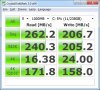
Ok..I got a Crucial C300 256GB and installed it with Win7 64 on SATAII Notebook. Here are my results after i did all the recommended updates and tweaks.
Let me know, if this is good or bad. Do i need to worry about the 4K?
-
The 4K seem a tad bit low.
This is what mine got when first installed: -
Seems a bit low yes. The 4K random read should be at least above 20MB/sec.
Have you enabled ACHI and are you running the Intel RST driver?
Here's mine:
![[IMG]](images/storyImages/Untitled2-1.png)
-
Yes, ACHI is enabled in BIOS and i installed the Intel RST driver.
In the device manager, under IDE ATA, Intel 5 Series 6 port SATA AHCI Controller is listed. Its driver detail says version 9.6.0.1014. Is that the right one?
Are your numbers from Laptop or desktop? -
Yes that's correct. Mine are from my laptop.
Assuming that your laptop is in High performance mode, maybe it's a good idea to post on the Crucial forums. They are probably experienced with what might be going on.
Edit: You did do a clean install right? -
Yes, i did a clean install.
-
Hi,
Is there a special procedure required if I want to do a second clean install of Windows 7? My SSD is Mushkin Enhanced Callisto Deluxe 60GB Sandforce controller. Do I have to secure erase it first or will Windows 7 take care of that for me?
Thanks.
SSD Thread (Benchmarks, Brands, News, and Advice)
Discussion in 'Hardware Components and Aftermarket Upgrades' started by Greg, Oct 29, 2009.


