 Problems? See this thread at archive.org.
Musuta, Nitroblu and others, if you are not having the performance that you should, I recommend creating your own thread. You will probably get more attention.
This SSD thread has become very big with discussions going through eachother, it's hard to keep track.
-
If I may...
Say you call the garage because your car won't start one morning.
Say the guy ask you to check if you've got gaz in your tank...
Say you checked yesterday...
Say you tell him you JUST checked yesterday...
Say he ask you to check again this morning, RIGHT NOW....
Say you keep telling him you JUST checked yesterday (so in your mind you tell yourself that since there was some gaz in your tank yesterday, there's no reason why there wouldn't be some left today, and that's why you're still arguying with the garagist)...
NOW, SAY SOME IDIOTS TOOK THE GAZ OFF YOUR TANK IN NIGHTIME AND BROKE THE GAUGE...
My point is that you come here asking for help from people you consider better than you at solving your problem, but on the same token, you refuse (wrongly) to execute what they ask you to do pretending you already went thru those steps...
What you have to understand is this: They don't ask you to run those tests for YOU to determine what's wrong; they ask you to run those tests so THEY can determine what's wrong or not; if you refuse to follow their advice, what's the point of asking them upfront ?
You are simply delaying their ability to help you out; if you follow carefully their advices, they shall be most likely able to help you out in a most timely fashion maneer, and THEN, they'll be able to EXPLAIN to you what was wrong, so you'll be better equipped for the next round.
Makes sense ?
eYe

-
@Les
Hi Les
Thnx for post i will try to do it what you said once i'll get home I just opened thread and guy we can transfer ours post there and discuss about our problems
I will post all possible pictures about my system and mine SSD Drives -
So I thought I'd take one my long ago post and update it more crispy, so here it goes, it's called:<O<O</O
WEAR LEVELING, ITGC AND TRIM FOR DUMMIES... ...AND YOUR GRAN'MA !
<O
The Promise: Gran'Ma, when we'll be over with this short conversation, you'll be able to explain hands down to anyone, even to the geekest geek this planet can carry, what are Wear Levelling, Idle Time Garbage Collection, and TRIM.<O</O
<O
The Problematic: See Gran'Ma, an SSD is like a pair of jeans: over time, both get dirty and used. So what you wanna do with you pair of jeans is the same we do with an SSD, clean them when they get dirty, and try to not use them on the same spot to maximize their lifespan, right ? -Right ! However, the irony is, for both the jeans and the SSD, the more you clean, the more you use, and the more you use, the more you gotta clean; see the cute vicious circle we're entering in here ? -Yup ! Well, the good news for the SSD is that we can apply some tweaks which help to maintain decent performance and maximize lifespan. Let me now introduce you with Wear Levelling, ITGC, and TRIM.<O</O
<O
What is Wear Levelling ?<O</O
Gran'Ma, I know you love gardening. Tell me, what's the part of your jeans that gets used the sooner ? -The knees of course. You betcha. Now, what about if you could, every time you wash them say, exchange the piece of denim that cover the knees by another one, never the same one every time; do you think it would prolong the lifespan of your jeans ? -Obviously, no question about it ! Well Gran'Ma, that's exactly what Wear Levelling does, it spreads the data to be written on the SSD among all the cells, making sure they all receive more or less the same amount of written data, so they all get used pretty much evenly.<O</O
<O
What is Idle Time Garbage Collection ?<O</O
<O
Gran'Ma, say you do some gardening on Monday, and you wanna go shopping to the mall on Tuesday. Most likely, if you wanna wear the same pair of jeans, you'll want to wash it between both activities, right ? -Now YOU betcha ! Thanks Sweetheart ! Now, tell me, what about if you could just walk in after your gardening, do your other Monday afternoon stuff, and your pair of jeans would have been washed automatically, without any intervention from you, during nighttimes, and would be up&ready by Tuesday morning for you to wear them and go to the mall; wouldn't that save you a lot of time ? -Hellya ! Well Gran’Ma, that’s exactly what ITGC does, it cleans up the drive while you’re not using your computer, it Collects the Garbage in Idle Times so when you get back to use it, it’s cleaned like the your Tuesday morning's jeans !
<O</O
<O
What is TRIM ?<O</O
<O
TRIM is exactly what it says: it‘s literally an HAIRCUT, where you get rid of superfluous stuff, like going to the barbershop and get a… TRIM ! But let's get back to our pair of jeans...<O</O
Gran’Ma, say you do your gardening on Monday morning, but unlike the precedent scenario, say you need or want to go shopping to the mall on Monday afternoon, not on Tuesday morning; then, if you wanna go there with the same pair of jeans, you cannot wait for them to be automatically washed in nighttimes because it’s Monday afternoon you wanna go to the mall, not the next day, right ? -Right ! Then, what if after your gardening, say as soon as you walk in your house, you jeans were instantly cleaned, just by you stepping in your house; wouldn’t that spare you a whole frigging bunch of time ? -Absolutely ! Well Gran’Ma, that’s exactly what TRIM does: it gets rid of the superfluous stuff, INSTANTLY, as soon as it gets marked as dirty, as no longer needed anymore.<O</O
<O
So, if you ever run into a situation where one asks you what are Wear Levelling, Idle Time Garbage Collection or TRIM, simply tell him:
<O</O
<O
Wear Levelling is like me exchanging the piece of denim that cover the knees by another piece of that same jeans;<O</O
<O
ITGC is like me having my pair of jeans washed in nighttimes without me having to do anything by myself;<O</O
<O
TRIM is like an haircut, or me stepping inside my house with my dirty pair of jeans on, and they get cleaned as soon as I step inside, kind of almost magically…
<O</O
<O
Y eye I ???
-
excellent post
i'd rep you but gotta spread some rep first. -
So we get a lot of posts lately on the theme "Help my SSD is not performing like normal"
I'm trying to compose a list of how to fix it. Please help me composing it.
1. make sure you did a clean install, from the ground up (removing all partitions before you start by choosing custom setup)
2. install Intel Rapid Storage driver
3. try enabling (or disabling) write caching
4. check partition alignment
5. check that TRIM is working -
Make sure the lappy is in HIGH performance mode...
Disabling pagefile...
Disabling hibernation...
Disabling indexing service...
Disabling prefetch...
Disabling superfetch...
... -
Thanks. Are all of those suitable for improving benchmark numbers?
I thought hibernation for example only saves disk space. -
You are right.
However...
Hibernation file is ± equal to the amount of RAM one's got; say 6GB for the purpose of this example. 6GB out of 80Gb say, is 6GB more that is free for windows to write to, where if they were reserved for the hibernation file, would then leaves 6GB less for windows, therefore, filling the drive more quickly, therefore, the more need for TRIM, and so on. That's the reason why manufacturers over-provision their SSDs, they hide some more space than what's advertized so the disk doesn't get stucked if near 100% full...
It's not imho the most important thing to do, but it sure can help, providing there's no need for an hibernation file.
I -
Ok got ya. This is what we've got sofar:
1. make sure you did a clean install, from the ground up (removing all partitions before you start by choosing custom setup)
2. install the latest Intel Rapid Storage driver
3. try enabling write caching (Device manager → Disk → Double-click on you disk → Strategy tab → check BOTH)
4. check that TRIM is enabled (Fsutil command)
5. Disable pagefile...
6. Disable hibernation...
7. Disable indexing service...
8. Disable prefetch...
9. Disable superfetch...
10. If none of these tweaks worked check partition alignment -
Intel RST should be any version 9.6 or higher (as far as I know, 9.5 does not handle the TRIM command...)
-
Expanded:
1. Make sure you did a clean install, from the ground up (removing all partitions before you start by choosing custom setup)
2. Install the latest Intel Rapid Storage driver (Download from here 64-bit Intel® RST Driver Files for F6 Install. Go to Device Manager, select under "IDE ATA/ATAPI controllers" the "Standard AHCI 1.0 Serial ATA Controller". Then right click, update driver software. Browse, browse. Now browse to where you saved the Intel Rapid Storage driver. Select the folder and click OK. Reboot required.)
3. try enabling write caching (Device manager → Disk → Double-click on you disk → Strategy tab → check BOTH)
4. check that TRIM is enabled (Fsutil command)
5. Disable pagefile (this can help but it's not mandatory. Some programs require a page file)
6. Disable hibernation
7. Disable indexing service
8. Disable prefetch
9. Disable superfetch
10. If none of these tweaks worked check partition alignment
More suggestions and simple instructions welcome. -
Unless you use some CAD or other intensive-high-graphic-heavy-duty-huge-files-handling-programs, there's no need for a pagefile if you've got say 4GB of RAM with windows 7.
Pagefile involves A LOT of writes and is the first thing I disabled since I use SSDs.
If any one can move all the cookies and all of his Internet and Windows TEMPORARY Files anywhere else than on the SSD, that's going to help down a whole bunch as well;
For instance, people with a ?-in-one card reader could set the windows temporary folder and Internet 's temporary files like cookies and stuff off an SD card that could be left consistently there, which would free the SSD from a lot of non-necessary small random writes...
-
Gosh; forgot most likely the most important one:
Disabling scheduled Defragmentation
-
Since you're talking about moving internet temp files, I use Firefox and changed the disk cache to memory cache to reduce the writes to the ssd when using the browser.
-
Great idea indeed !
-
Yes i will add it. Win 7 does that by itself btw.
Any simple (short) guide on how to do it?
Maybe this one?
Type about:config into the Location Bar
Set these preferences to these values....
browser.cache.disk.enable to False
browser.cache.memory.enable to True -
NO WAY !
It should but I had to install W7 at least 15 times since the last 6 months and NEVER did it disabled it by default, by itself; had to do it myself manually, every-single-time Sir, I swear to God ! -
It's actually done this way:
Open Firefox -> Type about:config into the address bar -> Enter -> double-click browser.cache.disk.enable to set the value to False -> Right-Click anywhere -> New -> Integer -> Preference Name "disk.cache.memory.capacity" -> value memory size in KB. Enter 32768 for 32MB, 65536 for 64MB, 131072 for 128MB, etc. -> restart Firefox -
What is Location Bar
Is it the one in the taskbar ?
'Cause it brings me up IE...
Never Mind... -
I don't think it disables it but sets it to manual. One has to go in and set it to disable, if I recall correctly.
-
Oops yeah you we're right. Strange I remember last clean install I checked defragmentation wasn't enabled.
Last updated list:
1. Make sure you did a clean install, from the ground up (removing all partitions before you start by choosing custom setup)
2. Install the latest Intel Rapid Storage driver (Download from here 64-bit Intel® RST Driver Files for F6 Install. Go to Device Manager, select under "IDE ATA/ATAPI controllers" the "Standard AHCI 1.0 Serial ATA Controller". Then right click, update driver software. Browse, browse. Now browse to where you saved the Intel Rapid Storage driver. Select the folder and click OK. Reboot required.)
3. try enabling write caching (Device manager → Disk → Double-click on you disk → Strategy tab → check BOTH)
4. check that TRIM is enabled (Fsutil command)
5. Disable scheduled defragmentation
6. Disable pagefile
7. Disable hibernation
8. Disable indexing service
9. Disable prefetch
10. Disable superfetch
11. Check partition alignment (shouldn't be necessary if you did a clean install with Windows 7) -
ok i just read yesterday that u have to disable microsoft defrag service but if u have a HDD and SSD combo , how do u defrag hard drive itself? Do you have to manually defrag lol?
-
You can set the defragmentation schedule to only defragment your HDD.
-
Most likely the case for most everyone.
Mine was set to once a week, sunday at ?:00 pm or something, but I work with a quicklunch toolbar where a shortcut to defrag in system32 used to be at my hand and, everytime I did a win fresh install, it was scheduled, but again, this is one of the first thing I do disable after install.
My setup is 2 X SSD in RAID0, and that is my explanation why windows drops the ball on this one in my case.
-
that's something i know but i might have not put across my question well enough. What i meant was that yesterday i read that microsoft has a background service which does auto defrag when on idle which needs to be disabled with the SSD.. can't it be made to only defrag the HDD.
-
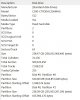
May be a dumb q'n.
When i check for partition alignment, do i need look at the system partition (partition #0) which is of 100MB or the boot partition (partition #1). The system partition is aligned , but not the boot partition (divided by 4096).
Here is what i see.
-
I thought the background service is the scheduled defrag.
-
Found a way to move some of the temp files to another drive:
To move Internet Explorer Temp Folder: Under Internet Explorer go to the “Tools”, then to which will bring up Internet Options, then go to Browser History and hit “Settings”, Go to Current Location and hit “Move Folder” then proceed to move the folder to your alternate location.
To move OS Temp and Tmp Files: Go to My Computer\\Properties\\Advanced\\Environment Variables\, then highlight the "temp or tmp" depending on which one you’re working on in the upper scroll box, pick the like variable in the lower scroll box, click edit, and change the path to another hard drive. Then go to the other hard drive, and create the new folder to hold the temp files, i.e. D:\Windows\TEMP
I did all these on my laptop and it works fine. -
Hi guys,
Got a few general questions about SSD's. I have a OCZ 60 GB in my Dell 1720 now, and I have a Crucial C300, 256 GB that was in my wife's Dell but it didn't behave very well - that's another story.
Anyway, what is the right way to swap them over?
1. What is the best procedure to format the Crucial SSD - it has Windows 7 installed?
2. I realize a clean install is best but will it be that much better than cloning my 60 GB to the 256 GB drive? Plus the hassle of re-installing all programs and updates!
Thanks, John -
Okay, I'm about to be in the SSD market again, and it looks like everything has come a long way since the Intel G2s used to rule.
Anyway, I'm looking for one with a decent mix of performance, price, and capacity ( Something a bit bigger than 160GB, since I'm actually planning putting more programs on it this time around). I'm reading a lot of posts about the Crucial C300s. The 256GB is $600-ish on Newegg after applying the abominable California sales tax. Icould probably get it cheaper on eBay, but hey.
This OCZ Vertex doesn't look bad, spec-wise, single 1-star review notwithstanding. (The complaint is a "I got a lemon" one, anyway; can happen to anyone.) This Agility doesn't look bad either.
So, anyone, got any pointers? I'm especially looking for Phil's and Tiller's insight, since they seem to be the storage guys around here. -
Hi Forge, I'd recommend the Corsair Force. Alternatively Vertex 2 or Agility 2. It's unlikely that you'll notice any performance difference between them in the real world.
But keep in mind, these SSDs will hardly/not feel faster than your Intel G2. Real world differences are too small for that.
C300 I would only recommend if you have a SATA III controller.
I'd recommend keeping your money in your pocket and see what Intel G3 brings. Unless you really need the extra space of course. -
The G2 is going into a netbook when I finally get around to ordering it. I'm looking for similar performance and greater space, really. That frequently-used Steam folder should go into the SSD, haha.
Anyway,what about those two OCZs that I linked? They seem to have good specs, on paper, at least.
But I'll stop looking at the C300 in any case. The laptop I'm planning on getting only has SATAII.
And speaking of Intel, I wouldn't mind getting an Intel again since my G2 has been so nice to me. Any news on higher capacities than 160GB? -
The OCZ's you linked to will do fine. They are both Agility 2. Vertex 2 is a little bit faster than Agility 2, Force is a little bit faster than Vertex 2. But these differences are very small.
They will basically feel as fast as Intel G2 but faster with writing large files.
I'd also recommend comparing prices because you may find better deals somewhere else. -
Of course. Just linked those for spec reference.
Thanks for the insight.
Out of curiosity, how is OCZ RMA in the event of a lemon? If I get it from eBay would it be a hassle? I know Crucial's RMA was very easy to deal with (even though I'm not looking at C300, but just saying). -
I've heard very good things about OCZ RMA service.
-
Very nice post, thank you very much, +Rep given.
-
For a more comprehensive list:
See:
http://forum.notebookreview.com/har...-hitachi-7k500-benchmark-setup-specifics.html
(and if followed as-is, there should be minimal extraneous writing to the 'C:' (or the SSD) drive/partition - over a standard install). -
Just put in my Corsair Force 120GB yesterday. I've only got Win 7 Professional and the drivers + Windows updates installed. It definitely starts up in under 20 seconds (previous time with stock HD was ~34 seconds), which I'm happy about. Will post benchmarks later this week.
-
Forge, tilleroftheearth has a Patriot Inferno SSD that performs quite bad. He assumes that this is common to every Sandforce drive. This is not the case. Anandtech and Techreport have written detailed reports about Sandforce performance and performance degradation. I believe they are right, and tilleroftheearth has a mal functioning SSD.
Source: AnandTech :: Your Source for Hardware Analysis and News
And Techreport. -
I'm leaning more towards a good OCZ drive, since they seem to have a good price/speed/performance ratio.
I could wait for an Intel G3 (or even a G2 with higher capacity), but I've seen no news of them and I'm spoiled by SSDs, haha.
As for the Momentus XT, I don't think I'll be getting it. If I have an SSD for main boot/program drive, I won't need the extra performance the XT will bring. I do hear that Seagate is going to be bringing out a 750GB 7200rpm sometime soon, and that would be great. I'm not looking insane performance in my media drive, anyway. -
I think i'll just disable the service all together Save me a lot of trouble.. looks like i'll have to make SmartDefrag do a scheduled defrag..
I would wait for the G3.. its comming out in the later part of this year and performance should be better and u should get greater capacity at similar price... i wouldn't trust the Sandforce drives really speaking.. C300 isn't bad..its actually quite good even on SATA II and u can get it way cheaper than any OCZ drive on ebay... -
i did alot of reading and just had a question. is it a fact that SSD's performance "dies" after time? is so, what is that time period? are there ways to prevent it from happening? is it then really worth it to get a SSD, as yur primary drive, if it's performance deteriorates in such a short time?
-
This used to be true. Now Windows 7 has TRIM, when this works properly performance over time should stay the same.
And keep in mind, even a degraded SSD is a lot faster than any 7200 rpm hard drive. -
thanks, that's reassuring. hopefully i do everything right when i prep the new SSD. i'm just waitin a week or 2 to see if any better deals, or more resellers pop up, on that 160GB corsair force.
pretty stoked, and pretty scared, at the same time cuz this will be the first SSD i've really had personal experience with. i don't wanna mess anything up.
-
Gonna hop in here for a bit if I can. We seem to be always hoping that the Intel G3 will give us something great and unexpected whereas Intel has already stated that they are staying with SATA 2. As we know that SATA 2 is pretty much tapped as high as it will go, performance is mute with the G3 release given exception to the fact that they are moving to smaller NAND which hopefully contain more dies per chip and will allow them to get above their 100MB/s write speeds.
So this will bring them up to where we are with the SandForce and maybe they will be able to bring down the Gb/$ and the G3 refresh will give us some higher capacity SSDs at a bit reduced pricing.
Now the gamble here is that they won't because Intels reputation is to price their product in consideration of market need as they did with both the G1 and G2 so... In the end, I dont really see anything big coming from the Intel unless they surprise us with TRIM in RAID.
With respect to Tillers ssd, I agree totally that he has a bad ssd or there is something in his system that is creating such. I have always been bewildered by ssd slowing and I guess its because, in all the ssds I have had over the past 3 plus years, I have not experienced this at all. Everyone here knows that I pretty much live by my system and testing so this always confused me until.....
Until one day we realized that System Restore was degrading performance in ssds and most noteably the Intel. I have always asked since if what we have seen has always been a software reason now and not that of the ssd itself. There are so many posts that I dont remember but did we ever get the fresh install and then CDM in safe mode from Tiller???
I will throw another thought out to houstoned and that is read the customer reviews carefully if you elect to get the OCZ drive. Not a fan at all but when Newegg alone has a 16-20% failure rate on drives with only a week or two of use... I get a bit concerned. They have come out with alot of firmware updates for a reason... and thats not to make their drives better of which even the TRIM update could be questioned I guess. Did they simply release to soon?
Everyone knows that I have had success with the OWC drives but I will tell you that Corsair, as mentioned by Phil is becoming a serious contender. -
ok guys, as it appears that I've not posted in here for some time, I'm gonna need somebody to sum it up little quick for me, if possible, of the news in the past what .. 500 pages ?
or in short, is the P256 still one of the top choices based on continues usage of the drive, combination of size and performance and power usage and no problems ?
out of what I remember, intel was faster in the 4k IOPs but lacked in the power usage and the price/GB, ocz always ran in one problem or another, and other so called performance drives failed miserably with freezing issues
I do see that some SATA3 units have emerged, however the top transfer speeds is not what makes one SSD good.
- also, is this still the second SSD thread ? ... or we're on the third one, lol -
I like my Corsair Nova 128GB just fine. I realize it is not current cutting edge, but performance wise it is fine. And I did to have to do anything to get it to perform well.
-
@ Les: hey, after a bit of research, i got the impression that the OCZ (the one u mentioned) and the corsair force SSD (the one i want) were 2 different units. i'm really hoping my research is correct cuz i'm about to put my order in for the 160GB corsair force SSD. everyone spoke highly of it, so if u know somethin i don't please let me know before i make the wrong choice. i wasn't aware the corsair force had a 16%-20% failure rate.
-
Last question for the SSD gurus: Vertex LE EXT or Vertex2.
The Vertex LE should end up being about $10 cheaper because of no shipping fee, plus another $30 off with an MiR.
SSD Thread (Benchmarks, Brands, News, and Advice)
Discussion in 'Hardware Components and Aftermarket Upgrades' started by Greg, Oct 29, 2009.


