Problems? See this thread at archive.org.
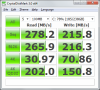
I wanted to get a few opinions about these scores. The drive is an OCZ Vertex 250 gig. I installed it and loaded a fresh copy of Windows 7 home premium yesterday. Intel RST driver is installed. The drive is blazing fast and I am very happy with it. The laptop is a an Alienware M15x.
-----------------------------------------------------------------------
CrystalDiskMark 3.0 x64 (C) 2007-2010 hiyohiyo
Crystal Dew World : Crystal Dew World
-----------------------------------------------------------------------
* MB/s = 1,000,000 byte/s [SATA/300 = 300,000,000 byte/s]
Sequential Read : 221.686 MB/s
Sequential Write : 144.134 MB/s
Random Read 512KB : 149.523 MB/s
Random Write 512KB : 134.654 MB/s
Random Read 4KB (QD=1) : 16.687 MB/s [ 4073.9 IOPS]
Random Write 4KB (QD=1) : 11.929 MB/s [ 2912.5 IOPS]
Random Read 4KB (QD=32) : 65.573 MB/s [ 16009.2 IOPS]
Random Write 4KB (QD=32) : 11.196 MB/s [ 2733.3 IOPS]
Test : 1000 MB [C: 15.6% (37.3/238.5 GB)] (x5)
Date : 2010/09/09 15:33:55
OS : Windows 7 Home Premium Edition [6.1 Build 7600] (x64)
-
-
I did a clean install of windows 7 and changed nothing. No tweaks.. These are my results with the kingston 64gb V+ series.
Kingston 64gb V+ no tweaks at all normal boot
View attachment 55720
Safe mode
View attachment 55721
Previous install with all tweaks from
http://forum.notebookreview.com/alienware-m15x/516410-windows-7-optimized-ssd-install-5-5gb.html
View attachment 55722
I dont think the tweaks do much. I feel no difference in performance and the numbers didnt change much. I have an old computer running intel core2 duo 1.5ghz and only 2gigs of ram right now. -
Yup. Gonna post a link here when its set (still looking for the best possible settings atm.)
-
I ran the bench a second time and the scores are about the same. They seem to be in line with what this drive should be but I was just curious.
-----------------------------------------------------------------------
CrystalDiskMark 3.0 x64 (C) 2007-2010 hiyohiyo
Crystal Dew World : Crystal Dew World
-----------------------------------------------------------------------
* MB/s = 1,000,000 byte/s [SATA/300 = 300,000,000 byte/s]
Sequential Read : 225.040 MB/s
Sequential Write : 144.531 MB/s
Random Read 512KB : 151.037 MB/s
Random Write 512KB : 138.426 MB/s
Random Read 4KB (QD=1) : 16.706 MB/s [ 4078.6 IOPS]
Random Write 4KB (QD=1) : 11.637 MB/s [ 2841.0 IOPS]
Random Read 4KB (QD=32) : 65.613 MB/s [ 16018.8 IOPS]
Random Write 4KB (QD=32) : 11.482 MB/s [ 2803.2 IOPS]
Test : 1000 MB [C: 15.6% (37.3/238.5 GB)] (x5)
Date : 2010/09/09 15:56:48
OS : Windows 7 Home Premium Edition [6.1 Build 7600] (x64) -
If you have a series 5 or 965 chipset you should try this reg tweak in high performance mode:
HKEY_LOCAL_MACHINE\SYSTEM\CurrentControlSet\Services\Processor
HKEY_LOCAL_MACHINE\SYSTEM\CurrentControlSet\Services\Intelppm
Change on both the "Start" from 3 to 4
PS. it could work on other chipsets too. -
Just a reminder: monitor your temps before and after applying the above tweak.
-
What do these tweaks actually do? I'm noticing my CPU doing odd things with them. It idles at full speed of 2400-2533 Mhz, but then when I launch a program, it'll start dynamically lowering its clocks as normal.. which seems a bit backwards.
I'm assuming from this that they disable power saving features when the CPU is idle? -
Guys, since I've decided to go with a 64GB SSD, I'm offering my brand new OWC 40GB for $110 shipped to USA here: http://forum.notebookreview.com/com...-fs-new-owc-mercury-extreme-pro-40gb-ssd.html
Otherwise I will return it back to OWC. Just thought I'd give someone a chance to save $10 from the current cost of $115+$5 shipping from OWC. -
I have odd results with this. My 4K Reads nearly doubled to 70mb/s, the writes increased as well. However, Windows 7 no longer detects whether the laptop is plugged in or not. The odd part, is that now Windows 7 is able to calculate my battery life, something I previously couldn't do with this notebook in either Windows XP/Vista/7 without installing third-party software.
Attached Files:
-
-
Just tried this tweak out, and noted my CPU idle temps before and after 30 minutes of idle. and this is what i got:
Before tweak:core1: 43
core2:38
core3:39
core4:41
after tweak: core1:64
core2:57
core3:59
core4:54
Note alot of these temps vary from second to second, by as much as 3-4 degrees, making it a little difficult to really gauge exactly how much hotter the cpu is running. I just took a snipet of what was displayed at a given time. One thing is clear though, its a definate increase. Much higher than i had anticipated.
So my question now is, what is the exact benefit of this tweak? and where would i be able to see or notice the performance increase? And finally, does this increase in performance justify the rather excessive heat increase?
**Also thought i should mention i also have the windows 7 core parking tweak applied as well, not sure if this has something to do with it. -
Mixing various tweaks will have unpredictable results, some of them are complementary but others may mutually exclude each other..
We walk on an unknown territory here.
It will take too much testing to figure out if we actually gain or not with those tweaks (and I am not talking about synthetic benchmarks) -
Did you notice any improvement after applying the core parking tweak?
PS: Core parking tweak also add your idle temp. -
Maybe if you're doing a lot of file copies or installs, etc, enable the tweak, then turn it off when done if it helps with stuff like that. Otherwise a 20C CPU increase is far from worth any gain it gives.
-
+1
20C increase is too much though he can get lower idle temps without the core parking tweak. -
The core parking tweak is brilliant. Been running it for months now. Makes everything snappier. Basically windows 7 parks the cores when not in use, essentially saving energy, but also creating slight lag when opening programs and menus, opening picture folders etc... (mind you...you ssd guys prob won't notice a difference...can you get any quicker? LOL) because the cores have to start up from 0. i was skeptical at the begining also about temps, and to my surprise didn't notice any diffrence? (maybe 2degrees? who knows but i didnt notice anything significant enough to matter)
Also, my core temps at idle were WITH the core parkign tweak already applied, and as you can see, my cpu temps are more than acceptable (22*C ambient temp) This tweak alone i know for a fact isn't the cause of the almost 20*C increase on some cores, but what i was suggesting is maybe that the combination (as stamatisx also suggested) is causing it. and Honestly i'm too lazy to try it with the core parking tweak disabled loll.
That being said, i would recommend the core parking tweak to everyone. Also is said to make the mousepad polling rate quicker. I haven't noticed that though, hard to tell really...after all we're talking about tenths of a second here... lol
And While we're on this subject matter....Anyone have the iexplorer max connections tweak applied? Another great tweak...
EDIT: Hmm maybe we should start a whole thread dedicated to Windows 7 RegEdit tweaks?? Does one exist yet? Who thinks thats a good idea?
-
Update:
Here's JJB's current suggested settings Link
PS: Please post your before and after idle temps on that thread. -
There was someone saying that Sandforce SSDs should not be written to a lot and they should not get full over 70%. Both are not true in my opinion.
Here's how a fresh Sandforce drive performs (Patriot Inferno 120GB). ( Note Crystal is not on default settings.)
![[IMG]](images/storyImages/1-1.png)
Here's how it performs when it's 95% full, after 55GB have been written to it in a matter of minutes.
![[IMG]](images/storyImages/degraded95full.jpg)
After I deleted the 55GB I did notice a slight drop in file copy performance (1:30 min to 1:50 min), but performance restored to the initial level quite quickly. -
Has anyone tried the secure erase feature of the new Toolbox?
Intel SSD Toolbox v2.0 Released | StorageReview.com
I haven't yet because I need my laptop intact for the time being... -
Would you say that a 60GB Vertex 2 is worth $24 over a 64GB Kingston V-series (not V+) SSD? I'm planning on buying two of them, for two PC's.
-
Phil, what you do once (and then benchmark) is not the the same thing as doing daily and seeing the performance plummet in a few short weeks.
Since I've stopped using the Inferno 100GB as an image editing platform, the performance has increased substantially.
I've also applied the tweaks in this thread too:
See:
http://forum.notebookreview.com/har...et-can-not-take-full-advantage-fast-ssds.html
It is very telling that with a single 'fill' and 'erase' the performance dropped 22%. -
If you would like to prove that "performance plummets in a few short weeks" that would be very interesting. It would have to be a lot more detailed than you're doing now though.
If you're writing 100GBs a week to a MLC SSD every MLC SSD will degrade.
About those tweaks, I'll say it here too: The effects are very apparent in synthetic testing. I've been doing some real world testing. Sofar the effects on real world SSD performance turn out far smaller than I thought, even when doing some basic multi tasking.
In theory they could help when there is some heavy usage going on but it's seems impossible the CPU would still be in that power saving mode.
I will be doing more benchmarking this week, I will update with results. -
@tilleroftheearth
When you were experiencing some performance slowdowns, were you able to let the system idle for like overnight?
It takes longer for the GC/TRIM to restore performance if you write a lot (from my own experience). -
I actually left the system on for a week with very little difference in how it operated.
For the last 3 or 4 days of that week, I didn't even use it. -
For heavy usage definitely. For light usage not really.
(I'm assuming you're talking about SNV425 not SNV325). -
Some more Sandforce torture testing.
Fresh drive:
Same drive, 10 seconds after writing and deleting 200 Gigabytes (!) of compressed and uncompressed (50%-50%) data to it.
![[IMG]](images/storyImages/200GB.png)
Notice anything peculiar? Yes very little performance degradation. These Sandforce drives are something. I wonder if other SSDs can pull of the same. -
Which Sandforce drive were you testing?
Got it - you mentioned it in a prior post:
-
Phil,
If you are going to do a test... Im still waiting for a simple one from any OCZ owner...
Put two Crystal scores side by side both drives full, the OWC and the OCZ. I cant get anyone to fill and post a OCZ score.
And that sounds familiar with respect to what you just posted eheheh -
I would also like to see this, but with also with the "torture test" that Phil posted 2 posts ago.
-
Les, I have no OCZ or OWC drives here at the moment. I doubt the Patriot Inferno is much different than a OCZ Vertex 2 though.
I filled it up to 95% and 97% percent. I did not notice any drop off.
-
Phil, I noticed that you have selected the 0x00 fill, could you run a test with the disk full and the default settings (random)?
I think that's why you didn't see any difference -
I'll might be able to do that later. I did do some real world testing. Copy 4GB folder.
Fresh drive: 59 seconds.
Tortured drive: 1:09 seconds.
The second test was run half an hour after writing and deleting the 200GB.
So yes some performance degradation but minor imo.
Update:
Here is the CDM with random data. Looks very good to me. The drive has had 45 minutes of idle times after the 200GB writing and deleting.
![[IMG]](images/storyImages/new.png)
-
The random contrary to the sequential R/W seem unaffected... indeed looks good
-
Well the sequential is unaffected too. On a fresh drive it wouldn't be any higher. This is because of the way Sandforce works with compressed data I believe.
-
Maybe this can help.
@ Phil: my opinion is that all drives should be benchmarked with random data, because that's what is going on with real data -
@ Tomy, the reason I generally don't run CDM with random data on a Sandforce drive is because Tony from OCZ does not recommend it, for the life span of the drive.
And I'm not comparing between drives, I'm only comparing a fresh Sandforce with a used Sandforce. With random data or not, the conclusion is the same. -
Thanks for the link I will keep that program in mind, it's that I just don't have time to switch back and forth to different drives at the moment... otherwise I would try to secure erase with Toolbox myself. I still prefer though a clean windows installation instead of cloning.
I also checked the manual and I saw that you can transfer the data from the HDD to the Intel SSD but not vise versa. -
That's pretty impressive from a Sandforce.
The Kingston V-series are JMicron controllers aren't they? How do you think it would fare from a similar test? Once filled at or near capacity do you think the performance would be horrible after deleting the data?
I'm just a little skittish after doing that with my Samsung drive and performance dropped to that of an HDD. -
Other people have said Kingston V series (SNV425) it quite resilient. I don't know if it's true.
-
Well I'm about ready to buy two of them, because if real-world performance difference (according to that article you posted earlier: http://forum.notebookreview.com/har...marks-brands-news-advice-656.html#post6682106) is negligible (heck seemed to do much better actually) I'd rather save the $50 cost difference ($25 each difference).
Of course JMicron has a bad name from their earlier controller issues, but seems all is good now. I think I'll go with the Kingston then. -
Life span, that's true, because SandForce can compress all 0s/1s and write less data that there really is, but all 0s/1s won't happen in real life.
Or I'm wrong? -
If I was benchmarking in order to get an idea of real world performance that would have been right.
But I was comparing the Patriot in a fresh state to the Patriot in a used state. Any CDM setting is fine for that in my opinion. I choose the one that has least impact on lifespan. -
There is a funny side of this though and i observed it in testing. Say I am testing the OWC and the Intel side by side and I do AS SSD and Crystal random tests. Anyone looking at them will say the OWC looks to be a crap drive right? Well now, lets put them through normal testing with real life tests as well as Vantagex64 and the results show that the two drives are actually very similar.
IMHO, the true end result of the Crystal Random and AS SSD is not truly indicative of the actual performance of the drive as has now been shown in the tests I spoke of. I personally think they are false results with respect to drives that utilize compression in storage. -
Any reason not to get this A-Data Sandforce 256gb for $509 + $5.99 shipping? I don't need it to be the best ssd around, I just need it to be within Sandforce range performance and not suck. Newegg.com - A-DATA S599 AS599S-256GM-C 2.5" 256GB SATA II Internal Solid State Drive (SSD)
-
@ taetertot, I'd rather buy from a bigger brand like OCZ which has better support. In case you need a firmware update OCZ is far more likely to bring it than Adata. OCZ also has a very good forum with expert help.
For example: OCZ Agility 2 240Gb is $535 at Newegg.
OCZ OCZSSD3-2AGT240G 240GB 3.5 Inch Agility 2 SATA II/3G SSD
You might want to look around on Ebay for a 240GB Corsair Force, Vertex 2 or Agility 2. -
Sure dude spend all my money like that lol. Actually the OCZ Vertex 2 240gb is the one I was originally going to buy; it is $565ish with a $20ish rebate currently in effect. Iirc the Vertex 2 has 4k/50,000 while the Agility doesn't and also packs some other improvements. I'm not sure this affects me but the Vertex 2 and Agility 2 are so near in price I may as well.
Dang I was hoping the answer would be "they are the same drive, buy the A-Data and spend the savings on Starcraft II." Plus I'm reading the HM55 chipset isn't so friendly to ssd perf anyway so I thought a cheap ssd would do. I've never even heard of A-Data though lol. Maybe $500 is a bit much to spend on a firm I've never heard of. I sure as heck got burned on this ghetto MSI I'm typing on. Price seemed too good to be true and it was lol. -
Adata released some bad SSDs here in the Netherlands. The firmware update needed to fix the problem didn't come.
About Agility 2 vs. Vertex 2, Techreport said they couldn't find a difference in real world performance. -
Oh sweet Newegg has the Agility 2 for $469 shipped. Thanks man.
-
It's certainly worth a thorough investigation. At least, that's what I would do if it concerned my pocketbook.
In any event, I believe people should concentrate more on SSDs that fit their style of computing first, rather than depend on direct numerical comparisons. After all, these benchmarks are only as good as the way you intend to use the SSD. As well, many of them are designed for specific uses anyway. -
Well, this is so frustrating for me. Benchmarks should help you decide, but when "real world" testing doesn't quite match up to the benchmarks its hard to know what to believe. I'm struggling between the 64GB Kingston V-series ($100 after rebate) and the 60GB OCZ Vertex 2 ($125 after rebate). I am buying two of them, and while I would like to pocket the $50 difference, I think I would also kick myself later for not spending that money if I get dismal performance in some area.
For the most part it will get general use, some gaming, but I also do quite a few file copies to and from the hard drive to an external or home server over gigabit (sometimes wireless, but hook up to hard line for lots of files or large ones). The 4k write benchmarks for the Kingston look so dismal, but program and game file copy performance shows otherwise. I don't understand that. -
Wow that's a very good deal.
http://www.newegg.com/Product/Produ...&cm_re=agility_2_240GB-_-20-227-544-_-Product
4K performance has little to do with file copy performance. 4K write performance influences install performance a lot.
Sandforce drives will only be noticeably faster than that Kingston during medium/heavy multi tasking, which was not covered in that review.
SSD Thread (Benchmarks, Brands, News, and Advice)
Discussion in 'Hardware Components and Aftermarket Upgrades' started by Greg, Oct 29, 2009.