 Problems? See this thread at archive.org.
If the available free space is not an issue for you, you should stick with your X25-Es. I don't plan to change mine either, very satisfied so far.
-
No, it's not really. Just talking from a purely information point-of-view, by the way. Not necessarily interested in buying right now, just trying to get caught up

But I did put them in RAID-0 because after Windows and my programs I only had like 20 GB left. My Steam folder alone is 25 GB's!! -
best deal for SSD now? what's difference of speed between corsair 240G vs 160G?
Newegg.com - Corsair Force CSSD-F240GB2-BRKT 2.5" 240GB SATA II MLC Internal Solid State Drive (SSD) -
I think it would be better to wait. The current SSDs don't really perform better.
If your next notebook has SATA III upgrading will become more interesting. -
waiting for new laptop having 2 STATIII slots, and USB 3.0 with IPS screen..hope so...
-
I think this is SF1200. CHeck OCZ Vertex 2, it around $440, or $390 after rebate, and it is SF1500.
-
SandForce - Wikipedia, the free encyclopedia
it seems only vertex 2 pro uses SF1500. -
Vertex 2 Pro or EX uses SF1500 though I am wondering if those two lines have been abandoned.
-
And it's not like anyone is going to notice a difference between SF1500 and SF1200.
-
I can't believe it, on same page there's post about dead SandForce based SSD and post about someone want to buy SSD like that one that died.
Is it just me or there's really to much marketing stuff behind those SandForce SSDs.
Why don't anyone recommend new Samsung? -
Mainly the price. A 256GB 470 costs over 500 euros here, while other 240GB drives start at 400.
I like the Samsung but it's price isn't very competitive imo.
I agree on the reliability of Vertex 2 though, I've seen quite a few issues with them. Seems like they have more issues than Intel for example. -
Yes SandFoce markets well but there product deserves all the credit it can get as well...especially in a few months when we are all using SSDs in sATA 3 that are 500MB/s read and write.
I personally love the Sammy as well and chuckle when I think of how the Intel is falling out. They are going to have to release something unexpected as everyone else has now jumped on the smaller NAND train. Sammy can easily fit twice as much by placing the reg size PCB back into the 2.5" drive rather than the reduced 1.8" as they have. This is going to be interesting...
Oh and as for the OCZ issues?!?!?!?!?!?!? Hello!!!!! I have been pointing this out for months now and even provided the reasoning ion several sites but there were so many lovers that I was disregarded. Wait a minute....didnt that happened when I said 64Bit would make it as well? eheheh
The OCZ difficulty lies in the relationship between SandForce and OCZ where they get first crack at f/w releases and are also allowed to complete testing themselves which means that it gets from SF to them before completely tested by SandForce under the guise that they will tested it themselves further. I am not saying that that is the reason but....how many f/w updates have been released to fix other updates or bricking drives that died possibly because of premature f/w? Why have others not had this problem with the exact drive? -
Going by this review the Samsung is by far the fastest one can get: Samsung 470 Series 256GB SSD Review > Benchmarks: Real-World Applications - TechSpot
This doesn't agree with my benchmarks though. -
Second that!
Samsungs are great for laptops or even the C300 and Intel SSDs.
Marketing has great power. Do anyone remember that "ultra-fast-reliable-state-of-the-art" OCZ SSDs with JMicron controler ? Or the immature OCZ Indilinx Barefoot powered SSDs and all these problems they had until a good firmware was released ? Still are a lot of OCZ "followers" doing beta testing for OCZ (just check OCZ forums) that have purchased one or more expensive SSDs with real money ! -
Wow....... I can't believe we are finally remembering and seeing the true picture. You KNOW that OCZ will see this soon enough as they have amazing perception throughout threads which post and backlink...
-
Did you see this guys...
![[IMG]](images/storyImages/Realworld_01.png)
![[IMG]](images/storyImages/Transfer_01.png)
Amazing how different their results are to mine. Their test system is vastly different though.
All credits to Techspot by the way. Finally a website that understands what real world benchmarks really are. -
I agree with the above posters that the new Samsung SSD is an awesome drive.
-
Les the "Second that !" in my post above was regarding Tomy B, previous post but I was a bit late
(
http://forum.notebookreview.com/6909404-post7627.html)
I have followed the whole SSD history the last 3-4 years (drolling over some Mtron & memoright reviews, although my first SSD was purchased 4 months ago, a C300) and for one thing I am sure : I will never buy an OCZ product even if they are the faster and cheaper. -
Just keep the info flowing guys. I'm planning on a new drive sometime in Feb or March 2011. Right now it will probably be a Samsung or Intel 256GB or larger depending on pricing. Would it be crazy to buy a stupid fast 60-90GB SSD for a boot drive and use a 256GB SSD for storage and apps?
-
I don't think it's crazy. Two fast SSDs would probably work out faster than one fast SSD because both can be accessed at the same time.
It's expensive though. -
I don't think it's crazy either. Check out my sig. I have an Intel x25-m 80GB for O.S. and programs and the Corsair Nova 128 for files. battery isn't really affected since Nova has low power consumption and the Intel is usually idling.
-
I too don't think that spending 'crazy' money on a two drive SSD setup is a bad thing.
What I don't understand though: where are you going to find a 'stupid fast' SSD?
The rumors of its arrival have been greatly exaggerated, so far.
-
Yeah good point, there doesn't really seem to be 'stupid fast' SSD.
To have a SSD that's signficantly faster than what's currently available a SATA III controller would be necessary imo.
Although the Samsung 470 did look very fast in that Techspot review... -
Well, in 3-4 months when I plan on buying my new laptop and SSD('s) as well, I figured if there is an expensive but really fast drive I can get a low capacity one, and then just a 'normal' large capacity SSD. Too bad Intel only has a max 160GB G2, because I wouldn't mind one of those as a storage / data drive. Maybe a single SSD is just the way to go, just I would then probably like 300GB plus, which can probably be much more expensive than a 60GB plus a 240-256GB.
-
BUMP on updating the C300 firmware.. Are there some tips to do it as i don't want to brick my SSD.. no experience doing this.. becomming really frustrating that nobody's answering my questions...
Thanks
Leopard 2 -
I doubt there is going to be stupid fast SSD in the next generation (i.e. signinficantly faster than what is out there).
Taking Phil's graph, I can see that the new Samsung is slightly faster in read(W7 boot) and about 2x faster in same drive copy. The increase in file copy speed I believe come largely from the size difference.
There are limitation on how fast NAND can read/write/erase and I don't know how much speed can each process generation gain (say 34nm -> 25nm). The size may be doubled, but speed gain may be minimal. The only way to make a drive much faster seems to be adding more channels (Intel has 10, are we going to see 20 and more).
Also, low capacity SSD is unlikely to be faster(why 40V is slower than 80M which is slower than 160M) as it is difficult to add channels when the size is small. -
That's what I think too. 240/256GB drives tend to be a lot faster than 120GB versions.
-
Testing a 480GB drive out right now... Size is there anyway right?
-
I'll test it for you for a good couple years if you'd like.
-
Naaa..you speed demons wouldn't like it as it only has the JMicron 616 slow poke compared to what you have. It does have 32 chips of 16GB micron NAND I'de sure like to see Samsung match though since they could easily do it with their present release. Here...quick peak k? Worlds first look at this setup. Ive never really been good at surprises.
Attached Files:
-
-
Looks like.... PCB and a bunch of silicon!
See that's what I'm talking about though. If it was relatively affordable, faster than any traditional HDD, I'd go with something like that coupled with a SandForce SF-2000 120GB for my boot drive and apps that would benefit from super fast SSD. -
What are the cases made of for SSDs? From all the pictures, they look like plastic and I suppose they can be since they don't have the heat to dissipate a platter drive will have. I suppose then, how much lighter are they than a dual platter hdd?
-
Yeah, sure would love a Samsung 470 256GTB for my next drive
GTB = GigaTerrabyte for those not in the know
Was actually just a typo
-
Any programs you're using to tweak or maintain performance in these drives? For either the Intels or the Crucials or Sammies?
-
Actually, most cases I have ripped apart are metal.
-
OK, thank you for that.
-
Guys is the Samsung mmdpe56g5dxp-0vbd1 a version like the 470 series or is it a previous version?
-
Found eBay item
eBay Österreich: SAMSUNG SATA 2.5" 256GB SSD MMDPE56G5DXP-0VB TRIM NEU (Artikel 290489758649 endet 24.10.10 20:31:55 MESZ)
The description states it is a PM800, the previous generation. -
Thanks. I was afraid so.
-
I have two Intels X25M 160GB G2 in RAID0.
Intel toolbox do NOT recognize them because of RAID...
TRIM is still not an option in RAID mode...
Last week, I noticed a severe performance drop (Seq. writes from 212 to 120MB/s; Seq. reads from 380 to 250MB/s, and so on...)
Therefore, the only way I can get the performance back is by Trimming them manualy, meaning, FORMAT C: /quick...
That is, re-install windows and quick format my C drive at the beginning of the process...
So basically, doing a quick format of my C drive is like giving it a manual TRIM, which gives me back my original performance.
Sad that I need to reinstall windows to get them back, but this is better than nothing, and as there's still no SSD ATAPI-8 compliant, there's NO possibility to TRIM in RAID... just yet...
eYe
Attached Files:
-
-
What is the JJ Tweak ? Can you give me a link ?
-
-
To keep things simple, let's call it JJB's tweak
-
Hi guys,
Yesterday I got my Intel 120 GB SSD. Wondering if these numbers are ok for this type of SSD?
![[IMG]](images/storyImages/intelssd.th.jpg)
My machine is Asus G71GX with P8700 and Win7 x64. -
Looks fine yes.
-
Thanks Phil.
-
So after getting my Samsung SSD in Tuesday (thanks Phil), I finally got it installed yesterday after much hassle. I had to take the back case of the SSD to make it fit, but it does sit very nice and tight in the drive bay.
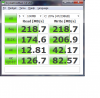
But I am very glad that I bought it. It very fast, but not sure if it's up to optimal speed:
-
Doesn't look optimal no.
Here's the same drive in my Acer 1830T with 3x 50MB
![[IMG]](images/storyImages/samcdm-1.png)
Did you install Intel RST driver? -
Yeah, the latest version. Ran the same settings as you. Still low:
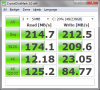
I havn't used JJP's tweak, so that might be it.
I have an Acer Aspire Timeline 5280TG. -
Try Stamatixs' tweak first, it's much easier: change the intelppm, start in the registry from 3 to 4
If that gives good effects, than it might be worth trying JJB's tweak.
By the way, have you tried ATTO also? I'd do that before any tweaks.
SSD Thread (Benchmarks, Brands, News, and Advice)
Discussion in 'Hardware Components and Aftermarket Upgrades' started by Greg, Oct 29, 2009.


![[IMG]](http://img834.imageshack.us/i/intelssd.jpg/)
