Problems? See this thread at archive.org.
That was an improvement:
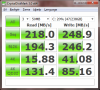
Read Seq is still low though. I will try to apply JJB's tweak and see how it goes.
-
After applying JJP's tweak it now equals your speeds. Thanks Phil.
By the way. Do you know why Samsung SSD Magician doesn't recognise the PM810 when it is just another name for the 470 series? Seems a bit odd to me. -
I hope you set intelppm back to 3, because it will kill battery life if you don't.
I don't know. Maybe because yours is an OEM version and the Toolbox is only meant for retail versions. -
Hey, i'm kinda new, and there's lots of posts in here.
Can anyone recommend me a good SSD, size ~ 120gb or so.
Thanks
-
Intel X25M 120GB.
-
Samsung 470 128GB, most consistent performance and low power consumption.
Corsair Nova V128, Intel X-25M and Sandforce drives are also good. -
Intel X25-M 120GB is now $199 (today only) from newegg.com and get a $35 prepaid card and the game Lost Planet 2 (worth $40):
Newegg.com - Intel X25-M SSDSA2MH120G2K5 2.5" 120GB SATA II MLC Internal Solid State Drive (SSD) -
updated to Crucial C300 0.006 firmware.. SSD feels fast.. any reason why? it was feeling very laggy before the firmware update....anyways , how does TRIM work? Is there some article for it or something? i want improve speed of my SSD... done all the software +JJB's tweaks...
Thanks
Leopard2 -
Holy craparoonie, that's a good price! Too bad it's sold out.
-
For those using the Callisto drives from Mushkin there is a firmaware update available.
There supposedly is a sanitize feature set fix. I am hoping this helps in resetting the LTWT once TRIM and GC have cleared the drive.
Release Notes;
Features added since 3.2.0:
- Improved latency
- ATA Sanitize Feature Set support
Resolved issues since 3.2.0
- Mitigated the possibility of data loss when drive is used with Windows 7 OS, drive indexing, and very slow rate of writing and drive experiences an unsafe shutdown.
- Fixed a rare condition in which a drive could hang on a SLEEP command.
- Modified IDENTIFY data to indicate that the SANITIZE feature set is supported.
- Added extra handling of parity errors for improved Soft Error handling.
- Added SMART Attribute Threshold 177 (B1h)
- Fixed the output of the IDENTIFY DEVICE request to properly indicate if the SMART Feature Set is enabled or disabled.
- Enabled flash write protection whenever core voltage is turned off.
- Improved the handling of aborted NCQ commands.
- Fixed an issue that occurred when two commands are waiting for each other to complete.
- Fixed the secure erase operation to rebuild the SMART log directory information.
- Fixed a case where sequential write with IOMETER 2006 could cause the drive to drop from the system. -
the changelog seems to be a line by line match to the OCZ 1.23 firmware version which was out about a month ago.
So it seems that OCZ is still a bit faster to get the newer firmware. It also further strength my understanding that all Sandforce SSD are basically using the same firmware(some older, some newer). -
The new JMicron JMF616 controller shows very decent performance:
![[IMG]](images/storyImages/480-crystal.png)
Source: SuperTalent's UltraDrive MX 480GB SSD review -
Yeah, Mushkin is a bit slow with FW...............
Now am I correct since this was on a tower it would no have suffered any of the ICH10 issues of the mobiles? -
Jstarnino,
you really haven't missed much - except being a beta tester for SSD manufacturers.
I would definitely be waiting another couple of months in your shoes (knowing what I know now ).
Btw, what is your typical usage scenario? -
You can always wait for a better deal a faster/bigger/cheaper SSD or you can enjoy what is available today and in the future move up as we all do. While you are waiting for the perfect item you are missing out on what is available today and it isn't all that bad.
-
I would love to upgrade my HDD to SSD. Um what im looking for though is a 500 GB SSD. while I know the price will be steep im willing to spend the money for it. I only have one HDD bay which makes it difficult to make the decision. My G50-x1 had two bays but it died. Is there a way to get the performance of a SSD to work with my current HDD through PCI, or what?
-
Get a momentus xt.
-
I'm going to be buying a gaming laptop soon and I'll be putting an SSD in it first thing.
I've done a little gaming with my current laptop (i3-370M & Intel HD) and the Corsair Nova I have is great for getting game maps and levels to load much faster than with any platter drive. But I'm going to buy a new drive for the Asus gaming laptop and looking for suggestions.
I'm guessing that sequential speeds for larger files would be my priority for an SSD in a gaming scenario. Any thoughts on this? -
Intel G3 will probably not be a spectacular improvement in performance.
Actually for any spectacular improvement a SATA 6 Gbps connection is needed.
+1 for Seagate Momentus XT now, very good deal on Amazon.
Get an SSD when prices come further down. -
Newegg has that drive for $99 right now, free shipping.
(I won't buy from Amazon because I'd have to pay sales tax -- they are located in my state.)
I wonder if the XT would boost gaming performance noticeably ??
Edit: Reviews by owners don't recommend it for gaming. Apparently good for speeding up repetitive usage patterns. -
I wouldn't say it's not recommend it for gaming, it's still a fast drive. You just won't get the same performance boost with game loads as you would with an SSD. Also note that some games are dependent on real-time game data loads (i.e. Oblivion) where most others only load in between levels or at the start of a multiplayer map, and many times that can be limited by other components on your PC. But in general SSD's are NOT very advantageous for games anyhow.
-
I updated the firmware on my samsung 470 drive but I'm not sure what the firmware fixes.
-
Well, you don't need to take my word; buy an SSD and find out for yourself.
With the type of use you put your system to, I would say that you need at least a 240GB SSD. Not because you want to keep all that data on your system - but because you want to have as much free space as possible on it (to sort of, kind of ensure it gives consistently good/great performance).
A 50% filled SSD (or less) will give better performance than any HDD available (even an XT Hybrid). Depending on the way you use it though, it can give worse real world results too. Fill it past 60 or 70% and if you use it a lot (like I do) you'll be wondering why you spent the extra money for. Not to mention all the work arounds you'll be doing to keep yourself confined to the much smaller capacity of today's SSD's.
So, the SSD that would fit your needs (and mine and about a billion other people too) is simply not made yet.
At least not one that you can just drop into your system and forget about what you're doing and whether it will boot up the next time you hit the power button anyway.
This is the reason to wait for the new generation SSD's. Not for performance, not for price (but those will come too) - but for everyday usability and the ability for the SSD to become 'invisible' in everyday use - just like we do with our HD's now.
Btw, my next SSD will be an Intel. No doubt about that. -
It's a very fast 7200rpm for gaming. Not as fast as SSDs though.
I don't really recommend the XT for the Acer 1830T though, it's such a small and light notebook. Vibration is quite noticeable and you'll get etter battery life with an SSD. -
HELP!!! Will my Asus F83VF(c2d P8800) support SSD? I went to device manager and saw
Intel(R) ICH9M-E/M SATA AHCI Controller. It's 1 year old...
Are there any more things to check?
Am thinking of getting phoenix pro 120gb....or intel x25m
some help pls! thanks -
Yes, you can add an SSD in your system. Any SATA 2.5" disk.
I would recomend you the Samsung 470 Series SSD 128MB or the Intel X25-M 120GB SSD (as this intel has ~120MB/s write instead of the 80-90MB/s that the X25M 80/160GB have)
These 2 drives are the best in the plug-n-forget category -
See here for more information.
See here and there for more information.
Actually, even with the fastest HDD, you STILL have to tweak, TLC and pamper if you want to get/keep the best out of it.
For instance, performance will severely degrade if you don't defrag an HDD on a regular basis.
Also, any HDD is more suceptible to crash than any SSD because it has moving parts, head can hit the disk, and so on...
Finally, I'm pretty sure a degraded SSD will outperform an average HDD, but it's just not worth the extra money in this case.
At the end of the day, all in all, there's no SSD nor HDD perfectly made to suit our needs just yet, as none of them (neither SSD nor HDD) can work (fly) flawlessly, without needing some care, without wearing, without hickups nor degradation, and so on...
All we can do is try to understand the pros and the cons of each, and make a choice so we get the best out of it, depending on our own particular needs, usage scenarios and so.
And that's exactly why people love to come here, as they get answers from owners and not from manufacturer's marketing stuff that, on a day to day basis, is often never seen.
Make sense ? -
Is Light Peak closer then we thought!
hint -
Thanks for the help! what do you mean by plug n forget?
By the way if i do get the intel, i would have to install Intel RST drivers right? I went to the intel site and looked for IRST but under the list they don't seem to have my chipset?? Does that mean i cannot have full TRIM support?what's ICH9M-E/M -
See here.
While not an Intel site, many people here, including myself, get their Intel drivers from there.
I personnally use the latest version, 10.0.0.1046, first link of the Rapid Storage Technology table on that page.
Chipsets supported are: ICH7R/ICH8R/ ICH9/ICH10/i5/i7
As a side note: TRIM has nothing to do with the Chipset; it's a matter of O/S (WIN7), Storage Controller (IRST 9.6 and above) and the SSD itself.
Also, Plug&Forget = Plug&play instead of Plug&PRAY...
Hope that helps ! -
Yes, this is what plug & forget is. Install it, do 1 or 2 tweaks in Windows7 (just 2 minutes of work) and you are ready. Beside this Intels and Sammy470 drives have one of the best GC so you can use these drives without any major problems under other OperatingSystems than Win7, like older linux, MacOSX, WinXP etc.
-
I've only had my Corsair Nova V128GB for about 5 weeks and it's already giving me a T.E.C. (death) date of June, 2012. This is according to SSDlife which reads the SMART data recorded by the drive's controller. "Health" is rated at 94%.
It's true that I have secure-erased it twice and done OS installs about 4 times and just before Thanksgiving (last week) I downloaded several gigabytes onto it. So, it's definitely true that you must keep the writes to a minimum to extend the life of your drive. It is still performing well since I never fill it more than 50% and it usually has 60% or more space free.
But, from now on I'll be pointing all downloads to an external USB HDD or a memory card and do whatever I can to minimize writes. With minimal writing in the future, that "death" date should get pushed back slowly over time until it's back up to around 3 years instead of the current 18 months or so.
I wonder if future technology in MLC manufacturing or drive controllers will allow more robust write-life on these drives. I sure hope so. This is a bit of an annoyance having to worry about writes.... it almost, but not quite, negates the wonderful speed advantage I get from the SSD. -
I've had my Intel X25-M 80GB since the end of August and have done 1.02TB in writes. That's a few OS installs, to SE's, and quite a few system image restores. According to Intel SSD Toolbox, my media wearout indicator is 99. The free version of SSD-Life has it at 99% health as well.
-
Most SSD's do not properly report health through SMART. Intel is about the only one that does.
-
Here's a clickable thumbnail image (snip) of the SSDlife report I just ran a few minutes ago. It has already changed, pushing the T.E.C. date back a few days because I haven't been doing many writes today.
![[IMG]](images/storyImages/th_SSDlife-1.jpg)
It shows 623 GB written. So, hopefully this is not an accurate estimate. It changes quickly as power-on time is calculated against amount of writes. With writes minimized it will continue to advance the T.E.C. date further on.
I don't place a lot of faith in this program. It doesn't even report the total/free space properly. It should read 119.5GB/99.2GB to reflect formatted capacity & free space. -
Our read/work hour ratios are very close to each other. Interesting how the lifespan is predicted so differently.
Raydabruce = 2.15GB/work hour
anseio = 2.10GB/work hour
Here's mine:Attached Files:
-
-
My SSD has an Indilinx controller. That may be what's responsible for the discrepancy. SSDlife may have been written with Intel drives in mind. After each secure-erase I did, I lost a percentage point on drive life. It doesn't look like you did. Or, it could be that the Indilinx firmware doesn't track or report SMART data properly... I just don't know.
I think I'm going to order the new 120GB Intel G2 drive. Reasonable price per GB for an SSD, at least at today's prices. -
I have the Nova 128 and I would not even think of doing anything differently than I normally would. 2 things: I do not normally do all the much. Also, even on a spinner I always had lots of empty space. But other than leaving some free space, which is only good housekeeping, I would never worry about when it will run out.
-
I guess that depends on what your normal usage is. Since I do a lot of downloading and file transfers I have to make some adjustments to get decent lifespan out of my SSD. Pointing downloads to an external spinner will help a lot as well as keeping large files off the SSD. It would be nice if my notebook had two internal drive bays... but it doesn't.
-
I do alot of downloading, installing, uninstalling, moving stuff around, etc. Alot compared to some and not so much compared to others I guess. I would say above average. And everything I have ever read tells me I will be just fine until long after I have swapped this drive for a bigger cheaper faster unit
-
UdamanCape.
-
Hello, I'm new here.
I just ordered and used Thinkpad T61 with a 100gb HDD. I was thinking of buying 2.5" 80GB X25-M G2 SSD for it. I'm new at all this hardware stuff, so I'd appreciate a little advice.
Is the SSD compatible with T61 (I think so, but just making sure)? I was thinking of moving the original drive to the ultrabay and put the SSD to the drive bay. Do you think this is rational thing to do, or is there a better way?
I'm going to install my OS (Debian) and apps to the SSD and use the HDD for storage. Does the HDD effect the SSD in some way (like the speed or something, if it's SATA or SATA2 etc.), or does it not matter what kind of HDD it is?
So in short: can I just take off the HDD, put it in the ultrabay and put the SSD in the drive bay?
And one more thing. There's 2gb RAM in the laptop, I don't know whether it's 1x2gb or 2x1gb, but I was thinking of buying a "Corsair 2GB DDR2 800MHz SO-DIMM CL5" RAM for it. Does the RAM speed effect the SSD speed somehow or the other way around, or perhaps the HDD speed? Thanks.
/EDIT: You can direct me to the right thread if there is one (I didn't find one though). Can I completely clean up the HDD (when I remove Windows)? I know there's some programs like ThinkVantage, but I'm not sure if it's necessary if I install Linux. Well, I don't really know what I'm asking. I'd just like to know what I'm supposed to do with the hard drive if I want to get rid of Windows and install Linux on the SSD... -
SSD is like an HDD, just replace it and install the OS. Done. Memory or HDD won't affect the SSD in any way.
-
![[IMG]](images/storyImages/ruhrohj.jpg)
Bad sign? I only bought this drive like 4 months ago.. -
There was a discussion here at NBR months ago about these drive life programs. They are not accurate, unfortunately. Only way to be certain is if the drive OEM releases a tool to measure it. Or more simply, take total GB's written divided by drive size to estimate how many times the drive has been written. Considering a 10,000 write life, you'll have a good idea of what kind of life is left. So in your case it's only been written to about 8 times divided by 10,000 = 0.08% life used.
See here:
http://forum.corsair.com/v3/showthread.php?t=89316
and here:
http://forum.notebookreview.com/har...marks-brands-news-advice-665.html#post6697716 -
Does anyone know if there is a drive health program that works with the c300? I have looked around for a few months and have found nothing, any reason why.
-
What your're both ignoring with your basic calculations is:
1) Write amplification factor of the drive in question.
2) How effective the firmware/wear-levelling algorithm is in using all cells equally.
3) The actual quality of the nand in question (don't forget: manufacturers bet against the longest lasting product they offer - they correctly bet consumers will move on to something else first).
So, although the total drive capacity may have been written to only 8 times, individual cells may have been read/written/erased many, many times over.
Under this more realistic scenario, a few nand cells can be close to their end of life already. With only 251.8GB written.
That is what the program is indicating, imo. -
That was just in a nutshell estiamate. The way I understand it, over time the wear leveling is supposed to move data, even static data, so that cells are generally wearing the same amount.
-
Are you guys trying your best to scare me? -_-
SSD Thread (Benchmarks, Brands, News, and Advice)
Discussion in 'Hardware Components and Aftermarket Upgrades' started by Greg, Oct 29, 2009.


![[IMG]](http://i494.photobucket.com/albums/rr309/debniak/SSDlife-1.jpg)