Problems? See this thread at archive.org.
well. fast enough to not notice a difference. others have faster numbers, but the intelligent design of intel means it doesn't matter, they still are at the edge.
P/N? product number? well, my sammies are old => they're not that new one. => i don't know anything about those. i just judge based on old outdated knowledge. that's why "but what do i know?"
-
-
still no answer to that ^ ?
besides, they erased my comment on the microns blog post ... LOL. -
Yes, P/N == product number!
-
There's a new version of the Magician Tool, see screenshot.
There's is also a new FW AXM08B1Q, just try it.
But be aware that an upgrade of the FW destroys the content of your SSD!!
HWiNFO32 shows my 470 as "Drive Model: SAMSUNG 470 Series SSD"
I have two 128 GB of them in RAID0, therefore I don't see them in device manager, I only see the RAID volume.
I have the original Samsung 470 SSDs with the orange notch. -
as this should be used only on a sata3 system, and it would be massively slowed down when not in ahci mode, who cares? you don't buy that drive (especially at that price) for any other system that is not sata3.
-
Sorry i should've been more specific. im not talking about sequential... im talking about exactly that... random reads and write (4k) ... and SF1200 .. yes Sf1200 is newer than the now ancient intel g2...
I mean common... intel needs to step up their game... their ssds are solid... but seems to like they are lagging behind the competition in raw performance... i don't know how much longer their "reliability" will continue to draw consumers to them... when the competition is starting to run around them in circles... and yes for a drive that came out so long ago... its awesome how it still is a favorite... but that might just be because sooooo many people trust intel... and reject the true reality that there are much better performing drives in all aspects.... 512 sequential to 4k random...readily available
One thing is for sure is that they are solid, and i am in no way bashing intel , as i am a true fan of the G2 as well as i have one in my desktop and in my netbook... i just want them to take top spot again as top performer, which they are definately not anymore... even in the sata 2 catagory...
you are also right... that most people won't notice... but those who know what to look for, and have the luxury of experiencing a couple different drives will notice...
anyways i rather not continue this "intel is better, no its not" debate... -
It should would in IDE, but slower.
SourceCode:1.2.2 Lenovo* ThinkPad* T410 and T510, and IdeaPad Y460 The Firmware Update Tool does not recognize Intel SSDs installed in Lenovo ThinkPad T410 and T510 systems and IdeaPad Y460 notebooks. To enable the Firmware Update Tool to recognize an Intel SSD in these systems, change the drive mode from AHCI to IDE or Compatibility mode, and then start the firmware update. See Section 5.2, Change to IDE or Compatibility Mode on Specific Lenovo Systems for instructions.
-
what ever it has to do with immaturity..
and no, a LEGAL bluray ripped mkv is 15-25gb at start. only those recompressed ones online for download are that low (and they show, which is why i store the original data only, ripped from my blurays).
there are logical reasons why the sizes jump in powers of two. check.. about anything in computer technology, and it always tries to scale in sizes of two. that's the basics of the binary system in there. all the inbetween sizes are "unbalanced". but they sure work just fine. -
and those that do don't notice a difference, because the intel, while being "slower" by numbers, is still efficient enough to play with the newest kids like the c300 that lies beside me. and that's what matters, and that's why i call the intel "better". it's old by now, and still in the top leage in terms of real world experiences. without having to put up big numbers.
-
in that respect then yes it is ... but don't call it better, because it is not... call it... an astonishingly outstanding drive that *almost* matches up to the newer top contenders...despite being a 1.5yr old + ssd....

btw dp i see you and i have a common interest in music.. or at least somewhat ... keep up the producing bro, and always remember... music is the answer
-
well I seem to care. I can not clean install Windows XP if the SSD is not initially in standard mode. If true, then I'll have clean install XP on another drive, and then image that drive to the intel SSD ... ewww pain.
besides, I've seen reports of intel SSDs not working on thinkpads - I suspect this has to deal with the whole thing.
(please no comments about how I should move to W7.)
So should I assume that Intel SSDs only work in ahci mode ? -
What are You trying to say? That Intel's SSDs are "unbalanced". But they work just fine?
Reason I'm asking: 1, 2, 4, 16, 32, 64, 128, 256, 512...
Now for real, what do You have against SSD in sizes of 64 GB, 128 GB...? -
My version of Magician Tool is the same. Your drive is a retail Samsung 470, so would not have any problems with the tool. Don't think I can upgrade using the Samsung firmware.
However am now in doubt if the Dell OEM MZ5PA256HMDR drive is the same as the 470 retail version:
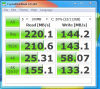
For instance this ebay auction says the drive is only 220 MB/s read and 200 MB/s write, which are more like my Crystaldiskmark scores.
Samsung 256GB SSD HDD 2.5" MZ5PA2560 bei eBay.de: Festplatten (endet 15.01.11 20:13:22 MEZ)
Could anybody with a Dell OEM Samsung PM810 drive with firmware AXM06D1Q post their crystaldiskmark scores? Many of them are sold on Ebay. -
Look here.
And You can install XP when drive is in AHCI mode. You need drivers for Your ACHI controller, when You but from CD You need to press F6 on the beginning to load drivers from FDD. -
nothing. they just don't make sense on intels (they have 10 busses, and flash chips have a size like your numbers above). 10x8gb chips = 80gb ssd. 5x8gb chips = 40gb at half speed (seen in the writes). 10x(2*8gb) is the 160 one. how's the 120 one built actually?
-
.... can i not make a comment about trying to fit a 10 year old technology onto nowadays hardware that it never was made for?
no, you know it yourself. move on. move on RIGHT NOW. xp SUCKS on an ssd compared to win7. the memory management is bad resulting in needless accesses, trim isn't there, disk priority isn't there, it has sleep-timers to wait for hdd accesses that don't make sense for an ssd anymore, etc..
just don't.
if you have to, install it on a hdd, get achi working, then copy to the ssd. or something like this. but seriously, you can install win7 in <7 minutes on such a system, up and running and online. just don't... -
5x8GB + 5x16GB for a total of 10 channels (hence the speed of the 160GB drive) and 120GB total capacity.
-
well there's this thing called UPDATES, so you cant say a 10 year old technology. XP ROCKS ... since forever Besides, I bet missing TRIM is no big deal when I'm thinking about Samsung 470 series 256GB SSD. Dont know what sleep timers you're talking about.
but thanks for the answer on my original question though. -
lol, missed that, thanks
-
And You won't miss TRIM, my SSD is working better without it.
-
Hey - with the next paycheck coming in 5 days i decided upon buying an SSD.
I'm living in Europe and having a hard time finding the exact best prices but:
On Amazon.de i found the Intel X25-M 120gb for 217€ and that equals to just around 300 $ - if anyone else living in Europe have experience of somewhere else to buy an SSD cheaper i would love to know.
The problem is that it should be inside europe, due to denmark ( the country i'm living in) have a rather high import-tax from countries outside of EU. -
hm right
xp sucks, since quite a while. usability, stability, security, performance, compatibility to actual hardware, scalability. all of those got massively improved after xp. you really should move on.
sleep timers: they knew that the hdds are slow, so they had to idle for data to get fetched. to do so, they put in short sleeps into their disk related functions so that the system isn't on 100% cpu while actually idling. these are no problem for high latency environments like hdds. but they are for ssds. not only in the os, but a lot of older apps had similar stuff in there. yes, there aren't much, no they don't slow down much. but seriously, you don't want them anymore afaik they're still on the cleaning of all of the needless waits, as they only started it really with win7. (i've read this on some microsoft developer blog)
the future of xp will only be less and less compatibility, more and more work to actually getting it running, and less and less gains from new hardware features. so it will actually run hotter, slower, less optimized with every new hardware iteration.
consider an extreme example: win98. it can't use multicore systems. having it on a quadcore (with hyperthreading) would result as a max performance of 1/4th. it can't use any of the new cpu instructions just as well => that one lacks, too. win98 never goes 64bit (and xp never did for the ordinary consumer environment) losing out on any 4gb+ system, too.
it won't support new technologies like lightpeak which seems to be just around the corner. i don't know if it supports ubs3/sata3 actually really
it lacks tons of stuff that win7 has which i can never move back from. this is for example not possible in aero at all (as apps draw onto their own surfaces, and aero composes them together, unlike in xp, where everyone draws on screen how he wants)
![[IMG]](images/storyImages/windows-xp-sucks.jpg) .
.
a gpu driver can only bluescreen with one specific part of the driver. everything else only creates an application crash, unlike in xp, where any crash of any driver can bluescreen. besides the gpu driver, nearly no driver can ever bluescreen as they are nearly all forced to be user mode. etc etc..
really, move on. don't stagnate and fall behind. enjoy all the new stuff that evolved in those years, enjoy how the os got much more usable, much more flexible, much more secure, much more stable, and actually higher performing on modern hardware.
i know you don't want to hear. but really, consider it. it's so worth it. -
yah, dave has it right... if you have ever taken a class on Operating systems they is pretty much 100% correct.
-
I dont want to to turn the subject about 7 vs XP
but in short: I havent seen anything that works on W7 and will not work on XP yet; I havent seen blue screen on my XP for long time (years); I'm not convinced that W7 is faster besides its start up and shut down times (I got no page file either); security-wise - people find that out with the time and patch it; MS still supports XP. Also OS compatibility with new hardware is based on the driver for it, not the OS that runs the driver - when manufacturers start making drivers that do not support XP then it would be different story. Gotta love <400MB in RAM with all my stuff loaded
I'll move to W7 some day, but it's not this week -
well i do, temporarily. because you're absolutely wrong.
64bit apps? dx10, dx11 apps? and besides, i've seen tons that work BETTER than on xp.
doesn't change the fact that xp has more parts which can go directly to bluescreen by design.
not faster, but more optimized for the hardware (it understands hyperthreads for example, and optimizes for those)
it also has nice things like superfetch, much better service design, optimized schedulers for smooth media playback, new much faster networking stack, lots of jobs scheduled onto the gpu where the cpu would be slower, etc.
so yes, actually, it is much faster.
fail. but glad you had no bluescreen, then.
doesn't change the fact that win7 removes tons of attack vectors that xp still has.
no, not yours. they do in businesses where they have to. but they don't care about it at all. no application they develop is still for xp, no feature update will ever be there. nothing.
not true.
which they already started in a lot of cases.
love 8gb ram fully filled with prefetched application and user data so that i don't have to access my disk during daily usage.
i moved there years ago (vista, which is the same for me), and never had to look back with a tear, ever. xp just is that outdated and irrelevant by today.
the essense of it: it's faster, it's better optimized for the hardware (longer batterylife possible), and besides, even if it wouldn't be, it's the much better os in terms of usability and design. it's the os that every developer (drivers, applications) on this world right now tailures, so apps and drivers run and perform best on it. that matters. -
I was an XP fan and user since the day it released. I had a horribly bad taste in my mouth with Vista when it was released so went back to XP. I was hesitant to touch 7 when it became available because it was basically an improved Vista. But the second I installed the RC I was set. No way I was going back to XP. Installation was fast, the OS was more responsive and more intuitive in general (a couple things I didn't like), and it just worked.
I don't care if someone still uses XP, really. But I am an advocate of recommending the switch to 7 sooner than later for sure. -
i don't care about "still using xp". i do care about actually considering installing xp on a new machine of today. xp is fine on elder systems where it's designed for. but on new hardware, it really is not made for it.
(still, i deploy win7 on all xp systems i can, no matter how slow and old they are/where. win7 works fine on all of them, and is much nicer to work with in the end) -
lolwut?
This isn't true of all SSD's. I had an older Samsung that didn't support TRIM and it stunk in performance after total writes exceeded capacity of the drive, and it was 256GB! 4k writes were < 1. -
Dave, yeah, me too - bought Vista x64 the day it was out - never looked back. I agree 100% with your assesment of XP vs. Win7x64.
XP is simply wrong in 2011!
As an aside; I had the chance to install Win7x64 w/SP1 on a system and was even more impressed than when I went from Vista x64 (SP2) to Win 7 x64.
Highly recommended: Clean Win7 x64 install with SP1.
Leaves XP in the stone age (whether some of us admit it or not... ).
-
some like the stone age. they state "it was all better back then". and in reality, they just have fear to accept that their knowledge is not important anymore, and they have to relearn their stuff.
-
I'm with HTWINGNUT, XP was great for its time, Vista stinks and Win 7 is an improvement over them all. Dave you are correct XP is an old dog that needs to be put to sleep with kindlness, its time has past.
-
Ok lets get back to discussion about SSD's. This is not a windows thread if you would like to carry on this discussion please open a new thread in the appropriate forum or discuss it in PM
But be civil toward each other
K_M -
On topic,
Does anyone on this board consider the new OCZ V3's a possible upgrade path?
See:
http://www.anandtech.com/show/4186/ocz-vertex-3-preview-the-first-client-focused-sf2200
I for one am never touching OCZ products (with or without SandForce controllers) nor any other SandForce based SSD.
For my workflow that requires using the HDD/SSD's as they were meant to (ie. actually writing to them), both those companies are alienating customers like me with their self protecting mechanisms.
Alienating:
OCZ with their ATTO backed, 'up to' speeds.
SandForce with their 'DuraWrite' performance-disabling 'tech'. -
Actually, if you re-arrange you workflow to SF, it may fit you well. You use the SSD as scratch disk(thus those heavy writes) so if you move the SSD to be the secondary drive and periodically SE it, you basically defeat DuraWrite.
OCZ as a vendor is another issue. If they give the drive to me free, I would take it(then sell it). -
That's actually a good point!
I've long stated that the best use of SSD's to give an increase in productivity is by using them as a PS Scratch Disk. (I've forgotten more than I currently know!). Using them as a system drive you do get more 'snap' to your inputs, but 'snap' does not equate to more productivity (in my usage scenario).
The problem of course, is that in the notebooks I have/had - I've only been able to run a single drive at a time. On the desktop though...
I am using an SandForce based Inferno right now as a 'usb key' - I may have to put this into my desktop as PS's Scratch disk.
Does anyone know of any Windows based utility to do a 'Secure Erase'? -
Hello
I would like some advice about a possible SSD purchase. I have chosen to go with the Hybrid Momentus drive but after reading OCZ Vertex 3 Preview: Faster and Cheaper than the Vertex 3 Pro - AnandTech :: Your Source for Hardware Analysis and News
I see there is a big leap with solid state.
My purpose for the laptop will be heavy gaming, microsoft office programs, tv(hulu) and movie watching. If I opt for the 80gb ssd + 500 gb hdd how exactly should I be placing files? Games and movies on the HDD, while the operating system and office programs on SSD? Would the stuff I stream go to the HDD?
Also is there anything I should know about an SSD compared to a HDD when formating, initial use or even everyday?
Thanks for any help, I feel like a noob =] -
As you described is just fine. Install OS and common apps on the SSD. Everything else on the hard drive unless there's a game that could benefit from the speeds of the SSD.
-
I think Intel SSD Toolbox does secure erase under windows. I tried but i got blue scren when unpluging it hot.
If you want to read more about it, check intels guide, check pages 21 to 24 -
SE is never easy on Windows.
I think the recommendation of booting into linux(say ubuntu) then put it to sleep and resume is a sure way to unlock the SSD and allows you to do the SE. -
OCZ has a toolbox as well that does a secure erase, although I've heard it's a poor piece of programming (I've never used the toolbox for anything other than checking SMART data so far, so I couldn't say). The Inferno might be close enough to an OCZ drive for it to work as well. It (the toolbox) unfortunately doesn't work with IRST 10.1, however.
-
Hi guys. Why is here everyone talking about Samsung 470, intel x25M g2 and ocz?
Nobody uses Crucial RealSSD C300 256GB? -
Of course it isn't true for all SSDs, but miro_gt was talking about buying Samsung 470.
1. Did You have GC on that Samsung?
2. Did You have TRIM?
3. Was TRIM enabled?
On my MasterDrive SX TRIM never worked. Best FW for it was one from Muskhin without TRIM, just GC (VMB1901Q). -
C300s are good, but only really shine on a SATA III (6 Gbps) interface. On a SATA II interface, they're not really much better than the others. They also tend to be a little more expensive, at least in the US. If I remember right, though, Phil was always suggesting the 64 GB model for European users.
-
ok all you ocz haters are going to lovvvve this
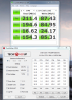
my 120gb ocz vertex 2 drive's performance just got cut in half... i doubt its durawrite kicking in since i dont bench it or copy huge files to it... whats going on? No nonsense about how ocz sucks, looking for real help here from the guys who know what theyre talking about.
here's some screens (ignore throttleStop...), and +rep for sure Thanks a mil
Attached Files:
-
-
There were some issues with OCZ switching from 34nm to 25nm on the vertex2, Buyer Beware: OCZ Agility2 and Vertex2 issues, what version do you have?
-
34nm ... i got it a while ago
them "fraud" drives are ~107Gb.... the non fraud 34nm are 111-112gb ...dodged a bullet there... but my problem now is that it is performing like a 25nm drive! WHat gives? -
The only way out of that black hole is a secure erase (as I've been told many times for my Inferno).
Obviously, your usage pattern is enough for DuraWrite and/or Life Time Throttling to kick in - once 'on', SE is the only way to turn it 'off' (and even then, only temporarily). Don't you love the 'up to' claims?
Abula, thanks for the suggestion, but I should have specified a Windows SE program for my SandForce based Inferno (the original 100GB version (not the current 120GB version), if it makes any difference).
(((STEREO))) sorry, but SE is your only, (temporary), option.
Good luck.
(Btw, I'm not happy this happened to you.. no matter how I feel for OCZ/SandForce). -
While I think it sucks, those numbers are still far and away pretty good, about same as my Intel 80GB. I would let your system idle overnight by logging off windows, and don't forget to turn off sleep and hibernate. See if it cleans itself up.
-
In what kinda games would an SSD shine?
I think Battlefield 3, Diablo 3 and SWTOR will be my games for the next couple years so my focus is on optimizing all three.
If I get a normal 7200rpm HDD will there be a bottleneck?
SSD Thread (Benchmarks, Brands, News, and Advice)
Discussion in 'Hardware Components and Aftermarket Upgrades' started by Greg, Oct 29, 2009.


)))