Problems? See this thread at archive.org.
I just got two 256gb Samsung PM830's in my M18x Replacement - obviously OEM issue/version of the retail 830 Series (at least thats what it looks like to me).....they are setup in a raid 0 array - havent used the system much but they seem to be blisteringly fast.
Anyone know of anything that I need/should be doing, in regards to these drives? - any critical tweaks such as LPM reg. hack required (like my old 256gb C300 needed for freezing) etc etc? - like I say, havent really had time to do anything much with the machine yet - wanted to ask the SSD guru's for any "practical advice"....
Also, I have seen figures/benches for a single 256gb 830 - anyone have an idea of what I should expect from two in raid 0? (cant find any comparisons!)
-
-
I got this on the 128GB Sammy 830 in my HP DV6T QUAD
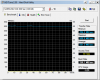
HDTune (safemode/fast/8MB)
max read 511 MB/s
ave read 501 MB/s -
^^ Congrats buddy
-
Anyone who know when the next generation of SSDs are coming out? Like the next gen of Sandforce controllers.
-
Got a Patriot Pyro 60GB SATAIII SSD

Manufacturer specs
Max Sequential Read: Up to 520MB/s
Max Sequential Write: Up to 490MB/s
4KB Random Write: Up to 80,000 IOPS
Newegg.com - Patriot Pyro PP60GS25SSDR 2.5" 60GB SATA III MLC Internal Solid State Drive (SSD)
Here's a ton of benchmark results...
Boot Time (Including Post)
---------
Time to Welcome screen: 26 Seconds
Time till Desktop: 32 Seconds
Time till all startup programs running: 59 Seconds (I have alot of startbup programs)
ATTO Benchmark - Read speed is spot on and a little higher than advertised, Write speed a little under.
---------
![[IMG]](images/storyImages/attoc.png)
HD Tune Benchmark
---------
![[IMG]](images/storyImages/hdtuneregular.png)
HDTune File Benchmark @ 1000MB - Read/Write Speeds pretty close to advertised
---------
![[IMG]](images/storyImages/hdtune502452.png)
HDTune Random Access Time (Read)
---------
![[IMG]](images/storyImages/hdtunerandomacessread.png)
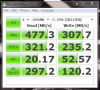
CrystalDiskMark - Not sure why this is so low when HDTune was on the same settings and gave much higher...
---------
![[IMG]](images/storyImages/crystals.png)
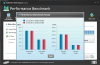
Windows Experience Index - 7.9
---------
![[IMG]](images/storyImages/weib.png)
Tested On: SATA III, Asus G73SW: Core i7 2630QM Quad Core | Nvidia GTX 460M (OC'd to 560M) | 8GB DDR3 RAM -
No 'next gen' SF controllers. SF is dead (they shot themselves in the head).
We might see 'fixed' last/current gen SF controllers sporting the LSI brand though...
I read on this forum (where??? ) that there are no revolutionary SSD's coming out in 2012, we'll have to wait a year (hopefully, 2012 will bring priced even further down).
-
Nah, if it's in French, it's not out yet.
(I'll still give it a spin though). -
It's in English, but site is french. Installed it and everything is fine.
-
I know, just teasing...
I tried to install it but this system does not meet minimum requirements.
-
Try to update through device manager (driver only).
-
I used to do that - now, I just enjoy my possibly slightly slower, but immensely stable systems.
-
Nooooooooo. Argh. That is sad. The time between Vertex 2 and 3 was over a year I think. Was hoping for Vertex 4 by LSI in july-ish 2012
But we have this one. Maybe King Crest will be something revolutionary
![[IMG]](images/storyImages/2011-10-11-image-6.png)
-
Sorry to burst your bubble, but if Cherryville has been bumped by 1 or 2 quarters, then I don't think King Crest will be anywhere close to 'on schedule' either. Especially when Cherryville was predicted 3 months ago and at that time King Crest was still in the 'planning' stage.
Sorry.
-
ok here we go
HP DV6T QUAD
i7-2720qm
16GB 1333 RAM
1GB GDDR5 HD6770M 1080p (oc to 800/900 from 725/800)
Samsung 830 SATAIII 128GB SSD (rated 520/320/80kiops/30kiops)
3dmark06
11354
3DMark Vantage
3dmarks 7556
Graphics 6518
CPU 14458
3dmark11
3dmarks P1656
Graphics 1478
Physics 5586
Combined 1443
pcmarkvantage
12936
pcmark7
3884
wei
7.4 | 7.6 | 7.0 | 7.0 | 7.9Attached Files:
-
-
Well done on the benchmark results!
I have the same Patriot Pyro SDD installed and my benchmarks were 50% slower ... I assume due to the Sata II interface on my PC?
-
I would assume that too, but even if it was delayed a quarter or till the end of 2012, it wouldn't be too big of a deal.
-
Thanks
It's an amazing SSD, especially when its only $80 bucks
And yeah, SATA III makes a huge difference. -
Well, it's sorta a big deal when the question was what's coming in 2012.
Wishing everyone a Very Happy New Year! -
I have a question about SSDs. I see everyone suggesting that for laptops you run strictly your OS on the SSD and then storing all of your files on a spinning disk (e.g. "regular") 2nd hard drive. Is this because SSDs have a higher tendency to fail and lose all of your files for good? Would it be considered reckless to simply use an SSD for OS and file saving? I am asking because I may not have an option to run 2 hard drives with my next laptop, but I really want an SSD drive.
-
Nope, it is only because SSDs are quite expensive so it makes sense to get a small one for apps and OS and use a HDD for storing multiple hundreds of GB. HDD prices are kinda crazy right now though.
-
Yeah I noticed that. Those SSD prices right now are kind of insane for the amount of space you get. I may just wait and keep the "old-school" hard drive for now.
-
What format should I format my SSD to as a primary drive Fat32 or Ntfs ?
-
Definately NTFS
-
I was going to purchase a Crucial M4 for my laptop but I read some posts about them failing after hitting 5200 hours of usage. ( Crucial Forum - 0x00000f4 error on M4 64GB)
Is there any other alternative to the Crucial M4 that's not an Intel 510? Is the Corsair Force 3 240GB reliable enough? I know there was a recall for the 120GB model, but no mention of a reliability issue with the 240GB model. -
Go with Samsung 830.
-
I know this is a very vague question, but I am wondering what my read/write speeds should I expect with a new Intel 320, 120GB SATA II. I am limited to SATA II by my system specs below. I have done a few of the tweaks but not the How To Improve SSD performance on Intel Series 4, 5, 965 Chipsets (JJB Tweak) yet. I just got it today.
I can run Crystal Mark. Is CM what most folks are using? If not, which one then?
I went ahead and posted it. Are my settings correct? Number of passes and so on.
Thanks! -
Does someone has Samsung dual 128gb sata 3 ssd raid benchmarks?
-
You can read the Samsung SSD 830 RAID Review | StorageReview.com - Storage Reviews while you wait for an answer here. There's a ton of benchmarks in the review. It's new. It was posted yesterday.
-
I have the same drive, and those numbers are very close to mine.
-
-
Wow its a rocket with raid. Can't wait for my m6600 with 2 128gb ssd drives
-
Thanks for replying to my question. Are our specs similar? -
Tried benchmarking my Corsair Force 120 and this is what I got. The drive itself is around 15 months old, and I've been using it for around 6 months (bought it used)
Results seem to be pretty slow across the board, especially the writes. Can anybody explain to me what might be causing this?Attached Files:
-
-
That ^^^ is why it is slow (along with the fact that it is a low capacity(low performance) SF based, DuraClass guaranteed; non-high performance product).
See:
Force Series? 3 120GB SATA 3 6Gb/s Solid-State Hard Drive - Force Series 3 - SSD -
![[IMG]](images/storyImages/ZkbbC.jpg)
my new samsung series 7 slate. 11" tablet, core i5. installimg win8 asap
-
I'm having a difficult time deciding between the following two SSDs: Samsung 830 256GB (MZ-7PC256N/AM) and Plextor M3 256GB (PX-256M3). Currently on Newegg the Samsung retails for $370 while the Plextor is $346.
Newegg.com - SAMSUNG 830 Series MZ-7PC256N/AM 2.5" 256GB SATA III MLC Internal Solid State Drive (SSD) Notebook Upgrade Kit
Newegg.com - Plextor M3 Series PX-256M3 2.5" 256GB SATA III Internal Solid State Drive (SSD)
Is it worth the extra ~$25 for the Samsung brand while also overlooking the fact that the Plextor comes with a 5 year warranty (Samsung only has 3 year warranty)?
Btw..I'll be putting the drive in a 2011 MacBook Pro 15 and I'm looking for an SSD with the best performance and longevity. -
Where can I find a good guide of some common do's and don'ts with an SSD? Like I heard excessive writing is bad, so would things like secure erase (in TuneUp Utilities) hurt the SSD? Because doesn't secure erasing a file like delete it and then overwrite it a bunch of times to make it impossible to get back? Wouldn't that involve several writes? I'm just not sure what's okay to do or if there's anything that I shouldn't be doing.
-
Should I enable or disable hibernation for a laptop using SSD? I disabled it on my desktop but I'm not quite sure if I should do the same on my laptop.
-
does not depend on the ssd. just depends if you want to not use hibernation, ever. then disable it. otherwise, don't.
-
Doesnt disabling hibernation also turn off the ability to sleep the system? - I find that the ability to sleep quite handy as it allows me to quickly resume. I know the argument will be that ssd's are fast enough to reboot anyway, but if you just want to close the lid and come back to it "as it was" with programs/apps open as you left them (and have the system in a low power state), its not a good idea to turn hibernate off, right?
-
Disabling hibernation doesn't affect the ability to put the laptop to sleep at all, i have it disabled and i can still put the laptop to sleep. I never use hibernation anyways so i decided to disable it.
-
If I buy one of these SSD's, do a clean install of Windows 7 on it and then put it in as my primary drive, what will happen upon boot when my "old" primary drive now sits as the secondary but with windows installed and all the former partitions? (Obviously, I will want to remove windows and then repartition but I havent a clue as to how to do that...)
-
it doesn't disable sleeping. it does disable turning off and restore to where you left (sleeping lets the system stay on a bit, don't take out the battery while sleeping, for example).
typically, hibernation and sleep are now united. system sleeps for a while, and hibernates while doing so to make sure system state is still save when the battery's out. -
When you will boot it up, make sure that your bios is set to boot from the SSD first and not the secondary HDD, that way you will boot from the SSD. You should of course get rid of the windows installation on the HDD unless you plan to dual boot windows.
-
Ya learn something new everyday here LOL - thanks for the correction guys.
-
Just as a precaution, I recommend disconnecting your old primary hard drive before your first boot onto the SSD. I've had a machine or two in my time get a little "confused" on where Windoz is running from and it boots off one drive but uses the Windoz system directories/files from another drive or partition, which makes for an interesting problem. I've only experienced this with Windows XP, never Win7.
Once you've rebooted a couple times onto the new drive, connect the old one, backup anything you want off of it and then just go into Computer Management | Storage | Disk management and format the old drive. -
How do I make sure my bios is set to boot from the SSD? Perhaps you could PM me...
-
I wondered the same some time back. I went ahead and instaled the ssd in the primary port 0 and installed a new OS. I then installed the old hdd in port 1 (still with OS on it) and the system will boot from the primary (or ssd in this case) drive (even with the old hdd with an OS on it installed)
To use the original hdd I had, as a storage drive, I simply formatted it, assigned it a drive letter and created one blank partition using "disk management" tools.
SSD Thread (Benchmarks, Brands, News, and Advice)
Discussion in 'Hardware Components and Aftermarket Upgrades' started by Greg, Oct 29, 2009.