Problems? See this thread at archive.org.
so, then, i forgot about it in my list.
electric cars, led lights, ssd based pc's, wireless power. that's my dream list.
two already solved. two to go
-
-
Just keep up the good work!
![[IMG]](images/storyImages/113.gif)
-
well, the tesla will be out at around 2012.. i try to get my money together till then.
wireless power should come anyways..
would be great for music stuff. no grounding loops ever again (they're so annoying) -
Or its going to be annoying for music because wireless power so far works with magnetic field - that would affect speaker
-
sshht..
just as i get used to those annoying sounds that you can hear from cpus and ssds and screen-fans once your pc got "silent"
-
The Tesla rocks! What a car!
-
^ except it lasts 5 minutes in reality with a 12 hour charge and handles horribly. not to mention most home power sources are MUCH worse for the environment than a Lotus.
-
^ except that this is completely untrue, and besides, i'm not talking about the roadster.
my house is powered by a (thanks leo.org) hydroelectric power plant. (by now, 80% of the electric energy in switzerland is from green sources like water, wind, and sun..) -
To me, this looks like eBoostr and/or Braidwood with integrated software and hardware.
I too agree it is a bad idea. But who knows? Maybe Lenovo really does have this 'right'?
These type of videos (in the link) to show off the tech are kinda useless to me. I don't care if a script can be run faster - my computer use involves a little more 'me' into the creative process.
Cheers! -
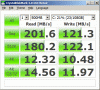
Just for others to compare (no laughing) - my Toshiba 128GB SSD (THNS128GG4BAA-N, firmware AGLA0203, SATA300) in CrystalDiskMark 3.0beta2 X64 ( http://release.crystaldew.info/CrystalDiskMarkBeta).
Nobody is talking about Toshiba's SSD drives, very little info and data to compare to others with the same drive. I know Intel's are much faster on random speeds but what about other Toshibas? Is mine slower than it should be?
500MB file used
Seq. Read: 201.6MB/s
Seq. Write: 121.3MB/s
512K Read: 180.2MB/s
512K Write: 122.1MB/s
4K Read: 12.32MB/s
4K Write: 10.48MB/s
4K (32QD) Read: 14.56MB/s
4K (32QD) Write: 11.97MB/sAttached Files:
-
-
its looks like is slower than samsung
-
RapidDrive is too superficial, it sounds like fast, wow, SSD, but it only applies to OS. You gonna cry if you have xxGs file to transfer.
-
if you have gbs to transfer, latency isn't much of a problem. and hdds are quite fast at transfer rates.
so if done well, it could actually perform really well.
i still don't like it
-
Does anybody know why the Kingston 40gb Intel drive's sequential write access is rated at 40mb/s and the Intel X-25V 40gb is only rated @ 35mb/s? I thought they were essentially the same drives with the same NAND and controller? Is Intel more conservative with their ratings than Kingston?
http://www.newegg.com/Product/ProductList.aspx?Submit=ENE&N=2010150636 1421450448&name=40GB -
sgilmore62, yes, I would say Intel is being more 'honest' about the expected sustained write speeds than Kingston.
+1 for Intel, yet again.
Cheers! -
Arguable...PM800 256GB with just Win7:
![[IMG]](images/storyImages/CrystalDiskMark.png)
From a recent test (Win7 plus one week's worth of usage), sequential read went up, everything else went down, but not by much (2-5%).
~Ibrahim~ -
you wont get any result with 100MB package.
try 1000MB one -
In my case, they are very close with the 80GB X25-M:
![[IMG]](images/storyImages/G280-1.jpg)
![[IMG]](images/storyImages/G280-2.jpg)
-
It depends how drives use heir cache - the Intel ones only have a very small one for moving files around - so its not used in read/write testing.
On other drives - a 100MB test only ends up testing the cache. -
coz the cache size is different.
Samsung has 128MB cache -
Its not size alone - its how its used.
-
and that one is an instant classic
-
LOL. Sweet.
-
4 KB random writes are better then Samsung
-
Fine, here's a 1000MB test.
![[IMG]](images/storyImages/newcrystalmark.png)
And a 500MB test, too.
![[IMG]](images/storyImages/newcrystalmark500.png)
-
Does this work?
http://www.ocztechnologyforum.com/forum/showthread.php?t=56855
Wipe Free Space? Can this work for users who don't have TRIM? It looked like it did. Any opinions? Should I enable Wipe MFT Free Space? That's not going to butcher my TRIM, right? -
Hm. So any new info on when to expect the next price drop on the Intel drives? I figure in the next month or so we'll be due, especially with the introduction with the 320GB. I've decided to just go ahead and upgrade from the 80GB to a 160GB now, because I need Windows for some of my classes (I'm running OS X) and I spent a lot less on texts this semester than I had originally planned to.
-
My guess is that when the 320GB Intel's appear, the price of the smaller Intel models will go up. Why? Because everyone will see that the 320GB is much more than they wanted/expected and will snap up the remaining 160GB models.
Newegg will surely see this very quickly and jack up their prices immediately, just as most other retailers will too.
Just as the G1's haven't really dropped in price because of the appearance of the G2's, so too with the higher capacity models, I guess.
The reason this works so well is because Intel is smart to market them (G1 vs. G2) differently. People in the know get G1's for RAID applications and they're willing to pay the premium (for a premium product).
I am guessing that the 320GB will also distinguish themselves in some way. Maybe just by capacity, but if Intel continues to be Intel, there will be something else 'extra' too, to entice the ones considering 2x 160GB models.
Cheers! -
Yes, that is going to butcher your drive because it fills your drives free space with 00's. SSD's free space should be written with FF's. Use AS freespce cleaner with FF box checked. to be honest, I don't know anything about the Toshiba drives wearleveling but if it's anything like Indilinx or Samsung you should shutdown and cold boot to logon screen afterwards.
-
Thats great, I can sell my 160G, and get 320G.
-
OK. Thanks for saving my drive.
Was going to try it tonight.
I'll see what I can do with AS Cleaner.
~Ibrahim~ -
Like everyone in the stock market knows, it doesn't matter if the economy is looking all roses, or if it looks like its going down the toilet; there are always deals and money to be made.
Hope it works out for you!
Cheers! -
I am interested in adding the 320GB to the mix as well
-
Heads up to everyone. New OCZ Indillx firmware out: this one does Trim and garbage collection at the same time as offering a minor but noticeable speed increase. Have fun. Be sure to read everything
http://www.ocztechnologyforum.com/forum/showthread.php?p=479638
Also if you are one of the 10 people who got tricked and bought a Vertex Turbo, you got a couple added hoops to jump through -
Also worth noting, is that the firmware has bricked several OCZ Agility drives after updating successfully, including my own.
-
What brand of SSDs am I likely to find in Dells and HPs? Would I be better off opting for the cheapest hard drive available and then swapping in an Intel?
-
I think all Dell's have some version of Samsung's PM800. If you want a review, just google Corsair P256/128: same drive.
@all
Is there real-world benefits for someone to move from a "fast" SSD (like the PM800?) to an Intel? Forget CrystalMark, but like boot-up, etc.? I mean, it feels uber fast now, just curious. Like, are there diminishing returns? -
I flashed to 1.5 on my vertex 250 GB.
-
Heh, doesn't look too good. And judging by HP's prices, they probably use drives of similar quality.
How hard is it to swap out a hard drive for an SSD? -
If you can unscrew a few screws and remove a cable, then you can do it.
~Ibrahim~ -
This is like asking if the Scorpio Black is faster than the Hitachi 7K200.
It will depend who you ask.
The best solution to this is buy/beg/borrow a returnable (no restocking fees applied) Intel G2 160GB and see how it performs on your system in your exact setup with your already established expectations for the exact workflow you need/do.
Sorry, too many 'exacts' but the point is that 'exactly'.
Once you've spent a few minutes/hours on the identically setup Intel, you'll be able to tell us, like davepermen will likely tell you too, that the Intel is the fastest responding SSD you have used.
At least, that would be my guess for your system/workflow/expectations based on the many times davepermen has stated that, exactly.
Cheers! -
Haha, OK. I know a friend with some Kingston Intel drives, I'll see if he's up to lending me one.
-
actually you won't notice the difference between intel and samsung SSD for normal usage. but I think intel is more reliable. I have owned intel 80G G1, 160G G2 and samsung 256G, and I eventually sold the 256G on ebay for $500 coz I did't like samsung customer service, and I will not touch samsung SSD again. A good customer service yields good products and more customers, and this is why i stick with intel and OCZ.
I have to figure how to pay my graduate school tuition first. -
Hi!
I have a problem with my X25-M G1. When writing large amounts of data (like installing a program) to the SSD, any action that causes other disk IO (like opening or closing a program) freezes my system temporarily. Nothing but moving the mouse pointer works.
The SSD is very used, but I didn't expect the performance to drop so dramatically. I use the latest firmware (8820).
When trying the same operations on my Vertex 30GB, the system slows down as well, but it doesn't lock up completely like the X25.
Anyone having the same problems, and hopefully a fix for them? -
Hmm, Dave didn't have that problem.
G1s don't have Trim - maybe "erase" empty space with one write (and deletion) -
you're on ahci? or ide mode? might make some difference.
-
Shouldn't be a large difference - only a small one at top speeds...
Top sequential speeds. -
no, ahci and ide communicate differently, and thus could result in less parallel workloads being processable trough the bus. i never tested, but i know from hdd times that ide mode made me such problems.
-
Well, OK - I didn't test parallel writes I think...
But benchmarks for non parallel operations on IDE and AHCI are similar. -
AHCI allows NCQ to operate, IDE doesn't.
Intel SSD's use NCQ very effectively (the harder they are hit the more I/O's they deliver).
Cheers!
SSD Thread (Benchmarks, Brands, News, and Advice)
Discussion in 'Hardware Components and Aftermarket Upgrades' started by Greg, Oct 29, 2009.