Problems? See this thread at archive.org.
There is no deal...its all light hearted and good natured. Dave is probably the main reason I got the Intel over others.. Its because of him that I "saw the light" once again. Now I am walking towards it; someone please stop me.
You install windows the same on a ssd as you would on a hd.....nice and simple. Good luck!!!
-
-
I have a Sony Vaio Z - VGN-Z540 to be more precise. I bought the Intel X25-M and installed it. I now run Ubuntu 10.04, and it is unbelievable how fast the boot time is. From cold start to firefox, 9 seconds - and that includes me fiddling around with my cell phone (used to time) and clicking on the firefox icon!!!!! A little disappointed with the write speed though, but nevermind, i don't transfer data that often!
-
how i love technet. download iso, burn it.

which is what i preach since so long. when you're developer and learn how the os handles files / file systems, you learn that this is default behaviour even for quite big files.
i would never! ...
just don't fly INTO the light. you'll burn yourself and die. towards the light is fine (but take some sunglasses with you, just in case)
the real question is, how often do you have file transfers that WOULD exceed the write speed of the intel.
you won't, when copying from usb.
you won't, when copying from wireless.
you won't, when you copy from cd/dvd/bluray.
you can, if you copy from esata.
you can, if you copy from gblan.
you won't, when you copy to somewhere else, copying FROM the ssd.
but actually, most don't use the last two (esata, gblan) anyways, ever.
i would use gblan, so for me, there could be cases. but even those aren't often. i use the gblan TOWARDS the server, not FROM the server, most of the time. -
Ahhhh when will the prices come down :-(
I'm considering that 80GB X25-M but 80GB is cutting it close with all the games/programs I install. $3.75/GB = not cool. It's really not about the money...is about the principal...and i'm a man of my principals
-
where do you life? prices are around 2.75$/GB right now
-
80Gb on newegg and microcenter is at $300 right now. 3.75/GB
-
-
Oh yea the OEM package is 220. just saw that
-
i'm SHOCKED about the non-oem package to be so much more expensive.
here they are all the same price (as oem is illegal, no bundling of hw, sw, etc together is allowed to get forced onto buyers). so we pay around 5$ more for the nice box around the non-oem version
-
This coming Saturday's Newegg shellshocker is going to be an Intel 2.5" SSD. Wonder which one?
![[IMG]](images/storyImages/eggi.png)
-
yeah and the mount can't be more than $10 (i'm getting for my desktop...my laptop gets no more love lol). That's a HUGE jump in price for mount + box + paper documents.
Now the question is how much spaces does Windows 7 Ultimate take up? I'm still worried it won't be enough space for my OS and Programs/games
Yeah i saw that too. Can't...wait. Already have my calendar marked to check it out. -
i'm at 42gb with os, office, traktor dj, ableton live + gbs of library data, visual studio to develop. some gb of music for djing and listening..
in short: it MAINLY depends on your apps/your data. not the os. it's quite small (disable system restore for enhanced smallity)
i don't care about a mount. my desktop-ssds just .. hang in there.. they have an sata cable that has a secured connector so it can't just drop out. and they just hang in there and do their job
-
yeah I'll pretty much have the OS, 2-3 games, a few GB's of music.
Right now I have 3x1TB Samsung HDD's so i plan to keep alot of my stuff on there.
And a mount is just $10 bucks so I can dish out a lil extra. Just in case I need to take my desktop somewhere. -
WinUlt64Bit alone takes up 18 Gb plus 3.5 for your pagefile.
-
Thanks. The reason I asked about installing Windows 7 on SSD is because I will only have the recovery disk (20$, wasn't sure if it was needed?) from HP and I wasn't sure how I go about using it to install Windows 7 on the new SSD when I wont have an original Windows 7 installation DVD.
-
Cool thanks. for the info. Just gotta count for updates too.
-
Newegg has the G1 X18m dane elec ssd kit for $179.99 $2.25/gb
http://www.newegg.com/Product/Product.aspx?Item=N82E16820157021 -
Yup 189 here in Canada as well...Nice find...passed it on to the boys in Canada at redflagdeals.com
Going to be a long day...I'm off at work and my ssd just arrived at the house...
and....
With this in mind, TRIM or no trim??? If a person chooses to manually clean the drive is there any positives or negatives? Did I here concerns here once upon a time with TRIM in some way? Does it make a difference if u do it manually or have TRIM enabled? -
I bought one a months ago for 199 from newegg it works great in my desktop! honestly the intels are so good that TRIM is not that big of a deal. these SSDs were amazing 8months ago before G2, and they still are.
-
you know rubberband? it's more cheap, and can fix my ssd to every part of the case with it
hm.. i installed the 32bit version, it took around 7gb or so?
i have both. i suggest trim from now on, but as it's a nice deal, why not getting it? esp.for raid setups with 2 or more drives, where trim support might take months / years till we get it. -
I try to point this out as well: Just because the file is 4GB doesn't mean all 4GB are being written sequentially across the drive. You are far more likely to be written smaller pieces all over the drive, which negates a lot (not all, but a lot) of the sequential aspect anyway.
My Win7Ult64 is taking up 18GB and that's with programs installed and some MP3s. I think right after installation with a clean system it used 14GB. -
I'm baaaaaaack! Notice anything different???? eheheh
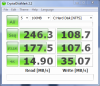
K... posted my initial scores below and I have a few questions....
1. Are they ok considering this is a fresh install untouched by my tweaking little hands?
2. Can someone link/suggest a good hard disk benchmark program at all?
I am very happy with what I am seeing so far. I had a real fear I would never get anything like this on this 11.6" Acer 1810T-6188.
Hard disk also got a Win Experience Score of 7.7
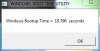
Oh and a 19 second start right off the bat...give me some time. I am trying for 13.Attached Files:
-
-
they look fine. only question, are you on ahci? i don't know how that would depend on scores, i just ask to make sure
-
Yes and here is the trick. I learned a while back that I would get better read scores with the Intel AHCO driver than the Microsoft one. I am sure that if I install the Intel driver, I can push my reads up to 245. The problem I have is everyone is telling me that TRIM will not function with the Intel driver installed. It has to be the Microsoft version.
Thoughts.
By the way, this system is alot quicker having gone from the Sammy ssd to this. My biggest worry was that I wouldn't notice a difference but I definitely do. -
don't care. if it works well, don't care. there should be new ones from intel coming quite soon, finally offical ones with specs.
hugs
?
another one in my growing list of people that notice how the intel is much faster feeling than the samsung, unimportant of actual bench numbers.
nice. -
His Samsung was Gen1 without TRIM and GC like yours, of course he is going to notice a difference just like you did.
-
The read seq and read 512k is kinda low? I get 250 and 191 with my 80 g2. I am using just the M$ driver
-
My 80GB G2 on an AS1410 with IRST 9.5.6 installed.
![[IMG]](images/storyImages/80gbg2as1410irst.th.png)
-
i have gen2 with 220MB/s read speed measured.
-
Were you able to upgrade the FW to GC/TRIM?
-
no. didn't work..
-
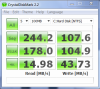
K... I found a few things out....
The AHCI driver you have installed definitely affects performance. Both are below.
Also, I have Intel AHCI installed right now and DOS command tells me that TRIM is on.....so it must work with the Intel driver, contrary to what so many say.
Now...just as I always do I screwed something up... On reboot it says GFXui has stopped working and I have tried to reinstall the GfxMedAccelerator without luck so reinstall it is...
Frig..frig...frigAttached Files:
-
-
What DOS command, do you mean fsutil behavior query disabledeletenotify ? TRIM is enabled by default whether you have an SSD or not -- that doesn't mean it is "working". TRIM needs SATA drivers capable of passing the command to the SSD controller.
-
Yes thats what I was using...
-
that just tells the os is sending trim commands. the question is, does the ssd receive them.
-
Intel forums seem to indicate that while the current IRST / IMSM drivers don't support TRIM, you can do it manually with the Toolbox. It's much like OCZ's wiper program.
Aha! Intel white papers to the rescue:
-
So...is there some way of confirming TRIM is working?
-
besides filling the disk, and deleting it, and measuring filled and deleted performance, not sure. the intel toolbox gives some info, but i'm unsure if that means trim is working down to the ssd, or just verifying trim gets sent.
i just stay on my default drivers till official drivers come out that officially state they support trim. -
Gonna install my SSD soon! Just to clarify a couple things...
I just pop it in and load my Win7 disk from the boot menu just like an HDD right? Any settings I should change prior to this or anything else I should do?
Then I'm going to install drivers and the Intel Toolbox and update the firmware. Am I missing anything? -
If you have BIOS settings you should select AHCI and ACPI 2.0 before installing OS.
-
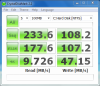
Just re-installed her again and got better numbers this time with the MS AHCI stock Win7 driver....
Boot time is still below 20 seconds as well.Attached Files:
-
-
as sgilmore said: enable ahci a priory (it's a bit of a hazzle to do so afterwards, but google helps).
else, nothing. no need to update the firmware. install the toolbox for the fun of it, but not needed as well.
firmware will be actual, and the moment you need a new one, you will notice it by the uproar in this very thread. -
Hmm and if I can't access these settings through the BIOS?
Oh really? I thought the firmware update was a top priority. And why no need for Intel toolbox? I heard it's useful. -
if you can't access it trough the bios, check for a bios update. maybe that allows it. if not, just don't care, as you can't.
the firmware update was a top priority to get it out to actually SELL THE DRIVES. no drives get sold without the actual firmware.
the toolbox might help. but if you just install, and let it be, trim will work, and the toolbox is just there for seeing "yes, all is fine". done.
you can install it, but it's not needed. the system will work perfectly well without it.
in other news, finally i got my i5 drawer system up and running. now i'm having a core i5 below my hands, in the drawer, with 80gb intel gen2 power, and 4gb ram. and it delivers the performance i wanted at a low power consumption. awesome. happy.
pics will follow soon of my installations. updating my webpage, as there huge cable chaos is still visible this is all gone by now.
edit: okay couldn't wait: here a first pic
Attached Files:
-
-
Thank you sir, helpful as usual
I'll let you guys know how it goes in a couple hours! -
glad to help
uploaded my pic, see post above
-
As a heads up, I just bought a X25-M G2 160GB OEM and it came with the old firmware (02G9), so I did have to update it to 02HD.
I'm still confused about something though (can't read all the pages in the thread right now). I've heard you say that trim will just work, but I have Intel Matrix Storage Manager installed (it's a new Vaio F notebook), which installs Intel's AHCI Controller version 8.9.4.1004.
From what I've heard, this does not support TRIM seamlessly? Should I uninstall matrix storage manager and update the driver to MS AHCI?
Thanks in advance -
with "just work" i mean, yeah, if you install from disk, and don't install anything else, that driver does trim. the IMSM doesn't afaik, so yeah, then you should uninstall it. but i'm not sure actually. i'm just happily using the default drivers..
if trim doesn't work, it's not the end of the world, actually. so i don't really bother. -
Oh that's a good point. My Sony CW has Intel AHCI controller drivers installed...but the thing is it's something I have to install after I do my clean install of Win7 on SSD.
So if I stand you correctly dave, should I just not install it and let MS drivers do their thing? -
it's one option. and it's a fine option. not an option for geeks, thus, as they always all have to mess with their systems. but a fine, very fine option to get the system up and running without having to manually ever care about it anymore. (like a harddrive, but faaaaaaast)
SSD Thread (Benchmarks, Brands, News, and Advice)
Discussion in 'Hardware Components and Aftermarket Upgrades' started by Greg, Oct 29, 2009.


![[IMG]](http://img341.imageshack.us/i/eggi.png/)



![[IMG]](http://img521.imageshack.us/img521/197/80gbg2as1410irst.png)