Problems? See this thread at archive.org.
Windows 7 has it's own M$ AHCI driver that installs by default on a clean install.
Just leave it be - do not install any Intel Matrix (AHCI) drivers.
Go ahead and install the Intel Chipset drivers, though.
-
-
What if IMSM and the drivers are already installed? Is it safe to uninstall (I'm not using RAID) and just update the driver, or would I really need to do a clean install again?
-
no, uninstalling them (and chosing "delete driver") worked fine for me, after testing the intel drivers out.
-
Perfect, that's what I was looking for. Ok great...I can't wait to see what the speed improvement will be like.
Upgrading from a Seagate 7200.4 so I hope I see a difference.
+ rep to both you and dave
-
great, thanks!
EDIT: ok, so I uninstalled IMSM, now I have the "Standard AHCI 1.0 Serial ATA Controller" driver from MS. However, the driver's date is 6/21/2006 (version 6.1.7600.16385). Is this the right one? -
Umm you will see a HUGE difference
lol
Now enjoy your SSD!!!! -
Yup, it's installing Windows
Edit: It's soooooooooo fast
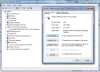
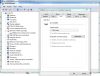
Hmm, I can't quite tell if I have Microsoft or Intel AHCI drivers. When I right click on the SSD in Device Manager and click on properties, it shows Microsoft as the driver provider. But if I look under IDE ATA/ATAPI controllers, I see the Intel 5 series SATA AHCI controller. Should I uninstall it? -
According to Newegg - mine is waiting at my PO Box - Install time tomorrow.... (if true). Thanks guys for the instructions/insights. Will let you know how it goes. Any tweaks to do once done? Have heard things like disable defrag, hibernation etc. What's fact and what's internet fiction??
-
@ davepermen: why are you telling that all Intel SSDs will come with latest FW? How can You be 100% sure?
@ all: just check FW and You'll know do You need to update it or not -
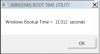
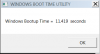
My ssd did not come with the latest firmware....Been playing with it a bit and got my boot up just a bit...check it out below.
Attached Files:
-
-
because by now i got 3 gen2 intels, and they all have the latest firmware
AND
because intel STOPPED SHIPPING THEIR DRIVES until that firmware got out. and they said they will only ship updated versions.
now you can still buy one from some sources that don't have the actual firmware, but chance is very low.
indeed. just do that. what i wanted people to understand is, to stop panik. they where stating "once i get it, i have to immediately update the firmware first, before doing anything else". this feels like paranoia and is completely useless. just install it, put it to use. and see with some tool if maybe, the firmware is old (chance is very very very low). and then, do an update as needed.
no need to rush. -
Anyway to check firmware without going into the flasher? No blank discs ATM, you see.
-
yeah, with crystaldiskinfo. google and download it.
-
You can right click on the drive under disk drives in device manager, select properties, details tab, hardware ids from drop down window. My Summits firmware is VBM19C1Q.
![[IMG]](images/storyImages/idsi.png)
-
I just received a couple Latitudes from Dell that came with VBM9LD1Q firmware. Crystaldiskinfo shows them as being TRIM aware, is there any reason to upgrade these to the newer VBM19 firmware?
-
The 19 firmware numbering is different than the ones assigned to the Dell Samsung SSD's.
There is only one Samsung TRIM/GC firmware regardless of the numbering system so yes, you do not need to upgrade if you already have it. -
I just got my first SSD - just a cheap little PATA Runcore in an X40. I ran HDTune on it last night and wow! Sustained read was 77 MB/Sec steady. Talk about giving an old PC new life!
I think I might be hooked now. SSD RAID on my M17x is tantalizing thought. -
Even with an Intel G2 my laptop still takes fifty seconds to boot.
But once in OS it screams. -
Can someone please confirm this? TIA
-
Yes, that is the right one for TRIM.
I see Newegg has the 100gb Vertex LE for $429.99. Why would anybody get this when the 160gb G2 is the same price and for all intents and purposes the same performance?
http://www.newegg.com/Product/Product.aspx?Item=N82E16820227508&cm_re=ocz_ssd-_-20-227-508-_-Product -
Maybe because of the following "silly" reasons:
1) The buyer is an OCZ Vertex fan.
2) "Limited Edition" sounds cooler?
-
Doesn't it perform better than the Intel?
-
measurable, yes. really? no.
and has all the problems anandtech stated about LE hw. all in all, nothing to buy except for showing you have the money to spare. -
Are the AHCI drivers under IDE ATA/ATAPI in Device Manager or am I looking in the wrong place? It used to say Intel AHCI but I uninstalled that and now it just says standard Microsoft driver.
-
Looking to stick a SSD in an old PATA computer, would a Runcore Pro IV be the best option? Would TRIM work on it under Windows 7?
-
Like this?:
Attached Files:
-
-
That pic isn't working for me.
Here is what I currently have.Attached Files:
-
-
See attachment, I'm using IRST.
Attached Files:
-
-
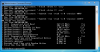
This is the worst SATA driver and it is dated 8/09 although winsat disk aint too bad...
Attached Files:
-
-
It's one with Indilinx controller (like OCZ Vertex) and I think it should work fine.
-
Any idea what could be causing stuttering in my Vertex 30GB desktop if not the drive? My stuttering problem that I thought was fixed by updating the firmware is back again. I ran an IOMeter test of 4K writes and had a maximum write latency of 53ms, but it wasn't over the whole drive, so it may not have revealed the problem.
-
Thanks sgilmore62.
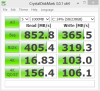
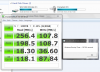
Has anyone seen the X25-M G2 have bad performance on random reads/writes (~14/25 MB/s respectively measured by CDM) on normal boot (Win 7), but achieve considerably better results in safe mode (~20/46 MB/s)?
This is happening to my configuration and I can't pinpoint what the problem is. I've tried loading windows with no services and startup items, and it gives the same result as a normal boot. -
Here is some interesting stuff....
I have re-installed a few times since yesterday. Today I thought I would get Win7Ultimate 64bit in as tightly as possible. I did it with a total of 8.5Gb with page/hiber turned off....anyway thats really not why I am writing...
I am wondering if anyone has any experience with encryption or Bit Locker. I have elected to cut the drive in two (C:=80Gb d:=70Gb) I am encrypting D with Bit Locker. This is a bit different than a hard drive i would think and I am wondering if it would affect things like wear levelling at all.
Further, would it slow the performance down at all???
Thoughts??? I will know in about 20. -
Wear leveling is, AFAIK, drive firmware level, which is even below partitioning. So I think it would still wear just like a full single 160GB drive.
-
I know but its juat a bit confusing. If you were to do this on a hard drive, the physical sector would be blocked off whereas, just by the way information is moved around the ssd, the physical sector really doesn't exist. Now add to this the fact that one drive is encrypted while one is not...
Is there a physical separation of some kind?
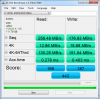
Well here ya have it.... Got my system tuned just as I like it and I'm still pulling off what I think are decent numbers... I was a bit concerned having one drive encrypted and one open but....works great!!!
Thanks again all for the help....Attached Files:
-
-
I'll take at least TWO of these
http://www.crucial.com/store/partspecs.aspx?imodule=CTFDDAC128MAG-1G1 -
it has worst max latency since JMicrap... http://www.anandtech.com/storage/showdoc.aspx?i=3747&p=3&cp=3
-
I'll still take them. As long as someone gives them to me
-
it works just as on the harddrive. except, the ssd doesn't care about any physical location internally except for having an index what should be where. so for your os, it looks like a hdd. for your ssd, it looks just like data, no clue what it contains. it's a fake world
-
If You look at Max Latency, then OCZ Vertex LE is almost three times faster than Intel, but if You look at all other numbers then both Vertex LE and RealSSD C300 is almost three times faster than Intel.
It just could be that RealSSD C300 had only this one write with latency over 0.1 ms and Intel had none under 0.2 ms. -
i can't afford 1 sec delay in its worst scenario for my tasks, vertex LE has good numbers but bad pricing and unknown reliability.
-
Windows let me build a mirrored array with my 7200rpm HDD and it worked okay, would I notice any performance gain by using a second ssd rather than the HDD? I really want RAID 0 but the "new striped volume" is greyed out. I think it would let me build a striped array within Windows if I had a third HDD and created a data drive. I wonder if I could delete the disks and make them dynamic and build a striped volume using command prompts within the Windows boot CD? There are some default NV RAID drivers included with Windows 7 but I don't know if they are compatible with my chipset. Has anyone successfully built a RAID 0 OS installation without BIOS options?
What I am going to end up doing is swap my dvd drive for single SSD for OS and put two SSD's in the other bays and build a RAID 0 data drive to put APPS and user folders.Attached Files:
-
-
Ok latest deal at newegg:
Dane-Elec 80GB Intel Rebrand (X18-M) Gen 1 w/2.5" adapter $150
using coupon: SNCDANE80G
found here.
For those who would point out no TRIM, this is $1.88/GB. -
Ummm that latest deal was posted a few days back...
-
Sorry Les, I really don't think so. It was $179 now there is a $30 off coupon.
I did a search on the the thread and sgilmore62 posted when it was $189 and again when it dropped to $179.
This is, I believe, the lowest it has ever been. $150 is super low. It kicks tush(filters) in terms of $/GB. -
Great price, very tempting to buy to replace the 30GB Vertex in my desktop, except I really don't need it.
-
My bad...it was advertised at $179 2 days ago here.
-
http://anandtech.com/storage/showdoc.aspx?i=3751
OWC 50GB SSD benched by Anandtech. -
I just can't believe what I am reading!!!
Can't You see (BTW: from link You provided) that even with it's max delay over 1 second RealSSD C300 is more then three times faster compared to Intel in 4 KB random writes? -
it's two different concepts.
SSD Thread (Benchmarks, Brands, News, and Advice)
Discussion in 'Hardware Components and Aftermarket Upgrades' started by Greg, Oct 29, 2009.