Problems? See this thread at archive.org.
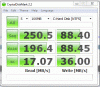
Well...here is mine for a comparison... Now there is a bit of a difference, this probably being how are systems are set up. Can I ask what AHCI driver you are using and whether the test was done on a fesh install of Win 7? For trim, the AHCI driver should be the included MS driver with Win 7...some make the mistake of thinking the Intel is a better driver...
Your most important numbers, however are those from the 4kb random which are almost identical to mine. These are the numbers that will enable a visible performance difference to be seen...which is why the Intel is so sweet.
Oh I think I know why your score is a bit lower... Is your power mode on balanced or high performance?
-
-
Try AS SSD Benchmark...
http://forums.legitreviews.com/about21729.html -
it was default, whatever its set at, probably balance on win7. and I had win7 drivers, will compare them myself later
and i will post AS SSD benchmarks up when i format into x64.. installed the wrong os :S -
Maybe updating the Intel X25-m SSD's firmware to the latest version will also improve the "seq" & "512k" score in CrystalDiskMark2.2?
-
^ I updated the firmware already, first thing I did
heres the results:
![[IMG]](images/storyImages/s4010m.png)
I have the intel drivers installed I believe, what are they called so I can remove them and try it as well..?
does the drive look good from the benchmarks? -
buckle is yours the 80 or 160? If its the 80 it looks about right. Here is mines with M$ driver, and high performance mode
Attached Files:
-
-
i got the 80gb, is the 160gb slightly faster?

edit: now back on ms drivers, seems slower..
and is it true that intel drivers dont support trim?
![[IMG]](images/storyImages/2145c3b.png)
-
Is there a point to waiting to pull the trigger on a Intel X-25M for the refresh? Will speeds really get much faster or is the shrinking technology just going to allow more GB packed into the 2.5" form factor?
I'm also seriously considering going for an X-25E, but I'm not sure 32 GB is enough. Any news on SLC technology from Intel? Refresh? Shrinkage? -
Yes...the Intel drivers DO NOT support trim. If you have been using the AHCI driver and not the MS AHCI driver, TRIM has not been working which may account for the difference in results. Download Intel SSD Toolbox and have it manually clean the drive (same as TRIM) and then try again.
-
oh ok, it seems better. but still a low 4k numbers it seems, any ideas?
before:
![[IMG]](images/storyImages/3rnug.png)
after ssd toolbox:
![[IMG]](images/storyImages/30m1lk3.png)
-
Hey guys, after pouring over numerous threads on SSD's, I am still a bit confused on how to keep them running at their optimal level ..
I am planning to buy the new Sony Z116 with 2x64GB Samsung SSD's on RAID 0. The SSD's do not support TRIM.
My understanding is that running Diskeeper w/ HyperFast and CCleaner will keep the drives running smoothly. What other tools should I run to maintain my SSD's? -
I wouldn't touch hyperfast for free.
http://www.tomshardware.com/news/diskeeper-ssd-defrag,6848.html -
The drives will run smoothly regardless and you can use CCleaner to do secure deletion which would copycat TRIM as far as I know...
There really is an over-reaction to the theories behind TRIM and garbage collection. Even the famous Anthology concedes that, yes, there may be some slowing but the average user will never notice it in their everyday use...
The BEST ssd deals to be found right now are the G1 Intels and you can thank the TRIM panic for driving those prices down.
(ok putting my bulletproof vest on)
And yes I have a G2 but i couldn't go wrong for the price...but would have never hesitated to get a G1 otherwise. -
Are you sure the new Sony notebooks are shipping with Samsung SSD's without TRIM?
Do not use CCleaner wipe free space on any SSD, it writes zeroes which is bad as there is a difference in how the SSD controller maps data and the OS does it. You want a program that writes FF's or 1's on the free space not 0's. AS freespace cleaner works for Samsung drives with GC.
http://alex-is.de/PHP/fusion/downloads.php?cat_id=2
Be sure to check the box FF. I've tested this freespace cleaner and it works also...
http://www.soft32.com/download_8999.html
Defragging is also not recommended for SSD's -- if you feel that you need to consolidate free space before running a freespace cleaner type defrag c: /x from an elevated command prompt. -
Suggest perform a Tony Trim. The important part os running AS-Cleaner so it fills empty filesystem blocks with FF (null), which then allows the drive's GC to do it's work.
-
Yup pretty sure they don't support TRIM.
Ok so I won't use any fancy programs except the AS Cleaner and defrag with the /x option to maintain the speed.
However, how do I completely erase the SSD and re-image it? -
Simple.
You don't - no need to. -
Great. So just regular maintenance. Perfect. Thanks a lot!
-
Not even regular maintenance - just use it.
If its Trim enabled and you do not use Win7 with the MS AHCI driver have a manual trim scheduled.
But that's all you need to do.
You can clear out temp files every now and then - but there is no specific HDD maintenance you need to do. -
That's the issue here. AFAIK the Sony Z's custom Samsung SSD's do not support TRIM. That's why I am trying to find out ways of maintaining it.
-
Get a programme like the Intel Toolbox that does a scheduled manual Trim.
And honestly, don't worry about it - you can write a few hundred GB and not notice anything at all.
In fact, on my intel without manual trim, random read/writes improved and sequential ones got a bit worse - i.e. it actually got better when used. -
I think HDDErase is the best way to reset the Samsung drives, it sends a command to the controller and it is reset in about 2 seconds. As far as re-imaging, I use the create an image app that comes with Windows 7 and re-image with the installation cd.
http://forum.hddguru.com/hdderase-t9993.html
http://www.shivaranjan.com/2009/05/...a-hard-disk-partition-or-windows-7-partition/ -
Hey guys I have been hit up with a question I cannot give a professional and experienced response for. I can give the logical response but I have never worked in a server environment so...can I ask for a bit of help?
In a server environment, is the slc preferable to the mlc despite the cost and, if so, why? -
Will the Intel toolbox work on Samsung drives?
-
I have a very strong feeling that not, but you can try.
(couldn't see why it would or should)
But honestly, don't worry about it.
And if after 2TB or more of writes you think its getting too slow you can worst of all always reinstall unless Samsung releases something until then. -
Toolbox only works on the G2 34nm Intel... It may read others fine but can only manually TRIM/do garbage collection on that one and forward.
-
SLC=Single Level Cell
MLC=Multi Level Cell
Single Level Cell is the simplest form of NAND flash memory. It is called "Single Level" because it can only represent 0 or 1. Multi Level Cell means it can represent multiple states, for example 00, 01, 10, and 11 for 2-bit Multi Level Cell NAND flash.
The problem with MLC representing multiple states is it requires more precision in maintaining the multiple states. The lack of needing that precision to maintain multiple states is why SLC is both faster and more reliable than MLC.
The controller is still an extremely important factor in performance and reliability. Still, SLC drive using the same controller will last longer and faster than MLC. -
I understand the difference between slc and mlc but we are now in a time where mlc speeds are equal to and, in some cases, have surpassed that of mlc with respect to sequential scoring of higher size files in any case.
I understand and can explain the process with respect to smaller random writes...
If someone asked me to make the sale that would convince them that a mlc would not be suitable in a server environment after a few years, is there a definite negative that I could respond with.
I know initially, there were tests that would literally rip up mlc ssds in the server environment but are we still there now? -
Way I see it with MLC/SLC is that say, a widget with 10 moving parts is inherently less reliable than a widget with 5 moving parts. Simple, and maybe not the best analogy, but for a server, I would for sure go with SLC
-
I like how simple that analogy is. On a similar note Cape, I have been asked to do a few articles for Storage Review bulding each from the most basic level up. My first one went in and should be up in a day or so. They may not catch the interest of all here just yet but I am hoping on building to the point where we are examining ssds through each of their components. After all most are twins except for the firmware in any case. Feel free to check them out!!!
NOTE: I am no more than a contributor to the site so I believe this falls within guidelines here to be a valid post. Besides, I believe we all jump back and forth in any case and there is no conflict that I can think of anyway.
Just nice to be into it again....and it all started with DaveP (eheheh little joke) -
I see what you mean. Nah, what's happening is as the controller technology advances, the lower end performance is catering to more and more people. The absolute top required for servers will inherently remain SLC though.
Once you get the controller technology decent though, the single biggest advantage using SLC for servers is reliability.
Fundamentally, SLC is faster then MLC, but currently the controller technology is not mature enough to show the differences and is a "bottleneck" for performance.
Even though Intel will move to MLC with their X25-E this year, they are not giving up SLC. A joint venture with Hitachi GST will create a SLC based server SSD using the SAS interface. Can they pull off the performance of add-in flash SSDs using a 2.5-inch interface? We'll see.
-
I recently kind of noticed a performance slowdown with my two sam 256; ran CDM and noticed a HUGE decrease in perf. only for the 512K writes, from ± 180MB/s down to ± 125MB/s. Been running this rig for ± 3 ~ 4 with no issue at all since this week...
So, I decided to give AS Freespace a try, and I DID INDEED checked the FF box, but now, it got even worse: all my writes are now down to below 100MB/s (second image)...
Any clue anyone ?
I am absolutely clueless; actually, all I want is get those drives back to their default speed, any help would be greatly appreciated...
Thanks in advance !Attached Files:
-
-
Don't tell me you notice that in real life.
Just ignore it. -
Was that answer aimed at me ?
If so, yes, I INDEED did notice that in real life. For instance, I use CCleaner on a regular basis. I am not saying that to be discussed, just a matter of fact.
While this program used to erase let's say 25MB of junk in less than 5 seconds (7 passes erase), it's now taking more that 15 seconds to erase the same amount of data... thus, me noticed...
I understand you might be skeptical about me noticiyng it, but your answer does not help me in any way, it's more like if you told me that I have absolutely no clue about what I am experiencing...
Thanks a bunch, but no help in that... ...However, if you think about something that could really help, I'd be more than happy to hear about it !
With no offence nor hard feelings,
-
Use CCleaner less often?
(I nowadays use it less often thanks Dave
)
Else... well, try things like those HDD erase programmes... but I have a feeling apart from a format and reinstall not a lot can help... -
After you run the freespace cleaner shutdown your computer then start from a cold boot, go to sleep mode until everything shuts down then press the power button and leave it at the logon screen for at least 20 minutes. With an array the size of yours it probably will take longer.
-
LOL! Good one! Whatever the reason, it is great to have you back. I am hoping SR can again be a player. For a LONG time they were pretty much all that was.
-
I apologize for being totally clueless on SSDs & please feel free to correct me.
You mentioned about using a 7 pass erase of data on your SSD. Do you do that often?
Isn't this kind of activity not really recommended for SSDs?
-
I would think multiple passes for erasing wasn't really necessary with an SSD.
-
Best SSD that is 30-80GB, right now? (TRIM is a must)
Mr. Mysterious
p.s. - I'm eyeing the OCZ Vertex Turbo, or the Kingston SSDNow V+ (just because of their ridiculous read and write speeds) -
overall performance if you dont mind spending around 200 is intel 80 g2
-
intel x-25m 80G G2 is somehow faster than 160G G2 regardless benchmarks.
-
OCZ drives randomly fail...
-
yeah, avoid ocz...
-
Excuse me?
-
Yup....waiting as well....
-
-
I also recommend the 80GB G2
-
What on earth did they test and how?
(Mainly how)
And why are they inconsistent in their labelling? -
"Desktop Performance
50% Throughput - 25% PCMark - 25% I/O"
SSD Thread (Benchmarks, Brands, News, and Advice)
Discussion in 'Hardware Components and Aftermarket Upgrades' started by Greg, Oct 29, 2009.