Problems? See this thread at archive.org.
How is throughput measured?
What does PCMark measure? Yes - I have no clue.
How did they measure I/O.
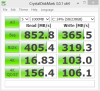
I mean, I can stick a drive via USB to my laptop... do some benchmarks - say Crystal Disk and then claim its so bad because its so slow...
Full documentation is needed for a real comparison.
-
-
@ SPEEDwithJJ:
Nand cells (which SSD's are made of) get used over time, meaning, they can only be written on a limited number of time. After that, they will not be able to retain the 0's or the 1's being written to them; they loose their ability to save (keep) the 0's or the 1's. Thus wear leveling so they get used almost equally, so some don't die prematuraly compared to the others. So you are absolutely right. I do not do that so often, kind of two times per month maybe, never really closely monitored that...
@ sgilmore62:
As you already know, I am fully awared of ITGC, I let this maintenance task take place everyday. Now, I am really clueless, so I gave your hint (ITGC after waking up from sleep mode) a try, not for ten minutes, not for an hour, but for a full 3 hours and, unfortunately, it did not help in any way , but there's no surprise about that...
My bad for following the advice of someone I do not know closely...
(no hard feelings here )
However, I am really sad and clueless, so again, any good advice would be appreciated.
I also tried the defrag c: /x, which did not reallly help neither. My next step would be to reinstall windows (and I love to do that so much that I would spend the rest of my life doing only that if I could)
BUT... I am wondering how that could be of any help... If I boot from the win cd, than format (quick), then reinstall, how the heck should that help to fix my slow writes Any idea ?
Actually, my biggest problem I think is that I do not know exactly what this CLEAN/FF did; when I look at Sysinternals's Diskview, it shows that only 99GB out 477Gb are used, but I know that the O/S and the SSD see the free space differently, mainly because data is not really erased when deleted, so I am wondering if i should try a CLEAN WITHOUT FF's before reinstalling everything from scratch... Any thoughts here ?
I am willing to offer for absolutely FREE one of my sweetest smile to the first one who will help me to find out how to get my perfs back to what it has always been before last week...
At your marks...
Get set...
THANKS A WHOLE BUNCH !!! -
Independent testing of the SSD industry ranks the Intel drives as most reliable. The story states what we all know, that the controller is massively important. Ok, the story is pretty much aimed at people who have no idea what an SSD is...
http://www.pcworld.com/businesscent...s_top_spots_in_ssd_storage_drive_ranking.html -
@ eYe-I-aïe...
What firmware are you running on those drives, you didn't upgrade to 19C by any chance?
Sometimes you have to run AS freespace cleaner a few times for it to overwrite whatever the discrepency is between what the OS sees as freespace and what the controller sees.
I have the same Nvidia chipset as your Alienware, the MCP79 and as you probably know, Nvidia chipsets are problematic with SSD's. The Nforce Serial ATA Controller drivers cause a bottleneck with SSD's for some reason. The Nvidia chipset is also likely responsible for blocking idle time GC from kicking in.
If your BIOS supports S1 sleep you can run the AS freespace cleaner>shutdown>cold boot then go to sleepmode and leave it overnight.
You can check to see what sleep modes are supported with your system by typing powercfg.exe /a from an elevated command prompt. -
Hey !
As per powerconfig: S1 & S3 are supported, S2 is not.
Did not know NVidia chipset were causing bottleneck with SSD's, but just ask me (as an M17X owner) why I am not surprised at all...
ITGC always worked for me, so I guess there's no problem in this specific area, unless I am totally out of my shoes here, but when I cold (even warm) boot, if left at logon screen, it does kick in (as per my HDD's lights...).
I don't see what difference it makes to cold boot --> sleep --> wake up and leave logon screen as opposite to cold boot --> leave logon screen...
I always worked cold boot --> leave logon screen and ITGC always kicked in...
But again, I am so clueles that I tried exactly what you wrote before, and no luck...
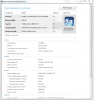
My FW is, and has always been VBM19D1Q, never flashed it, stock straight from AW/DELL... ...and it DOES NOT support TRIM, as per Crystal Disk Info (and I already posted a screen of that here some pages ago). Would they support TRIM that I could not care less, as NVidia seems too lazy to come up with a RAID controller that DO INDEED support TRIM...
If I could completely get rid of ANY NVidia component, I would gladly do it; seems that they are the major pain-in-my-you-know-what since I got this lappy...
Now, this being said, how would letting my drives doing their ITGC for a full night be more helpful than 3 hours in a row ? I mean, do you really think that ITGC for 8 hours would help better than only 3 hours ? I am really skeptical here, usually, 15 minutes is WAY enought, hard to understand how 8 hours could help more than 3 hours...
Maybe my NVidia chipset decided to f...reeze my drives on it's own ?
Thanks for your help and support ! -
Set to S1 sleep in BIOS and make sure "never" is selected for turn off hard disk under advanced power plan options. They say to cold boot so that the drives cache is flushed.
Got my $149 Intel 80gb G1 today...
![[IMG]](images/storyImages/cdm.png)
Attached Files:
-
-
Nice marks..... Congrats!!
-
How do I set S1 in the BIOS ????
"never" is already selected...
My question was what is the difference between COLD BOOT --> SLEEP --> WAKE-UP as opposed to: COLD BOOT --> LEAVE LOGON SCREEN FROM THERE...
Thx! -
Is it bad to hibernate on my intel x25-m g2 80gb?
-
Its not bad but why would you want to? I don't know your present boot times but, for myself, it doesn't make sense to have hibernate...or even sleep for that fact... since I am fully started in less than 20 seconds.
Eliminating hibernate gets you back 3Gb which is huge on an ssd with limited space. -
I like to hibernate because it saves what I was currently doing and allows me to unplug the laptop.
-
The dane elec 80gb Intel X-18m comes in a 2.5" adapter case, a 64mb usb stick with a copy of Acronis easy migrate and an external usb 2.0 enclosure. It gets a 7.7 WEI disk score on my system. The Windows installer put the 100mb partition on my Summit -- wonder why? Neither disk was dynamic when I installed Windows 7.
-
Just wanted to say thx for all of the help with my toshiba lap-top I followed your advice on memory up-grade and ssd up-grade and it made a big difference in the speed of my lap-top
-
-
I know what the partition is for just wondering why the installer put the partition on the Summit when I was installing Windows on the Intel drive? Now Windows is booting from the Summit instead of the Intel even though Windows is installed on the Intel drive.
-
i assume you have your previous win 7 installed in summit which has that 100MB partition.
don't really know the details but i have two identical i7 machines which installed 80G G2 and 160G G2 respectively, i can feel 80 G a bit snappier although benchmarks tell otherwise. -
No both disks were unformatted and the Summit was a deleted volume as I had to run a command prompt to convert both disks to basic.
-
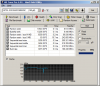
![[IMG]](images/storyImages/winsat.png) Ran HDTune at the same time as winsat disk...
Ran HDTune at the same time as winsat disk...
-
impressive 16k random read rate.
-
sgilmore62,
your Summit was on Sata Port 0 and the Intel was on Sata Port 1 - that is why it installed the 'boot' partition onto the Summit. Same thing happens with regular HD's.
I would recommend you to do a re-install without the Summit installed. Once Windows is up and running you can put the Summit back into Sata Port 0 and you don't have to worry about depending on the Summit to boot the Intel SSD.
BTW, congrats on the new SSD!
-
Thanks tiller, just finished re-installing, had to zero out the drive to install Windows because the installer was seeing a missing disk M0.
Attached Files:
-
-
Well, here you go.
You yourself say you don't know the details - this means that graph and those benchmarks are worthless.
Now the feel factor isn't a good indication - its very subjective.
However - it would be a good basis on which to do a clearly documented investigation of the matter. -
Hey Hey lets not snap at each other her.
For the record, I don't believe that any observed physical difference could ever be shown between the 80 or the 160Gb drive. Vostro, you cannot be cheating when you throw out tests by just getting one of them out there. Technically, there were 3 overall tests, two of which the 160Gb excelled, this being the enterprise and interface results. They are all benchmarks, including your desktop measurement, so don't go hiding behind the statement of "regardless of benchmark results".
These are both amazing drives that have become the basemark to all others...
I would like to see other separate examples other than just that one. There are so many possibilities for variances when we rely on a simple test. -
as it's from tomshardware, whether it's trustworthy depends on your view.
i saw the win7 bootup animation logo stay time in 80G is shorter than 160G, but i didn't use stop watch for an accurate test though.
being a regular user rather than enterprise or whatever else, i more concern the performance difference on this respect, that's why i quote this result. the so called overall result will never be fair enough but you can't say it's cheating if only quoting one of them.
what i mean benchmark results here is those benchmarks i used, such as AS SSD, CDM, HDtune. not those tomshardware used. -
I guess if you have both drives in very similar systems than you are the only ne with first hand knowledge.
I would love to see the comparisons with Crystal side by side, AS SSD side by side, CDM side by side and HDTune side by side.
Could u also do some full benching program? You are in a position none of us are right now. -
On a side note - when testing drives.
I think it would be best to test them via ESata externally - as due to drivers etc. OS drives could behave differently. -
will do it later.
one thing i can't explain is that, whichever machine has 80G G2 in these two identical machines will have higher memory read benchmark with everest ultimate, i swapped several times but got same results.
my external esata enclosure has a cap of 128MB/s read speed, i guess that's sata I spec. -
Oh we'll that's bad then... although you could still test the 4K speed which is the important one
-
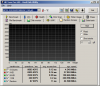
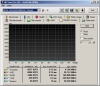
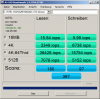
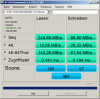
here is benchmarks, 160G burst rate is much lower for unknown reason, repeated twice, same result. memory read bandwidth with 80G is clearly higher.
EDIT:added HDtune pro benchmark for the other 160G G2 in vostro 1400, much better result. both 1400 and two N61 are using IRST 9.5.7.1002 driver.Attached Files:
-
-
I don't quite see what you are seeing in the memory read bandwidth and, in any case, I don't see anything that would indicate a noticeable visible improvement in the 80Gb. In fact, all the results I see seem to point to the 160Gb plainly.
Ummmm....In both, your random writes are 1/2rd of what I am seeing elsewhere. Any thoughts as to why?
Mine are below and I am constantly trying to figure why I have seen one or two above 40mb/s (4k random write) as well. -
you didn't notice 14158MB/s for 80G vs 13025MB/s for 160G in ultimate everest screen shot?
no idea why i got lower in 4k random r/w, i tested 160G G2 in vostro 1320 but still about same for CDM.
i can only assume it's hardware related, i always get better results for 4k r/w on vostro 1400 with ICH8 than vostro 1320 with ICH9 no matter what driver i used. -
Thoughts for the experts.....
I have been playing ALOT in the last week....videos in videos out piks and music...programs and on and on....
Anyway... I checked my performance and found my writes and 4k read/writes had dropped noticeably. So I ran the Toolbox which kind of shocked me because it took 2 hours to complete.
Anyway...once finished, there were my scores again back up there.
In this dilemma....I have come across a couple of questions....
1. When exactly does TRIM work and how do we know it?
2. Is it possible that even though FSUTIL returns that the commands are being sent, TRIM is not working?
In the questions, I came up with another idea. I have two drives one encrypted and one not encrypted. My non-encrypted drive is 80Gb of which 30Gb is free. Obviously, the reason for the slowing of the drive had to do with the movement of data, music, pics and video files in and out of the main non-encrypted drive you think???
So, what if I then reduced my C drive once again to say 3oGB strictly for OS and software and I moved my data to another drive... Would this allow for better operation of the OS drive as it wouldn't suffer slowing through all the movement in and out of data, music and videos?
So I would then have 3 logical drives....thoughts? Would this work? -
I think there might be a limit to some people with older controllers - or the drives have some inexplicable wear.
I got close to 40MB write on 4K when the SSD was brand new and nowadays get about 22MB/s when I run CrystalDisk Mark - oddly enough I once noticed that random read and writes improve with wear (without manual trim) - how is that possible?
I'd just not worry about it though. -
Ya but what are your thoughts on the post above....Its an idea that might be good I think...just a drive for the OS...or OS and programs.
-
When I ran the Inetl SSD optimizer(toolbox) it took 4 hrs on a Intel 160 G2. The reason was because system restore was on and I had alot of restore points. I deleted them and re-ran the Optimizer and it ran in less than a second!
-
Well I'm not sure if partitions are a good idea on a SSD - Dave would be more knowledgeable.
Personally I only have a C drive - but I don't need encrypted files.
Mine runs in seconds with no restore points. -
okay I didnt know this. I still have restore option enable on mines, and it normally takes 20 mins to run toolbox. I have about 56gb free on my 80. -
I've got 112GB free - and generally have over 100GB free - I keep all my data on an external WD passport drive - or better, all the data I don't need "right away".
-
Bang ON! Gotta rep for that. My system restore has been on for the last week or so since I have been doing so much fooling around with settings.
Anyway, even after I ran toolbox and went to rerun it earlier (with restore on) it took like two minutes.
So, I just went and shut it off and deleted the files and reran toolbox and it took less than a second.
Some valuable lesson here I am sure....just have to figure out exactly what it is. Does restore play hazard on a ssd i wonder? -
vostro 1400's controller ICH8 is older than 1320's ICH9 but get better results on 4k r/w, while N61 got newest HM55 chipset but worst result
with m$ driver, i can get much better result for 4k r/w on vostro 1400, but max latency is much worse some time, so i rather take IRST driver. -
strange indeed - I'm on an ICH7....
Best I had was in IDE mode with a fresh OS install... strange indeed -
here is m$ driver result in N61's HM55 chipset for 160G G2, although AS SSD benchmark gets a few marks better, random access benchmark with HDTune Pro is a huge disappointment, with max access time at around 5 seconds. i repeated twice got similar results, both results attached.
Attached Files:
-
-
Hmm... well, I have no idea what can cause that... maybe its the driver... maybe you should try an older one? I don't know...
-
just tested access delay situation with several older version driver, from HDTune pro random access benchmark, the best one which has minimum access delay is the newest IRST 9.5.7 driver, which i attached here. the other one i attached is the result from Asus disk driver which is actually HM chipset driver from intel with a version of 8.9.2.1002, its result is just ok but worse than IRST 9.5.7. the worst result comes from m$ driver as shown in previous post, it can have a max delay of 5 seconds! it will cause stutter-like situation at some point.
Attached Files:
-
-
The "flat line one" looks better to me - more consistent...
Which is which?
(I think I'm having a bad... head shut down...) -
the flat line one(8.9.2) has actually a worst delay point at 200ms (blue spot) while the other one has worst delay point at about 14ms, the Y axis scale unit revealed the truth (check previous m$ driver image which has the max Y axis unit at 5000ms and blue spot near there)
-
Ah, now I see it...
I only looked at the ones below - the thing is, a single point can be a "freak event"
(I don't use HDTune - never needed it... and it hasn't got a good name for SSDs - Crystal Mark is supposed to be better) -
m$ driver has 3-4 freak events in both of two image above with delay from about 0.5-5 seconds, too bad.
its newest pro version 4.01 is much better, especially for this random access benchmark which could show the distribution of max access delay, no other benchmark software has this function yet. -
Ok...
(..................) -
I bought one of the 80GB Dane-Elec G1 drives from Newegg's most recent unloading sale at $149. I didn't really need the drive, but I want a larger capacity SSD in my desktop since 30GB was getting frustrating with my Steam folder.
Main reason I bought it was because I was over at my parents fixing the Office installation on their desktop and noticed how horrendously slow their 7200RPM 500GB drive is. Unusably slow, in my opinion, and in theirs as well, so it was pretty easy to get them hyped on the idea of instantly-opening programs with a SSD. They're getting my Vertex as it's more "set it and forget it" since it supports TRIM in Windows 7. I think it's funny my 60+ year old parents have a faster system than most "enthusiasts" do, with the 30GB Vertex and Q6600 in their system.
SSD Thread (Benchmarks, Brands, News, and Advice)
Discussion in 'Hardware Components and Aftermarket Upgrades' started by Greg, Oct 29, 2009.