 Problems? See this thread at archive.org.
Well put Les....enjoying mine and learning as well..cheers!!!
-
To be fair...Putting any new hardware into a Macbook Pro and doing Bootcamp for a OS 7 partition is a little more complex with a technology like this that has not gotten the kinks quite out yet.
--I read all this stuff about drives not being seen at all
--Bouncing Balls after a while (
--Severe degradation
--Trim support on windows but not mac
--no 2nd drive on macbook pros unless you do severe modication.
it's a 700 buck drive--more than Intel. It's not a simple buyers remorse problem. These issues make it a bit choppier. -
Im not a Mac person but might have gone with the OWC ssd if I was. In any case, I also dont know how Macs handle backup and restore points but ssd degradation over time IMHO is caused mainly by restore points (with respect to Win7 anyways).
I would bet that, in the past year and a half, such a big issue wouldnt have been made of ssd degradation if the recently realized issue of restore point allocation (within Win) having such bad effects on the drive and TRIM were seen earlier on.
I say this because I have never used restore on any of my ssd drives (8-9) and I have stood fast stating that I havent noticed any degradation over time with any (and all were never tuned with any form of ssd optimization or TRIM). -
Marshman you will also have the lowest or second lowest power consumption of any SSD currently available.
-
If you use Win7 it should get "auto trimmed"....
-
Here is the big question I am running into over at Corsair Support. Will Bootcamp be able to formulate a partition on the thing.
There are some posts from folks having problems with bootcamp and third party SSDs on Macs.
I have not opened the box yet--want to make sure there won't be a problem creating my boot camp partition. Does anyone have a late 2009 MBP with Corsair P and a boot camp partition or know how to find out if it will work.
Corsair is not sure. They are like --talk to apple--it might not. -
So which SSD would you guys recommend? I need something about as fast as the mushkin for my laptop.
-
Intel G2 generally. X25-M series.
-
Thanks, can you give me a link to one that is generally good on amazon?
-
Intel X25-M ...
The prices are possibly on the HIGH side (retail packaging):
80GB
http://www.amazon.com/Intel-Mainstr...1?ie=UTF8&s=electronics&qid=1271354719&sr=8-1
160GB
http://www.amazon.com/Intel-Mainstr...2?ie=UTF8&s=electronics&qid=1271354719&sr=8-2
These numbers are important:
SSDSA2MH080G2R5
SSDSA2MH160G2R5
The last two letters - R5 are the packaging, you might be able to get cheaper ones as OEMs.
Do a bit of searching for a good price. -
Go on the NBR marketplace... it has tons of cheap Retail boxed intel G2s...
-
I'm one of them, haha. $371 retail isn't too shabby if I may so so myself. But yeah, speaking of SSDs and selling in the same sentence.
Managed another steal of an SSD (Crucial CT256M225 256GB) from eBay. I'm debating whether to keep it or to resell it here.
Right now I have the power combo of Intel 160GB G2 and a Hitachi 7k500. In the interest of epeen I can install the Crucial and put games on it, since that's pretty much all that's on the Hitachi, anyway. I might have to shave off some games and movies here and there, but I have 3TB worth in external enclosures. And besides, games would be a snap to reinstall and uninstall.
That said, if I resell it here for $453 ($525 -%8 Bing -$25 Forge-approved NBR rebate) I could save an NBR user some cash <strike>and I would come out a little bit ahead</strike> resulting in everyone winning.
Newegg Retails it for $579, not including tax
Choices choices. -
Forge, may I politely suggest that you "share the love" by selling your SSD here?
 Come on,
Forge, "share the love" with fellow NBR members!
Come on,
Forge, "share the love" with fellow NBR members!
-
Hi, I just wanted to know if this benchmark looks right. I have a T410 with a new Intel G2 80GB SSD. It's my first SSD so I don't know if it's right, but it looks like the random write is a little on the high side, and random read a little low. What do you think?
![[IMG]](images/storyImages/cdm3.jpg)
-
What's everyone's thoughts on prices for SSDs in the following months?
I'm interested in the Intel G2 40GB in particular. Anyone see a significant price drop on SSDs anytime soon? -
4k QD32 read is extreme low. should be more than 100 Mb/s.
-
I see you had it at 1000MB. 100MB is the better option to test your 4K speed
-
Preemptive buyer, eh. I'll think about it.
-
Hmmm....my thoughts are that....well.... the prices are going to remain above that of the hard drives in a perGb capacity. (eheh couldn't resist a bit of fun)
-
lol
well what I mean is, from what I gather, the next big price drop on the intel drives will be when the G3s come out... until then... the G2s will stay relatively the same price right? -
God I just hope my G1 x25E's remain relevant for the next couple of years. Most expensive investment for my computer yet...I bought SLC because I thought the technology would tide me over for a while.
-
-
Oh ok. I'll retest it then, thanks.
Edit: LOL, I guess something isn't right.
-
Not sure how you installed your OS. Did you use the toolbox yet?
Btw, please check post #4632 -
www.ncix.com I shop a lot at here in Canada. Their USA site is www.ncixus.com. Don't know your location and being in canada I mostly pay attention to canadian options online.
I read that the issues with some SSDs not working in Macs especially after firmware updates has to do with the ATA initialization timing being out of sync or not favourable to the Mac POSTing.
I reference my previous post as I vaguely remember reading the ATA initialization during boot up causes problems.
How fast is this Mushkin? You should state your size and price range preferences. I'm wondering what's the fastest SSDs on the market as far as just random reads/writes especially 4K R & W. Consumer end because I wouldn't be buying an X25-E for myself at all.
There's going to be a refresh of the G2 with an increase in capacity during 2010 but it might not be until Q3/Q4 of 2010.
so would a 160GB G2 I mean you'd have twice the space so you'd get double the life span of the 80GB G2 MLC and probably for less than your 32GB or 64GB X25-E. If you only use 64GB of the 160GB then you can get your drive to last 2.5x more erases than G2 MLC advertises for less money and near the same speed and you can get the next speed up when it's released too. -
I ran the toolbox right before I ran the benchmark. It's on a fresh XP install, I'm thinking it's a driver issue, or perhaps because I have to run XP in compatibility mode instead of AHCI. I got a really crappy 3dmark06 score as well, it wont run unless I set vertex processing to software, and then I get a score of 403 (versus 1904 in windows 7).
I just checked the link, and I've done all those things that he suggested.
-
@talin
allignment is important on XP, take a look at this:
http://www.ocztechnologyforum.com/f...h-stuttering-and-increases-drive-working-life -
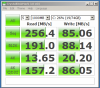
First test of my Intel 80gb G2, is my 4k low?
-
Try in safe mode - I get roughly the same in normal operations I think.
-
Thanks a lot, I'll look into that.
-
Why are the intel x25-m considered better than the OCZ Vertex when the Vertex has faster read/write and is cheaper? Reliability?
-
The OCZ only have a higher sequential speed which is pretty much irrelevant.
4K speeds are important - and the Intel come out top there.
And obviously reliability - OCZ is rather bad. -
Thanks!
10char -
Just finished installing my corsair 256 on my 2010 MBP--just arrived.
What do you guys think?
-------------------------------------------------
CrystalDiskMark 1.0 (C) 2007 hiyohiyo
Crystal Dew World : http://crystalmark.info/
--------------------------------------------------
Sequential Read : 185.439 MB/s
Sequential Write : 180.079 MB/s
Random Read 512KB : 153.306 MB/s
Random Write 512KB : 155.832 MB/s
Random Read 4KB : 15.274 MB/s
Random Write 4KB : 12.722 MB/s
Date : 2010/04/16 8:48:26 -
Horrible 4K speed compared to an Intel...
On a side note.
Is there something like Safe mode on a Mac?
If yes, bench it on that - you'll get numbers more accurately reflecting the drives raw performance. -
that's on my Windows 7 bootcamp drive.
how much better are the intels? -
This is in SafeMode:
![[IMG]](images/storyImages/intelssdbenchsafemode.th.jpg)
Normal OS some time ago - Vista:
![[IMG]](images/storyImages/justtrimmed.th.jpg)
And if you observe the read/writes to your drive - 4K is the most common. -
just did this one in safe mode. big drop for some reason.
Sequential Read : 195.575 MB/s
Sequential Write : 181.101 MB/s
Random Read 512KB : 161.962 MB/s
Random Write 512KB : 144.021 MB/s
Random Read 4KB (QD=1) : 20.307 MB/s [ 4957.7 IOPS]
Random Write 4KB (QD=1) : 7.297 MB/s [ 1781.6 IOPS]
Random Read 4KB (QD=32) : 18.297 MB/s [ 4467.0 IOPS]
Random Write 4KB (QD=32) : 6.619 MB/s [ 1616.0 IOPS]
Test : 1000 MB [C: 20.9% (35.1/168.2 GB)] (x5)
Date : 2010/04/16 10:47:46 -
Strange... some increased, other decreased...
PS: Post both side by side, easier to compare than across a few posts.
I wonder... have you got Trim? -
yes but just got the drive. ill let it sit for a bit and try running it later. the 4ks are not good as you point out. i like the drive tho.
-
I was trying to find some more information about a Samsung mini pci-express SSD around google and did a quick search here as well but couldn't come up with much so I thought I'd just ask.
I read this post HERE which was a link from THIS WEBSITE. Has anyone happen to come upon any new information or release dates? I'm supremely interested in this. -
Shamelessly stolen from the other SSD thread I frequent the April 16th post by Alereon http://forums.somethingawful.com/showthread.php?threadid=3220434&pagenumber=37#post375434241
Iwas starting to warm up to the SandForce guys, I really was. This is just despicable. Turns out Anand uncovered some hankypanky going on between SandForce and OCZ. The 2 inked a short term deal that ensures the Vertex2 has the best performance of the various SandForce drives. The official production firmware for all SandForce 1200 drives not going to OCZ has had random reads and writes artifically capped at a 1/3 of the performance of the firmware OCZ gets.
http://anandtech.com/show/3661/understanding-sandforces-sf1200-sf1500-not-all-drives-are-equal -
Up and running with my Intel 160GB X-25 Generation 2 drive.
Disk aligned (done by win 7 fresh install)
Windows search disabled
System restore disabled
Here are my scores. How do they look? There are 2 scores.
The first scores are from the firmware that was on it out of the box (2CV102HA)
The second scores are from the updated firmware that I got from Intel's site and installed (2CV102HD)
![[IMG]](images/storyImages/4527694159_676f000812_o.jpg)
-
4K speeds extremely low - try in SafeMode.
Read speeds low too. -
Sorry, how do you do safe mode? You mean windows safemode?
-
Yepp
F8 I think before it actually boots... -
Ok, I will do it now. If my speeds are better in safemode, what what does that mean?
-
That the SSD is allright
It might be that your OS is "organizing itself". -
Ok, I am backing up first
I literally took it out of the box, brand new yesterday so it had better be all right
Thanks for your help. -
Backing up first???
Nothing can go wrong is you benchmark in SafeMode.
You're not trying to change system settings.
SSD Thread (Benchmarks, Brands, News, and Advice)
Discussion in 'Hardware Components and Aftermarket Upgrades' started by Greg, Oct 29, 2009.


![[IMG]](http://img682.imageshack.us/i/intelssdbenchsafemode.jpg/)
![[IMG]](http://img69.imageshack.us/i/justtrimmed.jpg/)

