 Problems? See this thread at archive.org.
Very interesting comparison. That spinner is losing its luster
My drive, an Indilinx Corsair NOVA 128GB does not have extra space set aside, I do not think. Just the usual overhead after formatting. But, I do not intend on filling it up, at least not past 100-110GB.
I hope that by the time I may need more space that drives will be bigger, fast, and cheaper
SO, I really am pretty much banking on consistent and fast performance. Windows 7 of course, so I can only assume that TRIM is doing its thing as I do not have a utility for it like I did with the Intel.
But, as I said, barring any really strange happenings, I am never going back, except for external storage.
-
-
I'm going to miss 500GB of internal space. But I'm liking speedy 256GB. If I would speed it up a bit. Still, any half decent SSD is still an improvement. I'm trying to improve upon my benches in my previous post, but it can't be tweaked it seems.
-
Forge install CrystalDiskMark 3.5.5a and try the test again. Also try using 50MB and 100MB sizes as it's rare you'll have 1GB of random data to write in a single pass, that's like launching 50 programs simultaneously or serving 100 users simultaneously.
-
Well, it's the standard that everyone seems to be using.
I think. That's what I remember when seeing all the screens, anyway.
In any case, it's fast enough. Installing my old Steam games was a snap. -
I am big on silence. Real big. If I wasn't, I would leave my 1 TB spinner in the computer. But I will put it in an external case I think, and that way it also becomes portable, possibly offsite backup.
Having a backup inside the same computer is, well, not the best idea
I will need Esata for the external as it is MUCH faster than USB. And I like to do full image backups,which take a little time.
SSD's I must admit are MUCH different than I imagined way way back when. I assumed there would be no tweaking and really no difference between them. Kind of like RAM. RAM is pretty much RAM. Yeah, some is faster but I could sure never tell the difference.
But nooooooooo! I was dead wrong. There are HUGE differences between SSD's. And they are either untweakable, or we have not learned how to tweak them, or, more likely, somewhere in between those places.
Bottom line, as always, I am already awaiting what will supersede the Crucial 300 and other top of the line drives.
But, the other main thing is that I am enjoying having and using the technology. I can heartily recommend this drive to someone who just wants a good drive and wants it to work with an absolute minimum of fuss.
Again, it is early in my "testing", but I do tip my hat to Corsair for a job well done. -
Hmm. Considering I don't fill the drive up too much at any one time, is it harmful to use an SSD--namely a Crucial 256GB M225--as a torrenting drive?
Considering I allow TRIM to run--or use the wiper tool--am I looking at a significantly shortened lifespan?
I'd normally just switch on the eSata drive and go merrily on from there, but I'm just curious. -
I am not overly familiar with torrenting myself. But if it involves LOTS of writes to the drive then I would think it would help to have TRIM do its thing.
I am guessing that your drive does not have like 20% of its space secreted away like some drives which I think also helps with maintaining speed over the life of the drive.
I think it is only drives that have rounded capacity numbers like 100 and 200 that have the "secret stash" feature.
I have found there is no real substitute for personal experience with these drives so heck, give it a try.
Dave -
A hidden partition sounds like a good idea now that you mention it. But I think I can control myself, haha.
Msot of my torrents are moved straightaway to an external for storage, anyway. -
The problem with 50 or 100MB tests is that some drives will write that only to the Cache, not the SSD itself.
I think Samsung belongs in that category... -
A read this same day it come out.
"...read speed of 20MB/s, write speed of 10MB/s...) -
So?
That is a single flash chip.
Imagine putting 10 of them side by side that would give you 200MB and 100MB provided you write to them equally.
-
don't download torrents directly to an SSD unless you set your torrent client to use a really large ram cache like 30-100MB cache. Seeding from an SSD is not a problem at all, it's just if you download directly to your torrent you'll get tons of writes at probably a lot less than 4KB. Torrents can download as small as 1Byte/s per file if a connection is slow enough or the bandwidth is partitioned up enough. You don't want to have tons of small writes to your SSD. You don't want to have the "sparse files" option enabled because that will pad the file with 0s first and edit the file with data as it comes in. You want to have the "compact files" option enabled and I don't know if the SSD benefits from having TRIM & Garbage Collection disabled for torrent downloading because it sounds like with TRIM on there will be more erasing happening throughout the download than if you just ran TRIM once after your download session is complete.
Spinners will always stay for mass storage/downloads and that will not change until spinning HDD cost more than an SSD. They might even make HDDs with more cache and slower spin again to reduce power consumption.
DetlevCM SSDs use internal RAID so you'd get 200MB/s read and 100MB/s write sequentially I imagine. Unless you just made a typo. Don't know how random R/W would work with these.
Forge if you tested with CDM v3.5.5a you will be able to see your 4K QD32/64 performance. Meaning 32 or 64 random 4KB R/W as a burst. -
That's what I plan on doing. The Intel drivers I'm using don't pass automatic TRIM commands, anyway.
Torrent, run Wiper tool, done. And when I can I'll try to write directly to my external. -
I meant 200 and 100MB, typo.
-
Weird. Turned on the laptop this morning and my Crucial is telling me it needs to be formatted. There's nothing important on there, but still, it was working fine just last night.
Guess I will need to use MS drivers after all. Damn. -
As I know, Samsung have 8-channel controller, so putting 8 of them in "RAID" won't be a step forward.
-
And why?
If every one is 8GB - 8*8GB is 64GB
160MB read and 80MB write - not too bad, maybe a budget SSD?
But I'm sure it'll still advance. -
Sorry if I jumped the gun then
-
The forum rules state * If you are going to post material that is not your own, properly credit the source(s); failure to do so is considered plagiarism.*
-
This is the AS SSD BENCHMARK for the 64GB SSD (SAMSUNG) I have on my SONY VAIO TZ.
I noticed however that 31K-BAD.Why is it.Is it already degradation of the SSD? > or something else ? >>
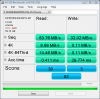
Also I have no idea whatsoever what the SCORES mean ?
Soon replacing the present SAMSUNG > PHOTOFAST V4 128GB
Thanks. -
Whoops. I found it on Anand Tech Forums. Thanks for the heads up. Dave
-
The more I read up on my Crucial, the more confused I become, haha.
So, I know it supports TRIM. However, it also have something called automatic garbage collection. So does that mean it TRIMs itself, regardless of TRIM commands or my drivers (IRST)?
Anyway, I pinpointed my weird format problem. It turns out the Crucial Wiper Tool bugs my SSD. So I dumped it. I found a generic wiper.exe for general Indilinx controlled-drives, and it works okay... most of the time. It tend to do an error every once and a while, and I have to manually delete the massive .dat file.
In any case, things are looking okay so far. I'll just hae to learn the quirks of my machine. Also, I am sad Intel hasn't released anything larger than 160GB. -
"31K-BAD" means that Your drive isn't aligned properly.
What OS do You use? -
who says they only use 1 controller for all their SSDs?
I knew something was bad with that photo but I didn't think it was partition alignment. I thought it was a SATA driver issue. Those speeds are like ATA66 HDD. -
Dammit, happened again, this time with the generic wiper.exe.
Rebooted to find my Crucial SSD "unformatted". Sigh. -
And who says they use more then one?
And yes, they use only one controller. If You don't believe me just read some reviews and look at some pictures.
It's 1st generation controller from Samsung and I think it was using ATA-5/ATA-66 interface, so sequential speed are low because of controller, but "31K-BAD" means that disk is misaligned. -
Maybe u should just stick with ur Intel G2.. u don't have that many problems with it and its faster.
-
Forge is that taking all your data with it? If so, holy crap, that sucks!
Note to self: Do not mess with wiper.exe on my Corsair SSD!
Less here is an image so you can see what I mean. Could not figure how to send it in a private message.Attached Files:
-
-
Yup Cape, it ate my data. Messy stuff. However, I think came across a simple solution.
I have two SSDs, haha. The perfectly stable and speedy Intel holds my OS and select programs, while the Crucial carries the bulk of my games. So losing the data wasn't that bad. I have backups. It was still annoying to reinstall all the games, in any case.
However, after poking around the Crucial forums, I think I found a solution: do nothing. I'm keeping the second-newest IRST on--which doesn't TRIM, as far as I know--and just sticking with that. If the Crucial is idle for a while, it will do background garbage collection. And since a torrent is not considered idle, it won't BGC until the torrent is turned off.
Although, I wonder if it's bad to have TRIM running while a torrent is active. -
I have one box with one (backed up) drive so cannot afford anything like that type of meltdown. I purposely bought a more or less proven controller for that reason.
And, all my other SSD's I tried out I messed with and ran trim on and tweaked settings etc. This one, I promised myself, NO TO ALL THAT. Sure, I am tempted. But it is working, and working better than any other SSD I had, even the Intel in a way I cannot really define. Maybe it just suits my usage pattern.
So, for my next trick, I want to sell these to clients who could benefit from the increased speed and reliability. -
Interesting design here.
-
Are the Kingston SSDnow M Series exactly the same as the Intel SSD?
-
Anyone see any info on the newer faster WD SSD? I am so glad that WD is leading the way at retail/consumer for SSD drives. They have really been an excellent storage company over the decades.
-
I don't know. Western Digital's offerings don't really seem to stand out to me.
I guess that's because they're late to the game. I mean, if Intel started to make HDDs, people would probably still stick WD, you know. -
I agree, the first one does not stand out. But guess what will sell at retail? Yep, WD! And at some point, that is going to drive sales up and prices down. Plus, they already have a faster one with no details.
I guess I always thought it would be a natural move of storage companies to go from spinners to SSD, and at least WD agrees with me.
Dave -
But not Seagate, from what I hear.
The more, the merrier, I say. They presence of competition is going to force their tech to be better and the price to be lower.
By the way, how's the SSD treating you? TRIM working out fine?
Like how I wish AMD would get back into the game already. Oh well. -
I'm going for RAID drives in my Sony TT. I'll have two 128GB uSata drives in RAID 0. Reliability really shouldn't be any different then if i had a single HD do you agree? I'm more concerned with HD faliure.
-
I am completely and ridiculously in love with my drive. No idea if TRIM is working or not. No slow down whatsoever.
I am ALMOST tempted to do just these tweaks as they make sense to me: http://www.guru3d.com/article/corsair-v128-ssd-review/5 but for now have simply left it completely alone.
If I did not know there was an SSD in there, I would simply think it was the quietest and fastest drive ever made
OK, I did go and turn off the defrag schedule. May do a full backup and then try ACHI and see what happens. -
Disabling automatic defragmentation is the ONLY point that is needed.
Superfetch, Prefetch - debatable, I've got no problems with it on.
Indexing - well, searching an index or searching a whole drive, huge difference, indexing also looks into written documents!, i.e. leave on. -
I wouldn't worry about reliability at all.
-
Unless its an Intel <strike>and</strike> or you trust the controller I would... cough....
-
Thank you. That has alleviated my concern and yes I am happy with the drives Im using.
-
Basically I agree, but wouldn't you say that ACHI is worth a try?
-
Cape are you not in ACHI? I would have figured that is a given...
And as well.... consider shutting down system restore. We know the background on that. -
LOL Les! Yeah, I had to clone from my old drive and for some reason had to stick with IDE or whatever it was that wasn't ACHI. Funny thing is, the drive works AWESOME anyways. But heck, if ACHI is better, I'll try it. BUt I need to do 2 image backups to make sure I can get back to where i am if it goes awry.
I have way too much stuff customized for a reformat.
And yeah, I am 99.99 % sure I have system restore turned off as I always did that on any drive. But I will check just to make sure.
I posted a link to your BLOG on Anand's forum. There is a memory and storage category there where they have some good discussions of SSD's.
Dave -
AHCI is definitely a good idea.
Its key advantage is queued read/writes - that's where you get the greatest performance increase over IDE. -
My BIOS (Sony CW) has no option to choose between IDE/AHCI, any other way to confirm which mode I'm on besides the XP/Vista Installer?
-
AS SSD Benchmark can tell you.
I guess your in IDE mode.
Check this thread and see if it has instructions for you...
http://forum.notebookreview.com/showthread.php?p=5983470#post5983470 -
Well I decided up swap the HDD in my netbook to a 32 GB SSD. My netbook runs windows xp home. So if I just clone so I need ensure that it installs in the right partition on the SSD to prevent slow performance in the long run. Moreover I want to copy the recovery partition... and make sure it works.
Note that the recovery partition runs on norton ghost (I have no control of it though.
Also will there be enough space for Office 2010 + a couple games and random softare? ( my guess is yes )
SSD Thread (Benchmarks, Brands, News, and Advice)
Discussion in 'Hardware Components and Aftermarket Upgrades' started by Greg, Oct 29, 2009.


